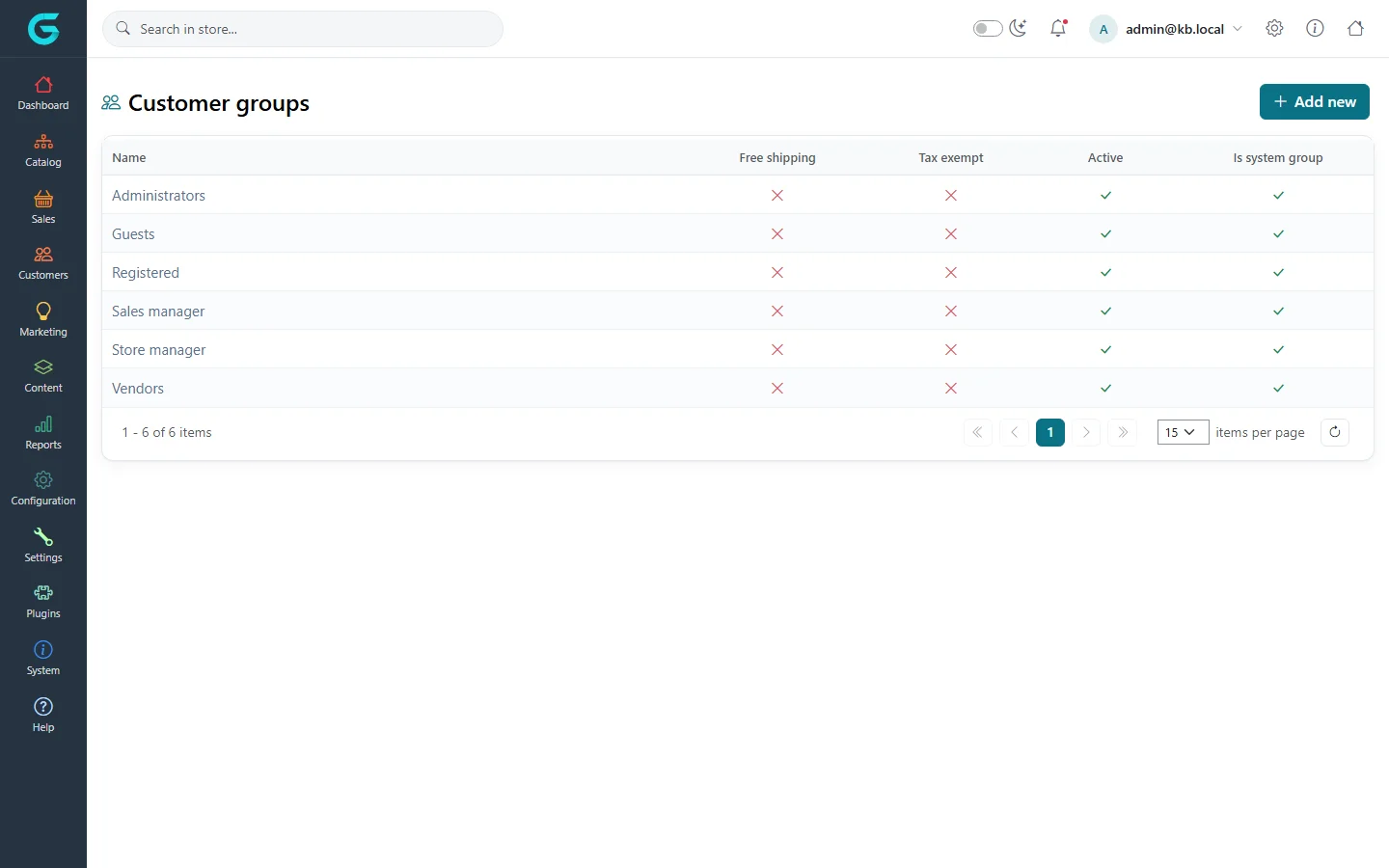
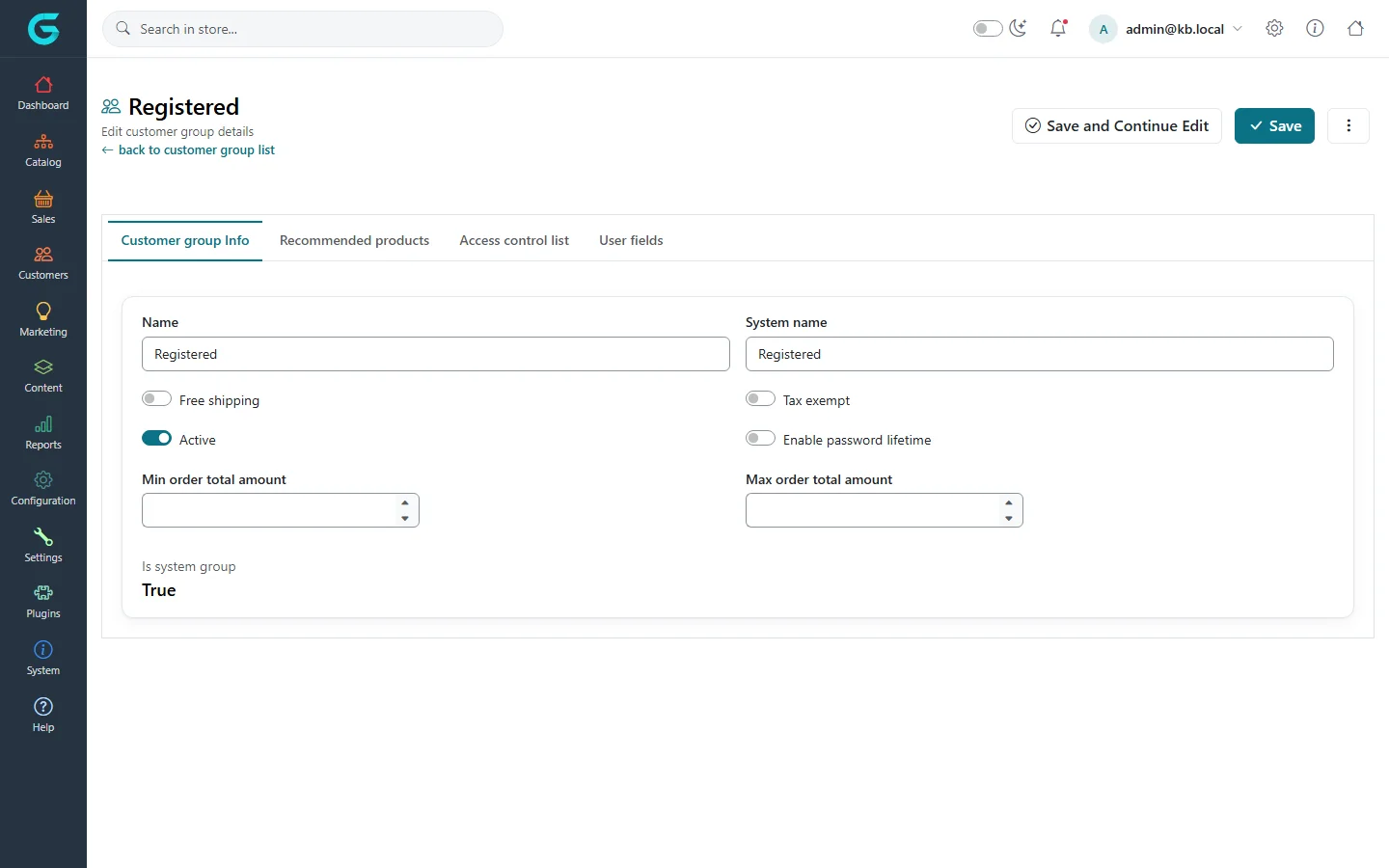
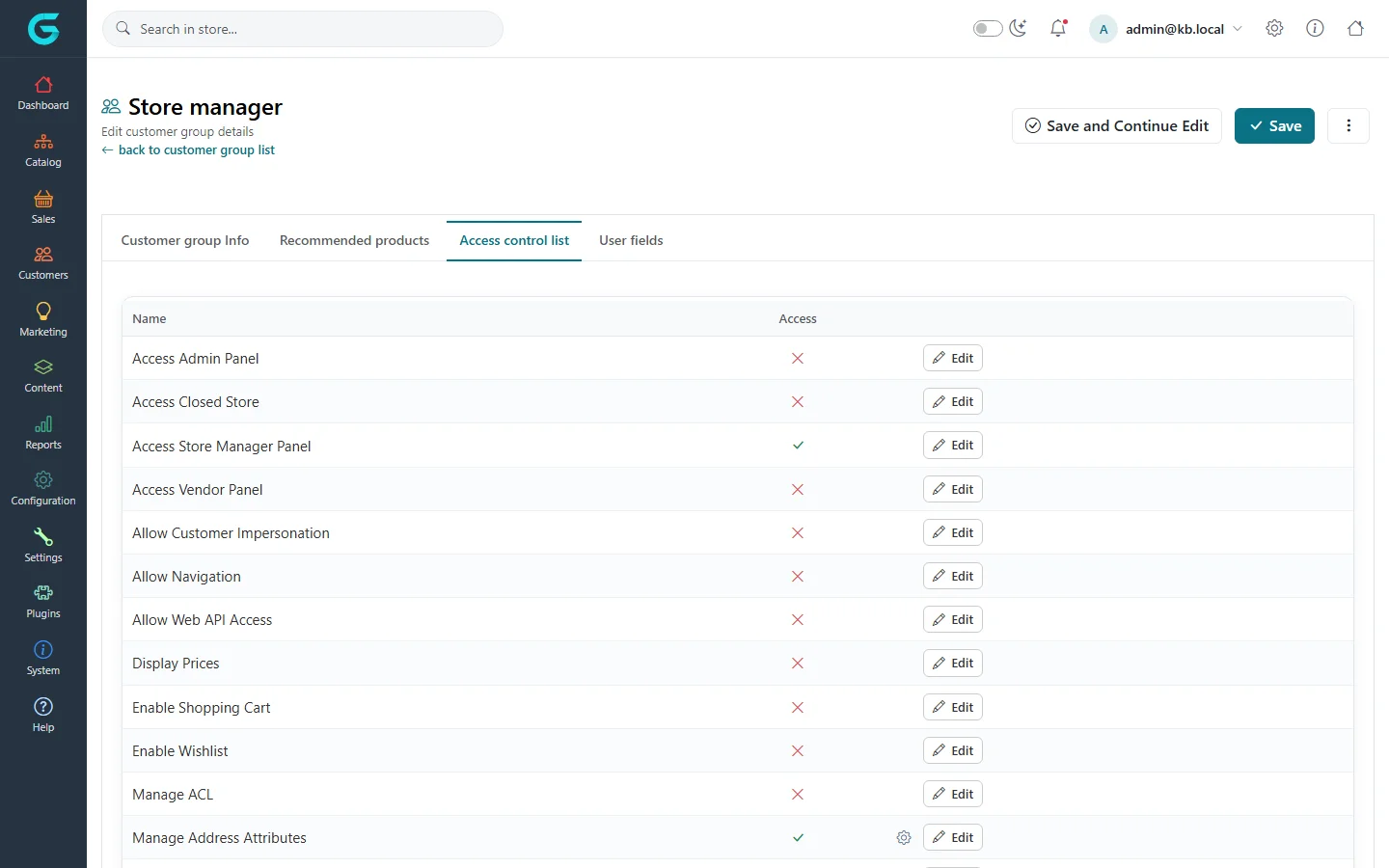
{"ArticleId":null,"Name":"Customer groups and access control","Content":"\n\u003Cp\u003ECustomer groups are the backbone of permissions in GrandNode. Every customer belongs to at least one group, and the group decides what the customer may do - see prices, use the cart, open the admin panel, edit products. Groups also drive business rules: free shipping, tax exemption, minimum and maximum order totals, and which products, categories or discounts a customer can see. Use this article to understand the built-in groups and to create your own, for example \u0022Wholesale\u0022 or \u0022VIP\u0022.\u003C/p\u003E\n\n\u003Ch2 id=\u0022where-to-find-it\u0022\u003EWhere to find it\u003C/h2\u003E\n\u003Cp\u003EGo to \u003Cstrong\u003ECustomers \u2192 Customer groups\u003C/strong\u003E. The list shows each group with \u003Cstrong\u003EFree shipping\u003C/strong\u003E, \u003Cstrong\u003ETax exempt\u003C/strong\u003E, \u003Cstrong\u003EActive\u003C/strong\u003E and \u003Cstrong\u003EIs system group\u003C/strong\u003E.\u003C/p\u003E\n\u003Cfigure\u003E\u003Cimg src=\u0022/Plugins/Theme.GrandNodeCom/Content/kb/customers/customer-groups-list.webp\u0022 alt=\u0022Customer groups list with the six system groups: Administrators, Guests, Registered, Sales manager, Store manager, Vendors\u0022 width=\u00221440\u0022 height=\u0022900\u0022 loading=\u0022lazy\u0022\u003E\u003Cfigcaption\u003EThe six built-in groups of a fresh installation.\u003C/figcaption\u003E\u003C/figure\u003E\n\n\u003Ch2 id=\u0022system-groups\u0022\u003EThe built-in groups\u003C/h2\u003E\n\u003Ctable\u003E\n\u003Cthead\u003E\u003Ctr\u003E\u003Cth\u003EGroup\u003C/th\u003E\u003Cth\u003EWho is in it\u003C/th\u003E\u003Cth\u003EDefault permissions\u003C/th\u003E\u003C/tr\u003E\u003C/thead\u003E\n\u003Ctbody\u003E\n\u003Ctr\u003E\u003Ctd\u003E\u003Cstrong\u003EAdministrators\u003C/strong\u003E\u003C/td\u003E\u003Ctd\u003EOperators of the whole installation.\u003C/td\u003E\u003Ctd\u003EEverything, including the admin panel, settings, plugins and permissions.\u003C/td\u003E\u003C/tr\u003E\n\u003Ctr\u003E\u003Ctd\u003E\u003Cstrong\u003ERegistered\u003C/strong\u003E\u003C/td\u003E\u003Ctd\u003EEvery customer with an account.\u003C/td\u003E\u003Ctd\u003EBrowse, see prices, use cart and wishlist, use the Web API.\u003C/td\u003E\u003C/tr\u003E\n\u003Ctr\u003E\u003Ctd\u003E\u003Cstrong\u003EGuests\u003C/strong\u003E\u003C/td\u003E\u003Ctd\u003EVisitors without an account.\u003C/td\u003E\u003Ctd\u003EBrowse, see prices, use cart and wishlist.\u003C/td\u003E\u003C/tr\u003E\n\u003Ctr\u003E\u003Ctd\u003E\u003Cstrong\u003EVendors\u003C/strong\u003E\u003C/td\u003E\u003Ctd\u003EAccounts that manage a vendor (a seller).\u003C/td\u003E\u003Ctd\u003EThe vendor panel: own products, orders, shipments, merchandise returns, vendor reviews and reports.\u003C/td\u003E\u003C/tr\u003E\n\u003Ctr\u003E\u003Ctd\u003E\u003Cstrong\u003EStore manager\u003C/strong\u003E\u003C/td\u003E\u003Ctd\u003EAccounts that run one store in a multi-store installation.\u003C/td\u003E\u003Ctd\u003EThe store manager panel: products, categories, brands, collections, orders, payments, shipments, merchandise returns, customers and reports of that store.\u003C/td\u003E\u003C/tr\u003E\n\u003Ctr\u003E\u003Ctd\u003E\u003Cstrong\u003ESales manager\u003C/strong\u003E\u003C/td\u003E\u003Ctd\u003EAccounts linked to a sales employee.\u003C/td\u003E\u003Ctd\u003EThe admin panel, limited to orders and customers assigned to their sales employee.\u003C/td\u003E\u003C/tr\u003E\n\u003C/tbody\u003E\n\u003C/table\u003E\n\u003Cp\u003ESystem groups cannot be deleted or deactivated, and their \u003Cstrong\u003ESystem name\u003C/strong\u003E cannot be changed - GrandNode finds them by that name. You can rename them and change their other settings.\u003C/p\u003E\n\n\u003Ch2 id=\u0022create-a-group\u0022\u003EHow to create a customer group\u003C/h2\u003E\n\u003Col\u003E\n\u003Cli\u003EOn \u003Cstrong\u003ECustomers \u2192 Customer groups\u003C/strong\u003E click \u003Cstrong\u003EAdd new\u003C/strong\u003E.\u003C/li\u003E\n\u003Cli\u003EEnter a \u003Cstrong\u003EName\u003C/strong\u003E, for example \u0022Wholesale\u0022. A \u003Cstrong\u003ESystem name\u003C/strong\u003E is optional - it matters only to plugins or custom code that look the group up.\u003C/li\u003E\n\u003Cli\u003ESet the options you need (see the table below) and keep \u003Cstrong\u003EActive\u003C/strong\u003E on.\u003C/li\u003E\n\u003Cli\u003EClick \u003Cstrong\u003ESave and Continue Edit\u003C/strong\u003E. The \u003Cstrong\u003ERecommended products\u003C/strong\u003E and \u003Cstrong\u003EAccess control list\u003C/strong\u003E tabs become available.\u003C/li\u003E\n\u003Cli\u003EAdd customers to the group on each customer\u0027s \u003Cstrong\u003ECustomer Info\u003C/strong\u003E tab, in \u003Cstrong\u003ECustomer groups\u003C/strong\u003E.\u003C/li\u003E\n\u003C/ol\u003E\n\u003Cfigure\u003E\u003Cimg src=\u0022/Plugins/Theme.GrandNodeCom/Content/kb/customers/customer-group-edit.webp\u0022 alt=\u0022Edit page of the Registered customer group with name, system name, free shipping, tax exempt, active, password lifetime and order total limits\u0022 width=\u00221440\u0022 height=\u0022900\u0022 loading=\u0022lazy\u0022\u003E\u003Cfigcaption\u003ECustomer group Info tab.\u003C/figcaption\u003E\u003C/figure\u003E\n\n\u003Ch2 id=\u0022fields\u0022\u003EFields and settings\u003C/h2\u003E\n\u003Ctable\u003E\n\u003Cthead\u003E\u003Ctr\u003E\u003Cth\u003EField\u003C/th\u003E\u003Cth\u003EWhat it does\u003C/th\u003E\u003C/tr\u003E\u003C/thead\u003E\n\u003Ctbody\u003E\n\u003Ctr\u003E\u003Ctd\u003E\u003Cstrong\u003EName\u003C/strong\u003E\u003C/td\u003E\u003Ctd\u003EName shown in the admin panel.\u003C/td\u003E\u003C/tr\u003E\n\u003Ctr\u003E\u003Ctd\u003E\u003Cstrong\u003ESystem name\u003C/strong\u003E\u003C/td\u003E\u003Ctd\u003EStable identifier for code. Read-only on system groups.\u003C/td\u003E\u003C/tr\u003E\n\u003Ctr\u003E\u003Ctd\u003E\u003Cstrong\u003EFree shipping\u003C/strong\u003E\u003C/td\u003E\u003Ctd\u003EMembers never pay for shipping.\u003C/td\u003E\u003C/tr\u003E\n\u003Ctr\u003E\u003Ctd\u003E\u003Cstrong\u003ETax exempt\u003C/strong\u003E\u003C/td\u003E\u003Ctd\u003ENo tax is charged to members.\u003C/td\u003E\u003C/tr\u003E\n\u003Ctr\u003E\u003Ctd\u003E\u003Cstrong\u003EActive\u003C/strong\u003E\u003C/td\u003E\u003Ctd\u003EAn inactive group is ignored - its permissions and benefits do not apply.\u003C/td\u003E\u003C/tr\u003E\n\u003Ctr\u003E\u003Ctd\u003E\u003Cstrong\u003EEnable password lifetime\u003C/strong\u003E\u003C/td\u003E\u003Ctd\u003EMembers must change their password after the number of days set in \u003Cstrong\u003EPassword lifetime\u003C/strong\u003E in customer settings.\u003C/td\u003E\u003C/tr\u003E\n\u003Ctr\u003E\u003Ctd\u003E\u003Cstrong\u003EMin order total amount\u003C/strong\u003E\u003C/td\u003E\u003Ctd\u003ECheckout is blocked until the cart reaches this total. If a customer is in several groups, the lowest minimum applies.\u003C/td\u003E\u003C/tr\u003E\n\u003Ctr\u003E\u003Ctd\u003E\u003Cstrong\u003EMax order total amount\u003C/strong\u003E\u003C/td\u003E\u003Ctd\u003ECheckout is blocked above this total. With several groups, the highest maximum applies.\u003C/td\u003E\u003C/tr\u003E\n\u003C/tbody\u003E\n\u003C/table\u003E\n\u003Cp\u003EThe \u003Cstrong\u003ERecommended products\u003C/strong\u003E tab lists products suggested to members of the group. They are ignored by default for performance; enable them in the performance section of catalog settings. The \u003Cstrong\u003EUser fields\u003C/strong\u003E tab stores extra key/value data for plugins and integrations.\u003C/p\u003E\n\n\u003Ch2 id=\u0022acl\u0022\u003EThe access control list\u003C/h2\u003E\n\u003Cp\u003EThe \u003Cstrong\u003EAccess control list\u003C/strong\u003E tab shows every permission in GrandNode - \u003Cstrong\u003EAccess Admin Panel\u003C/strong\u003E, \u003Cstrong\u003EAccess Store Manager Panel\u003C/strong\u003E, \u003Cstrong\u003EAccess Vendor Panel\u003C/strong\u003E, \u003Cstrong\u003EDisplay Prices\u003C/strong\u003E, \u003Cstrong\u003EEnable Shopping Cart\u003C/strong\u003E, \u003Cstrong\u003EManage Products\u003C/strong\u003E, \u003Cstrong\u003EManage Orders\u003C/strong\u003E and so on - with a tick or a cross for this group.\u003C/p\u003E\n\u003Col\u003E\n\u003Cli\u003EClick \u003Cstrong\u003EEdit\u003C/strong\u003E on a row, tick or clear \u003Cstrong\u003EAccess\u003C/strong\u003E and save the row.\u003C/li\u003E\n\u003Cli\u003EFor permissions with finer actions a gear icon appears. Click it to choose which actions the group may perform - for example allow \u003Cstrong\u003EList\u003C/strong\u003E and \u003Cstrong\u003EPreview\u003C/strong\u003E of products but not \u003Cstrong\u003EDelete\u003C/strong\u003E or \u003Cstrong\u003EExport\u003C/strong\u003E.\u003C/li\u003E\n\u003C/ol\u003E\n\u003Cfigure\u003E\u003Cimg src=\u0022/Plugins/Theme.GrandNodeCom/Content/kb/customers/customer-group-acl.webp\u0022 alt=\u0022Access control list of the Store manager group, with Access Store Manager Panel allowed and Access Admin Panel denied\u0022 width=\u00221440\u0022 height=\u0022900\u0022 loading=\u0022lazy\u0022\u003E\u003Cfigcaption\u003EThe Access control list tab of the Store manager group.\u003C/figcaption\u003E\u003C/figure\u003E\n\u003Cp\u003EA customer\u0027s permissions are the sum of the permissions of all their active groups. The same matrix for all groups at once is under \u003Cstrong\u003EConfiguration \u2192 Permissions\u003C/strong\u003E.\u003C/p\u003E\n\n\u003Ch2 id=\u0022limit-content\u0022\u003ELimiting content to groups\u003C/h2\u003E\n\u003Cp\u003EProducts, categories, brands, collections, pages, news, knowledgebase articles, courses, documents and checkout attributes have a \u003Cstrong\u003ELimited to customer groups\u003C/strong\u003E field. When you pick groups there, only members of those groups see the item. This is how you build a wholesale price list, members-only products or pages only approved B2B customers can read. (Discounts can be tied to groups with a discount rule instead.) The check can be switched off for the whole installation with \u003Ccode\u003EAccessControl:IgnoreAcl\u003C/code\u003E in \u003Ccode\u003Eappsettings.json\u003C/code\u003E, which makes large catalogues faster when you do not need it.\u003C/p\u003E\n\n\u003Ch2 id=\u0022tips\u0022\u003ETips and common mistakes\u003C/h2\u003E\n\u003Cul\u003E\n\u003Cli\u003ERemoving \u003Cstrong\u003EDisplay Prices\u003C/strong\u003E from Guests is the quickest way to hide prices until customers sign in.\u003C/li\u003E\n\u003Cli\u003EDo not take \u003Cstrong\u003EAccess Admin Panel\u003C/strong\u003E or \u003Cstrong\u003EManage ACL\u003C/strong\u003E away from Administrators - you can lock yourself out.\u003C/li\u003E\n\u003Cli\u003EGiving a group \u003Cstrong\u003EAccess Store Manager Panel\u003C/strong\u003E is not enough on its own: the account must also have \u003Cstrong\u003EManager of store\u003C/strong\u003E set. The same applies to vendors.\u003C/li\u003E\n\u003C/ul\u003E\n\n\u003Ch2 id=\u0022related\u0022\u003ERelated\u003C/h2\u003E\n\u003Cul\u003E\n\u003Cli\u003E\u003Ca href=\u0022/customers-manage-customers\u0022\u003EFinding and editing customers\u003C/a\u003E\u003C/li\u003E\n\u003Cli\u003E\u003Ca href=\u0022/docs-store-panel\u0022\u003EStore manager panel\u003C/a\u003E\u003C/li\u003E\n\u003Cli\u003E\u003Ca href=\u0022/docs-vendor-panel\u0022\u003EVendor panel\u003C/a\u003E\u003C/li\u003E\n\u003C/ul\u003E\n","ParentCategoryId":"6abdec6c83d2816248229edd","SeName":"customers-customer-groups","MetaKeywords":null,"MetaDescription":"The built-in GrandNode customer groups, creating your own groups for B2B or wholesale, order limits, free shipping and the access control list.","MetaTitle":null,"AllowComments":false,"Captcha":{"ReCaptchaChallengeField":null,"ReCaptchaResponseField":null,"ReCaptchaResponseValue":null,"ReCaptchaResponse":null},"RelatedArticles":[],"CategoryBreadcrumb":[{"Name":"Customers","Description":null,"IsCurrent":false,"Children":null,"Parent":null,"SeName":"docs-customers","Id":"6abdec6c83d2816248229edd","UserFields":[]}],"AddNewComment":{"CommentText":null,"DisplayCaptcha":false,"Id":null,"UserFields":[]},"Comments":[],"Id":"6abdec6c83d2816248229ee5","UserFields":[]}