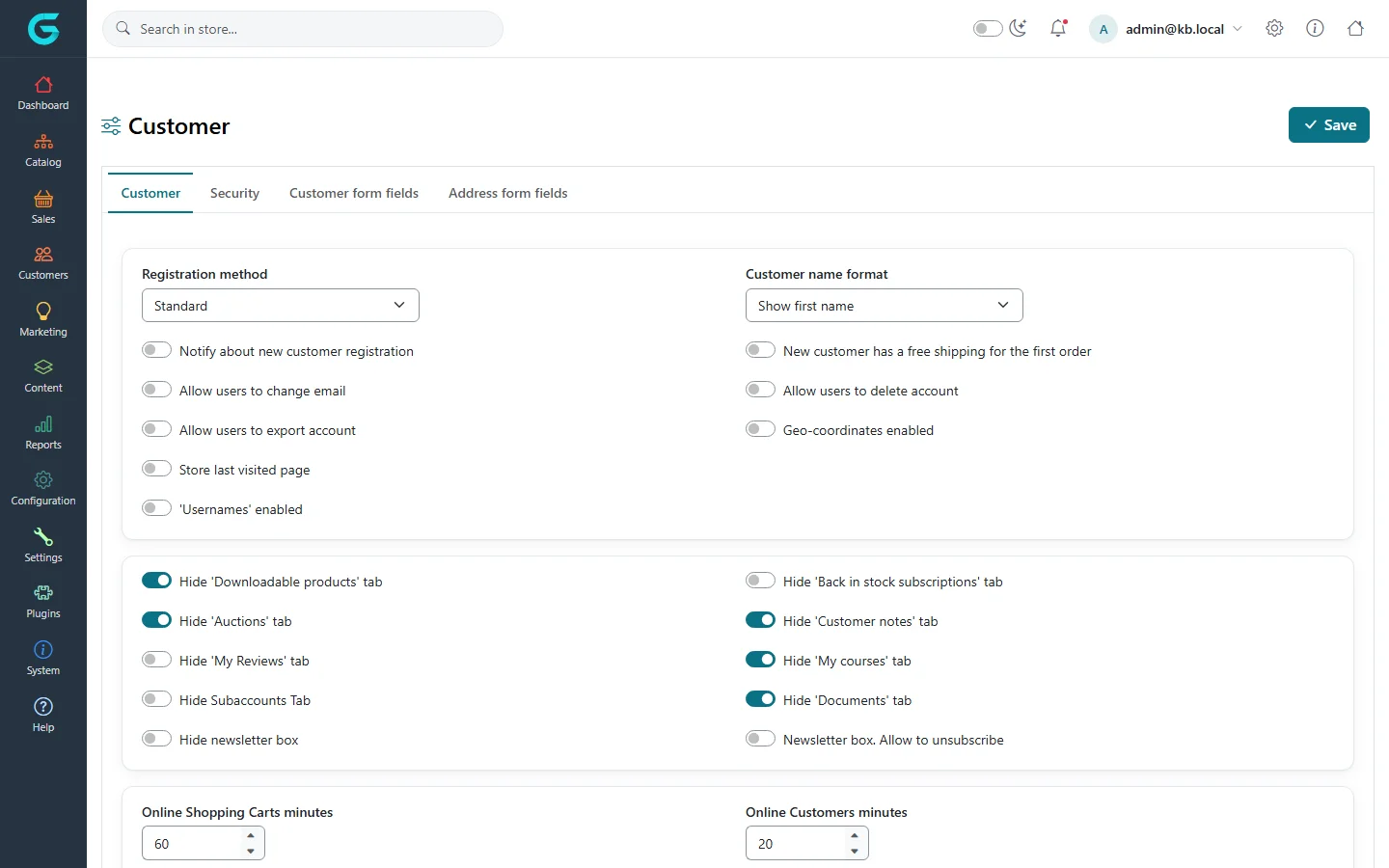
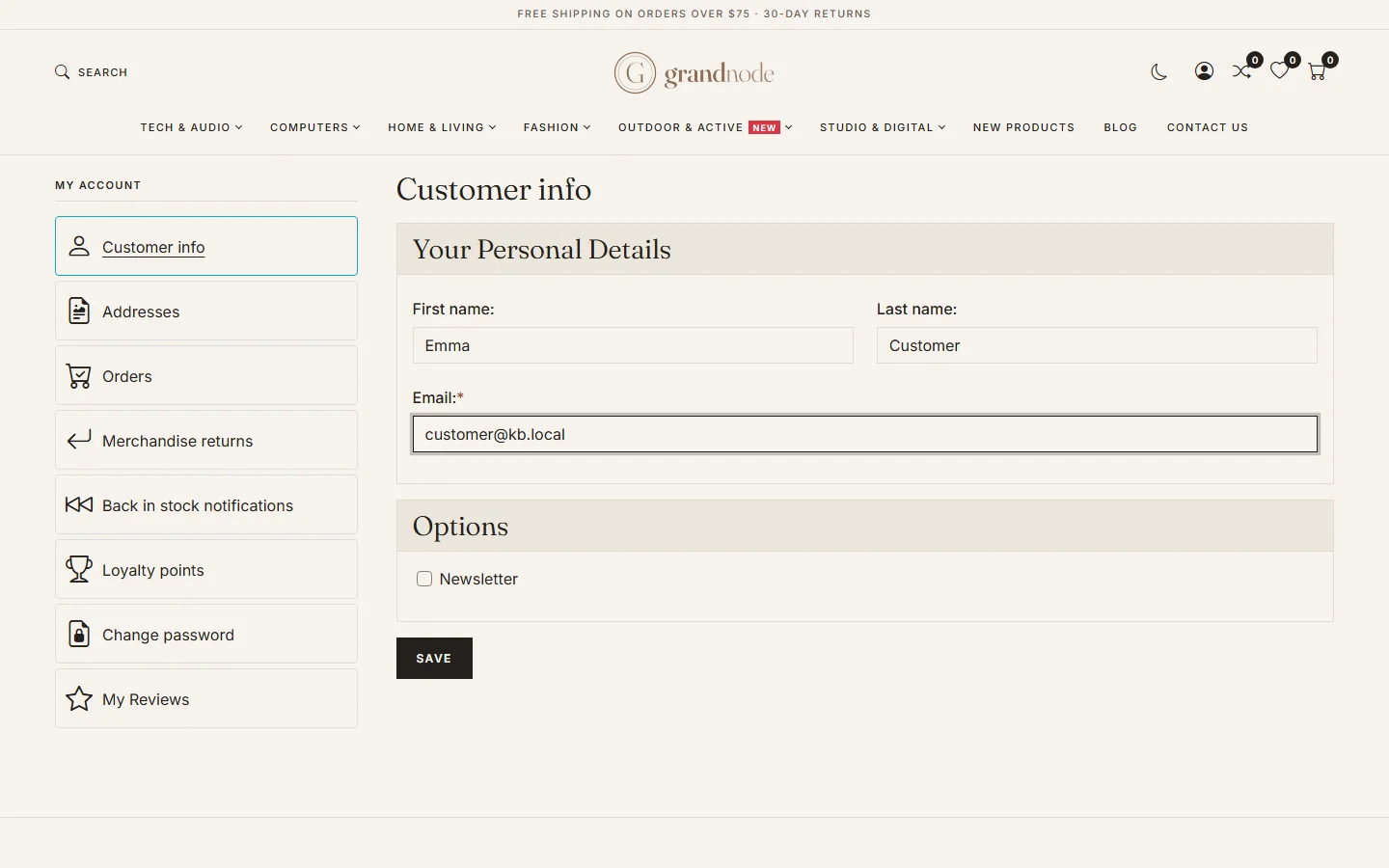
{"ArticleId":null,"Name":"Registration, login and privacy","Content":"\n\u003Cp\u003EHow people become customers and sign in is set in one place: \u003Cstrong\u003ESettings \u2192 Customer settings\u003C/strong\u003E. It has four tabs - \u003Cstrong\u003ECustomer\u003C/strong\u003E, \u003Cstrong\u003ESecurity\u003C/strong\u003E, \u003Cstrong\u003ECustomer form fields\u003C/strong\u003E and \u003Cstrong\u003EAddress form fields\u003C/strong\u003E.\u003C/p\u003E\n\u003Cfigure\u003E\u003Cimg src=\u0022/Plugins/Theme.GrandNodeCom/Content/kb/customers/customer-settings.webp\u0022 alt=\u0022Customer settings, Customer tab: registration method Standard, customer name format, switches for notifications, e-mail changes, account export and deletion, and the tabs shown in My account\u0022 width=\u00221440\u0022 height=\u0022900\u0022 loading=\u0022lazy\u0022\u003E\u003Cfigcaption\u003ESettings \u2192 Customer settings.\u003C/figcaption\u003E\u003C/figure\u003E\n\n\u003Ch2 id=\u0022registration\u0022\u003ERegistration method\u003C/h2\u003E\n\u003Ctable\u003E\n\u003Cthead\u003E\u003Ctr\u003E\u003Cth\u003EMethod\u003C/th\u003E\u003Cth\u003EWhat happens\u003C/th\u003E\u003C/tr\u003E\u003C/thead\u003E\n\u003Ctbody\u003E\n\u003Ctr\u003E\u003Ctd\u003EStandard\u003C/td\u003E\u003Ctd\u003EThe account is active as soon as the form is sent.\u003C/td\u003E\u003C/tr\u003E\n\u003Ctr\u003E\u003Ctd\u003EEmail validation\u003C/td\u003E\u003Ctd\u003EThe customer must click a link in an activation e-mail first.\u003C/td\u003E\u003C/tr\u003E\n\u003Ctr\u003E\u003Ctd\u003EAdmin approval\u003C/td\u003E\u003Ctd\u003EA staff member activates the account (set \u003Cstrong\u003EActive\u003C/strong\u003E on the customer). Use it for B2B shops.\u003C/td\u003E\u003C/tr\u003E\n\u003Ctr\u003E\u003Ctd\u003EDisabled\u003C/td\u003E\u003Ctd\u003ENo new registrations; guest checkout may still be allowed in the Sales settings.\u003C/td\u003E\u003C/tr\u003E\n\u003C/tbody\u003E\n\u003C/table\u003E\n\u003Cp\u003EOther switches on the same tab: \u003Cstrong\u003ENotify about new customer registration\u003C/strong\u003E (an e-mail to you), \u003Cstrong\u003EAllow users to change email\u003C/strong\u003E, \u003Cstrong\u003EUsernames enabled\u003C/strong\u003E (sign in with a user name instead of e-mail), \u003Cstrong\u003ENew customer has a free shipping for the first order\u003C/strong\u003E, and which tabs of \u003Cstrong\u003EMy account\u003C/strong\u003E are hidden (downloads, auctions, reviews, courses, documents...).\u003C/p\u003E\n\n\u003Ch2 id=\u0022security\u0022\u003EPasswords and sign-in security\u003C/h2\u003E\n\u003Cp\u003EThe \u003Cstrong\u003ESecurity\u003C/strong\u003E tab:\u003C/p\u003E\n\u003Ctable\u003E\n\u003Cthead\u003E\u003Ctr\u003E\u003Cth\u003ESetting\u003C/th\u003E\u003Cth\u003EWhat it does\u003C/th\u003E\u003C/tr\u003E\u003C/thead\u003E\n\u003Ctbody\u003E\n\u003Ctr\u003E\u003Ctd\u003ERegular Expression for password validation\u003C/td\u003E\u003Ctd\u003EThe password rule, for example a minimum length and a digit. The message shown to customers explains it.\u003C/td\u003E\u003C/tr\u003E\n\u003Ctr\u003E\u003Ctd\u003EDefault password format\u003C/td\u003E\u003Ctd\u003EHow new passwords are stored. Keep the hashed default; never store clear text.\u003C/td\u003E\u003C/tr\u003E\n\u003Ctr\u003E\u003Ctd\u003EUnduplicated passwords number\u003C/td\u003E\u003Ctd\u003EHow many previous passwords cannot be reused.\u003C/td\u003E\u003C/tr\u003E\n\u003Ctr\u003E\u003Ctd\u003EPassword lifetime\u003C/td\u003E\u003Ctd\u003EDays after which a customer must change the password (0 = never). Applies to customer groups that enforce it.\u003C/td\u003E\u003C/tr\u003E\n\u003Ctr\u003E\u003Ctd\u003EMaximum login failures, Lockout time\u003C/td\u003E\u003Ctd\u003EAfter this many wrong passwords the account is locked for the given minutes. Slows down password guessing.\u003C/td\u003E\u003C/tr\u003E\n\u003Ctr\u003E\u003Ctd\u003EPassword recovery link. Days valid\u003C/td\u003E\u003Ctd\u003EHow long a \u0022forgot password\u0022 link works.\u003C/td\u003E\u003C/tr\u003E\n\u003Ctr\u003E\u003Ctd\u003ETwo factor authentication enabled, type\u003C/td\u003E\u003Ctd\u003ELets customers protect their account with a second factor - an authenticator app, or a code by e-mail or SMS depending on the plugins installed.\u003C/td\u003E\u003C/tr\u003E\n\u003C/tbody\u003E\n\u003C/table\u003E\n\u003Cp\u003EExternal sign-in with Google or Facebook is provided by the authentication plugins under \u003Cstrong\u003EPlugins \u2192 External authentication methods\u003C/strong\u003E.\u003C/p\u003E\n\n\u003Ch2 id=\u0022privacy\u0022\u003EPrivacy: customers\u0027 own data\u003C/h2\u003E\n\u003Cul\u003E\n\u003Cli\u003E\u003Cstrong\u003EAllow users to export account\u003C/strong\u003E adds a button in My account that downloads the customer\u0027s data.\u003C/li\u003E\n\u003Cli\u003E\u003Cstrong\u003EAllow users to delete account\u003C/strong\u003E lets customers delete their account themselves.\u003C/li\u003E\n\u003Cli\u003EStaff can export or delete a customer\u0027s data from the customer\u0027s page in the admin.\u003C/li\u003E\n\u003Cli\u003EThe newsletter box can require an explicit opt-in, and the \u003Cstrong\u003ENewsletter box. Allow to unsubscribe\u003C/strong\u003E switch shows an unsubscribe option.\u003C/li\u003E\n\u003C/ul\u003E\n\u003Cp\u003EWhat customers see in \u003Cstrong\u003EMy account\u003C/strong\u003E:\u003C/p\u003E\n\u003Cfigure\u003E\u003Cimg src=\u0022/Plugins/Theme.GrandNodeCom/Content/kb/customers/storefront-account-info.webp\u0022 alt=\u0022The storefront Customer info page in My account with first name, last name, e-mail and the newsletter option, and the account menu with addresses, orders, returns, loyalty points and reviews\u0022 width=\u00221440\u0022 height=\u0022900\u0022 loading=\u0022lazy\u0022\u003E\u003Cfigcaption\u003EMy account \u2192 Customer info.\u003C/figcaption\u003E\u003C/figure\u003E\n\n\u003Ch2 id=\u0022tips\u0022\u003ETips and common mistakes\u003C/h2\u003E\n\u003Cul\u003E\n\u003Cli\u003EWith \u003Cstrong\u003EEmail validation\u003C/strong\u003E, make sure outgoing e-mail works first (\u003Ca href=\u0022/docs-content\u0022\u003Emessage templates and e-mail accounts\u003C/a\u003E), or nobody can finish registering.\u003C/li\u003E\n\u003Cli\u003EChanging the password rule does not affect existing passwords until they are changed.\u003C/li\u003E\n\u003C/ul\u003E\n\n\u003Ch2 id=\u0022related\u0022\u003ERelated\u003C/h2\u003E\n\u003Cul\u003E\n\u003Cli\u003E\u003Ca href=\u0022/customers-customer-attributes\u0022\u003ECustomer and address attributes\u003C/a\u003E\u003C/li\u003E\n\u003Cli\u003E\u003Ca href=\u0022/docs-configuration\u0022\u003EConfiguration\u003C/a\u003E\u003C/li\u003E\n\u003C/ul\u003E\n","ParentCategoryId":"6abdec6c83d2816248229edd","SeName":"customers-registration-login-and-privacy","MetaKeywords":null,"MetaDescription":"Choose how customers register, set password rules, lockout and two-factor authentication, and give customers control over their data in GrandNode.","MetaTitle":null,"AllowComments":false,"Captcha":{"ReCaptchaChallengeField":null,"ReCaptchaResponseField":null,"ReCaptchaResponseValue":null,"ReCaptchaResponse":null},"RelatedArticles":[],"CategoryBreadcrumb":[{"Name":"Customers","Description":null,"IsCurrent":false,"Children":null,"Parent":null,"SeName":"docs-customers","Id":"6abdec6c83d2816248229edd","UserFields":[]}],"AddNewComment":{"CommentText":null,"DisplayCaptcha":false,"Id":null,"UserFields":[]},"Comments":[],"Id":"6abdec6c83d2816248229eeb","UserFields":[]}