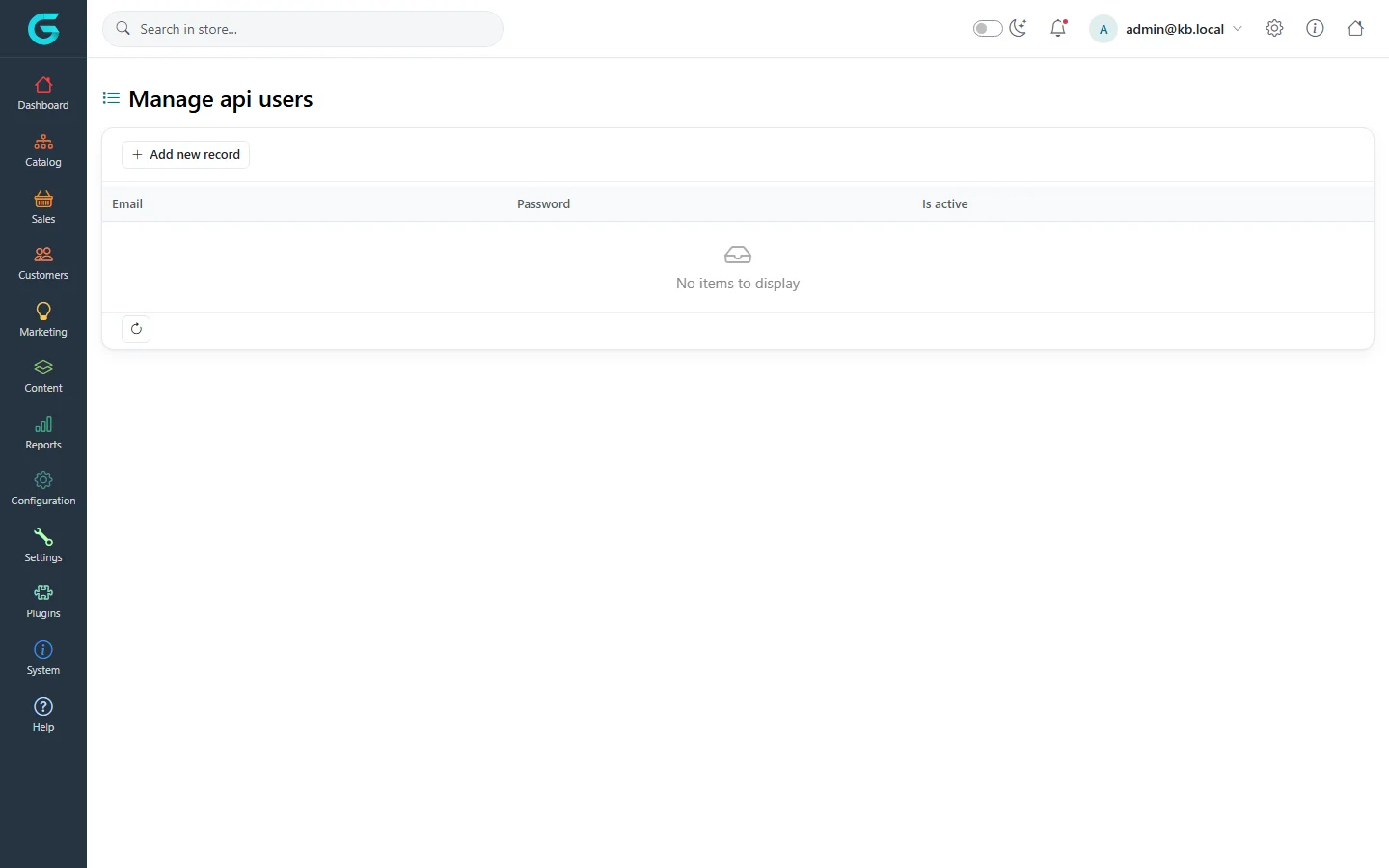
{"ArticleId":null,"Name":"The REST API","Content":"\u003Cp\u003EGrandNode ships an HTTP API in the \u003Ccode\u003EGrand.Module.Api\u003C/code\u003E module. It has two parts with separate configuration and separate tokens: the \u003Cstrong\u003EBackend API\u003C/strong\u003E (\u003Ccode\u003E/api/...\u003C/code\u003E) for integrations that manage the catalog and customers \u2014 ERP, PIM, import jobs \u2014 and the \u003Cstrong\u003EFrontend API\u003C/strong\u003E, which exposes the storefront\u0027s own actions (catalog, cart, checkout, account) to a headless or mobile frontend. Both use JSON Web Tokens and describe themselves with OpenAPI.\u003C/p\u003E\n\n\u003Ch2 id=\u0022enable\u0022\u003EHow to enable it\u003C/h2\u003E\n\u003Cp\u003EThe API module is switched off by default. In \u003Ccode\u003EApp_Data/appsettings.json\u003C/code\u003E (or with environment variables):\u003C/p\u003E\n\u003Cpre\u003E\u003Ccode\u003E\u0022FeatureManagement\u0022: {\n  \u0022Grand.Module.Api\u0022: true\n},\n\u0022BackendAPI\u0022: {\n  \u0022Enabled\u0022: true,\n  \u0022SecretKey\u0022: \u0022a-long-random-secret-of-at-least-32-characters\u0022,\n  \u0022ExpiryInMinutes\u0022: 1440\n},\n\u0022FrontendAPI\u0022: {\n  \u0022Enabled\u0022: true,\n  \u0022SecretKey\u0022: \u0022another-long-random-secret-of-32-characters-or-more\u0022,\n  \u0022JsonContentType\u0022: false,\n  \u0022ExpiryInMinutes\u0022: 1440,\n  \u0022RefreshTokenExpiryInMinutes\u0022: 1440\n}\u003C/code\u003E\u003C/pre\u003E\n\u003Cul\u003E\n\u003Cli\u003E\u003Ccode\u003EFeatureManagement:Grand.Module.Api\u003C/code\u003E loads the module at all. Restart the application after changing it.\u003C/li\u003E\n\u003Cli\u003E\u003Ccode\u003ESecretKey\u003C/code\u003E signs the tokens. Outside the Development environment the application refuses to start while an enabled API has an empty key, the shipped placeholder or a key shorter than 32 characters. Keep it out of source control: set \u003Ccode\u003EBackendAPI__SecretKey\u003C/code\u003E and \u003Ccode\u003EFrontendAPI__SecretKey\u003C/code\u003E as environment variables or in a secret store.\u003C/li\u003E\n\u003Cli\u003EIn production, cross-origin requests are allowed only from the origins listed in \u003Ccode\u003EAllowedHostOrigins\u003C/code\u003E. In Development any origin is allowed.\u003C/li\u003E\n\u003C/ul\u003E\n\n\u003Ch2 id=\u0022documentation\u0022\u003EAPI documentation\u003C/h2\u003E\n\u003Cp\u003EIn the Development environment the module generates OpenAPI documents at \u003Ccode\u003E/openapi/v1.json\u003C/code\u003E (Backend API) and \u003Ccode\u003E/openapi/v2.json\u003C/code\u003E (Frontend API), plus an interactive Scalar playground at \u003Ccode\u003E/scalar/v1\u003C/code\u003E and \u003Ccode\u003E/scalar/v2\u003C/code\u003E where you can authorise with a token and try every endpoint. Production instances do not publish the documents, so explore the API on a development copy. A step-by-step guide with all settings: \u003Ca href=\u0022/developers-scalar-api-playground\u0022\u003EAPI configuration and the Scalar playground\u003C/a\u003E.\u003C/p\u003E\n\n\u003Ch2 id=\u0022backend-auth\u0022\u003EBackend API: API users and tokens\u003C/h2\u003E\n\u003Cp\u003EBackend API access is granted per API user, managed in the admin panel under \u003Cstrong\u003ESystem \u2192 Developer Tools \u2192 Manage api users\u003C/strong\u003E.\u003C/p\u003E\n\u003Cfigure\u003E\u003Cimg src=\u0022/Plugins/Theme.GrandNodeCom/Content/kb/developers/admin-api-users.webp\u0022 alt=\u0022Manage api users page in the admin panel with the Add new record button and the Email, Password and Is active columns\u0022 width=\u00221440\u0022 height=\u0022900\u0022 loading=\u0022lazy\u0022\u003E\u003Cfigcaption\u003ESystem \u2192 Developer Tools \u2192 Manage api users. Each record has an e-mail, a password and an active flag.\u003C/figcaption\u003E\u003C/figure\u003E\n\u003Col\u003E\n\u003Cli\u003EMake sure a customer account with the same e-mail exists, is active and belongs to a customer group with access to the admin panel. The API user acts with that customer\u0027s permissions \u2014 for example, product endpoints require the \u003Cem\u003EProducts\u003C/em\u003E permission.\u003C/li\u003E\n\u003Cli\u003EClick \u003Cstrong\u003EAdd new record\u003C/strong\u003E, enter the e-mail and a password, tick \u003Cstrong\u003EIs active\u003C/strong\u003E and save.\u003C/li\u003E\n\u003Cli\u003ERequest a token. The password is sent Base64-encoded:\n\u003Cpre\u003E\u003Ccode\u003EPOST /Api/Token/Create\nContent-Type: application/json\n\n{ \u0022email\u0022: \u0022erp@example.com\u0022, \u0022password\u0022: \u0022c2VjcmV0LXBhc3N3b3Jk\u0022 }\u003C/code\u003E\u003C/pre\u003E\nThe response is the token as a JSON string.\u003C/li\u003E\n\u003Cli\u003ESend it with every call:\n\u003Cpre\u003E\u003Ccode\u003EGET /api/Product?$filter=Published == true\u0026amp;$top=20\nAuthorization: Bearer eyJhbGciOiJIUzI1NiIs...\u003C/code\u003E\u003C/pre\u003E\u003C/li\u003E\n\u003C/ol\u003E\n\u003Cp\u003EA token is accepted only while the API user is active and its password unchanged: setting a new password or clearing \u003Cstrong\u003EIs active\u003C/strong\u003E invalidates every token issued before. When \u003Cstrong\u003EAdmin area allowed IP\u003C/strong\u003E is set under \u003Cstrong\u003ESettings \u2192 General\u003C/strong\u003E, API calls from other addresses are refused too.\u003C/p\u003E\n\n\u003Ch2 id=\u0022backend-endpoints\u0022\u003EBackend API endpoints\u003C/h2\u003E\n\u003Cp\u003EControllers are available for brands, categories, collections and their layouts, products and product layouts, product attributes, specification attributes, pictures, customers, customer groups, vendors, stores, languages, currencies, countries, shipping methods, delivery dates, warehouses and pickup points. They follow one pattern, shown here for products:\u003C/p\u003E\n\u003Ctable\u003E\n\u003Cthead\u003E\u003Ctr\u003E\u003Cth\u003ERequest\u003C/th\u003E\u003Cth\u003EWhat it does\u003C/th\u003E\u003C/tr\u003E\u003C/thead\u003E\n\u003Ctbody\u003E\n\u003Ctr\u003E\u003Ctd\u003E\u003Ccode\u003EGET /api/Product\u003C/code\u003E\u003C/td\u003E\u003Ctd\u003EList, with query options\u003C/td\u003E\u003C/tr\u003E\n\u003Ctr\u003E\u003Ctd\u003E\u003Ccode\u003EGET /api/Product/{key}\u003C/code\u003E\u003C/td\u003E\u003Ctd\u003EOne product by id\u003C/td\u003E\u003C/tr\u003E\n\u003Ctr\u003E\u003Ctd\u003E\u003Ccode\u003EPOST /api/Product\u003C/code\u003E\u003C/td\u003E\u003Ctd\u003ECreate\u003C/td\u003E\u003C/tr\u003E\n\u003Ctr\u003E\u003Ctd\u003E\u003Ccode\u003EPUT /api/Product\u003C/code\u003E\u003C/td\u003E\u003Ctd\u003EReplace\u003C/td\u003E\u003C/tr\u003E\n\u003Ctr\u003E\u003Ctd\u003E\u003Ccode\u003EPATCH /api/Product/{key}\u003C/code\u003E\u003C/td\u003E\u003Ctd\u003EPartial update with a JSON Patch document\u003C/td\u003E\u003C/tr\u003E\n\u003Ctr\u003E\u003Ctd\u003E\u003Ccode\u003EDELETE /api/Product/{key}\u003C/code\u003E\u003C/td\u003E\u003Ctd\u003EDelete\u003C/td\u003E\u003C/tr\u003E\n\u003Ctr\u003E\u003Ctd\u003E\u003Ccode\u003EPOST /api/Product/{key}/UpdateStock\u003C/code\u003E\u003C/td\u003E\u003Ctd\u003EStock update; similar actions manage the product\u0027s categories, collections, pictures, specifications and tier prices\u003C/td\u003E\u003C/tr\u003E\n\u003C/tbody\u003E\n\u003C/table\u003E\n\n\u003Ch2 id=\u0022query-options\u0022\u003EQuery options\u003C/h2\u003E\n\u003Cp\u003EList endpoints accept OData-style query parameters:\u003C/p\u003E\n\u003Ctable\u003E\n\u003Cthead\u003E\u003Ctr\u003E\u003Cth\u003EParameter\u003C/th\u003E\u003Cth\u003EExample\u003C/th\u003E\u003C/tr\u003E\u003C/thead\u003E\n\u003Ctbody\u003E\n\u003Ctr\u003E\u003Ctd\u003E\u003Ccode\u003E$filter\u003C/code\u003E\u003C/td\u003E\u003Ctd\u003E\u003Ccode\u003EName.Contains(\u0022shirt\u0022) and Published == true\u003C/code\u003E\u003C/td\u003E\u003C/tr\u003E\n\u003Ctr\u003E\u003Ctd\u003E\u003Ccode\u003E$orderby\u003C/code\u003E\u003C/td\u003E\u003Ctd\u003E\u003Ccode\u003EName, Sku desc\u003C/code\u003E\u003C/td\u003E\u003C/tr\u003E\n\u003Ctr\u003E\u003Ctd\u003E\u003Ccode\u003E$select\u003C/code\u003E\u003C/td\u003E\u003Ctd\u003E\u003Ccode\u003EId, Name, Price\u003C/code\u003E\u003C/td\u003E\u003C/tr\u003E\n\u003Ctr\u003E\u003Ctd\u003E\u003Ccode\u003E$skip\u003C/code\u003E, \u003Ccode\u003E$top\u003C/code\u003E\u003C/td\u003E\u003Ctd\u003E\u003Ccode\u003E$skip=100\u0026amp;$top=50\u003C/code\u003E\u003C/td\u003E\u003C/tr\u003E\n\u003C/tbody\u003E\n\u003C/table\u003E\n\u003Cp\u003EFilters use C#-like expression syntax (\u003Ccode\u003E==\u003C/code\u003E, \u003Ccode\u003Eand\u003C/code\u003E, \u003Ccode\u003Eor\u003C/code\u003E, string methods such as \u003Ccode\u003EContains\u003C/code\u003E, \u003Ccode\u003EStartsWith\u003C/code\u003E, \u003Ccode\u003EEndsWith\u003C/code\u003E) and may name only fields of the returned model, up to 512 characters. At most 100 items are returned per call, whatever \u003Ccode\u003E$top\u003C/code\u003E says, so page with \u003Ccode\u003E$skip\u003C/code\u003E. An invalid option returns 400 with an error message.\u003C/p\u003E\n\n\u003Ch2 id=\u0022frontend-api\u0022\u003EFrontend API\u003C/h2\u003E\n\u003Cp\u003EThe Frontend API is not a separate set of URLs: storefront controllers (catalog, product, shopping cart, checkout, orders, account, blog, news, pages and others) are marked as API endpoints and accept a Frontend API token instead of the storefront cookie.\u003C/p\u003E\n\u003Col\u003E\n\u003Cli\u003EGet a token: \u003Ccode\u003EPOST /TokenWeb/Guest\u003C/code\u003E for an anonymous visitor, or \u003Ccode\u003EPOST /TokenWeb/Login\u003C/code\u003E with \u003Ccode\u003E{ \u0022email\u0022: \u0022...\u0022, \u0022password\u0022: \u0022\u0026lt;Base64\u0026gt;\u0022 }\u003C/code\u003E for a registered customer. Both return an access token and a refresh token.\u003C/li\u003E\n\u003Cli\u003ERefresh an expired access token with \u003Ccode\u003EPOST /TokenWeb/Refresh\u003C/code\u003E, sending both tokens.\u003C/li\u003E\n\u003Cli\u003EFor state-changing requests get an antiforgery token from \u003Ccode\u003EGET /TokenWeb/Antiforgery\u003C/code\u003E and send it in the \u003Ccode\u003EX-CSRF-TOKEN\u003C/code\u003E header.\u003C/li\u003E\n\u003Cli\u003ERequest bodies are form data by default; set \u003Ccode\u003EFrontendAPI:JsonContentType\u003C/code\u003E to \u003Ccode\u003Etrue\u003C/code\u003E to send JSON.\u003C/li\u003E\n\u003C/ol\u003E\n\u003Cp\u003EThe complete list of operations is in the v2 document at \u003Ccode\u003E/scalar/v2\u003C/code\u003E on a development instance.\u003C/p\u003E\n\n\u003Ch2 id=\u0022tips\u0022\u003ETips and common mistakes\u003C/h2\u003E\n\u003Cul\u003E\n\u003Cli\u003E401 on every call after enabling: the module flag is still off, or the token was issued before you changed the secret key.\u003C/li\u003E\n\u003Cli\u003E\u0022User not exists or password is wrong\u0022: the password was not Base64-encoded, or the API user is inactive.\u003C/li\u003E\n\u003Cli\u003E403 on a specific controller: the customer behind the API user lacks that permission.\u003C/li\u003E\n\u003Cli\u003ECode of the module: \u003Ca href=\u0022https://github.com/grandnode/grandnode2/tree/develop/src/Modules/Grand.Module.Api\u0022\u003Esrc/Modules/Grand.Module.Api\u003C/a\u003E.\u003C/li\u003E\n\u003C/ul\u003E\n\n\u003Ch2 id=\u0022related\u0022\u003ERelated\u003C/h2\u003E\n\u003Cul\u003E\n\u003Cli\u003E\u003Ca href=\u0022/developers-architecture-overview\u0022\u003EArchitecture overview\u003C/a\u003E\u003C/li\u003E\n\u003Cli\u003EPermissions and customer groups: \u003Ca href=\u0022/docs-customers\u0022\u003ECustomers\u003C/a\u003E\u003C/li\u003E\n\u003C/ul\u003E","ParentCategoryId":"6abdec6d83d2816248229f65","SeName":"developers-rest-api","MetaKeywords":null,"MetaDescription":"Enable and use the GrandNode REST API: the Backend API for admin integrations, the Frontend API for headless storefronts, JWT tokens and query options.","MetaTitle":null,"AllowComments":false,"Captcha":{"ReCaptchaChallengeField":null,"ReCaptchaResponseField":null,"ReCaptchaResponseValue":null,"ReCaptchaResponse":null},"RelatedArticles":[],"CategoryBreadcrumb":[{"Name":"For developers","Description":null,"IsCurrent":false,"Children":null,"Parent":null,"SeName":"docs-developers","Id":"6abdec6d83d2816248229f65","UserFields":[]}],"AddNewComment":{"CommentText":null,"DisplayCaptcha":false,"Id":null,"UserFields":[]},"Comments":[],"Id":"6abdec6d83d2816248229f71","UserFields":[]}