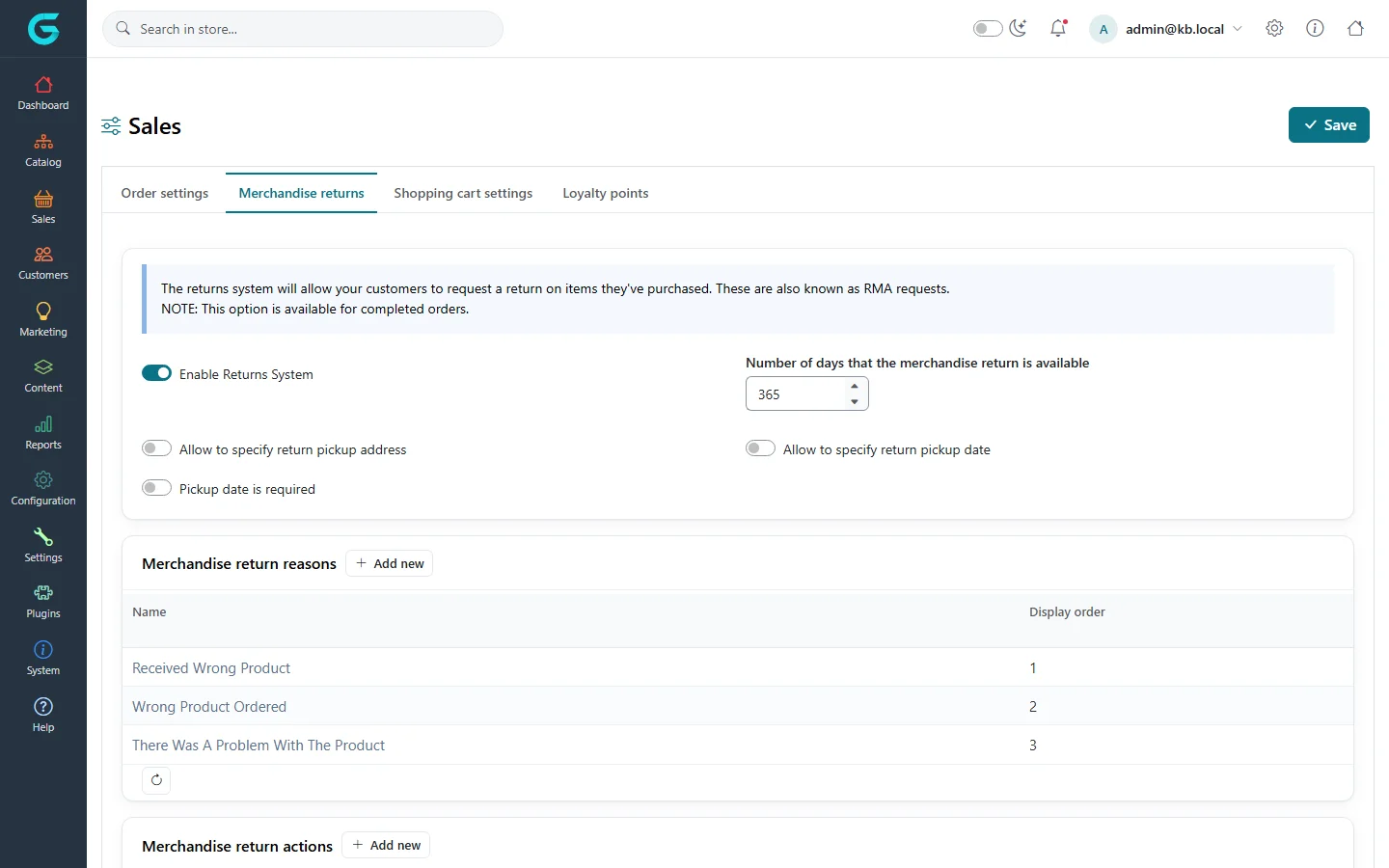
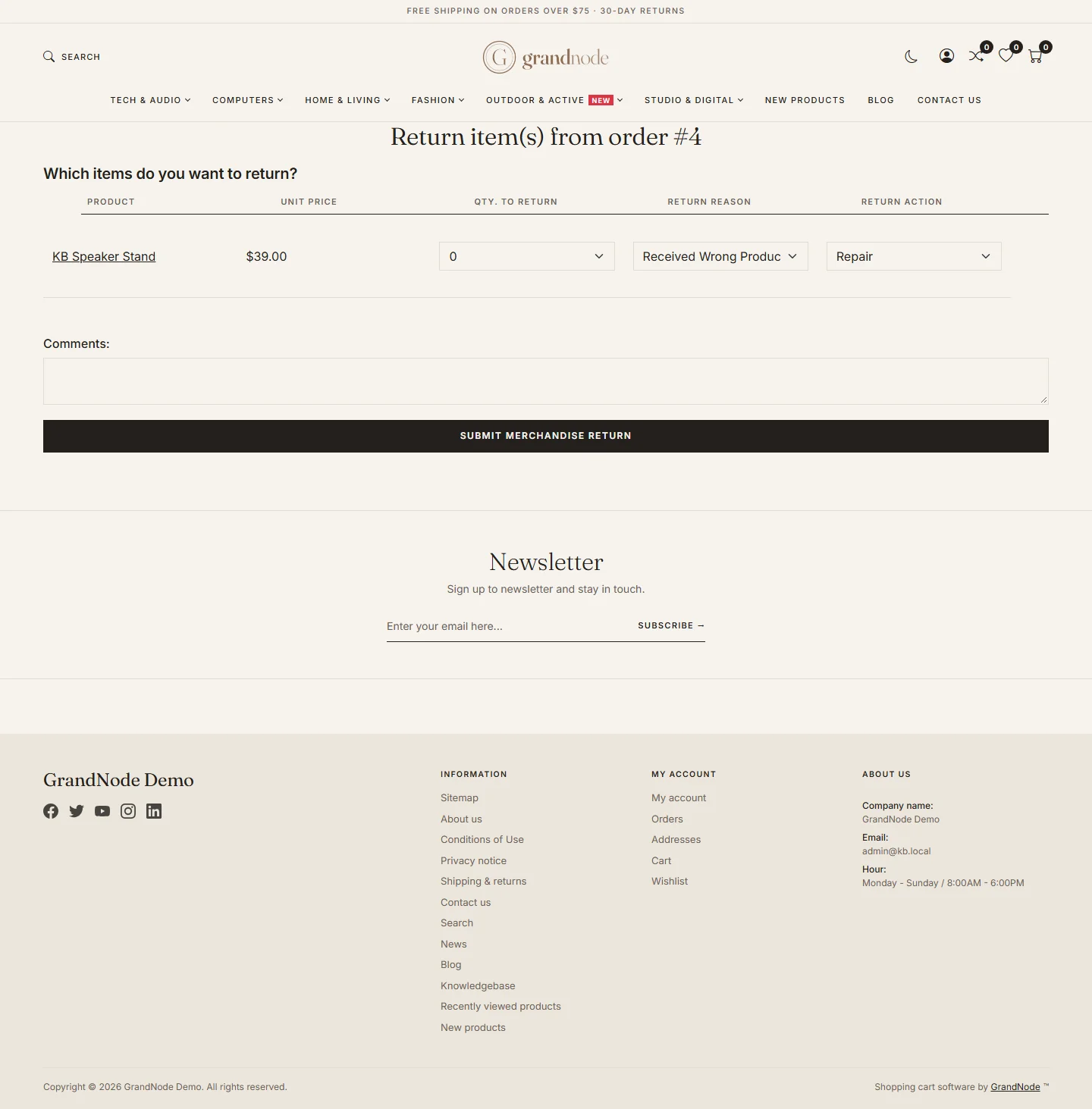
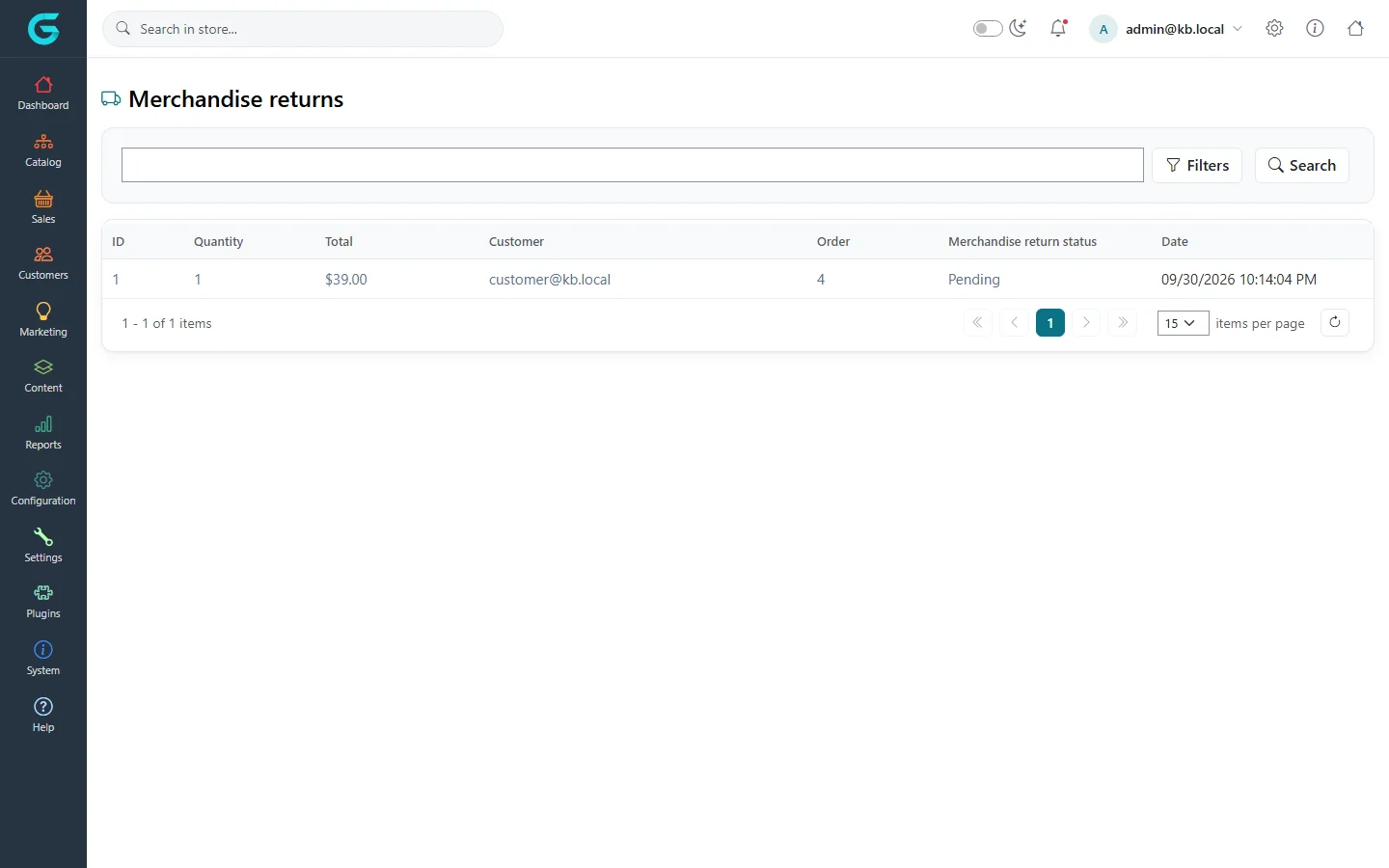
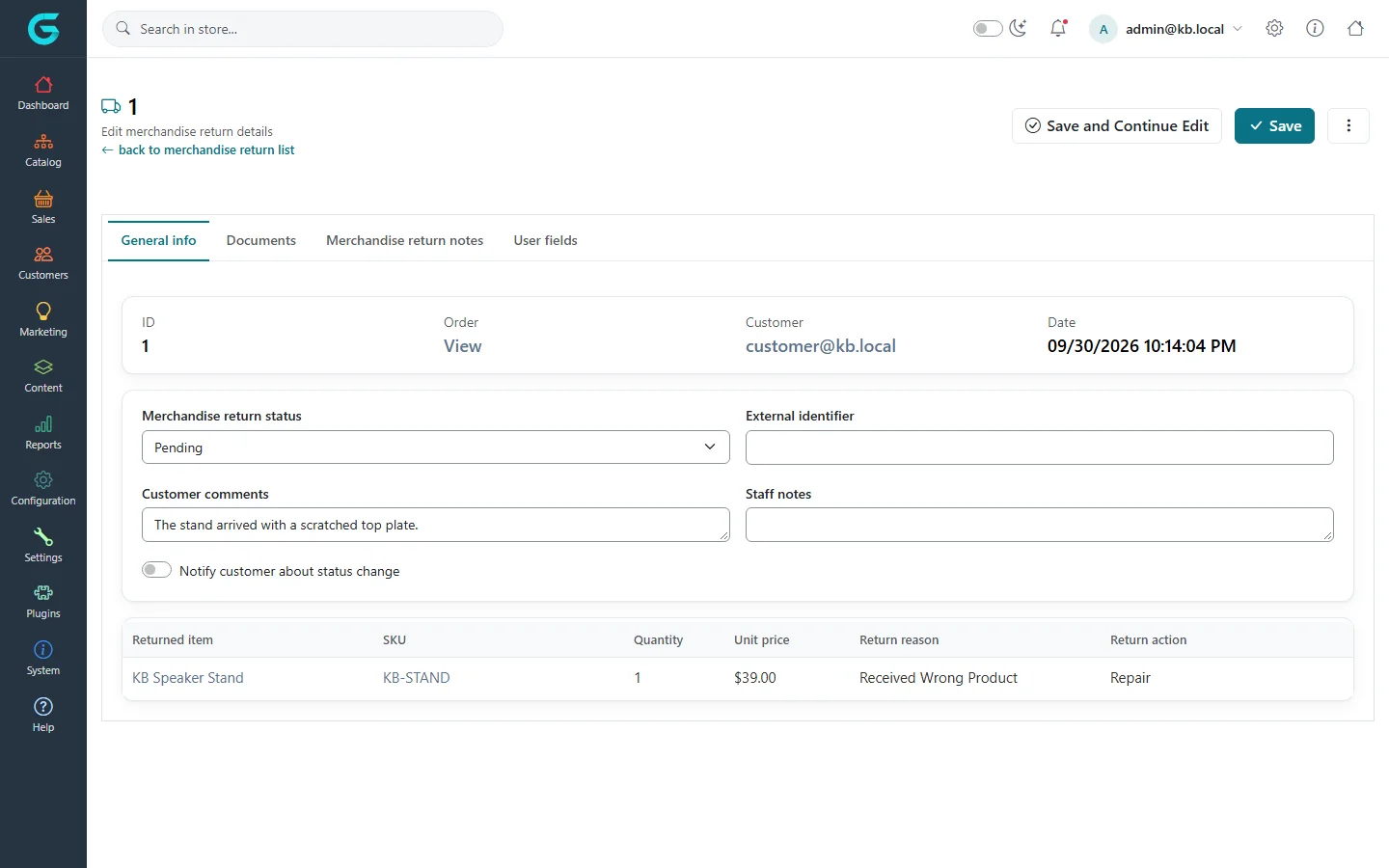
{"ArticleId":null,"Name":"Merchandise returns","Content":"\n\u003Cp\u003EA \u003Cstrong\u003Emerchandise return\u003C/strong\u003E (often called an RMA) is a customer\u0027s request to send back items from an order - for a refund, a replacement or a repair. Customers file it from their account; staff review and process it in the admin.\u003C/p\u003E\n\n\u003Ch2 id=\u0022enable\u0022\u003EEnable returns\u003C/h2\u003E\n\u003Cp\u003EOpen \u003Cstrong\u003ESettings \u2192 Sales settings\u003C/strong\u003E, tab \u003Cstrong\u003EMerchandise returns\u003C/strong\u003E.\u003C/p\u003E\n\u003Cfigure\u003E\u003Cimg src=\u0022/Plugins/Theme.GrandNodeCom/Content/kb/sales/sales-settings-returns.webp\u0022 alt=\u0022The Merchandise returns tab of the sales settings with Enable Returns System, number of days, pickup options, and the reasons and actions grids\u0022 width=\u00221440\u0022 height=\u0022900\u0022 loading=\u0022lazy\u0022\u003E\u003Cfigcaption\u003ESettings \u2192 Sales settings \u2192 Merchandise returns.\u003C/figcaption\u003E\u003C/figure\u003E\n\u003Ctable\u003E\n\u003Cthead\u003E\u003Ctr\u003E\u003Cth\u003ESetting\u003C/th\u003E\u003Cth\u003EWhat it does\u003C/th\u003E\u003C/tr\u003E\u003C/thead\u003E\n\u003Ctbody\u003E\n\u003Ctr\u003E\u003Ctd\u003EEnable Returns System\u003C/td\u003E\u003Ctd\u003EShows the return option to customers.\u003C/td\u003E\u003C/tr\u003E\n\u003Ctr\u003E\u003Ctd\u003ENumber of days that the merchandise return is available\u003C/td\u003E\u003Ctd\u003EThe return window, counted from the order date. 0 means no limit.\u003C/td\u003E\u003C/tr\u003E\n\u003Ctr\u003E\u003Ctd\u003EAllow to specify return pickup address / date\u003C/td\u003E\u003Ctd\u003ELets the customer give an address and a date for a courier pickup; the date can be made required.\u003C/td\u003E\u003C/tr\u003E\n\u003Ctr\u003E\u003Ctd\u003EMerchandise return reasons\u003C/td\u003E\u003Ctd\u003EThe reasons a customer picks from, for example \u0022Received wrong product\u0022.\u003C/td\u003E\u003C/tr\u003E\n\u003Ctr\u003E\u003Ctd\u003EMerchandise return actions\u003C/td\u003E\u003Ctd\u003EWhat the customer wants: Repair, Replacement, Store credit...\u003C/td\u003E\u003C/tr\u003E\n\u003C/tbody\u003E\n\u003C/table\u003E\n\u003Cp\u003EA return is possible only for items that were \u003Cstrong\u003Edelivered\u003C/strong\u003E, within the window, and for products without \u003Cstrong\u003EProduct is not returnable\u003C/strong\u003E ticked.\u003C/p\u003E\n\n\u003Ch2 id=\u0022customer\u0022\u003EHow a customer requests a return\u003C/h2\u003E\n\u003Cp\u003EIn \u003Cstrong\u003EMy account \u2192 Orders\u003C/strong\u003E the order details show a return button for eligible orders. The form lists the delivered items: the customer chooses the quantity, a reason and an action for each, and adds a comment.\u003C/p\u003E\n\u003Cfigure\u003E\u003Cimg src=\u0022/Plugins/Theme.GrandNodeCom/Content/kb/sales/storefront-return-request.webp\u0022 alt=\u0022The storefront form Return item(s) from order #4 with the item, quantity, return reason and action drop-downs and a comments field\u0022 width=\u00221440\u0022 height=\u00221463\u0022 loading=\u0022lazy\u0022\u003E\u003Cfigcaption\u003EThe return form on the storefront.\u003C/figcaption\u003E\u003C/figure\u003E\n\n\u003Ch2 id=\u0022process\u0022\u003EProcess a return\u003C/h2\u003E\n\u003Col\u003E\n\u003Cli\u003EOpen \u003Cstrong\u003ESales \u2192 Merchandise returns\u003C/strong\u003E. New requests have the status \u003Cstrong\u003EPending\u003C/strong\u003E.\u003C/li\u003E\n\u003Cli\u003EOpen the return to see the items, quantities, reason, requested action and the customer\u0027s comment.\u003C/li\u003E\n\u003Cli\u003ESet the \u003Cstrong\u003EMerchandise return status\u003C/strong\u003E as you progress: \u003Cem\u003EAccepted\u003C/em\u003E, \u003Cem\u003ERejected\u003C/em\u003E, \u003Cem\u003ECancelled\u003C/em\u003E or \u003Cem\u003ECompleted\u003C/em\u003E. Add a \u003Cstrong\u003EStaff note\u003C/strong\u003E and an \u003Cstrong\u003EExternal identifier\u003C/strong\u003E (your carrier or ERP reference) if you use one.\u003C/li\u003E\n\u003Cli\u003ETick \u003Cstrong\u003ENotify customer about status change\u003C/strong\u003E to e-mail the customer when you save.\u003C/li\u003E\n\u003Cli\u003ERefund the money on the order\u0027s payment transaction if the action is a refund - the return itself does not move money.\u003C/li\u003E\n\u003C/ol\u003E\n\u003Cfigure\u003E\u003Cimg src=\u0022/Plugins/Theme.GrandNodeCom/Content/kb/sales/merchandise-returns.webp\u0022 alt=\u0022The Merchandise returns list with return 1 for order 4, quantity 1, total 39.00, customer, pending status and date\u0022 width=\u00221440\u0022 height=\u0022900\u0022 loading=\u0022lazy\u0022\u003E\u003Cfigcaption\u003ESales \u2192 Merchandise returns.\u003C/figcaption\u003E\u003C/figure\u003E\n\u003Cfigure\u003E\u003Cimg src=\u0022/Plugins/Theme.GrandNodeCom/Content/kb/sales/merchandise-return-edit.webp\u0022 alt=\u0022Editing merchandise return 1: status Pending, customer comment about a scratched plate, staff notes, and the returned item KB Speaker Stand with reason and action\u0022 width=\u00221440\u0022 height=\u0022900\u0022 loading=\u0022lazy\u0022\u003E\u003Cfigcaption\u003EA return: status, comments and the returned items.\u003C/figcaption\u003E\u003C/figure\u003E\n\u003Cp\u003EThe \u003Cstrong\u003EMerchandise returns notes\u003C/strong\u003E tab keeps a conversation with the customer; notes marked to display are visible in their account.\u003C/p\u003E\n\n\u003Ch2 id=\u0022tips\u0022\u003ETips and common mistakes\u003C/h2\u003E\n\u003Cul\u003E\n\u003Cli\u003EIf customers say the return button is missing, check that the order is delivered (not just shipped) and within the window.\u003C/li\u003E\n\u003Cli\u003ERestock returned items by hand on the product\u0027s inventory tab after you inspect them.\u003C/li\u003E\n\u003C/ul\u003E\n\n\u003Ch2 id=\u0022related\u0022\u003ERelated\u003C/h2\u003E\n\u003Cul\u003E\n\u003Cli\u003E\u003Ca href=\u0022/sales-shipments\u0022\u003EShipments\u003C/a\u003E\u003C/li\u003E\n\u003Cli\u003E\u003Ca href=\u0022/sales-payments\u0022\u003EPayments and payment transactions\u003C/a\u003E\u003C/li\u003E\n\u003C/ul\u003E\n","ParentCategoryId":"6abdec6c83d2816248229ec5","SeName":"sales-merchandise-returns","MetaKeywords":null,"MetaDescription":"Let customers request returns from their account, set reasons, actions and the return window, and process merchandise returns in the GrandNode admin.","MetaTitle":null,"AllowComments":false,"Captcha":{"ReCaptchaChallengeField":null,"ReCaptchaResponseField":null,"ReCaptchaResponseValue":null,"ReCaptchaResponse":null},"RelatedArticles":[],"CategoryBreadcrumb":[{"Name":"Sales and orders","Description":null,"IsCurrent":false,"Children":null,"Parent":null,"SeName":"docs-sales","Id":"6abdec6c83d2816248229ec5","UserFields":[]}],"AddNewComment":{"CommentText":null,"DisplayCaptcha":false,"Id":null,"UserFields":[]},"Comments":[],"Id":"6abdec6c83d2816248229ed5","UserFields":[]}