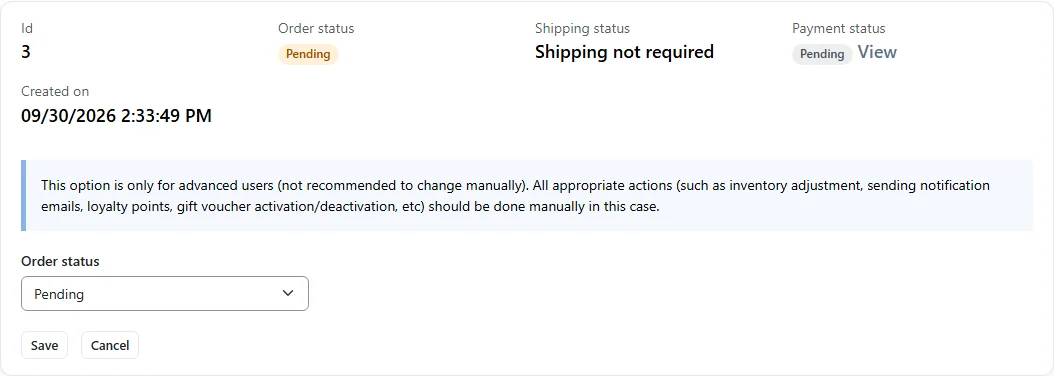
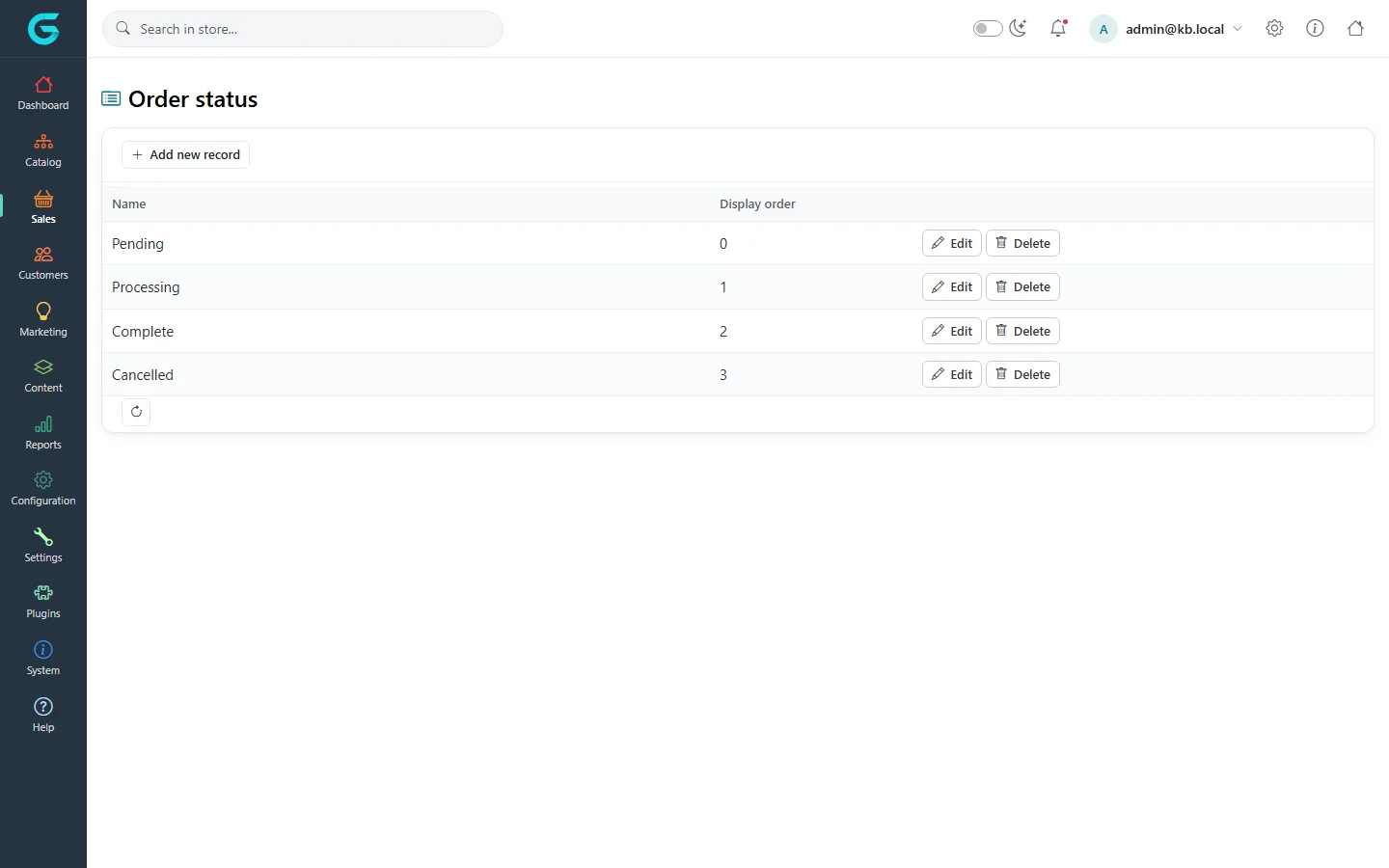
{"ArticleId":null,"Name":"Order, payment and shipping status","Content":"\n\u003Cp\u003EEvery GrandNode order has three statuses that move independently: the \u003Cstrong\u003Eorder status\u003C/strong\u003E, the \u003Cstrong\u003Epayment status\u003C/strong\u003E and the \u003Cstrong\u003Eshipping status\u003C/strong\u003E. The payment and shipping statuses follow what actually happens to the money and the goods. The order status is mostly derived from those two \u2013 GrandNode moves an order to \u003Cem\u003EProcessing\u003C/em\u003E and \u003Cem\u003EComplete\u003C/em\u003E by itself. Knowing the rules lets you process orders with the right buttons instead of overriding statuses by hand.\u003C/p\u003E\n\n\u003Ch2 id=\u0022order-status\u0022\u003EOrder status\u003C/h2\u003E\n\u003Ctable\u003E\n\u003Cthead\u003E\u003Ctr\u003E\u003Cth\u003EValue\u003C/th\u003E\u003Cth\u003EMeaning\u003C/th\u003E\u003C/tr\u003E\u003C/thead\u003E\n\u003Ctbody\u003E\n\u003Ctr\u003E\u003Ctd\u003E\u003Cem\u003EPending\u003C/em\u003E\u003C/td\u003E\u003Ctd\u003EThe order is placed but nothing has happened yet: no payment and nothing shipped. Only a pending order can be cancelled.\u003C/td\u003E\u003C/tr\u003E\n\u003Ctr\u003E\u003Ctd\u003E\u003Cem\u003EProcessing\u003C/em\u003E\u003C/td\u003E\u003Ctd\u003ESet automatically when a pending order becomes \u003Cem\u003EAuthorized\u003C/em\u003E, \u003Cem\u003EPaid\u003C/em\u003E or \u003Cem\u003EPartially paid\u003C/em\u003E, or when any part of it is shipped.\u003C/td\u003E\u003C/tr\u003E\n\u003Ctr\u003E\u003Ctd\u003E\u003Cem\u003EComplete\u003C/em\u003E\u003C/td\u003E\u003Ctd\u003ESet automatically when the order is \u003Cem\u003EPaid\u003C/em\u003E and shipping is finished (see below). The customer receives the \u0022order completed\u0022 email.\u003C/td\u003E\u003C/tr\u003E\n\u003Ctr\u003E\u003Ctd\u003E\u003Cem\u003ECancelled\u003C/em\u003E\u003C/td\u003E\u003Ctd\u003ESet by \u003Cstrong\u003ECancel order\u003C/strong\u003E (by you, or by the customer when the store allows cancelling unpaid orders). Stock and loyalty points are returned and the customer is notified.\u003C/td\u003E\u003C/tr\u003E\n\u003C/tbody\u003E\n\u003C/table\u003E\n\n\u003Ch2 id=\u0022payment-status\u0022\u003EPayment status\u003C/h2\u003E\n\u003Ctable\u003E\n\u003Cthead\u003E\u003Ctr\u003E\u003Cth\u003EValue\u003C/th\u003E\u003Cth\u003EMeaning\u003C/th\u003E\u003C/tr\u003E\u003C/thead\u003E\n\u003Ctbody\u003E\n\u003Ctr\u003E\u003Ctd\u003E\u003Cem\u003EPending\u003C/em\u003E\u003C/td\u003E\u003Ctd\u003ENo money yet \u2013 typical for cash on delivery, bank transfer or a payment the customer has not finished.\u003C/td\u003E\u003C/tr\u003E\n\u003Ctr\u003E\u003Ctd\u003E\u003Cem\u003EAuthorized\u003C/em\u003E\u003C/td\u003E\u003Ctd\u003EThe card is authorised but not charged; you capture it later.\u003C/td\u003E\u003C/tr\u003E\n\u003Ctr\u003E\u003Ctd\u003E\u003Cem\u003EPartially paid\u003C/em\u003E\u003C/td\u003E\u003Ctd\u003EPart of the amount was recorded with \u003Cstrong\u003EPartial paid (offline)\u003C/strong\u003E.\u003C/td\u003E\u003C/tr\u003E\n\u003Ctr\u003E\u003Ctd\u003E\u003Cem\u003EPaid\u003C/em\u003E\u003C/td\u003E\u003Ctd\u003EThe full amount arrived \u2013 from a payment plugin, a capture, or \u003Cstrong\u003EMark as paid\u003C/strong\u003E.\u003C/td\u003E\u003C/tr\u003E\n\u003Ctr\u003E\u003Ctd\u003E\u003Cem\u003EPartially refunded\u003C/em\u003E / \u003Cem\u003ERefunded\u003C/em\u003E\u003C/td\u003E\u003Ctd\u003EPart or all of the money was returned.\u003C/td\u003E\u003C/tr\u003E\n\u003Ctr\u003E\u003Ctd\u003E\u003Cem\u003EVoided\u003C/em\u003E\u003C/td\u003E\u003Ctd\u003EAn authorisation was cancelled before it was captured.\u003C/td\u003E\u003C/tr\u003E\n\u003C/tbody\u003E\n\u003C/table\u003E\n\u003Cp\u003EAll payment changes are made on the payment transaction \u2013 see \u003Ca href=\u0022/sales-payments\u0022\u003EPayments and refunds\u003C/a\u003E.\u003C/p\u003E\n\n\u003Ch2 id=\u0022shipping-status\u0022\u003EShipping status\u003C/h2\u003E\n\u003Ctable\u003E\n\u003Cthead\u003E\u003Ctr\u003E\u003Cth\u003EValue\u003C/th\u003E\u003Cth\u003EMeaning\u003C/th\u003E\u003C/tr\u003E\u003C/thead\u003E\n\u003Ctbody\u003E\n\u003Ctr\u003E\u003Ctd\u003E\u003Cem\u003EShipping not required\u003C/em\u003E\u003C/td\u003E\u003Ctd\u003ENo item in the order has shipping enabled (services, downloads, gift vouchers, or products with \u003Cstrong\u003EShippable product\u003C/strong\u003E switched off).\u003C/td\u003E\u003C/tr\u003E\n\u003Ctr\u003E\u003Ctd\u003E\u003Cem\u003EPending\u003C/em\u003E\u003C/td\u003E\u003Ctd\u003ESomething needs to be shipped and no shipment exists yet. Adding a shippable product to such an order also sets it to \u003Cem\u003EPending\u003C/em\u003E.\u003C/td\u003E\u003C/tr\u003E\n\u003Ctr\u003E\u003Ctd\u003E\u003Cem\u003EPrepared to shipped\u003C/em\u003E\u003C/td\u003E\u003Ctd\u003EA shipment was created but not sent yet.\u003C/td\u003E\u003C/tr\u003E\n\u003Ctr\u003E\u003Ctd\u003E\u003Cem\u003EPartially shipped\u003C/em\u003E\u003C/td\u003E\u003Ctd\u003ESome shipments were sent, but items are still waiting or other shipments are not sent.\u003C/td\u003E\u003C/tr\u003E\n\u003Ctr\u003E\u003Ctd\u003E\u003Cem\u003EShipped\u003C/em\u003E\u003C/td\u003E\u003Ctd\u003EEvery item is in a shipment and every shipment is marked shipped.\u003C/td\u003E\u003C/tr\u003E\n\u003Ctr\u003E\u003Ctd\u003E\u003Cem\u003EDelivered\u003C/em\u003E\u003C/td\u003E\u003Ctd\u003EEvery item is in a shipment and every shipment is marked delivered.\u003C/td\u003E\u003C/tr\u003E\n\u003C/tbody\u003E\n\u003C/table\u003E\n\u003Cp\u003EShipments are described in \u003Ca href=\u0022/sales-shipments\u0022\u003EShipments and tracking\u003C/a\u003E.\u003C/p\u003E\n\n\u003Ch2 id=\u0022when-complete\u0022\u003EWhen does an order become Complete?\u003C/h2\u003E\n\u003Cp\u003EAfter every payment or shipping change GrandNode re-checks the order. It becomes \u003Cem\u003EComplete\u003C/em\u003E when the payment status is \u003Cem\u003EPaid\u003C/em\u003E and:\u003C/p\u003E\n\u003Cul\u003E\n\u003Cli\u003Ethe shipping status is \u003Cem\u003EShipping not required\u003C/em\u003E, or\u003C/li\u003E\n\u003Cli\u003Ethe shipping status is \u003Cem\u003EShipped\u003C/em\u003E or \u003Cem\u003EDelivered\u003C/em\u003E \u2013 or only \u003Cem\u003EDelivered\u003C/em\u003E if \u003Cstrong\u003EComplete order when delivered\u003C/strong\u003E is switched on in \u003Cstrong\u003ESettings \u2192 Sales settings\u003C/strong\u003E.\u003C/li\u003E\n\u003C/ul\u003E\n\u003Cp\u003EA complete or cancelled order is not moved automatically any more. A refund does not reopen a complete order.\u003C/p\u003E\n\n\u003Ch2 id=\u0022change-status-manually\u0022\u003EHow to change the order status by hand\u003C/h2\u003E\n\u003Col\u003E\n\u003Cli\u003EOpen the order and stay on the \u003Cstrong\u003EInfo\u003C/strong\u003E tab.\u003C/li\u003E\n\u003Cli\u003EClick \u003Cstrong\u003EChange status\u003C/strong\u003E.\u003C/li\u003E\n\u003Cli\u003ERead the warning, choose the new \u003Cstrong\u003EOrder status\u003C/strong\u003E and click \u003Cstrong\u003ESave\u003C/strong\u003E, then confirm.\u003C/li\u003E\n\u003C/ol\u003E\n\u003Cfigure\u003E\u003Cimg src=\u0022/Plugins/Theme.GrandNodeCom/Content/kb/sales/order-change-status.webp\u0022 alt=\u0022The Change status panel with a warning for advanced users, an Order status dropdown and Save and Cancel buttons\u0022 width=\u00221054\u0022 height=\u0022376\u0022 loading=\u0022lazy\u0022\u003E\u003Cfigcaption\u003EChanging the order status by hand.\u003C/figcaption\u003E\u003C/figure\u003E\n\u003Cp\u003EThis changes only the label and writes an order note. As the warning says, nothing else happens: no emails, no stock adjustment, no loyalty points, no gift voucher activation. Use it to correct a status, not to process an order.\u003C/p\u003E\n\n\u003Ch2 id=\u0022custom-statuses\u0022\u003ERenaming statuses and adding your own\u003C/h2\u003E\n\u003Cp\u003E\u003Cstrong\u003ESales \u2192 Order status\u003C/strong\u003E lists the order statuses with their \u003Cstrong\u003EName\u003C/strong\u003E and \u003Cstrong\u003EDisplay order\u003C/strong\u003E. You can rename the four built-in statuses (they cannot be deleted) and add your own with \u003Cstrong\u003EAdd new record\u003C/strong\u003E \u2013 for example \u003Cem\u003EAwaiting stock\u003C/em\u003E or \u003Cem\u003EOn hold\u003C/em\u003E. Custom statuses are then available in \u003Cstrong\u003EChange status\u003C/strong\u003E and in the order list filter. GrandNode\u0027s automatic rules only use the built-in four, so an order you put in a custom status stays there until you change it. A status that is used by any order cannot be deleted.\u003C/p\u003E\n\u003Cfigure\u003E\u003Cimg src=\u0022/Plugins/Theme.GrandNodeCom/Content/kb/sales/order-status-list.webp\u0022 alt=\u0022Order status list with Pending, Processing, Complete and Cancelled, each with Edit and Delete\u0022 width=\u00221440\u0022 height=\u0022900\u0022 loading=\u0022lazy\u0022\u003E\u003Cfigcaption\u003ESales \u2192 Order status.\u003C/figcaption\u003E\u003C/figure\u003E\n\n\u003Ch2 id=\u0022tips\u0022\u003ETips and common mistakes\u003C/h2\u003E\n\u003Cul\u003E\n\u003Cli\u003EOrder \u003Cem\u003EPending\u003C/em\u003E \u002B payment \u003Cem\u003EPaid\u003C/em\u003E should not happen; if you see it, the status was set by hand.\u003C/li\u003E\n\u003Cli\u003EIf an order stays \u003Cem\u003EProcessing\u003C/em\u003E after shipping, check that it is really \u003Cem\u003EPaid\u003C/em\u003E and whether \u003Cstrong\u003EComplete order when delivered\u003C/strong\u003E is on.\u003C/li\u003E\n\u003Cli\u003EOrders with shipments can be neither cancelled nor deleted \u2013 delete the shipments first if you really must.\u003C/li\u003E\n\u003C/ul\u003E\n\n\u003Ch2 id=\u0022related\u0022\u003ERelated\u003C/h2\u003E\n\u003Cul\u003E\n\u003Cli\u003E\u003Ca href=\u0022/sales-payments\u0022\u003EPayments and refunds\u003C/a\u003E\u003C/li\u003E\n\u003Cli\u003E\u003Ca href=\u0022/sales-shipments\u0022\u003EShipments and tracking\u003C/a\u003E\u003C/li\u003E\n\u003Cli\u003E\u003Ca href=\u0022/sales-editing-orders\u0022\u003EEditing, cancelling and deleting orders\u003C/a\u003E\u003C/li\u003E\n\u003C/ul\u003E\n","ParentCategoryId":"6abdec6c83d2816248229ec5","SeName":"sales-order-statuses","MetaKeywords":null,"MetaDescription":"The three statuses of a GrandNode order, what each value means, which actions change them, and when an order becomes Complete.","MetaTitle":null,"AllowComments":false,"Captcha":{"ReCaptchaChallengeField":null,"ReCaptchaResponseField":null,"ReCaptchaResponseValue":null,"ReCaptchaResponse":null},"RelatedArticles":[],"CategoryBreadcrumb":[{"Name":"Sales and orders","Description":null,"IsCurrent":false,"Children":null,"Parent":null,"SeName":"docs-sales","Id":"6abdec6c83d2816248229ec5","UserFields":[]}],"AddNewComment":{"CommentText":null,"DisplayCaptcha":false,"Id":null,"UserFields":[]},"Comments":[],"Id":"6abdec6c83d2816248229ecd","UserFields":[]}