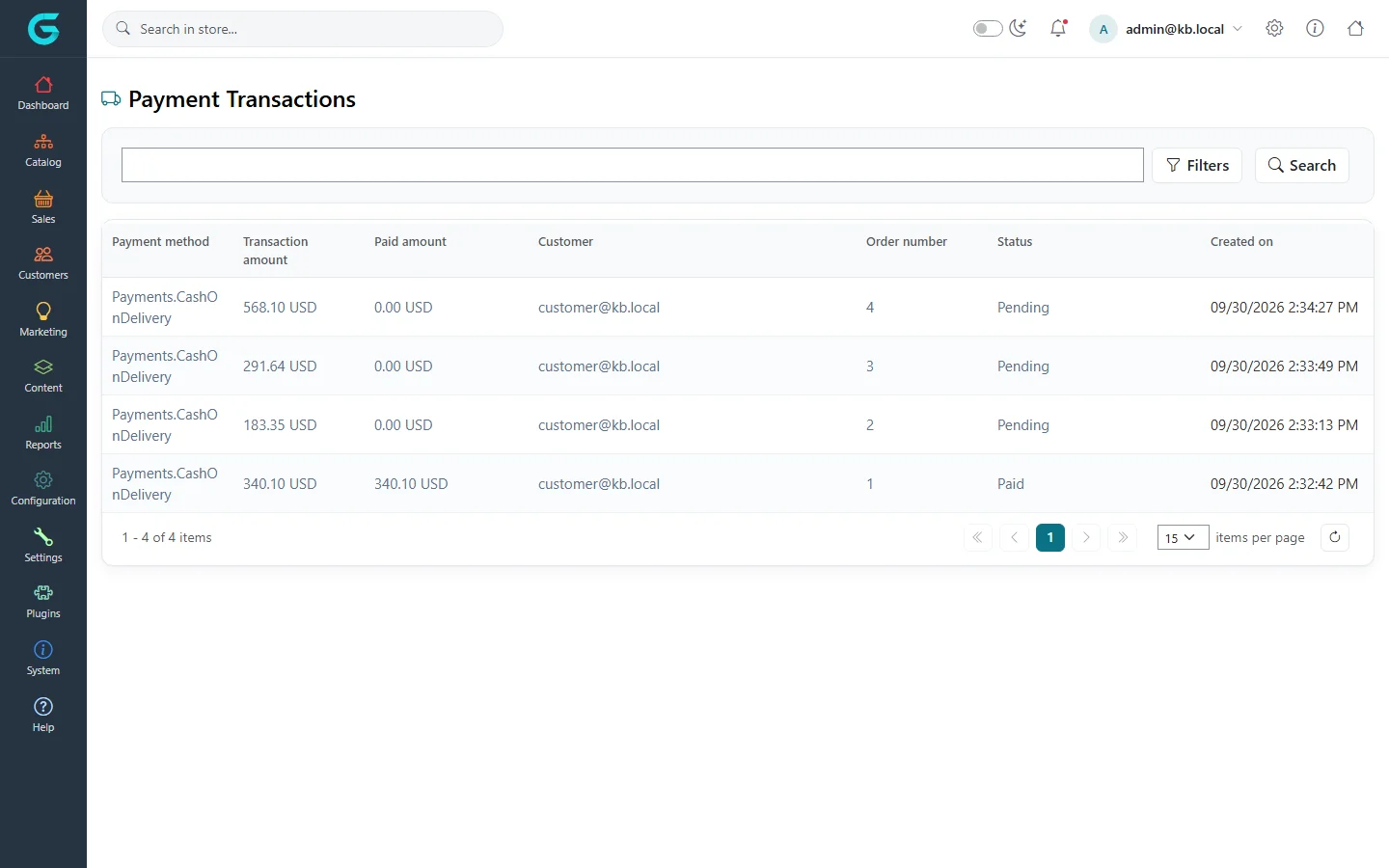
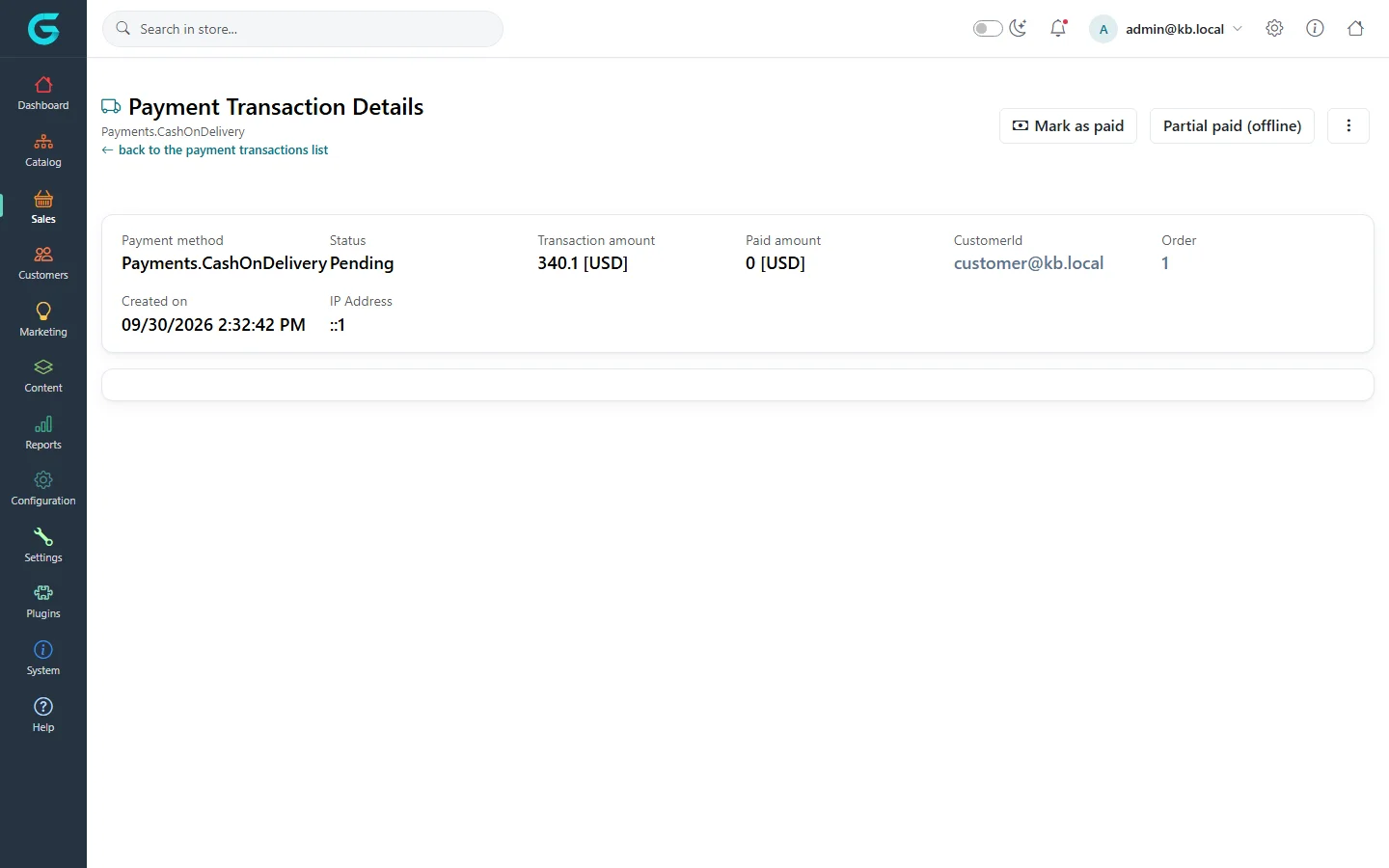
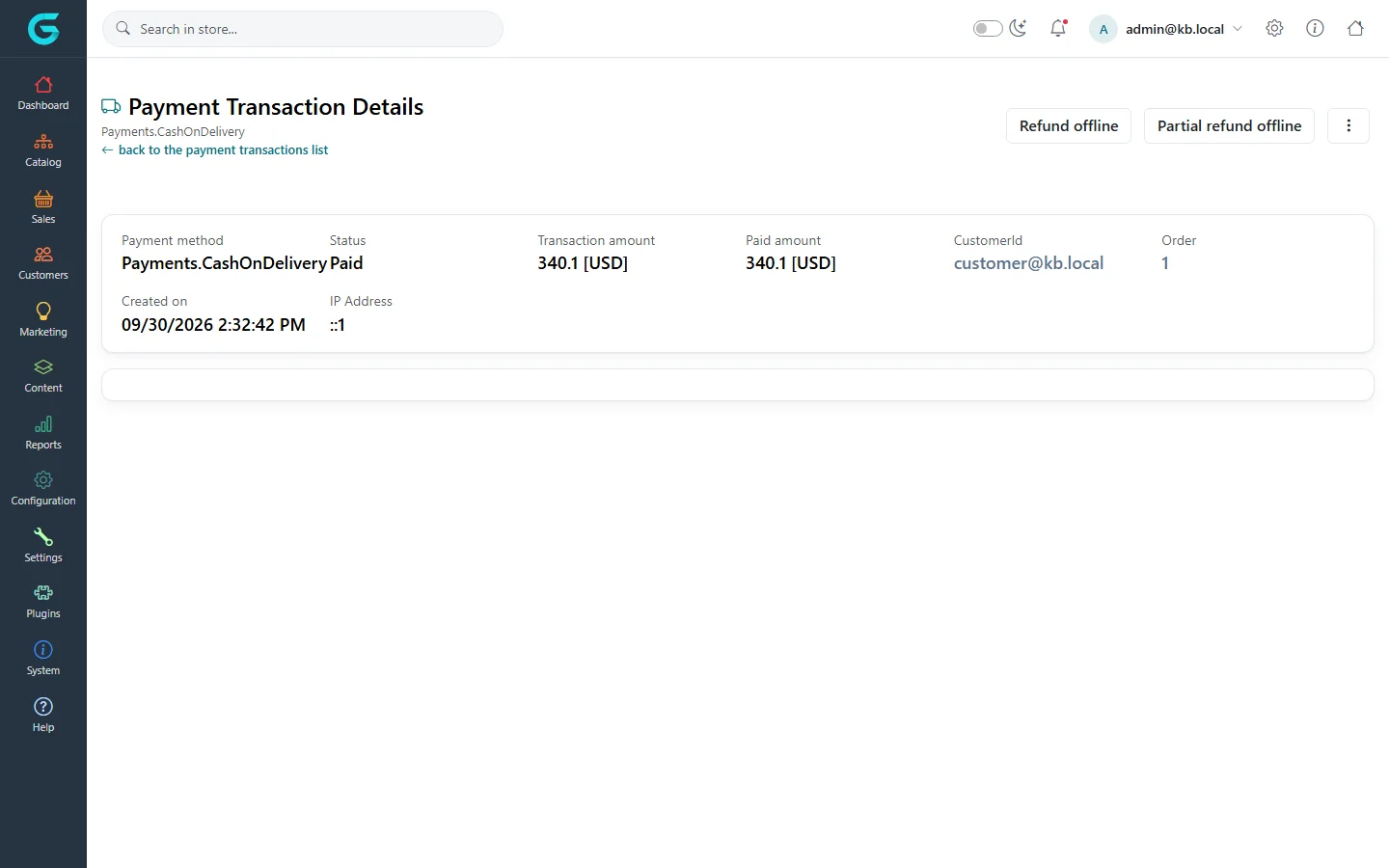
{"ArticleId":null,"Name":"Payments and payment transactions","Content":"\n\u003Cp\u003EEvery order has a \u003Cstrong\u003Epayment transaction\u003C/strong\u003E: a record of what the customer owes, what has been paid and refunded, and through which payment method. The order\u0027s payment status follows the transaction. This article explains the transaction list, the transaction statuses and the actions you use to settle payments by hand.\u003C/p\u003E\n\n\u003Ch2 id=\u0022list\u0022\u003EThe payment transaction list\u003C/h2\u003E\n\u003Cp\u003EOpen \u003Cstrong\u003ESales \u2192 Payment transaction\u003C/strong\u003E. Each row shows the payment method, the transaction amount, the paid amount, the customer, the order number, the status and the date.\u003C/p\u003E\n\u003Cfigure\u003E\u003Cimg src=\u0022/Plugins/Theme.GrandNodeCom/Content/kb/sales/payment-transactions.webp\u0022 alt=\u0022The Payment Transactions list with four Cash on delivery transactions, three pending and one paid\u0022 width=\u00221440\u0022 height=\u0022900\u0022 loading=\u0022lazy\u0022\u003E\u003Cfigcaption\u003ESales \u2192 Payment transaction. Filters narrow it by status, method or date.\u003C/figcaption\u003E\u003C/figure\u003E\n\n\u003Ch2 id=\u0022statuses\u0022\u003ETransaction statuses\u003C/h2\u003E\n\u003Ctable\u003E\n\u003Cthead\u003E\u003Ctr\u003E\u003Cth\u003EStatus\u003C/th\u003E\u003Cth\u003EMeaning\u003C/th\u003E\u003C/tr\u003E\u003C/thead\u003E\n\u003Ctbody\u003E\n\u003Ctr\u003E\u003Ctd\u003EPending\u003C/td\u003E\u003Ctd\u003ENothing has been paid yet. Offline methods such as Cash on delivery stay here until you mark them paid.\u003C/td\u003E\u003C/tr\u003E\n\u003Ctr\u003E\u003Ctd\u003EAuthorized\u003C/td\u003E\u003Ctd\u003EThe payment provider reserved the money but has not taken it. Capture it before the authorization expires.\u003C/td\u003E\u003C/tr\u003E\n\u003Ctr\u003E\u003Ctd\u003EPartial paid\u003C/td\u003E\u003Ctd\u003EPart of the amount has been paid.\u003C/td\u003E\u003C/tr\u003E\n\u003Ctr\u003E\u003Ctd\u003EPaid\u003C/td\u003E\u003Ctd\u003EThe full amount has been paid.\u003C/td\u003E\u003C/tr\u003E\n\u003Ctr\u003E\u003Ctd\u003EPartially refunded, Refunded\u003C/td\u003E\u003Ctd\u003EPart or all of the payment was returned.\u003C/td\u003E\u003C/tr\u003E\n\u003Ctr\u003E\u003Ctd\u003EVoided\u003C/td\u003E\u003Ctd\u003EAn authorization was cancelled before capture; no money moved.\u003C/td\u003E\u003C/tr\u003E\n\u003Ctr\u003E\u003Ctd\u003ECanceled\u003C/td\u003E\u003Ctd\u003EThe transaction was cancelled.\u003C/td\u003E\u003C/tr\u003E\n\u003C/tbody\u003E\n\u003C/table\u003E\n\n\u003Ch2 id=\u0022actions\u0022\u003ESettle a payment\u003C/h2\u003E\n\u003Cp\u003EOpen a transaction to see its details and the actions its payment method and status allow.\u003C/p\u003E\n\u003Cfigure\u003E\u003Cimg src=\u0022/Plugins/Theme.GrandNodeCom/Content/kb/sales/payment-transaction-pending.webp\u0022 alt=\u0022Payment Transaction Details of a pending Cash on delivery transaction of 340.10 USD with Mark as paid and Partial paid (offline) buttons\u0022 width=\u00221440\u0022 height=\u0022900\u0022 loading=\u0022lazy\u0022\u003E\u003Cfigcaption\u003EA pending offline payment: mark it paid, or record a partial payment.\u003C/figcaption\u003E\u003C/figure\u003E\n\u003Cul\u003E\n\u003Cli\u003E\u003Cstrong\u003ECapture\u003C/strong\u003E takes an authorized payment through the payment provider.\u003C/li\u003E\n\u003Cli\u003E\u003Cstrong\u003EMark as paid\u003C/strong\u003E records that the full amount arrived outside GrandNode (cash, bank transfer). The order\u0027s payment status becomes Paid.\u003C/li\u003E\n\u003Cli\u003E\u003Cstrong\u003EPartial paid (offline)\u003C/strong\u003E records a part payment; the paid amount grows and the status becomes Partial paid.\u003C/li\u003E\n\u003Cli\u003E\u003Cstrong\u003ERefund\u003C/strong\u003E returns money through the provider, if it supports refunds; \u003Cstrong\u003ERefund (offline)\u003C/strong\u003E only records a refund made outside GrandNode. Partial variants refund a given amount.\u003C/li\u003E\n\u003Cli\u003E\u003Cstrong\u003EVoid\u003C/strong\u003E and \u003Cstrong\u003EVoid (offline)\u003C/strong\u003E cancel an authorization.\u003C/li\u003E\n\u003C/ul\u003E\n\u003Cp\u003EEvery action asks for confirmation and adds a note to the order.\u003C/p\u003E\n\u003Cfigure\u003E\u003Cimg src=\u0022/Plugins/Theme.GrandNodeCom/Content/kb/sales/payment-transaction-paid.webp\u0022 alt=\u0022The same transaction after Mark as paid: status Paid, paid amount 340.1 USD, with Refund offline and Partial refund offline buttons\u0022 width=\u00221440\u0022 height=\u0022900\u0022 loading=\u0022lazy\u0022\u003E\u003Cfigcaption\u003EAfter Mark as paid: the refund actions become available.\u003C/figcaption\u003E\u003C/figure\u003E\n\n\u003Ch2 id=\u0022order-completion\u0022\u003EHow payment completes an order\u003C/h2\u003E\n\u003Cp\u003EWhen an order is paid and needs no shipping, or is paid and delivered, GrandNode moves it to \u003Cstrong\u003EComplete\u003C/strong\u003E. An order that is delivered but not yet paid stays in \u003Cstrong\u003EProcessing\u003C/strong\u003E. See \u003Ca href=\u0022/sales-order-statuses\u0022\u003EOrder, payment and shipping statuses\u003C/a\u003E.\u003C/p\u003E\n\n\u003Ch2 id=\u0022tips\u0022\u003ETips and common mistakes\u003C/h2\u003E\n\u003Cul\u003E\n\u003Cli\u003EMark as paid does not contact the payment provider. Use it only for money you have actually received.\u003C/li\u003E\n\u003Cli\u003EAn offline refund does not send money back; it only records that you did.\u003C/li\u003E\n\u003Cli\u003EPayment methods and their settings are under \u003Cstrong\u003EConfiguration \u2192 Payment\u003C/strong\u003E (see \u003Ca href=\u0022/docs-configuration\u0022\u003EConfiguration\u003C/a\u003E).\u003C/li\u003E\n\u003C/ul\u003E\n\n\u003Ch2 id=\u0022related\u0022\u003ERelated\u003C/h2\u003E\n\u003Cul\u003E\n\u003Cli\u003E\u003Ca href=\u0022/sales-order-details\u0022\u003EOrder details\u003C/a\u003E\u003C/li\u003E\n\u003Cli\u003E\u003Ca href=\u0022/sales-editing-orders\u0022\u003EEditing an order\u003C/a\u003E\u003C/li\u003E\n\u003C/ul\u003E\n","ParentCategoryId":"6abdec6c83d2816248229ec5","SeName":"sales-payments","MetaKeywords":null,"MetaDescription":"How GrandNode records payments: payment transactions and their statuses, capturing, marking as paid, partial payments, refunds and voids.","MetaTitle":null,"AllowComments":false,"Captcha":{"ReCaptchaChallengeField":null,"ReCaptchaResponseField":null,"ReCaptchaResponseValue":null,"ReCaptchaResponse":null},"RelatedArticles":[],"CategoryBreadcrumb":[{"Name":"Sales and orders","Description":null,"IsCurrent":false,"Children":null,"Parent":null,"SeName":"docs-sales","Id":"6abdec6c83d2816248229ec5","UserFields":[]}],"AddNewComment":{"CommentText":null,"DisplayCaptcha":false,"Id":null,"UserFields":[]},"Comments":[],"Id":"6abdec6c83d2816248229ed1","UserFields":[]}