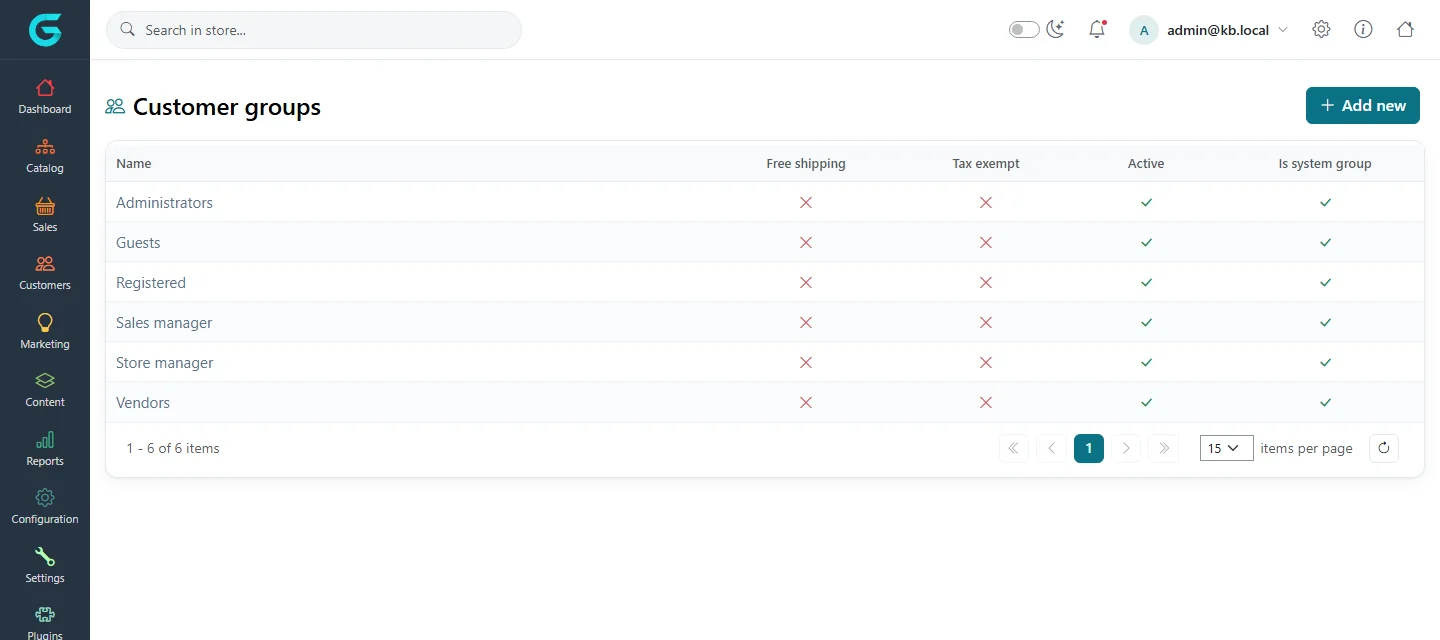
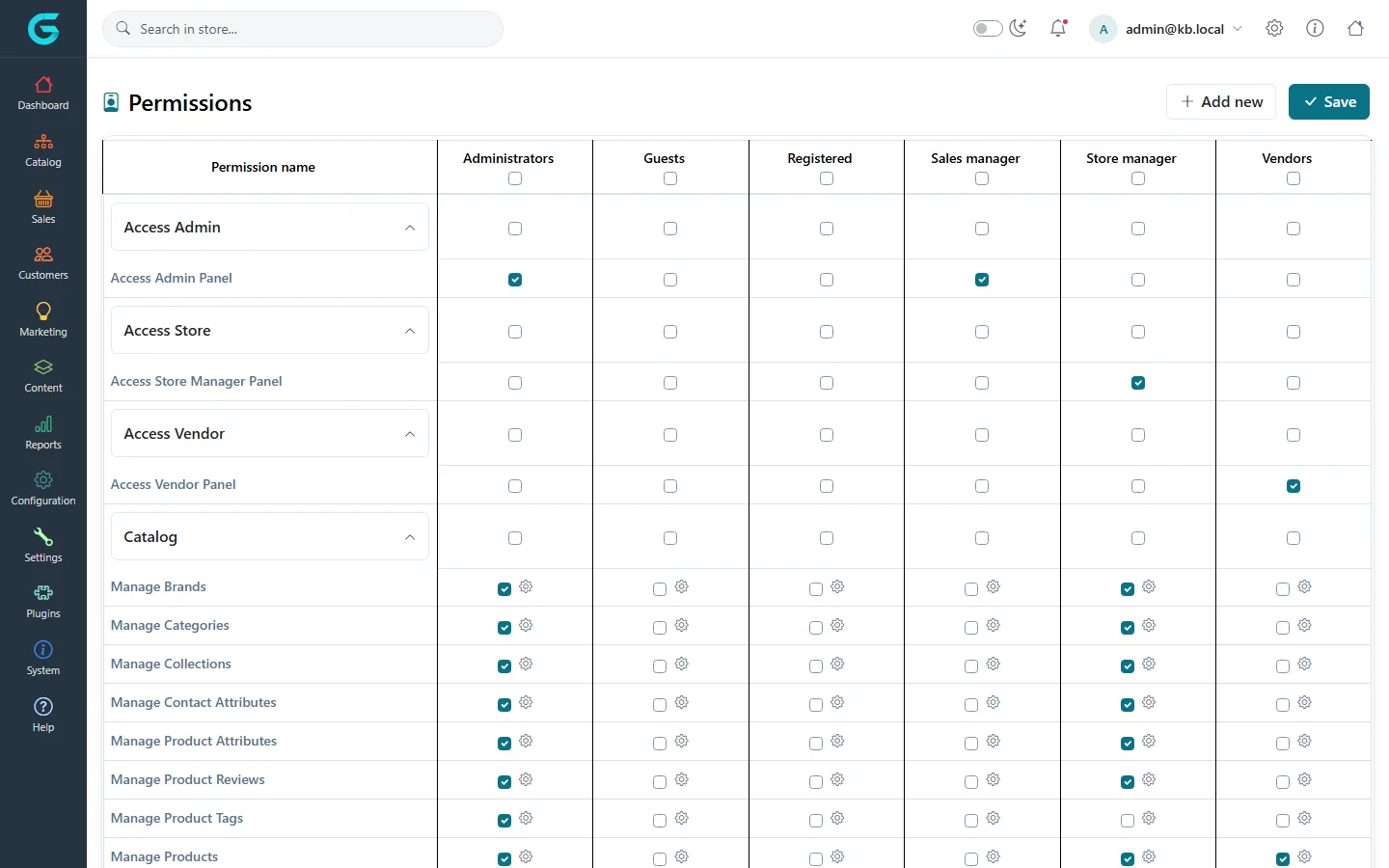
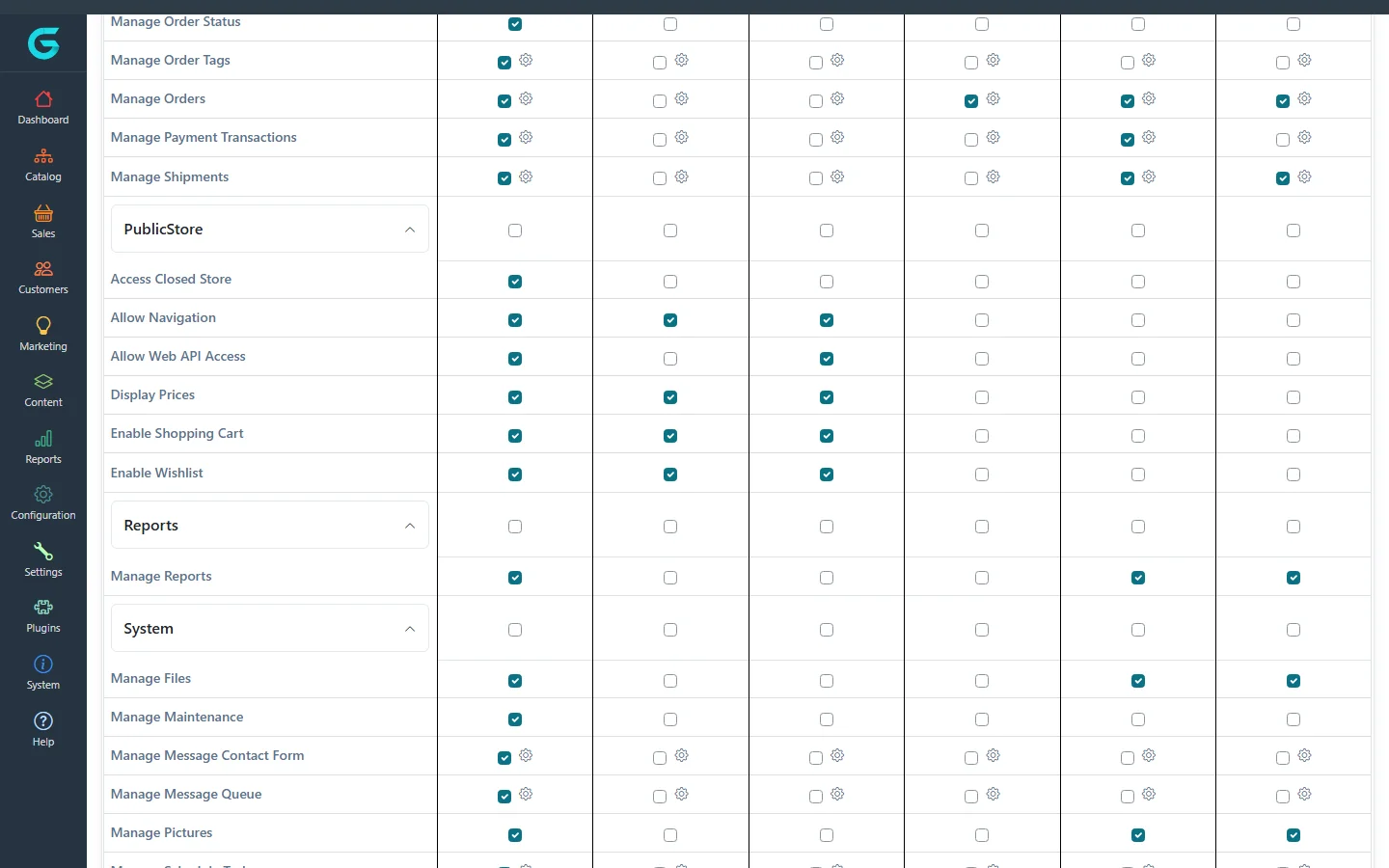
{"ArticleId":null,"Name":"Permissions","Content":"\n\u003Cp\u003EAccess in GrandNode is granted to \u003Cstrong\u003Ecustomer groups\u003C/strong\u003E, not to individual people. A staff member gets rights by being in a group - Administrators, Store manager, Vendors, or a group you create such as \u0022Order processing\u0022 - and the \u003Cstrong\u003Epermissions\u003C/strong\u003E say what each group may do.\u003C/p\u003E\n\n\u003Ch2 id=\u0022groups\u0022\u003EGroups\u003C/h2\u003E\n\u003Cp\u003EGroups are managed under \u003Cstrong\u003ECustomers \u2192 Customer groups\u003C/strong\u003E (see \u003Ca href=\u0022/customers-customer-groups\u0022\u003ECustomer groups\u003C/a\u003E).\u003C/p\u003E\n\u003Cfigure\u003E\u003Cimg src=\u0022/Plugins/Theme.GrandNodeCom/Content/kb/system/customer-groups-list.webp\u0022 alt=\u0022Customer groups: Administrators, Guests, Registered, Sales manager, Store manager and Vendors with free shipping, tax exempt, active and system group columns\u0022 width=\u00221440\u0022 height=\u0022640\u0022 loading=\u0022lazy\u0022\u003E\u003Cfigcaption\u003EThe system customer groups.\u003C/figcaption\u003E\u003C/figure\u003E\n\n\u003Ch2 id=\u0022matrix\u0022\u003EThe permission matrix\u003C/h2\u003E\n\u003Cp\u003E\u003Cstrong\u003EConfiguration \u2192 Permissions\u003C/strong\u003E shows every permission as a row and every customer group as a column. Tick a box to grant the permission to the group, then click \u003Cstrong\u003ESave\u003C/strong\u003E.\u003C/p\u003E\n\u003Cfigure\u003E\u003Cimg src=\u0022/Plugins/Theme.GrandNodeCom/Content/kb/system/permissions-list.webp\u0022 alt=\u0022The Permissions matrix with sections Access Admin, Access Store, Access Vendor and Catalog, and columns for Administrators, Guests, Registered, Sales manager, Store manager and Vendors\u0022 width=\u00221440\u0022 height=\u0022900\u0022 loading=\u0022lazy\u0022\u003E\u003Cfigcaption\u003EConfiguration \u2192 Permissions.\u003C/figcaption\u003E\u003C/figure\u003E\n\u003Cp\u003EPermissions are grouped by area:\u003C/p\u003E\n\u003Cul\u003E\n\u003Cli\u003E\u003Cstrong\u003EAccess Admin / Store / Vendor\u003C/strong\u003E - who may open the admin panel, the \u003Ca href=\u0022/docs-store-panel\u0022\u003Estore owner panel\u003C/a\u003E or the \u003Ca href=\u0022/docs-vendor-panel\u0022\u003Evendor panel\u003C/a\u003E at all.\u003C/li\u003E\n\u003Cli\u003E\u003Cstrong\u003ECatalog, Sales, Customers, Promotions, Content, Configuration, System\u003C/strong\u003E - what may be managed in the panel.\u003C/li\u003E\n\u003Cli\u003E\u003Cstrong\u003EPublicStore\u003C/strong\u003E - what visitors may do on the storefront: display prices, use the cart and wishlist, browse a closed store, use the web API.\u003C/li\u003E\n\u003C/ul\u003E\n\u003Cfigure\u003E\u003Cimg src=\u0022/Plugins/Theme.GrandNodeCom/Content/kb/system/permissions-system-category.webp\u0022 alt=\u0022Part of the permission matrix: sales permissions, PublicStore permissions such as Display Prices and Enable Shopping Cart, Reports and System permissions\u0022 width=\u00221440\u0022 height=\u0022900\u0022 loading=\u0022lazy\u0022\u003E\u003Cfigcaption\u003EStorefront and system permissions further down the matrix.\u003C/figcaption\u003E\u003C/figure\u003E\n\n\u003Ch2 id=\u0022actions\u0022\u003EPermission actions\u003C/h2\u003E\n\u003Cp\u003EMany permissions have finer \u003Cstrong\u003Eactions\u003C/strong\u003E - the small circle next to a checkbox. Open it to allow only some operations, for example let a group \u003Cem\u003Eview\u003C/em\u003E and \u003Cem\u003Eedit\u003C/em\u003E products but not \u003Cem\u003Edelete\u003C/em\u003E or \u003Cem\u003Eimport\u003C/em\u003E them.\u003C/p\u003E\n\n\u003Ch2 id=\u0022examples\u0022\u003EExamples\u003C/h2\u003E\n\u003Cul\u003E\n\u003Cli\u003EHide prices from guests (B2B): untick \u003Cstrong\u003EDisplay Prices\u003C/strong\u003E and \u003Cstrong\u003EEnable Shopping Cart\u003C/strong\u003E for Guests.\u003C/li\u003E\n\u003Cli\u003EAn order-processing role: create a group with \u003Cstrong\u003EAccess Admin Panel\u003C/strong\u003E, \u003Cstrong\u003EManage Orders\u003C/strong\u003E and \u003Cstrong\u003EManage Shipments\u003C/strong\u003E only, and add the staff account to it together with Registered.\u003C/li\u003E\n\u003C/ul\u003E\n\n\u003Ch2 id=\u0022tips\u0022\u003ETips and common mistakes\u003C/h2\u003E\n\u003Cul\u003E\n\u003Cli\u003ENever remove \u003Cstrong\u003EAccess Admin Panel\u003C/strong\u003E from Administrators.\u003C/li\u003E\n\u003Cli\u003EA user in several groups gets the sum of their permissions.\u003C/li\u003E\n\u003Cli\u003EMenu items the user cannot access are hidden; if someone cannot find a screen, check their groups first.\u003C/li\u003E\n\u003C/ul\u003E\n\n\u003Ch2 id=\u0022related\u0022\u003ERelated\u003C/h2\u003E\n\u003Cul\u003E\n\u003Cli\u003E\u003Ca href=\u0022/customers-customer-groups\u0022\u003ECustomer groups\u003C/a\u003E\u003C/li\u003E\n\u003Cli\u003E\u003Ca href=\u0022/docs-store-panel\u0022\u003EStore owner panel\u003C/a\u003E\u003C/li\u003E\n\u003C/ul\u003E\n","ParentCategoryId":"6abdec6d83d2816248229f33","SeName":"system-permissions","MetaKeywords":null,"MetaDescription":"Control what each customer group may do in GrandNode: the permission matrix, permission actions, and panel access for admins, store managers and vendors.","MetaTitle":null,"AllowComments":false,"Captcha":{"ReCaptchaChallengeField":null,"ReCaptchaResponseField":null,"ReCaptchaResponseValue":null,"ReCaptchaResponse":null},"RelatedArticles":[],"CategoryBreadcrumb":[{"Name":"System and maintenance","Description":null,"IsCurrent":false,"Children":null,"Parent":null,"SeName":"docs-system","Id":"6abdec6d83d2816248229f33","UserFields":[]}],"AddNewComment":{"CommentText":null,"DisplayCaptcha":false,"Id":null,"UserFields":[]},"Comments":[],"Id":"6abdec6d83d2816248229f3b","UserFields":[]}