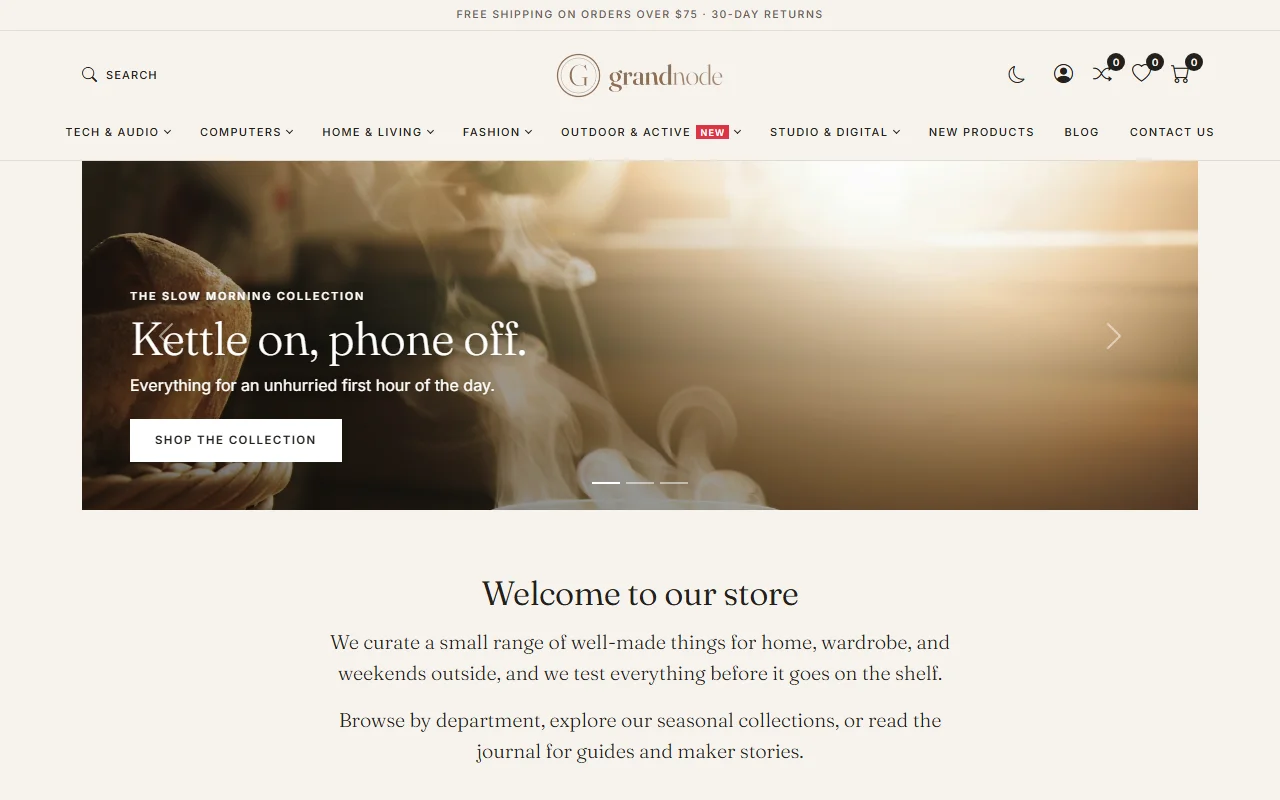
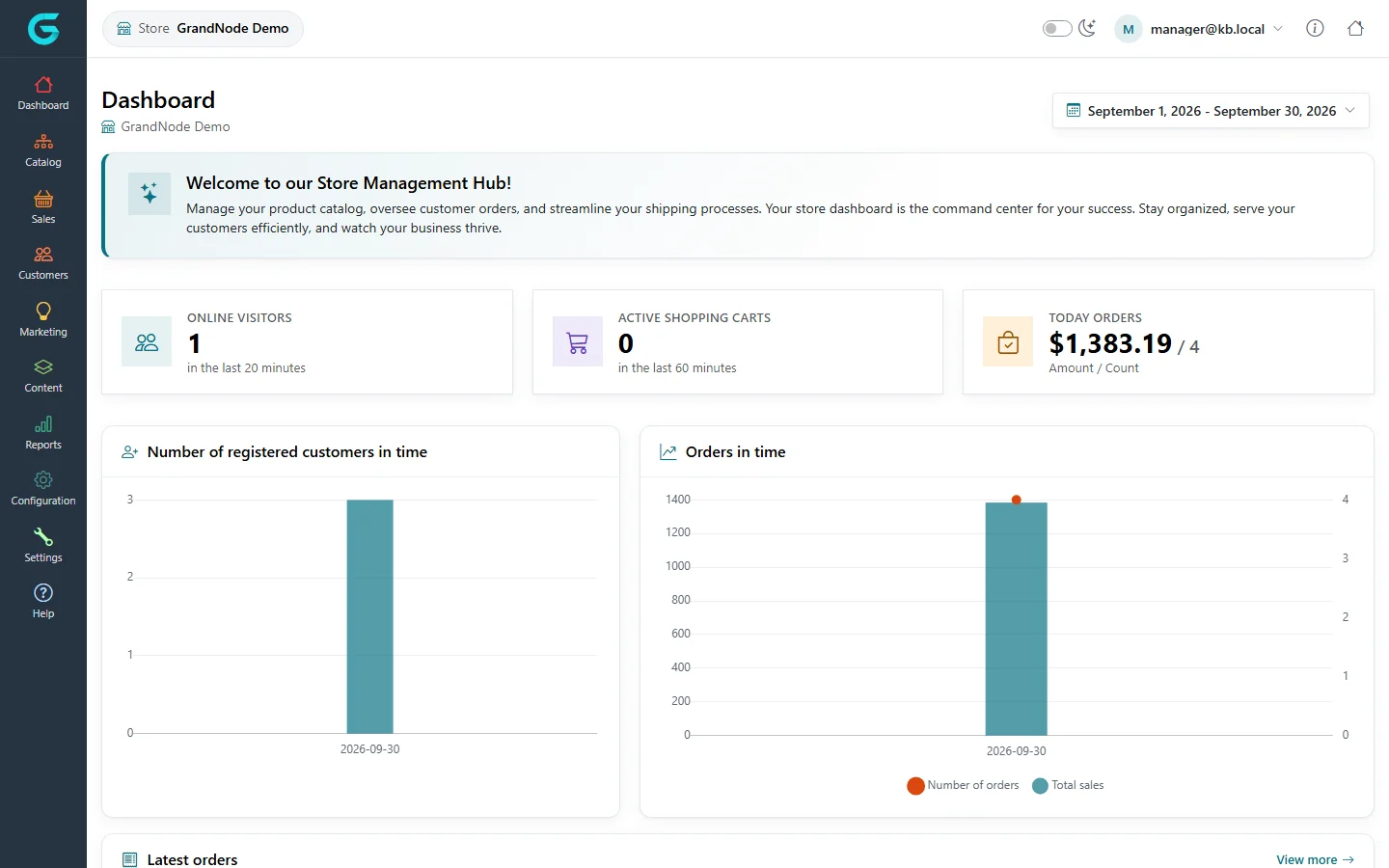
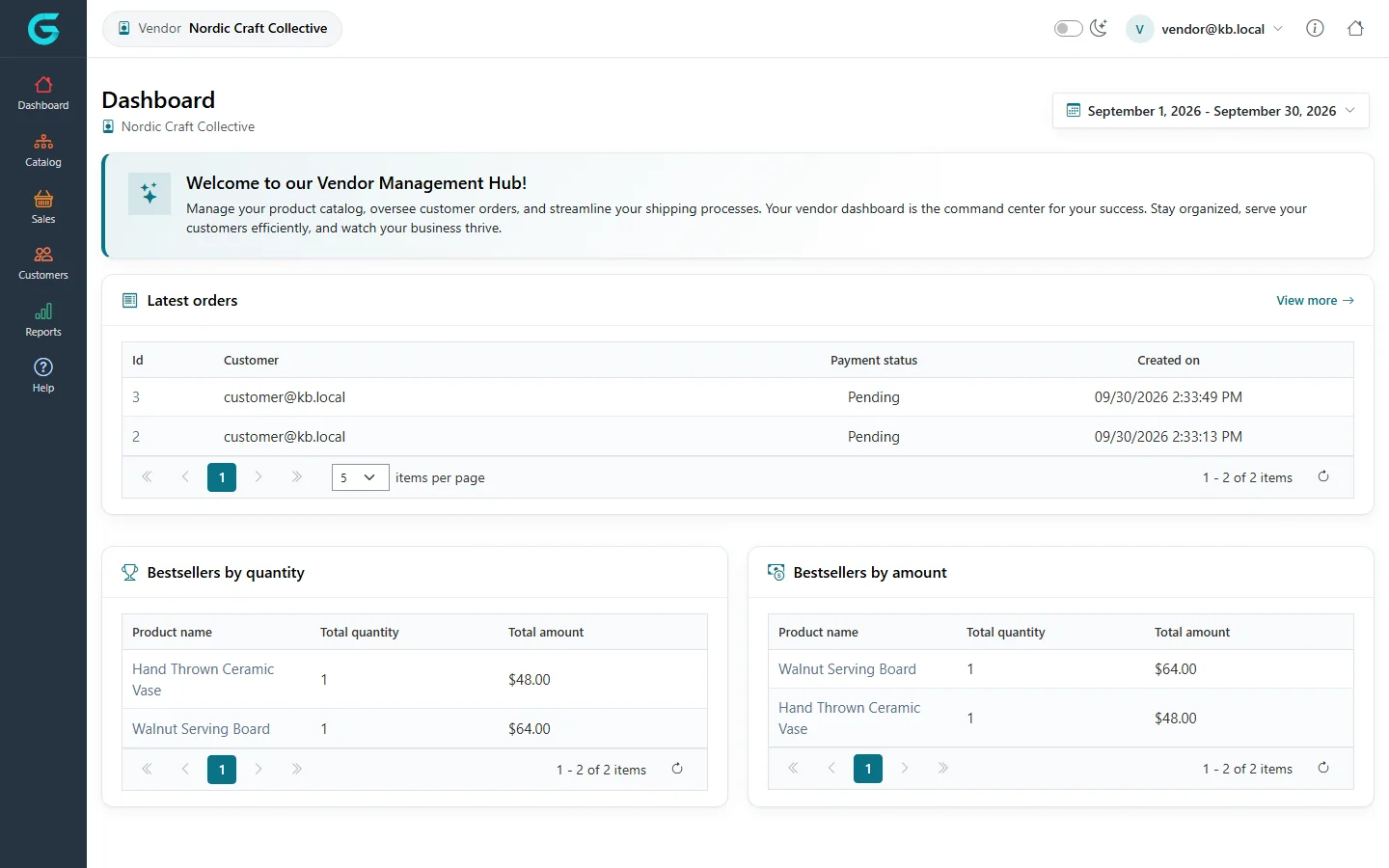
{"ArticleId":null,"Name":"What is GrandNode","Content":"\u003Cp\u003EGrandNode is an open-source e-commerce platform built on ASP.NET Core (.NET 10) and MongoDB. One installation runs a complete online store: the shop your customers see, the back office you run it from, and the extension points you use to connect payment providers, shipping carriers, tax engines and your own code. It supports B2C and B2B selling, several stores from one installation, marketplaces with independent vendors, and any number of languages and currencies. This article explains the parts you will meet, so the rest of the documentation makes sense.\u003C/p\u003E\n\n\u003Ch2 id=\u0022the-storefront\u0022\u003EThe storefront\u003C/h2\u003E\n\u003Cp\u003EThe storefront is the public website: home page, category and brand pages, product pages, search, cart, checkout, customer account, blog, news, knowledgebase and content pages. It is server-rendered by ASP.NET Core with Vue 3 and Bootstrap 5 for the interactive parts, so pages are fast and indexable. What it looks like is decided by the active \u003Cstrong\u003Etheme\u003C/strong\u003E. A fresh installation with sample data uses the Nordic theme; the other themes shipped in the repository are Default and Modern.\u003C/p\u003E\n\u003Cfigure\u003E\u003Cimg src=\u0022/Plugins/Theme.GrandNodeCom/Content/kb/getting-started/storefront-home.webp\u0022 alt=\u0022GrandNode storefront home page with the Nordic theme: top menu of categories, a hero slider and a welcome text\u0022 width=\u00221280\u0022 height=\u0022800\u0022 loading=\u0022lazy\u0022\u003E\u003Cfigcaption\u003EThe storefront of a fresh installation with sample data (Nordic theme).\u003C/figcaption\u003E\u003C/figure\u003E\n\n\u003Ch2 id=\u0022the-admin-panel\u0022\u003EThe Admin panel\u003C/h2\u003E\n\u003Cp\u003EThe Admin panel at \u003Ccode\u003E/admin\u003C/code\u003E is where administrators run the whole installation: catalog, orders, customers, marketing, content, reports, configuration of every store, settings, plugins and system tools. Only customers in the \u003Cstrong\u003EAdministrators\u003C/strong\u003E customer group (or a group you grant the admin permissions to) can sign in. The administrator account is created by the installation wizard. See \u003Ca href=\u0022/getting-started-admin-tour\u0022\u003EA tour of the Admin panel\u003C/a\u003E.\u003C/p\u003E\n\n\u003Ch2 id=\u0022the-store-owner-panel\u0022\u003EThe Store owner panel\u003C/h2\u003E\n\u003Cp\u003EThe Store owner panel at \u003Ccode\u003E/store\u003C/code\u003E is a reduced back office for a person who manages \u003Cem\u003Eone\u003C/em\u003E store in a multi-store installation. A store manager is a customer in the \u003Cstrong\u003EStore manager\u003C/strong\u003E customer group whose account is assigned to a store. They see the same kind of screens as an administrator \u2014 products, categories, orders, customers, discounts, landing pages, reports, payment, shipping and tax configuration, store-level settings \u2014 but only the data of their store, and nothing that affects the installation as a whole (plugins, permissions, system tools).\u003C/p\u003E\n\u003Cfigure\u003E\u003Cimg src=\u0022/Plugins/Theme.GrandNodeCom/Content/kb/getting-started/store-panel.webp\u0022 alt=\u0022Store owner panel dashboard for the store GrandNode Demo, with visitors, carts, today\u0027s orders and charts\u0022 width=\u00221440\u0022 height=\u0022900\u0022 loading=\u0022lazy\u0022\u003E\u003Cfigcaption\u003EThe Store owner panel shows the store it belongs to in the top bar and in the page header.\u003C/figcaption\u003E\u003C/figure\u003E\n\n\u003Ch2 id=\u0022the-vendor-panel\u0022\u003EThe Vendor panel\u003C/h2\u003E\n\u003Cp\u003EIn a marketplace, products can belong to \u003Cstrong\u003Evendors\u003C/strong\u003E \u2014 independent sellers who list their goods in your store. The Vendor panel at \u003Ccode\u003E/vendor\u003C/code\u003E lets a vendor manage their own products, see and ship the orders that contain them, handle merchandise returns, read their vendor reviews and run reports. A vendor account is a customer in the \u003Cstrong\u003EVendors\u003C/strong\u003E customer group linked to a vendor record under \u003Cstrong\u003ECustomers \u2192 Vendors\u003C/strong\u003E.\u003C/p\u003E\n\u003Cfigure\u003E\u003Cimg src=\u0022/Plugins/Theme.GrandNodeCom/Content/kb/getting-started/vendor-panel.webp\u0022 alt=\u0022Vendor panel dashboard for the vendor Nordic Craft Collective with latest orders and bestsellers\u0022 width=\u00221440\u0022 height=\u0022900\u0022 loading=\u0022lazy\u0022\u003E\u003Cfigcaption\u003EThe Vendor panel is limited to Catalog, Sales, Customers (vendor reviews) and Reports.\u003C/figcaption\u003E\u003C/figure\u003E\n\n\u003Ch2 id=\u0022plugins\u0022\u003EPlugins\u003C/h2\u003E\n\u003Cp\u003EPlugins add providers to the platform without changing its code. The repository ships with plugins for:\u003C/p\u003E\n\u003Cul\u003E\n\u003Cli\u003E\u003Cstrong\u003EPayments\u003C/strong\u003E \u2014 Cash on delivery, Stripe Checkout, BrainTree;\u003C/li\u003E\n\u003Cli\u003E\u003Cstrong\u003EShipping\u003C/strong\u003E \u2014 fixed rate, by weight, and shipping points (pickup);\u003C/li\u003E\n\u003Cli\u003E\u003Cstrong\u003ETax\u003C/strong\u003E \u2014 fixed rate and country/state/zip based;\u003C/li\u003E\n\u003Cli\u003E\u003Cstrong\u003EDiscount rules\u003C/strong\u003E \u2014 the standard set of conditions for discounts;\u003C/li\u003E\n\u003Cli\u003E\u003Cstrong\u003EExternal authentication\u003C/strong\u003E \u2014 Facebook and Google sign-in;\u003C/li\u003E\n\u003Cli\u003E\u003Cstrong\u003EWidgets\u003C/strong\u003E \u2014 Google Analytics, Facebook Pixel and the home page slider;\u003C/li\u003E\n\u003Cli\u003E\u003Cstrong\u003EExchange rates\u003C/strong\u003E \u2014 a currency rate provider;\u003C/li\u003E\n\u003Cli\u003E\u003Cstrong\u003EThemes\u003C/strong\u003E \u2014 Nordic and Modern (the Default theme is built into the web project).\u003C/li\u003E\n\u003C/ul\u003E\n\u003Cp\u003EThe installation wizard installs every plugin it finds, so they are ready to be configured. You manage them under \u003Cstrong\u003EPlugins \u2192 Local plugins\u003C/strong\u003E.\u003C/p\u003E\n\n\u003Ch2 id=\u0022modules\u0022\u003EModules\u003C/h2\u003E\n\u003Cp\u003EBesides plugins, GrandNode has a few \u003Cem\u003Emodules\u003C/em\u003E \u2014 parts of the application that can be switched on and off in \u003Ccode\u003EApp_Data/appsettings.json\u003C/code\u003E under \u003Ccode\u003EFeatureManagement\u003C/code\u003E: the installer (\u003Ccode\u003EGrand.Module.Installer\u003C/code\u003E), database migrations (\u003Ccode\u003EGrand.Module.Migration\u003C/code\u003E), scheduled tasks (\u003Ccode\u003EGrand.Module.ScheduledTasks\u003C/code\u003E) and the REST API (\u003Ccode\u003EGrand.Module.Api\u003C/code\u003E, off by default).\u003C/p\u003E\n\n\u003Ch2 id=\u0022how-the-pieces-fit\u0022\u003EHow the pieces fit\u003C/h2\u003E\n\u003Ctable\u003E\n\u003Cthead\u003E\u003Ctr\u003E\u003Cth\u003EPart\u003C/th\u003E\u003Cth\u003EAddress\u003C/th\u003E\u003Cth\u003EWho uses it\u003C/th\u003E\u003C/tr\u003E\u003C/thead\u003E\n\u003Ctbody\u003E\n\u003Ctr\u003E\u003Ctd\u003EStorefront\u003C/td\u003E\u003Ctd\u003E\u003Ccode\u003E/\u003C/code\u003E\u003C/td\u003E\u003Ctd\u003EGuests and registered customers\u003C/td\u003E\u003C/tr\u003E\n\u003Ctr\u003E\u003Ctd\u003EAdmin panel\u003C/td\u003E\u003Ctd\u003E\u003Ccode\u003E/admin\u003C/code\u003E\u003C/td\u003E\u003Ctd\u003EAdministrators\u003C/td\u003E\u003C/tr\u003E\n\u003Ctr\u003E\u003Ctd\u003EStore owner panel\u003C/td\u003E\u003Ctd\u003E\u003Ccode\u003E/store\u003C/code\u003E\u003C/td\u003E\u003Ctd\u003EStore managers of one store\u003C/td\u003E\u003C/tr\u003E\n\u003Ctr\u003E\u003Ctd\u003EVendor panel\u003C/td\u003E\u003Ctd\u003E\u003Ccode\u003E/vendor\u003C/code\u003E\u003C/td\u003E\u003Ctd\u003EMarketplace vendors\u003C/td\u003E\u003C/tr\u003E\n\u003Ctr\u003E\u003Ctd\u003EDatabase\u003C/td\u003E\u003Ctd\u003EMongoDB (or LiteDB for small setups)\u003C/td\u003E\u003Ctd\u003EThe application\u003C/td\u003E\u003C/tr\u003E\n\u003C/tbody\u003E\n\u003C/table\u003E\n\u003Cp\u003EEverything lives in one web application and one database, so there is nothing extra to deploy for the panels.\u003C/p\u003E\n\n\u003Ch2 id=\u0022related\u0022\u003ERelated\u003C/h2\u003E\n\u003Cul\u003E\n\u003Cli\u003E\u003Ca href=\u0022/getting-started-system-requirements\u0022\u003ESystem requirements\u003C/a\u003E\u003C/li\u003E\n\u003Cli\u003E\u003Ca href=\u0022/getting-started-installing\u0022\u003EInstalling GrandNode\u003C/a\u003E\u003C/li\u003E\n\u003Cli\u003E\u003Ca href=\u0022/getting-started-admin-tour\u0022\u003EA tour of the Admin panel\u003C/a\u003E\u003C/li\u003E\n\u003C/ul\u003E","ParentCategoryId":"6abdec6c83d2816248229ea1","SeName":"getting-started-what-is-grandnode","MetaKeywords":null,"MetaDescription":"GrandNode is an open-source e-commerce platform on ASP.NET Core and MongoDB. Learn its parts: storefront, Admin, Store owner and Vendor panels, plugins, themes.","MetaTitle":null,"AllowComments":false,"Captcha":{"ReCaptchaChallengeField":null,"ReCaptchaResponseField":null,"ReCaptchaResponseValue":null,"ReCaptchaResponse":null},"RelatedArticles":[],"CategoryBreadcrumb":[{"Name":"Getting started","Description":null,"IsCurrent":false,"Children":null,"Parent":null,"SeName":"docs-getting-started","Id":"6abdec6c83d2816248229ea1","UserFields":[]}],"AddNewComment":{"CommentText":null,"DisplayCaptcha":false,"Id":null,"UserFields":[]},"Comments":[],"Id":"6abdec6c83d2816248229ea3","UserFields":[]}