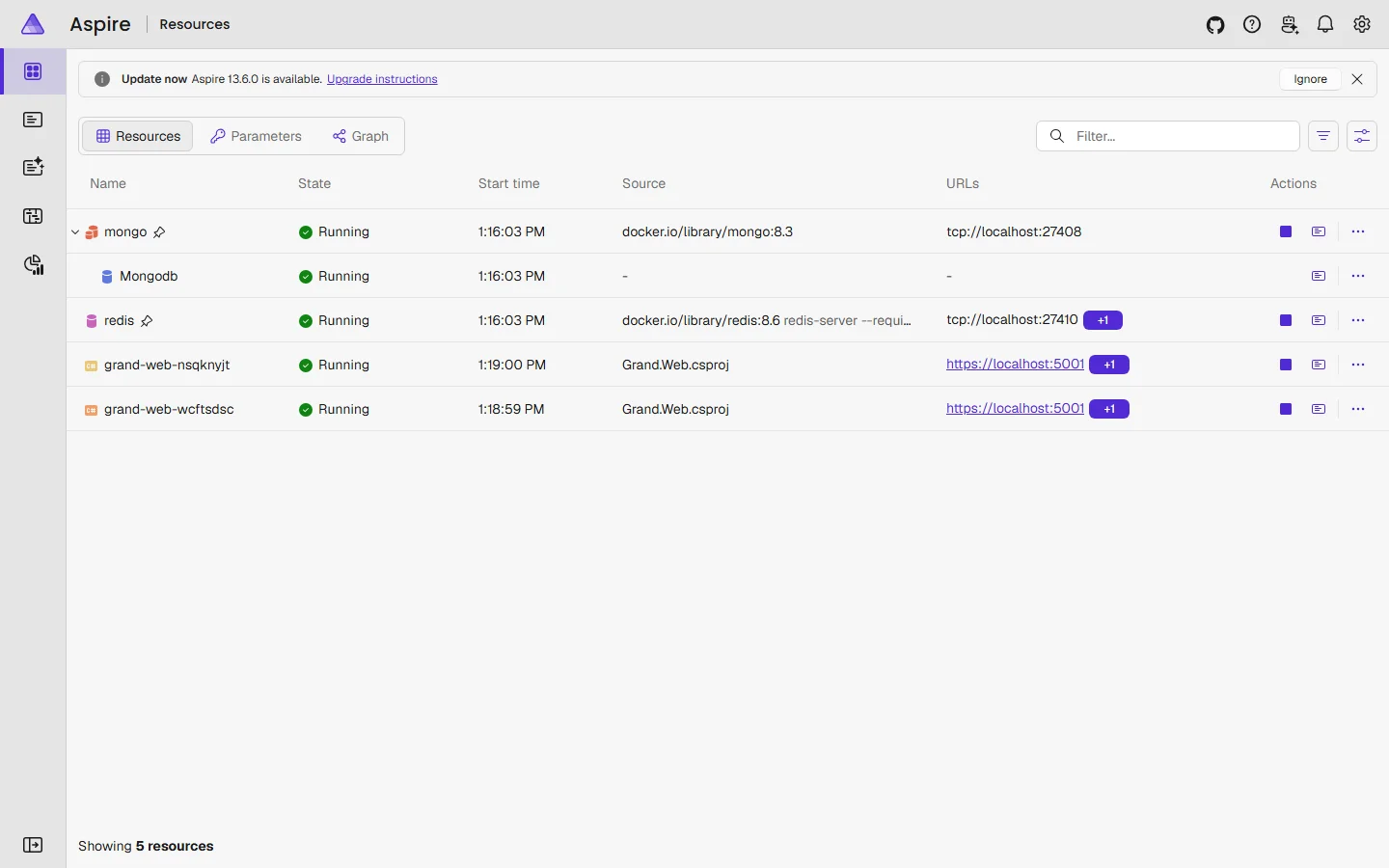
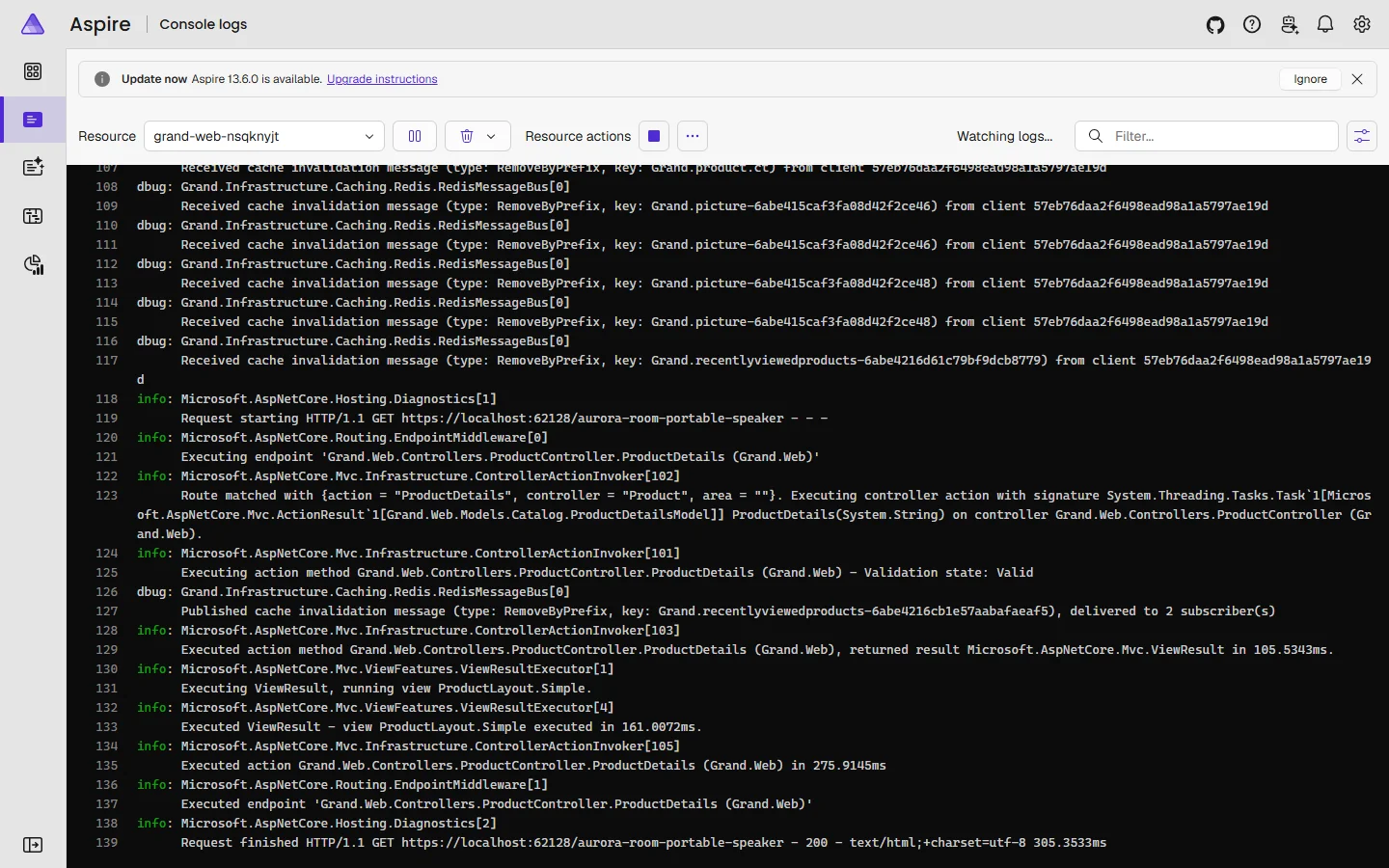
{"ArticleId":null,"Name":"Local multi-instance testing with .NET Aspire","Content":"\n\u003Cp\u003EThe repository contains a \u003Cstrong\u003E.NET Aspire\u003C/strong\u003E host (\u003Ccode\u003Esrc/Aspire/Aspire.AppHost\u003C/code\u003E) that starts a production-like setup on your machine with one command: MongoDB and Redis in containers and \u003Cstrong\u003Etwo replicas\u003C/strong\u003E of the store sharing them. It is the easiest way to see how GrandNode behaves with several instances - the situation of a Kubernetes cluster - before you deploy, and to test cache invalidation through Redis for real.\u003C/p\u003E\n\n\u003Ch2 id=\u0022what-it-starts\u0022\u003EWhat it starts\u003C/h2\u003E\n\u003Ctable\u003E\n\u003Cthead\u003E\u003Ctr\u003E\u003Cth\u003EResource\u003C/th\u003E\u003Cth\u003EWhat it is\u003C/th\u003E\u003C/tr\u003E\u003C/thead\u003E\n\u003Ctbody\u003E\n\u003Ctr\u003E\u003Ctd\u003E\u003Ccode\u003Emongo\u003C/code\u003E / \u003Ccode\u003EMongodb\u003C/code\u003E\u003C/td\u003E\u003Ctd\u003EA MongoDB container and the \u003Ccode\u003EMongodb\u003C/code\u003E database. The connection string is passed to the store as \u003Ccode\u003EConnectionStrings__Mongodb\u003C/code\u003E - the same environment variable you use in production.\u003C/td\u003E\u003C/tr\u003E\n\u003Ctr\u003E\u003Ctd\u003E\u003Ccode\u003Eredis\u003C/code\u003E\u003C/td\u003E\u003Ctd\u003EA Redis container for the cache invalidation bus.\u003C/td\u003E\u003C/tr\u003E\n\u003Ctr\u003E\u003Ctd\u003E\u003Ccode\u003Egrand-web\u003C/code\u003E \u00D7 2\u003C/td\u003E\u003Ctd\u003ETwo processes of \u003Ccode\u003EGrand.Web\u003C/code\u003E, each on its own port, behind one shared address. Configured with \u003Ccode\u003ERedis__RedisPubSubEnabled=true\u003C/code\u003E, the channel \u003Ccode\u003Egrandnode-cache\u003C/code\u003E, \u003Ccode\u003EExtensions__PluginShadowCopy=false\u003C/code\u003E (both processes use the same folder), and Debug logging for \u003Ccode\u003EGrand.Infrastructure.Caching.Redis\u003C/code\u003E.\u003C/td\u003E\u003C/tr\u003E\n\u003C/tbody\u003E\n\u003C/table\u003E\n\u003Cp\u003EThe containers have a persistent lifetime: they keep running, with their data, after you stop the host, so the next start is fast and the store stays installed. The project definitions are in \u003Ccode\u003EProgram.cs\u003C/code\u003E and \u003Ccode\u003EProjectConfiguration.cs\u003C/code\u003E of the AppHost - change the replica count there.\u003C/p\u003E\n\n\u003Ch2 id=\u0022prerequisites\u0022\u003EPrerequisites\u003C/h2\u003E\n\u003Cul\u003E\n\u003Cli\u003EThe .NET 10 SDK and a trusted development certificate (\u003Ccode\u003Edotnet dev-certs https --trust\u003C/code\u003E).\u003C/li\u003E\n\u003Cli\u003EDocker Desktop (or another container runtime Aspire supports) running.\u003C/li\u003E\n\u003Cli\u003EThe solution built once, so the plugins are in \u003Ccode\u003Esrc/Web/Grand.Web/Plugins\u003C/code\u003E: \u003Ccode\u003Edotnet build GrandNode.slnx\u003C/code\u003E.\u003C/li\u003E\n\u003C/ul\u003E\n\u003Cp\u003ENo Aspire workload has to be installed; the AppHost uses the Aspire SDK packages.\u003C/p\u003E\n\n\u003Ch2 id=\u0022run\u0022\u003ERun it\u003C/h2\u003E\n\u003Cpre\u003E\u003Ccode\u003Edotnet run --project src/Aspire/Aspire.AppHost --launch-profile https\u003C/code\u003E\u003C/pre\u003E\n\u003Cp\u003EOr set \u003Cstrong\u003EAspire.AppHost\u003C/strong\u003E as the startup project in Visual Studio or Rider. The console prints the dashboard address with a one-time login link, for example \u003Ccode\u003Ehttps://localhost:17196/login?t=...\u003C/code\u003E.\u003C/p\u003E\n\u003Cfigure\u003E\u003Cimg src=\u0022/Plugins/Theme.GrandNodeCom/Content/kb/developers/aspire-dashboard.webp\u0022 alt=\u0022The Aspire dashboard Resources page with mongo, Mongodb, redis and two grand-web replicas running, each with its URL\u0022 width=\u00221440\u0022 height=\u0022900\u0022 loading=\u0022lazy\u0022\u003E\u003Cfigcaption\u003EThe Aspire dashboard: MongoDB, Redis and two replicas of the store.\u003C/figcaption\u003E\u003C/figure\u003E\n\u003Col\u003E\n\u003Cli\u003EOpen the store through the URL shown for \u003Ccode\u003Egrand-web\u003C/code\u003E. On the first start the database is empty and you get the installation wizard - without the database fields, because the connection string comes from Aspire. Install (with sample data if you like).\u003C/li\u003E\n\u003Cli\u003EStop the host and start it again (or restart both replicas from the dashboard), as the wizard asks.\u003C/li\u003E\n\u003Cli\u003EEach replica\u0027s console log, under \u003Cstrong\u003EConsole\u003C/strong\u003E in the dashboard, shows its own address (\u003Ccode\u003ENow listening on: https://localhost:...\u003C/code\u003E) and \u003Ccode\u003ESubscribed to Redis pub/sub channel grandnode-cache\u003C/code\u003E.\u003C/li\u003E\n\u003C/ol\u003E\n\n\u003Ch2 id=\u0022cache-test\u0022\u003ETest cache invalidation between instances\u003C/h2\u003E\n\u003Cp\u003EUse the two replicas\u0027 own addresses (from their console logs), not the shared one, so you know which instance answers.\u003C/p\u003E\n\u003Col\u003E\n\u003Cli\u003EOpen a product page on replica A and on replica B - both now have the product in their memory cache.\u003C/li\u003E\n\u003Cli\u003ESign in to the admin on replica A, rename the product and save.\u003C/li\u003E\n\u003Cli\u003EReload the product on replica B. It must show the new name immediately.\u003C/li\u003E\n\u003Cli\u003EIn the dashboard, replica A logs \u003Ccode\u003EPublished cache invalidation message (type: RemoveByPrefix, key: ...), delivered to 2 subscriber(s)\u003C/code\u003E - two, because both replicas subscribe. Replica B logs \u003Ccode\u003EReceived cache invalidation message ... from client ...\u003C/code\u003E for the same keys.\u003C/li\u003E\n\u003C/ol\u003E\n\u003Cfigure\u003E\u003Cimg src=\u0022/Plugins/Theme.GrandNodeCom/Content/kb/developers/aspire-console-logs.webp\u0022 alt=\u0022Console logs of a replica in the Aspire dashboard with Received cache invalidation message lines from the other replica and a Published message delivered to 2 subscribers\u0022 width=\u00221440\u0022 height=\u0022900\u0022 loading=\u0022lazy\u0022\u003E\u003Cfigcaption\u003EA replica\u0027s console: messages received from the other replica, and its own message delivered to 2 subscribers.\u003C/figcaption\u003E\u003C/figure\u003E\n\u003Cp\u003ETo see what goes wrong without Redis, set \u003Ccode\u003ERedis__RedisPubSubEnabled\u003C/code\u003E to \u003Ccode\u003Efalse\u003C/code\u003E in \u003Ccode\u003EProjectConfiguration.cs\u003C/code\u003E and repeat: replica B keeps showing the old name until its cache expires. This is exactly what happens in a cluster without Redis - see \u003Ca href=\u0022/getting-started-docker-kubernetes\u0022\u003ERunning in production: Docker and Kubernetes\u003C/a\u003E.\u003C/p\u003E\n\n\u003Ch2 id=\u0022observability\u0022\u003ELogs, traces and metrics\u003C/h2\u003E\n\u003Cp\u003E\u003Ccode\u003EGrand.Web\u003C/code\u003E calls \u003Ccode\u003EAddServiceDefaults()\u003C/code\u003E from \u003Ccode\u003EAspire.ServiceDefaults\u003C/code\u003E, which wires OpenTelemetry. Under Aspire, the dashboard\u0027s \u003Cstrong\u003EStructured logs\u003C/strong\u003E, \u003Cstrong\u003ETraces\u003C/strong\u003E and \u003Cstrong\u003EMetrics\u003C/strong\u003E show every request, database call and log entry of both replicas, correlated - useful for finding slow pages or chatty code. Outside Aspire the same telemetry is exported when \u003Ccode\u003EOTEL_EXPORTER_OTLP_ENDPOINT\u003C/code\u003E is set.\u003C/p\u003E\n\n\u003Ch2 id=\u0022reset\u0022\u003EStart from scratch\u003C/h2\u003E\n\u003Cp\u003EBecause the containers are persistent, the database survives restarts. To start again with an empty store, remove the containers: \u003Ccode\u003Edocker ps\u003C/code\u003E shows them as \u003Ccode\u003Emongo-...\u003C/code\u003E and \u003Ccode\u003Eredis-...\u003C/code\u003E; \u003Ccode\u003Edocker rm -f\u003C/code\u003E them and run the host again.\u003C/p\u003E\n\n\u003Ch2 id=\u0022limits\u0022\u003EWhat it does not simulate\u003C/h2\u003E\n\u003Cul\u003E\n\u003Cli\u003EBoth replicas run from the same project folder, so they share \u003Ccode\u003EApp_Data\u003C/code\u003E, \u003Ccode\u003EPlugins\u003C/code\u003E and \u003Ccode\u003Ewwwroot\u003C/code\u003E - like a shared volume in a cluster. Problems caused by \u003Cem\u003Eunshared\u003C/em\u003E folders (sitemap.xml, custom CSS) do not show up here.\u003C/li\u003E\n\u003Cli\u003EBecause both processes load plugins from one folder, a replica may log a one-off \u003Ccode\u003EPluginManager\u003C/code\u003E access error for a plugin\u0027s \u003Ccode\u003E.deps.json\u003C/code\u003E at start-up while the other replica holds the file.\u003C/li\u003E\n\u003Cli\u003EThere is no ingress or TLS termination; forwarded headers are not exercised.\u003C/li\u003E\n\u003C/ul\u003E\n\n\u003Ch2 id=\u0022related\u0022\u003ERelated\u003C/h2\u003E\n\u003Cul\u003E\n\u003Cli\u003E\u003Ca href=\u0022/developers-development-setup\u0022\u003EDevelopment setup\u003C/a\u003E\u003C/li\u003E\n\u003Cli\u003E\u003Ca href=\u0022/getting-started-docker-kubernetes\u0022\u003ERunning in production: Docker and Kubernetes\u003C/a\u003E\u003C/li\u003E\n\u003C/ul\u003E\n","ParentCategoryId":"6abdec6d83d2816248229f65","SeName":"developers-aspire-local-testing","MetaKeywords":null,"MetaDescription":"Run GrandNode locally with .NET Aspire: MongoDB and Redis in containers, two replicas of the store, the dashboard, and a real cache invalidation test.","MetaTitle":null,"AllowComments":false,"Captcha":{"ReCaptchaChallengeField":null,"ReCaptchaResponseField":null,"ReCaptchaResponseValue":null,"ReCaptchaResponse":null},"RelatedArticles":[],"CategoryBreadcrumb":[{"Name":"For developers","Description":null,"IsCurrent":false,"Children":null,"Parent":null,"SeName":"docs-developers","Id":"6abdec6d83d2816248229f65","UserFields":[]}],"AddNewComment":{"CommentText":null,"DisplayCaptcha":false,"Id":null,"UserFields":[]},"Comments":[],"Id":"6abe44072dc7defd25b302d9","UserFields":[]}