Writing a plugin
A plugin is a separate class library that GrandNode discovers at startup and that an administrator installs, configures and uninstalls from the admin panel. Payment methods, shipping rate calculators, tax providers, widgets, discount rules, external login providers, exchange-rate sources and storefront themes are all plugins. This article walks through the files every plugin needs, using the shipped Payments.CashOnDelivery plugin as the reference.
Structure
src/Plugins/Payments.CashOnDelivery/
  Payments.CashOnDelivery.csproj
  Manifest.cs                        plugin identity
  CashOnDeliveryPaymentDefaults.cs   system name, resource keys, URLs
  CashOnDeliveryPaymentSettings.cs   ISettings, persisted per store
  CashOnDeliveryPaymentProvider.cs   IPaymentProvider
  CashOnDeliveryPaymentPlugin.cs     BasePlugin: install / uninstall
  StartupApplication.cs              DI registration
  EndpointProvider.cs                routes, when the plugin has pages
  logo.jpg                           shown in the plugin list
  Controllers/                       storefront controllers
  Areas/Admin/Controllers/           configuration screen
  Areas/Admin/Views/
Name the project after its system name, using the group prefix of the plugin type: Payments.X, Shipping.X, Tax.X, Widgets.X, DiscountRules.X, Authentication.X, ExchangeRate.X or Theme.X. The system name is the plugin's persisted identity and must not change after release.
The project file
<Project Sdk="Microsoft.NET.Sdk.Razor">
  <Import Project="..\..\Build\Grand.Common.props" />
  <Import Project="..\..\Build\Grand.Plugin.props" />
  <PropertyGroup>
    <AddRazorSupportForMvc>true</AddRazorSupportForMvc>
    <StaticWebAssetsEnabled>false</StaticWebAssetsEnabled>
  </PropertyGroup>
  <PropertyGroup Condition="'$(Configuration)|$(Platform)'=='Debug|AnyCPU'">
    <OutputPath>..\..\Web\Grand.Web\Plugins\Payments.Example\</OutputPath>
    <OutDir>$(OutputPath)</OutDir>
  </PropertyGroup>
  <PropertyGroup Condition="'$(Configuration)|$(Platform)'=='Release|AnyCPU'">
    <OutputPath>..\..\Web\Grand.Web\Plugins\Payments.Example\</OutputPath>
    <OutDir>$(OutputPath)</OutDir>
  </PropertyGroup>
  <ItemGroup>
    <None Update="logo.jpg"><CopyToOutputDirectory>Always</CopyToOutputDirectory></None>
  </ItemGroup>
</Project>Grand.Plugin.propsadds references to the core projects withPrivate=false, so host assemblies are not copied next to the plugin. Add NuGet packages without a version: versions are managed centrally inDirectory.Packages.props.- Set the output path for both Debug and Release. A missing Release path makes the plugin disappear from release builds and Docker images.
- Use
Microsoft.NET.Sdk.Razorwhen the plugin has views. The views are compiled into the plugin DLL.
The manifest
using Grand.Infrastructure.Plugins;
using Payments.Example;

[assembly: PluginInfo(
    FriendlyName = "Example payment",
    Group = "Payment methods",
    SystemName = ExamplePaymentDefaults.ProviderSystemName,
    Author = "Your company",
    Version = "1.0.0"
)]
Group decides where the plugin is listed; use an existing group name: Payment methods, Shipping rate, Tax providers, Widgets, External authentication, Discount rules, Exchange rate or Themes. SupportedVersion is normally left out: it is resolved from the Grand.Infrastructure version the plugin was compiled against, and the admin refuses to install a plugin built for another major.minor version of GrandNode.
Keep the identity in one defaults class and reference it everywhere:
public static class ExamplePaymentDefaults
{
    public const string ProviderSystemName = "Payments.Example";
    public const string FriendlyName = "Payments.Example.FriendlyName";   // a resource key
    public const string ConfigurationUrl = "/Admin/PaymentExample/Configure";
}
BasePlugin: install and uninstall
The plugin class derives from BasePlugin. Install seeds default settings and localization resources; Uninstall removes exactly what Install added. Call base.Install() and base.Uninstall() last: they record the plugin in App_Data/InstalledPlugins.cfg.
public class ExamplePaymentPlugin(
    ISettingService settingService,
    IPluginTranslateResource pluginTranslateResource)
    : BasePlugin, IPlugin
{
    public override string ConfigurationUrl() => ExamplePaymentDefaults.ConfigurationUrl;

    public override async Task Install()
    {
        await settingService.SaveSetting(new ExamplePaymentSettings { DisplayOrder = 1 });
        await pluginTranslateResource.AddOrUpdatePluginTranslateResource(
            ExamplePaymentDefaults.FriendlyName, "Example payment");
        await pluginTranslateResource.AddOrUpdatePluginTranslateResource(
            "Plugins.Payments.Example.ApiKey", "API key");
        await base.Install();
    }

    public override async Task Uninstall()
    {
        await settingService.DeleteSetting<ExamplePaymentSettings>();
        await pluginTranslateResource.DeletePluginTranslationResource(ExamplePaymentDefaults.FriendlyName);
        await pluginTranslateResource.DeletePluginTranslationResource("Plugins.Payments.Example.ApiKey");
        await base.Uninstall();
    }
}
A settings class is a plain class implementing ISettings. GrandNode registers settings classes in dependency injection, so a provider can take ExamplePaymentSettings in its constructor and gets the values for the current store.
Registering services: IStartupApplication
public class StartupApplication : IStartupApplication
{
    public void ConfigureServices(IServiceCollection services, IConfiguration configuration)
    {
        services.AddScoped<IPaymentProvider, ExamplePaymentProvider>();
    }

    public int Priority => 10;
    public void Configure(WebApplication application, IWebHostEnvironment webHostEnvironment) { }
    public bool BeforeConfigure => false;
}
Nothing in Grand.Web mentions the plugin; the class is found by assembly scanning. A plugin's startup class runs only while the plugin is installed. That is why installing or uninstalling from the admin stops the application: the host (IIS, a Windows service, systemd or Docker) starts it again with the new registrations.
A configuration screen
When the plugin has settings, add an admin controller under Areas/Admin. Load and save the settings for the store selected in the admin store switcher, so each store can have its own values:
[AuthorizeAdmin]
[Area("Admin")]
[PermissionAuthorize(PermissionSystemName.PaymentMethods)]
public class PaymentExampleController(
    ISettingService settingService, IAdminStoreService adminStoreService) : BasePaymentController
{
    public async Task<IActionResult> Configure()
    {
        var storeScope = await adminStoreService.GetActiveStore();
        var settings = await settingService.LoadSetting<ExamplePaymentSettings>(storeScope);
        return View(new ConfigurationModel { ApiKey = settings.ApiKey, ActiveStore = storeScope });
    }

    [HttpPost]
    public async Task<IActionResult> Configure(ConfigurationModel model)
    {
        if (!ModelState.IsValid) return await Configure();
        var storeScope = await adminStoreService.GetActiveStore();
        var settings = await settingService.LoadSetting<ExamplePaymentSettings>(storeScope);
        settings.ApiKey = model.ApiKey;
        await settingService.SaveSetting(settings, storeScope);
        await settingService.ClearCache();
        return await Configure();
    }
}
Views under Areas/Admin/Views need their own _ViewImports.cshtml (tag helpers and @inject LocService Loc) and a _ViewStart.cshtml with Layout = ""; the admin supplies the page shell. If store managers should configure the plugin too, add the same screen under Areas/Store, otherwise the Configure link in the store manager panel returns 404.
Build and install
- Build the plugin:
dotnet build src/Plugins/Payments.Example. The output lands insrc/Web/Grand.Web/Plugins/Payments.Example. - Start the site and open Plugins → Local plugins in the admin panel. Click Reload list of plugins if the site was already running.
- Click Install next to the plugin. The application restarts.
- Click Configure, then enable the provider where its type requires it (for example under Configuration → Payment → Payment methods for a payment method, or Plugins → Widgets for a widget).
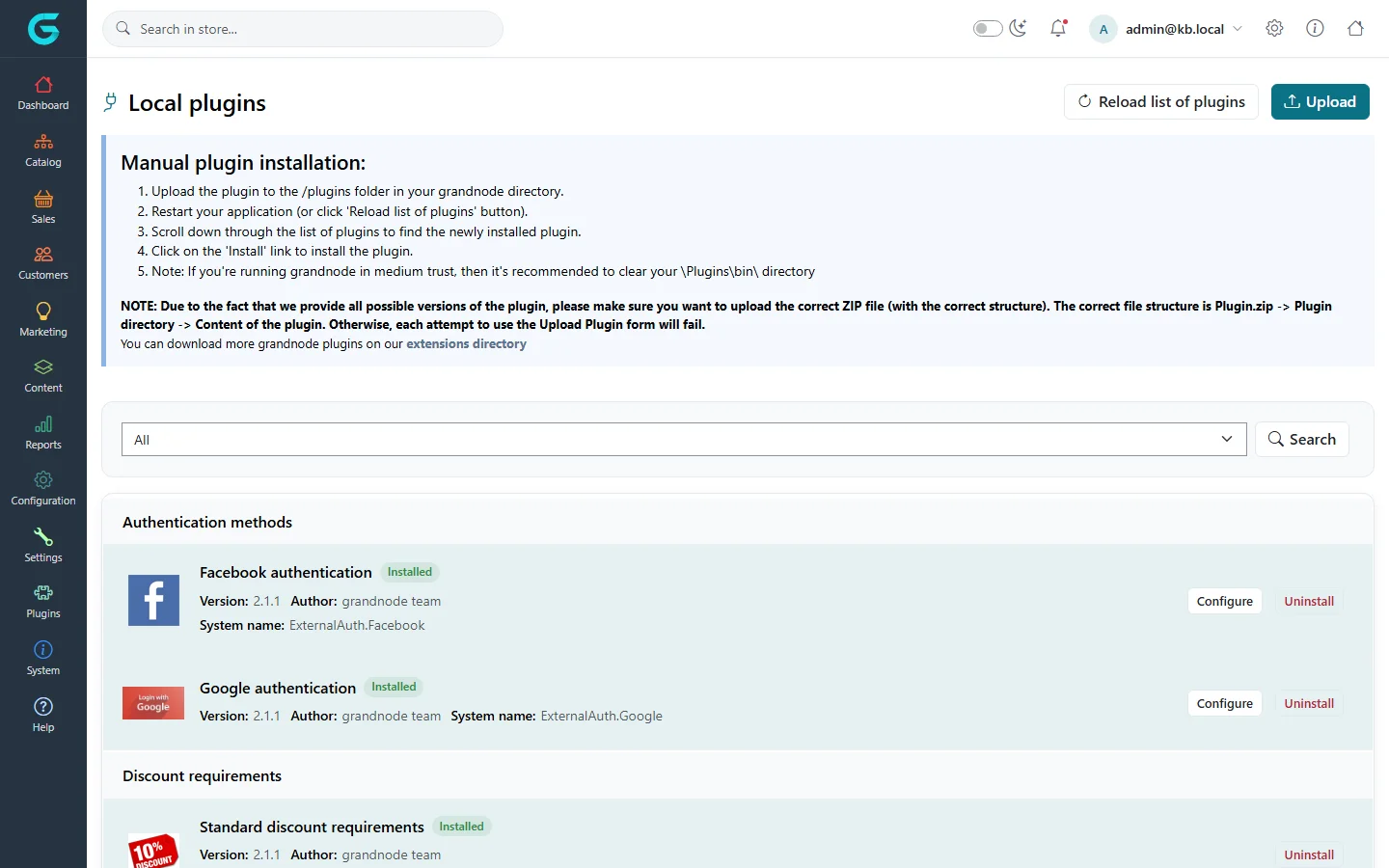
On a server without source code, a packaged plugin can be uploaded as a ZIP with the Upload button (Plugin.zip → plugin folder → plugin files), unless Extensions:DisableUploadExtensions is set.
Tips and common mistakes
- The manifest
SystemName, the provider'sSystemNameand the output folder must be identical. FriendlyNameshould be a resource key resolved throughITranslationService, so operators can translate it.- Every resource and setting added in
Installmust be removed inUninstall. - Never put secrets in code or in the manifest; keep them in settings or configuration.
- Store data in your own collection with
IRepository<YourEntity>; your entity derives fromBaseEntity.
Related
- Plugin provider types — payment, shipping, widget and discount rule contracts.
- Creating a theme
- Upgrade migrations
Question not answered here? Ask the community on GitHub Discussions ↗