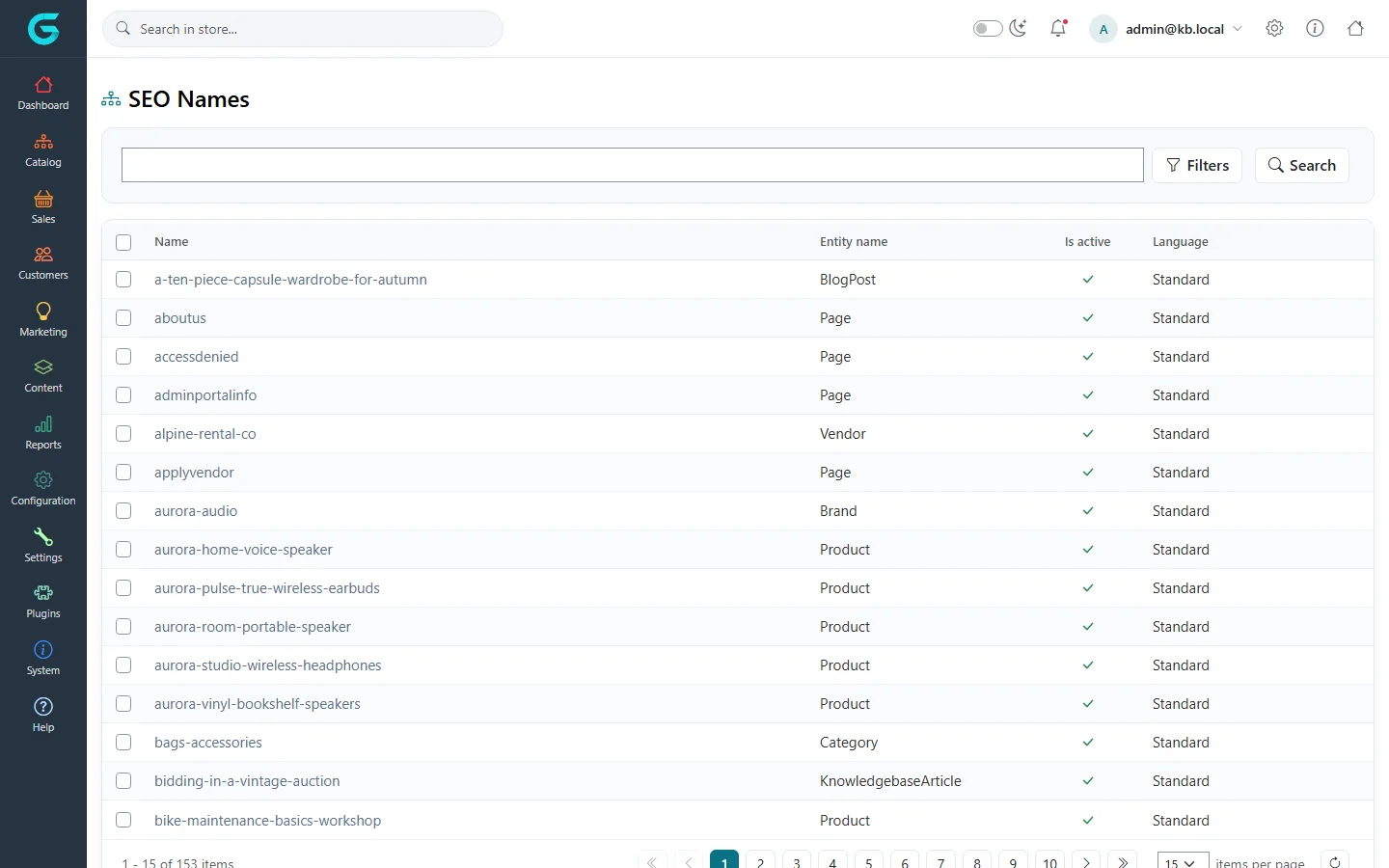
{"ArticleId":null,"Name":"Friendly URLs and redirects","Content":"\n\u003Cp\u003EEvery product, category, brand, collection, vendor, page, blog post, news item, course and knowledgebase article has a \u003Cstrong\u003Esearch engine friendly name\u003C/strong\u003E - the readable part of its address, such as \u003Ccode\u003E/aurora-room-portable-speaker\u003C/code\u003E. GrandNode creates it from the name, and you can change it on the item\u0027s SEO tab.\u003C/p\u003E\n\n\u003Ch2 id=\u0022how\u0022\u003EHow names are built\u003C/h2\u003E\n\u003Cul\u003E\n\u003Cli\u003EThe name is lower-cased, spaces become hyphens and characters that do not belong in an address are removed.\u003C/li\u003E\n\u003Cli\u003EWith \u003Cstrong\u003EConvert non-western chars\u003C/strong\u003E, letters such as \u0105, \u00F6 or \u00DF are converted to their Latin equivalents (a, o, ss). With \u003Cstrong\u003EAllow Unicode chars in URLs\u003C/strong\u003E they are kept. Both are in the SEO settings.\u003C/li\u003E\n\u003Cli\u003ENames are unique across all types: if \u003Ccode\u003Espeakers\u003C/code\u003E is taken, the next one becomes \u003Ccode\u003Espeakers-2\u003C/code\u003E.\u003C/li\u003E\n\u003Cli\u003EWith several languages and \u003Ccode\u003ESeoFriendlyUrlsForLanguagesEnabled\u003C/code\u003E in \u003Ccode\u003Eappsettings.json\u003C/code\u003E, addresses get a language prefix (\u003Ccode\u003E/de/...\u003C/code\u003E) and each language can have its own name.\u003C/li\u003E\n\u003C/ul\u003E\n\n\u003Ch2 id=\u0022rename\u0022\u003ERenaming keeps old links working\u003C/h2\u003E\n\u003Cp\u003EWhen you change a friendly name, the old one is kept as inactive and answered with a \u003Cstrong\u003Epermanent (301) redirect\u003C/strong\u003E to the new address. Search engines move the page\u0027s ranking to the new address and old links keep working.\u003C/p\u003E\n\n\u003Ch2 id=\u0022list\u0022\u003EAll friendly names\u003C/h2\u003E\n\u003Cp\u003E\u003Cstrong\u003EConfiguration \u2192 Search engine friendly names\u003C/strong\u003E lists every name with the type of item, whether it is active and its language. Search it to find which item owns an address, and delete old inactive names you no longer want redirected.\u003C/p\u003E\n\u003Cfigure\u003E\u003Cimg src=\u0022/Plugins/Theme.GrandNodeCom/Content/kb/seo/se-names.webp\u0022 alt=\u0022The SEO Names list with names such as aboutus, aurora-audio and aurora-room-portable-speaker, the entity type, active flag and language\u0022 width=\u00221440\u0022 height=\u0022900\u0022 loading=\u0022lazy\u0022\u003E\u003Cfigcaption\u003EConfiguration \u2192 Search engine friendly names.\u003C/figcaption\u003E\u003C/figure\u003E\n\n\u003Ch2 id=\u0022migration\u0022\u003ERedirects after a migration\u003C/h2\u003E\n\u003Cp\u003EWhen you move to GrandNode from another platform, the old addresses (for example \u003Ccode\u003E/index.php?route=product\u0026amp;id=42\u003C/code\u003E) should redirect to the new ones. Two options:\u003C/p\u003E\n\u003Cul\u003E\n\u003Cli\u003EUse the old address as the new friendly name where the format allows it.\u003C/li\u003E\n\u003Cli\u003EAdd rewrite rules to \u003Ccode\u003EApp_Data/UrlRewrite.xml\u003C/code\u003E and set \u003Ccode\u003EUrlRewrite:UseUrlRewrite\u003C/code\u003E to \u003Ccode\u003Etrue\u003C/code\u003E in \u003Ccode\u003Eappsettings.json\u003C/code\u003E. The file uses the IIS URL Rewrite format; it ships with an example rule that redirects \u003Ccode\u003Ewww.\u003C/code\u003E to the address without it.\u003C/li\u003E\n\u003C/ul\u003E\n\u003Cpre\u003E\u003Ccode\u003E\u0026lt;rule name=\u0022OldProduct42\u0022 stopProcessing=\u0022true\u0022\u0026gt;\n  \u0026lt;match url=\u0022^product/42$\u0022 /\u0026gt;\n  \u0026lt;action type=\u0022Redirect\u0022 url=\u0022/aurora-room-portable-speaker\u0022 redirectType=\u0022Permanent\u0022 /\u0026gt;\n\u0026lt;/rule\u0026gt;\u003C/code\u003E\u003C/pre\u003E\n\n\u003Ch2 id=\u0022tips\u0022\u003ETips\u003C/h2\u003E\n\u003Cul\u003E\n\u003Cli\u003EShort, descriptive names without stop words work best: \u003Ccode\u003E/oak-dining-table\u003C/code\u003E, not \u003Ccode\u003E/the-best-oak-dining-table-for-your-home-2026\u003C/code\u003E.\u003C/li\u003E\n\u003Cli\u003EChoose www or non-www once and redirect the other; mixing them splits your ranking.\u003C/li\u003E\n\u003C/ul\u003E\n\n\u003Ch2 id=\u0022related\u0022\u003ERelated\u003C/h2\u003E\n\u003Cul\u003E\n\u003Cli\u003E\u003Ca href=\u0022/seo-meta-and-settings\u0022\u003ETitles, meta tags and SEO settings\u003C/a\u003E\u003C/li\u003E\n\u003Cli\u003E\u003Ca href=\u0022/system-appsettings\u0022\u003EApplication settings (appsettings.json)\u003C/a\u003E\u003C/li\u003E\n\u003C/ul\u003E\n","ParentCategoryId":"6abe3a3b04b9d0a2009febef","SeName":"seo-urls-and-redirects","MetaKeywords":null,"MetaDescription":"How GrandNode builds friendly URLs, keeps them unique, redirects renamed pages, manages search engine friendly names and rewrites old URLs after a migration.","MetaTitle":null,"AllowComments":false,"Captcha":{"ReCaptchaChallengeField":null,"ReCaptchaResponseField":null,"ReCaptchaResponseValue":null,"ReCaptchaResponse":null},"RelatedArticles":[],"CategoryBreadcrumb":[{"Name":"SEO and AI visibility","Description":null,"IsCurrent":false,"Children":null,"Parent":null,"SeName":"docs-seo","Id":"6abe3a3b04b9d0a2009febef","UserFields":[]}],"AddNewComment":{"CommentText":null,"DisplayCaptcha":false,"Id":null,"UserFields":[]},"Comments":[],"Id":"6abe3a3b04b9d0a2009febf5","UserFields":[]}