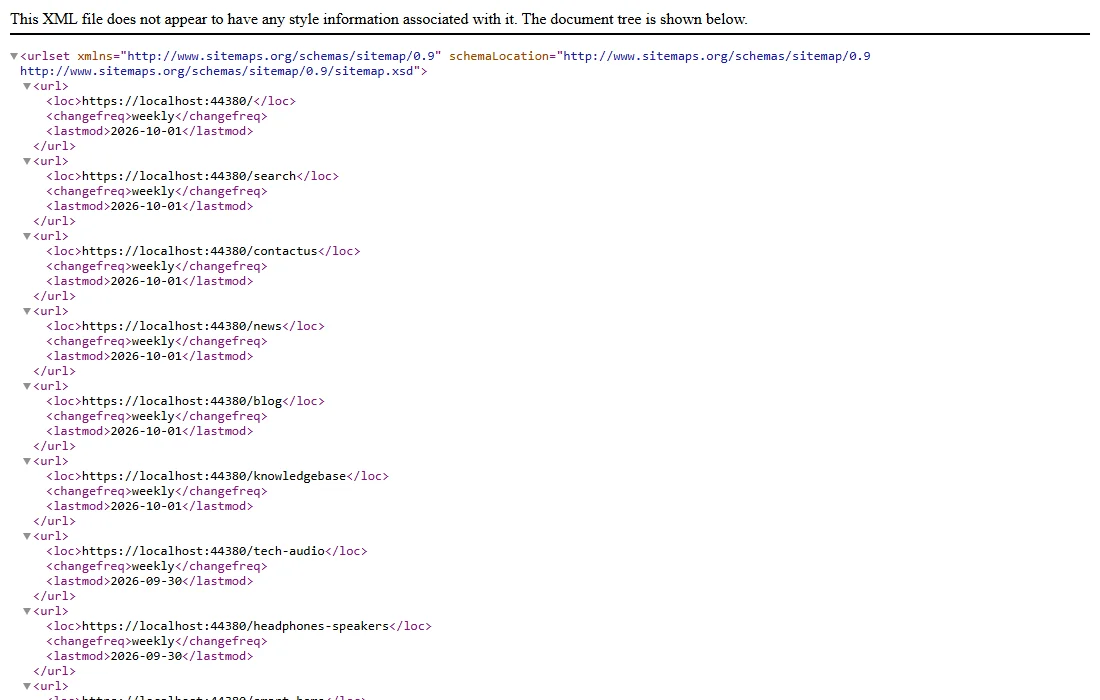
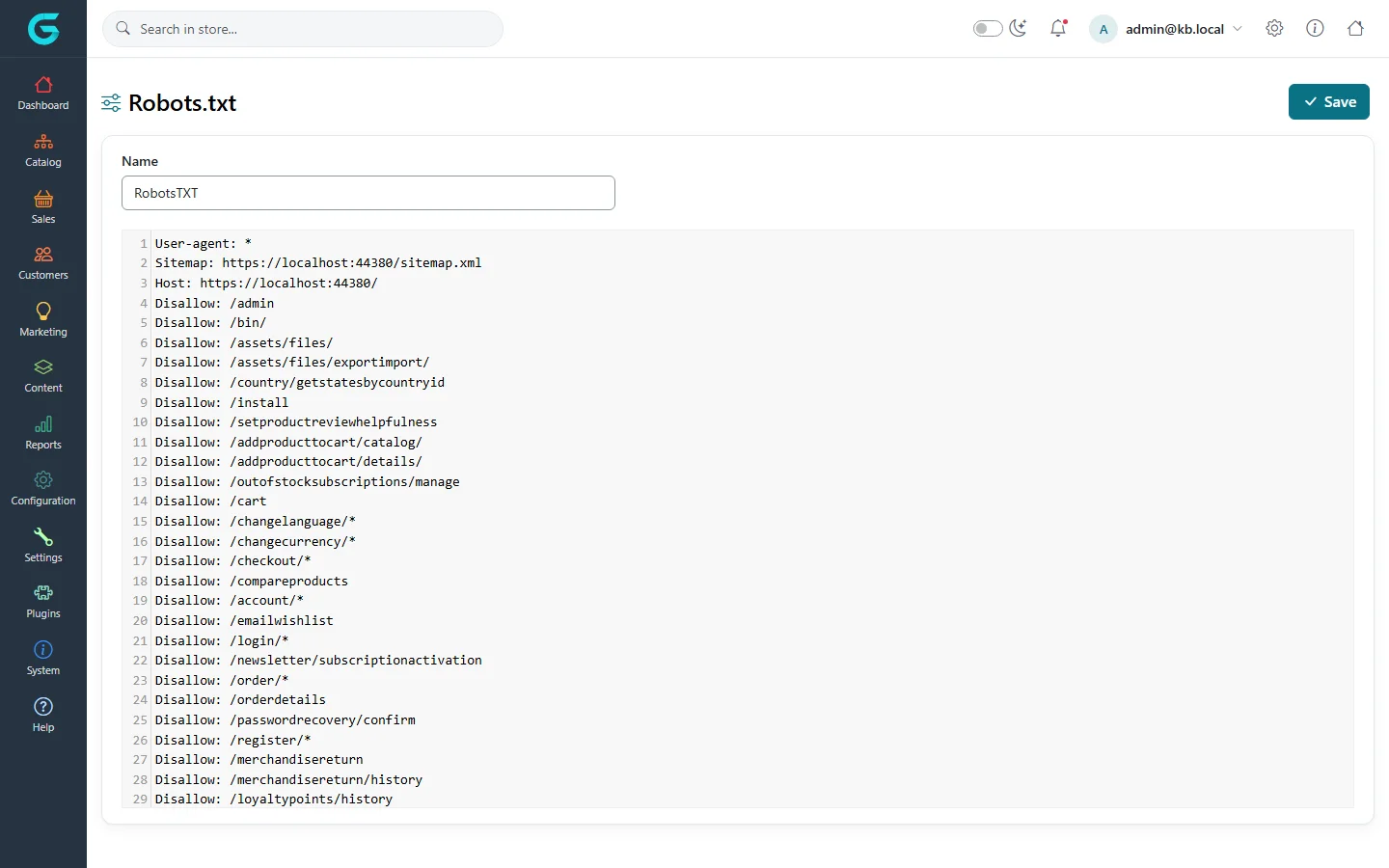
{"ArticleId":null,"Name":"Sitemap and robots.txt","Content":"\n\u003Cp\u003EA \u003Cstrong\u003Esitemap\u003C/strong\u003E lists the pages of your store so search engines find them all; \u003Cstrong\u003Erobots.txt\u003C/strong\u003E tells crawlers what they may read. GrandNode provides both, per store.\u003C/p\u003E\n\n\u003Ch2 id=\u0022sitemap-settings\u0022\u003EWhat the sitemap contains\u003C/h2\u003E\n\u003Cp\u003EIn \u003Cstrong\u003ESettings \u2192 General and common settings\u003C/strong\u003E, tab \u003Cstrong\u003EStore information\u003C/strong\u003E:\u003C/p\u003E\n\u003Cfigure\u003E\u003Cimg src=\u0022/Plugins/Theme.GrandNodeCom/Content/kb/seo/settings-sitemap.webp\u0022 alt=\u0022The sitemap settings: Sitemap enabled, include subcategories, include pictures, include brands and include products in sitemap\u0022 width=\u00221276\u0022 height=\u0022140\u0022 loading=\u0022lazy\u0022\u003E\u003Cfigcaption\u003ESitemap settings.\u003C/figcaption\u003E\u003C/figure\u003E\n\u003Cul\u003E\n\u003Cli\u003E\u003Cstrong\u003ESitemap enabled\u003C/strong\u003E - shows the sitemap link and page.\u003C/li\u003E\n\u003Cli\u003E\u003Cstrong\u003EInclude subcategories / brands / products / pictures in sitemap\u003C/strong\u003E - what goes into the sitemap besides the main pages. Turn on products: they are the pages you most want found.\u003C/li\u003E\n\u003C/ul\u003E\n\n\u003Ch2 id=\u0022sitemap-xml\u0022\u003Esitemap.xml\u003C/h2\u003E\n\u003Cp\u003EThe \u003Ccode\u003Esitemap.xml\u003C/code\u003E file is written by the scheduled task \u003Cstrong\u003EGenerate sitemap XML file\u003C/strong\u003E. The task is not enabled after installation: open \u003Cstrong\u003ESystem \u2192 Maintenance \u2192 Schedule tasks\u003C/strong\u003E, enable it (once a day is enough) or click \u003Cstrong\u003ERun now\u003C/strong\u003E. Until it has run, \u003Ccode\u003E/sitemap.xml\u003C/code\u003E returns \u0022not found\u0022.\u003C/p\u003E\n\u003Cfigure\u003E\u003Cimg src=\u0022/Plugins/Theme.GrandNodeCom/Content/kb/seo/sitemap-xml.webp\u0022 alt=\u0022The generated sitemap.xml opened in a browser, listing URLs with changefreq and lastmod\u0022 width=\u00221100\u0022 height=\u0022700\u0022 loading=\u0022lazy\u0022\u003E\u003Cfigcaption\u003EThe generated sitemap.xml.\u003C/figcaption\u003E\u003C/figure\u003E\n\u003Cp\u003ESubmit \u003Ccode\u003Ehttps://your-store/sitemap.xml\u003C/code\u003E in Google Search Console and Bing Webmaster Tools. \u003Ccode\u003E/sitemap\u003C/code\u003E (without .xml) is a different thing: a sitemap page for people.\u003C/p\u003E\n\u003Cp\u003EWith several instances (pods), the task runs on one of them. Set \u003Ccode\u003EApplication:MediaPath\u003C/code\u003E to a volume shared by all instances, so every instance serves the same \u003Ccode\u003Esitemap*.xml\u003C/code\u003E - see the \u003Ca href=\u0022/system-appsettings#media-path\u0022\u003Eapplication settings reference\u003C/a\u003E. On a multi-store or multi-language installation the files are named \u003Ccode\u003Esitemap-{store}-{language}.xml\u003C/code\u003E; point robots.txt and Search Console at the right file for each store.\u003C/p\u003E\n\n\u003Ch2 id=\u0022robots\u0022\u003Erobots.txt\u003C/h2\u003E\n\u003Cp\u003EEach store has its own robots.txt, edited under \u003Cstrong\u003ESystem \u2192 Maintenance \u2192 Robot.txt\u003C/strong\u003E. The default points to the sitemap and keeps crawlers out of the admin, cart, checkout, account and other pages that should not be indexed.\u003C/p\u003E\n\u003Cfigure\u003E\u003Cimg src=\u0022/Plugins/Theme.GrandNodeCom/Content/kb/seo/robots-editor.webp\u0022 alt=\u0022The Robots.txt editor with the default rules: User-agent, Sitemap, Host and many Disallow lines for admin, cart, checkout and account pages\u0022 width=\u00221440\u0022 height=\u0022900\u0022 loading=\u0022lazy\u0022\u003E\u003Cfigcaption\u003ESystem \u2192 Maintenance \u2192 Robot.txt.\u003C/figcaption\u003E\u003C/figure\u003E\n\u003Ch3 id=\u0022ai-crawlers\u0022\u003ERules for AI crawlers\u003C/h3\u003E\n\u003Cp\u003EAI companies use their own crawlers. Some collect training data, others fetch pages to answer a user\u0027s question right now - blocking the latter makes your products invisible in AI answers. Add rules by crawler name, for example:\u003C/p\u003E\n\u003Cpre\u003E\u003Ccode\u003E# allow assistants that fetch pages to answer users\nUser-agent: OAI-SearchBot\nAllow: /\n\nUser-agent: PerplexityBot\nAllow: /\n\n# no training on our content\nUser-agent: GPTBot\nDisallow: /\n\nUser-agent: Google-Extended\nDisallow: /\u003C/code\u003E\u003C/pre\u003E\n\u003Cp\u003ECheck each company\u0027s documentation for the current names; they change.\u003C/p\u003E\n\n\u003Ch2 id=\u0022tips\u0022\u003ETips\u003C/h2\u003E\n\u003Cul\u003E\n\u003Cli\u003ENever disallow product or category pages \u0022to save crawl budget\u0022; disallowed pages cannot appear in results.\u003C/li\u003E\n\u003Cli\u003EAfter editing robots.txt, open \u003Ccode\u003E/robots.txt\u003C/code\u003E on the store to check what crawlers actually get.\u003C/li\u003E\n\u003C/ul\u003E\n\n\u003Ch2 id=\u0022related\u0022\u003ERelated\u003C/h2\u003E\n\u003Cul\u003E\n\u003Cli\u003E\u003Ca href=\u0022/system-scheduled-tasks\u0022\u003EScheduled tasks\u003C/a\u003E\u003C/li\u003E\n\u003Cli\u003E\u003Ca href=\u0022/seo-ai-visibility\u0022\u003EVisibility in AI assistants\u003C/a\u003E\u003C/li\u003E\n\u003C/ul\u003E\n","ParentCategoryId":"6abe3a3b04b9d0a2009febef","SeName":"seo-sitemap-and-robots","MetaKeywords":null,"MetaDescription":"Generate sitemap.xml with the GrandNode scheduled task, choose what it includes, and edit robots.txt per store, including rules for AI crawlers.","MetaTitle":null,"AllowComments":false,"Captcha":{"ReCaptchaChallengeField":null,"ReCaptchaResponseField":null,"ReCaptchaResponseValue":null,"ReCaptchaResponse":null},"RelatedArticles":[],"CategoryBreadcrumb":[{"Name":"SEO and AI visibility","Description":null,"IsCurrent":false,"Children":null,"Parent":null,"SeName":"docs-seo","Id":"6abe3a3b04b9d0a2009febef","UserFields":[]}],"AddNewComment":{"CommentText":null,"DisplayCaptcha":false,"Id":null,"UserFields":[]},"Comments":[],"Id":"6abe3a3b04b9d0a2009febf7","UserFields":[]}