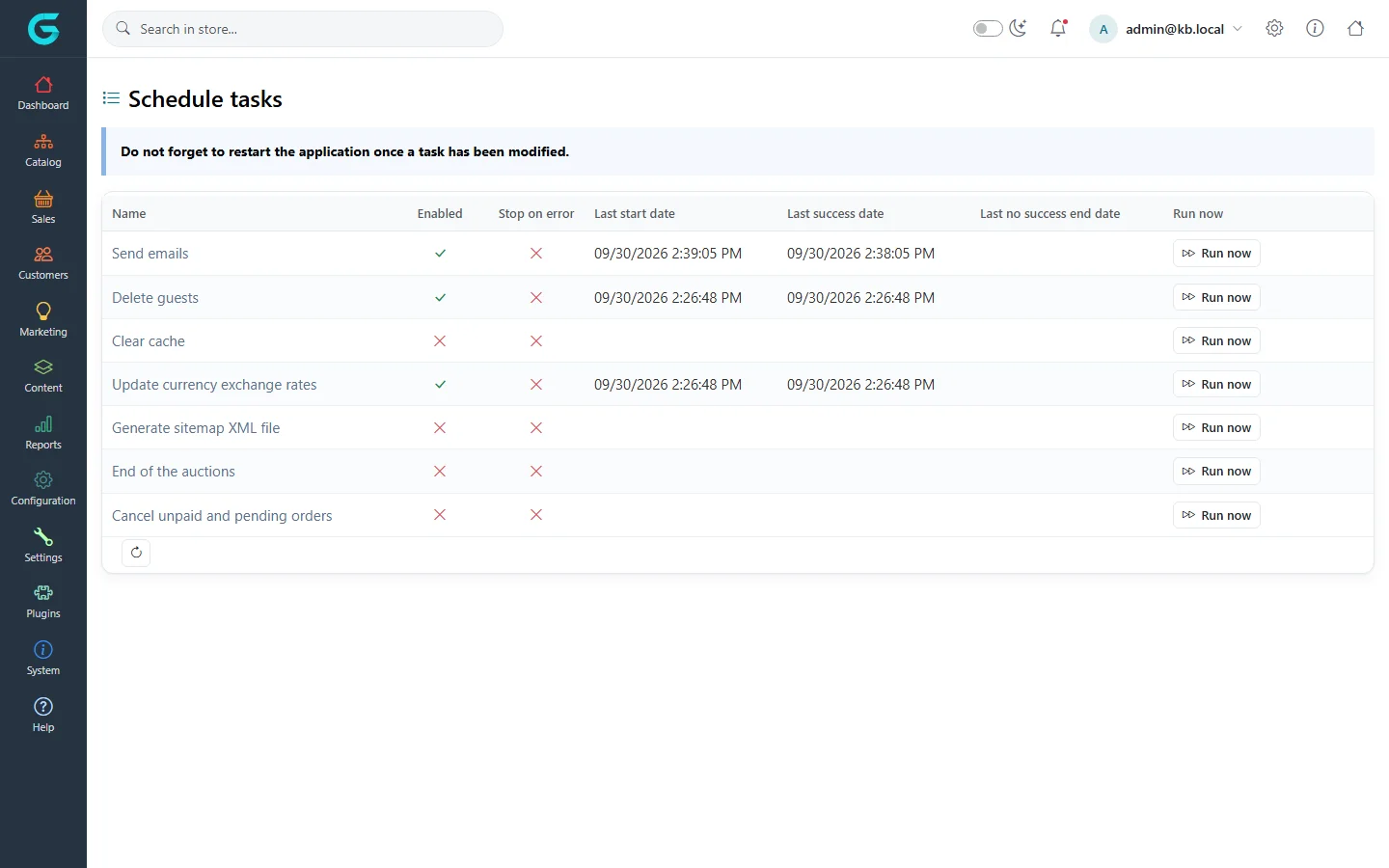
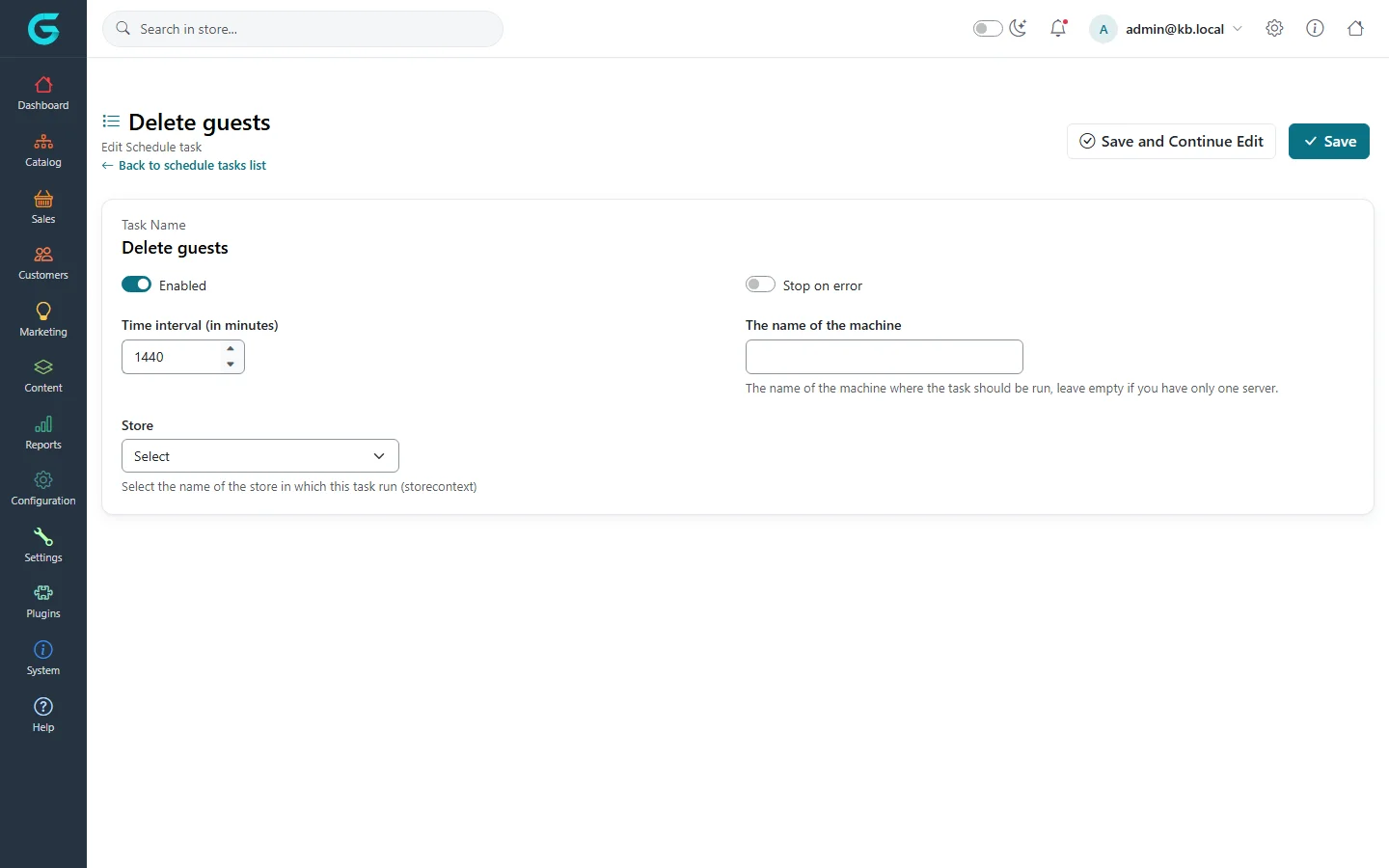
{"ArticleId":null,"Name":"Scheduled tasks","Content":"\n\u003Cp\u003EScheduled tasks are background jobs the application runs at an interval: sending the e-mail queue, cleaning up guests, generating the sitemap. They run inside the web application, so they only run while it is running.\u003C/p\u003E\n\n\u003Ch2 id=\u0022list\u0022\u003EThe task list\u003C/h2\u003E\n\u003Cp\u003EOpen \u003Cstrong\u003ESystem \u2192 Maintenance \u2192 Schedule tasks\u003C/strong\u003E.\u003C/p\u003E\n\u003Cfigure\u003E\u003Cimg src=\u0022/Plugins/Theme.GrandNodeCom/Content/kb/system/schedule-tasks-list.webp\u0022 alt=\u0022Schedule tasks: Send emails, Delete guests, Clear cache, Update currency exchange rates, Generate sitemap XML file, End of the auctions and Cancel unpaid and pending orders, with enabled, stop on error, last start and last success dates and Run now\u0022 width=\u00221440\u0022 height=\u0022900\u0022 loading=\u0022lazy\u0022\u003E\u003Cfigcaption\u003EThe schedule tasks. \u0022Do not forget to restart the application once a task has been modified.\u0022\u003C/figcaption\u003E\u003C/figure\u003E\n\u003Ctable\u003E\n\u003Cthead\u003E\u003Ctr\u003E\u003Cth\u003ETask\u003C/th\u003E\u003Cth\u003EWhat it does\u003C/th\u003E\u003C/tr\u003E\u003C/thead\u003E\n\u003Ctbody\u003E\n\u003Ctr\u003E\u003Ctd\u003ESend emails\u003C/td\u003E\u003Ctd\u003ESends messages from the queue. Must be enabled, or no e-mail leaves the store.\u003C/td\u003E\u003C/tr\u003E\n\u003Ctr\u003E\u003Ctd\u003EDelete guests\u003C/td\u003E\u003Ctd\u003ERemoves old guest customer records (see the system settings for the age).\u003C/td\u003E\u003C/tr\u003E\n\u003Ctr\u003E\u003Ctd\u003EClear cache\u003C/td\u003E\u003Ctd\u003EEmpties the cache at the interval.\u003C/td\u003E\u003C/tr\u003E\n\u003Ctr\u003E\u003Ctd\u003EUpdate currency exchange rates\u003C/td\u003E\u003Ctd\u003EFetches rates from the exchange rate provider when auto update is on.\u003C/td\u003E\u003C/tr\u003E\n\u003Ctr\u003E\u003Ctd\u003EGenerate sitemap XML file\u003C/td\u003E\u003Ctd\u003EWrites \u003Ccode\u003Esitemap.xml\u003C/code\u003E for search engines.\u003C/td\u003E\u003C/tr\u003E\n\u003Ctr\u003E\u003Ctd\u003EEnd of the auctions\u003C/td\u003E\u003Ctd\u003ECloses auctions whose end date has passed and picks the winners.\u003C/td\u003E\u003C/tr\u003E\n\u003Ctr\u003E\u003Ctd\u003ECancel unpaid and pending orders\u003C/td\u003E\u003Ctd\u003ECancels orders unpaid for longer than the days set in the system settings.\u003C/td\u003E\u003C/tr\u003E\n\u003C/tbody\u003E\n\u003C/table\u003E\n\u003Cp\u003EPlugins can add their own tasks. \u003Cstrong\u003ERun now\u003C/strong\u003E runs a task immediately.\u003C/p\u003E\n\n\u003Ch2 id=\u0022edit\u0022\u003EConfigure a task\u003C/h2\u003E\n\u003Cfigure\u003E\u003Cimg src=\u0022/Plugins/Theme.GrandNodeCom/Content/kb/system/schedule-task-edit.webp\u0022 alt=\u0022Editing the task Delete guests: enabled, stop on error, time interval 1440 minutes, machine name and store\u0022 width=\u00221440\u0022 height=\u0022900\u0022 loading=\u0022lazy\u0022\u003E\u003Cfigcaption\u003EA task: interval, machine and store.\u003C/figcaption\u003E\u003C/figure\u003E\n\u003Ctable\u003E\n\u003Cthead\u003E\u003Ctr\u003E\u003Cth\u003EField\u003C/th\u003E\u003Cth\u003EWhat it does\u003C/th\u003E\u003C/tr\u003E\u003C/thead\u003E\n\u003Ctbody\u003E\n\u003Ctr\u003E\u003Ctd\u003EEnabled\u003C/td\u003E\u003Ctd\u003EWhether the task runs.\u003C/td\u003E\u003C/tr\u003E\n\u003Ctr\u003E\u003Ctd\u003ETime interval (in minutes)\u003C/td\u003E\u003Ctd\u003EHow often it runs.\u003C/td\u003E\u003C/tr\u003E\n\u003Ctr\u003E\u003Ctd\u003EStop on error\u003C/td\u003E\u003Ctd\u003EDisables the task after a failure, instead of retrying at the next interval.\u003C/td\u003E\u003C/tr\u003E\n\u003Ctr\u003E\u003Ctd\u003EThe name of the machine\u003C/td\u003E\u003Ctd\u003EOn a web farm, the task runs only on the server with this name. Empty = every server that runs the application.\u003C/td\u003E\u003C/tr\u003E\n\u003Ctr\u003E\u003Ctd\u003EStore\u003C/td\u003E\u003Ctd\u003EThe store whose context the task runs in (for store-specific data such as the sitemap).\u003C/td\u003E\u003C/tr\u003E\n\u003C/tbody\u003E\n\u003C/table\u003E\n\u003Cp\u003ERestart the application after changing a task, as the notice on the list says.\u003C/p\u003E\n\n\u003Ch2 id=\u0022multi-instance\u0022\u003ESeveral servers\u003C/h2\u003E\n\u003Cp\u003EWhen the store runs on several instances (for example several pods in Kubernetes), every run of a task is claimed atomically in the database, so exactly one instance executes it - no extra setup is needed. Use \u003Cstrong\u003EThe name of the machine\u003C/strong\u003E only to pin a task to one particular server, for example the one that holds files the task writes; in Kubernetes that requires stable pod names (a StatefulSet). See \u003Ca href=\u0022/getting-started-docker-kubernetes\u0022\u003ERunning in production: Docker and Kubernetes\u003C/a\u003E.\u003C/p\u003E\n\n\u003Ch2 id=\u0022related\u0022\u003ERelated\u003C/h2\u003E\n\u003Cul\u003E\n\u003Cli\u003E\u003Ca href=\u0022/system-maintenance\u0022\u003EMaintenance tools and logs\u003C/a\u003E\u003C/li\u003E\n\u003Cli\u003E\u003Ca href=\u0022/content-message-queue\u0022\u003EThe message queue\u003C/a\u003E\u003C/li\u003E\n\u003C/ul\u003E\n","ParentCategoryId":"6abdec6d83d2816248229f33","SeName":"system-scheduled-tasks","MetaKeywords":null,"MetaDescription":"What each GrandNode scheduled task does - e-mails, guests, cache, exchange rates, sitemap, auctions, unpaid orders - and how to configure them.","MetaTitle":null,"AllowComments":false,"Captcha":{"ReCaptchaChallengeField":null,"ReCaptchaResponseField":null,"ReCaptchaResponseValue":null,"ReCaptchaResponse":null},"RelatedArticles":[],"CategoryBreadcrumb":[{"Name":"System and maintenance","Description":null,"IsCurrent":false,"Children":null,"Parent":null,"SeName":"docs-system","Id":"6abdec6d83d2816248229f33","UserFields":[]}],"AddNewComment":{"CommentText":null,"DisplayCaptcha":false,"Id":null,"UserFields":[]},"Comments":[],"Id":"6abdec6d83d2816248229f39","UserFields":[]}