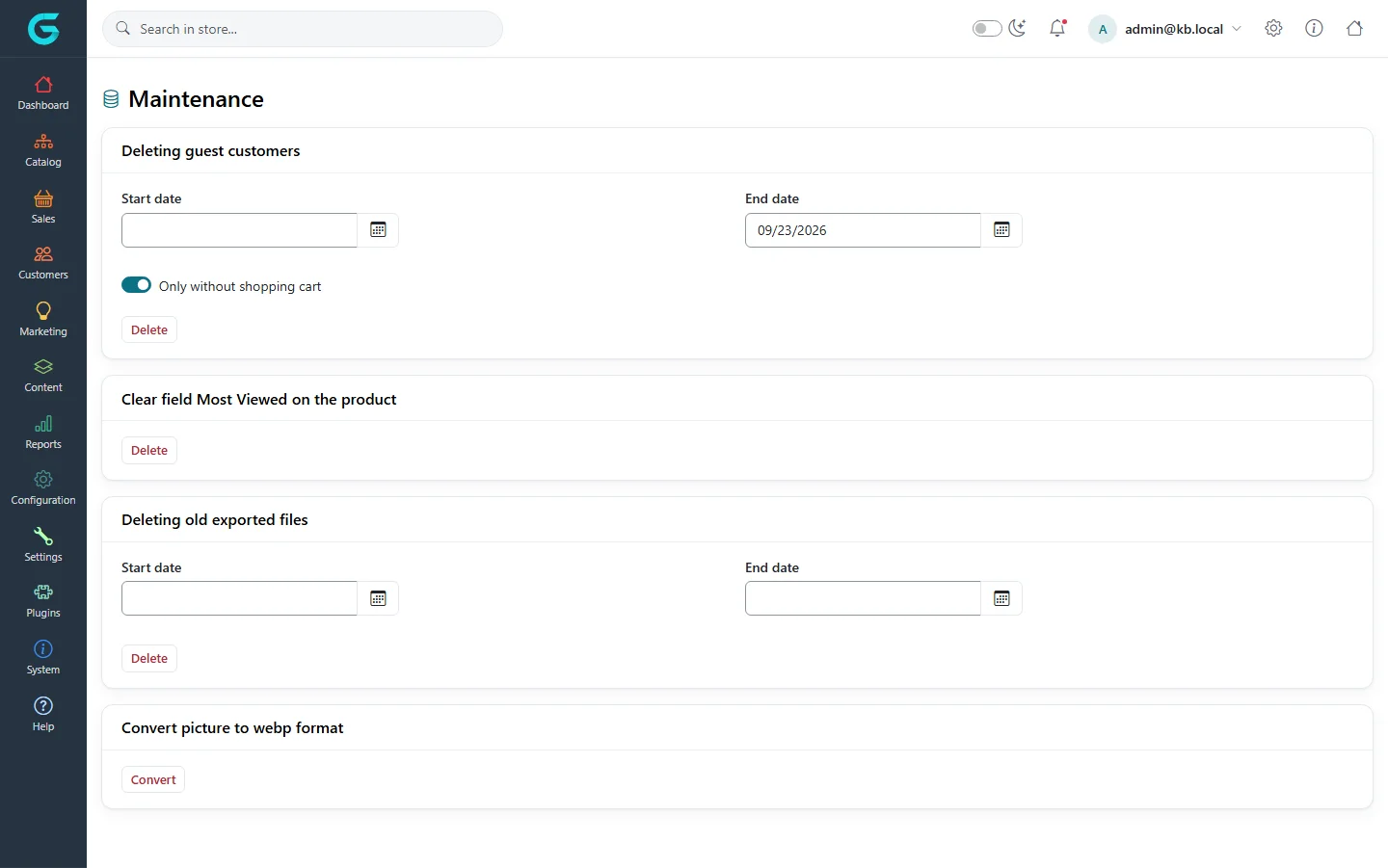
{"ArticleId":null,"Name":"Maintenance tools and logs","Content":"\n\u003Cp\u003E\u003Cstrong\u003ESystem \u2192 Maintenance\u003C/strong\u003E collects the clean-up jobs you run by hand. None of them is needed daily; they keep the database and disk tidy on long-running stores.\u003C/p\u003E\n\n\u003Ch2 id=\u0022tools\u0022\u003EThe tools\u003C/h2\u003E\n\u003Cfigure\u003E\u003Cimg src=\u0022/Plugins/Theme.GrandNodeCom/Content/kb/system/maintenance.webp\u0022 alt=\u0022The Maintenance page: deleting guest customers with a date range and only without shopping cart, clear most viewed on the product, deleting old exported files with a date range, and convert pictures to WebP\u0022 width=\u00221440\u0022 height=\u0022901\u0022 loading=\u0022lazy\u0022\u003E\u003Cfigcaption\u003ESystem \u2192 Maintenance.\u003C/figcaption\u003E\u003C/figure\u003E\n\u003Ctable\u003E\n\u003Cthead\u003E\u003Ctr\u003E\u003Cth\u003ETool\u003C/th\u003E\u003Cth\u003EWhat it does\u003C/th\u003E\u003C/tr\u003E\u003C/thead\u003E\n\u003Ctbody\u003E\n\u003Ctr\u003E\u003Ctd\u003EDeleting guest customers\u003C/td\u003E\u003Ctd\u003EDeletes guest records created in a date range. \u003Cstrong\u003EOnly without shopping cart\u003C/strong\u003E keeps guests with something in their cart.\u003C/td\u003E\u003C/tr\u003E\n\u003Ctr\u003E\u003Ctd\u003EClear field Most Viewed on the product\u003C/td\u003E\u003Ctd\u003EResets the view counters used for \u0022most viewed\u0022 lists.\u003C/td\u003E\u003C/tr\u003E\n\u003Ctr\u003E\u003Ctd\u003EDeleting old exported files\u003C/td\u003E\u003Ctd\u003EDeletes export files left on the server in a date range.\u003C/td\u003E\u003C/tr\u003E\n\u003Ctr\u003E\u003Ctd\u003EConvert picture to webp format\u003C/td\u003E\u003Ctd\u003EConverts stored pictures to WebP, which is smaller and faster to load.\u003C/td\u003E\u003C/tr\u003E\n\u003C/tbody\u003E\n\u003C/table\u003E\n\u003Cp\u003EBack up the database before bulk deletions and the picture conversion.\u003C/p\u003E\n\n\u003Ch2 id=\u0022other\u0022\u003EOther entries under Maintenance\u003C/h2\u003E\n\u003Cul\u003E\n\u003Cli\u003E\u003Cstrong\u003ESchedule tasks\u003C/strong\u003E - see \u003Ca href=\u0022/system-scheduled-tasks\u0022\u003EScheduled tasks\u003C/a\u003E.\u003C/li\u003E\n\u003Cli\u003E\u003Cstrong\u003ECustom css\u003C/strong\u003E and \u003Cstrong\u003ECustom JS\u003C/strong\u003E - small additions to the storefront without a theme change.\u003C/li\u003E\n\u003Cli\u003E\u003Cstrong\u003ERobot.txt\u003C/strong\u003E - edit the robots.txt file search engines read.\u003C/li\u003E\n\u003Cli\u003E\u003Cstrong\u003EDeveloper tools\u003C/strong\u003E - API users for the web API (see \u003Ca href=\u0022/developers-rest-api\u0022\u003EThe REST API\u003C/a\u003E) and the Roslyn compiler for script extensions.\u003C/li\u003E\n\u003C/ul\u003E\n\n\u003Ch2 id=\u0022logs\u0022\u003ELogs\u003C/h2\u003E\n\u003Cp\u003EGrandNode writes its log through the standard .NET logging system. Where the entries go depends on the hosting: the console (and so \u003Ccode\u003Edocker logs\u003C/code\u003E), the Windows event log or IIS stdout log, or Azure Application Insights when \u003Ccode\u003EApplicationInsights\u003C/code\u003E is configured. The level is set in the \u003Ccode\u003ELogging\u003C/code\u003E section of \u003Ccode\u003Eappsettings.json\u003C/code\u003E. When something fails, the log and the \u003Cstrong\u003ESystem information\u003C/strong\u003E page are the first things to look at.\u003C/p\u003E\n\u003Cp\u003EWhat customers and staff did in the store is recorded separately in the activity log, shown on each customer\u0027s page.\u003C/p\u003E\n\n\u003Ch2 id=\u0022related\u0022\u003ERelated\u003C/h2\u003E\n\u003Cul\u003E\n\u003Cli\u003E\u003Ca href=\u0022/system-overview\u0022\u003ESystem tools: an overview\u003C/a\u003E\u003C/li\u003E\n\u003Cli\u003E\u003Ca href=\u0022/system-appsettings\u0022\u003EApplication settings (appsettings.json)\u003C/a\u003E\u003C/li\u003E\n\u003C/ul\u003E\n","ParentCategoryId":"6abdec6d83d2816248229f33","SeName":"system-maintenance","MetaKeywords":null,"MetaDescription":"GrandNode maintenance tools: deleting guest customers, clearing most-viewed data, deleting exported files, converting pictures to WebP, and where the logs are.","MetaTitle":null,"AllowComments":false,"Captcha":{"ReCaptchaChallengeField":null,"ReCaptchaResponseField":null,"ReCaptchaResponseValue":null,"ReCaptchaResponse":null},"RelatedArticles":[],"CategoryBreadcrumb":[{"Name":"System and maintenance","Description":null,"IsCurrent":false,"Children":null,"Parent":null,"SeName":"docs-system","Id":"6abdec6d83d2816248229f33","UserFields":[]}],"AddNewComment":{"CommentText":null,"DisplayCaptcha":false,"Id":null,"UserFields":[]},"Comments":[],"Id":"6abdec6d83d2816248229f3d","UserFields":[]}