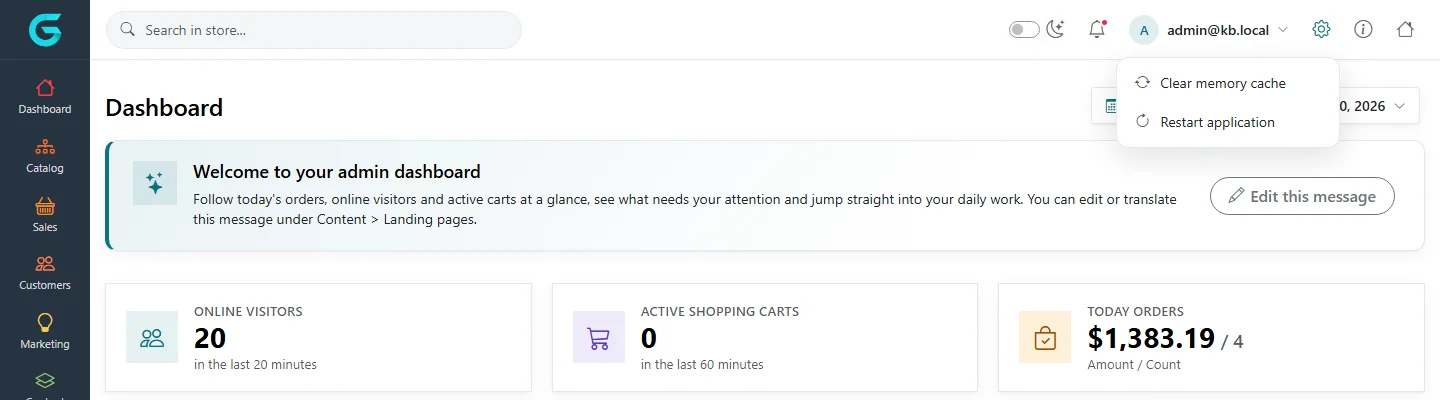
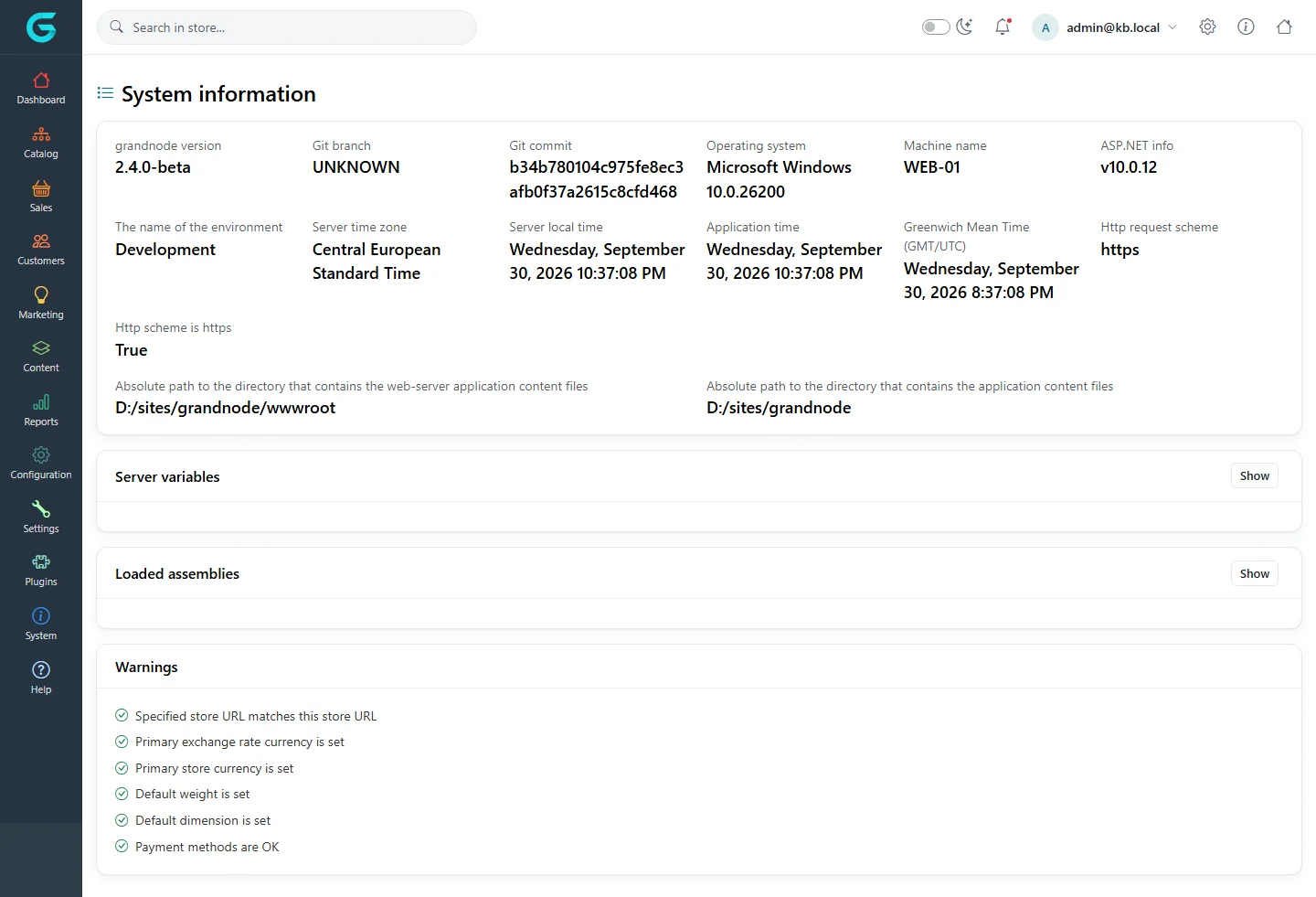
{"ArticleId":null,"Name":"System tools: an overview","Content":"\n\u003Cp\u003EBesides running the shop, an administrator looks after the installation itself: which plugins are installed, which background tasks run, who may do what, and whether the system is configured correctly. These tools live in the \u003Cstrong\u003EPlugins\u003C/strong\u003E and \u003Cstrong\u003ESystem\u003C/strong\u003E menus of the admin panel and in the gear menu at the top.\u003C/p\u003E\n\n\u003Ch2 id=\u0022menus\u0022\u003EWhere to find it\u003C/h2\u003E\n\u003Ctable\u003E\n\u003Cthead\u003E\u003Ctr\u003E\u003Cth\u003EMenu\u003C/th\u003E\u003Cth\u003EWhat is there\u003C/th\u003E\u003C/tr\u003E\u003C/thead\u003E\n\u003Ctbody\u003E\n\u003Ctr\u003E\u003Ctd\u003EPlugins \u2192 Local plugins\u003C/td\u003E\u003Ctd\u003EInstall, uninstall, upload and configure plugins. See \u003Ca href=\u0022/system-plugins\u0022\u003EPlugins\u003C/a\u003E.\u003C/td\u003E\u003C/tr\u003E\n\u003Ctr\u003E\u003Ctd\u003EPlugins \u2192 Widgets, External authentication\u003C/td\u003E\u003Ctd\u003EActivate widget and sign-in plugins.\u003C/td\u003E\u003C/tr\u003E\n\u003Ctr\u003E\u003Ctd\u003ESystem \u2192 System information\u003C/td\u003E\u003Ctd\u003EVersion, environment, server time, loaded assemblies and configuration warnings.\u003C/td\u003E\u003C/tr\u003E\n\u003Ctr\u003E\u003Ctd\u003ESystem \u2192 Queued emails\u003C/td\u003E\u003Ctd\u003EThe e-mail queue (see \u003Ca href=\u0022/content-message-queue\u0022\u003EThe message queue\u003C/a\u003E).\u003C/td\u003E\u003C/tr\u003E\n\u003Ctr\u003E\u003Ctd\u003ESystem \u2192 Maintenance\u003C/td\u003E\u003Ctd\u003EClean-up tools, schedule tasks, custom CSS and JS, robots.txt, and developer tools such as API users.\u003C/td\u003E\u003C/tr\u003E\n\u003Ctr\u003E\u003Ctd\u003EConfiguration \u2192 Permissions\u003C/td\u003E\u003Ctd\u003EWho may do what. See \u003Ca href=\u0022/system-permissions\u0022\u003EPermissions\u003C/a\u003E.\u003C/td\u003E\u003C/tr\u003E\n\u003C/tbody\u003E\n\u003C/table\u003E\n\n\u003Ch2 id=\u0022gear-menu\u0022\u003ECache and restart\u003C/h2\u003E\n\u003Cp\u003EThe gear icon in the top bar has two commands:\u003C/p\u003E\n\u003Cfigure\u003E\u003Cimg src=\u0022/Plugins/Theme.GrandNodeCom/Content/kb/system/header-gear-menu.webp\u0022 alt=\u0022The admin top bar with the gear menu open, offering Clear memory cache and Restart application\u0022 width=\u00221440\u0022 height=\u0022400\u0022 loading=\u0022lazy\u0022\u003E\u003Cfigcaption\u003EThe gear menu.\u003C/figcaption\u003E\u003C/figure\u003E\n\u003Cul\u003E\n\u003Cli\u003E\u003Cstrong\u003EClear memory cache\u003C/strong\u003E - empties the cache. Use it after changing data directly in the database, or when a change does not show up.\u003C/li\u003E\n\u003Cli\u003E\u003Cstrong\u003ERestart application\u003C/strong\u003E - restarts the web application, which is needed after installing plugins by copying files. The store is unavailable for a few seconds.\u003C/li\u003E\n\u003C/ul\u003E\n\n\u003Ch2 id=\u0022system-information\u0022\u003ESystem information\u003C/h2\u003E\n\u003Cp\u003E\u003Cstrong\u003ESystem \u2192 System information\u003C/strong\u003E shows the GrandNode version and git commit, the operating system, the .NET version, the environment name, the server and application time, the paths of the application, server variables, loaded assemblies, and a list of \u003Cstrong\u003Ewarnings\u003C/strong\u003E.\u003C/p\u003E\n\u003Cfigure\u003E\u003Cimg src=\u0022/Plugins/Theme.GrandNodeCom/Content/kb/system/system-info.webp\u0022 alt=\u0022System information: version 2.4.0-beta, git commit, operating system, machine name, ASP.NET version, environment, times, paths, server variables, loaded assemblies and a Warnings list with all checks passing\u0022 width=\u00221440\u0022 height=\u0022981\u0022 loading=\u0022lazy\u0022\u003E\u003Cfigcaption\u003ESystem \u2192 System information. The warnings at the bottom check the basic configuration.\u003C/figcaption\u003E\u003C/figure\u003E\n\u003Cp\u003EThe warnings check that the store URL matches the address you are using, that primary currencies, weight and dimension are set, and that payment methods are configured. Fix anything marked red before going live. Include this page when you report a problem.\u003C/p\u003E\n\n\u003Ch2 id=\u0022related\u0022\u003ERelated\u003C/h2\u003E\n\u003Cul\u003E\n\u003Cli\u003E\u003Ca href=\u0022/system-maintenance\u0022\u003EMaintenance tools and logs\u003C/a\u003E\u003C/li\u003E\n\u003Cli\u003E\u003Ca href=\u0022/system-appsettings\u0022\u003EApplication settings (appsettings.json)\u003C/a\u003E\u003C/li\u003E\n\u003C/ul\u003E\n","ParentCategoryId":"6abdec6d83d2816248229f33","SeName":"system-overview","MetaKeywords":null,"MetaDescription":"Where the GrandNode system tools are: plugins, scheduled tasks, permissions, system information, maintenance, cache and restart.","MetaTitle":null,"AllowComments":false,"Captcha":{"ReCaptchaChallengeField":null,"ReCaptchaResponseField":null,"ReCaptchaResponseValue":null,"ReCaptchaResponse":null},"RelatedArticles":[],"CategoryBreadcrumb":[{"Name":"System and maintenance","Description":null,"IsCurrent":false,"Children":null,"Parent":null,"SeName":"docs-system","Id":"6abdec6d83d2816248229f33","UserFields":[]}],"AddNewComment":{"CommentText":null,"DisplayCaptcha":false,"Id":null,"UserFields":[]},"Comments":[],"Id":"6abdec6d83d2816248229f35","UserFields":[]}