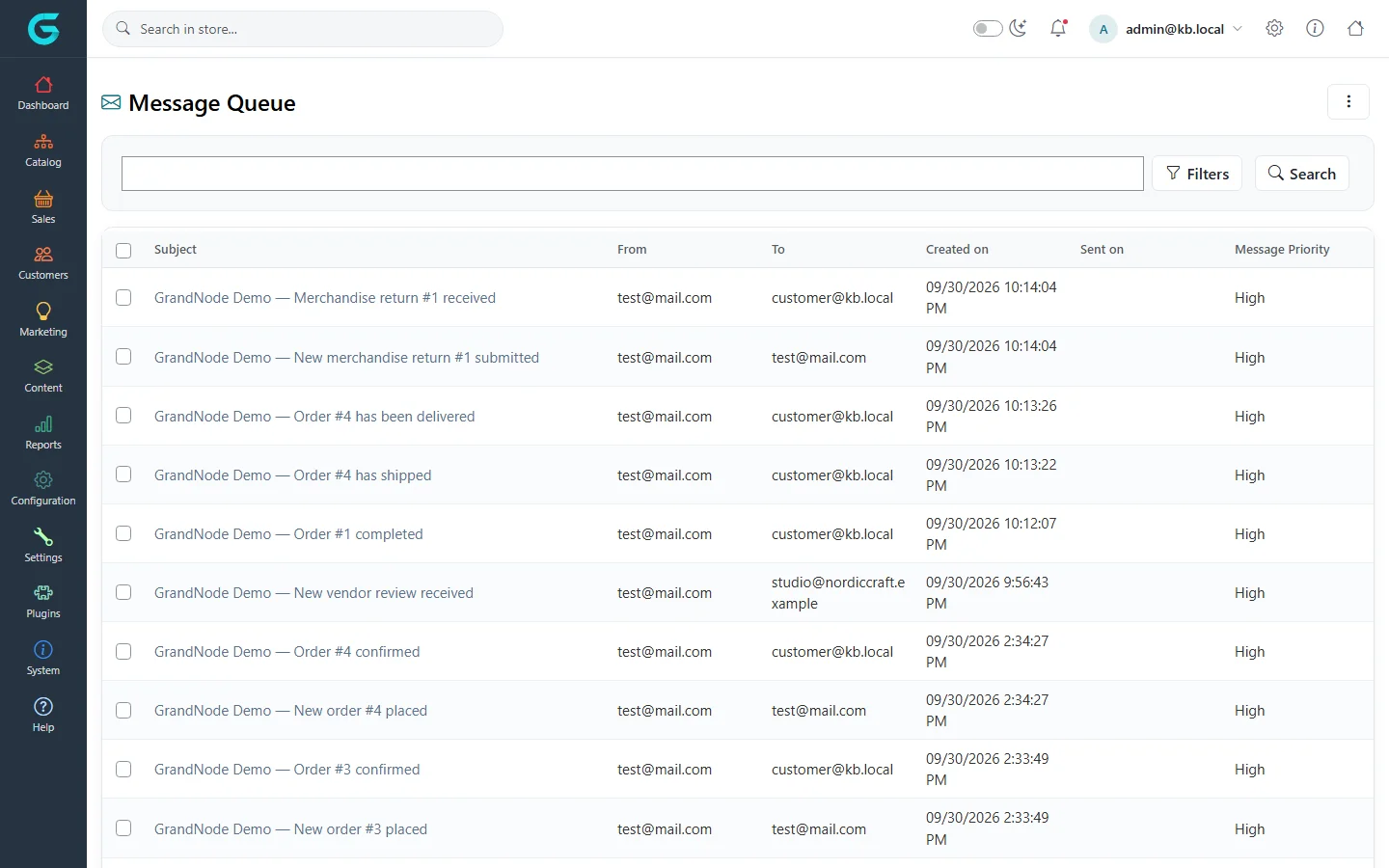
{"ArticleId":null,"Name":"The message queue (queued e-mails)","Content":"\n\u003Cp\u003EGrandNode does not send e-mails the moment something happens. Each message is first written to the \u003Cstrong\u003Emessage queue\u003C/strong\u003E, and a scheduled task sends queued messages every minute or so. This keeps checkout fast and lets failed messages be retried.\u003C/p\u003E\n\n\u003Ch2 id=\u0022queue\u0022\u003EThe queue\u003C/h2\u003E\n\u003Cp\u003E\u003Cstrong\u003ESystem \u2192 Queued emails\u003C/strong\u003E (Message Queue) lists messages with the subject, sender, recipient, creation date, when it was sent and its priority.\u003C/p\u003E\n\u003Cfigure\u003E\u003Cimg src=\u0022/Plugins/Theme.GrandNodeCom/Content/kb/content/queued-emails.webp\u0022 alt=\u0022The Message Queue with order, shipment and merchandise return e-mails to customer@kb.local, created and sent dates, and priority\u0022 width=\u00221440\u0022 height=\u0022900\u0022 loading=\u0022lazy\u0022\u003E\u003Cfigcaption\u003EThe message queue.\u003C/figcaption\u003E\u003C/figure\u003E\n\u003Cul\u003E\n\u003Cli\u003EFilter by e-mail address, dates, or \u003Cstrong\u003ELoad not sent emails only\u003C/strong\u003E.\u003C/li\u003E\n\u003Cli\u003EOpen a message to read the full body, see the number of \u003Cstrong\u003ESent attempts\u003C/strong\u003E and the error, change the recipient, and \u003Cstrong\u003ERequeue\u003C/strong\u003E it.\u003C/li\u003E\n\u003Cli\u003EDelete old messages in bulk to keep the collection small.\u003C/li\u003E\n\u003C/ul\u003E\n\n\u003Ch2 id=\u0022sending\u0022\u003EHow sending works\u003C/h2\u003E\n\u003Cp\u003EThe scheduled task \u003Cstrong\u003ESend emails\u003C/strong\u003E (see \u003Ca href=\u0022/docs-system\u0022\u003ESystem and maintenance\u003C/a\u003E) picks up unsent messages and sends them through the message\u0027s e-mail account. A message that fails is tried again on the next runs, up to a maximum number of tries; the error is stored on the message.\u003C/p\u003E\n\n\u003Ch2 id=\u0022troubleshooting\u0022\u003EE-mails do not arrive\u003C/h2\u003E\n\u003Col\u003E\n\u003Cli\u003EIs the message in the queue? If not, the template may be inactive, or limited to another store or language.\u003C/li\u003E\n\u003Cli\u003EIs it sent? If \u003Cstrong\u003ESent on\u003C/strong\u003E is empty and tries are growing, open it and read the error - usually wrong SMTP settings. Test the e-mail account.\u003C/li\u003E\n\u003Cli\u003EIs the \u003Cstrong\u003ESend emails\u003C/strong\u003E task enabled and running?\u003C/li\u003E\n\u003Cli\u003ESent but not received: check the spam folder and your domain\u0027s SPF, DKIM and DMARC records with your mail provider.\u003C/li\u003E\n\u003C/ol\u003E\n\n\u003Ch2 id=\u0022related\u0022\u003ERelated\u003C/h2\u003E\n\u003Cul\u003E\n\u003Cli\u003E\u003Ca href=\u0022/content-message-templates\u0022\u003EMessage templates and e-mail accounts\u003C/a\u003E\u003C/li\u003E\n\u003C/ul\u003E\n","ParentCategoryId":"6abdec6c83d2816248229f03","SeName":"content-message-queue","MetaKeywords":null,"MetaDescription":"How GrandNode queues and sends e-mails, how to find out whether a message was sent, resend it, and fix e-mails that do not arrive.","MetaTitle":null,"AllowComments":false,"Captcha":{"ReCaptchaChallengeField":null,"ReCaptchaResponseField":null,"ReCaptchaResponseValue":null,"ReCaptchaResponse":null},"RelatedArticles":[],"CategoryBreadcrumb":[{"Name":"Content management","Description":null,"IsCurrent":false,"Children":null,"Parent":null,"SeName":"docs-content","Id":"6abdec6c83d2816248229f03","UserFields":[]}],"AddNewComment":{"CommentText":null,"DisplayCaptcha":false,"Id":null,"UserFields":[]},"Comments":[],"Id":"6abdec6c83d2816248229f15","UserFields":[]}