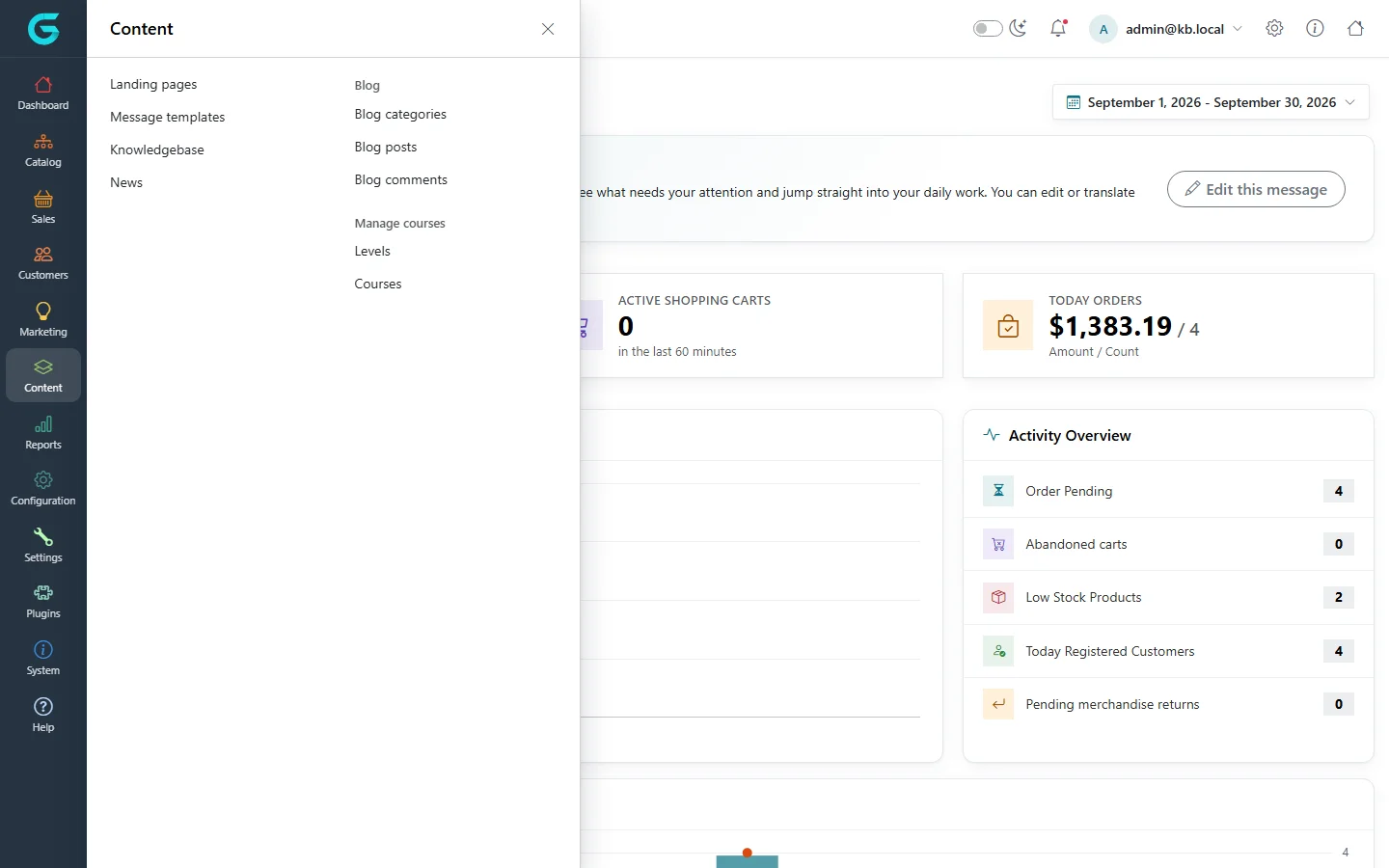
{"ArticleId":null,"Name":"Content management overview","Content":"\n\u003Cp\u003EBesides products and orders, every store needs words: an About us page, shipping and returns rules, a blog, a news feed, help articles and the e-mails the store sends to customers. In GrandNode all of this is managed from the admin panel, most of it from the \u003Cstrong\u003EContent\u003C/strong\u003E menu. This article is the map: what each screen is for, where the related settings live, and which panel (administrator, store manager) can use it.\u003C/p\u003E\n\n\u003Ch2 id=\u0022where-to-find-it\u0022\u003EWhere to find it\u003C/h2\u003E\n\u003Cp\u003EOpen the admin panel (\u003Ccode\u003E/admin\u003C/code\u003E) and click \u003Cstrong\u003EContent\u003C/strong\u003E in the left sidebar. A panel slides out with the content screens grouped in two columns.\u003C/p\u003E\n\u003Cfigure\u003E\u003Cimg src=\u0022/Plugins/Theme.GrandNodeCom/Content/kb/content/menu.webp\u0022 alt=\u0022The Content menu opened in the admin sidebar, listing Landing pages, Message templates, Knowledgebase, News, Blog and Manage courses\u0022 width=\u00221440\u0022 height=\u0022900\u0022 loading=\u0022lazy\u0022\u003E\u003Cfigcaption\u003EThe Content menu in the admin panel.\u003C/figcaption\u003E\u003C/figure\u003E\n\n\u003Ch2 id=\u0022what-is-in-the-menu\u0022\u003EWhat is in the Content menu\u003C/h2\u003E\n\u003Ctable\u003E\n\u003Cthead\u003E\u003Ctr\u003E\u003Cth\u003EMenu item\u003C/th\u003E\u003Cth\u003EWhat it is for\u003C/th\u003E\u003C/tr\u003E\u003C/thead\u003E\n\u003Ctbody\u003E\n\u003Ctr\u003E\u003Ctd\u003E\u003Cstrong\u003ELanding pages\u003C/strong\u003E\u003C/td\u003E\u003Ctd\u003EStatic pages of the storefront (About us, Conditions of use, Shipping \u0026amp; returns, the home page welcome text). Each page has a title, a rich-text body, SEO fields, a layout, menu and footer placement, visibility dates and access rules. See \u003Ca href=\u0022/content-pages\u0022\u003ELanding pages\u003C/a\u003E.\u003C/td\u003E\u003C/tr\u003E\n\u003Ctr\u003E\u003Ctd\u003E\u003Cstrong\u003EMessage templates\u003C/strong\u003E\u003C/td\u003E\u003Ctd\u003EThe e-mails GrandNode sends automatically: order placed, shipment sent, password recovery, new review, and many more. See \u003Ca href=\u0022/content-message-templates\u0022\u003EMessage templates and e-mail accounts\u003C/a\u003E.\u003C/td\u003E\u003C/tr\u003E\n\u003Ctr\u003E\u003Ctd\u003E\u003Cstrong\u003EKnowledgebase\u003C/strong\u003E\u003C/td\u003E\u003Ctd\u003EA help centre made of categories and articles, with optional customer comments. The documentation you are reading is built with it. See \u003Ca href=\u0022/content-knowledgebase\u0022\u003EKnowledgebase\u003C/a\u003E.\u003C/td\u003E\u003C/tr\u003E\n\u003Ctr\u003E\u003Ctd\u003E\u003Cstrong\u003ENews\u003C/strong\u003E\u003C/td\u003E\u003Ctd\u003EDated announcements with a short and a full text, optional comments and an RSS feed. See \u003Ca href=\u0022/content-news\u0022\u003ENews\u003C/a\u003E.\u003C/td\u003E\u003C/tr\u003E\n\u003Ctr\u003E\u003Ctd\u003E\u003Cstrong\u003EBlog\u003C/strong\u003E (Blog categories, Blog posts, Blog comments)\u003C/td\u003E\u003Ctd\u003EA blog with categories, tags, pictures and comment moderation. See \u003Ca href=\u0022/content-blog\u0022\u003EBlog\u003C/a\u003E.\u003C/td\u003E\u003C/tr\u003E\n\u003Ctr\u003E\u003Ctd\u003E\u003Cstrong\u003EManage courses\u003C/strong\u003E (Levels, Courses)\u003C/td\u003E\u003Ctd\u003EOnline courses with subjects and lessons, sold together with a product. They are a separate topic and are not covered in this module.\u003C/td\u003E\u003C/tr\u003E\n\u003C/tbody\u003E\n\u003C/table\u003E\n\n\u003Ch2 id=\u0022related-screens-elsewhere\u0022\u003ERelated screens in other menus\u003C/h2\u003E\n\u003Cp\u003ESome screens that shape content live under other menus, because they are also used by other parts of the system:\u003C/p\u003E\n\u003Cul\u003E\n\u003Cli\u003E\u003Cstrong\u003EConfiguration \u2192 Layouts \u2192 Page layouts\u003C/strong\u003E (and category, brand, collection and product layouts) decide which Razor view renders a page. See \u003Ca href=\u0022/content-layouts\u0022\u003EPage layouts and other layouts\u003C/a\u003E.\u003C/li\u003E\n\u003Cli\u003E\u003Cstrong\u003EConfiguration \u2192 Email Accounts\u003C/strong\u003E holds the SMTP accounts message templates send through.\u003C/li\u003E\n\u003Cli\u003E\u003Cstrong\u003ESystem \u2192 Message Queue\u003C/strong\u003E shows every e-mail GrandNode has generated, whether it was sent, and lets you resend it. See \u003Ca href=\u0022/content-message-queue\u0022\u003EMessage queue\u003C/a\u003E.\u003C/li\u003E\n\u003Cli\u003E\u003Cstrong\u003EPlugins \u2192 Widgets\u003C/strong\u003E turns on widget plugins such as the home page slider or the Facebook pixel. See \u003Ca href=\u0022/content-widgets\u0022\u003EWidgets and widget zones\u003C/a\u003E.\u003C/li\u003E\n\u003Cli\u003E\u003Cstrong\u003ESettings \u2192 Content\u003C/strong\u003E has the \u003Cstrong\u003EBlog\u003C/strong\u003E, \u003Cstrong\u003ENews\u003C/strong\u003E and \u003Cstrong\u003EKnowledgebase\u003C/strong\u003E sections: they enable or disable each feature on the storefront and set page sizes, home page blocks and comment rules.\u003C/li\u003E\n\u003C/ul\u003E\n\n\u003Ch2 id=\u0022the-html-editor\u0022\u003EOne editor for all rich text\u003C/h2\u003E\n\u003Cp\u003EPage bodies, blog posts, news, knowledgebase articles, message template bodies and product descriptions all use the same HTML editor, with a file manager for pictures. Whatever you type is cleaned by an allowlist HTML sanitizer before it is saved, which is why a pasted \u003Ccode\u003E\u0026lt;script\u0026gt;\u003C/code\u003E never reaches the storefront. See \u003Ca href=\u0022/content-html-editor\u0022\u003EThe HTML editor, file manager and allowed HTML\u003C/a\u003E.\u003C/p\u003E\n\n\u003Ch2 id=\u0022who-can-use-it\u0022\u003EWho can use it\u003C/h2\u003E\n\u003Cul\u003E\n\u003Cli\u003E\u003Cstrong\u003EAdministrators\u003C/strong\u003E see every screen, subject to the permissions of their customer group (\u003Cstrong\u003EConfiguration \u2192 Permissions\u003C/strong\u003E): Manage Pages, Manage Blog, Manage News, Manage Knowledgebase, Manage Message Templates, Manage Message Queue, Manage Widgets and Manage HTML Editor Pictures are separate permissions.\u003C/li\u003E\n\u003Cli\u003E\u003Cstrong\u003EStore managers\u003C/strong\u003E (the \u003Ccode\u003E/store\u003C/code\u003E panel) manage the content of their own store: landing pages, blog, news, message templates and e-mail accounts, limited to that store. The knowledgebase, widgets, layouts and the message queue stay with administrators. Global content shared by all stores is visible to them, and a global landing page can be copied into a store-specific version.\u003C/li\u003E\n\u003Cli\u003E\u003Cstrong\u003EVendors\u003C/strong\u003E do not manage store content.\u003C/li\u003E\n\u003C/ul\u003E\n\n\u003Ch2 id=\u0022multistore-and-languages\u0022\u003EStores, languages and customer groups\u003C/h2\u003E\n\u003Cp\u003EAlmost every content item has the same three access controls: \u003Cstrong\u003ELimited to stores\u003C/strong\u003E (show it only in selected stores), \u003Cstrong\u003ELimited to customer groups\u003C/strong\u003E (show it only to, for example, registered customers or wholesale buyers) and translations per language (the language tabs above the title and body). Items without restrictions are visible everywhere. The storefront filters by the current store, the customer\u0027s groups and the working language automatically.\u003C/p\u003E\n\n\u003Ch2 id=\u0022related\u0022\u003ERelated\u003C/h2\u003E\n\u003Cul\u003E\n\u003Cli\u003E\u003Ca href=\u0022/docs-configuration\u0022\u003EConfiguration\u003C/a\u003E for settings, stores and languages\u003C/li\u003E\n\u003Cli\u003E\u003Ca href=\u0022/docs-catalog\u0022\u003ECatalog\u003C/a\u003E for product, category and brand descriptions, which use the same editor\u003C/li\u003E\n\u003Cli\u003E\u003Ca href=\u0022/docs-marketing\u0022\u003EMarketing\u003C/a\u003E for newsletters and campaigns, which are sent through the same e-mail accounts and queue\u003C/li\u003E\n\u003C/ul\u003E\n","ParentCategoryId":"6abdec6c83d2816248229f03","SeName":"content-overview","MetaKeywords":null,"MetaDescription":"What the Content menu of the GrandNode admin panel holds, where related screens live and who can use them.","MetaTitle":null,"AllowComments":false,"Captcha":{"ReCaptchaChallengeField":null,"ReCaptchaResponseField":null,"ReCaptchaResponseValue":null,"ReCaptchaResponse":null},"RelatedArticles":[],"CategoryBreadcrumb":[{"Name":"Content management","Description":null,"IsCurrent":false,"Children":null,"Parent":null,"SeName":"docs-content","Id":"6abdec6c83d2816248229f03","UserFields":[]}],"AddNewComment":{"CommentText":null,"DisplayCaptcha":false,"Id":null,"UserFields":[]},"Comments":[],"Id":"6abdec6c83d2816248229f05","UserFields":[]}