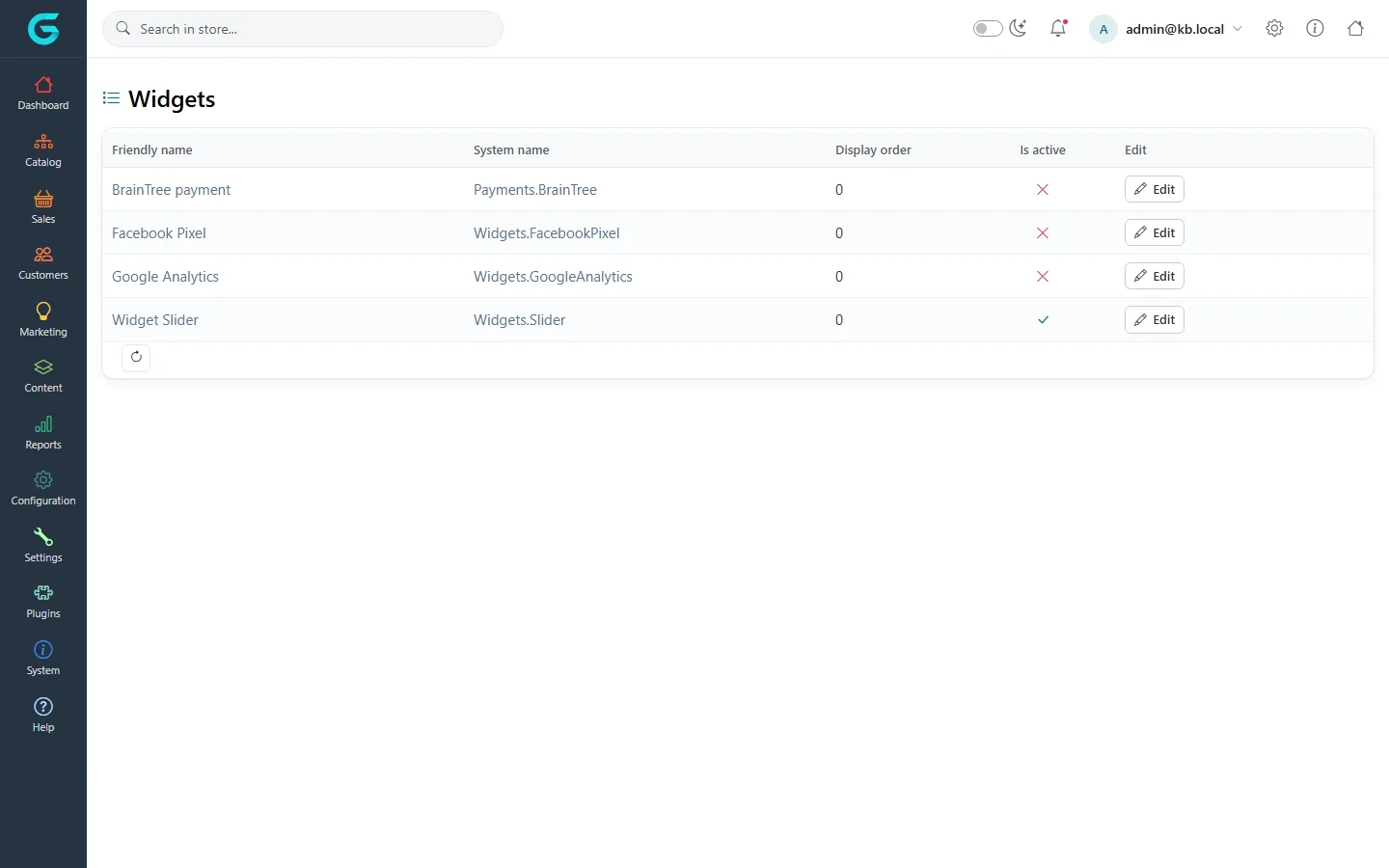
{"ArticleId":null,"Name":"Widgets","Content":"\n\u003Cp\u003EA \u003Cstrong\u003Ewidget\u003C/strong\u003E is a plugin that adds something to storefront pages without changing the theme: a tracking script, a Facebook pixel, a slider, a cookie banner, a payment badge. Each widget renders in one or more \u003Cstrong\u003Ewidget zones\u003C/strong\u003E - named places in the page layout such as the head, the top of the home page or under the product description.\u003C/p\u003E\n\n\u003Ch2 id=\u0022list\u0022\u003EThe widget list\u003C/h2\u003E\n\u003Cp\u003E\u003Cstrong\u003EPlugins \u2192 Widgets\u003C/strong\u003E lists the installed widget plugins with their system name, display order and whether they are active.\u003C/p\u003E\n\u003Cfigure\u003E\u003Cimg src=\u0022/Plugins/Theme.GrandNodeCom/Content/kb/content/widgets.webp\u0022 alt=\u0022The Widgets list with Payment info, Facebook Pixel, Google Analytics and Widget Slider, their system names, display order and active flags with Edit buttons\u0022 width=\u00221440\u0022 height=\u0022900\u0022 loading=\u0022lazy\u0022\u003E\u003Cfigcaption\u003EPlugins \u2192 Widgets.\u003C/figcaption\u003E\u003C/figure\u003E\n\n\u003Ch2 id=\u0022activate\u0022\u003EActivate and configure a widget\u003C/h2\u003E\n\u003Col\u003E\n\u003Cli\u003EInstall the plugin first under \u003Cstrong\u003EPlugins \u2192 Local plugins\u003C/strong\u003E, if it is not installed (see \u003Ca href=\u0022/docs-system\u0022\u003ESystem and maintenance\u003C/a\u003E).\u003C/li\u003E\n\u003Cli\u003EIn \u003Cstrong\u003EPlugins \u2192 Widgets\u003C/strong\u003E, click \u003Cstrong\u003EEdit\u003C/strong\u003E on the row, tick \u003Cstrong\u003EIs active\u003C/strong\u003E and save the row.\u003C/li\u003E\n\u003Cli\u003EClick the widget\u0027s name or its \u003Cstrong\u003EConfigure\u003C/strong\u003E link to set it up - a tracking id, slides, texts. Settings can differ per store with the store selector.\u003C/li\u003E\n\u003Cli\u003ECheck the storefront.\u003C/li\u003E\n\u003C/ol\u003E\n\u003Cp\u003E\u003Cstrong\u003EDisplay order\u003C/strong\u003E decides the order when several widgets use the same zone.\u003C/p\u003E\n\n\u003Ch2 id=\u0022zones\u0022\u003EWidget zones\u003C/h2\u003E\n\u003Cp\u003EA theme calls widget zones by name, for example \u003Ccode\u003Ehead_html_tag\u003C/code\u003E, \u003Ccode\u003Ehome_page_top\u003C/code\u003E, \u003Ccode\u003Eproductdetails_bottom\u003C/code\u003E or \u003Ccode\u003Efooter\u003C/code\u003E. A widget declares which zones it uses. If a widget is active but not visible, the current theme may not render that zone - check with the theme author, or see \u003Ca href=\u0022/developers-creating-a-theme\u0022\u003ECreating a theme\u003C/a\u003E.\u003C/p\u003E\n\n\u003Ch2 id=\u0022privacy\u0022\u003EConsent\u003C/h2\u003E\n\u003Cp\u003ETracking widgets such as analytics and pixels should load only after the visitor consents to cookies. The shipped tracking widgets respect the cookie consent; when you add your own scripts, do the same.\u003C/p\u003E\n\n\u003Ch2 id=\u0022related\u0022\u003ERelated\u003C/h2\u003E\n\u003Cul\u003E\n\u003Cli\u003E\u003Ca href=\u0022/content-pages\u0022\u003EPages\u003C/a\u003E\u003C/li\u003E\n\u003Cli\u003E\u003Ca href=\u0022/developers-plugin-provider-types\u0022\u003EPlugin provider types\u003C/a\u003E\u003C/li\u003E\n\u003C/ul\u003E\n","ParentCategoryId":"6abdec6c83d2816248229f03","SeName":"content-widgets","MetaKeywords":null,"MetaDescription":"Add features to storefront pages with GrandNode widgets: activate a widget plugin, configure it, and understand widget zones.","MetaTitle":null,"AllowComments":false,"Captcha":{"ReCaptchaChallengeField":null,"ReCaptchaResponseField":null,"ReCaptchaResponseValue":null,"ReCaptchaResponse":null},"RelatedArticles":[],"CategoryBreadcrumb":[{"Name":"Content management","Description":null,"IsCurrent":false,"Children":null,"Parent":null,"SeName":"docs-content","Id":"6abdec6c83d2816248229f03","UserFields":[]}],"AddNewComment":{"CommentText":null,"DisplayCaptcha":false,"Id":null,"UserFields":[]},"Comments":[],"Id":"6abdec6c83d2816248229f11","UserFields":[]}