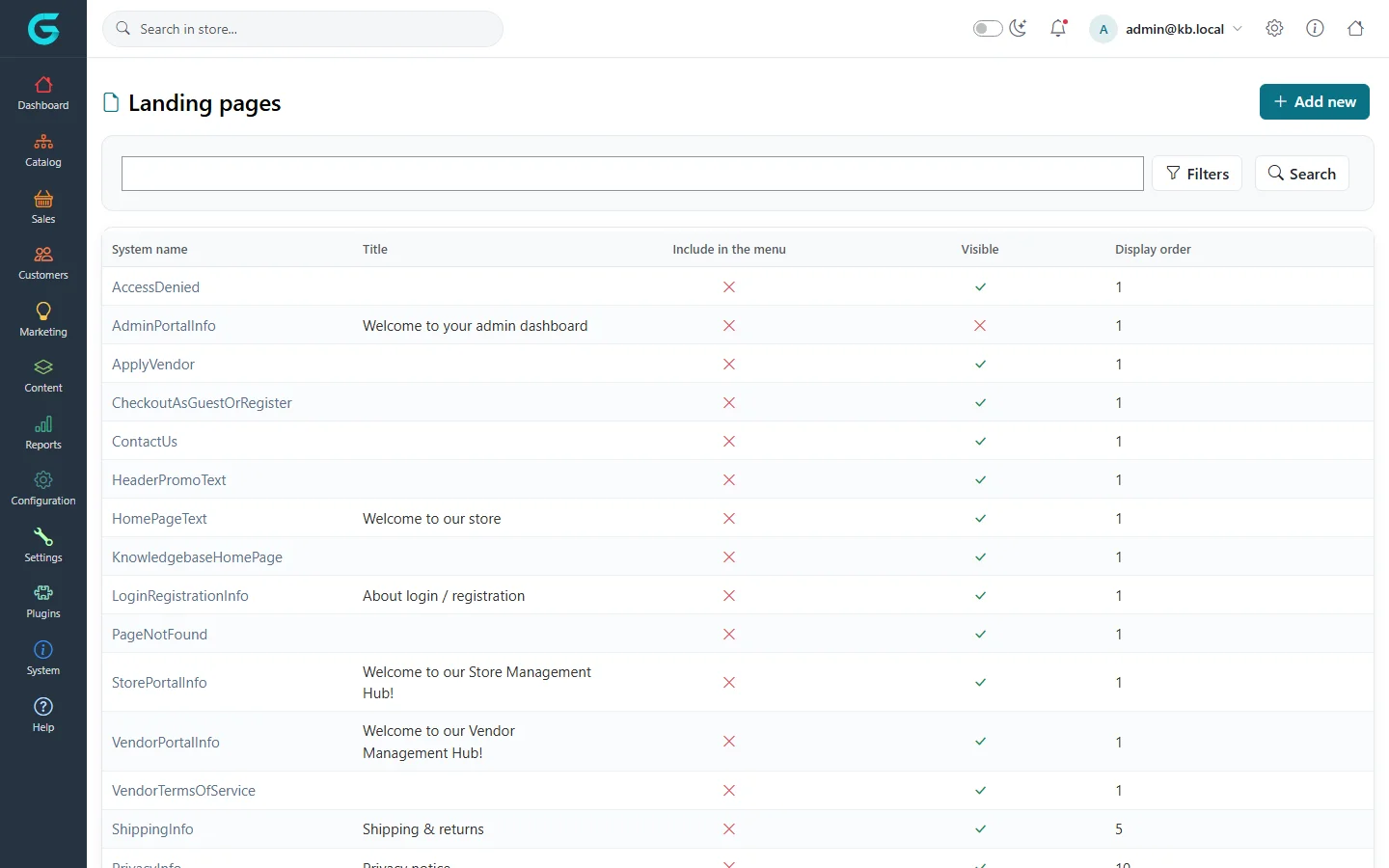
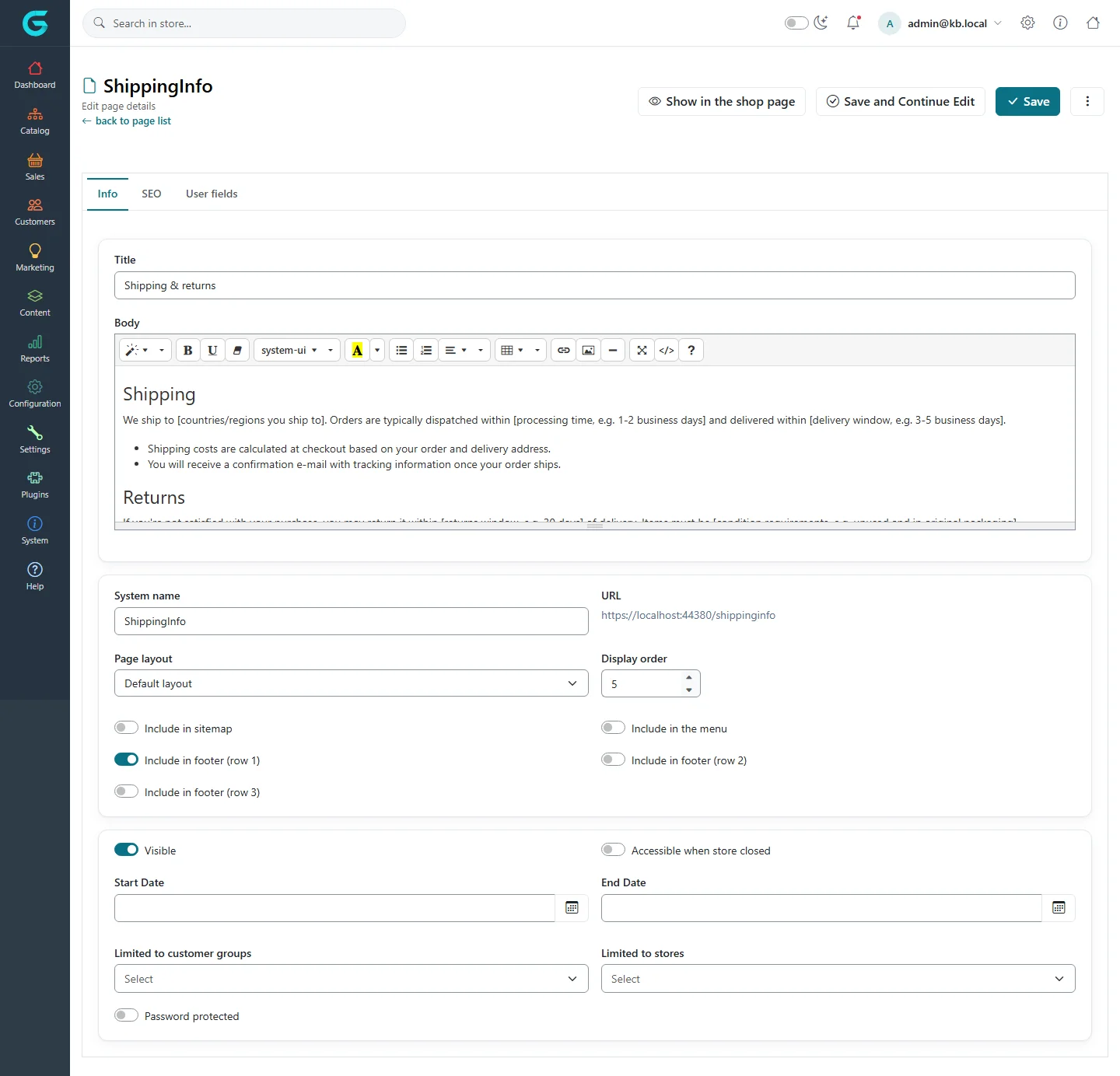
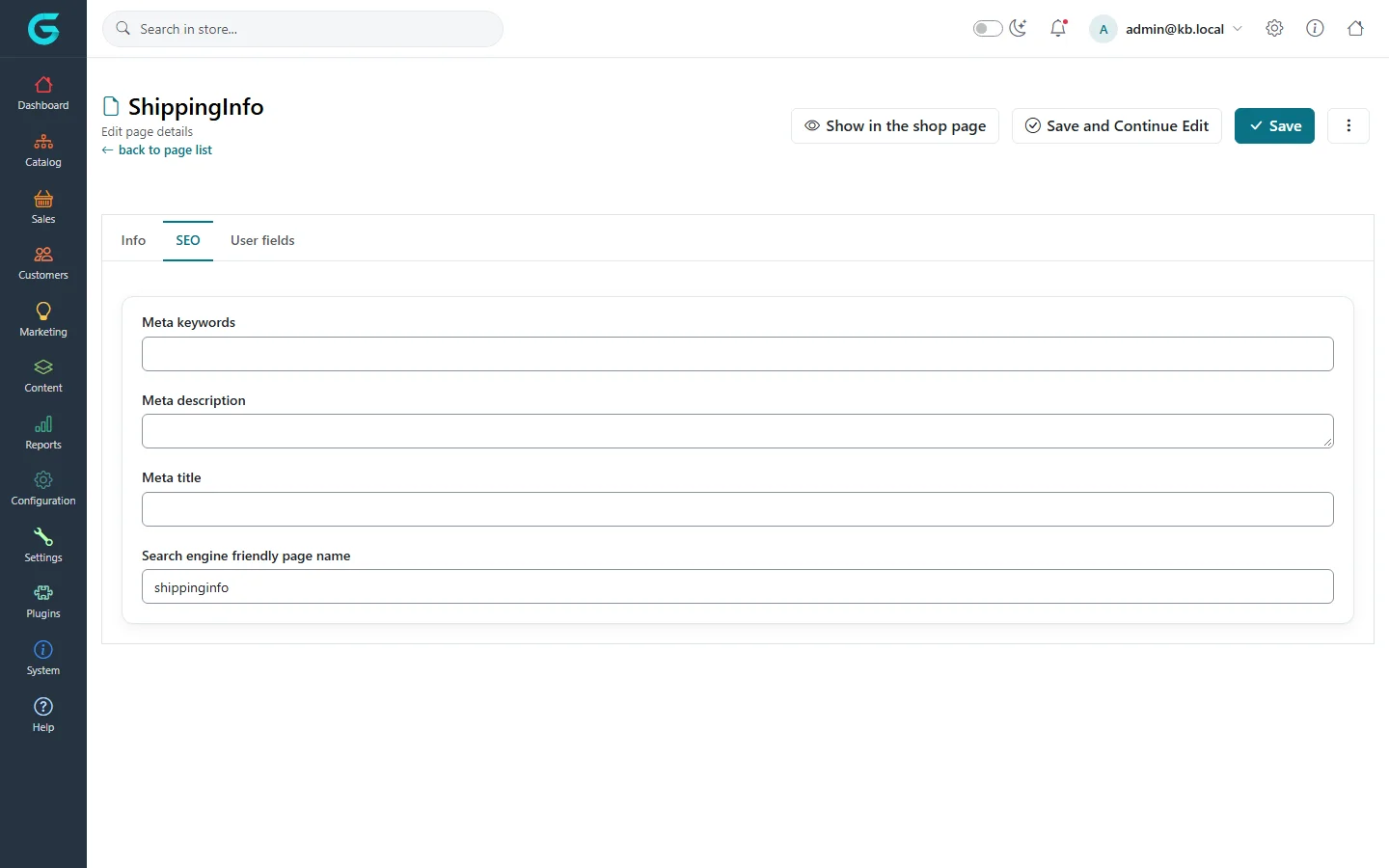
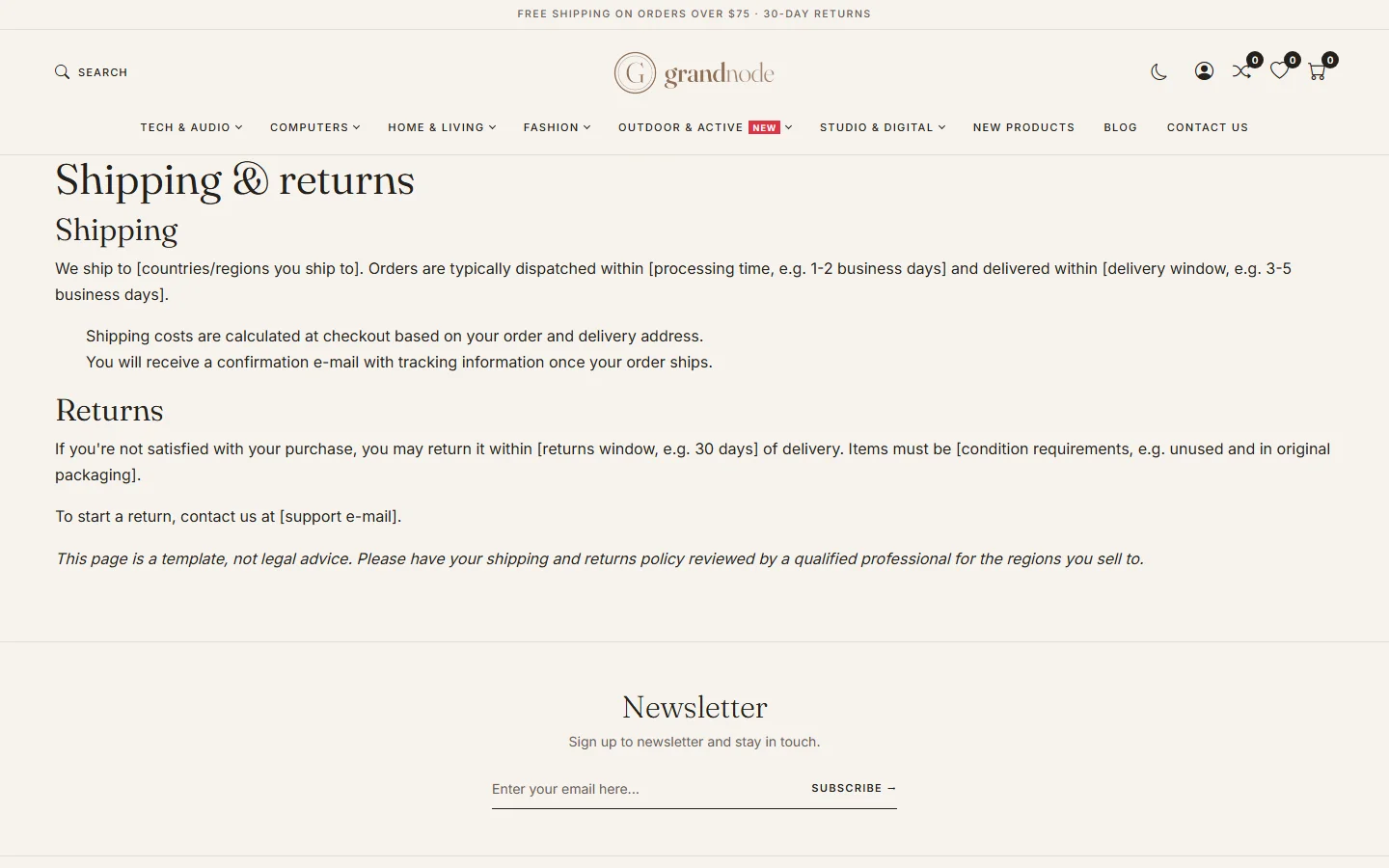
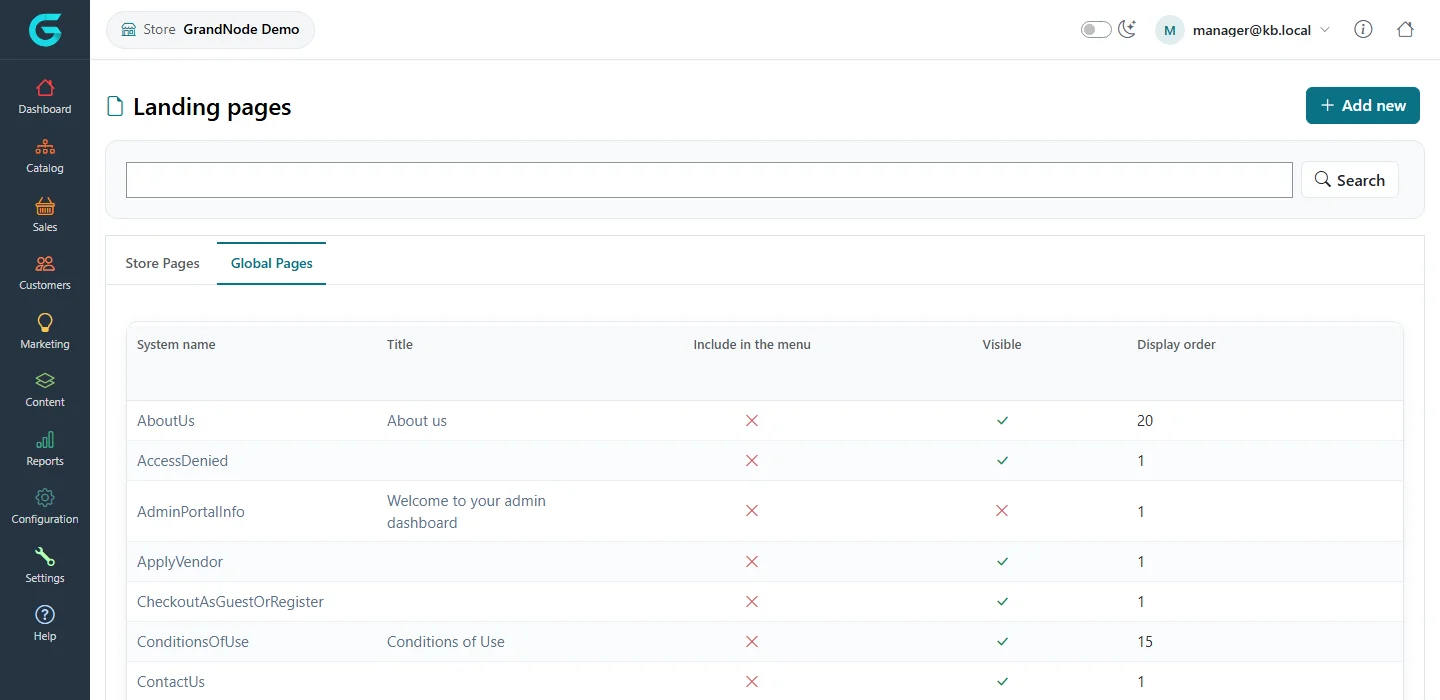
{"ArticleId":null,"Name":"Landing pages","Content":"\n\u003Cp\u003ELanding pages (in the code and older versions: pages, or topics in nopCommerce) are the static pages of the storefront: About us, Conditions of use, Privacy notice, Shipping \u0026amp; returns, and blocks of text that the theme places on other pages, such as the welcome text on the home page. A landing page has a title, a rich-text body, its own URL, SEO fields and a set of switches that decide where it is linked from and who may see it.\u003C/p\u003E\n\n\u003Ch2 id=\u0022where-to-find-it\u0022\u003EWhere to find it\u003C/h2\u003E\n\u003Cp\u003EGo to \u003Cstrong\u003EContent \u2192 Landing pages\u003C/strong\u003E. The list shows every page with its \u003Cstrong\u003ESystem name\u003C/strong\u003E, \u003Cstrong\u003ETitle\u003C/strong\u003E, \u003Cstrong\u003EInclude in the menu\u003C/strong\u003E, \u003Cstrong\u003EVisible\u003C/strong\u003E and \u003Cstrong\u003EDisplay order\u003C/strong\u003E. Type in the search box and click \u003Cstrong\u003ESearch\u003C/strong\u003E to filter by name; click a row to edit it.\u003C/p\u003E\n\u003Cfigure\u003E\u003Cimg src=\u0022/Plugins/Theme.GrandNodeCom/Content/kb/content/pages-list.webp\u0022 alt=\u0022The Landing pages list in the admin panel with system names such as AboutUs, ContactUs, HomePageText and ShippingInfo\u0022 width=\u00221440\u0022 height=\u0022900\u0022 loading=\u0022lazy\u0022\u003E\u003Cfigcaption\u003EContent \u2192 Landing pages.\u003C/figcaption\u003E\u003C/figure\u003E\n\n\u003Ch2 id=\u0022system-pages\u0022\u003EPages the store itself uses\u003C/h2\u003E\n\u003Cp\u003EA fresh installation creates a set of pages that the storefront looks up by their \u003Cstrong\u003ESystem name\u003C/strong\u003E, not by their URL. Do not rename or delete them; edit their title and body instead.\u003C/p\u003E\n\u003Ctable\u003E\n\u003Cthead\u003E\u003Ctr\u003E\u003Cth\u003ESystem name\u003C/th\u003E\u003Cth\u003EWhere it appears\u003C/th\u003E\u003C/tr\u003E\u003C/thead\u003E\n\u003Ctbody\u003E\n\u003Ctr\u003E\u003Ctd\u003E\u003Ccode\u003EHomePageText\u003C/code\u003E\u003C/td\u003E\u003Ctd\u003EThe welcome block on the home page.\u003C/td\u003E\u003C/tr\u003E\n\u003Ctr\u003E\u003Ctd\u003E\u003Ccode\u003EAboutUs\u003C/code\u003E, \u003Ccode\u003EConditionsOfUse\u003C/code\u003E, \u003Ccode\u003EPrivacyInfo\u003C/code\u003E, \u003Ccode\u003EShippingInfo\u003C/code\u003E\u003C/td\u003E\u003Ctd\u003ELinked from the footer. The cart and checkout link to \u003Ccode\u003EConditionsOfUse\u003C/code\u003E (terms of service), and the cookie notice and registration form link to \u003Ccode\u003EPrivacyInfo\u003C/code\u003E.\u003C/td\u003E\u003C/tr\u003E\n\u003Ctr\u003E\u003Ctd\u003E\u003Ccode\u003EContactUs\u003C/code\u003E\u003C/td\u003E\u003Ctd\u003EThe text above the contact form.\u003C/td\u003E\u003C/tr\u003E\n\u003Ctr\u003E\u003Ctd\u003E\u003Ccode\u003ELoginRegistrationInfo\u003C/code\u003E, \u003Ccode\u003ECheckoutAsGuestOrRegister\u003C/code\u003E\u003C/td\u003E\u003Ctd\u003ETexts on the login and checkout-as-guest pages.\u003C/td\u003E\u003C/tr\u003E\n\u003Ctr\u003E\u003Ctd\u003E\u003Ccode\u003EPageNotFound\u003C/code\u003E, \u003Ccode\u003EAccessDenied\u003C/code\u003E\u003C/td\u003E\u003Ctd\u003EShown on the 404 page and when a visitor is not allowed to open something.\u003C/td\u003E\u003C/tr\u003E\n\u003Ctr\u003E\u003Ctd\u003E\u003Ccode\u003EHeaderPromoText\u003C/code\u003E\u003C/td\u003E\u003Ctd\u003EThe one-line promotion bar at the top of the storefront (for example free shipping over a threshold), in themes that show it.\u003C/td\u003E\u003C/tr\u003E\n\u003Ctr\u003E\u003Ctd\u003E\u003Ccode\u003EApplyVendor\u003C/code\u003E, \u003Ccode\u003EVendorTermsOfService\u003C/code\u003E\u003C/td\u003E\u003Ctd\u003EThe \u0022apply for vendor account\u0022 page.\u003C/td\u003E\u003C/tr\u003E\n\u003Ctr\u003E\u003Ctd\u003E\u003Ccode\u003EKnowledgebaseHomePage\u003C/code\u003E\u003C/td\u003E\u003Ctd\u003EThe introduction on the knowledgebase home page.\u003C/td\u003E\u003C/tr\u003E\n\u003Ctr\u003E\u003Ctd\u003E\u003Ccode\u003EAdminPortalInfo\u003C/code\u003E, \u003Ccode\u003EStorePortalInfo\u003C/code\u003E, \u003Ccode\u003EVendorPortalInfo\u003C/code\u003E\u003C/td\u003E\u003Ctd\u003EThe welcome message on the dashboards of the admin, store manager and vendor panels (the \u003Cstrong\u003EEdit this message\u003C/strong\u003E button on the dashboard opens it).\u003C/td\u003E\u003C/tr\u003E\n\u003C/tbody\u003E\n\u003C/table\u003E\n\n\u003Ch2 id=\u0022how-to-create-a-page\u0022\u003EHow to create a page\u003C/h2\u003E\n\u003Col\u003E\n\u003Cli\u003EIn \u003Cstrong\u003EContent \u2192 Landing pages\u003C/strong\u003E click \u003Cstrong\u003EAdd new\u003C/strong\u003E.\u003C/li\u003E\n\u003Cli\u003EOn the \u003Cstrong\u003EInfo\u003C/strong\u003E tab enter the \u003Cstrong\u003ETitle\u003C/strong\u003E and write the \u003Cstrong\u003EBody\u003C/strong\u003E in the HTML editor. If the store has more than one language, switch the language tabs above the fields to translate them.\u003C/li\u003E\n\u003Cli\u003EEnter a \u003Cstrong\u003ESystem name\u003C/strong\u003E (required). It identifies the page for developers and themes; for an ordinary page any unique name such as \u003Ccode\u003EWarranty\u003C/code\u003E is fine.\u003C/li\u003E\n\u003Cli\u003EChoose where it is linked from: \u003Cstrong\u003EInclude in the menu\u003C/strong\u003E (the top menu) and/or one of \u003Cstrong\u003EInclude in footer (row 1)\u003C/strong\u003E, \u003Cstrong\u003E(row 2)\u003C/strong\u003E, \u003Cstrong\u003E(row 3)\u003C/strong\u003E (the footer link columns). \u003Cstrong\u003EDisplay order\u003C/strong\u003E sorts the links.\u003C/li\u003E\n\u003Cli\u003ELeave \u003Cstrong\u003EVisible\u003C/strong\u003E on, or switch it off to keep a draft.\u003C/li\u003E\n\u003Cli\u003EOn the \u003Cstrong\u003ESEO\u003C/strong\u003E tab enter the meta fields and, if you want, the \u003Cstrong\u003ESearch engine friendly page name\u003C/strong\u003E. When left empty it is generated from the title.\u003C/li\u003E\n\u003Cli\u003EClick \u003Cstrong\u003ESave and Continue Edit\u003C/strong\u003E. The \u003Cstrong\u003EURL\u003C/strong\u003E of the page now appears next to the system name, and \u003Cstrong\u003EShow in the shop page\u003C/strong\u003E opens it on the storefront.\u003C/li\u003E\n\u003C/ol\u003E\n\u003Cfigure\u003E\u003Cimg src=\u0022/Plugins/Theme.GrandNodeCom/Content/kb/content/page-edit-info.webp\u0022 alt=\u0022Editing the ShippingInfo landing page: title and body in the HTML editor, system name, URL, page layout, display order, sitemap, menu and footer switches, visibility, dates, customer groups, stores and password\u0022 width=\u00221440\u0022 height=\u00221384\u0022 loading=\u0022lazy\u0022\u003E\u003Cfigcaption\u003EThe Info tab of a landing page, in three cards: content, placement, and access.\u003C/figcaption\u003E\u003C/figure\u003E\n\n\u003Ch2 id=\u0022fields-and-settings\u0022\u003EFields and settings\u003C/h2\u003E\n\u003Ctable\u003E\n\u003Cthead\u003E\u003Ctr\u003E\u003Cth\u003EField\u003C/th\u003E\u003Cth\u003EWhat it does\u003C/th\u003E\u003C/tr\u003E\u003C/thead\u003E\n\u003Ctbody\u003E\n\u003Ctr\u003E\u003Ctd\u003E\u003Cstrong\u003ETitle\u003C/strong\u003E, \u003Cstrong\u003EBody\u003C/strong\u003E\u003C/td\u003E\u003Ctd\u003EThe heading and content of the page, translatable per language.\u003C/td\u003E\u003C/tr\u003E\n\u003Ctr\u003E\u003Ctd\u003E\u003Cstrong\u003ESystem name\u003C/strong\u003E\u003C/td\u003E\u003Ctd\u003EInternal identifier used by the storefront and themes to find the page. Must be unique within a store.\u003C/td\u003E\u003C/tr\u003E\n\u003Ctr\u003E\u003Ctd\u003E\u003Cstrong\u003EURL\u003C/strong\u003E\u003C/td\u003E\u003Ctd\u003ERead only, shown after the first save: the address of the page, built from the store URL and the SEO name (for example \u003Ccode\u003E/shippinginfo\u003C/code\u003E).\u003C/td\u003E\u003C/tr\u003E\n\u003Ctr\u003E\u003Ctd\u003E\u003Cstrong\u003EPage layout\u003C/strong\u003E\u003C/td\u003E\u003Ctd\u003EWhich view renders the page. A default installation has one, \u003Cstrong\u003EDefault layout\u003C/strong\u003E. Themes and developers can add more. See \u003Ca href=\u0022/content-layouts\u0022\u003EPage layouts and other layouts\u003C/a\u003E.\u003C/td\u003E\u003C/tr\u003E\n\u003Ctr\u003E\u003Ctd\u003E\u003Cstrong\u003EDisplay order\u003C/strong\u003E\u003C/td\u003E\u003Ctd\u003ESort order of the page in the menu and footer.\u003C/td\u003E\u003C/tr\u003E\n\u003Ctr\u003E\u003Ctd\u003E\u003Cstrong\u003EInclude in sitemap\u003C/strong\u003E\u003C/td\u003E\u003Ctd\u003EAdds the page to the storefront sitemap and to \u003Ccode\u003Esitemap.xml\u003C/code\u003E.\u003C/td\u003E\u003C/tr\u003E\n\u003Ctr\u003E\u003Ctd\u003E\u003Cstrong\u003EInclude in the menu\u003C/strong\u003E\u003C/td\u003E\u003Ctd\u003EAdds a link to the top menu.\u003C/td\u003E\u003C/tr\u003E\n\u003Ctr\u003E\u003Ctd\u003E\u003Cstrong\u003EInclude in footer (row 1/2/3)\u003C/strong\u003E\u003C/td\u003E\u003Ctd\u003EAdds a link to the matching footer column. Which column shows which heading depends on the theme.\u003C/td\u003E\u003C/tr\u003E\n\u003Ctr\u003E\u003Ctd\u003E\u003Cstrong\u003EVisible\u003C/strong\u003E\u003C/td\u003E\u003Ctd\u003EPublished or not. A hidden page redirects visitors to the home page.\u003C/td\u003E\u003C/tr\u003E\n\u003Ctr\u003E\u003Ctd\u003E\u003Cstrong\u003EAccessible when store closed\u003C/strong\u003E\u003C/td\u003E\u003Ctd\u003EKeeps the page reachable while \u003Cstrong\u003EStore closed\u003C/strong\u003E is on in the store settings, for example the conditions of use or the contact page.\u003C/td\u003E\u003C/tr\u003E\n\u003Ctr\u003E\u003Ctd\u003E\u003Cstrong\u003EStart Date\u003C/strong\u003E, \u003Cstrong\u003EEnd Date\u003C/strong\u003E\u003C/td\u003E\u003Ctd\u003EShow the page only in this period, for example a seasonal promotion page. Outside it the page behaves as hidden and disappears from the menu and footer.\u003C/td\u003E\u003C/tr\u003E\n\u003Ctr\u003E\u003Ctd\u003E\u003Cstrong\u003ELimited to customer groups\u003C/strong\u003E\u003C/td\u003E\u003Ctd\u003EOnly customers in the selected groups can open the page. Empty means everyone.\u003C/td\u003E\u003C/tr\u003E\n\u003Ctr\u003E\u003Ctd\u003E\u003Cstrong\u003ELimited to stores\u003C/strong\u003E\u003C/td\u003E\u003Ctd\u003EThe page is used only in the selected stores. Empty means all stores.\u003C/td\u003E\u003C/tr\u003E\n\u003Ctr\u003E\u003Ctd\u003E\u003Cstrong\u003EPassword protected\u003C/strong\u003E, \u003Cstrong\u003EPassword\u003C/strong\u003E\u003C/td\u003E\u003Ctd\u003EThe storefront shows a password box instead of the content; the title and body are sent to the browser only after the right password is entered.\u003C/td\u003E\u003C/tr\u003E\n\u003Ctr\u003E\u003Ctd\u003E\u003Cstrong\u003EMeta keywords\u003C/strong\u003E, \u003Cstrong\u003EMeta description\u003C/strong\u003E, \u003Cstrong\u003EMeta title\u003C/strong\u003E (SEO tab)\u003C/td\u003E\u003Ctd\u003EThe tags search engines read. Meta title falls back to the page title.\u003C/td\u003E\u003C/tr\u003E\n\u003Ctr\u003E\u003Ctd\u003E\u003Cstrong\u003ESearch engine friendly page name\u003C/strong\u003E (SEO tab)\u003C/td\u003E\u003Ctd\u003EThe slug in the URL. Must be unique across the store (products, categories and pages share the URL space).\u003C/td\u003E\u003C/tr\u003E\n\u003C/tbody\u003E\n\u003C/table\u003E\n\u003Cfigure\u003E\u003Cimg src=\u0022/Plugins/Theme.GrandNodeCom/Content/kb/content/page-edit-seo.webp\u0022 alt=\u0022The SEO tab of a landing page with meta keywords, meta description, meta title and the search engine friendly page name shippinginfo\u0022 width=\u00221440\u0022 height=\u0022900\u0022 loading=\u0022lazy\u0022\u003E\u003Cfigcaption\u003EThe SEO tab.\u003C/figcaption\u003E\u003C/figure\u003E\n\n\u003Ch2 id=\u0022the-result-on-the-storefront\u0022\u003EThe result on the storefront\u003C/h2\u003E\n\u003Cp\u003EA page opens at its SEO name, directly under the store address. The ShippingInfo page above, for example, is \u003Ccode\u003E/shippinginfo\u003C/code\u003E, linked from the first footer column:\u003C/p\u003E\n\u003Cfigure\u003E\u003Cimg src=\u0022/Plugins/Theme.GrandNodeCom/Content/kb/content/storefront-page.webp\u0022 alt=\u0022The Shipping and returns page on the storefront, rendered by the Nordic theme\u0022 width=\u00221440\u0022 height=\u0022900\u0022 loading=\u0022lazy\u0022\u003E\u003Cfigcaption\u003EThe same page seen by a visitor (Nordic theme).\u003C/figcaption\u003E\u003C/figure\u003E\n\n\u003Ch2 id=\u0022previewing\u0022\u003EPreviewing hidden and scheduled pages\u003C/h2\u003E\n\u003Cp\u003EAn administrator who is logged in and has the Manage Pages permission can open a page that is hidden or outside its date range, so you can check a draft on the storefront before publishing it. Visitors are redirected to the home page. The storefront also shows administrators a small edit link on the page that jumps back to the editor.\u003C/p\u003E\n\n\u003Ch2 id=\u0022store-managers\u0022\u003EPages in the store manager panel\u003C/h2\u003E\n\u003Cp\u003EIn the store manager panel (\u003Ccode\u003E/store\u003C/code\u003E), \u003Cstrong\u003EContent \u2192 Landing pages\u003C/strong\u003E has two tabs. \u003Cstrong\u003EStore Pages\u003C/strong\u003E are pages that belong only to this store; the manager creates and edits them freely. \u003Cstrong\u003EGlobal Pages\u003C/strong\u003E are shared by all stores (or by several). Opening a global page shows the warning \u0022This page is shared across multiple stores. Changes may affect other stores.\u0022 The \u003Cstrong\u003ECopy\u003C/strong\u003E action in the overflow menu creates a store-specific copy with the same system name and translations. When a store has its own copy, the storefront of that store uses it instead of the global page, which is how one store gets its own About us or Conditions of use without touching the others.\u003C/p\u003E\n\u003Cfigure\u003E\u003Cimg src=\u0022/Plugins/Theme.GrandNodeCom/Content/kb/content/store-pages-list.webp\u0022 alt=\u0022The Landing pages list in the store manager panel with the Store Pages and Global Pages tabs\u0022 width=\u00221440\u0022 height=\u0022700\u0022 loading=\u0022lazy\u0022\u003E\u003Cfigcaption\u003EStore manager panel: store-specific pages and global pages are listed separately.\u003C/figcaption\u003E\u003C/figure\u003E\n\n\u003Ch2 id=\u0022tips\u0022\u003ETips and common mistakes\u003C/h2\u003E\n\u003Cul\u003E\n\u003Cli\u003EDo not delete a system page such as \u003Ccode\u003EConditionsOfUse\u003C/code\u003E or \u003Ccode\u003EPageNotFound\u003C/code\u003E. Switch off \u003Cstrong\u003EVisible\u003C/strong\u003E if you do not want it, or empty its body.\u003C/li\u003E\n\u003Cli\u003EIf a page does not appear in the footer, check that it is \u003Cstrong\u003EVisible\u003C/strong\u003E, inside its dates, not limited to another store or group, and that the active theme renders the footer row you chose.\u003C/li\u003E\n\u003Cli\u003EA password protects the text, not the existence of the page: the title is hidden too, but the URL and meta tags are public. Do not put secrets in meta fields.\u003C/li\u003E\n\u003Cli\u003EContent pasted from Word or another site may lose inline scripts, event handlers and some embeds: the sanitizer removes them. See \u003Ca href=\u0022/content-html-editor\u0022\u003EThe HTML editor, file manager and allowed HTML\u003C/a\u003E.\u003C/li\u003E\n\u003Cli\u003EKeep the \u003Cstrong\u003ESearch engine friendly page name\u003C/strong\u003E of \u003Ccode\u003EConditionsOfUse\u003C/code\u003E and \u003Ccode\u003EPrivacyInfo\u003C/code\u003E as \u003Ccode\u003Econditionsofuse\u003C/code\u003E and \u003Ccode\u003Eprivacyinfo\u003C/code\u003E: the cart, checkout, cookie notice and registration form link to those addresses directly.\u003C/li\u003E\n\u003Cli\u003EUse \u003Cstrong\u003ELimited to stores\u003C/strong\u003E rather than a copy when a page is simply not needed in some stores.\u003C/li\u003E\n\u003C/ul\u003E\n\n\u003Ch2 id=\u0022related\u0022\u003ERelated\u003C/h2\u003E\n\u003Cul\u003E\n\u003Cli\u003E\u003Ca href=\u0022/content-layouts\u0022\u003EPage layouts and other layouts\u003C/a\u003E\u003C/li\u003E\n\u003Cli\u003E\u003Ca href=\u0022/content-html-editor\u0022\u003EThe HTML editor, file manager and allowed HTML\u003C/a\u003E\u003C/li\u003E\n\u003Cli\u003E\u003Ca href=\u0022/docs-configuration\u0022\u003EConfiguration\u003C/a\u003E (store closed, SEO settings)\u003C/li\u003E\n\u003C/ul\u003E\n","ParentCategoryId":"6abdec6c83d2816248229f03","SeName":"content-pages","MetaKeywords":null,"MetaDescription":"Create and edit landing pages in GrandNode: body, SEO, page layout, menu and footer links, visibility dates, password and store or group access.","MetaTitle":null,"AllowComments":false,"Captcha":{"ReCaptchaChallengeField":null,"ReCaptchaResponseField":null,"ReCaptchaResponseValue":null,"ReCaptchaResponse":null},"RelatedArticles":[],"CategoryBreadcrumb":[{"Name":"Content management","Description":null,"IsCurrent":false,"Children":null,"Parent":null,"SeName":"docs-content","Id":"6abdec6c83d2816248229f03","UserFields":[]}],"AddNewComment":{"CommentText":null,"DisplayCaptcha":false,"Id":null,"UserFields":[]},"Comments":[],"Id":"6abdec6c83d2816248229f07","UserFields":[]}