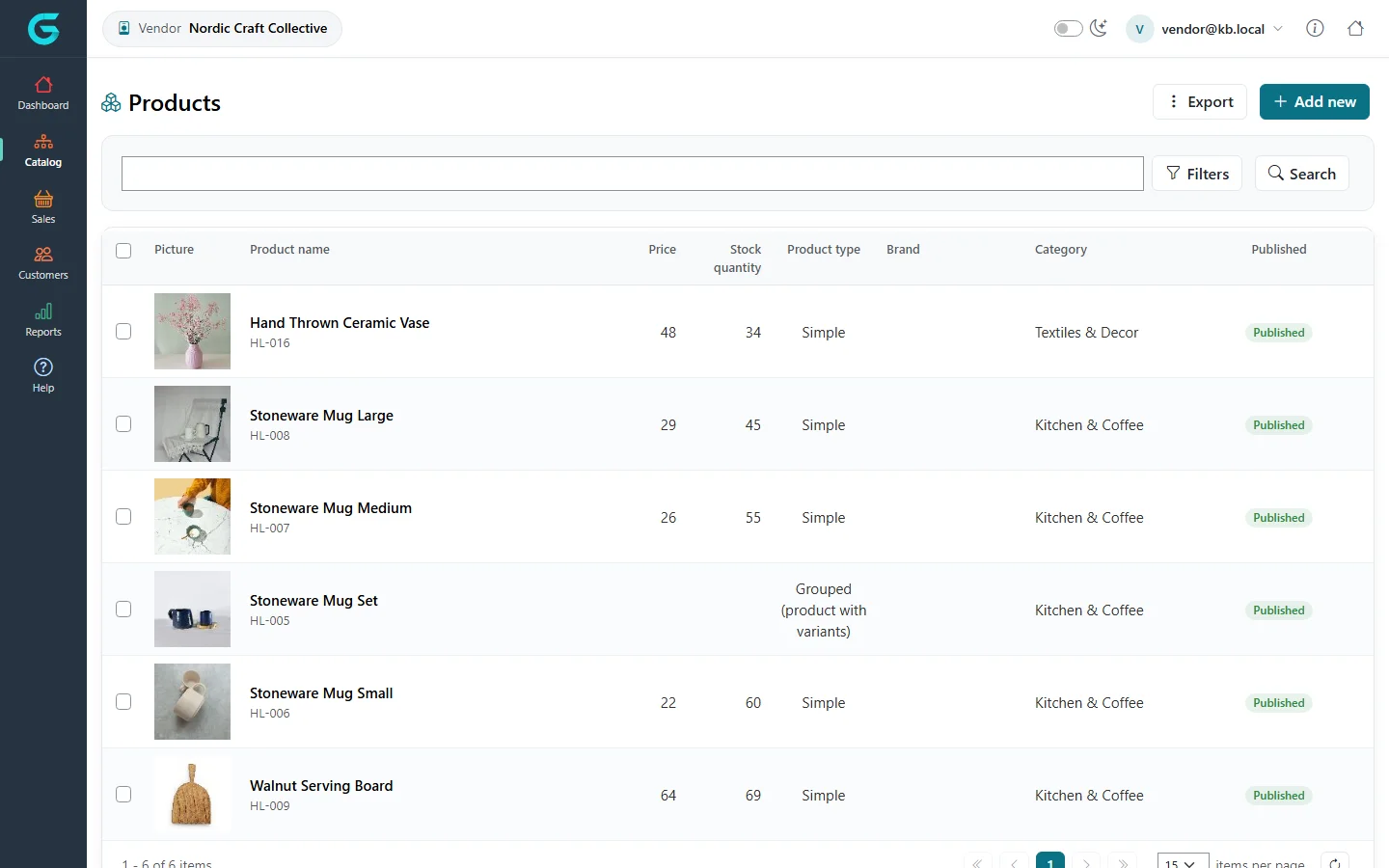
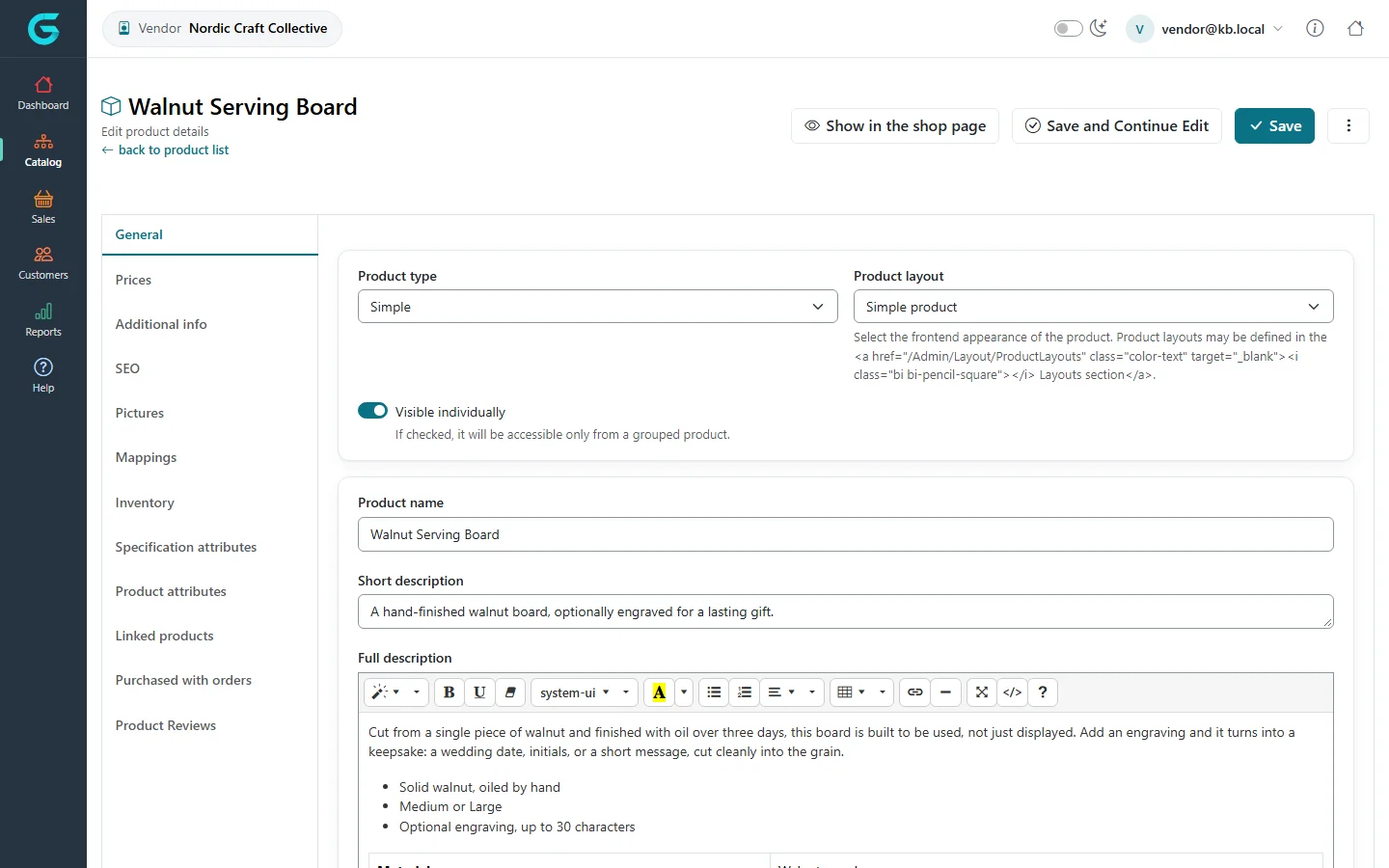
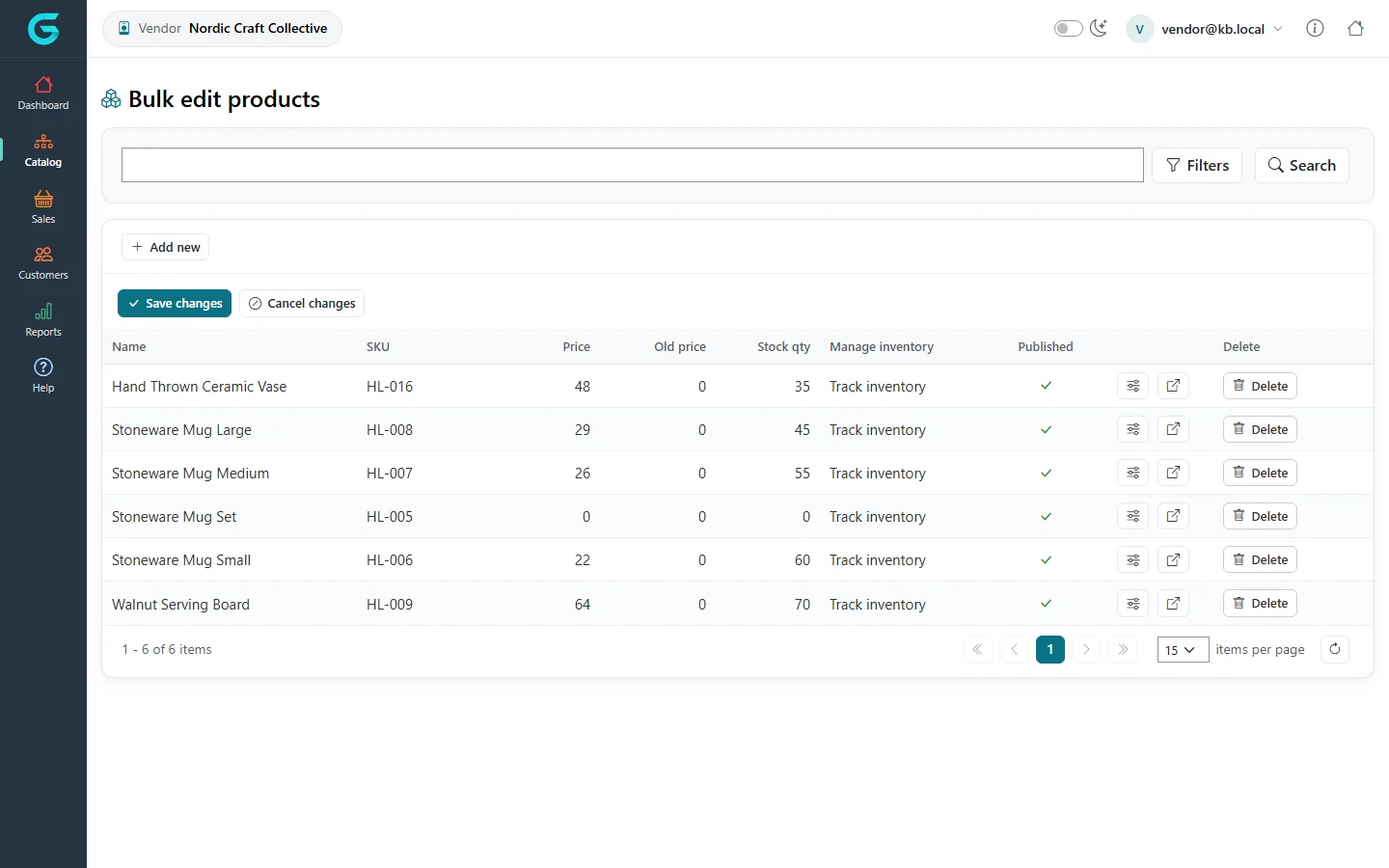
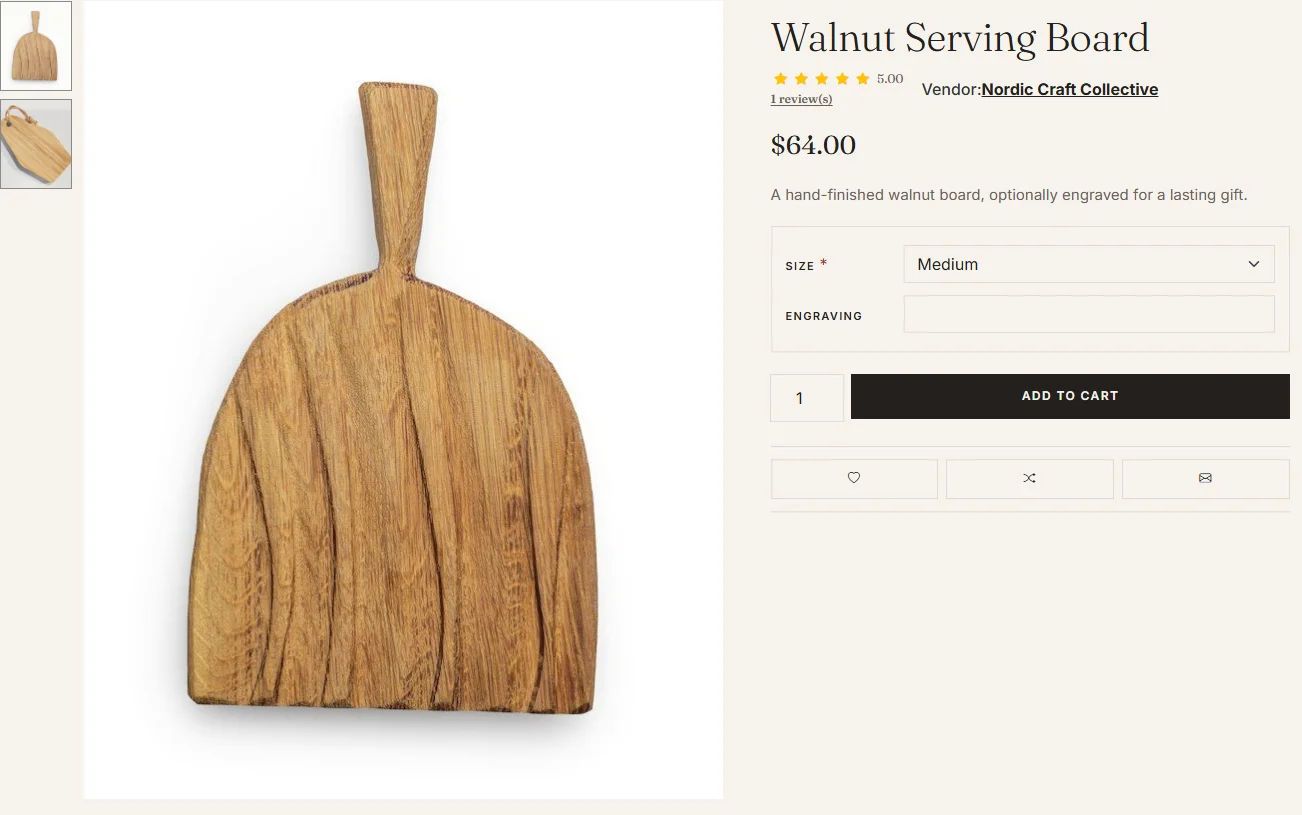
{"ArticleId":null,"Name":"Managing products as a vendor","Content":"\n\u003Cp\u003EVendors manage their own products in the vendor panel. Every product a vendor creates is automatically assigned to that vendor; products of other vendors and of the store are not visible.\u003C/p\u003E\n\n\u003Ch2 id=\u0022list\u0022\u003EYour products\u003C/h2\u003E\n\u003Cp\u003E\u003Cstrong\u003ECatalog \u2192 Products\u003C/strong\u003E lists your products with picture, name, SKU, price, stock, type and status. Use \u003Cstrong\u003EAdd new\u003C/strong\u003E to create one and \u003Cstrong\u003EExport\u003C/strong\u003E to download them.\u003C/p\u003E\n\u003Cfigure\u003E\u003Cimg src=\u0022/Plugins/Theme.GrandNodeCom/Content/kb/vendor-panel/product-list.webp\u0022 alt=\u0022The vendor product list with Hand-Thrown Ceramic Vase, Stoneware Mugs, Stoneware Mug Set and Walnut Serving Board, prices, stock, types and published status\u0022 width=\u00221440\u0022 height=\u0022900\u0022 loading=\u0022lazy\u0022\u003E\u003Cfigcaption\u003ECatalog \u2192 Products in the vendor panel.\u003C/figcaption\u003E\u003C/figure\u003E\n\n\u003Ch2 id=\u0022edit\u0022\u003EThe product editor\u003C/h2\u003E\n\u003Cp\u003EThe editor has the same tabs as in the admin panel - General, Prices, Additional info, SEO, Pictures, Mappings, Inventory, Specification and Product attributes, Linked products, Reviews. The meaning of the fields is explained in \u003Ca href=\u0022/docs-catalog\u0022\u003ECatalog\u003C/a\u003E.\u003C/p\u003E\n\u003Cfigure\u003E\u003Cimg src=\u0022/Plugins/Theme.GrandNodeCom/Content/kb/vendor-panel/product-edit-general.webp\u0022 alt=\u0022Editing Walnut Serving Board in the vendor panel: product type, layout, visible individually, name, short and full description\u0022 width=\u00221440\u0022 height=\u0022900\u0022 loading=\u0022lazy\u0022\u003E\u003Cfigcaption\u003EA vendor editing their product.\u003C/figcaption\u003E\u003C/figure\u003E\n\u003Cp\u003EDifferences from the admin panel:\u003C/p\u003E\n\u003Cul\u003E\n\u003Cli\u003EThe vendor cannot be changed; the product always belongs to you.\u003C/li\u003E\n\u003Cli\u003EStore, customer group and ACL limits, and some system fields, are not available.\u003C/li\u003E\n\u003Cli\u003ECategories, brands and collections are chosen from what the store has; vendors do not create categories.\u003C/li\u003E\n\u003Cli\u003EDepending on the marketplace\u0027s rules, the store owner may review or unpublish products.\u003C/li\u003E\n\u003C/ul\u003E\n\n\u003Ch2 id=\u0022bulk-edit\u0022\u003EBulk edit\u003C/h2\u003E\n\u003Cp\u003E\u003Cstrong\u003ECatalog \u2192 Bulk edit products\u003C/strong\u003E lets you change price, old price, stock, inventory method and published status of many of your products at once, then \u003Cstrong\u003ESave changes\u003C/strong\u003E.\u003C/p\u003E\n\u003Cfigure\u003E\u003Cimg src=\u0022/Plugins/Theme.GrandNodeCom/Content/kb/vendor-panel/bulk-edit.webp\u0022 alt=\u0022The vendor Bulk edit products grid with the vendor products, SKUs, prices, stock and published switches\u0022 width=\u00221440\u0022 height=\u0022900\u0022 loading=\u0022lazy\u0022\u003E\u003Cfigcaption\u003EBulk edit in the vendor panel.\u003C/figcaption\u003E\u003C/figure\u003E\n\n\u003Ch2 id=\u0022storefront\u0022\u003EOn the storefront\u003C/h2\u003E\n\u003Cp\u003EWith \u003Cstrong\u003EShow vendor on product details page\u003C/strong\u003E on, the product page names the vendor and links to the vendor\u0027s page, which lists all their products.\u003C/p\u003E\n\u003Cfigure\u003E\u003Cimg src=\u0022/Plugins/Theme.GrandNodeCom/Content/kb/vendor-panel/storefront-product-vendor.webp\u0022 alt=\u0022A storefront product page showing the vendor name link\u0022 width=\u00221302\u0022 height=\u0022815\u0022 loading=\u0022lazy\u0022\u003E\u003Cfigcaption\u003EThe vendor on a product page.\u003C/figcaption\u003E\u003C/figure\u003E\n\n\u003Ch2 id=\u0022related\u0022\u003ERelated\u003C/h2\u003E\n\u003Cul\u003E\n\u003Cli\u003E\u003Ca href=\u0022/vendor-panel-orders-shipments-returns\u0022\u003EOrders, shipments and returns for vendors\u003C/a\u003E\u003C/li\u003E\n\u003Cli\u003E\u003Ca href=\u0022/vendor-panel-vendor-profile-and-reviews\u0022\u003EVendor profile, page and reviews\u003C/a\u003E\u003C/li\u003E\n\u003C/ul\u003E\n","ParentCategoryId":"6abdec6d83d2816248229f55","SeName":"vendor-panel-manage-products","MetaKeywords":null,"MetaDescription":"Add and edit your products in the GrandNode vendor panel: product list, the product editor, bulk edit, and what vendors cannot change.","MetaTitle":null,"AllowComments":false,"Captcha":{"ReCaptchaChallengeField":null,"ReCaptchaResponseField":null,"ReCaptchaResponseValue":null,"ReCaptchaResponse":null},"RelatedArticles":[],"CategoryBreadcrumb":[{"Name":"Vendor panel (marketplace)","Description":null,"IsCurrent":false,"Children":null,"Parent":null,"SeName":"docs-vendor-panel","Id":"6abdec6d83d2816248229f55","UserFields":[]}],"AddNewComment":{"CommentText":null,"DisplayCaptcha":false,"Id":null,"UserFields":[]},"Comments":[],"Id":"6abdec6d83d2816248229f5f","UserFields":[]}