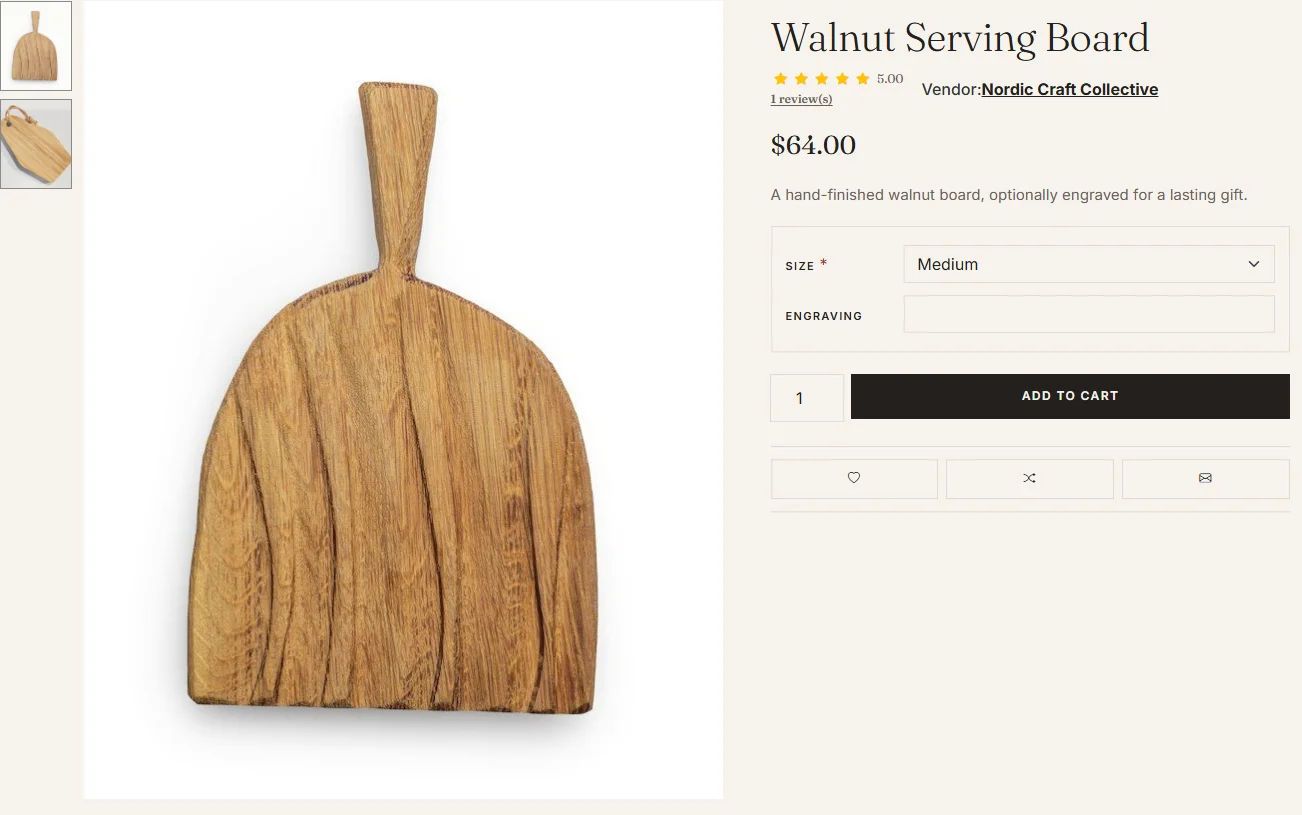
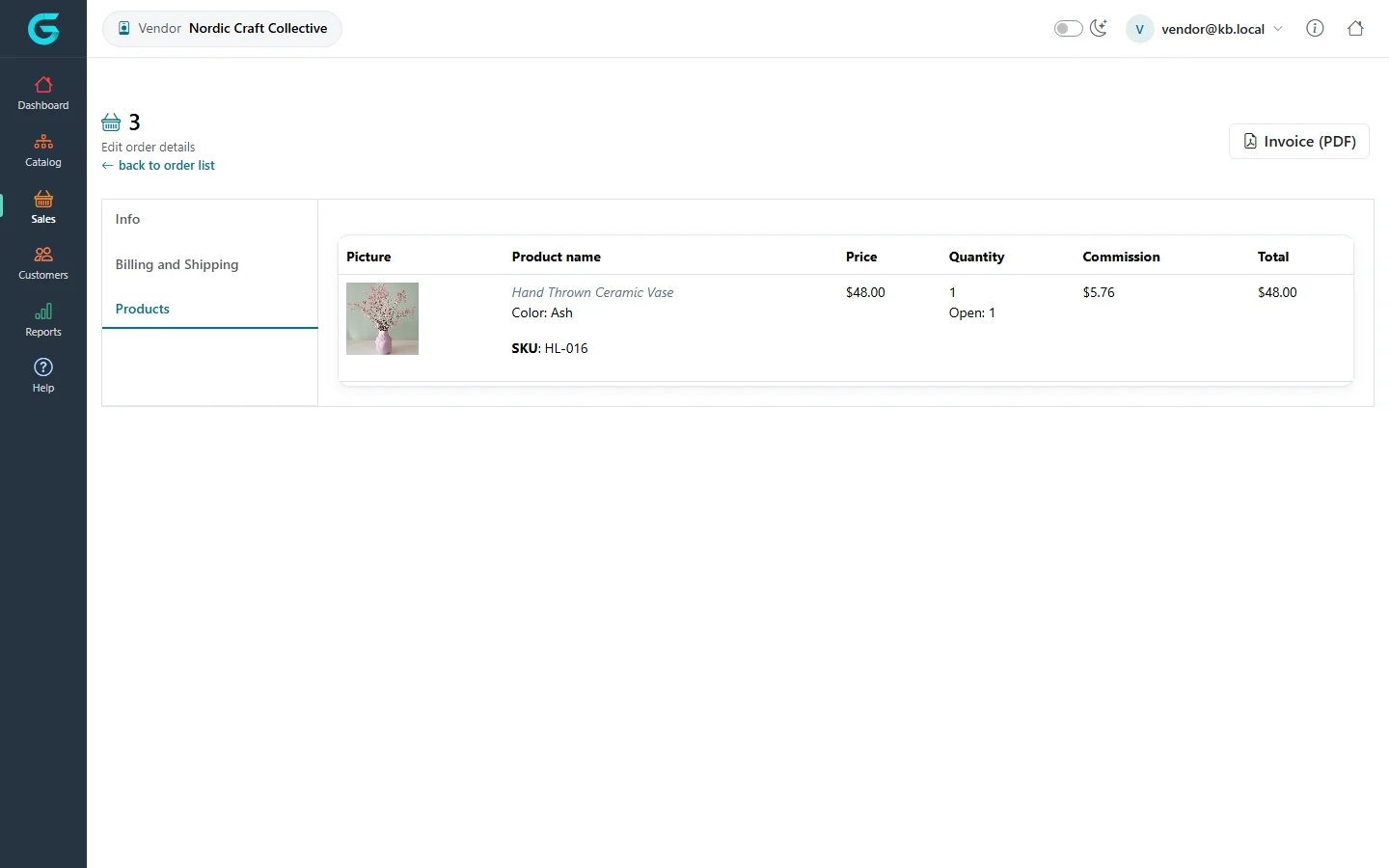
{"ArticleId":null,"Name":"Marketplace and vendors: how it works","Content":"\n\u003Cp\u003EGrandNode can run as a single store or as a marketplace where independent sellers, called \u003Cstrong\u003Evendors\u003C/strong\u003E, offer their products next to yours. There is no separate marketplace edition or plugin: vendors are part of the core. The store owner manages vendors in the admin panel, and each vendor works in its own panel at \u003Ccode\u003E/vendor\u003C/code\u003E, where it sees only its own products, the order lines that belong to it, and its own reviews and reports. This article explains the model; the rest of this section shows each screen step by step.\u003C/p\u003E\n\n\u003Ch2 id=\u0022the-three-parties\u0022\u003EWho does what\u003C/h2\u003E\n\u003Ctable\u003E\n\u003Cthead\u003E\u003Ctr\u003E\u003Cth\u003EParty\u003C/th\u003E\u003Cth\u003EWhere they work\u003C/th\u003E\u003Cth\u003EWhat they control\u003C/th\u003E\u003C/tr\u003E\u003C/thead\u003E\n\u003Ctbody\u003E\n\u003Ctr\u003E\u003Ctd\u003EStore owner (administrator)\u003C/td\u003E\u003Ctd\u003EAdmin panel, \u003Ccode\u003E/admin\u003C/code\u003E\u003C/td\u003E\u003Ctd\u003EVendor settings, creating and activating vendors, commission, every product and order in the store, payments, shipping methods, taxes, the storefront.\u003C/td\u003E\u003C/tr\u003E\n\u003Ctr\u003E\u003Ctd\u003EVendor\u003C/td\u003E\u003Ctd\u003EVendor panel, \u003Ccode\u003E/vendor\u003C/code\u003E\u003C/td\u003E\u003Ctd\u003EIts own products, shipments for its own order lines, merchandise returns for its items, reviews of the vendor, its own reports and (if allowed) its public profile.\u003C/td\u003E\u003C/tr\u003E\n\u003Ctr\u003E\u003Ctd\u003ECustomer\u003C/td\u003E\u003Ctd\u003EStorefront\u003C/td\u003E\u003Ctd\u003EBuys products from any vendor in one cart and one checkout, reviews vendors, contacts them, and can apply to become a vendor.\u003C/td\u003E\u003C/tr\u003E\n\u003C/tbody\u003E\n\u003C/table\u003E\n\n\u003Ch2 id=\u0022vendors-own-products\u0022\u003EVendors own products\u003C/h2\u003E\n\u003Cp\u003EEvery product has a \u003Cstrong\u003EVendor\u003C/strong\u003E field. In the admin panel you pick it on the product\u0027s \u003Cstrong\u003EGeneral\u003C/strong\u003E tab; a product created in the vendor panel is assigned to that vendor automatically and the vendor cannot change it. A product with no vendor belongs to the store owner. The vendor assignment decides:\u003C/p\u003E\n\u003Cul\u003E\n\u003Cli\u003Ewho can see and edit the product in the vendor panel (a vendor never sees another vendor\u0027s products, not even by guessing a URL);\u003C/li\u003E\n\u003Cli\u003Ewhose sales reports, bestsellers and low-stock list the product counts in;\u003C/li\u003E\n\u003Cli\u003Ewhich vendor page on the storefront lists the product, and which vendor name is shown on the product page when \u003Cstrong\u003EShow vendor on product details page\u003C/strong\u003E is on.\u003C/li\u003E\n\u003C/ul\u003E\n\u003Cfigure\u003E\u003Cimg src=\u0022/Plugins/Theme.GrandNodeCom/Content/kb/vendor-panel/storefront-product-vendor.webp\u0022 alt=\u0022Product page on the storefront with the line Vendor: Nordic Craft Collective under the product name\u0022 width=\u00221302\u0022 height=\u0022815\u0022 loading=\u0022lazy\u0022\u003E\u003Cfigcaption\u003EThe product page names the vendor and links to its vendor page.\u003C/figcaption\u003E\u003C/figure\u003E\n\n\u003Ch2 id=\u0022one-order-many-vendors\u0022\u003EOne order, many vendors\u003C/h2\u003E\n\u003Cp\u003EThe customer does not check out once per vendor. The cart can hold products from any number of vendors plus the store owner\u0027s own products, and checkout creates \u003Cstrong\u003Eone order\u003C/strong\u003E with one payment. Each order line remembers the vendor of its product and the \u003Cstrong\u003Ecommission\u003C/strong\u003E the store takes on it (the vendor\u0027s \u003Cstrong\u003ECommission\u003C/strong\u003E percentage at the time of the order).\u003C/p\u003E\n\u003Cp\u003EIn the demo data, order 3 contains products from several sellers. The store owner sees the whole order in \u003Cstrong\u003ESales \u2192 Orders\u003C/strong\u003E. Nordic Craft Collective sees the same order in its vendor panel, but only with its own line (the Hand Thrown Ceramic Vase), the price, quantity, commission and total of that line, and no order totals, payment method or other vendors\u0027 products.\u003C/p\u003E\n\u003Cfigure\u003E\u003Cimg src=\u0022/Plugins/Theme.GrandNodeCom/Content/kb/vendor-panel/order-products.webp\u0022 alt=\u0022Vendor panel order 3, Products tab, showing only the Hand Thrown Ceramic Vase line with price, quantity, commission and total\u0022 width=\u00221440\u0022 height=\u0022900\u0022 loading=\u0022lazy\u0022\u003E\u003Cfigcaption\u003EA vendor sees only its own lines of a shared order, with the store commission on each line.\u003C/figcaption\u003E\u003C/figure\u003E\n\n\u003Ch2 id=\u0022what-vendors-see\u0022\u003EWhat a vendor can and cannot see\u003C/h2\u003E\n\u003Cul\u003E\n\u003Cli\u003E\u003Cstrong\u003EOrders\u003C/strong\u003E: only orders that contain at least one of its items, and inside them only its own items.\u003C/li\u003E\n\u003Cli\u003E\u003Cstrong\u003EShipments\u003C/strong\u003E: only shipments it created, containing only its items. Each vendor ships its own part of an order.\u003C/li\u003E\n\u003Cli\u003E\u003Cstrong\u003EMerchandise returns\u003C/strong\u003E: only returns of its own items.\u003C/li\u003E\n\u003Cli\u003E\u003Cstrong\u003ECustomers\u003C/strong\u003E: no customer list. The vendor sees customer emails on its orders and in the \u003Cstrong\u003ECustomer reports\u003C/strong\u003E, limited to customers who bought its products.\u003C/li\u003E\n\u003Cli\u003E\u003Cstrong\u003EConfiguration\u003C/strong\u003E: nothing. Payment, shipping, tax, stores, languages, categories and settings stay with the store owner.\u003C/li\u003E\n\u003C/ul\u003E\n\n\u003Ch2 id=\u0022money\u0022\u003EPayment and commission\u003C/h2\u003E\n\u003Cp\u003ECustomers pay the store, not the vendor, through the payment methods the store owner configured. GrandNode records the commission per order line so you can settle with vendors, but it does not pay vendors out automatically. How and when you transfer the vendor\u0027s share is up to your own process or an integration.\u003C/p\u003E\n\n\u003Ch2 id=\u0022typical-setup\u0022\u003ETypical setup, in order\u003C/h2\u003E\n\u003Col\u003E\n\u003Cli\u003EReview the vendor settings: whether customers can apply, whether vendors may edit their profile, and the review rules. See \u003Ca href=\u0022/vendor-panel-vendor-settings\u0022\u003EVendor settings\u003C/a\u003E.\u003C/li\u003E\n\u003Cli\u003ECreate vendors yourself or let customers apply, then activate them. See \u003Ca href=\u0022/vendor-panel-create-and-approve-vendors\u0022\u003ECreate, approve and activate vendors\u003C/a\u003E.\u003C/li\u003E\n\u003Cli\u003EAssign existing products to vendors, or let vendors add their own in the vendor panel. See \u003Ca href=\u0022/vendor-panel-manage-products\u0022\u003EManaging products as a vendor\u003C/a\u003E.\u003C/li\u003E\n\u003Cli\u003EVendors sign in at \u003Ccode\u003E/vendor\u003C/code\u003E and handle their orders and shipments. See \u003Ca href=\u0022/vendor-panel-tour\u0022\u003EA tour of the vendor panel\u003C/a\u003E and \u003Ca href=\u0022/vendor-panel-orders-shipments-returns\u0022\u003EOrders, shipments and returns\u003C/a\u003E.\u003C/li\u003E\n\u003C/ol\u003E\n\n\u003Ch2 id=\u0022related\u0022\u003ERelated\u003C/h2\u003E\n\u003Cul\u003E\n\u003Cli\u003E\u003Ca href=\u0022/docs-customers\u0022\u003ECustomers\u003C/a\u003E: customer accounts, customer groups (including the \u003Cem\u003EVendors\u003C/em\u003E group) and permissions.\u003C/li\u003E\n\u003Cli\u003E\u003Ca href=\u0022/vendor-panel-vendor-profile-and-reviews\u0022\u003EVendor profile, reviews and the vendor page\u003C/a\u003E\u003C/li\u003E\n\u003C/ul\u003E\n","ParentCategoryId":"6abdec6d83d2816248229f55","SeName":"vendor-panel-marketplace-overview","MetaKeywords":null,"MetaDescription":"How GrandNode works as a multi-vendor marketplace: vendors own products, orders mix items from several vendors, and each vendor sees only its own part.","MetaTitle":null,"AllowComments":false,"Captcha":{"ReCaptchaChallengeField":null,"ReCaptchaResponseField":null,"ReCaptchaResponseValue":null,"ReCaptchaResponse":null},"RelatedArticles":[],"CategoryBreadcrumb":[{"Name":"Vendor panel (marketplace)","Description":null,"IsCurrent":false,"Children":null,"Parent":null,"SeName":"docs-vendor-panel","Id":"6abdec6d83d2816248229f55","UserFields":[]}],"AddNewComment":{"CommentText":null,"DisplayCaptcha":false,"Id":null,"UserFields":[]},"Comments":[],"Id":"6abdec6d83d2816248229f57","UserFields":[]}