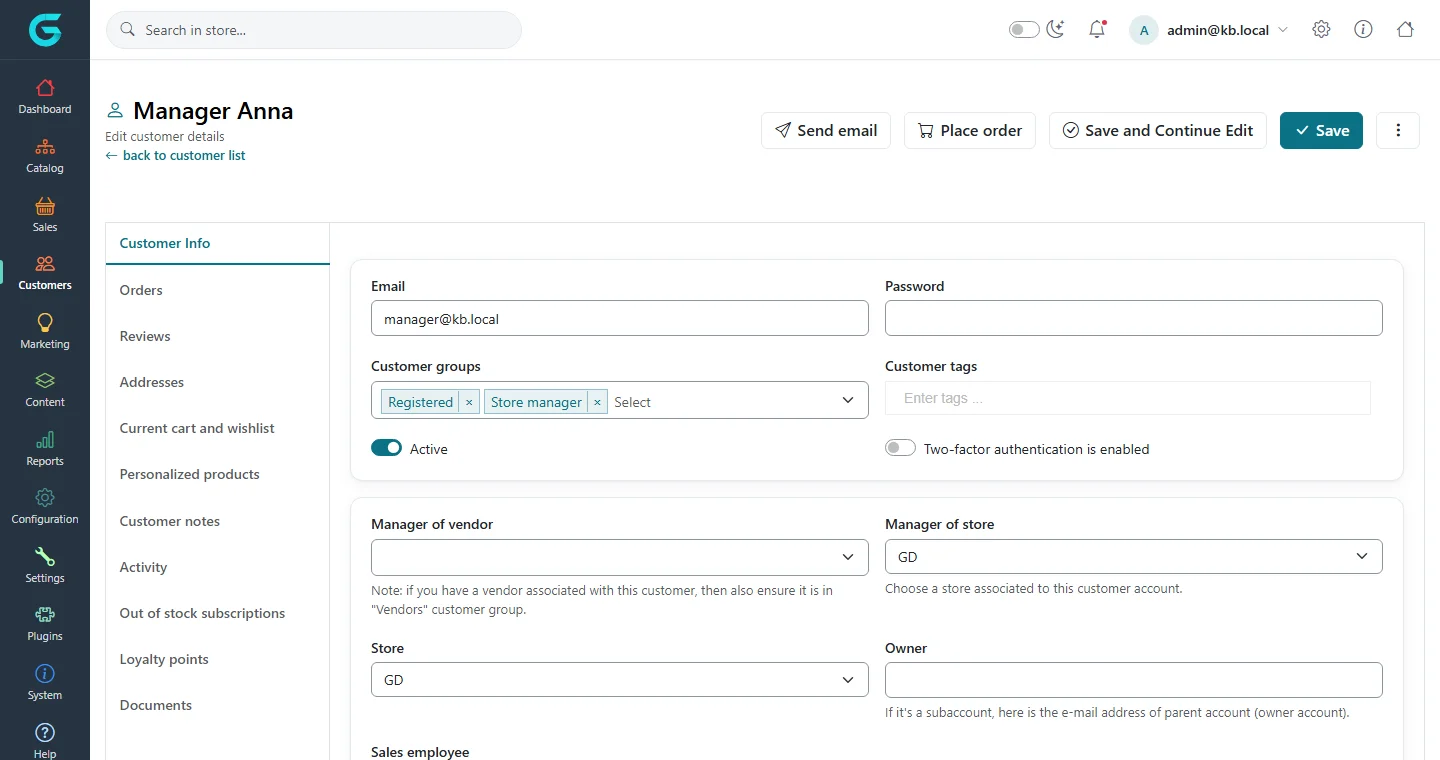
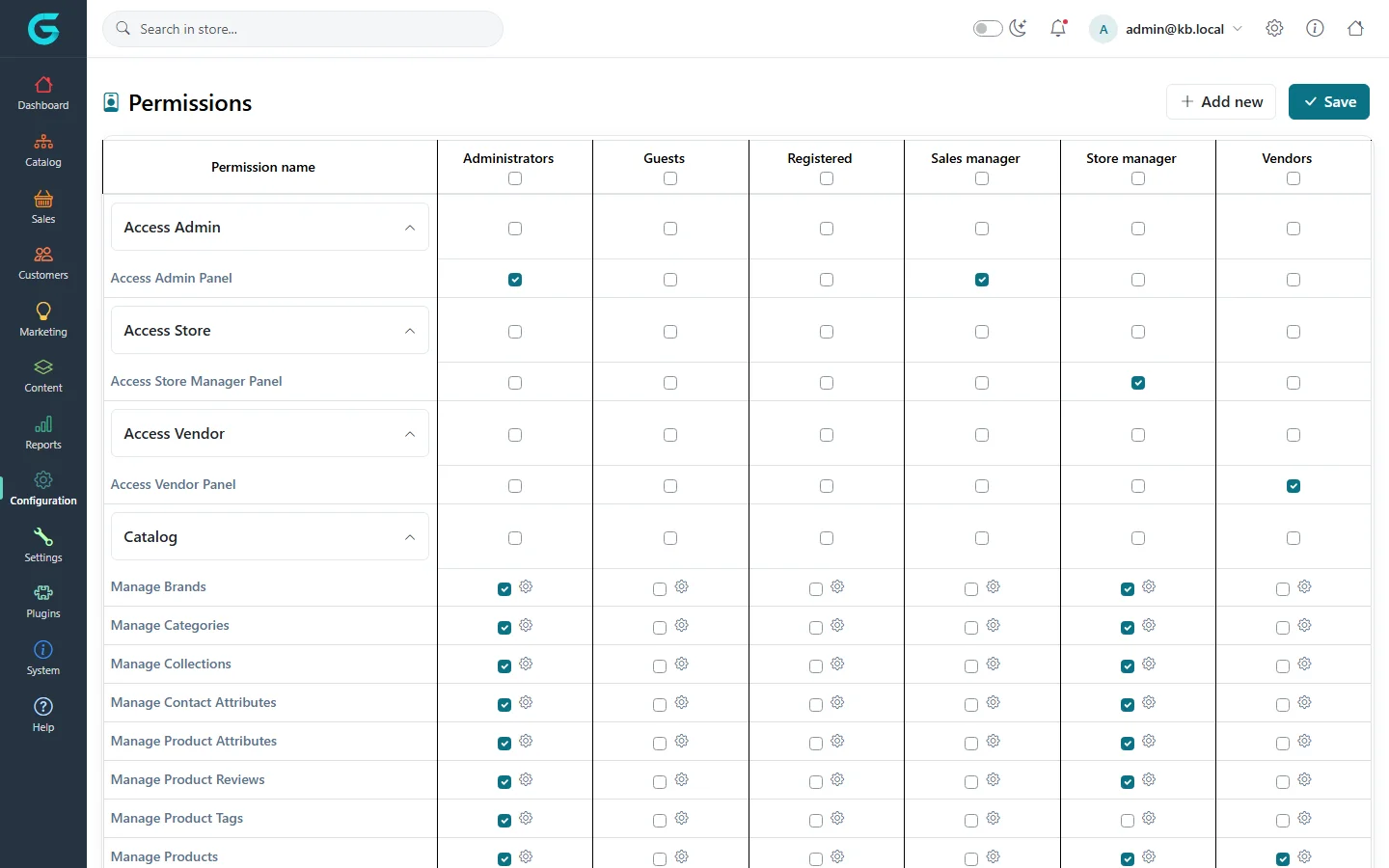
{"ArticleId":null,"Name":"Give someone access to the store owner panel","Content":"\n\u003Cp\u003EAccess to the store owner panel is not a separate user type: it is an ordinary customer account with two things set by an administrator \u2014 membership in the \u003Cstrong\u003EStore manager\u003C/strong\u003E customer group and a store chosen in \u003Cstrong\u003EManager of store\u003C/strong\u003E. Both are required. What the manager can then do inside the panel is controlled by the permissions of the Store manager group.\u003C/p\u003E\n\n\u003Ch2 id=\u0022before-you-start\u0022\u003EBefore you start\u003C/h2\u003E\n\u003Cul\u003E\n\u003Cli\u003EThe store must exist in \u003Cstrong\u003EConfiguration \u2192 Stores\u003C/strong\u003E in the Admin panel. The store owner panel is only useful in a multi-store installation; with one store the administrator can simply use \u003Ccode\u003E/admin\u003C/code\u003E.\u003C/li\u003E\n\u003Cli\u003EThe person needs a customer account. You can create it in \u003Cstrong\u003ECustomers \u2192 Customers \u2192 Add new\u003C/strong\u003E or let them register on the storefront and promote the account afterwards.\u003C/li\u003E\n\u003Cli\u003EYou need an administrator account with the \u003Cstrong\u003EManage Customers\u003C/strong\u003E and \u003Cstrong\u003EManage ACL\u003C/strong\u003E permissions.\u003C/li\u003E\n\u003C/ul\u003E\n\n\u003Ch2 id=\u0022make-a-customer-a-store-manager\u0022\u003EHow to make a customer a store manager\u003C/h2\u003E\n\u003Col\u003E\n\u003Cli\u003EIn the Admin panel open \u003Cstrong\u003ECustomers \u2192 Customers\u003C/strong\u003E and find the account by email.\u003C/li\u003E\n\u003Cli\u003EOpen it. On the \u003Cstrong\u003ECustomer Info\u003C/strong\u003E tab, in \u003Cstrong\u003ECustomer groups\u003C/strong\u003E, keep \u003Cstrong\u003ERegistered\u003C/strong\u003E and add \u003Cstrong\u003EStore manager\u003C/strong\u003E.\u003C/li\u003E\n\u003Cli\u003EIn \u003Cstrong\u003EManager of store\u003C/strong\u003E choose the store this person will run. Leave \u003Cstrong\u003EManager of vendor\u003C/strong\u003E empty \u2014 a store manager is not a vendor.\u003C/li\u003E\n\u003Cli\u003ECheck that \u003Cstrong\u003EActive\u003C/strong\u003E is on, then click \u003Cstrong\u003ESave\u003C/strong\u003E.\u003C/li\u003E\n\u003Cli\u003ESend the person the address of the panel: \u003Ccode\u003Ehttps://\u0026lt;your-store-domain\u0026gt;/store\u003C/code\u003E. They sign in with their normal email and password; the storefront account menu also shows a \u003Cstrong\u003EStore portal\u003C/strong\u003E button for them.\u003C/li\u003E\n\u003C/ol\u003E\n\u003Cfigure\u003E\u003Cimg src=\u0022/Plugins/Theme.GrandNodeCom/Content/kb/store-panel/admin-customer-manager.webp\u0022 alt=\u0022Admin panel customer editor with the Store manager customer group and the Manager of store field set\u0022 width=\u00221440\u0022 height=\u0022760\u0022 loading=\u0022lazy\u0022\u003E\u003Cfigcaption\u003EAdmin panel, Customers \u2192 Customers \u2192 edit: the Store manager group and the Manager of store field are what open /store.\u003C/figcaption\u003E\u003C/figure\u003E\n\u003Cp\u003EThe \u003Cstrong\u003EStore\u003C/strong\u003E field just below is something else: it says which store the customer account belongs to (it matters when customer accounts are kept per store). Setting it does not give any back-office access. The two are usually the same store.\u003C/p\u003E\n\u003Cp\u003EMore about customer groups and the customer editor: \u003Ca href=\u0022/docs-customers\u0022\u003ECustomers\u003C/a\u003E.\u003C/p\u003E\n\n\u003Ch2 id=\u0022what-is-checked-at-sign-in\u0022\u003EWhat is checked on every request\u003C/h2\u003E\n\u003Cp\u003EEach page of the panel checks, in this order:\u003C/p\u003E\n\u003Col\u003E\n\u003Cli\u003Ethe signed-in customer has the \u003Cstrong\u003EAccess Store Manager Panel\u003C/strong\u003E permission (through any of their groups);\u003C/li\u003E\n\u003Cli\u003Ethe customer is in the \u003Cstrong\u003EStore manager\u003C/strong\u003E group; and\u003C/li\u003E\n\u003Cli\u003E\u003Cstrong\u003EManager of store\u003C/strong\u003E is not empty.\u003C/li\u003E\n\u003C/ol\u003E\n\u003Cp\u003EIf any check fails the person is sent to the store owner panel login page. That is the first thing to look at when a manager says \u0022the panel keeps asking me to log in\u0022.\u003C/p\u003E\n\n\u003Ch2 id=\u0022choose-what-the-manager-can-do\u0022\u003EHow to choose what the manager can do\u003C/h2\u003E\n\u003Cp\u003EMenu entries and screens in \u003Ccode\u003E/store\u003C/code\u003E are shown only when the Store manager group holds the matching permission. Permissions are edited for the whole group, so every store manager of every store gets the same set \u2014 the store scope is what keeps them apart.\u003C/p\u003E\n\u003Col\u003E\n\u003Cli\u003EIn the Admin panel open \u003Cstrong\u003EConfiguration \u2192 Permissions\u003C/strong\u003E.\u003C/li\u003E\n\u003Cli\u003EFind the \u003Cstrong\u003EStore manager\u003C/strong\u003E column.\u003C/li\u003E\n\u003Cli\u003EMake sure \u003Cstrong\u003EAccess Store Manager Panel\u003C/strong\u003E (section \u003Cstrong\u003EAccess Store\u003C/strong\u003E) is ticked.\u003C/li\u003E\n\u003Cli\u003ETick the areas you want managers to run, for example \u003Cstrong\u003EManage Products\u003C/strong\u003E, \u003Cstrong\u003EManage Orders\u003C/strong\u003E, \u003Cstrong\u003EManage Discounts\u003C/strong\u003E, \u003Cstrong\u003EManage Settings\u003C/strong\u003E, \u003Cstrong\u003EManage Payment Methods\u003C/strong\u003E, \u003Cstrong\u003EManage Shipping Settings\u003C/strong\u003E, \u003Cstrong\u003EManage Tax Settings\u003C/strong\u003E.\u003C/li\u003E\n\u003Cli\u003EClick \u003Cstrong\u003ESave\u003C/strong\u003E. The manager sees the new menu entries on the next page load.\u003C/li\u003E\n\u003C/ol\u003E\n\u003Cfigure\u003E\u003Cimg src=\u0022/Plugins/Theme.GrandNodeCom/Content/kb/store-panel/admin-permissions.webp\u0022 alt=\u0022Admin panel Permissions screen with the Store manager column and Access Store Manager Panel ticked\u0022 width=\u00221440\u0022 height=\u0022900\u0022 loading=\u0022lazy\u0022\u003E\u003Cfigcaption\u003EConfiguration \u2192 Permissions in the Admin panel. The Store manager column decides which menus appear in /store.\u003C/figcaption\u003E\u003C/figure\u003E\n\u003Cp\u003EThe gear icon next to a tick opens the action-level permissions (for example allow viewing but not deleting). A new installation gives the Store manager group: \u003Cstrong\u003EAccess Store Manager Panel\u003C/strong\u003E, \u003Cstrong\u003EManage Products\u003C/strong\u003E, \u003Cstrong\u003EManage Files\u003C/strong\u003E, \u003Cstrong\u003EManage Pictures\u003C/strong\u003E, \u003Cstrong\u003EManage Categories\u003C/strong\u003E, \u003Cstrong\u003EManage Brands\u003C/strong\u003E, \u003Cstrong\u003EManage Collections\u003C/strong\u003E, \u003Cstrong\u003EManage Orders\u003C/strong\u003E, \u003Cstrong\u003EManage Payment Transactions\u003C/strong\u003E, \u003Cstrong\u003EManage Shipments\u003C/strong\u003E, \u003Cstrong\u003EManage Merchandise Returns\u003C/strong\u003E, \u003Cstrong\u003EManage Customers\u003C/strong\u003E and \u003Cstrong\u003EManage Reports\u003C/strong\u003E. Payment, shipping, tax, settings, discounts, content and attribute screens must be granted explicitly.\u003C/p\u003E\n\n\u003Ch2 id=\u0022customers-per-store\u0022\u003EManaging customers requires per-store accounts\u003C/h2\u003E\n\u003Cp\u003EThe \u003Cstrong\u003ECustomers\u003C/strong\u003E screens in \u003Ccode\u003E/store\u003C/code\u003E work only when customer accounts are kept per store \u2014 the \u003Ccode\u003ECustomer:RegisterCustomersPerStore\u003C/code\u003E option in \u003Ccode\u003Eappsettings.json\u003C/code\u003E is \u003Ccode\u003Etrue\u003C/code\u003E. With the option off, customers are shared across stores and cannot belong to one manager, so the panel shows a page explaining how to enable it instead of the customer list. The option is set by whoever hosts the installation and needs an application restart.\u003C/p\u003E\n\n\u003Ch2 id=\u0022tips\u0022\u003ETips and common mistakes\u003C/h2\u003E\n\u003Cul\u003E\n\u003Cli\u003E\u003Cstrong\u003EGroup without store, or store without group.\u003C/strong\u003E Both are needed; either alone leads back to the login page.\u003C/li\u003E\n\u003Cli\u003E\u003Cstrong\u003ENever make an administrator a store manager.\u003C/strong\u003E The Admin panel refuses any account in the Store manager group or with \u003Cstrong\u003EManager of store\u003C/strong\u003E set, so doing it to your own account locks you out of \u003Ccode\u003E/admin\u003C/code\u003E. Use a separate account for store work.\u003C/li\u003E\n\u003Cli\u003E\u003Cstrong\u003EPermissions are per group, not per person.\u003C/strong\u003E Permissions from all of a customer\u0027s groups add up, so an extra group can give one manager more rights, never fewer. Grant the Store manager group the set that every store may have.\u003C/li\u003E\n\u003Cli\u003E\u003Cstrong\u003ERemoving access.\u003C/strong\u003E Clear \u003Cstrong\u003EManager of store\u003C/strong\u003E or remove the Store manager group and save; the next request is rejected.\u003C/li\u003E\n\u003C/ul\u003E\n\n\u003Ch2 id=\u0022related\u0022\u003ERelated\u003C/h2\u003E\n\u003Cul\u003E\n\u003Cli\u003E\u003Ca href=\u0022/store-panel-overview\u0022\u003EStore owner panel overview\u003C/a\u003E\u003C/li\u003E\n\u003Cli\u003E\u003Ca href=\u0022/store-panel-dashboard-and-navigation\u0022\u003EDashboard and navigation\u003C/a\u003E\u003C/li\u003E\n\u003Cli\u003E\u003Ca href=\u0022/docs-customers\u0022\u003ECustomers\u003C/a\u003E\u003C/li\u003E\n\u003C/ul\u003E\n","ParentCategoryId":"6abdec6d83d2816248229f43","SeName":"store-panel-access","MetaKeywords":null,"MetaDescription":"How an administrator makes a customer the manager of a store: the Store manager group, the Manager of store field and Store manager permissions.","MetaTitle":null,"AllowComments":false,"Captcha":{"ReCaptchaChallengeField":null,"ReCaptchaResponseField":null,"ReCaptchaResponseValue":null,"ReCaptchaResponse":null},"RelatedArticles":[],"CategoryBreadcrumb":[{"Name":"Store owner panel","Description":null,"IsCurrent":false,"Children":null,"Parent":null,"SeName":"docs-store-panel","Id":"6abdec6d83d2816248229f43","UserFields":[]}],"AddNewComment":{"CommentText":null,"DisplayCaptcha":false,"Id":null,"UserFields":[]},"Comments":[],"Id":"6abdec6d83d2816248229f47","UserFields":[]}