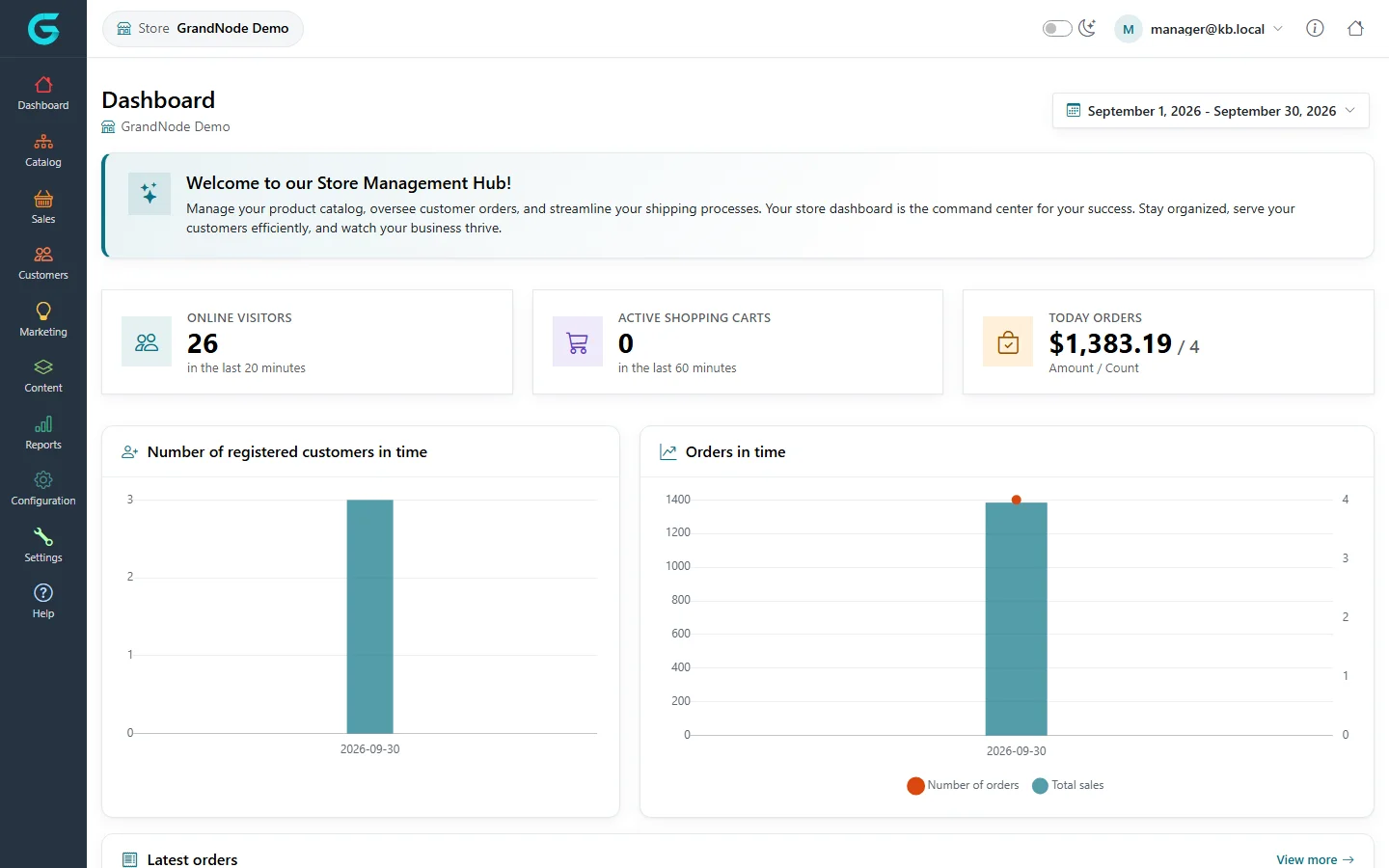
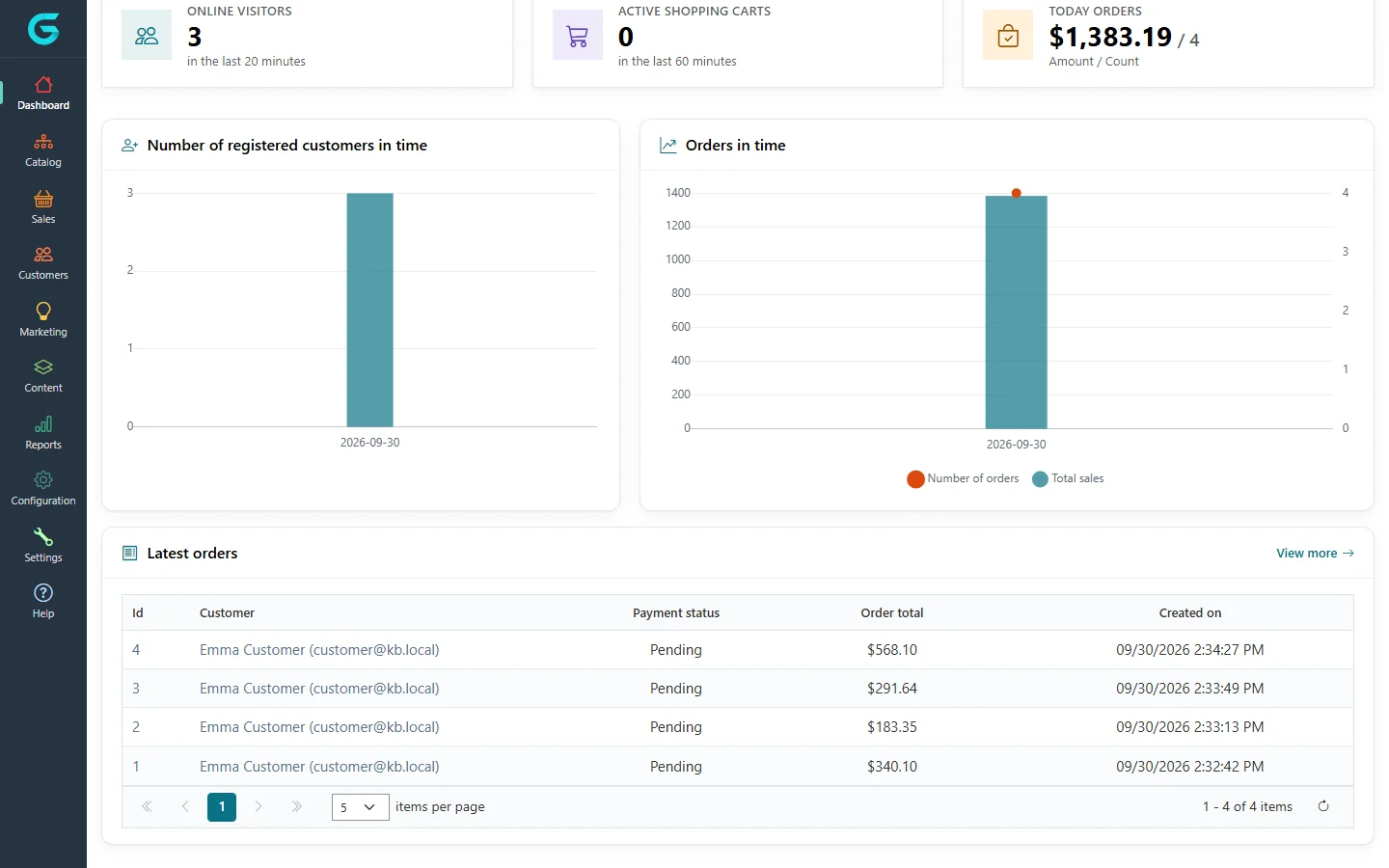
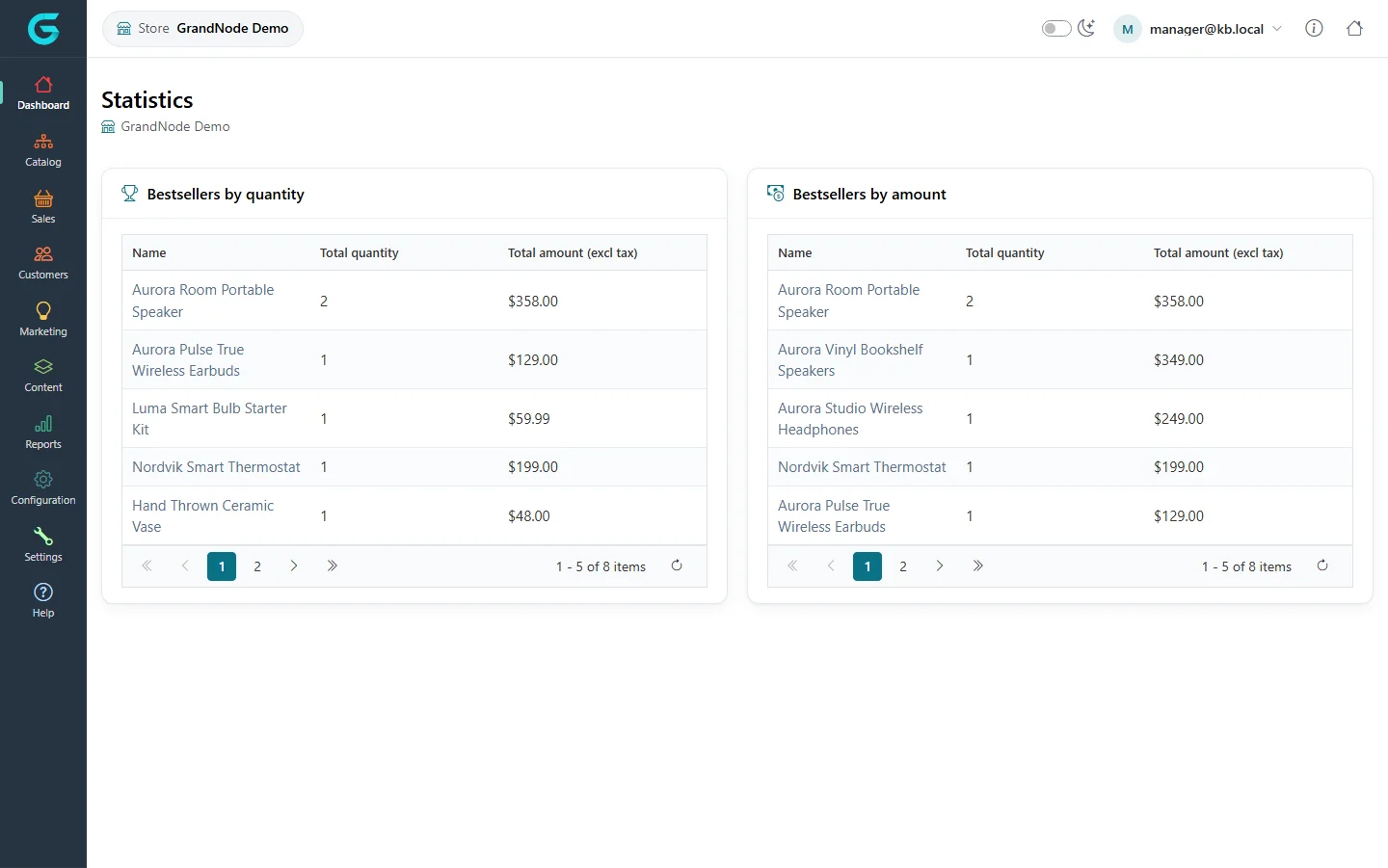
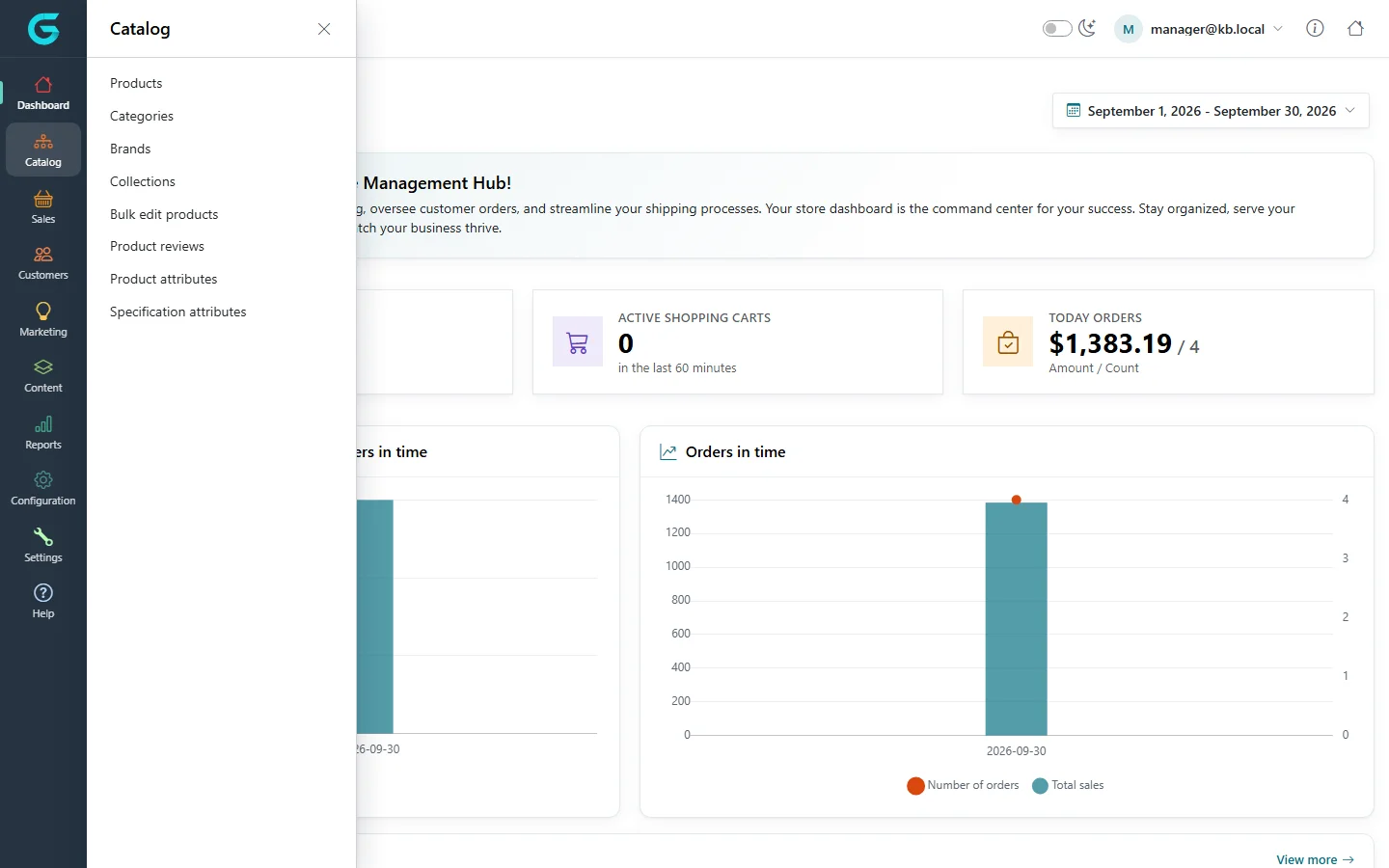
{"ArticleId":null,"Name":"Dashboard and navigation","Content":"\n\u003Cp\u003EThis article is a tour of the store owner panel as a store manager sees it after signing in: what the dashboard shows, how the menu is organised and where each task lives. Everything on these screens is already filtered to the manager\u0027s own store \u2014 the numbers, the charts and the lists never include other stores.\u003C/p\u003E\n\n\u003Ch2 id=\u0022signing-in\u0022\u003ESigning in and out\u003C/h2\u003E\n\u003Cp\u003EOpen \u003Ccode\u003E/store\u003C/code\u003E on any domain of the installation. If you are not signed in you get the panel login page at \u003Ccode\u003E/store/login\u003C/code\u003E; sign in with your customer email and password. When you are already signed in on the storefront, the account menu shows a \u003Cstrong\u003EStore portal\u003C/strong\u003E button that opens the panel. To leave, open your email address in the top-right corner and choose \u003Cstrong\u003ELogout\u003C/strong\u003E.\u003C/p\u003E\n\n\u003Ch2 id=\u0022the-header\u0022\u003EThe header\u003C/h2\u003E\n\u003Cul\u003E\n\u003Cli\u003E\u003Cstrong\u003EStore\u003C/strong\u003E badge (top left) \u2014 the name of the store you manage. It cannot be changed here; the store comes from your account.\u003C/li\u003E\n\u003Cli\u003E\u003Cstrong\u003EDark mode\u003C/strong\u003E switch \u2014 toggles the panel between light and dark.\u003C/li\u003E\n\u003Cli\u003EYour \u003Cstrong\u003Eemail\u003C/strong\u003E \u2014 opens the user menu with \u003Cstrong\u003ELogout\u003C/strong\u003E.\u003C/li\u003E\n\u003Cli\u003E\u003Cstrong\u003EInfo\u003C/strong\u003E icon \u2014 links to documentation, the community and release notes.\u003C/li\u003E\n\u003Cli\u003E\u003Cstrong\u003EHome\u003C/strong\u003E icon \u2014 opens the storefront.\u003C/li\u003E\n\u003C/ul\u003E\n\n\u003Ch2 id=\u0022the-dashboard\u0022\u003EThe dashboard\u003C/h2\u003E\n\u003Cp\u003E\u003Cstrong\u003EDashboard \u2192 Dashboard\u003C/strong\u003E is the landing page. The date range button in the top right (by default the current month) sets the period of the two charts.\u003C/p\u003E\n\u003Cfigure\u003E\u003Cimg src=\u0022/Plugins/Theme.GrandNodeCom/Content/kb/store-panel/dashboard.webp\u0022 alt=\u0022Store owner panel dashboard with a welcome box, three counters and two charts\u0022 width=\u00221440\u0022 height=\u0022900\u0022 loading=\u0022lazy\u0022\u003E\u003Cfigcaption\u003EThe dashboard of the store GrandNode Demo.\u003C/figcaption\u003E\u003C/figure\u003E\n\u003Ctable\u003E\n\u003Cthead\u003E\u003Ctr\u003E\u003Cth\u003EBlock\u003C/th\u003E\u003Cth\u003EWhat it shows\u003C/th\u003E\u003C/tr\u003E\u003C/thead\u003E\n\u003Ctbody\u003E\n\u003Ctr\u003E\u003Ctd\u003E\u003Cstrong\u003EOnline visitors\u003C/strong\u003E\u003C/td\u003E\u003Ctd\u003EVisitors of your store active within the online window (20 minutes by default, set by the administrator in customer settings).\u003C/td\u003E\u003C/tr\u003E\n\u003Ctr\u003E\u003Ctd\u003E\u003Cstrong\u003EActive shopping carts\u003C/strong\u003E\u003C/td\u003E\u003Ctd\u003ECarts in your store changed within the last 60 minutes (by default).\u003C/td\u003E\u003C/tr\u003E\n\u003Ctr\u003E\u003Ctd\u003E\u003Cstrong\u003EToday orders\u003C/strong\u003E\u003C/td\u003E\u003Ctd\u003ETotal value and number of orders placed in your store today.\u003C/td\u003E\u003C/tr\u003E\n\u003Ctr\u003E\u003Ctd\u003E\u003Cstrong\u003ENumber of registered customers in time\u003C/strong\u003E\u003C/td\u003E\u003Ctd\u003ENew registrations in your store per day in the selected range.\u003C/td\u003E\u003C/tr\u003E\n\u003Ctr\u003E\u003Ctd\u003E\u003Cstrong\u003EOrders in time\u003C/strong\u003E\u003C/td\u003E\u003Ctd\u003ENumber of orders and total sales per day in the selected range.\u003C/td\u003E\u003C/tr\u003E\n\u003Ctr\u003E\u003Ctd\u003E\u003Cstrong\u003ELatest orders\u003C/strong\u003E\u003C/td\u003E\u003Ctd\u003EThe most recent orders of your store with payment status and total. \u003Cstrong\u003EView more\u003C/strong\u003E opens \u003Cstrong\u003ESales \u2192 Orders\u003C/strong\u003E.\u003C/td\u003E\u003C/tr\u003E\n\u003C/tbody\u003E\n\u003C/table\u003E\n\u003Cfigure\u003E\u003Cimg src=\u0022/Plugins/Theme.GrandNodeCom/Content/kb/store-panel/dashboard-lower.webp\u0022 alt=\u0022Lower part of the dashboard with the charts and the Latest orders grid\u0022 width=\u00221440\u0022 height=\u0022900\u0022 loading=\u0022lazy\u0022\u003E\u003Cfigcaption\u003EScroll down for the charts and the latest orders of the store.\u003C/figcaption\u003E\u003C/figure\u003E\n\n\u003Ch2 id=\u0022statistics-and-online-customers\u0022\u003EStatistics and online customers\u003C/h2\u003E\n\u003Cp\u003E\u003Cstrong\u003EDashboard \u2192 Statistics\u003C/strong\u003E shows two bestseller tables for your store: \u003Cstrong\u003EBestsellers by quantity\u003C/strong\u003E and \u003Cstrong\u003EBestsellers by amount\u003C/strong\u003E, each with total quantity and total amount excluding tax. Click a product name to open it.\u003C/p\u003E\n\u003Cfigure\u003E\u003Cimg src=\u0022/Plugins/Theme.GrandNodeCom/Content/kb/store-panel/statistics.webp\u0022 alt=\u0022Statistics page with Bestsellers by quantity and Bestsellers by amount tables\u0022 width=\u00221440\u0022 height=\u0022901\u0022 loading=\u0022lazy\u0022\u003E\u003Cfigcaption\u003EDashboard \u2192 Statistics: bestsellers of this store.\u003C/figcaption\u003E\u003C/figure\u003E\n\u003Cp\u003E\u003Cstrong\u003EDashboard \u2192 Online customers\u003C/strong\u003E lists the visitors of your store who are online now: customer (or Guest), IP address, last activity and last visited page. The last visited page is recorded only when the administrator enables \u003Cstrong\u003EStore last visited page\u003C/strong\u003E in the customer settings; otherwise the column says the setting is disabled.\u003C/p\u003E\n\n\u003Ch2 id=\u0022the-menu\u0022\u003EThe menu\u003C/h2\u003E\n\u003Cp\u003EThe left menu is icon-based; click a group to open its flyout, then pick the screen. Only entries allowed by the Store manager group permissions are listed, so your menu may be shorter than the one below.\u003C/p\u003E\n\u003Cfigure\u003E\u003Cimg src=\u0022/Plugins/Theme.GrandNodeCom/Content/kb/store-panel/menu-catalog.webp\u0022 alt=\u0022Store owner panel with the Catalog flyout open listing Products, Categories, Brands, Collections and more\u0022 width=\u00221440\u0022 height=\u0022900\u0022 loading=\u0022lazy\u0022\u003E\u003Cfigcaption\u003EClick a menu group to open its flyout.\u003C/figcaption\u003E\u003C/figure\u003E\n\u003Ctable\u003E\n\u003Cthead\u003E\u003Ctr\u003E\u003Cth\u003EMenu\u003C/th\u003E\u003Cth\u003EEntries\u003C/th\u003E\u003Cth\u003EDetails\u003C/th\u003E\u003C/tr\u003E\u003C/thead\u003E\n\u003Ctbody\u003E\n\u003Ctr\u003E\u003Ctd\u003E\u003Cstrong\u003EDashboard\u003C/strong\u003E\u003C/td\u003E\u003Ctd\u003EDashboard, Statistics, Online customers\u003C/td\u003E\u003Ctd\u003EThis article\u003C/td\u003E\u003C/tr\u003E\n\u003Ctr\u003E\u003Ctd\u003E\u003Cstrong\u003ECatalog\u003C/strong\u003E\u003C/td\u003E\u003Ctd\u003EProducts, Categories, Brands, Collections, Bulk edit products, Product reviews, Product attributes, Specification attributes\u003C/td\u003E\u003Ctd\u003E\u003Ca href=\u0022/store-panel-catalog\u0022\u003ECatalog in the store owner panel\u003C/a\u003E\u003C/td\u003E\u003C/tr\u003E\n\u003Ctr\u003E\u003Ctd\u003E\u003Cstrong\u003ESales\u003C/strong\u003E\u003C/td\u003E\u003Ctd\u003EOrders, Shipments, Merchandise returns, Payment Transactions, Checkout Attributes\u003C/td\u003E\u003Ctd\u003E\u003Ca href=\u0022/store-panel-sales\u0022\u003EOrders, shipments and reports\u003C/a\u003E\u003C/td\u003E\u003C/tr\u003E\n\u003Ctr\u003E\u003Ctd\u003E\u003Cstrong\u003ECustomers\u003C/strong\u003E\u003C/td\u003E\u003Ctd\u003ECustomers, Customer attributes, Address attributes\u003C/td\u003E\u003Ctd\u003E\u003Ca href=\u0022/store-panel-customers-marketing-content\u0022\u003ECustomers, marketing and content\u003C/a\u003E\u003C/td\u003E\u003C/tr\u003E\n\u003Ctr\u003E\u003Ctd\u003E\u003Cstrong\u003EMarketing\u003C/strong\u003E\u003C/td\u003E\u003Ctd\u003EDiscounts, Gift vouchers, Contact Attributes\u003C/td\u003E\u003Ctd\u003E\u003Ca href=\u0022/store-panel-customers-marketing-content\u0022\u003ECustomers, marketing and content\u003C/a\u003E\u003C/td\u003E\u003C/tr\u003E\n\u003Ctr\u003E\u003Ctd\u003E\u003Cstrong\u003EContent\u003C/strong\u003E\u003C/td\u003E\u003Ctd\u003ELanding pages, Message templates, News, Blog (Blog categories, Blog posts, Blog comments)\u003C/td\u003E\u003Ctd\u003E\u003Ca href=\u0022/store-panel-customers-marketing-content\u0022\u003ECustomers, marketing and content\u003C/a\u003E\u003C/td\u003E\u003C/tr\u003E\n\u003Ctr\u003E\u003Ctd\u003E\u003Cstrong\u003EReports\u003C/strong\u003E\u003C/td\u003E\u003Ctd\u003ELow stock report, Bestsellers, Products never purchased, Country report, Customer reports\u003C/td\u003E\u003Ctd\u003E\u003Ca href=\u0022/store-panel-sales\u0022\u003EOrders, shipments and reports\u003C/a\u003E\u003C/td\u003E\u003C/tr\u003E\n\u003Ctr\u003E\u003Ctd\u003E\u003Cstrong\u003EConfiguration\u003C/strong\u003E\u003C/td\u003E\u003Ctd\u003EEmail Accounts, Languages, Currencies, Payment (methods, settings, restrictions), Shipping (providers, methods, restrictions, settings, delivery dates, warehouses, pickup points), Tax (providers, categories, settings)\u003C/td\u003E\u003Ctd\u003E\u003Ca href=\u0022/store-panel-configuration\u0022\u003EPayment, shipping, tax and other configuration\u003C/a\u003E\u003C/td\u003E\u003C/tr\u003E\n\u003Ctr\u003E\u003Ctd\u003E\u003Cstrong\u003ESettings\u003C/strong\u003E\u003C/td\u003E\u003Ctd\u003EGeneral, Catalog, Customer, Sales, Media, Content\u003C/td\u003E\u003Ctd\u003E\u003Ca href=\u0022/store-panel-settings\u0022\u003EStore settings\u003C/a\u003E\u003C/td\u003E\u003C/tr\u003E\n\u003C/tbody\u003E\n\u003C/table\u003E\n\u003Cp\u003EWhat the store owner panel does not have at all: plugin management, stores, permissions, countries, measures, vendors, affiliates, customer groups and tags, newsletter, campaigns, scheduled tasks, logs, import/export and system maintenance. Those stay with the administrator in \u003Ccode\u003E/admin\u003C/code\u003E.\u003C/p\u003E\n\n\u003Ch2 id=\u0022lists-and-editors\u0022\u003ELists and editors\u003C/h2\u003E\n\u003Cp\u003EScreens work the same way as in the Admin panel: a list with \u003Cstrong\u003EFilters\u003C/strong\u003E and a grid, an \u003Cstrong\u003EAdd new\u003C/strong\u003E button where you are allowed to create, and an editor with tabs and \u003Cstrong\u003ESave\u003C/strong\u003E / \u003Cstrong\u003ESave and Continue Edit\u003C/strong\u003E. Two things are specific to this panel:\u003C/p\u003E\n\u003Cul\u003E\n\u003Cli\u003EThere is never a \u003Cstrong\u003EStores\u003C/strong\u003E picker in an editor. What you create belongs to your store automatically.\u003C/li\u003E\n\u003Cli\u003EItems the administrator created for all stores (or for several stores) can appear in lists. They open with a warning such as \u0022You can\u0027t edit this product, because it is not yours.\u0022 and without write buttons \u2014 see \u003Ca href=\u0022/store-panel-catalog\u0022\u003ECatalog in the store owner panel\u003C/a\u003E.\u003C/li\u003E\n\u003C/ul\u003E\n\n\u003Ch2 id=\u0022related\u0022\u003ERelated\u003C/h2\u003E\n\u003Cul\u003E\n\u003Cli\u003E\u003Ca href=\u0022/store-panel-overview\u0022\u003EStore owner panel overview\u003C/a\u003E\u003C/li\u003E\n\u003Cli\u003E\u003Ca href=\u0022/store-panel-access\u0022\u003EGive someone access to the store owner panel\u003C/a\u003E\u003C/li\u003E\n\u003C/ul\u003E\n","ParentCategoryId":"6abdec6d83d2816248229f43","SeName":"store-panel-dashboard-and-navigation","MetaKeywords":null,"MetaDescription":"A tour of the GrandNode store owner panel: the dashboard, statistics, online customers, the header and every menu a store manager can open.","MetaTitle":null,"AllowComments":false,"Captcha":{"ReCaptchaChallengeField":null,"ReCaptchaResponseField":null,"ReCaptchaResponseValue":null,"ReCaptchaResponse":null},"RelatedArticles":[],"CategoryBreadcrumb":[{"Name":"Store owner panel","Description":null,"IsCurrent":false,"Children":null,"Parent":null,"SeName":"docs-store-panel","Id":"6abdec6d83d2816248229f43","UserFields":[]}],"AddNewComment":{"CommentText":null,"DisplayCaptcha":false,"Id":null,"UserFields":[]},"Comments":[],"Id":"6abdec6d83d2816248229f49","UserFields":[]}