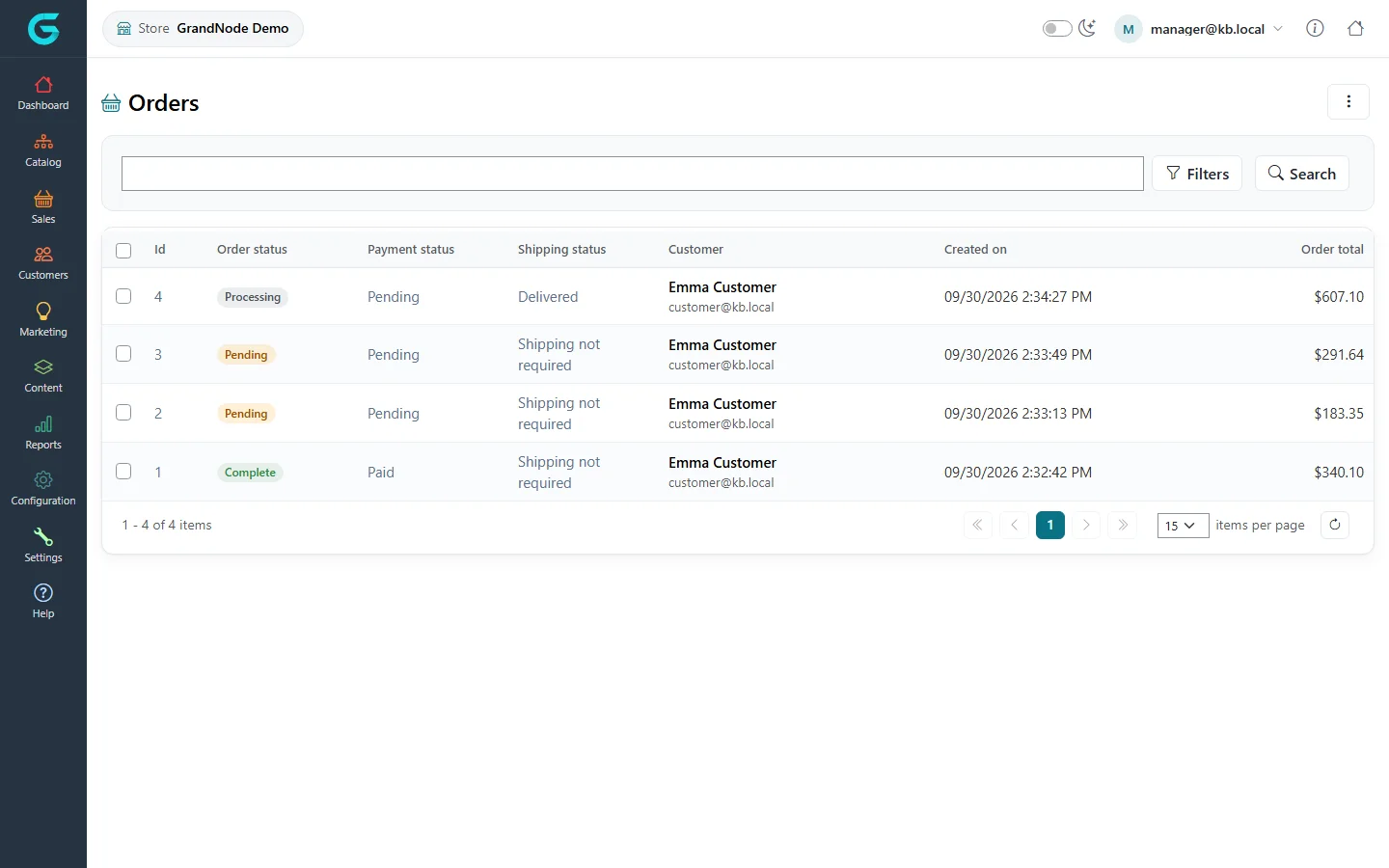
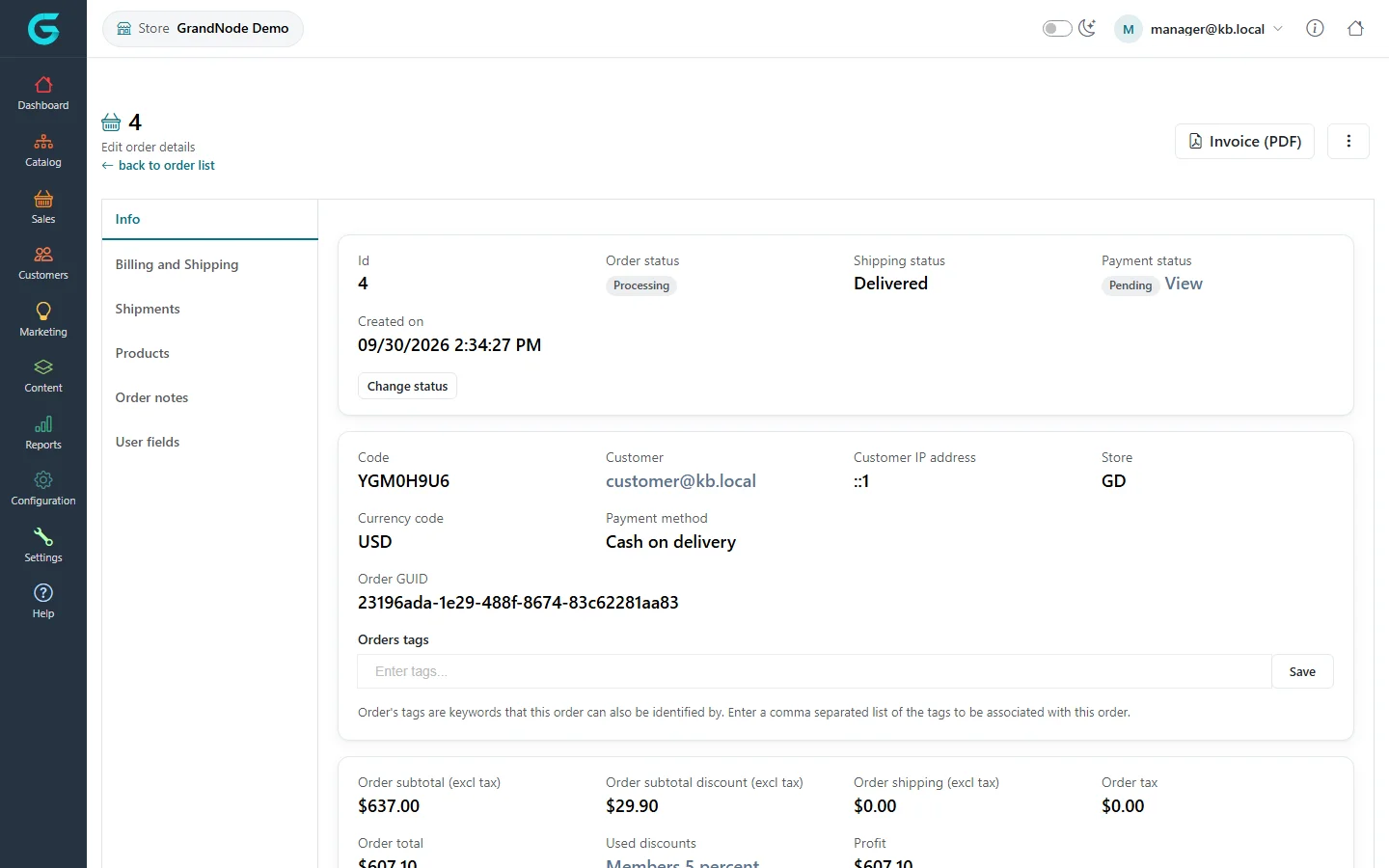
{"ArticleId":null,"Name":"Orders in the store owner panel","Content":"\n\u003Cp\u003EA store manager sees and processes the orders placed \u003Cstrong\u003Ein their store\u003C/strong\u003E. Orders from other stores do not appear.\u003C/p\u003E\n\n\u003Ch2 id=\u0022list\u0022\u003EThe order list\u003C/h2\u003E\n\u003Cp\u003E\u003Cstrong\u003ESales \u2192 Orders\u003C/strong\u003E lists the store\u0027s orders with the three statuses, the customer, the date and the total. Use \u003Cstrong\u003EFilters\u003C/strong\u003E to find orders by date, status, payment method or product.\u003C/p\u003E\n\u003Cfigure\u003E\u003Cimg src=\u0022/Plugins/Theme.GrandNodeCom/Content/kb/store-panel/orders-list.webp\u0022 alt=\u0022The store panel order list with orders 1 to 4, order status, payment status, shipping status, customer, date and total\u0022 width=\u00221440\u0022 height=\u0022900\u0022 loading=\u0022lazy\u0022\u003E\u003Cfigcaption\u003ESales \u2192 Orders in the store owner panel.\u003C/figcaption\u003E\u003C/figure\u003E\n\n\u003Ch2 id=\u0022details\u0022\u003EOrder details\u003C/h2\u003E\n\u003Cp\u003EAn order opens with the same tabs as in the admin panel: \u003Cstrong\u003EInfo\u003C/strong\u003E, \u003Cstrong\u003EBilling and Shipping\u003C/strong\u003E, \u003Cstrong\u003EShipments\u003C/strong\u003E, \u003Cstrong\u003EProducts\u003C/strong\u003E, \u003Cstrong\u003EOrder notes\u003C/strong\u003E and \u003Cstrong\u003EUser fields\u003C/strong\u003E. The Info tab shows the statuses, the code, the customer, the payment method and the totals, with \u003Cstrong\u003EChange status\u003C/strong\u003E and \u003Cstrong\u003EInvoice (PDF)\u003C/strong\u003E.\u003C/p\u003E\n\u003Cfigure\u003E\u003Cimg src=\u0022/Plugins/Theme.GrandNodeCom/Content/kb/store-panel/order-edit.webp\u0022 alt=\u0022Order 4 in the store panel: order status Processing, shipping status Delivered, payment status Pending, code, customer, currency, payment method, order tags and totals\u0022 width=\u00221440\u0022 height=\u0022900\u0022 loading=\u0022lazy\u0022\u003E\u003Cfigcaption\u003EAn order of the store.\u003C/figcaption\u003E\u003C/figure\u003E\n\u003Cp\u003EEveryday work is the same as in the admin panel:\u003C/p\u003E\n\u003Cul\u003E\n\u003Cli\u003Echange the order status and settle payments - see \u003Ca href=\u0022/sales-order-statuses\u0022\u003EOrder, payment and shipping statuses\u003C/a\u003E and \u003Ca href=\u0022/sales-payments\u0022\u003EPayments and payment transactions\u003C/a\u003E;\u003C/li\u003E\n\u003Cli\u003Ecreate shipments and mark them shipped and delivered - see \u003Ca href=\u0022/sales-shipments\u0022\u003EShipments\u003C/a\u003E;\u003C/li\u003E\n\u003Cli\u003Eadd notes for the customer and tags for yourself.\u003C/li\u003E\n\u003C/ul\u003E\n\u003Cp\u003EMerchandise returns, current carts and the sales reports of the store are in the \u003Cstrong\u003ESales\u003C/strong\u003E and \u003Cstrong\u003EReports\u003C/strong\u003E menus, limited to your store\u0027s data.\u003C/p\u003E\n\n\u003Ch2 id=\u0022related\u0022\u003ERelated\u003C/h2\u003E\n\u003Cul\u003E\n\u003Cli\u003E\u003Ca href=\u0022/docs-sales\u0022\u003ESales and orders\u003C/a\u003E\u003C/li\u003E\n\u003Cli\u003E\u003Ca href=\u0022/store-panel-customers-marketing-content\u0022\u003ECustomers, marketing and content in the store owner panel\u003C/a\u003E\u003C/li\u003E\n\u003C/ul\u003E\n","ParentCategoryId":"6abdec6d83d2816248229f43","SeName":"store-panel-sales","MetaKeywords":null,"MetaDescription":"Process the orders of your store in the GrandNode store owner panel: order list, order details, statuses, shipments and invoices.","MetaTitle":null,"AllowComments":false,"Captcha":{"ReCaptchaChallengeField":null,"ReCaptchaResponseField":null,"ReCaptchaResponseValue":null,"ReCaptchaResponse":null},"RelatedArticles":[],"CategoryBreadcrumb":[{"Name":"Store owner panel","Description":null,"IsCurrent":false,"Children":null,"Parent":null,"SeName":"docs-store-panel","Id":"6abdec6d83d2816248229f43","UserFields":[]}],"AddNewComment":{"CommentText":null,"DisplayCaptcha":false,"Id":null,"UserFields":[]},"Comments":[],"Id":"6abdec6d83d2816248229f4d","UserFields":[]}