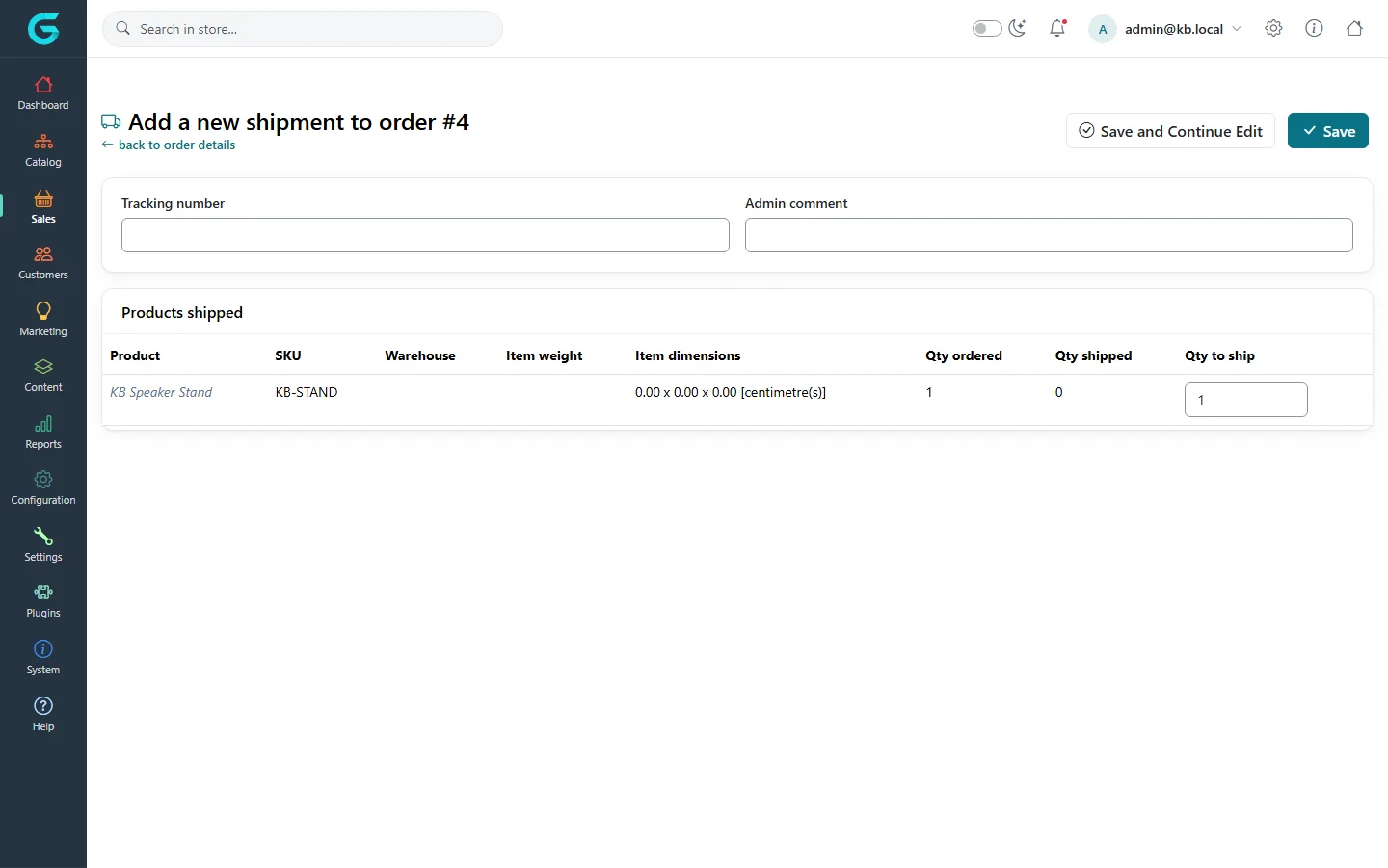
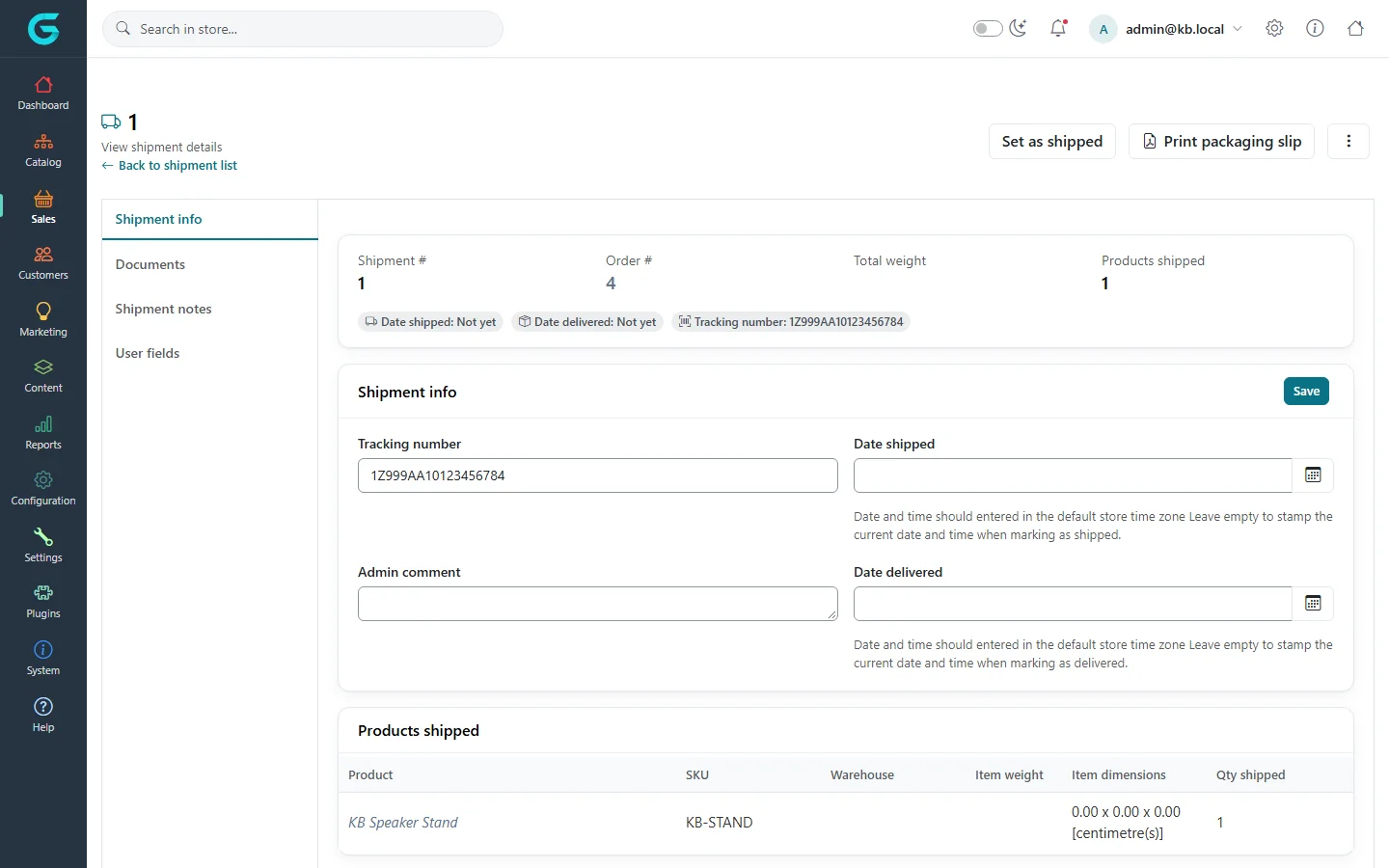
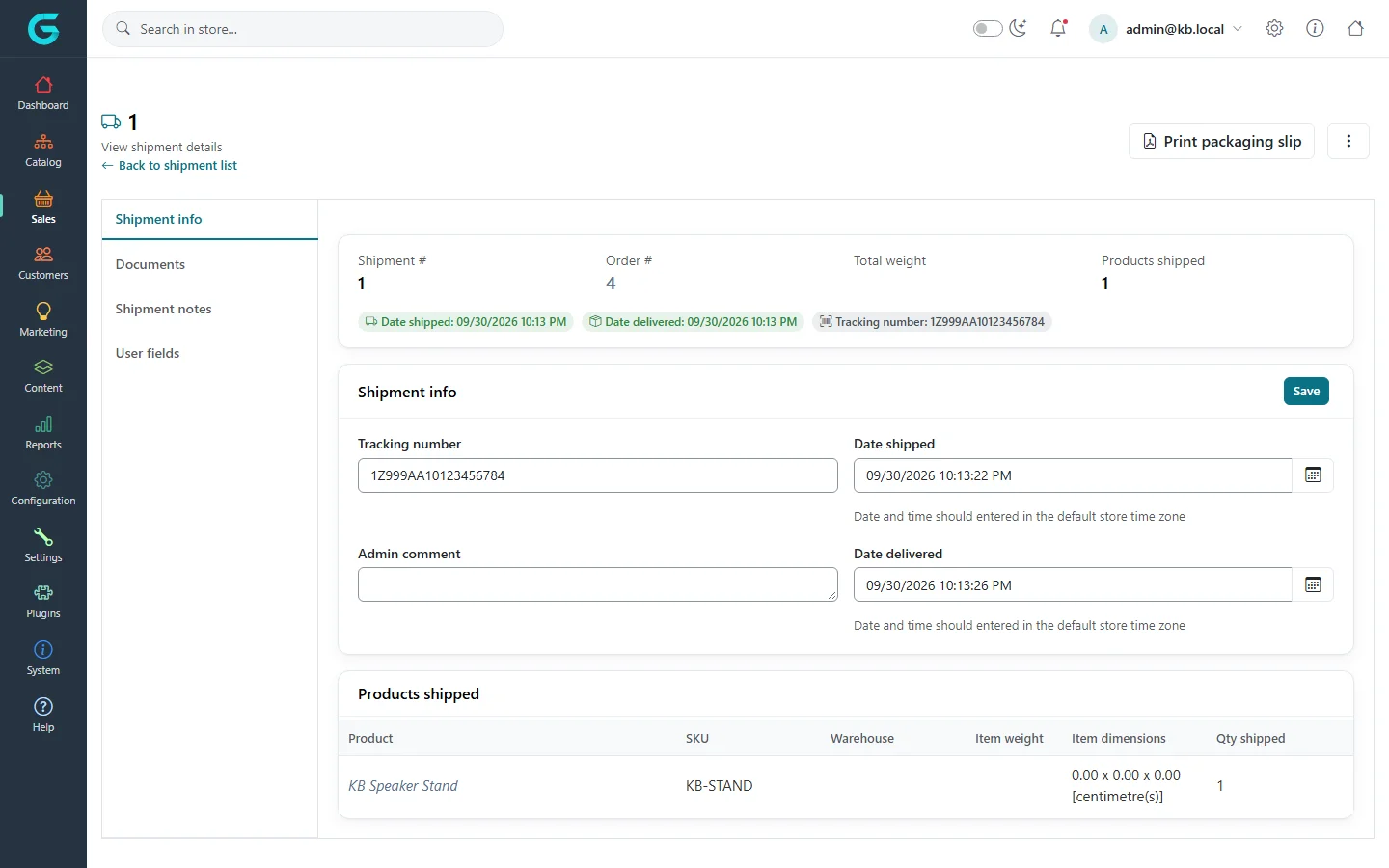
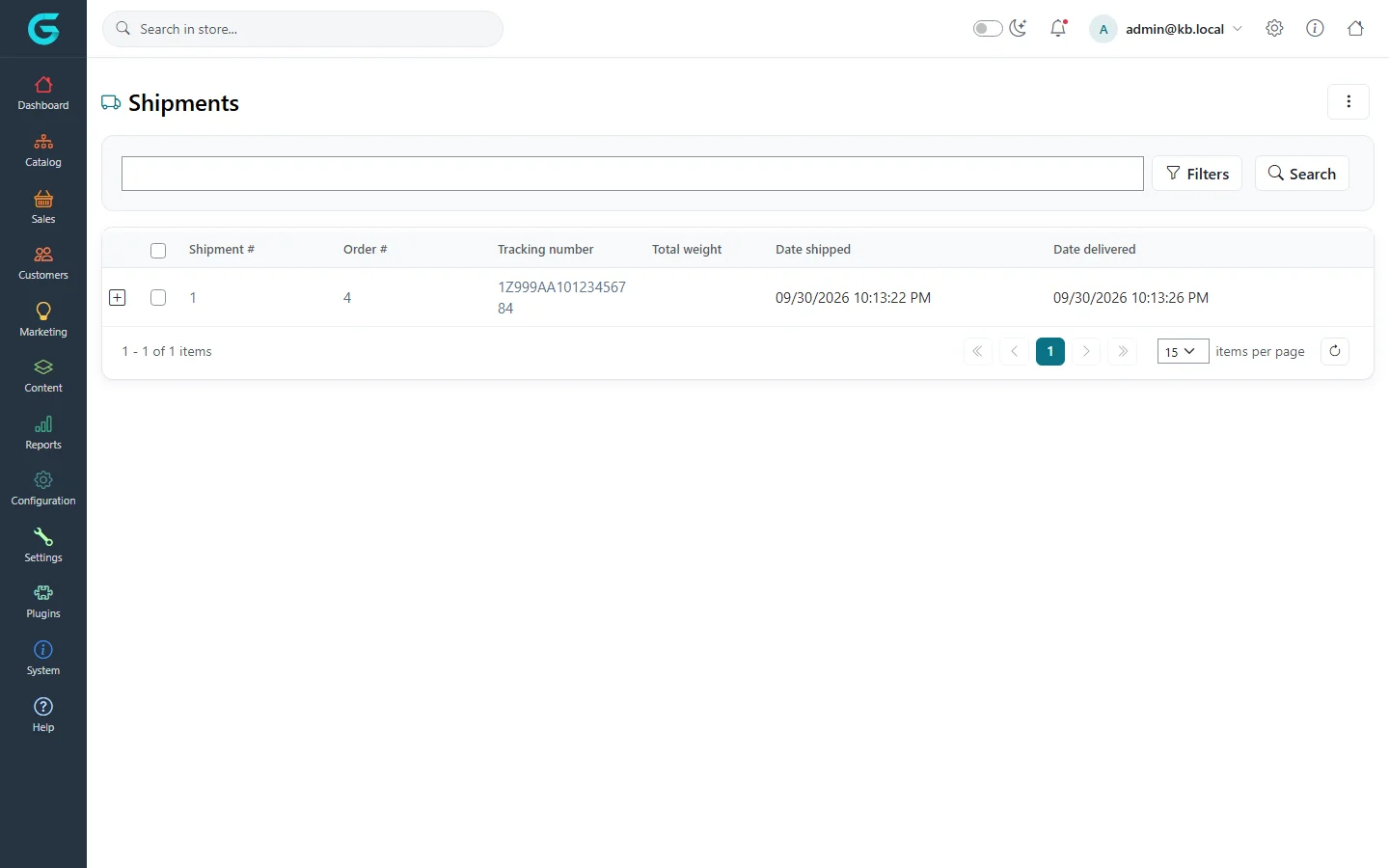
{"ArticleId":null,"Name":"Shipments","Content":"\n\u003Cp\u003EA \u003Cstrong\u003Eshipment\u003C/strong\u003E is one parcel sent for an order. An order can be sent in several shipments - for example when one item is back-ordered - and the order\u0027s shipping status follows them: \u003Cem\u003ENot yet shipped\u003C/em\u003E, \u003Cem\u003EPartially shipped\u003C/em\u003E, \u003Cem\u003EShipped\u003C/em\u003E, \u003Cem\u003EDelivered\u003C/em\u003E. Orders that contain only downloadable or virtual products do not need shipping at all.\u003C/p\u003E\n\n\u003Ch2 id=\u0022create\u0022\u003ECreate a shipment\u003C/h2\u003E\n\u003Col\u003E\n\u003Cli\u003EOpen the order and go to the \u003Cstrong\u003EShipments\u003C/strong\u003E tab.\u003C/li\u003E\n\u003Cli\u003EClick \u003Cstrong\u003EAdd shipment\u003C/strong\u003E.\u003C/li\u003E\n\u003Cli\u003EEnter the \u003Cstrong\u003ETracking number\u003C/strong\u003E from your carrier and, if needed, an \u003Cstrong\u003EAdmin comment\u003C/strong\u003E (internal).\u003C/li\u003E\n\u003Cli\u003EIn \u003Cstrong\u003EProducts shipped\u003C/strong\u003E, enter the \u003Cstrong\u003EQty to ship\u003C/strong\u003E for each line. Lines with quantity 0 stay for a later shipment. If you use several warehouses, choose the warehouse the item leaves from.\u003C/li\u003E\n\u003Cli\u003EClick \u003Cstrong\u003ESave\u003C/strong\u003E or \u003Cstrong\u003ESave and Continue Edit\u003C/strong\u003E.\u003C/li\u003E\n\u003C/ol\u003E\n\u003Cfigure\u003E\u003Cimg src=\u0022/Plugins/Theme.GrandNodeCom/Content/kb/sales/shipment-add.webp\u0022 alt=\u0022Add a new shipment to order #4 with tracking number and admin comment fields and the product KB Speaker Stand with quantity to ship 1\u0022 width=\u00221440\u0022 height=\u0022900\u0022 loading=\u0022lazy\u0022\u003E\u003Cfigcaption\u003EAdd a new shipment: tracking number and quantities.\u003C/figcaption\u003E\u003C/figure\u003E\n\n\u003Ch2 id=\u0022ship-deliver\u0022\u003EMark it shipped and delivered\u003C/h2\u003E\n\u003Cp\u003EThe shipment page shows the shipment and order numbers, the weight, the products, and the dates.\u003C/p\u003E\n\u003Cfigure\u003E\u003Cimg src=\u0022/Plugins/Theme.GrandNodeCom/Content/kb/sales/shipment-details-new.webp\u0022 alt=\u0022Shipment 1 of order 4 not yet shipped, with a Set as shipped button, tracking number, date shipped and date delivered fields\u0022 width=\u00221440\u0022 height=\u0022900\u0022 loading=\u0022lazy\u0022\u003E\u003Cfigcaption\u003EA new shipment: not shipped yet.\u003C/figcaption\u003E\u003C/figure\u003E\n\u003Col\u003E\n\u003Cli\u003EClick \u003Cstrong\u003ESet as shipped\u003C/strong\u003E when the parcel leaves. The date is recorded and the customer gets the \u0022shipment sent\u0022 e-mail.\u003C/li\u003E\n\u003Cli\u003EClick \u003Cstrong\u003ESet as delivered\u003C/strong\u003E when it arrives - by hand, or automatically if a shipment tracker plugin reports it.\u003C/li\u003E\n\u003C/ol\u003E\n\u003Cfigure\u003E\u003Cimg src=\u0022/Plugins/Theme.GrandNodeCom/Content/kb/sales/shipment-details-delivered.webp\u0022 alt=\u0022The same shipment with shipped and delivered dates filled in\u0022 width=\u00221440\u0022 height=\u0022900\u0022 loading=\u0022lazy\u0022\u003E\u003Cfigcaption\u003EShipped and delivered, with both dates.\u003C/figcaption\u003E\u003C/figure\u003E\n\u003Cp\u003EThe dates can also be typed into \u003Cstrong\u003EDate shipped\u003C/strong\u003E and \u003Cstrong\u003EDate delivered\u003C/strong\u003E to backdate them. \u003Cstrong\u003EPrint packaging slip\u003C/strong\u003E produces a PDF to put in the box.\u003C/p\u003E\n\n\u003Ch2 id=\u0022list\u0022\u003EAll shipments\u003C/h2\u003E\n\u003Cp\u003E\u003Cstrong\u003ESales \u2192 Shipments\u003C/strong\u003E lists shipments across orders with their tracking numbers and dates. Select several and use the bulk actions to print packaging slips or set them shipped or delivered in one go.\u003C/p\u003E\n\u003Cfigure\u003E\u003Cimg src=\u0022/Plugins/Theme.GrandNodeCom/Content/kb/sales/shipment-list.webp\u0022 alt=\u0022The Shipments list with shipment 1 of order 4, its tracking number, shipped and delivered dates\u0022 width=\u00221440\u0022 height=\u0022900\u0022 loading=\u0022lazy\u0022\u003E\u003Cfigcaption\u003ESales \u2192 Shipments.\u003C/figcaption\u003E\u003C/figure\u003E\n\n\u003Ch2 id=\u0022tracking\u0022\u003ETracking for customers\u003C/h2\u003E\n\u003Cp\u003EThe customer sees each shipment in the order details on the storefront, with the tracking number. If the shipping method has a tracker (see \u003Ca href=\u0022/docs-configuration\u0022\u003EConfiguration\u003C/a\u003E), the number links to the carrier\u0027s tracking page, and with \u003Cstrong\u003EDisplay shipment events to customers\u003C/strong\u003E on, the events are listed too.\u003C/p\u003E\n\n\u003Ch2 id=\u0022tips\u0022\u003ETips and common mistakes\u003C/h2\u003E\n\u003Cul\u003E\n\u003Cli\u003EEnter the tracking number before you set the shipment as shipped, so it is in the e-mail.\u003C/li\u003E\n\u003Cli\u003EWith \u003Cstrong\u003EComplete order when delivered\u003C/strong\u003E (Sales settings), a paid order becomes Complete when its last shipment is delivered.\u003C/li\u003E\n\u003C/ul\u003E\n\n\u003Ch2 id=\u0022related\u0022\u003ERelated\u003C/h2\u003E\n\u003Cul\u003E\n\u003Cli\u003E\u003Ca href=\u0022/sales-order-statuses\u0022\u003EOrder, payment and shipping statuses\u003C/a\u003E\u003C/li\u003E\n\u003Cli\u003E\u003Ca href=\u0022/sales-merchandise-returns\u0022\u003EMerchandise returns\u003C/a\u003E\u003C/li\u003E\n\u003C/ul\u003E\n","ParentCategoryId":"6abdec6c83d2816248229ec5","SeName":"sales-shipments","MetaKeywords":null,"MetaDescription":"Create shipments for an order, add a tracking number, mark them shipped and delivered, and print packaging slips in the GrandNode admin.","MetaTitle":null,"AllowComments":false,"Captcha":{"ReCaptchaChallengeField":null,"ReCaptchaResponseField":null,"ReCaptchaResponseValue":null,"ReCaptchaResponse":null},"RelatedArticles":[],"CategoryBreadcrumb":[{"Name":"Sales and orders","Description":null,"IsCurrent":false,"Children":null,"Parent":null,"SeName":"docs-sales","Id":"6abdec6c83d2816248229ec5","UserFields":[]}],"AddNewComment":{"CommentText":null,"DisplayCaptcha":false,"Id":null,"UserFields":[]},"Comments":[],"Id":"6abdec6c83d2816248229ed3","UserFields":[]}