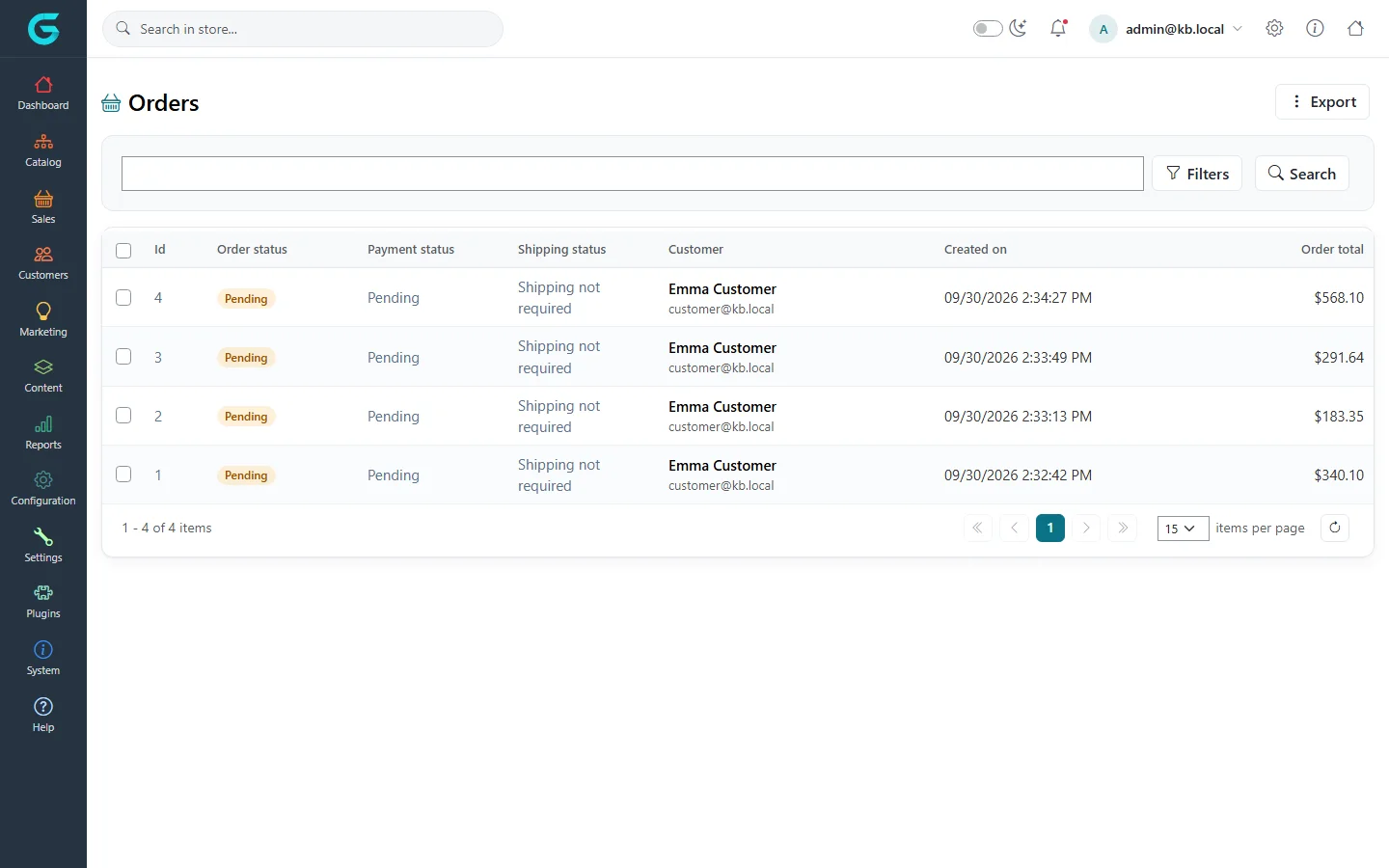
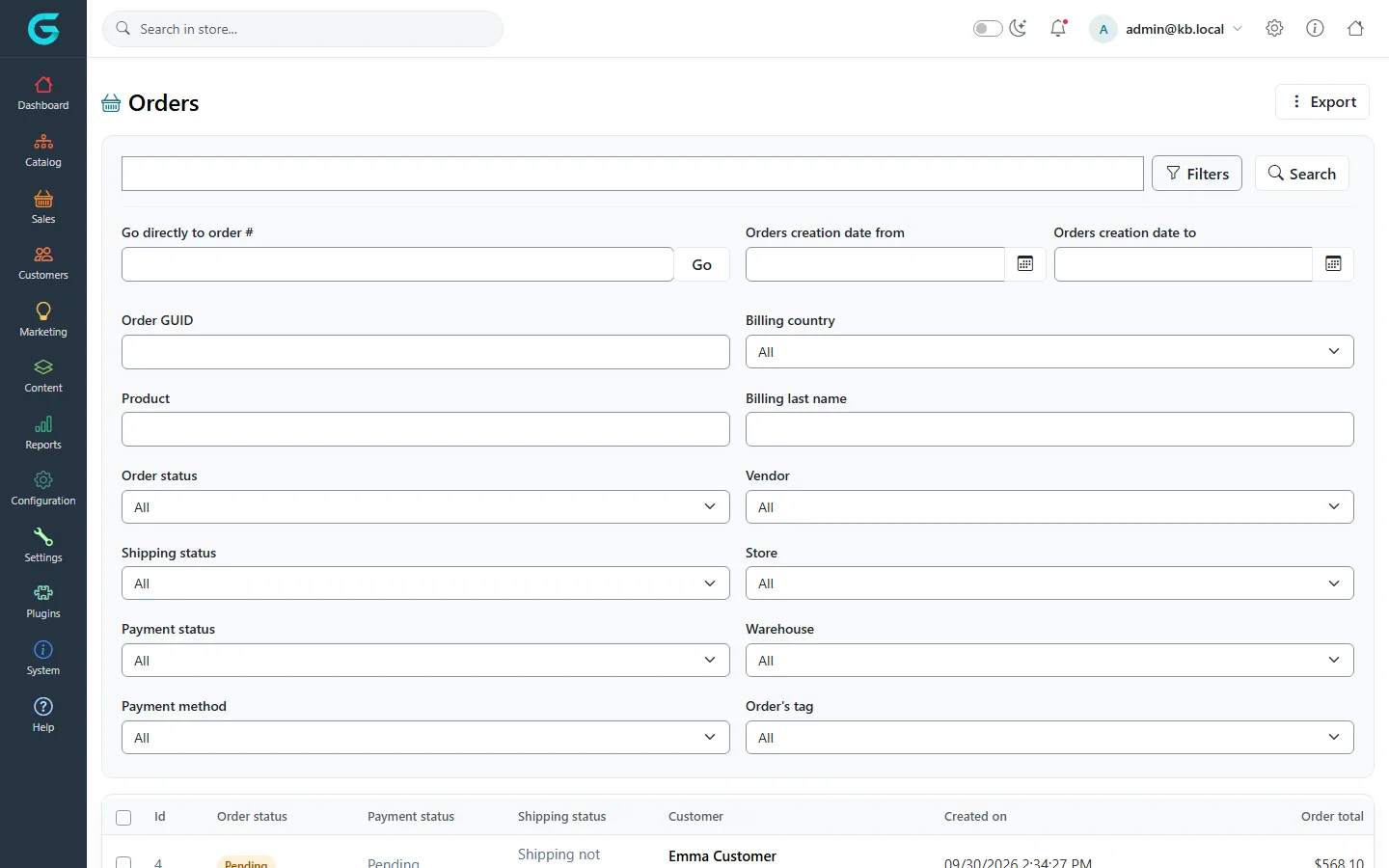
{"ArticleId":null,"Name":"Finding orders: list, filters and export","Content":"\n\u003Cp\u003EThe order list is where daily order processing starts. It shows the newest orders first and lets you narrow the list down by almost any property of an order: its statuses, dates, the products in it, the store it was placed in or the tags you gave it. From here you also export orders to Excel and print PDF invoices in bulk.\u003C/p\u003E\n\n\u003Ch2 id=\u0022where-to-find-it\u0022\u003EWhere to find it\u003C/h2\u003E\n\u003Cp\u003EGo to \u003Cstrong\u003ESales \u2192 Orders\u003C/strong\u003E. Each row shows the order number (\u003Cstrong\u003EId\u003C/strong\u003E), \u003Cstrong\u003EOrder status\u003C/strong\u003E, \u003Cstrong\u003EPayment status\u003C/strong\u003E, \u003Cstrong\u003EShipping status\u003C/strong\u003E, the \u003Cstrong\u003ECustomer\u003C/strong\u003E name and email, \u003Cstrong\u003ECreated on\u003C/strong\u003E and \u003Cstrong\u003EOrder total\u003C/strong\u003E. Click the number, a status or the row to open the order; click the customer to open their customer record.\u003C/p\u003E\n\n\u003Cfigure\u003E\u003Cimg src=\u0022/Plugins/Theme.GrandNodeCom/Content/kb/sales/orders-list.webp\u0022 alt=\u0022Orders list with a quick search box, Filters and Search buttons, and a grid of orders\u0022 width=\u00221440\u0022 height=\u0022900\u0022 loading=\u0022lazy\u0022\u003E\u003Cfigcaption\u003EThe order list with the quick search on top.\u003C/figcaption\u003E\u003C/figure\u003E\n\n\u003Ch2 id=\u0022search-and-filter\u0022\u003EHow to search and filter\u003C/h2\u003E\n\u003Col\u003E\n\u003Cli\u003EType a customer\u0027s billing email in the search box and press \u003Cstrong\u003ESearch\u003C/strong\u003E for the quickest lookup.\u003C/li\u003E\n\u003Cli\u003EClick \u003Cstrong\u003EFilters\u003C/strong\u003E to open all other criteria.\u003C/li\u003E\n\u003Cli\u003ESet the fields you need (see the table below) and click \u003Cstrong\u003ESearch\u003C/strong\u003E. The criteria combine: every filter you set must match.\u003C/li\u003E\n\u003Cli\u003ETo jump straight to one order, enter its number in \u003Cstrong\u003EGo directly to order #\u003C/strong\u003E and click \u003Cstrong\u003EGo\u003C/strong\u003E.\u003C/li\u003E\n\u003C/ol\u003E\n\n\u003Cfigure\u003E\u003Cimg src=\u0022/Plugins/Theme.GrandNodeCom/Content/kb/sales/orders-filters.webp\u0022 alt=\u0022The expanded order filters: order number, creation dates, order GUID, billing country, product, billing last name, statuses, vendor, store, warehouse, payment method and order tag\u0022 width=\u00221440\u0022 height=\u0022900\u0022 loading=\u0022lazy\u0022\u003E\u003Cfigcaption\u003EAll filters of the order list.\u003C/figcaption\u003E\u003C/figure\u003E\n\n\u003Ch2 id=\u0022fields\u0022\u003EFilters\u003C/h2\u003E\n\u003Ctable\u003E\n\u003Cthead\u003E\u003Ctr\u003E\u003Cth\u003EField\u003C/th\u003E\u003Cth\u003EWhat it does\u003C/th\u003E\u003C/tr\u003E\u003C/thead\u003E\n\u003Ctbody\u003E\n\u003Ctr\u003E\u003Ctd\u003E\u003Cstrong\u003EGo directly to order #\u003C/strong\u003E\u003C/td\u003E\u003Ctd\u003EOpens the order with that number without searching.\u003C/td\u003E\u003C/tr\u003E\n\u003Ctr\u003E\u003Ctd\u003E\u003Cstrong\u003EOrders creation date from / to\u003C/strong\u003E\u003C/td\u003E\u003Ctd\u003ELimits the list to orders created in that period.\u003C/td\u003E\u003C/tr\u003E\n\u003Ctr\u003E\u003Ctd\u003E\u003Cstrong\u003EOrder GUID\u003C/strong\u003E\u003C/td\u003E\u003Ctd\u003EFinds an order by its technical identifier, for example one quoted by a payment provider.\u003C/td\u003E\u003C/tr\u003E\n\u003Ctr\u003E\u003Ctd\u003E\u003Cstrong\u003EBilling country\u003C/strong\u003E, \u003Cstrong\u003EBilling last name\u003C/strong\u003E\u003C/td\u003E\u003Ctd\u003EMatch the billing address of the order.\u003C/td\u003E\u003C/tr\u003E\n\u003Ctr\u003E\u003Ctd\u003E\u003Cstrong\u003EProduct\u003C/strong\u003E\u003C/td\u003E\u003Ctd\u003EShows only orders that contain the chosen product.\u003C/td\u003E\u003C/tr\u003E\n\u003Ctr\u003E\u003Ctd\u003E\u003Cstrong\u003EOrder status\u003C/strong\u003E, \u003Cstrong\u003EPayment status\u003C/strong\u003E, \u003Cstrong\u003EShipping status\u003C/strong\u003E\u003C/td\u003E\u003Ctd\u003EFilter by any of the three statuses \u2013 for example all \u003Cem\u003EPaid\u003C/em\u003E orders whose shipping is still \u003Cem\u003EPending\u003C/em\u003E, i.e. the orders waiting to be packed.\u003C/td\u003E\u003C/tr\u003E\n\u003Ctr\u003E\u003Ctd\u003E\u003Cstrong\u003EVendor\u003C/strong\u003E\u003C/td\u003E\u003Ctd\u003EOrders containing products of one vendor.\u003C/td\u003E\u003C/tr\u003E\n\u003Ctr\u003E\u003Ctd\u003E\u003Cstrong\u003EStore\u003C/strong\u003E\u003C/td\u003E\u003Ctd\u003EOrders placed in one store of a multi-store installation.\u003C/td\u003E\u003C/tr\u003E\n\u003Ctr\u003E\u003Ctd\u003E\u003Cstrong\u003EWarehouse\u003C/strong\u003E\u003C/td\u003E\u003Ctd\u003EOrders with items shipped from a given warehouse.\u003C/td\u003E\u003C/tr\u003E\n\u003Ctr\u003E\u003Ctd\u003E\u003Cstrong\u003EPayment method\u003C/strong\u003E\u003C/td\u003E\u003Ctd\u003EOrders paid with one method, e.g. cash on delivery.\u003C/td\u003E\u003C/tr\u003E\n\u003Ctr\u003E\u003Ctd\u003E\u003Cstrong\u003EOrder\u0027s tag\u003C/strong\u003E\u003C/td\u003E\u003Ctd\u003EOrders you tagged with a keyword on the order\u0027s \u003Cstrong\u003EInfo\u003C/strong\u003E tab.\u003C/td\u003E\u003C/tr\u003E\n\u003C/tbody\u003E\n\u003C/table\u003E\n\n\u003Ch2 id=\u0022export\u0022\u003EExport and bulk actions\u003C/h2\u003E\n\u003Cp\u003EThe \u003Cstrong\u003EExport\u003C/strong\u003E menu in the top right offers:\u003C/p\u003E\n\u003Cul\u003E\n\u003Cli\u003E\u003Cstrong\u003EExport to Excel (all found)\u003C/strong\u003E \u2013 every order matching the current filters, one row per order.\u003C/li\u003E\n\u003Cli\u003E\u003Cstrong\u003EExport to Excel (selected)\u003C/strong\u003E \u2013 only the orders ticked in the grid.\u003C/li\u003E\n\u003Cli\u003E\u003Cstrong\u003EPrint PDF invoices (all found)\u003C/strong\u003E and \u003Cstrong\u003EPrint PDF invoices (selected)\u003C/strong\u003E \u2013 one PDF with an invoice per order, the same document the customer can download.\u003C/li\u003E\n\u003C/ul\u003E\n\u003Cp\u003ETicking orders also shows a bar with \u003Cstrong\u003EDelete (selected)\u003C/strong\u003E. Deleting marks the orders as deleted and returns their stock; orders that already have shipments cannot be deleted.\u003C/p\u003E\n\n\u003Ch2 id=\u0022tips\u0022\u003ETips and common mistakes\u003C/h2\u003E\n\u003Cul\u003E\n\u003Cli\u003EA daily \u0022to ship\u0022 view: \u003Cstrong\u003EPayment status\u003C/strong\u003E = \u003Cem\u003EPaid\u003C/em\u003E, \u003Cstrong\u003EShipping status\u003C/strong\u003E = \u003Cem\u003EPending\u003C/em\u003E.\u003C/li\u003E\n\u003Cli\u003EA \u0022chase payment\u0022 view: \u003Cstrong\u003EOrder status\u003C/strong\u003E = \u003Cem\u003EPending\u003C/em\u003E, \u003Cstrong\u003EPayment method\u003C/strong\u003E = your offline method, and a date range older than a few days.\u003C/li\u003E\n\u003Cli\u003EThe quick search matches the \u003Cem\u003Ebilling\u003C/em\u003E email, which is normally, but not always, the customer\u0027s account email.\u003C/li\u003E\n\u003Cli\u003EUse order tags for anything the statuses cannot express \u2013 they are free text and filterable.\u003C/li\u003E\n\u003C/ul\u003E\n\n\u003Ch2 id=\u0022related\u0022\u003ERelated\u003C/h2\u003E\n\u003Cul\u003E\n\u003Cli\u003E\u003Ca href=\u0022/sales-order-details\u0022\u003EOrder details\u003C/a\u003E\u003C/li\u003E\n\u003Cli\u003E\u003Ca href=\u0022/sales-order-statuses\u0022\u003EOrder, payment and shipping status\u003C/a\u003E\u003C/li\u003E\n\u003Cli\u003E\u003Ca href=\u0022/sales-reports\u0022\u003ESales reports\u003C/a\u003E\u003C/li\u003E\n\u003C/ul\u003E\n","ParentCategoryId":"6abdec6c83d2816248229ec5","SeName":"sales-orders-list","MetaKeywords":null,"MetaDescription":"Search GrandNode orders by email, number, date, status, product, vendor, store or tag, and export them to Excel or PDF invoices.","MetaTitle":null,"AllowComments":false,"Captcha":{"ReCaptchaChallengeField":null,"ReCaptchaResponseField":null,"ReCaptchaResponseValue":null,"ReCaptchaResponse":null},"RelatedArticles":[],"CategoryBreadcrumb":[{"Name":"Sales and orders","Description":null,"IsCurrent":false,"Children":null,"Parent":null,"SeName":"docs-sales","Id":"6abdec6c83d2816248229ec5","UserFields":[]}],"AddNewComment":{"CommentText":null,"DisplayCaptcha":false,"Id":null,"UserFields":[]},"Comments":[],"Id":"6abdec6c83d2816248229ec9","UserFields":[]}