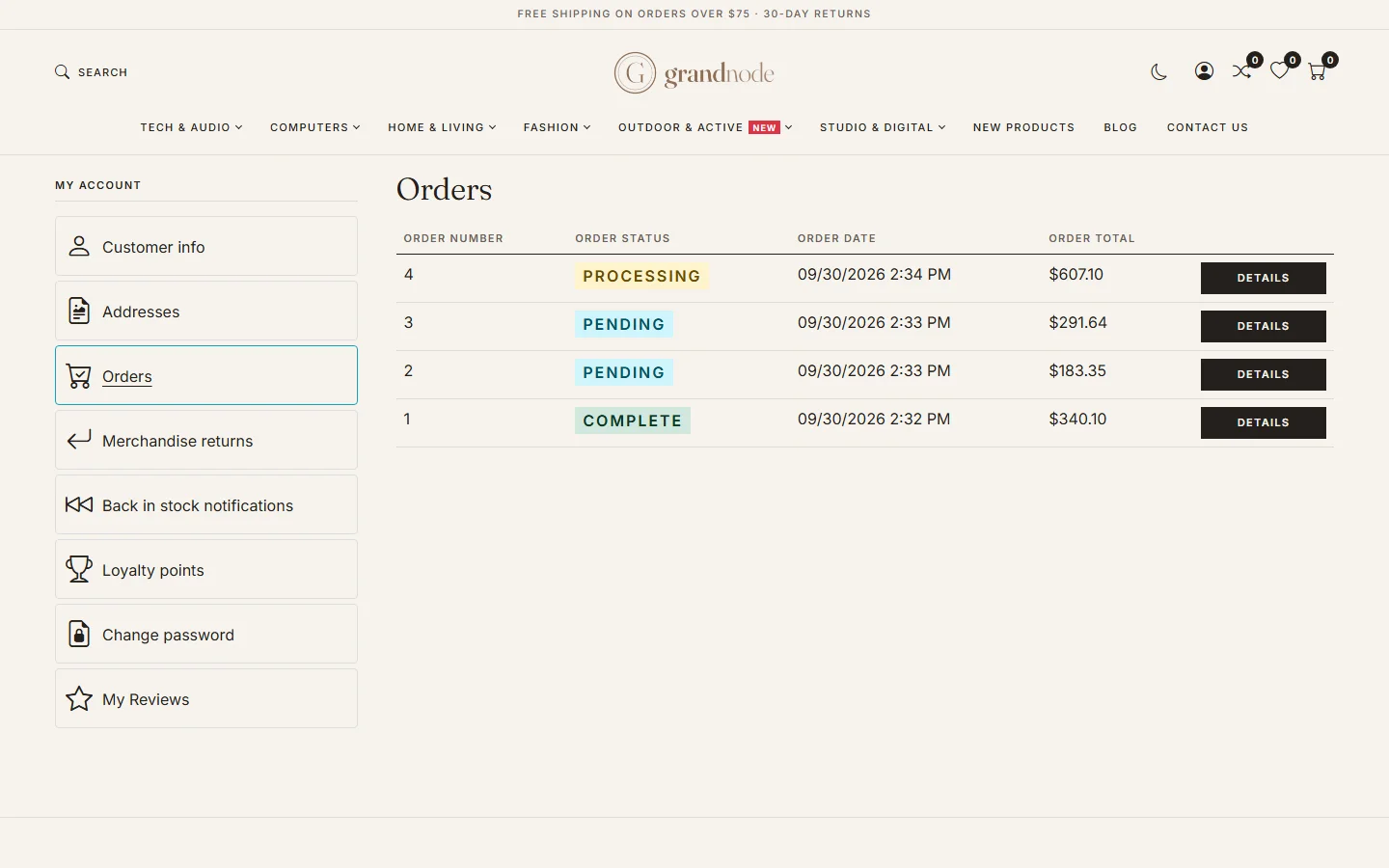
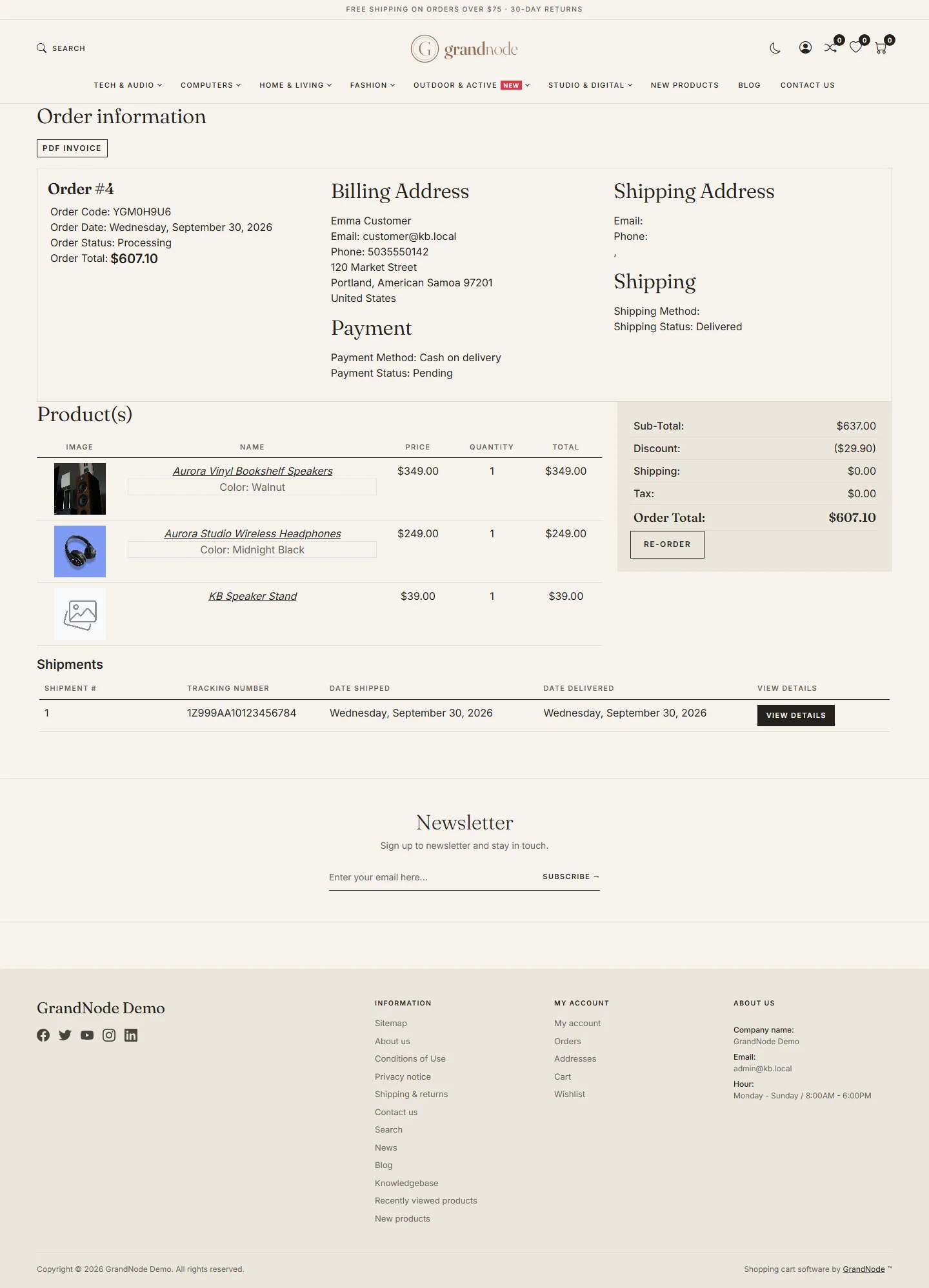
{"ArticleId":null,"Name":"What customers see: order history and details","Content":"\n\u003Cp\u003EMuch of the work in the admin is visible to the customer in \u003Cstrong\u003EMy account\u003C/strong\u003E. Knowing what they see helps you answer questions and decide what to write in order notes.\u003C/p\u003E\n\n\u003Ch2 id=\u0022history\u0022\u003EOrder history\u003C/h2\u003E\n\u003Cp\u003EUnder \u003Cstrong\u003EMy account \u2192 Orders\u003C/strong\u003E a signed-in customer sees every order with its number, status, date and total, and a \u003Cstrong\u003EDetails\u003C/strong\u003E button.\u003C/p\u003E\n\u003Cfigure\u003E\u003Cimg src=\u0022/Plugins/Theme.GrandNodeCom/Content/kb/sales/storefront-order-history.webp\u0022 alt=\u0022My account Orders page listing orders 4, 3, 2 and 1 with statuses Processing, Pending, Pending and Complete, dates and totals\u0022 width=\u00221440\u0022 height=\u0022900\u0022 loading=\u0022lazy\u0022\u003E\u003Cfigcaption\u003EThe order history in My account.\u003C/figcaption\u003E\u003C/figure\u003E\n\n\u003Ch2 id=\u0022details\u0022\u003EOrder details\u003C/h2\u003E\n\u003Cp\u003EThe details page shows:\u003C/p\u003E\n\u003Cul\u003E\n\u003Cli\u003Ethe order number, date, status and total;\u003C/li\u003E\n\u003Cli\u003Ebilling and shipping addresses, the shipping method and the payment method with its status;\u003C/li\u003E\n\u003Cli\u003Ethe products with attributes, prices and quantities, and the totals including discounts and tax;\u003C/li\u003E\n\u003Cli\u003Eshipments with their tracking numbers and dates;\u003C/li\u003E\n\u003Cli\u003Eorder notes you marked as \u003Cstrong\u003EDisplay to customer\u003C/strong\u003E;\u003C/li\u003E\n\u003Cli\u003Echeckout attribute answers, such as a gift message.\u003C/li\u003E\n\u003C/ul\u003E\n\u003Cfigure\u003E\u003Cimg src=\u0022/Plugins/Theme.GrandNodeCom/Content/kb/sales/storefront-order-details.webp\u0022 alt=\u0022The storefront order details of order 4 with addresses, payment and shipping, products, totals, shipments and notes\u0022 width=\u00221440\u0022 height=\u00221997\u0022 loading=\u0022lazy\u0022\u003E\u003Cfigcaption\u003EOrder details on the storefront.\u003C/figcaption\u003E\u003C/figure\u003E\n\u003Cp\u003EButtons on the page, depending on your settings and the order state:\u003C/p\u003E\n\u003Ctable\u003E\n\u003Cthead\u003E\u003Ctr\u003E\u003Cth\u003EButton\u003C/th\u003E\u003Cth\u003EShown when\u003C/th\u003E\u003C/tr\u003E\u003C/thead\u003E\n\u003Ctbody\u003E\n\u003Ctr\u003E\u003Ctd\u003EPrint, PDF invoice\u003C/td\u003E\u003Ctd\u003EAlways; the invoice uses the same template as the admin.\u003C/td\u003E\u003C/tr\u003E\n\u003Ctr\u003E\u003Ctd\u003ERe-order\u003C/td\u003E\u003Ctd\u003E\u003Cstrong\u003EIs re-order allowed\u003C/strong\u003E is on in Sales settings. It puts the same products in the cart again.\u003C/td\u003E\u003C/tr\u003E\n\u003Ctr\u003E\u003Ctd\u003EReturn item(s)\u003C/td\u003E\u003Ctd\u003EMerchandise returns are enabled and the order has delivered, returnable items within the window.\u003C/td\u003E\u003C/tr\u003E\n\u003Ctr\u003E\u003Ctd\u003ECancel order\u003C/td\u003E\u003Ctd\u003E\u003Cstrong\u003EAllow to cancel orders by users\u003C/strong\u003E is on and the order is not paid yet.\u003C/td\u003E\u003C/tr\u003E\n\u003Ctr\u003E\u003Ctd\u003EAdd order note\u003C/td\u003E\u003Ctd\u003E\u003Cstrong\u003EAllow customer to add order note\u003C/strong\u003E is on.\u003C/td\u003E\u003C/tr\u003E\n\u003C/tbody\u003E\n\u003C/table\u003E\n\n\u003Ch2 id=\u0022guests\u0022\u003EGuest orders\u003C/h2\u003E\n\u003Cp\u003ECustomers who checked out as guests have no account page and rely on the order e-mails. Anything they should know, send as a displayed order note - it is e-mailed to them.\u003C/p\u003E\n\n\u003Ch2 id=\u0022related\u0022\u003ERelated\u003C/h2\u003E\n\u003Cul\u003E\n\u003Cli\u003E\u003Ca href=\u0022/sales-order-details\u0022\u003EOrder details\u003C/a\u003E\u003C/li\u003E\n\u003Cli\u003E\u003Ca href=\u0022/sales-merchandise-returns\u0022\u003EMerchandise returns\u003C/a\u003E\u003C/li\u003E\n\u003Cli\u003E\u003Ca href=\u0022/docs-customers\u0022\u003ECustomers\u003C/a\u003E\u003C/li\u003E\n\u003C/ul\u003E\n","ParentCategoryId":"6abdec6c83d2816248229ec5","SeName":"sales-customer-orders","MetaKeywords":null,"MetaDescription":"The customer side of an order in GrandNode: order history in My account, order details, shipments, notes, re-ordering, invoices and returns.","MetaTitle":null,"AllowComments":false,"Captcha":{"ReCaptchaChallengeField":null,"ReCaptchaResponseField":null,"ReCaptchaResponseValue":null,"ReCaptchaResponse":null},"RelatedArticles":[],"CategoryBreadcrumb":[{"Name":"Sales and orders","Description":null,"IsCurrent":false,"Children":null,"Parent":null,"SeName":"docs-sales","Id":"6abdec6c83d2816248229ec5","UserFields":[]}],"AddNewComment":{"CommentText":null,"DisplayCaptcha":false,"Id":null,"UserFields":[]},"Comments":[],"Id":"6abdec6c83d2816248229ed9","UserFields":[]}