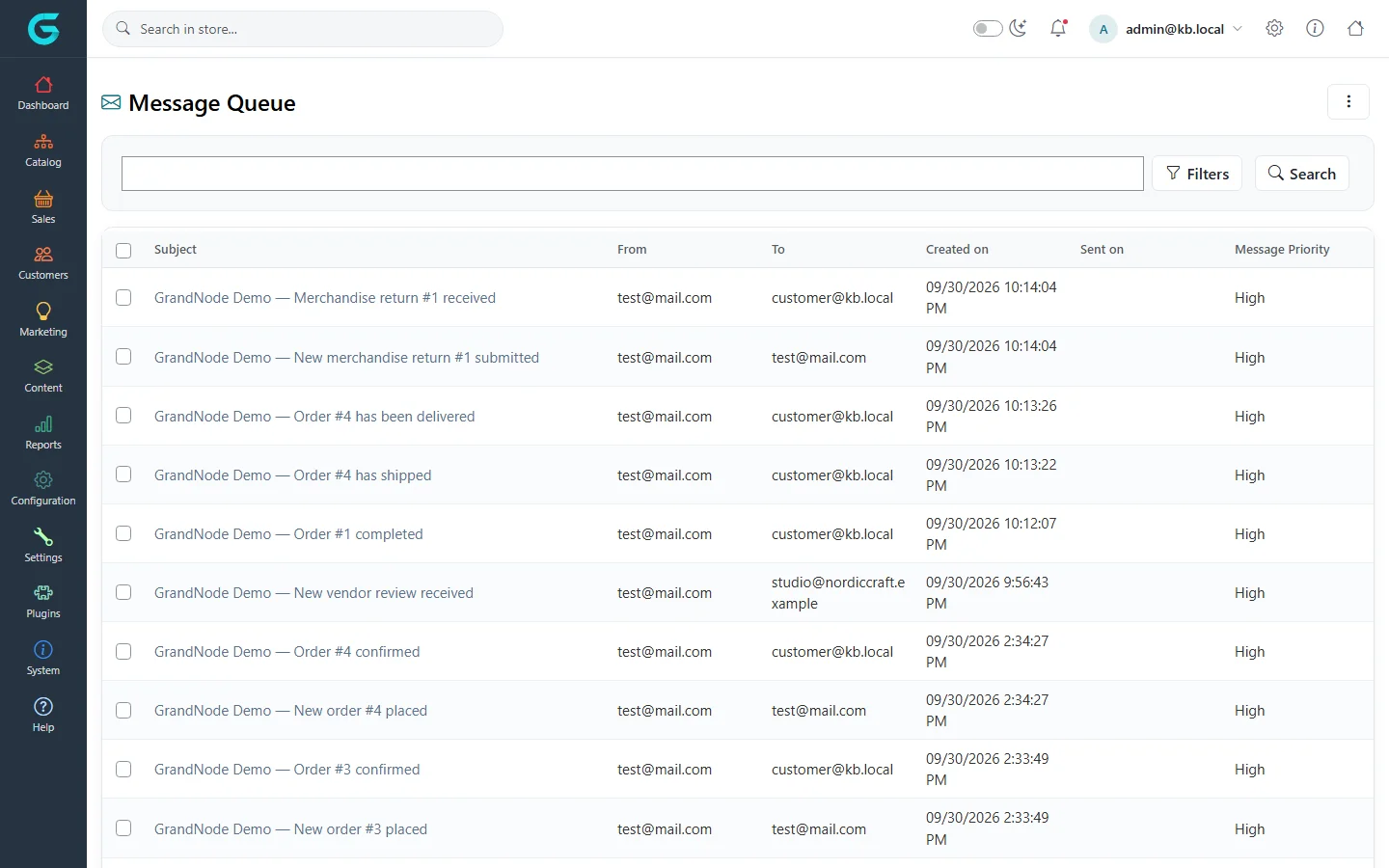
{"ArticleId":null,"Name":"E-mails are not sent or do not arrive","Content":"\n\u003Cp\u003EOrder confirmations, password recovery and registration e-mails go through templates, the message queue and an SMTP account. Check them in this order - each step tells you which part fails.\u003C/p\u003E\n\n\u003Ch2 id=\u0022steps\u0022\u003EStep by step\u003C/h2\u003E\n\u003Col\u003E\n\u003Cli\u003E\u003Cstrong\u003EIs the message in the queue?\u003C/strong\u003E Open \u003Cstrong\u003ESystem \u2192 Queued emails\u003C/strong\u003E and search for the recipient. If it is not there, the e-mail was never created: the message template is inactive, limited to another store, or the event did not happen (for example an order placed by a guest with no e-mail).\u003C/li\u003E\n\u003Cli\u003E\u003Cstrong\u003EWas it sent?\u003C/strong\u003E If \u003Cstrong\u003ESent on\u003C/strong\u003E is empty, open the message: \u003Cstrong\u003ESent attempts\u003C/strong\u003E and the error text tell you why. Typical errors are wrong SMTP host, port or credentials, or TLS settings that do not match the server.\u003C/li\u003E\n\u003Cli\u003E\u003Cstrong\u003EDoes the task run?\u003C/strong\u003E \u003Cstrong\u003ESystem \u2192 Maintenance \u2192 Schedule tasks\u003C/strong\u003E: \u003Cstrong\u003ESend emails\u003C/strong\u003E must be enabled, and its last success date should be recent. On a web farm, check the machine name it is restricted to.\u003C/li\u003E\n\u003Cli\u003E\u003Cstrong\u003EDoes the account work?\u003C/strong\u003E Open the e-mail account under \u003Cstrong\u003EConfiguration \u2192 Email accounts\u003C/strong\u003E and use \u003Cstrong\u003ESend Test Email\u003C/strong\u003E.\u003C/li\u003E\n\u003Cli\u003E\u003Cstrong\u003ESent, but not received?\u003C/strong\u003E Look in the spam folder. Make sure the sender address is on your own domain and that the domain has SPF, DKIM and DMARC records for the mail service you use.\u003C/li\u003E\n\u003C/ol\u003E\n\u003Cfigure\u003E\u003Cimg src=\u0022/Plugins/Theme.GrandNodeCom/Content/kb/content/queued-emails.webp\u0022 alt=\u0022The message queue with order and shipment e-mails, their recipients and sent dates\u0022 width=\u00221440\u0022 height=\u0022900\u0022 loading=\u0022lazy\u0022\u003E\u003Cfigcaption\u003ESystem \u2192 Queued emails: created and sent dates per message.\u003C/figcaption\u003E\u003C/figure\u003E\n\n\u003Ch2 id=\u0022registration\u0022\u003ECustomers cannot finish registration\u003C/h2\u003E\n\u003Cp\u003EWith the registration method \u003Cstrong\u003EEmail validation\u003C/strong\u003E, accounts stay inactive until the activation link is clicked. If e-mail does not work, nobody can register - fix e-mail first, or switch temporarily to \u003Cstrong\u003EStandard\u003C/strong\u003E.\u003C/p\u003E\n\n\u003Ch2 id=\u0022related\u0022\u003ERelated\u003C/h2\u003E\n\u003Cul\u003E\n\u003Cli\u003E\u003Ca href=\u0022/content-message-queue\u0022\u003EThe message queue\u003C/a\u003E\u003C/li\u003E\n\u003Cli\u003E\u003Ca href=\u0022/content-message-templates\u0022\u003EMessage templates and e-mail accounts\u003C/a\u003E\u003C/li\u003E\n\u003C/ul\u003E\n","ParentCategoryId":"6abe3a3b04b9d0a2009fec01","SeName":"troubleshooting-emails","MetaKeywords":null,"MetaDescription":"Why GrandNode e-mails do not arrive: inactive templates, the e-mail queue, SMTP errors, the Send emails task, and spam filtering - checked in order.","MetaTitle":null,"AllowComments":false,"Captcha":{"ReCaptchaChallengeField":null,"ReCaptchaResponseField":null,"ReCaptchaResponseValue":null,"ReCaptchaResponse":null},"RelatedArticles":[],"CategoryBreadcrumb":[{"Name":"Troubleshooting and FAQ","Description":null,"IsCurrent":false,"Children":null,"Parent":null,"SeName":"docs-troubleshooting","Id":"6abe3a3b04b9d0a2009fec01","UserFields":[]}],"AddNewComment":{"CommentText":null,"DisplayCaptcha":false,"Id":null,"UserFields":[]},"Comments":[],"Id":"6abe3a3b04b9d0a2009fec05","UserFields":[]}