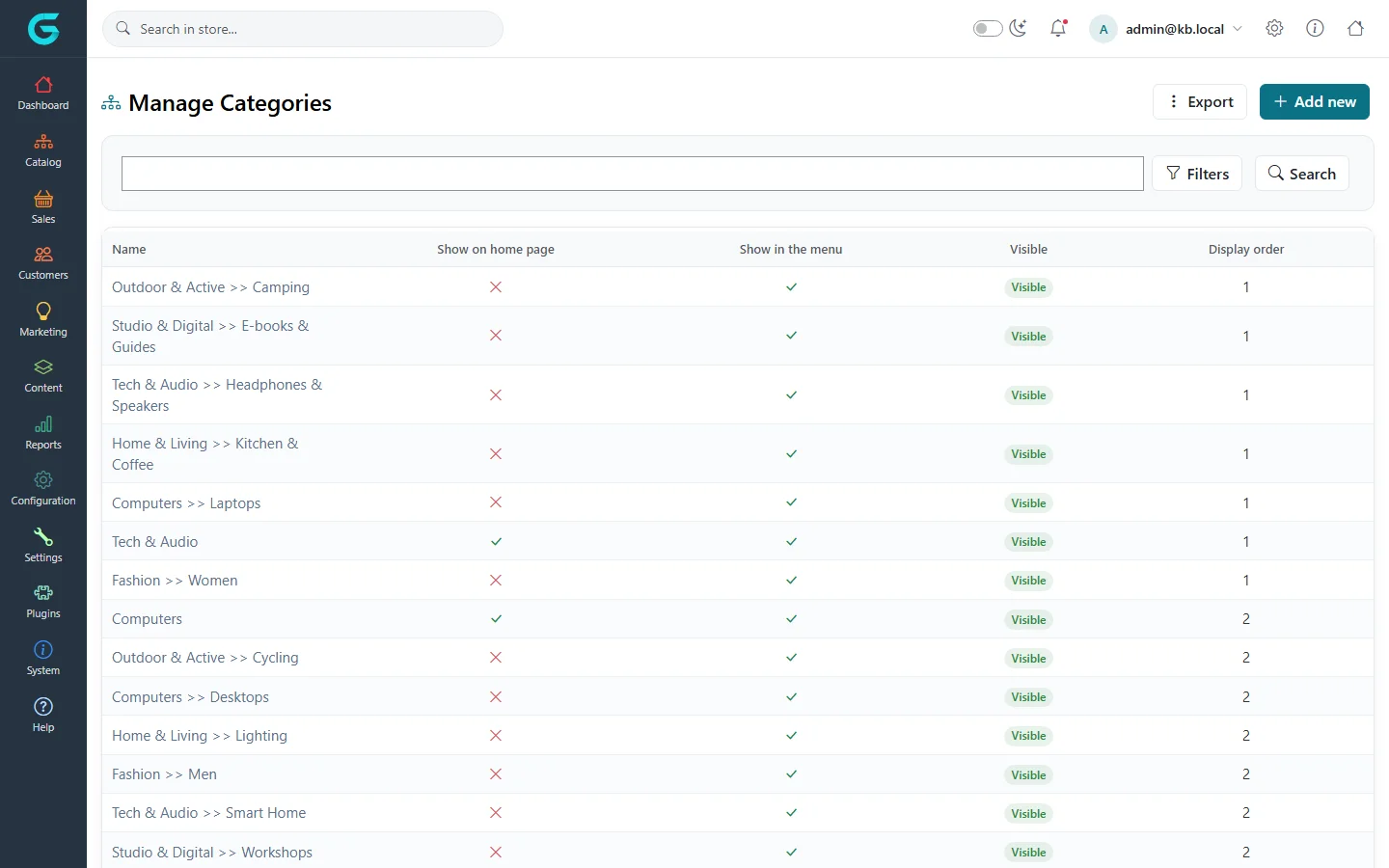
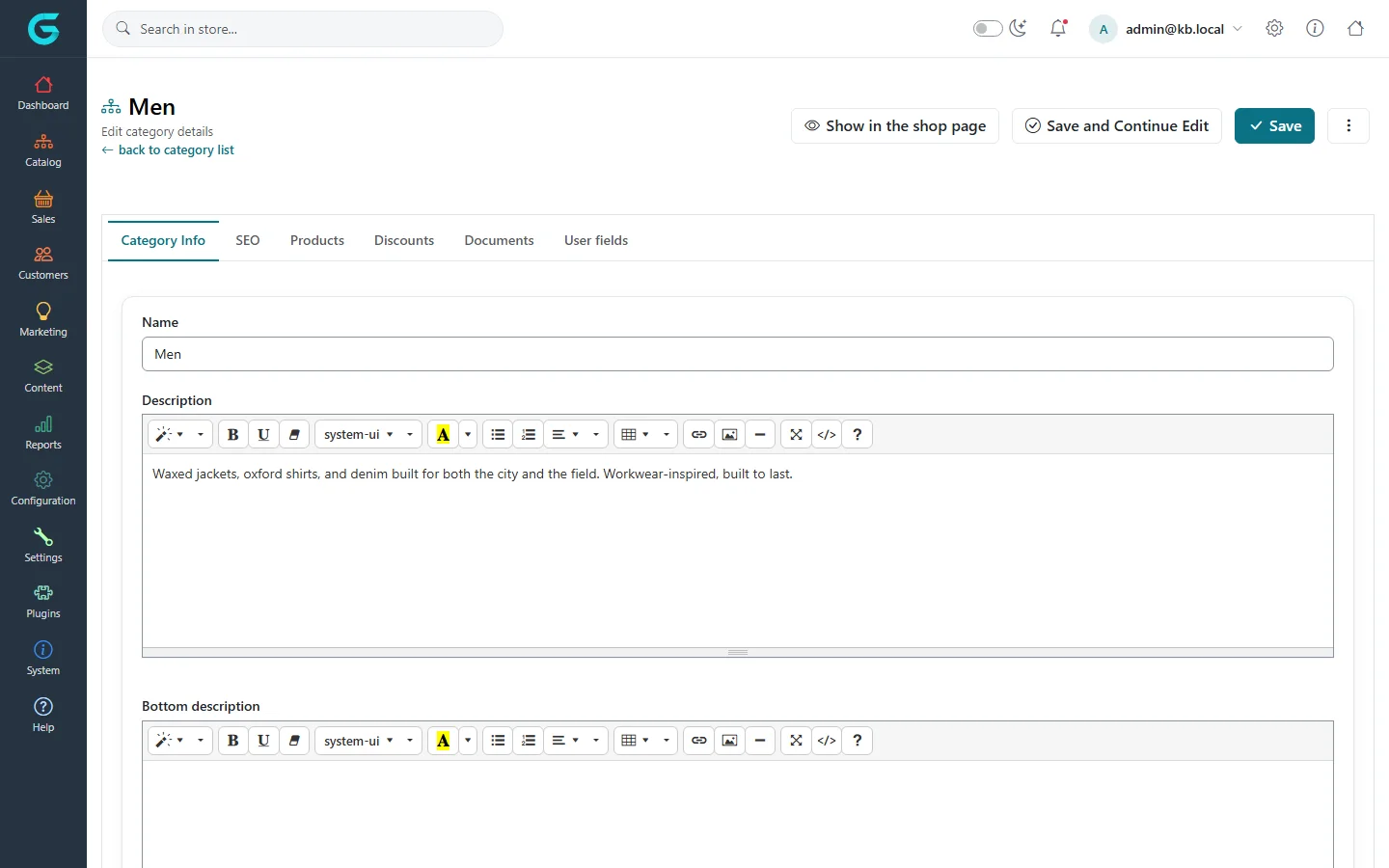
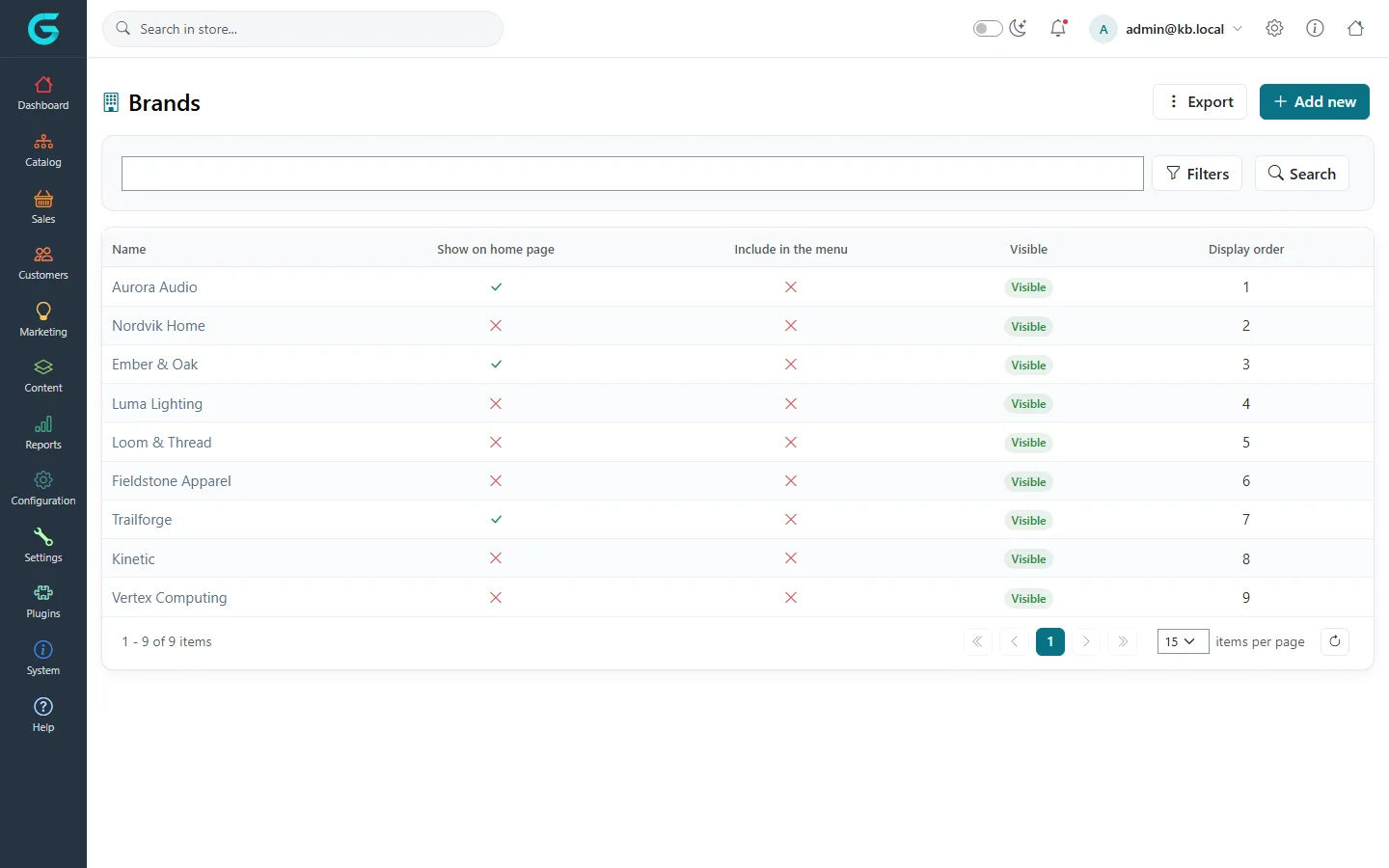
{"ArticleId":null,"Name":"Categories, brands and collections","Content":"\n\u003Cp\u003EGrandNode groups products in three ways. \u003Cstrong\u003ECategories\u003C/strong\u003E form a tree and are the main navigation of the storefront. \u003Cstrong\u003EBrands\u003C/strong\u003E say who makes a product; each product has at most one. \u003Cstrong\u003ECollections\u003C/strong\u003E are curated groupings that cut across categories, such as \u0022Autumn essentials\u0022 or a gift guide. All three share the same editor shape, so once you know one you know the others.\u003C/p\u003E\n\n\u003Ch2 id=\u0022categories\u0022\u003ECategories\u003C/h2\u003E\n\u003Cp\u003EOpen \u003Cstrong\u003ECatalog \u2192 Categories\u003C/strong\u003E. The list shows the full path of every category (for example \u003Cem\u003EFashion \u0026gt;\u0026gt; Men\u003C/em\u003E), whether it is on the home page, in the menu, visible, and its display order.\u003C/p\u003E\n\u003Cfigure\u003E\u003Cimg src=\u0022/Plugins/Theme.GrandNodeCom/Content/kb/catalog/category-list.webp\u0022 alt=\u0022The Manage Categories list with category paths such as Tech \u0026 Audio \u003E\u003E Headphones \u0026 Speakers, columns for home page, menu, visibility and display order, and Export and Add new buttons\u0022 width=\u00221440\u0022 height=\u0022900\u0022 loading=\u0022lazy\u0022\u003E\u003Cfigcaption\u003ECatalog \u2192 Categories.\u003C/figcaption\u003E\u003C/figure\u003E\n\u003Ch3 id=\u0022add-category\u0022\u003EAdd a category\u003C/h3\u003E\n\u003Col\u003E\n\u003Cli\u003EClick \u003Cstrong\u003EAdd new\u003C/strong\u003E.\u003C/li\u003E\n\u003Cli\u003EOn \u003Cstrong\u003ECategory Info\u003C/strong\u003E enter the \u003Cstrong\u003EName\u003C/strong\u003E, a \u003Cstrong\u003EDescription\u003C/strong\u003E shown above the product list and optionally a \u003Cstrong\u003EBottom description\u003C/strong\u003E shown below it (useful for longer SEO text).\u003C/li\u003E\n\u003Cli\u003EChoose the \u003Cstrong\u003EParent category\u003C/strong\u003E to place it in the tree; leave it empty for a top-level category.\u003C/li\u003E\n\u003Cli\u003ESet the switches described below, then click \u003Cstrong\u003ESave\u003C/strong\u003E or \u003Cstrong\u003ESave and Continue Edit\u003C/strong\u003E.\u003C/li\u003E\n\u003C/ol\u003E\n\u003Cfigure\u003E\u003Cimg src=\u0022/Plugins/Theme.GrandNodeCom/Content/kb/catalog/category-edit.webp\u0022 alt=\u0022Editing the category Men: the Category Info tab with name, description and bottom description editors, and tabs SEO, Products, Discounts, Documents and User fields\u0022 width=\u00221440\u0022 height=\u0022900\u0022 loading=\u0022lazy\u0022\u003E\u003Cfigcaption\u003EThe category editor. The Products tab maps many products at once.\u003C/figcaption\u003E\u003C/figure\u003E\n\u003Ctable\u003E\n\u003Cthead\u003E\u003Ctr\u003E\u003Cth\u003EField\u003C/th\u003E\u003Cth\u003EWhat it does\u003C/th\u003E\u003C/tr\u003E\u003C/thead\u003E\n\u003Ctbody\u003E\n\u003Ctr\u003E\u003Ctd\u003EParent category\u003C/td\u003E\u003Ctd\u003EPlaces the category in the tree. The path appears in breadcrumbs and in the admin list.\u003C/td\u003E\u003C/tr\u003E\n\u003Ctr\u003E\u003Ctd\u003EPicture, Icon\u003C/td\u003E\u003Ctd\u003EAn image for category tiles and an icon for menus, where the theme uses them.\u003C/td\u003E\u003C/tr\u003E\n\u003Ctr\u003E\u003Ctd\u003ECategory layout\u003C/td\u003E\u003Ctd\u003EThe template used to render the category page (grid, list, or a theme\u0027s own layouts).\u003C/td\u003E\u003C/tr\u003E\n\u003Ctr\u003E\u003Ctd\u003EPage size, Allow customers to select page size, Page size options\u003C/td\u003E\u003Ctd\u003EHow many products a page shows and which sizes a shopper may pick, for example \u003Ccode\u003E6, 12, 24\u003C/code\u003E.\u003C/td\u003E\u003C/tr\u003E\n\u003Ctr\u003E\u003Ctd\u003EDefault sort, Available sort options\u003C/td\u003E\u003Ctd\u003EThe initial ordering (position, name, price, newest) and which orderings shoppers can choose.\u003C/td\u003E\u003C/tr\u003E\n\u003Ctr\u003E\u003Ctd\u003EShow on home page\u003C/td\u003E\u003Ctd\u003EAdds the category to the home page category block.\u003C/td\u003E\u003C/tr\u003E\n\u003Ctr\u003E\u003Ctd\u003EFeatured products on home page\u003C/td\u003E\u003Ctd\u003EShows the category\u0027s featured products on the home page.\u003C/td\u003E\u003C/tr\u003E\n\u003Ctr\u003E\u003Ctd\u003EInclude in menu\u003C/td\u003E\u003Ctd\u003EShows the category in the top menu.\u003C/td\u003E\u003C/tr\u003E\n\u003Ctr\u003E\u003Ctd\u003EHide on catalog\u003C/td\u003E\u003Ctd\u003EKeeps the category out of the catalog navigation while its page stays reachable, for landing pages.\u003C/td\u003E\u003C/tr\u003E\n\u003Ctr\u003E\u003Ctd\u003EShow on search box\u003C/td\u003E\u003Ctd\u003EOffers the category as a filter in the search box, ordered by \u003Cstrong\u003ESearch box display order\u003C/strong\u003E.\u003C/td\u003E\u003C/tr\u003E\n\u003Ctr\u003E\u003Ctd\u003EFlag, Flag style\u003C/td\u003E\u003Ctd\u003EA short label such as \u0022New\u0022 or \u0022Sale\u0022 shown next to the category name.\u003C/td\u003E\u003C/tr\u003E\n\u003Ctr\u003E\u003Ctd\u003EPublished, Display order\u003C/td\u003E\u003Ctd\u003EWhether shoppers see it, and its position among its siblings.\u003C/td\u003E\u003C/tr\u003E\n\u003C/tbody\u003E\n\u003C/table\u003E\n\u003Cp\u003EThe other tabs: \u003Cstrong\u003ESEO\u003C/strong\u003E (page name, title, meta description - as for products), \u003Cstrong\u003EProducts\u003C/strong\u003E (map products with a search popup and set their order and featured flag), \u003Cstrong\u003EDiscounts\u003C/strong\u003E (discounts of the type \u0022assigned to categories\u0022), \u003Cstrong\u003EDocuments\u003C/strong\u003E and \u003Cstrong\u003EUser fields\u003C/strong\u003E. Access by customer group and store limits appear when those features are in use.\u003C/p\u003E\n\n\u003Ch2 id=\u0022brands\u0022\u003EBrands\u003C/h2\u003E\n\u003Cp\u003E\u003Cstrong\u003ECatalog \u2192 Brands\u003C/strong\u003E lists the makers of your products with the same home page, menu and visibility columns.\u003C/p\u003E\n\u003Cfigure\u003E\u003Cimg src=\u0022/Plugins/Theme.GrandNodeCom/Content/kb/catalog/brand-list.webp\u0022 alt=\u0022The Brands list with Aurora Audio, Nordvik Home, Ember \u0026 Oak and six more brands\u0022 width=\u00221440\u0022 height=\u0022900\u0022 loading=\u0022lazy\u0022\u003E\u003Cfigcaption\u003ECatalog \u2192 Brands.\u003C/figcaption\u003E\u003C/figure\u003E\n\u003Cp\u003EA brand has a name, description, picture, layout, page size and sort options, SEO fields and a Discounts tab - the same fields as a category, without the parent. A product gets its brand on the product\u0027s \u003Cstrong\u003EGeneral\u003C/strong\u003E tab. Shoppers can browse all brands at \u003Ccode\u003E/brand/all\u003C/code\u003E and each brand has its own page.\u003C/p\u003E\n\n\u003Ch2 id=\u0022collections\u0022\u003ECollections\u003C/h2\u003E\n\u003Cp\u003E\u003Cstrong\u003ECatalog \u2192 Collections\u003C/strong\u003E works exactly like brands, but a product can belong to any number of collections, mapped on the product\u0027s \u003Cstrong\u003EMappings\u003C/strong\u003E tab or from the collection\u0027s \u003Cstrong\u003EProducts\u003C/strong\u003E tab. Use collections for merchandising themes that should not change the category tree: seasonal edits, \u0022Staff picks\u0022, or products of one designer.\u003C/p\u003E\n\n\u003Ch2 id=\u0022import-export\u0022\u003EImport and export\u003C/h2\u003E\n\u003Cp\u003EThe category, brand and collection lists have an \u003Cstrong\u003EExport\u003C/strong\u003E button that downloads an Excel file and an import action that reads the same format back. An imported row with an existing \u003Cstrong\u003EId\u003C/strong\u003E updates that record; a row without one creates a new record. This is the quickest way to translate or reorganise a large tree - see \u003Ca href=\u0022/catalog-import-export-bulk-edit\u0022\u003EImport, export and bulk edit\u003C/a\u003E.\u003C/p\u003E\n\n\u003Ch2 id=\u0022tips\u0022\u003ETips and common mistakes\u003C/h2\u003E\n\u003Cul\u003E\n\u003Cli\u003EKeep the tree shallow. Two or three levels are easier to navigate on a phone than five.\u003C/li\u003E\n\u003Cli\u003ETurning off \u003Cstrong\u003EPublished\u003C/strong\u003E hides the category, not its products; they stay reachable through search and their own addresses.\u003C/li\u003E\n\u003Cli\u003EIf a category does not appear in the menu, check \u003Cstrong\u003EInclude in menu\u003C/strong\u003E, \u003Cstrong\u003EPublished\u003C/strong\u003E, the store and customer group limits, and that its parent is visible too.\u003C/li\u003E\n\u003C/ul\u003E\n\n\u003Ch2 id=\u0022related\u0022\u003ERelated\u003C/h2\u003E\n\u003Cul\u003E\n\u003Cli\u003E\u003Ca href=\u0022/catalog-pictures-seo-mappings\u0022\u003EPictures, SEO and category mappings\u003C/a\u003E\u003C/li\u003E\n\u003Cli\u003E\u003Ca href=\u0022/docs-content\u0022\u003EContent management\u003C/a\u003E - page and category layouts\u003C/li\u003E\n\u003Cli\u003E\u003Ca href=\u0022/docs-marketing\u0022\u003EMarketing and promotions\u003C/a\u003E - discounts on categories and brands\u003C/li\u003E\n\u003C/ul\u003E\n","ParentCategoryId":"6abdec6c83d2816248229eb1","SeName":"catalog-categories-brands-collections","MetaKeywords":null,"MetaDescription":"Build the category tree, add brands and curated collections, and control menus, home page blocks, layouts and sorting in the GrandNode admin.","MetaTitle":null,"AllowComments":false,"Captcha":{"ReCaptchaChallengeField":null,"ReCaptchaResponseField":null,"ReCaptchaResponseValue":null,"ReCaptchaResponse":null},"RelatedArticles":[],"CategoryBreadcrumb":[{"Name":"Catalog","Description":null,"IsCurrent":false,"Children":null,"Parent":null,"SeName":"docs-catalog","Id":"6abdec6c83d2816248229eb1","UserFields":[]}],"AddNewComment":{"CommentText":null,"DisplayCaptcha":false,"Id":null,"UserFields":[]},"Comments":[],"Id":"6abdec6c83d2816248229ebd","UserFields":[]}