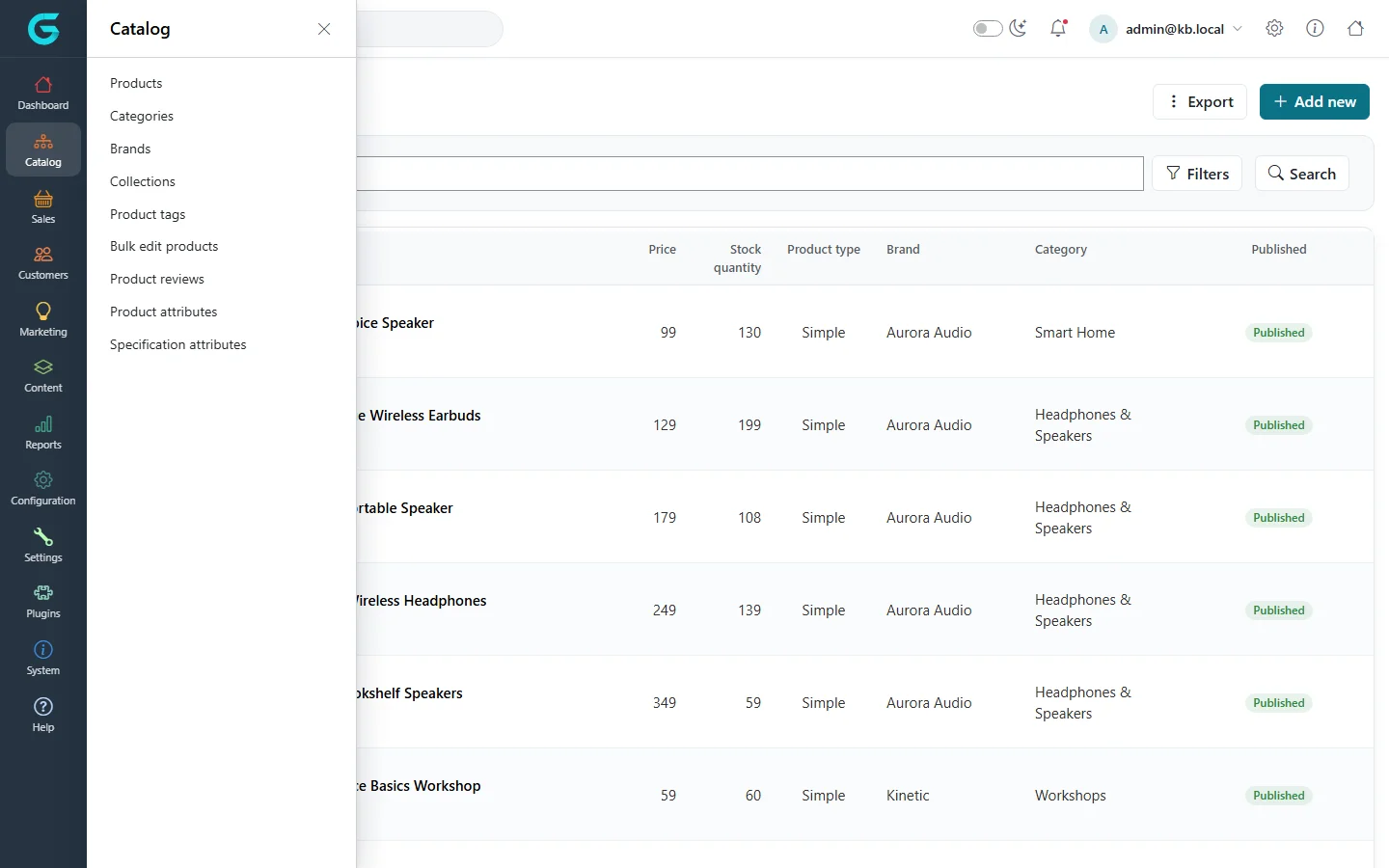
{"ArticleId":null,"Name":"Catalog overview","Content":"\n\u003Cp\u003EThe catalog is everything a customer can browse and buy in your store. In GrandNode it is built from a small number of building blocks: \u003Cstrong\u003Eproducts\u003C/strong\u003E that are sold, \u003Cstrong\u003Ecategories\u003C/strong\u003E, \u003Cstrong\u003Ebrands\u003C/strong\u003E and \u003Cstrong\u003Ecollections\u003C/strong\u003E that group them, \u003Cstrong\u003Eattributes\u003C/strong\u003E that describe the options a customer chooses and the specifications a customer filters by, \u003Cstrong\u003Eproduct tags\u003C/strong\u003E for loose grouping and search, and \u003Cstrong\u003Eproduct reviews\u003C/strong\u003E written by customers. This article explains how the pieces fit together and where to find each of them, so that the rest of this section is easy to follow.\u003C/p\u003E\n\n\u003Ch2 id=\u0022where-to-find-it\u0022\u003EWhere to find it\u003C/h2\u003E\n\u003Cp\u003EOpen the admin panel (\u003Ccode\u003E/admin\u003C/code\u003E) and click \u003Cstrong\u003ECatalog\u003C/strong\u003E in the left sidebar. The flyout lists every catalog screen:\u003C/p\u003E\n\u003Cul\u003E\n\u003Cli\u003E\u003Cstrong\u003EProducts\u003C/strong\u003E - the product list, with search, filters, Excel import and export, and the product editor.\u003C/li\u003E\n\u003Cli\u003E\u003Cstrong\u003ECategories\u003C/strong\u003E - the category tree that forms the main navigation of the storefront.\u003C/li\u003E\n\u003Cli\u003E\u003Cstrong\u003EBrands\u003C/strong\u003E - the makers of your products (in other platforms often called manufacturers).\u003C/li\u003E\n\u003Cli\u003E\u003Cstrong\u003ECollections\u003C/strong\u003E - curated, cross-category groupings such as seasonal edits or gift guides.\u003C/li\u003E\n\u003Cli\u003E\u003Cstrong\u003EProduct tags\u003C/strong\u003E - free-form keywords shared across products.\u003C/li\u003E\n\u003Cli\u003E\u003Cstrong\u003EBulk edit products\u003C/strong\u003E - a spreadsheet-style grid for changing names, SKUs, prices, stock and publishing of many products at once.\u003C/li\u003E\n\u003Cli\u003E\u003Cstrong\u003EProduct reviews\u003C/strong\u003E - moderation of customer reviews.\u003C/li\u003E\n\u003Cli\u003E\u003Cstrong\u003EProduct attributes\u003C/strong\u003E - the reusable definitions of options such as Size or Color.\u003C/li\u003E\n\u003Cli\u003E\u003Cstrong\u003ESpecification attributes\u003C/strong\u003E - the reusable definitions of facts such as Material or Screen size, used for comparison and filtering.\u003C/li\u003E\n\u003C/ul\u003E\n\u003Cfigure\u003E\u003Cimg src=\u0022/Plugins/Theme.GrandNodeCom/Content/kb/catalog/catalog-menu.webp\u0022 alt=\u0022The Catalog flyout in the admin sidebar listing Products, Categories, Brands, Collections, Product tags, Bulk edit products, Product reviews, Product attributes and Specification attributes\u0022 width=\u00221440\u0022 height=\u0022900\u0022 loading=\u0022lazy\u0022\u003E\u003Cfigcaption\u003EEverything in this section starts from the Catalog menu.\u003C/figcaption\u003E\u003C/figure\u003E\n\u003Cp\u003ETwo related screens live elsewhere: the \u003Cstrong\u003Elayouts\u003C/strong\u003E that decide how a product, category, brand or collection page is rendered are under \u003Cstrong\u003EConfiguration \u2192 Layouts\u003C/strong\u003E, and the store-wide catalog behaviour (page sizes, what is shown on product pages, search options) is under \u003Cstrong\u003ESettings \u2192 Catalog\u003C/strong\u003E. The \u003Cstrong\u003ELow stock\u003C/strong\u003E report is under \u003Cstrong\u003EReports\u003C/strong\u003E.\u003C/p\u003E\n\n\u003Ch2 id=\u0022how-the-pieces-fit\u0022\u003EHow the pieces fit together\u003C/h2\u003E\n\u003Cp\u003EA \u003Cstrong\u003Eproduct\u003C/strong\u003E is the central record. It has a type (simple, grouped, bundled, reservation or auction), prices, inventory rules, pictures and SEO data. A product is then \u003Cem\u003Emapped\u003C/em\u003E to the places where it should appear:\u003C/p\u003E\n\u003Cul\u003E\n\u003Cli\u003Eto one or more \u003Cstrong\u003Ecategories\u003C/strong\u003E - a product may live in several categories at once, for example both \u003Cem\u003EKitchen \u0026amp; Coffee\u003C/em\u003E and \u003Cem\u003EGifts\u003C/em\u003E;\u003C/li\u003E\n\u003Cli\u003Eto one \u003Cstrong\u003Ebrand\u003C/strong\u003E - chosen on the product\u0027s General tab;\u003C/li\u003E\n\u003Cli\u003Eto any number of \u003Cstrong\u003Ecollections\u003C/strong\u003E.\u003C/li\u003E\n\u003C/ul\u003E\n\u003Cp\u003EAttributes come in two kinds and are easy to confuse:\u003C/p\u003E\n\u003Ctable\u003E\n\u003Cthead\u003E\u003Ctr\u003E\u003Cth\u003EKind\u003C/th\u003E\u003Cth\u003EWhat it is for\u003C/th\u003E\u003Cth\u003EExample\u003C/th\u003E\u003C/tr\u003E\u003C/thead\u003E\n\u003Ctbody\u003E\n\u003Ctr\u003E\u003Ctd\u003EProduct attribute\u003C/td\u003E\u003Ctd\u003EA choice the customer makes when adding the product to the cart. It can change the price, weight, SKU and stock.\u003C/td\u003E\u003Ctd\u003ESize: S, M, L; Color: Navy, White\u003C/td\u003E\u003C/tr\u003E\n\u003Ctr\u003E\u003Ctd\u003ESpecification attribute\u003C/td\u003E\u003Ctd\u003EA fixed fact about the product, shown in the specification table and usable as a filter in category pages.\u003C/td\u003E\u003Ctd\u003EMaterial: Cotton; Fit: Slim\u003C/td\u003E\u003C/tr\u003E\n\u003C/tbody\u003E\n\u003C/table\u003E\n\u003Cp\u003EBoth kinds are defined once in the Catalog menu and then attached to individual products, so the same Size or Material definition is reused across the whole store.\u003C/p\u003E\n\n\u003Ch2 id=\u0022stores-groups-vendors\u0022\u003EStores, customer groups and vendors\u003C/h2\u003E\n\u003Cp\u003EGrandNode is multi-store. Products, categories, brands and collections each have \u003Cstrong\u003ELimited to stores\u003C/strong\u003E and \u003Cstrong\u003ELimited to customer groups\u003C/strong\u003E fields: leave them empty to show the item everywhere and to everyone, or pick stores or customer groups to restrict it. A product can also be assigned to a \u003Cstrong\u003Evendor\u003C/strong\u003E; vendors then manage their own products in the vendor panel (\u003Ccode\u003E/vendor\u003C/code\u003E), and store managers manage the catalog of their store in the store panel (\u003Ccode\u003E/store\u003C/code\u003E). The screens described in this section are the same in all three panels, with fewer options where a panel is limited to its own scope. Stores, customer groups and vendors themselves are set up under \u003Cstrong\u003EConfiguration \u2192 Stores\u003C/strong\u003E and \u003Cstrong\u003ECustomers\u003C/strong\u003E.\u003C/p\u003E\n\n\u003Ch2 id=\u0022recommended-order\u0022\u003ERecommended order when you start\u003C/h2\u003E\n\u003Col\u003E\n\u003Cli\u003ECreate the \u003Cstrong\u003Ecategory tree\u003C/strong\u003E and the \u003Cstrong\u003Ebrands\u003C/strong\u003E - see \u003Ca href=\u0022/catalog-categories-brands-collections\u0022\u003ECategories\u003C/a\u003E and \u003Ca href=\u0022/catalog-categories-brands-collections\u0022\u003EBrands and collections\u003C/a\u003E.\u003C/li\u003E\n\u003Cli\u003EDefine the \u003Cstrong\u003Eproduct attributes\u003C/strong\u003E and \u003Cstrong\u003Especification attributes\u003C/strong\u003E you will need - see \u003Ca href=\u0022/catalog-attributes\u0022\u003EProduct attributes and combinations\u003C/a\u003E and \u003Ca href=\u0022/catalog-attributes#specifications\u0022\u003ESpecification attributes\u003C/a\u003E.\u003C/li\u003E\n\u003Cli\u003EAdd products one by one (\u003Ca href=\u0022/catalog-products\u0022\u003EAdding and editing products\u003C/a\u003E) or in bulk from Excel (\u003Ca href=\u0022/catalog-import-export-bulk-edit\u0022\u003EImport, export and bulk edit\u003C/a\u003E).\u003C/li\u003E\n\u003Cli\u003ESet prices and stock rules - see \u003Ca href=\u0022/catalog-prices-inventory\u0022\u003EPrices, discounts and inventory\u003C/a\u003E.\u003C/li\u003E\n\u003Cli\u003ECheck the result on the storefront with \u003Cstrong\u003EShow in the shop page\u003C/strong\u003E on the product editor.\u003C/li\u003E\n\u003C/ol\u003E\n\n\u003Ch2 id=\u0022tips\u0022\u003ETips and common mistakes\u003C/h2\u003E\n\u003Cul\u003E\n\u003Cli\u003EA product that is not visible on the storefront is usually unpublished, limited to another store or customer group, outside its \u003Cstrong\u003EAvailable from\u003C/strong\u003E/\u003Cstrong\u003EAvailable to\u003C/strong\u003E dates, or not mapped to any category that is itself published.\u003C/li\u003E\n\u003Cli\u003EUse product attributes only for choices that really change what is shipped. A fact that never varies belongs in a specification attribute, where it can also be filtered.\u003C/li\u003E\n\u003Cli\u003ECatalog changes are cached. They normally show on the storefront immediately after saving; if they do not, check that you saved (not only switched tabs) the product.\u003C/li\u003E\n\u003C/ul\u003E\n\n\u003Ch2 id=\u0022related\u0022\u003ERelated\u003C/h2\u003E\n\u003Cul\u003E\n\u003Cli\u003E\u003Ca href=\u0022/catalog-products\u0022\u003EAdding and editing products\u003C/a\u003E\u003C/li\u003E\n\u003Cli\u003E\u003Ca href=\u0022/catalog-product-types\u0022\u003EProduct types\u003C/a\u003E\u003C/li\u003E\n\u003Cli\u003E\u003Ca href=\u0022/catalog-prices-inventory\u0022\u003EPrices, discounts and inventory\u003C/a\u003E\u003C/li\u003E\n\u003C/ul\u003E\n","ParentCategoryId":"6abdec6c83d2816248229eb1","SeName":"catalog-overview","MetaKeywords":null,"MetaDescription":"What the GrandNode catalog is made of - products, categories, brands, collections, attributes, tags and reviews - and where each lives in the admin panel.","MetaTitle":null,"AllowComments":false,"Captcha":{"ReCaptchaChallengeField":null,"ReCaptchaResponseField":null,"ReCaptchaResponseValue":null,"ReCaptchaResponse":null},"RelatedArticles":[],"CategoryBreadcrumb":[{"Name":"Catalog","Description":null,"IsCurrent":false,"Children":null,"Parent":null,"SeName":"docs-catalog","Id":"6abdec6c83d2816248229eb1","UserFields":[]}],"AddNewComment":{"CommentText":null,"DisplayCaptcha":false,"Id":null,"UserFields":[]},"Comments":[],"Id":"6abdec6c83d2816248229eb3","UserFields":[]}