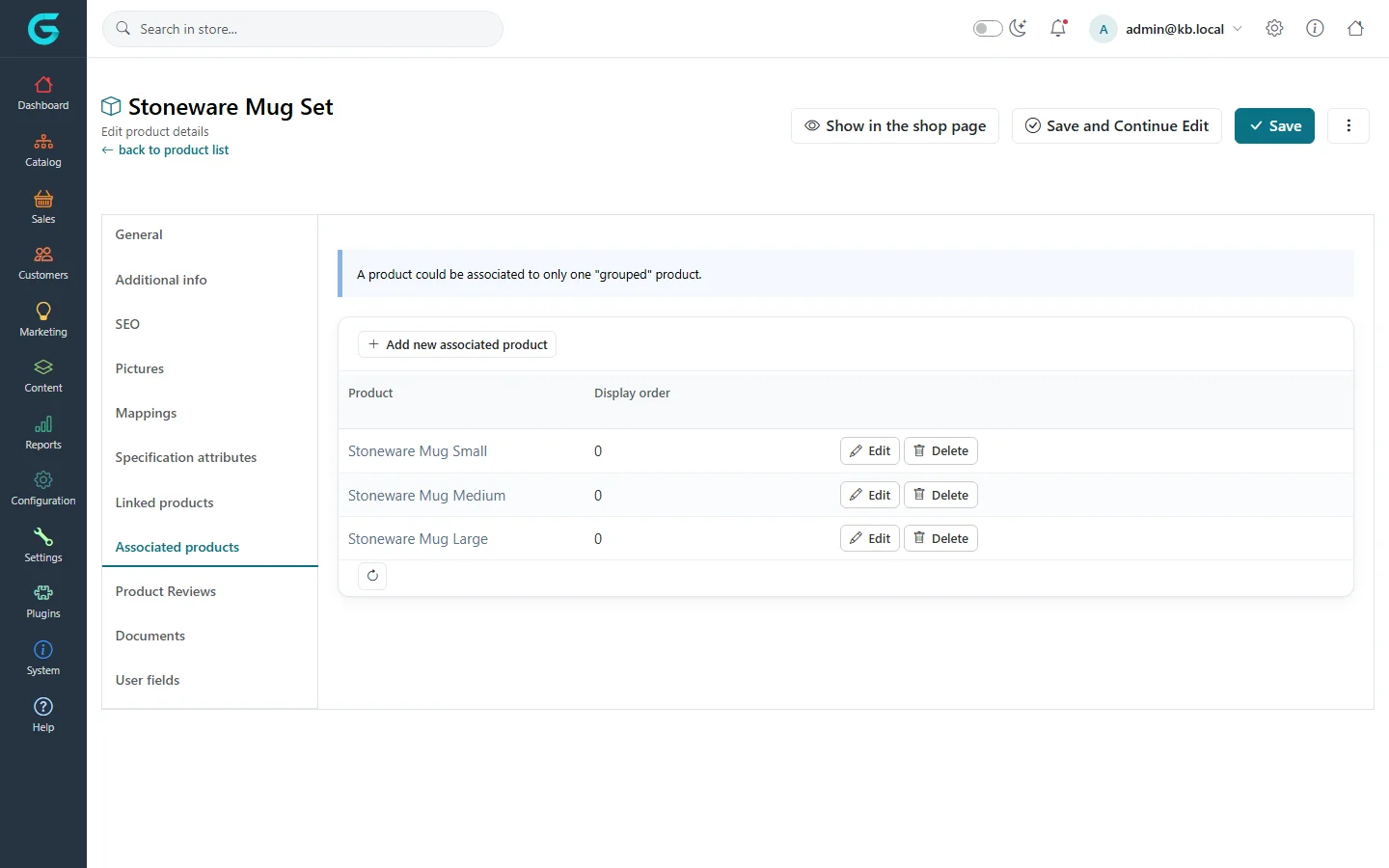
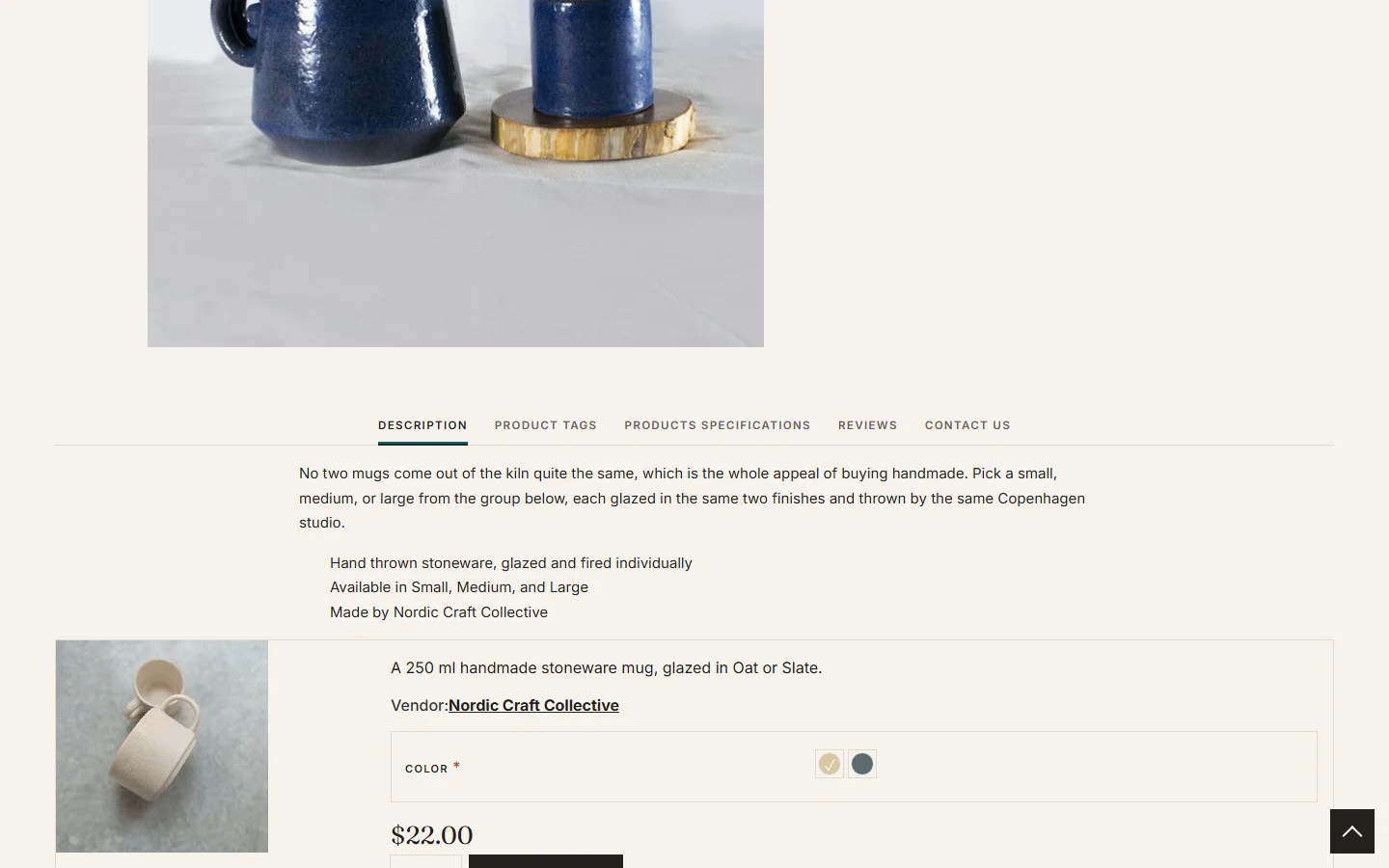
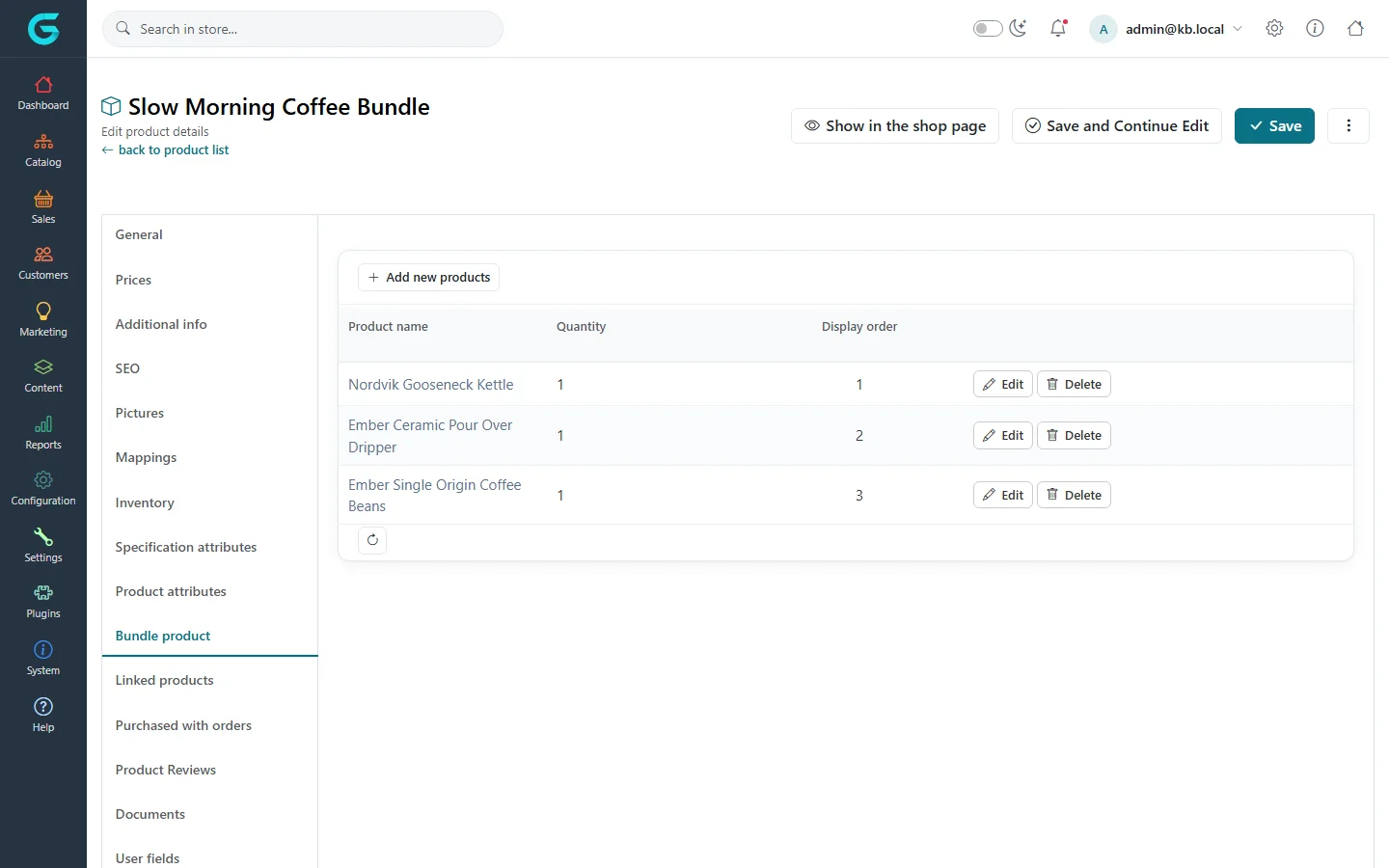
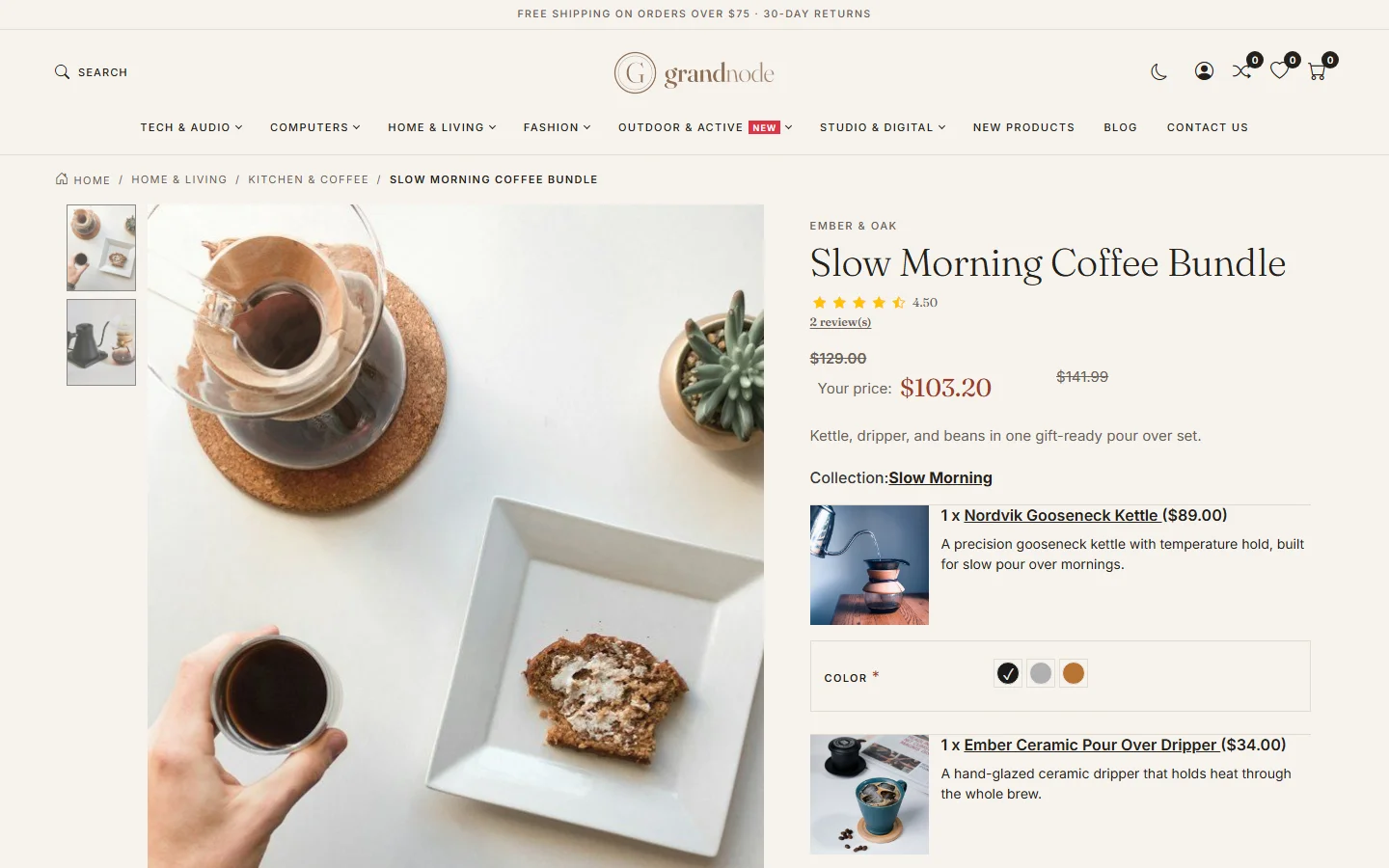
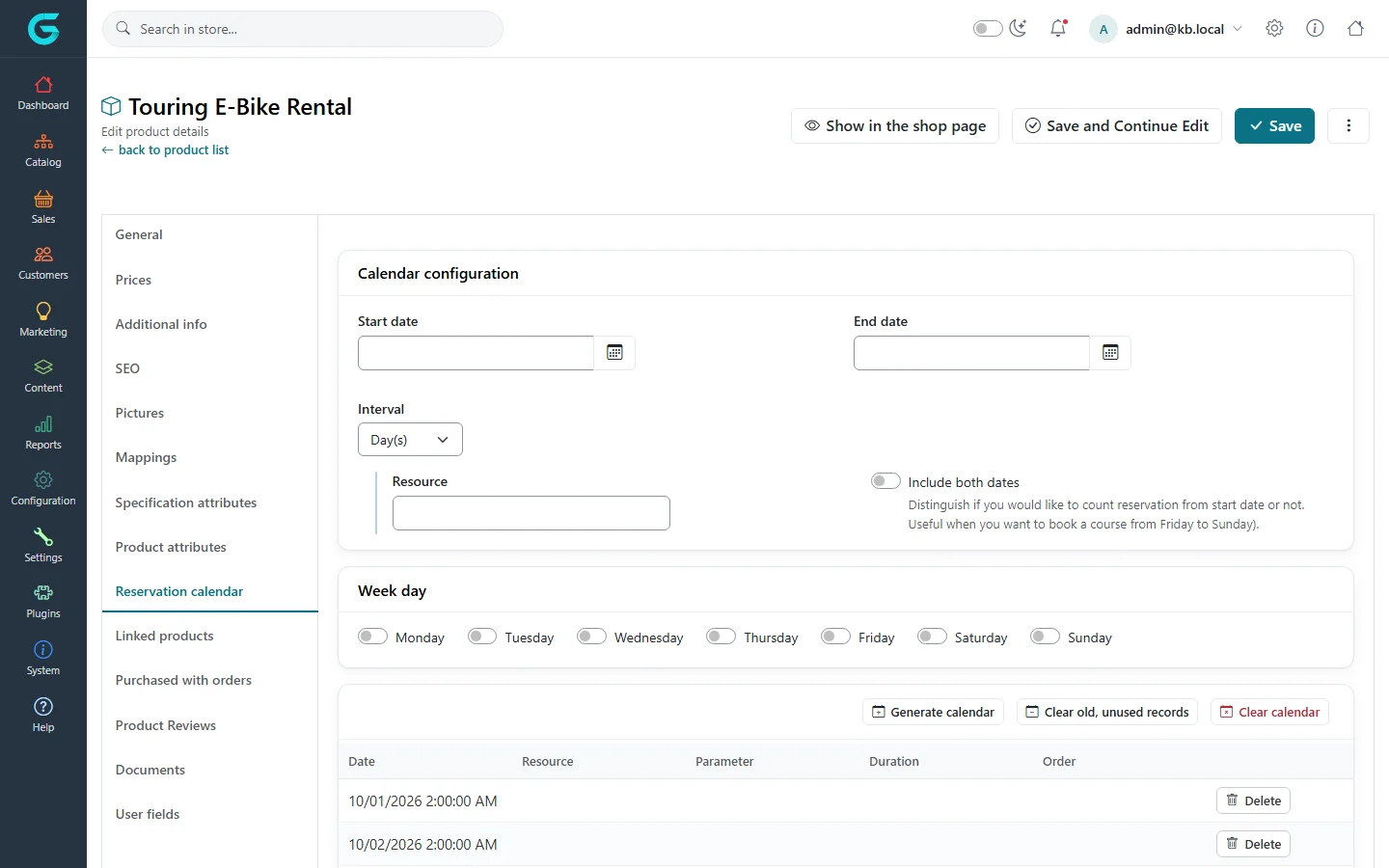
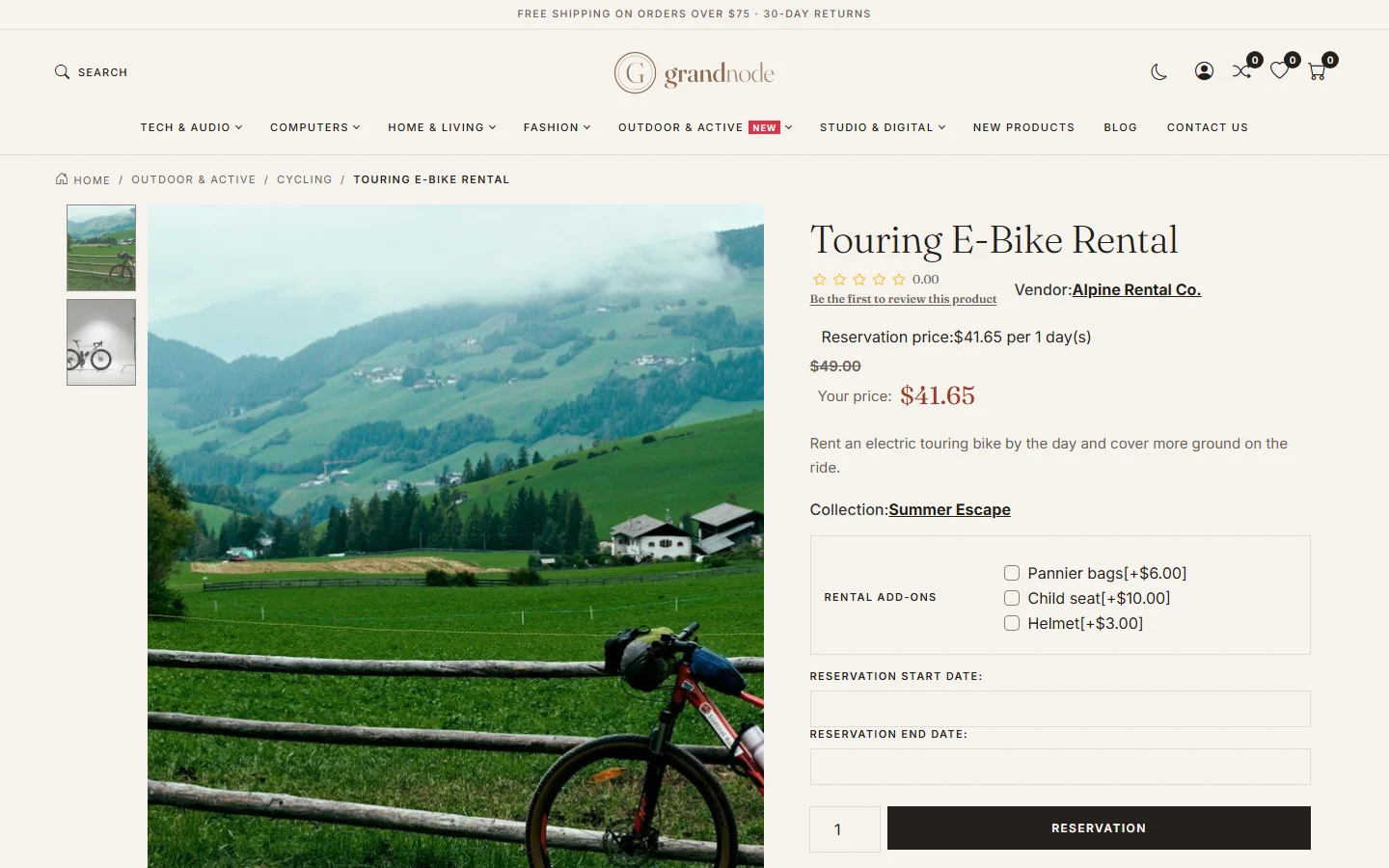
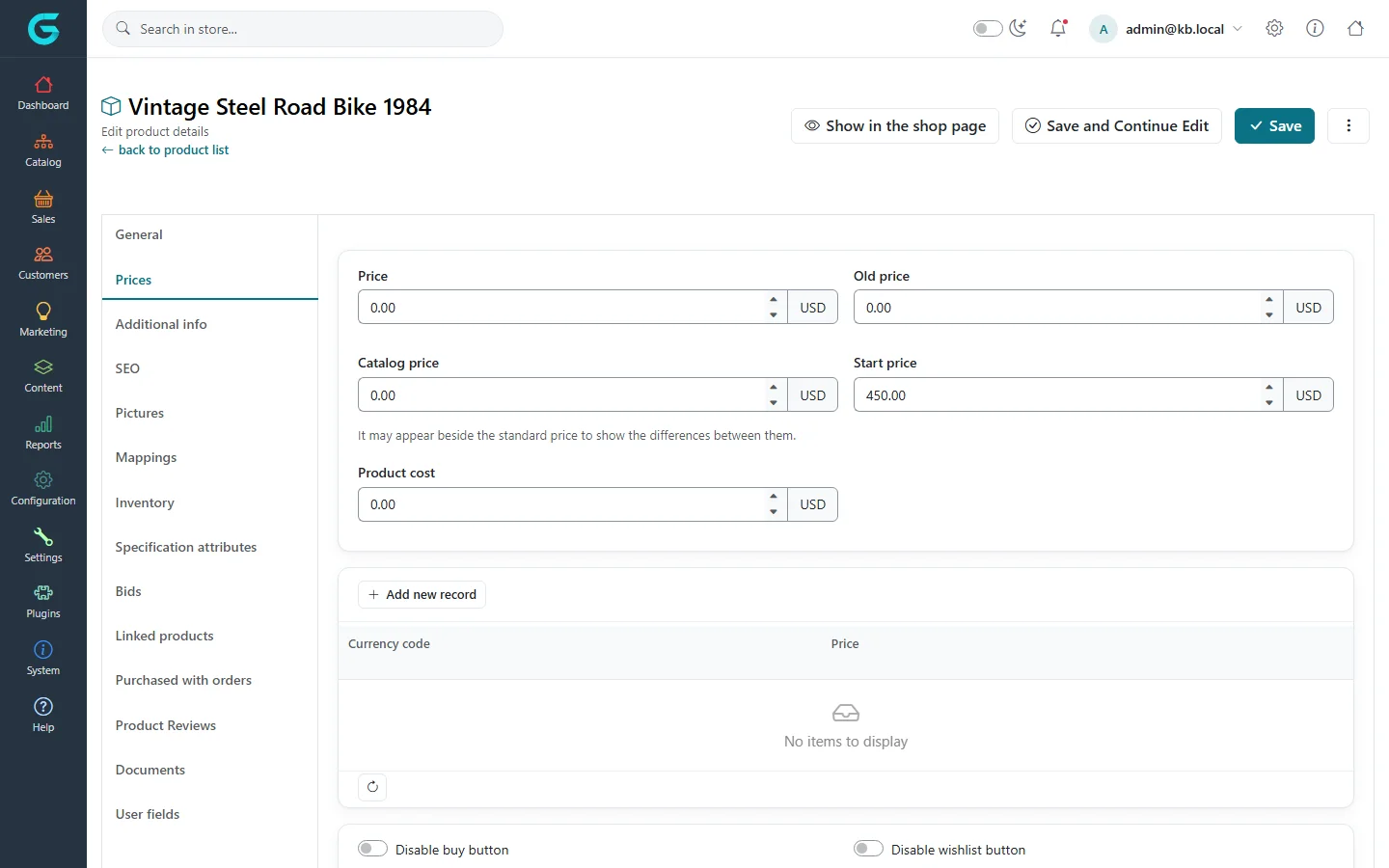
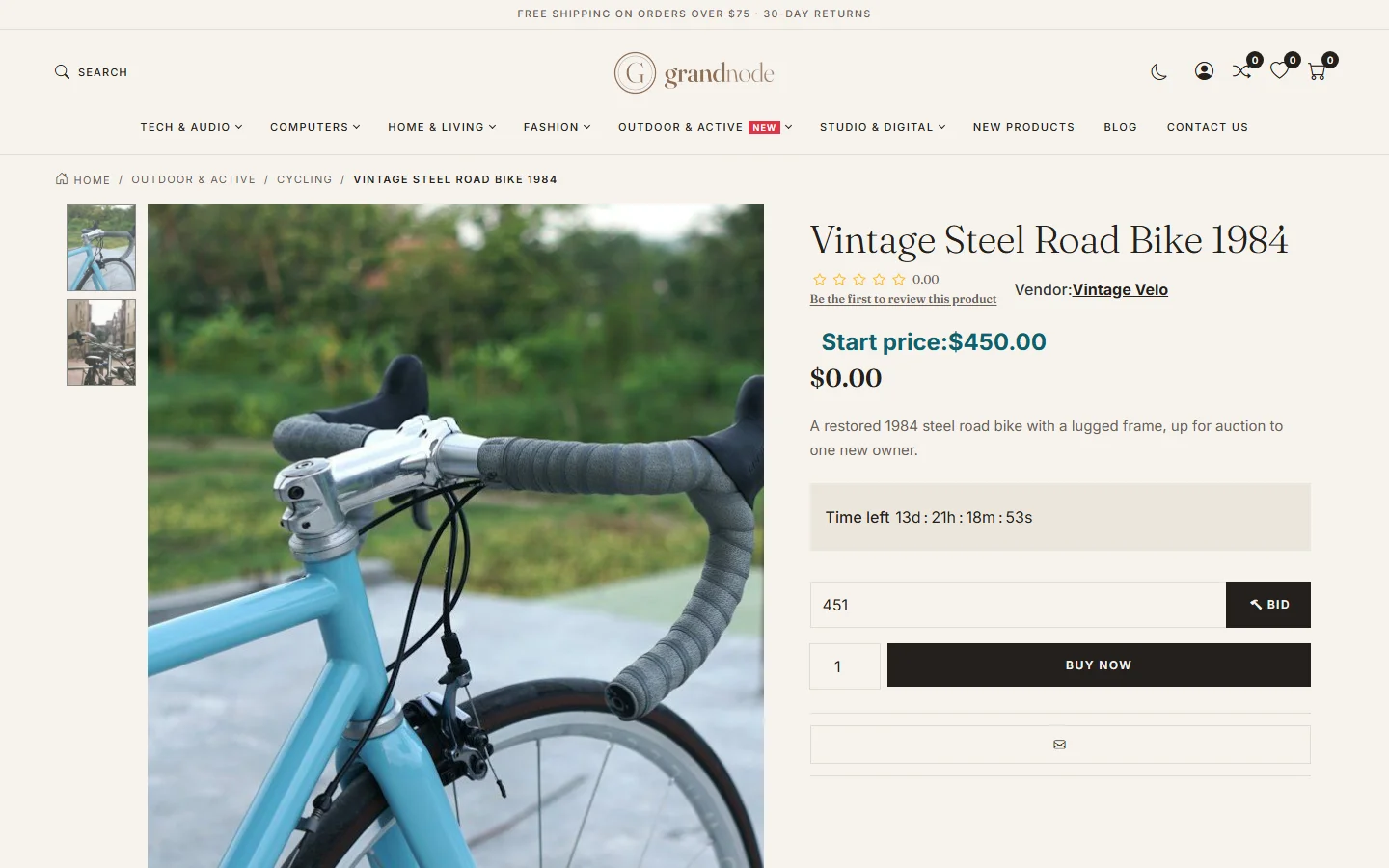
{"ArticleId":null,"Name":"Product types","Content":"\n\u003Cp\u003EEvery GrandNode product has a \u003Cstrong\u003EProduct type\u003C/strong\u003E, chosen at the top of the \u003Cstrong\u003EGeneral\u003C/strong\u003E tab. The type decides how the product is sold - added to the cart as it is, chosen from a list of variants, sold as a set, booked for dates, or auctioned - and which tabs the product editor shows. Pick the type before you fill in the rest: switching it later hides tabs whose data then stops being used.\u003C/p\u003E\n\n\u003Ch2 id=\u0022overview\u0022\u003EThe five types at a glance\u003C/h2\u003E\n\u003Ctable\u003E\n\u003Cthead\u003E\u003Ctr\u003E\u003Cth\u003EType\u003C/th\u003E\u003Cth\u003EUse it for\u003C/th\u003E\u003Cth\u003EExtra tab\u003C/th\u003E\u003C/tr\u003E\u003C/thead\u003E\n\u003Ctbody\u003E\n\u003Ctr\u003E\u003Ctd\u003ESimple\u003C/td\u003E\u003Ctd\u003EAn ordinary product: one price, one stock level, optional attributes such as size and color. Also used for downloads, gift vouchers and subscriptions.\u003C/td\u003E\u003Ctd\u003E-\u003C/td\u003E\u003C/tr\u003E\n\u003Ctr\u003E\u003Ctd\u003EGrouped (product with variants)\u003C/td\u003E\u003Ctd\u003EA shared page that lists several simple products, each bought separately with its own price and stock.\u003C/td\u003E\u003Ctd\u003EAssociated products\u003C/td\u003E\u003C/tr\u003E\n\u003Ctr\u003E\u003Ctd\u003EBundled product\u003C/td\u003E\u003Ctd\u003EA set of existing products sold together at one price and added to the cart as one line.\u003C/td\u003E\u003Ctd\u003EBundle product\u003C/td\u003E\u003C/tr\u003E\n\u003Ctr\u003E\u003Ctd\u003EReservation\u003C/td\u003E\u003Ctd\u003ESomething booked for days or hours: rentals, rooms, courses, appointments.\u003C/td\u003E\u003Ctd\u003EReservation calendar\u003C/td\u003E\u003C/tr\u003E\n\u003Ctr\u003E\u003Ctd\u003EAuction\u003C/td\u003E\u003Ctd\u003EA single item sold to the highest bidder before a closing date.\u003C/td\u003E\u003Ctd\u003EBids\u003C/td\u003E\u003C/tr\u003E\n\u003C/tbody\u003E\n\u003C/table\u003E\n\n\u003Ch2 id=\u0022simple\u0022\u003ESimple products\u003C/h2\u003E\n\u003Cp\u003ESimple is the default and covers most of a catalog. All tabs are available: prices, inventory, product attributes, and on \u003Cstrong\u003EAdditional info\u003C/strong\u003E the switches that turn a simple product into something special - \u003Cstrong\u003EIs gift voucher\u003C/strong\u003E, \u003Cstrong\u003EDigital product\u003C/strong\u003E (a downloadable file, with download limits and an optional sample), \u003Cstrong\u003ERecurring product\u003C/strong\u003E (a subscription with a cycle length and period) and \u003Cstrong\u003ERequire other products added to the cart\u003C/strong\u003E. A shirt in three sizes is still a simple product: the sizes are \u003Ca href=\u0022/catalog-attributes\u0022\u003Eproduct attributes\u003C/a\u003E.\u003C/p\u003E\n\n\u003Ch2 id=\u0022grouped\u0022\u003EGrouped products\u003C/h2\u003E\n\u003Cp\u003EA grouped product is a shop window for a family of simple products. The grouped product itself has no price, inventory or attributes - those tabs are hidden. Instead, the \u003Cstrong\u003EAssociated products\u003C/strong\u003E tab lists the simple products shown on its page, each with its own price, stock and add-to-cart button.\u003C/p\u003E\n\u003Col\u003E\n\u003Cli\u003ECreate the individual variants as simple products first. If they should not appear on their own in lists and search, switch off \u003Cstrong\u003EVisible individually\u003C/strong\u003E on each.\u003C/li\u003E\n\u003Cli\u003ECreate the grouped product, set \u003Cstrong\u003EProduct type\u003C/strong\u003E to \u003Cstrong\u003EGrouped (product with variants)\u003C/strong\u003E and \u003Cstrong\u003EProduct layout\u003C/strong\u003E to \u003Cstrong\u003EGrouped product (with variants)\u003C/strong\u003E, and save.\u003C/li\u003E\n\u003Cli\u003EOpen \u003Cstrong\u003EAssociated products\u003C/strong\u003E, click \u003Cstrong\u003EAdd new associated product\u003C/strong\u003E, search for the variants and tick them. Set their \u003Cstrong\u003EDisplay order\u003C/strong\u003E.\u003C/li\u003E\n\u003C/ol\u003E\n\u003Cfigure\u003E\u003Cimg src=\u0022/Plugins/Theme.GrandNodeCom/Content/kb/catalog/type-grouped-associated.webp\u0022 alt=\u0022The Associated products tab of Stoneware Mug Set listing Stoneware Mug Small, Medium and Large\u0022 width=\u00221440\u0022 height=\u0022900\u0022 loading=\u0022lazy\u0022\u003E\u003Cfigcaption\u003EStoneware Mug Set is a grouped product with three associated mugs.\u003C/figcaption\u003E\u003C/figure\u003E\n\u003Cp\u003EA product can be associated with only one grouped product at a time. On the storefront, the variants are listed under the description of the grouped product, each with its own options and price:\u003C/p\u003E\n\u003Cfigure\u003E\u003Cimg src=\u0022/Plugins/Theme.GrandNodeCom/Content/kb/catalog/sf-stoneware-mug-set.webp\u0022 alt=\u0022The Stoneware Mug Set page on the storefront, with a variant row showing a picture, description, color choice and price of 22 dollars\u0022 width=\u00221440\u0022 height=\u0022900\u0022 loading=\u0022lazy\u0022\u003E\u003Cfigcaption\u003EEach associated product is a row on the grouped page with its own attributes and price.\u003C/figcaption\u003E\u003C/figure\u003E\n\n\u003Ch2 id=\u0022bundled\u0022\u003EBundled products\u003C/h2\u003E\n\u003Cp\u003EA bundle sells several existing products together as one cart line, for example a coffee starter kit made of a kettle, a dripper and beans. The bundle has its own price on the \u003Cstrong\u003EPrices\u003C/strong\u003E tab; price adjustments of attributes chosen for the bundled items are added to it, multiplied by the item quantity.\u003C/p\u003E\n\u003Col\u003E\n\u003Cli\u003ECreate a product with type \u003Cstrong\u003EBundled product\u003C/strong\u003E and save it.\u003C/li\u003E\n\u003Cli\u003EOn the \u003Cstrong\u003EBundle product\u003C/strong\u003E tab click \u003Cstrong\u003EAdd new products\u003C/strong\u003E, pick the items and set the \u003Cstrong\u003EQuantity\u003C/strong\u003E of each in one bundle and their display order.\u003C/li\u003E\n\u003Cli\u003EOn \u003Cstrong\u003EInventory\u003C/strong\u003E, choose \u003Cstrong\u003ETrack inventory by bundle products\u003C/strong\u003E if the bundle\u0027s availability should follow the stock of its items. The cart then checks, for every item, that \u003Cem\u003Ebundle quantity \u00D7 item quantity\u003C/em\u003E is in stock.\u003C/li\u003E\n\u003C/ol\u003E\n\u003Cfigure\u003E\u003Cimg src=\u0022/Plugins/Theme.GrandNodeCom/Content/kb/catalog/type-bundle-products.webp\u0022 alt=\u0022The Bundle product tab of Slow Morning Coffee Bundle listing the kettle, dripper and coffee beans with quantity and display order\u0022 width=\u00221440\u0022 height=\u0022900\u0022 loading=\u0022lazy\u0022\u003E\u003Cfigcaption\u003EA bundle of three products, one of each.\u003C/figcaption\u003E\u003C/figure\u003E\n\u003Cfigure\u003E\u003Cimg src=\u0022/Plugins/Theme.GrandNodeCom/Content/kb/catalog/sf-slow-morning-coffee-bundle.webp\u0022 alt=\u0022The Slow Morning Coffee Bundle product page listing the kettle and the pour-over dripper it contains, each with its quantity, price and colour choice\u0022 width=\u00221440\u0022 height=\u0022900\u0022 loading=\u0022lazy\u0022\u003E\u003Cfigcaption\u003EOn the storefront a bundle lists its items; a bundle item with attributes asks for its own choice, here the dripper colour.\u003C/figcaption\u003E\u003C/figure\u003E\n\n\u003Ch2 id=\u0022reservation\u0022\u003EReservation products\u003C/h2\u003E\n\u003Cp\u003EReservation products are booked rather than stocked. Choosing this type switches inventory tracking off, unticks shipping and marks the product as not returnable, and shows the \u003Cstrong\u003EReservation calendar\u003C/strong\u003E tab. The calendar is a list of bookable slots that you generate once and top up from time to time.\u003C/p\u003E\n\u003Col\u003E\n\u003Cli\u003EOn \u003Cstrong\u003EReservation calendar\u003C/strong\u003E, set a \u003Cstrong\u003EStart date\u003C/strong\u003E and \u003Cstrong\u003EEnd date\u003C/strong\u003E for the period to open for booking.\u003C/li\u003E\n\u003Cli\u003EChoose the \u003Cstrong\u003EInterval\u003C/strong\u003E unit. With \u003Cstrong\u003EDay(s)\u003C/strong\u003E each slot is a whole day; you may name a \u003Cstrong\u003EResource\u003C/strong\u003E (for example a room or bike number) and choose \u003Cstrong\u003EInclude both dates\u003C/strong\u003E to count the end date as booked. With \u003Cstrong\u003EHour(s)\u003C/strong\u003E or \u003Cstrong\u003EMinute(s)\u003C/strong\u003E you set the interval length, the daily \u003Cstrong\u003EFrom hour\u003C/strong\u003E and \u003Cstrong\u003ETo hour\u003C/strong\u003E, how many parallel bookings a slot takes (\u003Cstrong\u003EQuantity\u003C/strong\u003E) and an optional \u003Cstrong\u003EAdditional parameter\u003C/strong\u003E the customer chooses (for example a language or a guide).\u003C/li\u003E\n\u003Cli\u003ETick the \u003Cstrong\u003EWeek day\u003C/strong\u003Es that can be booked and click \u003Cstrong\u003EGenerate calendar\u003C/strong\u003E. The slots appear in the grid below; booked ones link to their order.\u003C/li\u003E\n\u003Cli\u003EUse \u003Cstrong\u003EClear old, unused records\u003C/strong\u003E to remove past slots nobody booked, and \u003Cstrong\u003EClear calendar\u003C/strong\u003E to start over.\u003C/li\u003E\n\u003C/ol\u003E\n\u003Cfigure\u003E\u003Cimg src=\u0022/Plugins/Theme.GrandNodeCom/Content/kb/catalog/type-reservation-calendar.webp\u0022 alt=\u0022The Reservation calendar tab of Touring E-Bike Rental with start and end date, a day interval, resource, week days and a grid of daily slots\u0022 width=\u00221440\u0022 height=\u0022900\u0022 loading=\u0022lazy\u0022\u003E\u003Cfigcaption\u003EA daily rental calendar. Generate calendar fills the grid with bookable days.\u003C/figcaption\u003E\u003C/figure\u003E\n\u003Cp\u003EOn the storefront the customer picks the reservation dates and any add-ons, and the button reads \u003Cstrong\u003EReservation\u003C/strong\u003E instead of Add to cart. The price is shown per interval:\u003C/p\u003E\n\u003Cfigure\u003E\u003Cimg src=\u0022/Plugins/Theme.GrandNodeCom/Content/kb/catalog/sf-touring-e-bike-rental.webp\u0022 alt=\u0022The Touring E-Bike Rental product page with price per day, rental add-on checkboxes, reservation start and end date fields and a Reservation button\u0022 width=\u00221440\u0022 height=\u0022900\u0022 loading=\u0022lazy\u0022\u003E\u003Cfigcaption\u003EThe storefront of a daily reservation product.\u003C/figcaption\u003E\u003C/figure\u003E\n\n\u003Ch2 id=\u0022auction\u0022\u003EAuction products\u003C/h2\u003E\n\u003Cp\u003EAn auction sells one item to the highest bid. Set \u003Cstrong\u003EProduct type\u003C/strong\u003E to \u003Cstrong\u003EAuction\u003C/strong\u003E; the \u003Cstrong\u003EPrices\u003C/strong\u003E tab then shows a \u003Cstrong\u003EStart price\u003C/strong\u003E, the lowest acceptable first bid, and the \u003Cstrong\u003EBids\u003C/strong\u003E tab lists every bid with date, customer, amount and, once won, the order.\u003C/p\u003E\n\u003Cfigure\u003E\u003Cimg src=\u0022/Plugins/Theme.GrandNodeCom/Content/kb/catalog/type-auction-prices.webp\u0022 alt=\u0022The Prices tab of the auction product Vintage Steel Road Bike 1984 with a start price of 450 dollars\u0022 width=\u00221440\u0022 height=\u0022900\u0022 loading=\u0022lazy\u0022\u003E\u003Cfigcaption\u003EAn auction product. The start price is the minimum first bid.\u003C/figcaption\u003E\u003C/figure\u003E\n\u003Cfigure\u003E\u003Cimg src=\u0022/Plugins/Theme.GrandNodeCom/Content/kb/catalog/sf-vintage-steel-road-bike-1984.webp\u0022 alt=\u0022The Vintage Steel Road Bike 1984 auction page with start price, time left, a bid field and a Buy now button\u0022 width=\u00221440\u0022 height=\u0022900\u0022 loading=\u0022lazy\u0022\u003E\u003Cfigcaption\u003EThe auction on the storefront: start price, countdown, a bid field and, when a buy-now price is set, a Buy now button.\u003C/figcaption\u003E\u003C/figure\u003E\n\u003Cp\u003EThe auction closes at the product\u0027s \u003Cstrong\u003EAvailable to\u003C/strong\u003E date on the General tab - set it, or the auction never ends. After that moment the \u003Cstrong\u003EEnd of the auctions\u003C/strong\u003E scheduled task (\u003Cstrong\u003ESystem \u2192 Scheduled tasks\u003C/strong\u003E) picks the highest bid, puts the item in the winner\u0027s cart at the bid amount, and sends the \u003Cem\u003Eauction ended\u003C/em\u003E messages to the store owner, the winner and the other bidders. If nobody bid, the auction is simply marked as ended and the store owner is notified.\u003C/p\u003E\n\n\u003Ch2 id=\u0022tips\u0022\u003ETips and common mistakes\u003C/h2\u003E\n\u003Cul\u003E\n\u003Cli\u003EChanging the type of an existing product does not delete its data - associated products, bundle items or calendar slots stay stored but are ignored while the type does not use them.\u003C/li\u003E\n\u003Cli\u003EVariants of a grouped product that are still \u003Cstrong\u003EVisible individually\u003C/strong\u003E also appear on their own in category pages and search, which usually looks like duplicates.\u003C/li\u003E\n\u003Cli\u003ERemember to regenerate the reservation calendar before the last generated date passes, otherwise the product can no longer be booked.\u003C/li\u003E\n\u003C/ul\u003E\n\n\u003Ch2 id=\u0022related\u0022\u003ERelated\u003C/h2\u003E\n\u003Cul\u003E\n\u003Cli\u003E\u003Ca href=\u0022/catalog-products\u0022\u003EAdding and editing products\u003C/a\u003E\u003C/li\u003E\n\u003Cli\u003E\u003Ca href=\u0022/catalog-attributes\u0022\u003EProduct attributes and combinations\u003C/a\u003E\u003C/li\u003E\n\u003Cli\u003E\u003Ca href=\u0022/catalog-prices-inventory\u0022\u003EPrices, discounts and inventory\u003C/a\u003E\u003C/li\u003E\n\u003C/ul\u003E\n","ParentCategoryId":"6abdec6c83d2816248229eb1","SeName":"catalog-product-types","MetaKeywords":null,"MetaDescription":"Simple, grouped, bundled, reservation and auction products in GrandNode: what each type is for and how to set it up in the admin panel.","MetaTitle":null,"AllowComments":false,"Captcha":{"ReCaptchaChallengeField":null,"ReCaptchaResponseField":null,"ReCaptchaResponseValue":null,"ReCaptchaResponse":null},"RelatedArticles":[],"CategoryBreadcrumb":[{"Name":"Catalog","Description":null,"IsCurrent":false,"Children":null,"Parent":null,"SeName":"docs-catalog","Id":"6abdec6c83d2816248229eb1","UserFields":[]}],"AddNewComment":{"CommentText":null,"DisplayCaptcha":false,"Id":null,"UserFields":[]},"Comments":[],"Id":"6abdec6c83d2816248229eb7","UserFields":[]}