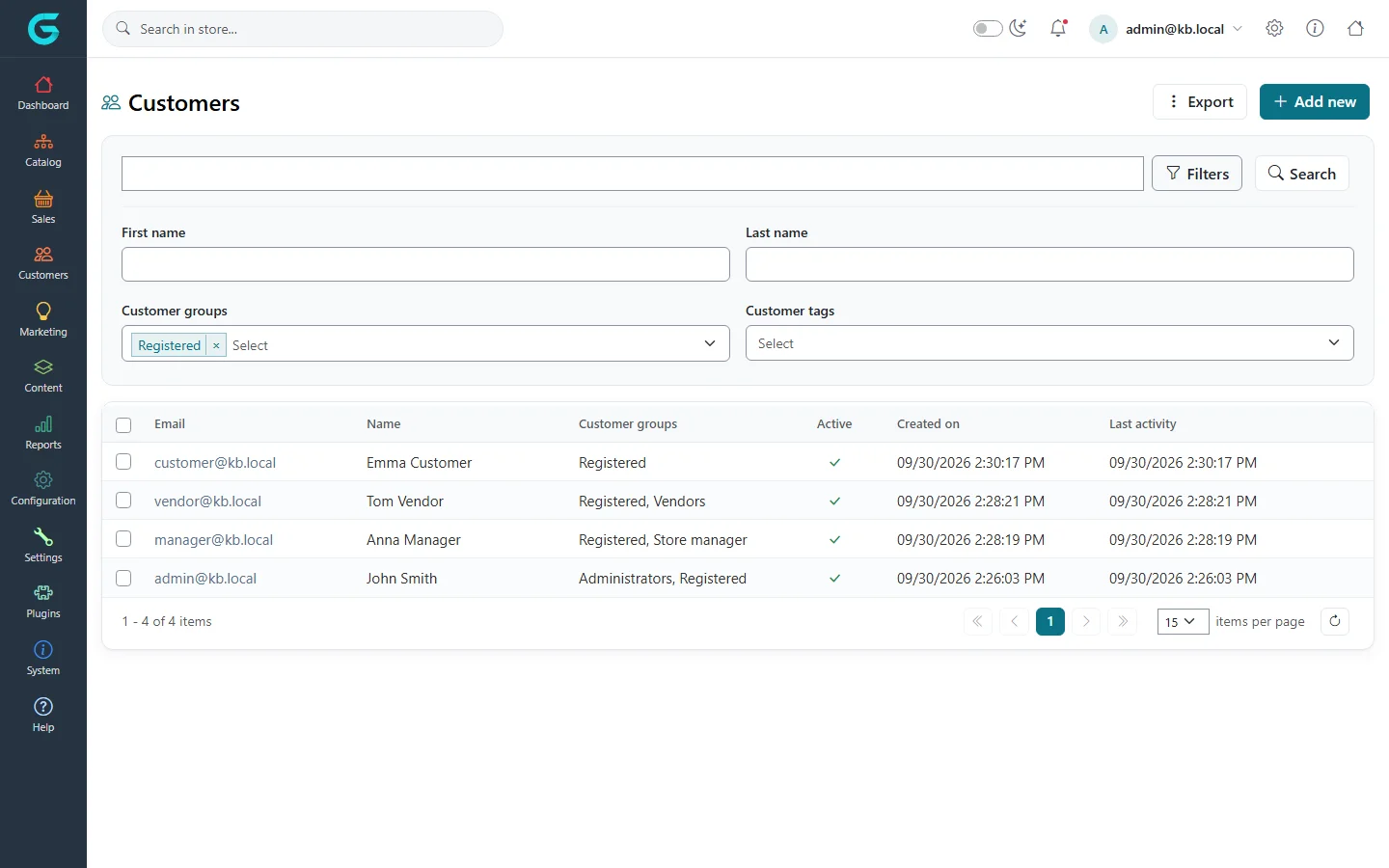
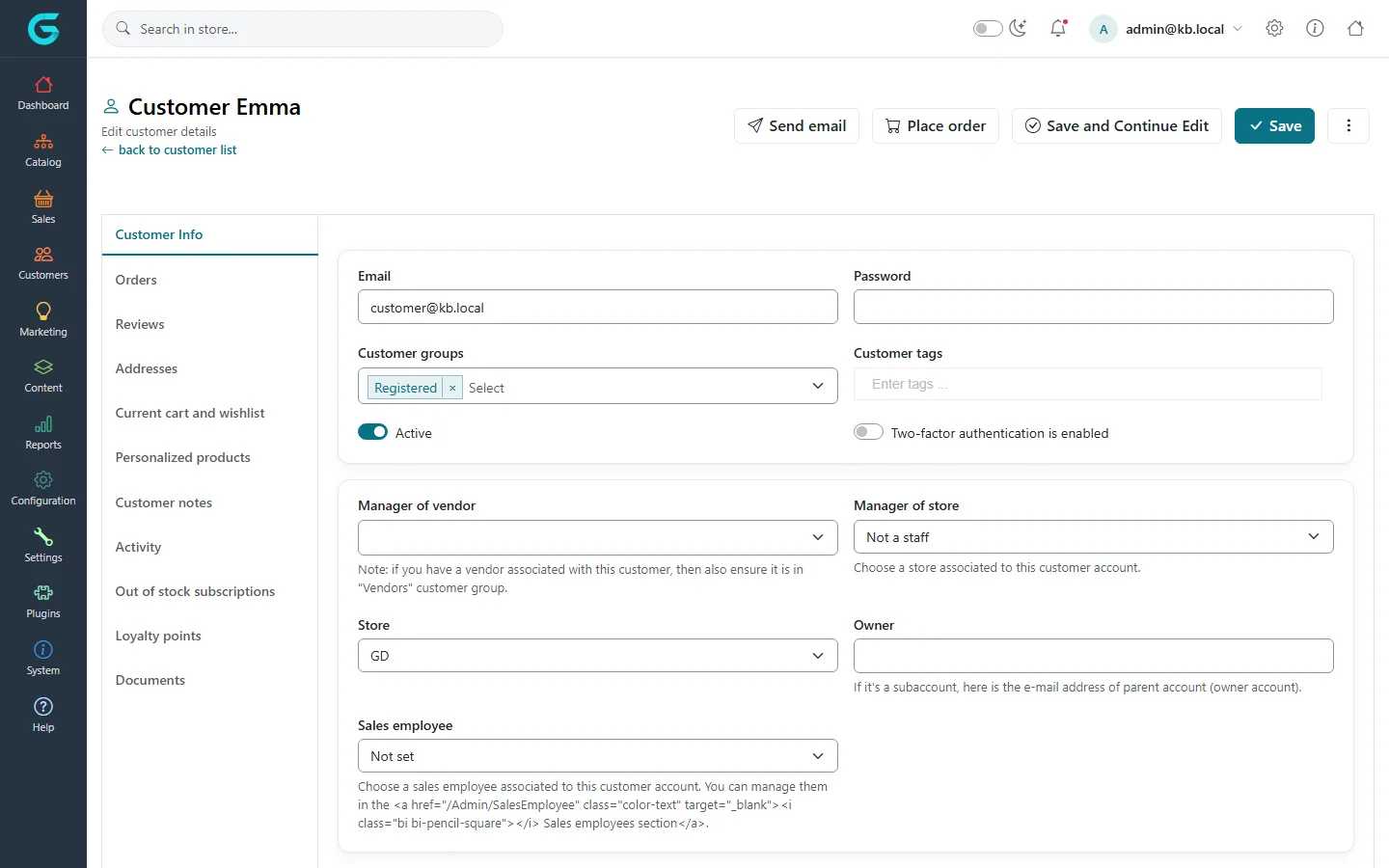
{"ArticleId":null,"Name":"Finding and editing customers","Content":"\n\u003Cp\u003EThe customer list is where you look people up, open their account, correct their data, reset a password or create an account on their behalf - for a phone order, a B2B customer or a new member of staff. This article covers the list, the \u003Cstrong\u003ECustomer Info\u003C/strong\u003E tab and deleting accounts. The other tabs of the customer record are described in \u003Ca href=\u0022/customers-customer-record\u0022\u003EThe customer record: orders, carts, addresses and more\u003C/a\u003E.\u003C/p\u003E\n\n\u003Ch2 id=\u0022where-to-find-it\u0022\u003EWhere to find it\u003C/h2\u003E\n\u003Cp\u003EGo to \u003Cstrong\u003ECustomers \u2192 Customers\u003C/strong\u003E. The list shows e-mail, name, customer groups, whether the account is active, when it was created and the last activity. Click an e-mail address to open the customer.\u003C/p\u003E\n\n\u003Ch2 id=\u0022searching\u0022\u003ESearching and filtering\u003C/h2\u003E\n\u003Cp\u003EThe wide box at the top searches by \u003Cstrong\u003EEmail\u003C/strong\u003E (a part of the address is enough). Click \u003Cstrong\u003EFilters\u003C/strong\u003E to show more fields: \u003Cstrong\u003EFirst name\u003C/strong\u003E, \u003Cstrong\u003ELast name\u003C/strong\u003E, \u003Cstrong\u003ECustomer groups\u003C/strong\u003E and \u003Cstrong\u003ECustomer tags\u003C/strong\u003E. \u003Cstrong\u003EUsername\u003C/strong\u003E, \u003Cstrong\u003ECompany\u003C/strong\u003E, \u003Cstrong\u003EPhone\u003C/strong\u003E and \u003Cstrong\u003EZip code\u003C/strong\u003E appear as well when those fields are enabled in customer settings. Then click \u003Cstrong\u003ESearch\u003C/strong\u003E.\u003C/p\u003E\n\u003Cfigure\u003E\u003Cimg src=\u0022/Plugins/Theme.GrandNodeCom/Content/kb/customers/customer-list-filters.webp\u0022 alt=\u0022Customer list with the filter panel open: first name, last name, customer groups and customer tags\u0022 width=\u00221440\u0022 height=\u0022900\u0022 loading=\u0022lazy\u0022\u003E\u003Cfigcaption\u003EThe Filters panel. The Registered group is preselected, so guests are hidden until you remove it.\u003C/figcaption\u003E\u003C/figure\u003E\n\u003Cblockquote\u003E\u003Cp\u003EThe \u003Cstrong\u003ECustomer groups\u003C/strong\u003E filter starts with \u003Cstrong\u003ERegistered\u003C/strong\u003E selected. To find a guest - for example the owner of an abandoned cart - remove Registered and choose \u003Cstrong\u003EGuests\u003C/strong\u003E. To list your staff, choose \u003Cstrong\u003EAdministrators\u003C/strong\u003E, \u003Cstrong\u003EStore manager\u003C/strong\u003E or \u003Cstrong\u003EVendors\u003C/strong\u003E.\u003C/p\u003E\u003C/blockquote\u003E\n\n\u003Ch2 id=\u0022create-a-customer\u0022\u003EHow to create a customer\u003C/h2\u003E\n\u003Col\u003E\n\u003Cli\u003EOn the customer list click \u003Cstrong\u003EAdd new\u003C/strong\u003E.\u003C/li\u003E\n\u003Cli\u003EEnter the \u003Cstrong\u003EEmail\u003C/strong\u003E and a \u003Cstrong\u003EPassword\u003C/strong\u003E. If usernames are enabled, the \u003Cstrong\u003EUsername\u003C/strong\u003E is required too.\u003C/li\u003E\n\u003Cli\u003EIn \u003Cstrong\u003ECustomer groups\u003C/strong\u003E keep \u003Cstrong\u003ERegistered\u003C/strong\u003E. Add other groups only when the account needs them (see the rules below).\u003C/li\u003E\n\u003Cli\u003EChoose the \u003Cstrong\u003EStore\u003C/strong\u003E the customer belongs to and fill in the name, company and address fields you need.\u003C/li\u003E\n\u003Cli\u003ELeave \u003Cstrong\u003EActive\u003C/strong\u003E switched on, otherwise the customer cannot sign in.\u003C/li\u003E\n\u003Cli\u003EClick \u003Cstrong\u003ESave\u003C/strong\u003E, or \u003Cstrong\u003ESave and Continue Edit\u003C/strong\u003E to stay on the record and open the other tabs.\u003C/li\u003E\n\u003C/ol\u003E\n\u003Cp\u003EGrandNode checks that the e-mail address (and username) is not already used and that the password matches the password rule from customer settings.\u003C/p\u003E\n\n\u003Ch2 id=\u0022customer-info-fields\u0022\u003EFields on the Customer Info tab\u003C/h2\u003E\n\u003Cfigure\u003E\u003Cimg src=\u0022/Plugins/Theme.GrandNodeCom/Content/kb/customers/customer-edit-info.webp\u0022 alt=\u0022Customer edit page, Customer Info tab, with e-mail, customer groups, tags, active switch, manager of vendor, manager of store, store, owner and sales employee\u0022 width=\u00221440\u0022 height=\u0022900\u0022 loading=\u0022lazy\u0022\u003E\u003Cfigcaption\u003ECustomers \u2192 Customers \u2192 a customer: the Customer Info tab.\u003C/figcaption\u003E\u003C/figure\u003E\n\u003Ctable\u003E\n\u003Cthead\u003E\u003Ctr\u003E\u003Cth\u003EField\u003C/th\u003E\u003Cth\u003EWhat it does\u003C/th\u003E\u003C/tr\u003E\u003C/thead\u003E\n\u003Ctbody\u003E\n\u003Ctr\u003E\u003Ctd\u003E\u003Cstrong\u003EEmail\u003C/strong\u003E\u003C/td\u003E\u003Ctd\u003ESign-in name and address for all messages. Must be unique.\u003C/td\u003E\u003C/tr\u003E\n\u003Ctr\u003E\u003Ctd\u003E\u003Cstrong\u003EPassword\u003C/strong\u003E\u003C/td\u003E\u003Ctd\u003ELeave empty to keep the current password. Type a value to set a new one - useful when a customer cannot use the password recovery e-mail.\u003C/td\u003E\u003C/tr\u003E\n\u003Ctr\u003E\u003Ctd\u003E\u003Cstrong\u003ECustomer groups\u003C/strong\u003E\u003C/td\u003E\u003Ctd\u003EGroup membership: Registered or Guests, plus any others. Drives permissions, prices, visibility and panel access.\u003C/td\u003E\u003C/tr\u003E\n\u003Ctr\u003E\u003Ctd\u003E\u003Cstrong\u003ECustomer tags\u003C/strong\u003E\u003C/td\u003E\u003Ctd\u003EFree labels. Type at least three letters to pick an existing tag or type a new one - it is created on save. See \u003Ca href=\u0022/customers-customer-tags\u0022\u003ECustomer tags\u003C/a\u003E.\u003C/td\u003E\u003C/tr\u003E\n\u003Ctr\u003E\u003Ctd\u003E\u003Cstrong\u003EActive\u003C/strong\u003E\u003C/td\u003E\u003Ctd\u003EInactive customers cannot sign in. New registrations waiting for e-mail validation or admin approval are inactive.\u003C/td\u003E\u003C/tr\u003E\n\u003Ctr\u003E\u003Ctd\u003E\u003Cstrong\u003ETwo-factor authentication is enabled\u003C/strong\u003E\u003C/td\u003E\u003Ctd\u003EShows whether the customer turned on 2FA; switch it off to let a customer who lost their authenticator sign in with the password only.\u003C/td\u003E\u003C/tr\u003E\n\u003Ctr\u003E\u003Ctd\u003E\u003Cstrong\u003EManager of vendor\u003C/strong\u003E\u003C/td\u003E\u003Ctd\u003ELinks the account to a vendor, so it can sign in to the vendor panel. The account must also be in the Vendors group.\u003C/td\u003E\u003C/tr\u003E\n\u003Ctr\u003E\u003Ctd\u003E\u003Cstrong\u003EManager of store\u003C/strong\u003E\u003C/td\u003E\u003Ctd\u003ELinks the account to a store, so it can sign in to the store manager panel. The account must also be in the Store manager group.\u003C/td\u003E\u003C/tr\u003E\n\u003Ctr\u003E\u003Ctd\u003E\u003Cstrong\u003EStore\u003C/strong\u003E\u003C/td\u003E\u003Ctd\u003EThe store the customer belongs to. Required when a non-administrator creates the account.\u003C/td\u003E\u003C/tr\u003E\n\u003Ctr\u003E\u003Ctd\u003E\u003Cstrong\u003EOwner\u003C/strong\u003E\u003C/td\u003E\u003Ctd\u003EE-mail of a parent account. Makes this account a sub-account of that customer (the owner manages sub-accounts from \u003Cstrong\u003EMy account\u003C/strong\u003E on the storefront).\u003C/td\u003E\u003C/tr\u003E\n\u003Ctr\u003E\u003Ctd\u003E\u003Cstrong\u003ESales employee\u003C/strong\u003E\u003C/td\u003E\u003Ctd\u003EThe sales employee who looks after this customer. Orders the customer places carry this sales employee and, if set, their commission.\u003C/td\u003E\u003C/tr\u003E\n\u003Ctr\u003E\u003Ctd\u003EName, gender, date of birth, company, address, phone, fax\u003C/td\u003E\u003Ctd\u003EPersonal data. Which of these fields appear depends on the form fields enabled in customer settings.\u003C/td\u003E\u003C/tr\u003E\n\u003Ctr\u003E\u003Ctd\u003E\u003Cstrong\u003EIs tax exempt\u003C/strong\u003E\u003C/td\u003E\u003Ctd\u003ENo tax is charged on this customer\u0027s orders.\u003C/td\u003E\u003C/tr\u003E\n\u003Ctr\u003E\u003Ctd\u003E\u003Cstrong\u003EFree shipping to the next order\u003C/strong\u003E\u003C/td\u003E\u003Ctd\u003EShipping is free on the next order; GrandNode clears the flag after that order.\u003C/td\u003E\u003C/tr\u003E\n\u003Ctr\u003E\u003Ctd\u003E\u003Cstrong\u003EVAT number\u003C/strong\u003E\u003C/td\u003E\u003Ctd\u003EShown when EU VAT is used; \u003Cstrong\u003EMark as valid\u003C/strong\u003E / \u003Cstrong\u003EMark as invalid\u003C/strong\u003E change its status by hand.\u003C/td\u003E\u003C/tr\u003E\n\u003Ctr\u003E\u003Ctd\u003E\u003Cstrong\u003ENewsletter\u003C/strong\u003E\u003C/td\u003E\u003Ctd\u003EOne check box per store; subscribes or unsubscribes the customer\u0027s e-mail.\u003C/td\u003E\u003C/tr\u003E\n\u003Ctr\u003E\u003Ctd\u003E\u003Cstrong\u003EAdmin comment\u003C/strong\u003E\u003C/td\u003E\u003Ctd\u003EInternal note, never shown to the customer.\u003C/td\u003E\u003C/tr\u003E\n\u003C/tbody\u003E\n\u003C/table\u003E\n\u003Cp\u003EAt the bottom of the tab you see read-only facts: \u003Cstrong\u003EIP Address\u003C/strong\u003E, \u003Cstrong\u003ECreated on\u003C/strong\u003E, \u003Cstrong\u003ELast activity\u003C/strong\u003E, \u003Cstrong\u003ELast visited page\u003C/strong\u003E (when storing it is enabled) and \u003Cstrong\u003ELast purchase date\u003C/strong\u003E. Custom \u003Ca href=\u0022/customers-customer-attributes\u0022\u003Ecustomer attributes\u003C/a\u003E appear between the personal fields.\u003C/p\u003E\n\n\u003Ch2 id=\u0022group-rules\u0022\u003ERules GrandNode enforces on groups\u003C/h2\u003E\n\u003Cul\u003E\n\u003Cli\u003EA customer must be in \u003Cstrong\u003ERegistered\u003C/strong\u003E or \u003Cstrong\u003EGuests\u003C/strong\u003E, never both.\u003C/li\u003E\n\u003Cli\u003EOnly an administrator can add someone to \u003Cstrong\u003EAdministrators\u003C/strong\u003E.\u003C/li\u003E\n\u003Cli\u003EA customer in \u003Cstrong\u003EVendors\u003C/strong\u003E must have \u003Cstrong\u003EManager of vendor\u003C/strong\u003E set, and a vendor account cannot also be a store manager.\u003C/li\u003E\n\u003Cli\u003EA customer in \u003Cstrong\u003EStore manager\u003C/strong\u003E must have \u003Cstrong\u003EManager of store\u003C/strong\u003E set.\u003C/li\u003E\n\u003Cli\u003EA customer in \u003Cstrong\u003ESales manager\u003C/strong\u003E must have \u003Cstrong\u003ESales employee\u003C/strong\u003E set.\u003C/li\u003E\n\u003Cli\u003EAn administrator cannot be linked to a vendor or a store at the same time.\u003C/li\u003E\n\u003C/ul\u003E\n\u003Cp\u003EIf a rule is broken the record is not saved and the message appears at the top of the form.\u003C/p\u003E\n\n\u003Ch2 id=\u0022export\u0022\u003EExporting customers\u003C/h2\u003E\n\u003Cp\u003EClick \u003Cstrong\u003EExport\u003C/strong\u003E on the list and choose \u003Cstrong\u003EExport to Excel (all found)\u003C/strong\u003E to download every customer matching the current filters, or tick rows first and choose \u003Cstrong\u003EExport to Excel (selected)\u003C/strong\u003E. The file is an .xlsx workbook.\u003C/p\u003E\n\n\u003Ch2 id=\u0022delete\u0022\u003EDeleting customers\u003C/h2\u003E\n\u003Cp\u003EOpen a customer and choose \u003Cstrong\u003EDelete\u003C/strong\u003E from the \u003Cstrong\u003E\u22EE\u003C/strong\u003E menu, or tick several rows on the list and use \u003Cstrong\u003EDelete (selected)\u003C/strong\u003E. Deleting does not remove the document from the database: GrandNode marks it deleted, replaces the e-mail and username with an anonymous value, clears the addresses, personal fields, cart, groups and tags, and removes newsletter subscriptions. Orders stay, so your sales history and invoices remain complete. You cannot delete your own account, and built-in system accounts (such as the search engine and background task accounts) cannot be deleted.\u003C/p\u003E\n\n\u003Ch2 id=\u0022tips\u0022\u003ETips and common mistakes\u003C/h2\u003E\n\u003Cul\u003E\n\u003Cli\u003E\u0022Add the customer to \u0027Guests\u0027 or \u0027Registered\u0027 customer group\u0022 - you removed Registered while editing groups. Add it back.\u003C/li\u003E\n\u003Cli\u003EA new vendor or store manager cannot open their panel: check both the group and the link field (\u003Cstrong\u003EManager of vendor\u003C/strong\u003E / \u003Cstrong\u003EManager of store\u003C/strong\u003E).\u003C/li\u003E\n\u003Cli\u003EA customer says they registered but cannot sign in: check \u003Cstrong\u003EActive\u003C/strong\u003E. With e-mail validation, use \u003Cstrong\u003ERe-send activation message\u003C/strong\u003E from the \u003Cstrong\u003E\u22EE\u003C/strong\u003E menu; with admin approval, switch Active on.\u003C/li\u003E\n\u003C/ul\u003E\n\n\u003Ch2 id=\u0022related\u0022\u003ERelated\u003C/h2\u003E\n\u003Cul\u003E\n\u003Cli\u003E\u003Ca href=\u0022/customers-customer-record\u0022\u003EThe customer record: orders, carts, addresses and more\u003C/a\u003E\u003C/li\u003E\n\u003Cli\u003E\u003Ca href=\u0022/customers-customer-groups\u0022\u003ECustomer groups and access control\u003C/a\u003E\u003C/li\u003E\n\u003Cli\u003E\u003Ca href=\u0022/customers-registration-login-and-privacy\u0022\u003ERegistration, login and customer privacy\u003C/a\u003E\u003C/li\u003E\n\u003C/ul\u003E\n","ParentCategoryId":"6abdec6c83d2816248229edd","SeName":"customers-manage-customers","MetaKeywords":null,"MetaDescription":"Search, create, edit, export and delete customer accounts in the GrandNode admin panel, and what each field on the Customer Info tab does.","MetaTitle":null,"AllowComments":false,"Captcha":{"ReCaptchaChallengeField":null,"ReCaptchaResponseField":null,"ReCaptchaResponseValue":null,"ReCaptchaResponse":null},"RelatedArticles":[],"CategoryBreadcrumb":[{"Name":"Customers","Description":null,"IsCurrent":false,"Children":null,"Parent":null,"SeName":"docs-customers","Id":"6abdec6c83d2816248229edd","UserFields":[]}],"AddNewComment":{"CommentText":null,"DisplayCaptcha":false,"Id":null,"UserFields":[]},"Comments":[],"Id":"6abdec6c83d2816248229ee1","UserFields":[]}