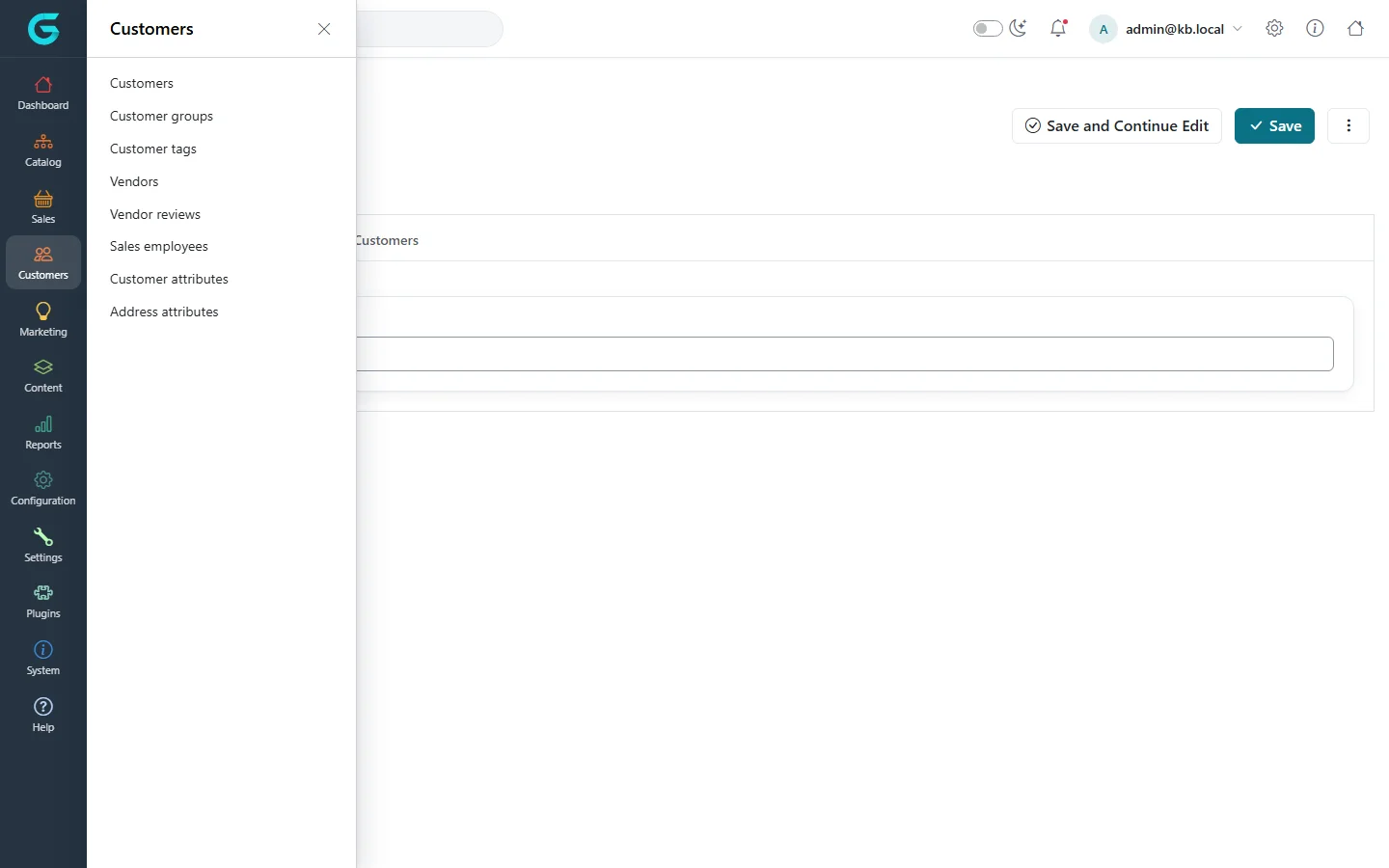
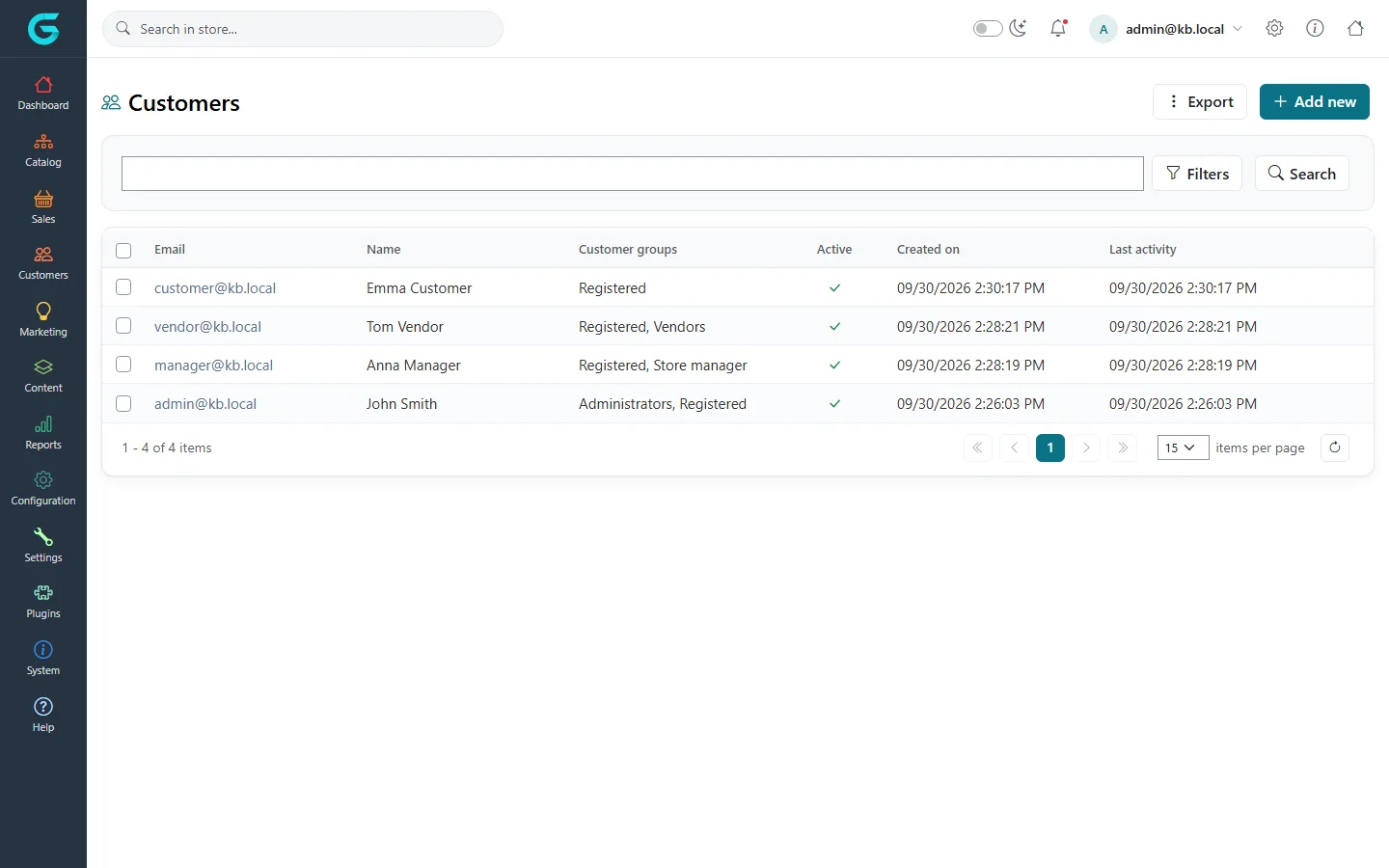
{"ArticleId":null,"Name":"Customers in GrandNode: an overview","Content":"\n\u003Cp\u003EIn GrandNode every visitor is a customer. The moment someone opens the storefront, adds a product to the cart or starts checkout, GrandNode keeps a customer record for them, even before they register. Registration does not create a new account, it converts that guest record into a registered one, so the cart, the wishlist and the browsing history carry over. This article explains the model and walks through the \u003Cstrong\u003ECustomers\u003C/strong\u003E menu of the admin panel, so you know which screen to open for which job.\u003C/p\u003E\n\n\u003Ch2 id=\u0022guests-and-registered-customers\u0022\u003EGuests and registered customers\u003C/h2\u003E\n\u003Cp\u003EEvery customer belongs to one or more \u003Cstrong\u003Ecustomer groups\u003C/strong\u003E. Two of them describe the account itself and exactly one of them is always present:\u003C/p\u003E\n\u003Cul\u003E\n\u003Cli\u003E\u003Cstrong\u003EGuests\u003C/strong\u003E - a visitor who has not registered. Guests can browse, see prices and use the cart and wishlist (these are the default permissions of the Guests group). Guest records are not shown in the customer list unless you filter for them.\u003C/li\u003E\n\u003Cli\u003E\u003Cstrong\u003ERegistered\u003C/strong\u003E - a customer with an e-mail address and a password who can sign in, see the order history and manage addresses on the storefront.\u003C/li\u003E\n\u003C/ul\u003E\n\u003Cp\u003EGrandNode refuses to save a customer who is in both groups or in neither of them. On top of that a customer can belong to any number of other groups: the built-in \u003Cstrong\u003EAdministrators\u003C/strong\u003E, \u003Cstrong\u003EVendors\u003C/strong\u003E, \u003Cstrong\u003EStore manager\u003C/strong\u003E and \u003Cstrong\u003ESales manager\u003C/strong\u003E groups, and groups you create yourself for pricing, visibility or free shipping. Group membership is what decides who may open which panel and what they may do there - see \u003Ca href=\u0022/customers-customer-groups\u0022\u003ECustomer groups and access control\u003C/a\u003E.\u003C/p\u003E\n\n\u003Ch2 id=\u0022one-account-many-roles\u0022\u003EOne account, many roles\u003C/h2\u003E\n\u003Cp\u003EGrandNode has no separate \u0022user\u0022 table for staff. An administrator, a store manager or a vendor is a customer record with extra groups and a link to what they manage:\u003C/p\u003E\n\u003Ctable\u003E\n\u003Cthead\u003E\u003Ctr\u003E\u003Cth\u003EWho\u003C/th\u003E\u003Cth\u003ECustomer groups\u003C/th\u003E\u003Cth\u003ELink on the customer record\u003C/th\u003E\u003Cth\u003EPanel\u003C/th\u003E\u003C/tr\u003E\u003C/thead\u003E\n\u003Ctbody\u003E\n\u003Ctr\u003E\u003Ctd\u003EShopper\u003C/td\u003E\u003Ctd\u003ERegistered (or Guests)\u003C/td\u003E\u003Ctd\u003E-\u003C/td\u003E\u003Ctd\u003Estorefront only\u003C/td\u003E\u003C/tr\u003E\n\u003Ctr\u003E\u003Ctd\u003EAdministrator\u003C/td\u003E\u003Ctd\u003EAdministrators, Registered\u003C/td\u003E\u003Ctd\u003E-\u003C/td\u003E\u003Ctd\u003E\u003Ccode\u003E/admin\u003C/code\u003E\u003C/td\u003E\u003C/tr\u003E\n\u003Ctr\u003E\u003Ctd\u003EStore manager\u003C/td\u003E\u003Ctd\u003EStore manager, Registered\u003C/td\u003E\u003Ctd\u003E\u003Cstrong\u003EManager of store\u003C/strong\u003E\u003C/td\u003E\u003Ctd\u003E\u003Ccode\u003E/store\u003C/code\u003E\u003C/td\u003E\u003C/tr\u003E\n\u003Ctr\u003E\u003Ctd\u003EVendor\u003C/td\u003E\u003Ctd\u003EVendors, Registered\u003C/td\u003E\u003Ctd\u003E\u003Cstrong\u003EManager of vendor\u003C/strong\u003E\u003C/td\u003E\u003Ctd\u003E\u003Ccode\u003E/vendor\u003C/code\u003E\u003C/td\u003E\u003C/tr\u003E\n\u003Ctr\u003E\u003Ctd\u003ESales manager\u003C/td\u003E\u003Ctd\u003ESales manager, Registered\u003C/td\u003E\u003Ctd\u003E\u003Cstrong\u003ESales employee\u003C/strong\u003E\u003C/td\u003E\u003Ctd\u003E\u003Ccode\u003E/admin\u003C/code\u003E, limited to own customers and orders\u003C/td\u003E\u003C/tr\u003E\n\u003C/tbody\u003E\n\u003C/table\u003E\n\u003Cp\u003EBecause it is all one record, the same person can shop in your store with the account they use to manage it. The only combinations GrandNode blocks are the ones that would mix scopes: an administrator cannot also be linked to a vendor or a store, and a vendor account cannot be a store manager at the same time.\u003C/p\u003E\n\n\u003Ch2 id=\u0022the-customers-menu\u0022\u003EThe Customers menu\u003C/h2\u003E\n\u003Cfigure\u003E\u003Cimg src=\u0022/Plugins/Theme.GrandNodeCom/Content/kb/customers/customers-menu.webp\u0022 alt=\u0022The Customers flyout in the admin sidebar: Customers, Customer groups, Customer tags, Vendors, Vendor reviews, Sales employees, Customer attributes and Address attributes\u0022 width=\u00221440\u0022 height=\u0022900\u0022 loading=\u0022lazy\u0022\u003E\u003Cfigcaption\u003EThe Customers menu.\u003C/figcaption\u003E\u003C/figure\u003E\n\u003Cp\u003EOpen \u003Cstrong\u003ECustomers\u003C/strong\u003E in the left-hand menu of the admin panel. The entries are:\u003C/p\u003E\n\u003Ctable\u003E\n\u003Cthead\u003E\u003Ctr\u003E\u003Cth\u003EMenu entry\u003C/th\u003E\u003Cth\u003EWhat you do there\u003C/th\u003E\u003C/tr\u003E\u003C/thead\u003E\n\u003Ctbody\u003E\n\u003Ctr\u003E\u003Ctd\u003E\u003Cstrong\u003ECustomers\u003C/strong\u003E\u003C/td\u003E\u003Ctd\u003ESearch, create, edit, export and delete customer accounts. See \u003Ca href=\u0022/customers-manage-customers\u0022\u003EFinding and editing customers\u003C/a\u003E.\u003C/td\u003E\u003C/tr\u003E\n\u003Ctr\u003E\u003Ctd\u003E\u003Cstrong\u003ECustomer groups\u003C/strong\u003E\u003C/td\u003E\u003Ctd\u003EBuilt-in and custom groups, their order limits, free shipping, tax exemption and the access control list.\u003C/td\u003E\u003C/tr\u003E\n\u003Ctr\u003E\u003Ctd\u003E\u003Cstrong\u003ECustomer tags\u003C/strong\u003E\u003C/td\u003E\u003Ctd\u003EFree labels for segmenting customers - used by newsletter campaigns and suggested products.\u003C/td\u003E\u003C/tr\u003E\n\u003Ctr\u003E\u003Ctd\u003E\u003Cstrong\u003EVendors\u003C/strong\u003E\u003C/td\u003E\u003Ctd\u003ESellers in a marketplace set-up and the customer accounts that manage them.\u003C/td\u003E\u003C/tr\u003E\n\u003Ctr\u003E\u003Ctd\u003E\u003Cstrong\u003EVendor reviews\u003C/strong\u003E\u003C/td\u003E\u003Ctd\u003EApprove or remove reviews customers wrote about vendors.\u003C/td\u003E\u003C/tr\u003E\n\u003Ctr\u003E\u003Ctd\u003E\u003Cstrong\u003ESales employee\u003C/strong\u003E\u003C/td\u003E\u003Ctd\u003EInternal sales staff that customers can be assigned to, with a commission rate.\u003C/td\u003E\u003C/tr\u003E\n\u003Ctr\u003E\u003Ctd\u003E\u003Cstrong\u003ECustomer attributes\u003C/strong\u003E\u003C/td\u003E\u003Ctd\u003EExtra fields on the registration and account forms.\u003C/td\u003E\u003C/tr\u003E\n\u003Ctr\u003E\u003Ctd\u003E\u003Cstrong\u003EAddress attributes\u003C/strong\u003E\u003C/td\u003E\u003Ctd\u003EExtra fields on the address form.\u003C/td\u003E\u003C/tr\u003E\n\u003C/tbody\u003E\n\u003C/table\u003E\n\u003Cp\u003ETwo customer screens live under \u003Cstrong\u003EReports\u003C/strong\u003E: \u003Cstrong\u003EOnline customers\u003C/strong\u003E (who is on the site right now) and \u003Cstrong\u003ECustomer reports\u003C/strong\u003E (best customers and registrations over time). They are described in \u003Ca href=\u0022/customers-online-customers-and-reports\u0022\u003EOnline customers and customer reports\u003C/a\u003E.\u003C/p\u003E\n\u003Cfigure\u003E\u003Cimg src=\u0022/Plugins/Theme.GrandNodeCom/Content/kb/customers/customer-list.webp\u0022 alt=\u0022The Customers list in the GrandNode admin panel with four registered accounts\u0022 width=\u00221440\u0022 height=\u0022900\u0022 loading=\u0022lazy\u0022\u003E\u003Cfigcaption\u003ECustomers \u2192 Customers: the default view lists registered customers, newest first.\u003C/figcaption\u003E\u003C/figure\u003E\n\n\u003Ch2 id=\u0022where-customer-settings-live\u0022\u003EWhere customer settings live\u003C/h2\u003E\n\u003Cp\u003EHow people register and sign in - the registration method, which form fields are shown and required, password rules, two-factor authentication, whether customers may delete or export their account - is configured in \u003Cstrong\u003ESettings \u2192 Customer settings\u003C/strong\u003E. The settings that change what you see in the Customers screens are summarised in \u003Ca href=\u0022/customers-registration-login-and-privacy\u0022\u003ERegistration, login and customer privacy\u003C/a\u003E; the full reference is in \u003Ca href=\u0022/docs-configuration\u0022\u003EConfiguration\u003C/a\u003E.\u003C/p\u003E\n\n\u003Ch2 id=\u0022multi-store\u0022\u003ECustomers in a multi-store installation\u003C/h2\u003E\n\u003Cp\u003EA customer record has a \u003Cstrong\u003EStore\u003C/strong\u003E field - the store the customer registered in. Store managers working in the \u003Ccode\u003E/store\u003C/code\u003E panel only see and create registered customers of their own store; administrators see everybody. By default an e-mail address is unique across the whole installation, so one person has one account that works in every store. Loyalty points, newsletter subscriptions and orders are kept per store.\u003C/p\u003E\n\n\u003Ch2 id=\u0022related\u0022\u003ERelated\u003C/h2\u003E\n\u003Cul\u003E\n\u003Cli\u003E\u003Ca href=\u0022/customers-manage-customers\u0022\u003EFinding and editing customers\u003C/a\u003E\u003C/li\u003E\n\u003Cli\u003E\u003Ca href=\u0022/customers-customer-groups\u0022\u003ECustomer groups and access control\u003C/a\u003E\u003C/li\u003E\n\u003Cli\u003E\u003Ca href=\u0022/docs-vendor-panel\u0022\u003EVendor panel\u003C/a\u003E\u003C/li\u003E\n\u003C/ul\u003E\n","ParentCategoryId":"6abdec6c83d2816248229edd","SeName":"customers-overview","MetaKeywords":null,"MetaDescription":"What a customer is in GrandNode, how guests become registered customers, and what each entry of the Customers menu in the admin panel is for.","MetaTitle":null,"AllowComments":false,"Captcha":{"ReCaptchaChallengeField":null,"ReCaptchaResponseField":null,"ReCaptchaResponseValue":null,"ReCaptchaResponse":null},"RelatedArticles":[],"CategoryBreadcrumb":[{"Name":"Customers","Description":null,"IsCurrent":false,"Children":null,"Parent":null,"SeName":"docs-customers","Id":"6abdec6c83d2816248229edd","UserFields":[]}],"AddNewComment":{"CommentText":null,"DisplayCaptcha":false,"Id":null,"UserFields":[]},"Comments":[],"Id":"6abdec6c83d2816248229edf","UserFields":[]}