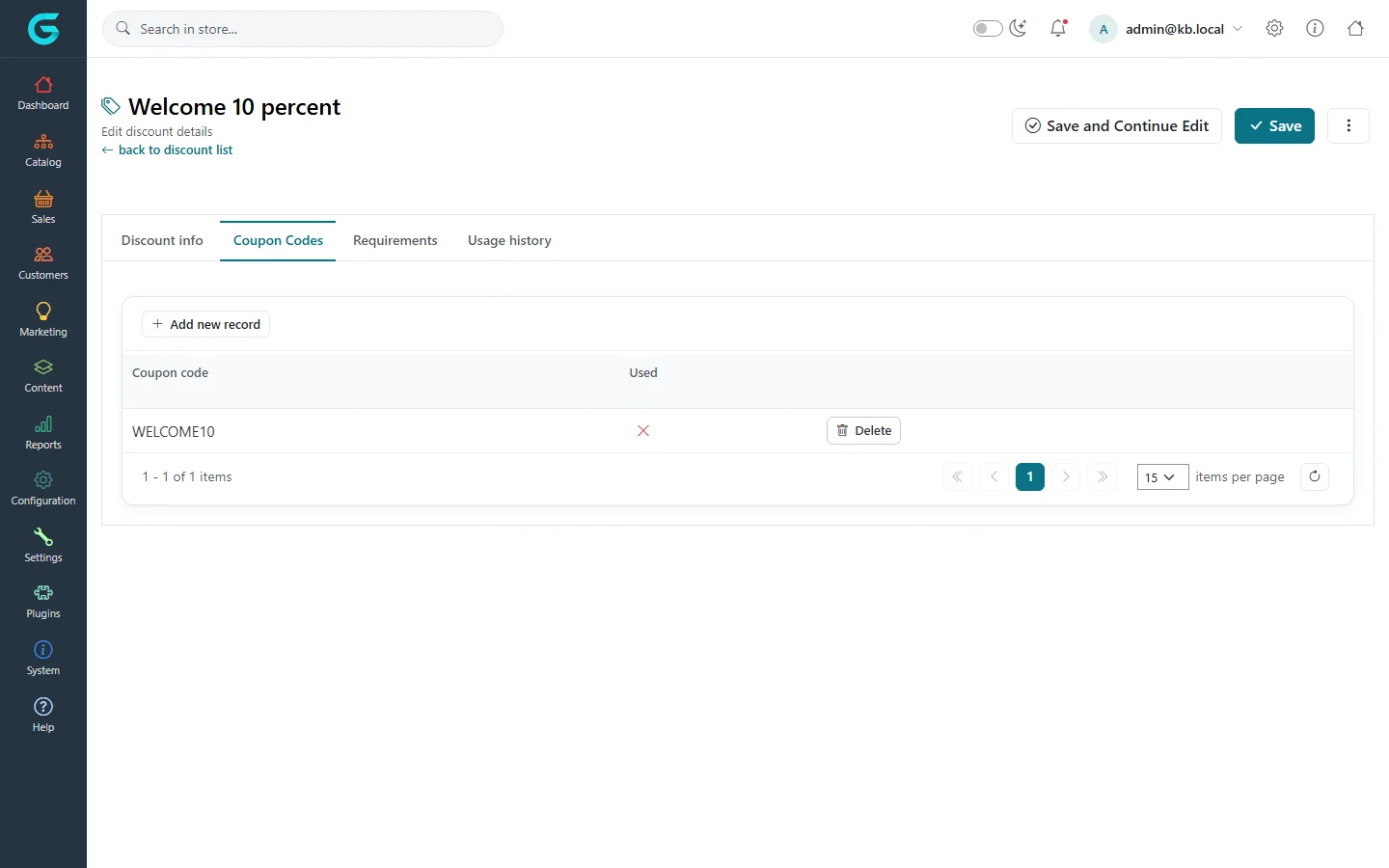
{"ArticleId":null,"Name":"Coupon codes and limits","Content":"\n\u003Cp\u003EA discount can work automatically or only after the customer types a \u003Cstrong\u003Ecoupon code\u003C/strong\u003E in the cart. Codes let you target a newsletter, an influencer or a single customer, and measure which channel worked.\u003C/p\u003E\n\n\u003Ch2 id=\u0022require-code\u0022\u003ERequire a coupon code\u003C/h2\u003E\n\u003Col\u003E\n\u003Cli\u003EOpen the discount and tick \u003Cstrong\u003ERequires coupon code\u003C/strong\u003E on the \u003Cstrong\u003EDiscount info\u003C/strong\u003E tab. Save.\u003C/li\u003E\n\u003Cli\u003EA \u003Cstrong\u003ECoupon Codes\u003C/strong\u003E tab appears. Click \u003Cstrong\u003EAdd new record\u003C/strong\u003E and enter a code, or generate one.\u003C/li\u003E\n\u003Cli\u003EAdd as many codes as you need. Each row shows whether that code has been \u003Cstrong\u003EUsed\u003C/strong\u003E.\u003C/li\u003E\n\u003C/ol\u003E\n\u003Cfigure\u003E\u003Cimg src=\u0022/Plugins/Theme.GrandNodeCom/Content/kb/marketing/discount-coupon-codes.webp\u0022 alt=\u0022The Coupon Codes tab of Welcome 10 percent with the code WELCOME10, not used\u0022 width=\u00221440\u0022 height=\u0022900\u0022 loading=\u0022lazy\u0022\u003E\u003Cfigcaption\u003EThe Coupon Codes tab: one code, not used yet.\u003C/figcaption\u003E\u003C/figure\u003E\n\u003Cp\u003ECustomers enter the code in \u003Cstrong\u003EEnter your coupon here\u003C/strong\u003E on the cart page. Several codes can be entered in one cart when the discounts are cumulative.\u003C/p\u003E\n\n\u003Ch2 id=\u0022limits\u0022\u003ELimit usage\u003C/h2\u003E\n\u003Ctable\u003E\n\u003Cthead\u003E\u003Ctr\u003E\u003Cth\u003EDiscount limitation\u003C/th\u003E\u003Cth\u003EEffect\u003C/th\u003E\u003C/tr\u003E\u003C/thead\u003E\n\u003Ctbody\u003E\n\u003Ctr\u003E\u003Ctd\u003ENo limits\u003C/td\u003E\u003Ctd\u003EThe discount can be used any number of times.\u003C/td\u003E\u003C/tr\u003E\n\u003Ctr\u003E\u003Ctd\u003EN times only\u003C/td\u003E\u003Ctd\u003EThe discount stops working after N uses in total - \u0022the first 100 orders\u0022.\u003C/td\u003E\u003C/tr\u003E\n\u003Ctr\u003E\u003Ctd\u003EN times per customer\u003C/td\u003E\u003Ctd\u003EEach customer can use it N times - \u0022once per customer\u0022.\u003C/td\u003E\u003C/tr\u003E\n\u003C/tbody\u003E\n\u003C/table\u003E\n\u003Cp\u003EUses are counted from the discount\u0027s \u003Cstrong\u003EUsage history\u003C/strong\u003E. When you cancel an order that used a discount, delete the usage entry to give the use back.\u003C/p\u003E\n\n\u003Ch2 id=\u0022unique-codes\u0022\u003EMany single-use codes\u003C/h2\u003E\n\u003Cp\u003EFor personal codes - one per newsletter subscriber, for example - add one code per person and use \u003Cstrong\u003EN times only\u003C/strong\u003E with N = 1 on a discount with many codes; the \u003Cstrong\u003EUsed\u003C/strong\u003E column shows which were redeemed.\u003C/p\u003E\n\n\u003Ch2 id=\u0022tips\u0022\u003ETips and common mistakes\u003C/h2\u003E\n\u003Cul\u003E\n\u003Cli\u003EAvoid look-alike characters (0/O, 1/I) in printed codes.\u003C/li\u003E\n\u003Cli\u003EA code with an end date in the past or on a disabled discount is rejected with a message in the cart - check both when a customer complains.\u003C/li\u003E\n\u003C/ul\u003E\n\n\u003Ch2 id=\u0022related\u0022\u003ERelated\u003C/h2\u003E\n\u003Cul\u003E\n\u003Cli\u003E\u003Ca href=\u0022/marketing-discounts\u0022\u003ECreating a discount\u003C/a\u003E\u003C/li\u003E\n\u003Cli\u003E\u003Ca href=\u0022/marketing-discount-rules\u0022\u003EDiscount rules\u003C/a\u003E\u003C/li\u003E\n\u003C/ul\u003E\n","ParentCategoryId":"6abdec6c83d2816248229ef1","SeName":"marketing-coupon-codes-and-limits","MetaKeywords":null,"MetaDescription":"Make a GrandNode discount require a coupon code, add one or many codes, and limit how often a discount or code can be used.","MetaTitle":null,"AllowComments":false,"Captcha":{"ReCaptchaChallengeField":null,"ReCaptchaResponseField":null,"ReCaptchaResponseValue":null,"ReCaptchaResponse":null},"RelatedArticles":[],"CategoryBreadcrumb":[{"Name":"Marketing and promotions","Description":null,"IsCurrent":false,"Children":null,"Parent":null,"SeName":"docs-marketing","Id":"6abdec6c83d2816248229ef1","UserFields":[]}],"AddNewComment":{"CommentText":null,"DisplayCaptcha":false,"Id":null,"UserFields":[]},"Comments":[],"Id":"6abdec6c83d2816248229ef9","UserFields":[]}