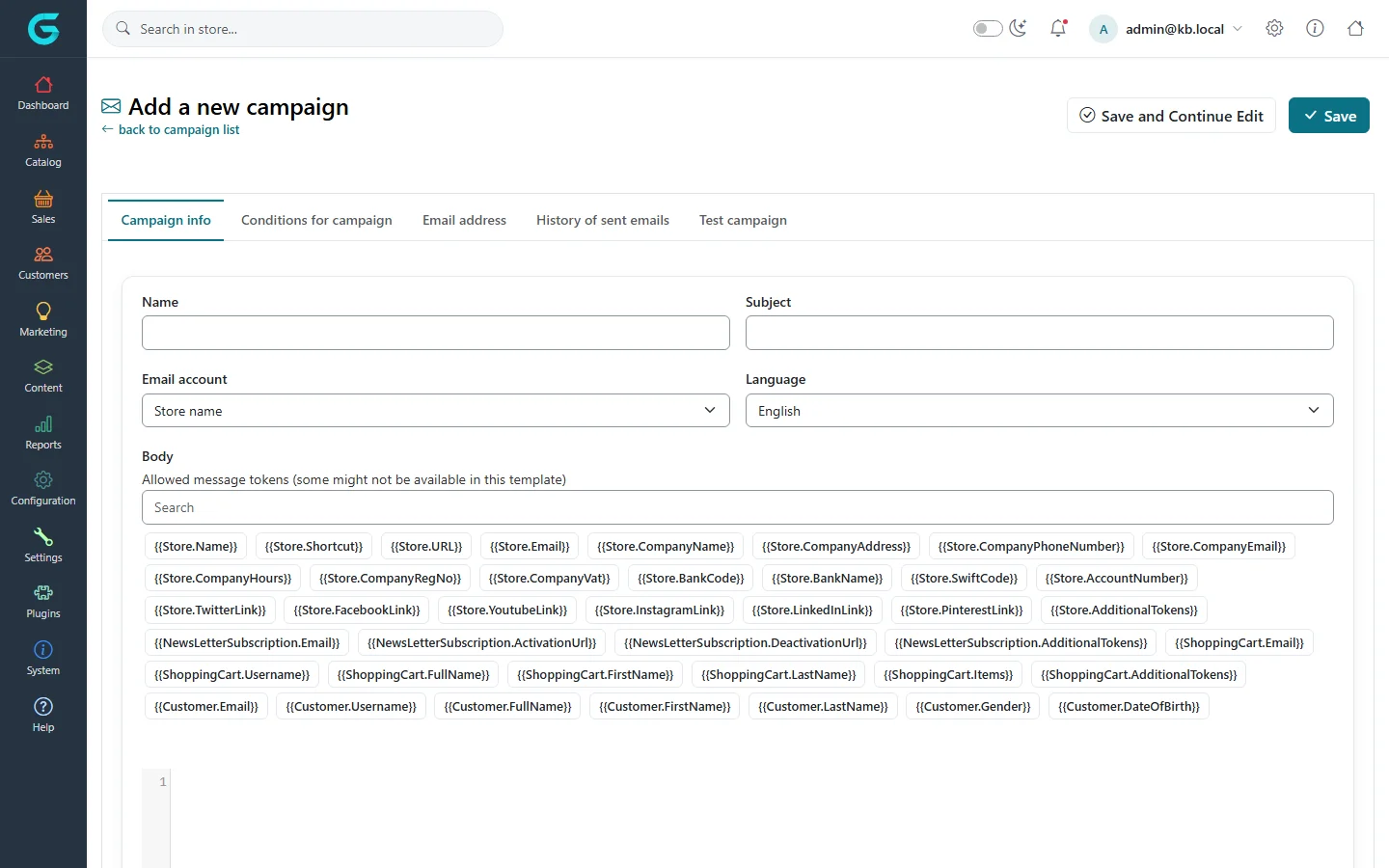
{"ArticleId":null,"Name":"Newsletter, campaigns and the contact form","Content":"\n\u003Cp\u003EGrandNode can collect newsletter subscribers, send them e-mail campaigns, and store the messages visitors send through the contact form - all under \u003Cstrong\u003EMarketing\u003C/strong\u003E.\u003C/p\u003E\n\n\u003Ch2 id=\u0022subscribers\u0022\u003ENewsletter subscribers\u003C/h2\u003E\n\u003Cp\u003EVisitors subscribe with the newsletter box in the footer or in \u003Cstrong\u003EMy account\u003C/strong\u003E. \u003Cstrong\u003EMarketing \u2192 Newsletter subscriptions\u003C/strong\u003E lists them with their status, categories and the date. Filter the list, \u003Cstrong\u003EExport\u003C/strong\u003E it to CSV, or import subscribers from a CSV file.\u003C/p\u003E\n\u003Cul\u003E\n\u003Cli\u003EWith \u003Cstrong\u003ENewsletter box. Allow to unsubscribe\u003C/strong\u003E on (Customer settings), the box also offers unsubscribing.\u003C/li\u003E\n\u003Cli\u003EA new subscription is confirmed with an activation link sent by e-mail (double opt-in).\u003C/li\u003E\n\u003C/ul\u003E\n\n\u003Ch2 id=\u0022categories\u0022\u003ENewsletter categories\u003C/h2\u003E\n\u003Cp\u003E\u003Cstrong\u003EMarketing \u2192 Newsletter categories\u003C/strong\u003E lets subscribers choose topics - \u0022New products\u0022, \u0022Offers\u0022, \u0022Events\u0022. When a visitor subscribes, a popup asks for the categories; campaigns can then be sent to one category only.\u003C/p\u003E\n\n\u003Ch2 id=\u0022campaigns\u0022\u003ECampaigns\u003C/h2\u003E\n\u003Cp\u003E\u003Cstrong\u003EMarketing \u2192 Campaigns \u2192 Add new\u003C/strong\u003E creates an e-mail campaign.\u003C/p\u003E\n\u003Cfigure\u003E\u003Cimg src=\u0022/Plugins/Theme.GrandNodeCom/Content/kb/marketing/campaign-create.webp\u0022 alt=\u0022Add a new campaign: name, subject, e-mail account, language, and a body with the list of allowed message tokens for store, subscription, shopping cart and customer\u0022 width=\u00221440\u0022 height=\u0022900\u0022 loading=\u0022lazy\u0022\u003E\u003Cfigcaption\u003EA new campaign. The token list shows what can be inserted into the body.\u003C/figcaption\u003E\u003C/figure\u003E\n\u003Col\u003E\n\u003Cli\u003EOn \u003Cstrong\u003ECampaign info\u003C/strong\u003E, enter the \u003Cstrong\u003EName\u003C/strong\u003E (internal), the \u003Cstrong\u003ESubject\u003C/strong\u003E, the \u003Cstrong\u003EEmail account\u003C/strong\u003E it is sent from, the \u003Cstrong\u003ELanguage\u003C/strong\u003E of the recipients and the \u003Cstrong\u003EBody\u003C/strong\u003E. Tokens such as the store name, the customer\u0027s first name or the unsubscribe link are inserted by clicking them in the list.\u003C/li\u003E\n\u003Cli\u003EOn \u003Cstrong\u003EConditions for campaign\u003C/strong\u003E, narrow the audience: stores, customer groups, customer tags, newsletter categories, and whether customers have a cart or have ordered.\u003C/li\u003E\n\u003Cli\u003EUse \u003Cstrong\u003ETest campaign\u003C/strong\u003E to send it to your own address first.\u003C/li\u003E\n\u003Cli\u003ECheck the recipients on \u003Cstrong\u003EEmail address\u003C/strong\u003E, then send. \u003Cstrong\u003EHistory of sent emails\u003C/strong\u003E lists what went out.\u003C/li\u003E\n\u003C/ol\u003E\n\u003Cp\u003ECampaign e-mails go through the queued e-mail system like all other e-mails, so a large campaign is sent over time by the scheduled task. See \u003Ca href=\u0022/docs-content\u0022\u003EContent management\u003C/a\u003E for e-mail accounts and queued e-mails.\u003C/p\u003E\n\n\u003Ch2 id=\u0022contact-form\u0022\u003EContact form\u003C/h2\u003E\n\u003Cp\u003EMessages from the \u003Cstrong\u003EContact us\u003C/strong\u003E page are e-mailed to the store and also saved under \u003Cstrong\u003EMarketing \u2192 Contact form\u003C/strong\u003E with the date, the sender, the IP address and the subject - useful when an e-mail got lost. Extra fields on the form are added with \u003Cstrong\u003EMarketing \u2192 Contact attributes\u003C/strong\u003E.\u003C/p\u003E\n\n\u003Ch2 id=\u0022tips\u0022\u003ETips and common mistakes\u003C/h2\u003E\n\u003Cul\u003E\n\u003Cli\u003EAlways include the unsubscribe link token in a campaign body.\u003C/li\u003E\n\u003Cli\u003ETest a campaign on a real mail client; the admin preview is not what Outlook shows.\u003C/li\u003E\n\u003C/ul\u003E\n\n\u003Ch2 id=\u0022related\u0022\u003ERelated\u003C/h2\u003E\n\u003Cul\u003E\n\u003Cli\u003E\u003Ca href=\u0022/customers-customer-tags\u0022\u003ECustomer tags\u003C/a\u003E\u003C/li\u003E\n\u003Cli\u003E\u003Ca href=\u0022/docs-content\u0022\u003EContent management\u003C/a\u003E\u003C/li\u003E\n\u003C/ul\u003E\n","ParentCategoryId":"6abdec6c83d2816248229ef1","SeName":"marketing-newsletter-campaigns","MetaKeywords":null,"MetaDescription":"Collect newsletter subscribers with categories, send e-mail campaigns to a filtered audience, and read contact form messages in GrandNode.","MetaTitle":null,"AllowComments":false,"Captcha":{"ReCaptchaChallengeField":null,"ReCaptchaResponseField":null,"ReCaptchaResponseValue":null,"ReCaptchaResponse":null},"RelatedArticles":[],"CategoryBreadcrumb":[{"Name":"Marketing and promotions","Description":null,"IsCurrent":false,"Children":null,"Parent":null,"SeName":"docs-marketing","Id":"6abdec6c83d2816248229ef1","UserFields":[]}],"AddNewComment":{"CommentText":null,"DisplayCaptcha":false,"Id":null,"UserFields":[]},"Comments":[],"Id":"6abdec6c83d2816248229f01","UserFields":[]}