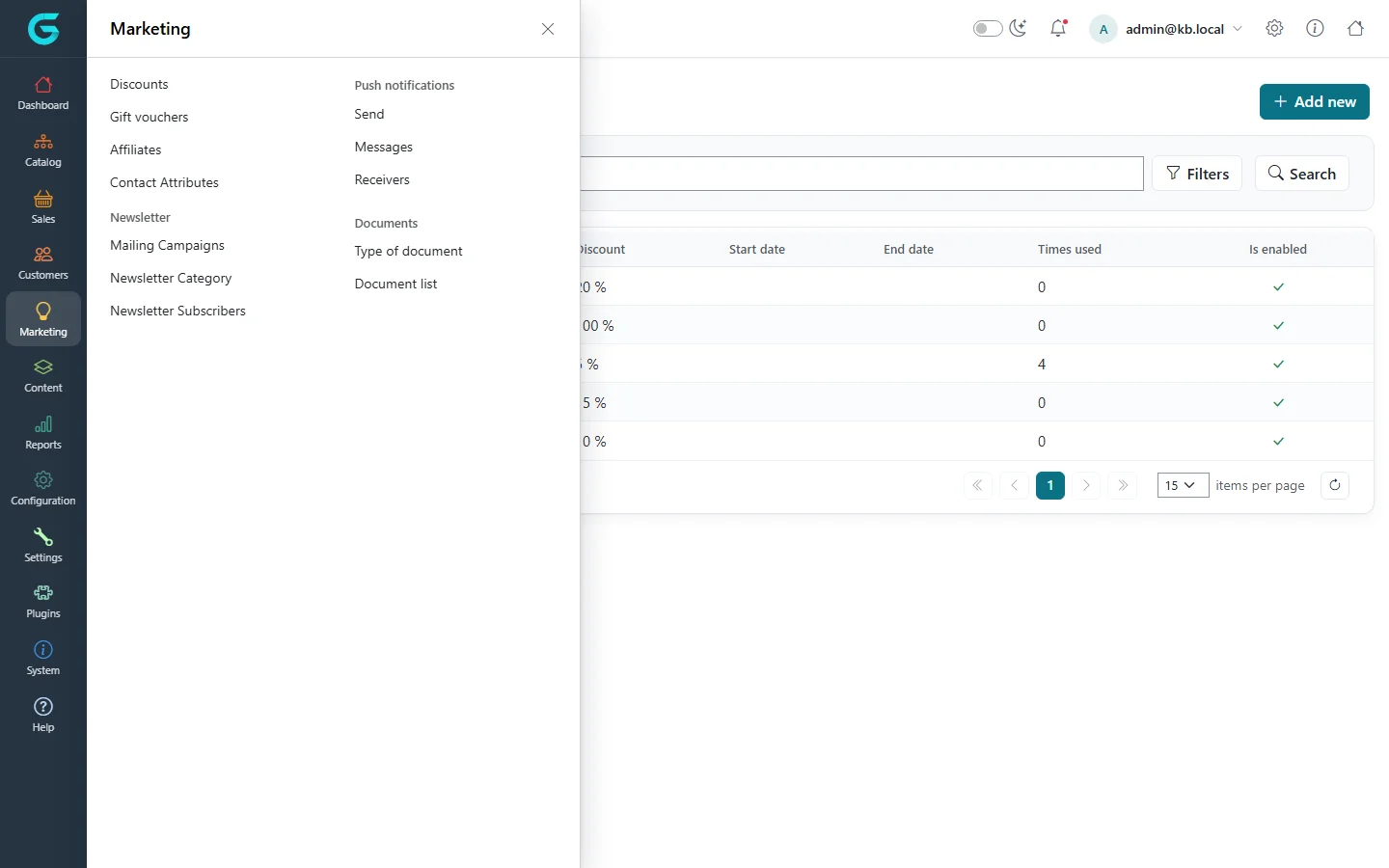
{"ArticleId":null,"Name":"Marketing and promotions overview","Content":"\n\u003Cp\u003EGrandNode gives you the promotional tools most stores need without extra plugins: \u003Cstrong\u003Ediscounts\u003C/strong\u003E with coupon codes and rules, \u003Cstrong\u003Eloyalty points\u003C/strong\u003E that reward repeat customers, \u003Cstrong\u003Eaffiliates\u003C/strong\u003E that track orders brought in by partners, and \u003Cstrong\u003Enewsletters\u003C/strong\u003E with targeted mailing campaigns. This article is the map: what each tool is for, where it lives in the admin panel, and which article explains it in detail.\u003C/p\u003E\n\n\u003Ch2 id=\u0022where-to-find-it\u0022\u003EWhere to find it\u003C/h2\u003E\n\u003Cp\u003EOpen the admin panel (\u003Ccode\u003E/admin\u003C/code\u003E) and click \u003Cstrong\u003EMarketing\u003C/strong\u003E in the left sidebar. The flyout groups the screens:\u003C/p\u003E\n\u003Cul\u003E\n\u003Cli\u003E\u003Cstrong\u003EDiscounts\u003C/strong\u003E - percentage or fixed-amount reductions on products, categories, brands, collections, vendors, the order subtotal, the order total or shipping, with optional coupon codes and rules.\u003C/li\u003E\n\u003Cli\u003E\u003Cstrong\u003EGift vouchers\u003C/strong\u003E - prepaid codes customers buy or receive and redeem at checkout (covered in \u003Ca href=\u0022/docs-sales\u0022\u003ESales and orders\u003C/a\u003E).\u003C/li\u003E\n\u003Cli\u003E\u003Cstrong\u003EAffiliates\u003C/strong\u003E - partners with their own tracking link; orders placed through the link are attributed to them.\u003C/li\u003E\n\u003Cli\u003E\u003Cstrong\u003EContact Attributes\u003C/strong\u003E - extra fields on the storefront \u003Cem\u003EContact us\u003C/em\u003E form.\u003C/li\u003E\n\u003Cli\u003E\u003Cstrong\u003ENewsletter\u003C/strong\u003E \u2192 \u003Cstrong\u003EMailing Campaigns\u003C/strong\u003E, \u003Cstrong\u003ENewsletter Category\u003C/strong\u003E, \u003Cstrong\u003ENewsletter Subscribers\u003C/strong\u003E - the subscriber list, the topics people can subscribe to, and the e-mails you send them.\u003C/li\u003E\n\u003Cli\u003E\u003Cstrong\u003EPush notifications\u003C/strong\u003E \u2192 \u003Cstrong\u003ESend\u003C/strong\u003E, \u003Cstrong\u003EMessages\u003C/strong\u003E, \u003Cstrong\u003EReceivers\u003C/strong\u003E - browser push messages to customers who allowed them (requires push notification settings).\u003C/li\u003E\n\u003Cli\u003E\u003Cstrong\u003EDocuments\u003C/strong\u003E \u2192 \u003Cstrong\u003EType of document\u003C/strong\u003E, \u003Cstrong\u003EDocument list\u003C/strong\u003E - documents such as contracts or invoices attached to customers, orders or vendors.\u003C/li\u003E\n\u003C/ul\u003E\n\u003Cfigure\u003E\u003Cimg src=\u0022/Plugins/Theme.GrandNodeCom/Content/kb/marketing/menu.webp\u0022 alt=\u0022The Marketing flyout in the admin sidebar with Discounts, Gift vouchers, Affiliates, Contact Attributes, Newsletter, Push notifications and Documents groups\u0022 width=\u00221440\u0022 height=\u0022900\u0022 loading=\u0022lazy\u0022\u003E\u003Cfigcaption\u003EThe Marketing menu. Newsletter, Push notifications and Documents open sub-menus.\u003C/figcaption\u003E\u003C/figure\u003E\n\u003Cp\u003ETwo marketing tools are configured elsewhere:\u003C/p\u003E\n\u003Cul\u003E\n\u003Cli\u003E\u003Cstrong\u003ELoyalty points\u003C/strong\u003E are switched on and tuned in \u003Cstrong\u003ESettings \u2192 Sales\u003C/strong\u003E on the \u003Cstrong\u003ELoyalty points\u003C/strong\u003E tab, and each customer\u0027s balance is shown on the customer\u0027s \u003Cstrong\u003ELoyalty points\u003C/strong\u003E tab under \u003Cstrong\u003ECustomers \u2192 Customers\u003C/strong\u003E.\u003C/li\u003E\n\u003Cli\u003E\u003Cstrong\u003EContact form messages\u003C/strong\u003E sent by visitors are listed under \u003Cstrong\u003ESystem \u2192 Contact Us form\u003C/strong\u003E.\u003C/li\u003E\n\u003C/ul\u003E\n\n\u003Ch2 id=\u0022which-tool\u0022\u003EWhich tool for which goal\u003C/h2\u003E\n\u003Ctable\u003E\n\u003Cthead\u003E\u003Ctr\u003E\u003Cth\u003EGoal\u003C/th\u003E\u003Cth\u003ETool\u003C/th\u003E\u003Cth\u003EArticle\u003C/th\u003E\u003C/tr\u003E\u003C/thead\u003E\n\u003Ctbody\u003E\n\u003Ctr\u003E\u003Ctd\u003EPut a category or brand on sale for a season\u003C/td\u003E\u003Ctd\u003EDiscount assigned to categories, brands or collections, with start and end dates\u003C/td\u003E\u003Ctd\u003E\u003Ca href=\u0022/marketing-discount-types\u0022\u003EDiscount types and where they apply\u003C/a\u003E\u003C/td\u003E\u003C/tr\u003E\n\u003Ctr\u003E\u003Ctd\u003EGive a code to newsletter readers or influencers\u003C/td\u003E\u003Ctd\u003EDiscount with \u003Cstrong\u003ERequires coupon code\u003C/strong\u003E\u003C/td\u003E\u003Ctd\u003E\u003Ca href=\u0022/marketing-coupon-codes-and-limits\u0022\u003ECoupon codes, limits and usage history\u003C/a\u003E\u003C/td\u003E\u003C/tr\u003E\n\u003Ctr\u003E\u003Ctd\u003EReward only wholesale or VIP customers\u003C/td\u003E\u003Ctd\u003EDiscount rule \u003Cem\u003EMust be assigned to customer group\u003C/em\u003E\u003C/td\u003E\u003Ctd\u003E\u003Ca href=\u0022/marketing-discount-rules\u0022\u003EDiscount rules\u003C/a\u003E\u003C/td\u003E\u003C/tr\u003E\n\u003Ctr\u003E\u003Ctd\u003EFree shipping above a basket value\u003C/td\u003E\u003Ctd\u003EDiscount assigned to shipping plus the cart subtotal rule\u003C/td\u003E\u003Ctd\u003E\u003Ca href=\u0022/marketing-discount-rules\u0022\u003EDiscount rules\u003C/a\u003E\u003C/td\u003E\u003C/tr\u003E\n\u003Ctr\u003E\u003Ctd\u003EBring customers back for the next order\u003C/td\u003E\u003Ctd\u003ELoyalty points\u003C/td\u003E\u003Ctd\u003E\u003Ca href=\u0022/marketing-loyalty-points\u0022\u003ELoyalty points\u003C/a\u003E\u003C/td\u003E\u003C/tr\u003E\n\u003Ctr\u003E\u003Ctd\u003EPay partners for the sales they refer\u003C/td\u003E\u003Ctd\u003EAffiliates\u003C/td\u003E\u003Ctd\u003E\u003Ca href=\u0022/marketing-affiliates\u0022\u003EAffiliates\u003C/a\u003E\u003C/td\u003E\u003C/tr\u003E\n\u003Ctr\u003E\u003Ctd\u003EAnnounce a sale by e-mail\u003C/td\u003E\u003Ctd\u003ENewsletter categories and a mailing campaign\u003C/td\u003E\u003Ctd\u003E\u003Ca href=\u0022/marketing-newsletter-campaigns\u0022\u003EMailing campaigns\u003C/a\u003E\u003C/td\u003E\u003C/tr\u003E\n\u003C/tbody\u003E\n\u003C/table\u003E\n\n\u003Ch2 id=\u0022multi-store\u0022\u003EStores, vendors and store managers\u003C/h2\u003E\n\u003Cp\u003EMost marketing records can be \u003Cstrong\u003Elimited to stores\u003C/strong\u003E: a discount, a newsletter category or a campaign that is limited to one store is ignored in the others. If you run several stores, decide early whether a promotion is global or per store. Store managers working in the store panel (\u003Ccode\u003E/store\u003C/code\u003E) also have a Discounts screen: every discount they create is limited to their own store automatically, and they only see and edit their store\u0027s discounts. See \u003Ca href=\u0022/docs-store-panel\u0022\u003EStore panel\u003C/a\u003E for details.\u003C/p\u003E\n\n\u003Ch2 id=\u0022permissions\u0022\u003EPermissions\u003C/h2\u003E\n\u003Cp\u003EEach screen is protected by its own permission (\u003Cem\u003EManage Discounts\u003C/em\u003E, \u003Cem\u003EManage Affiliates\u003C/em\u003E, \u003Cem\u003EManage Newsletter Subscribers\u003C/em\u003E, \u003Cem\u003EManage Newsletter Categories\u003C/em\u003E, \u003Cem\u003EManage Campaigns\u003C/em\u003E, \u003Cem\u003EManage Push Notifications\u003C/em\u003E, \u003Cem\u003EManage Documents\u003C/em\u003E; contact form messages need \u003Cem\u003EManage Message Contact Form\u003C/em\u003E). If a staff member cannot see an item in the Marketing menu, give their customer group the permission under \u003Cstrong\u003ECustomers \u2192 Customer groups\u003C/strong\u003E (see \u003Ca href=\u0022/docs-customers\u0022\u003ECustomers\u003C/a\u003E).\u003C/p\u003E\n\n\u003Ch2 id=\u0022related\u0022\u003ERelated\u003C/h2\u003E\n\u003Cul\u003E\n\u003Cli\u003E\u003Ca href=\u0022/marketing-discounts\u0022\u003ECreating a discount\u003C/a\u003E\u003C/li\u003E\n\u003Cli\u003E\u003Ca href=\u0022/configuration-sales-customer-settings\u0022\u003ESales and customer settings\u003C/a\u003E - where loyalty points are configured\u003C/li\u003E\n\u003Cli\u003E\u003Ca href=\u0022/docs-sales\u0022\u003ESales and orders\u003C/a\u003E - gift vouchers, orders and what customers pay\u003C/li\u003E\n\u003C/ul\u003E\n","ParentCategoryId":"6abdec6c83d2816248229ef1","SeName":"marketing-overview","MetaKeywords":null,"MetaDescription":"What the GrandNode Marketing menu contains - discounts, gift vouchers, affiliates, newsletters, push notifications, documents - and where related tools live.","MetaTitle":null,"AllowComments":false,"Captcha":{"ReCaptchaChallengeField":null,"ReCaptchaResponseField":null,"ReCaptchaResponseValue":null,"ReCaptchaResponse":null},"RelatedArticles":[],"CategoryBreadcrumb":[{"Name":"Marketing and promotions","Description":null,"IsCurrent":false,"Children":null,"Parent":null,"SeName":"docs-marketing","Id":"6abdec6c83d2816248229ef1","UserFields":[]}],"AddNewComment":{"CommentText":null,"DisplayCaptcha":false,"Id":null,"UserFields":[]},"Comments":[],"Id":"6abdec6c83d2816248229ef3","UserFields":[]}