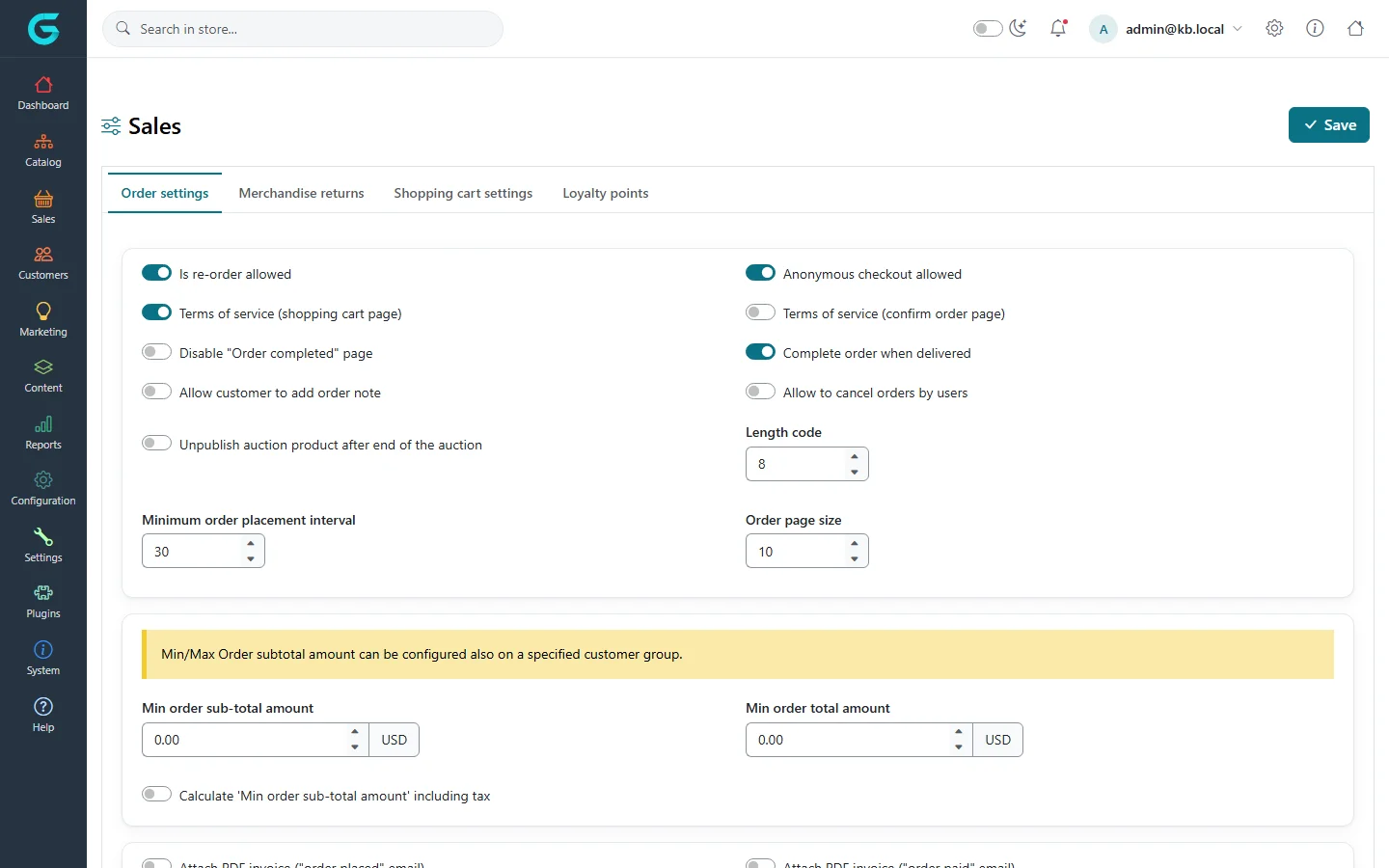
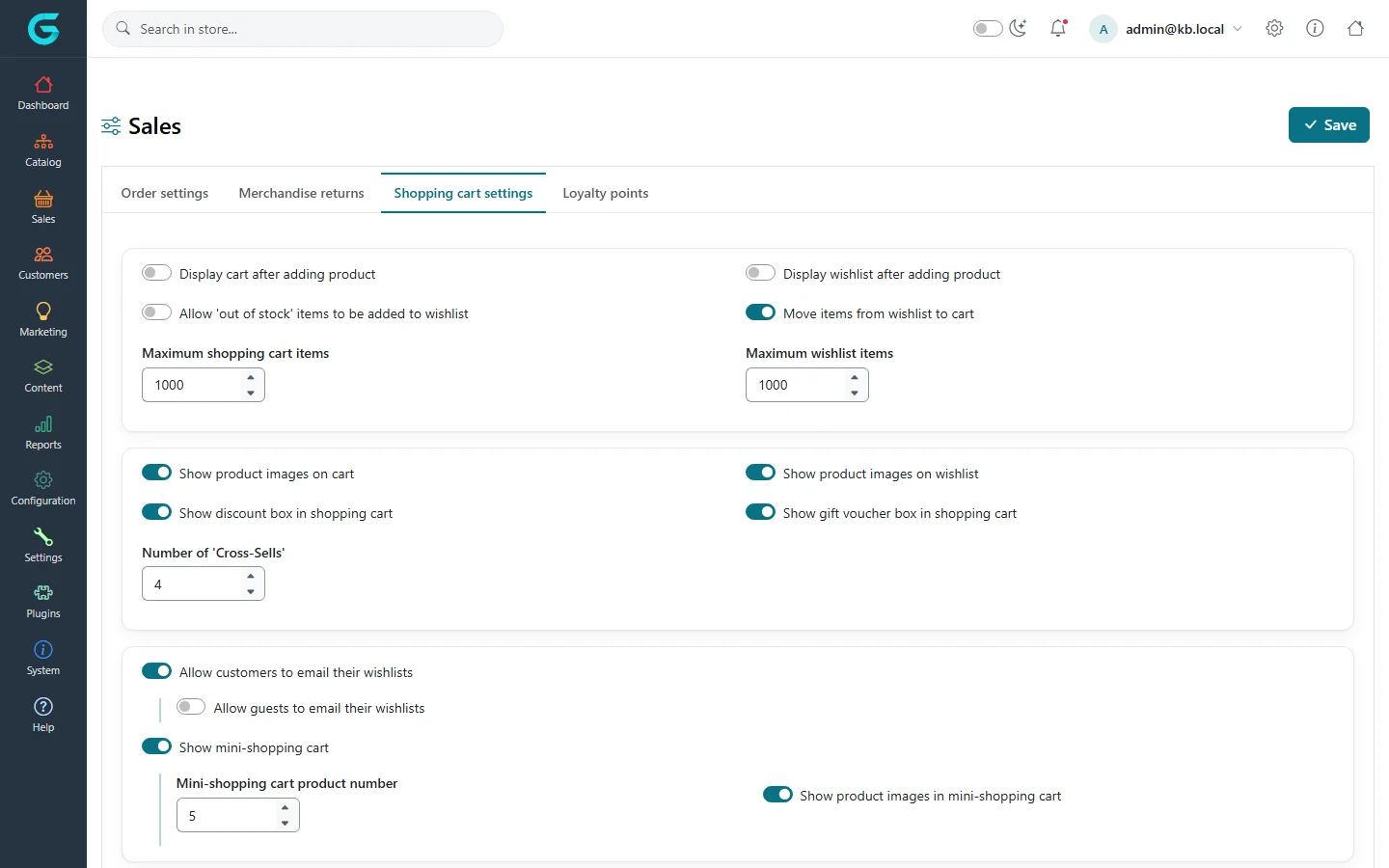
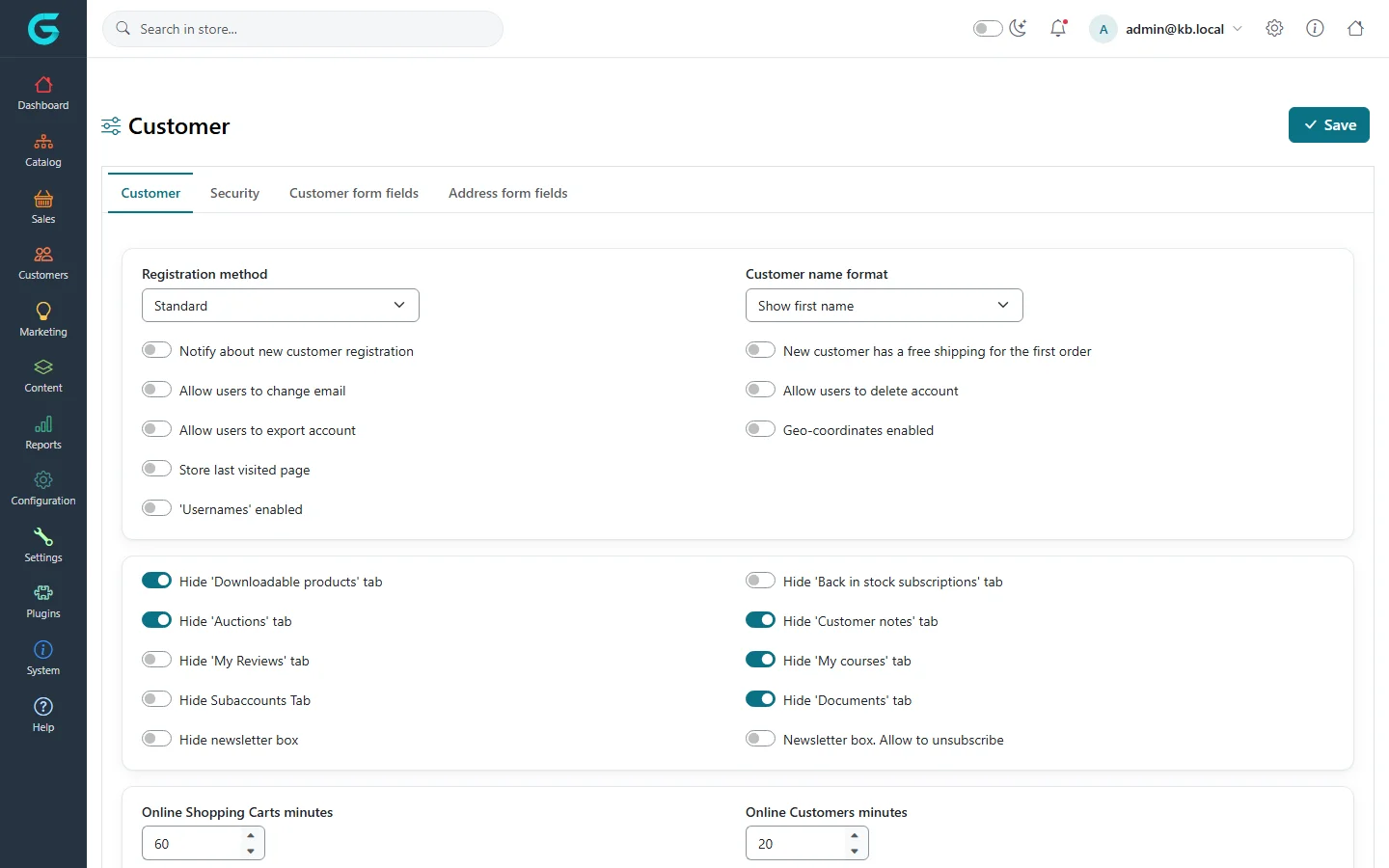
{"ArticleId":null,"Name":"Sales and customer settings: orders, cart, returns, registration","Content":"\u003Cp\u003EThe \u003Cstrong\u003ESales\u003C/strong\u003E settings page controls checkout and everything after it - order rules, the shopping cart and wishlist, merchandise returns and loyalty points. The \u003Cstrong\u003ECustomer\u003C/strong\u003E settings page controls who can register and how, which fields the registration and address forms ask for, and password security. Together they decide how smooth - or how strict - buying in your store is.\u003C/p\u003E\n\n\u003Ch2 id=\u0022where-to-find-it\u0022\u003EWhere to find it\u003C/h2\u003E\n\u003Cp\u003E\u003Cstrong\u003ESettings \u2192 Sales\u003C/strong\u003E has the tabs \u003Cstrong\u003EOrder settings\u003C/strong\u003E, \u003Cstrong\u003EMerchandise returns\u003C/strong\u003E, \u003Cstrong\u003EShopping cart settings\u003C/strong\u003E and \u003Cstrong\u003ELoyalty points\u003C/strong\u003E. \u003Cstrong\u003ESettings \u2192 Customer\u003C/strong\u003E has the tabs \u003Cstrong\u003ECustomer\u003C/strong\u003E, \u003Cstrong\u003ESecurity\u003C/strong\u003E, \u003Cstrong\u003ECustomer form fields\u003C/strong\u003E and \u003Cstrong\u003EAddress form fields\u003C/strong\u003E.\u003C/p\u003E\n\u003Cfigure\u003E\u003Cimg src=\u0022/Plugins/Theme.GrandNodeCom/Content/kb/configuration/settings-sales.webp\u0022 alt=\u0022The Order settings tab of Sales settings with re-order, anonymous checkout, terms of service, order note, cancel orders and minimum order amounts\u0022 width=\u00221440\u0022 height=\u0022900\u0022 loading=\u0022lazy\u0022\u003E\u003Cfigcaption\u003E\u003Cstrong\u003ESettings \u2192 Sales\u003C/strong\u003E, tab \u003Cstrong\u003EOrder settings\u003C/strong\u003E.\u003C/figcaption\u003E\u003C/figure\u003E\n\n\u003Ch2 id=\u0022order-settings\u0022\u003EOrder settings\u003C/h2\u003E\n\u003Ctable\u003E\n\u003Cthead\u003E\u003Ctr\u003E\u003Cth\u003ESetting\u003C/th\u003E\u003Cth\u003EWhat it does\u003C/th\u003E\u003C/tr\u003E\u003C/thead\u003E\n\u003Ctbody\u003E\n\u003Ctr\u003E\u003Ctd\u003E\u003Cstrong\u003EAnonymous checkout allowed\u003C/strong\u003E\u003C/td\u003E\u003Ctd\u003EGuests can check out without creating an account. Off forces registration or login at checkout.\u003C/td\u003E\u003C/tr\u003E\n\u003Ctr\u003E\u003Ctd\u003E\u003Cstrong\u003EIs re-order allowed\u003C/strong\u003E\u003C/td\u003E\u003Ctd\u003EShows a \u0022Re-order\u0022 button on the customer\u0027s order details.\u003C/td\u003E\u003C/tr\u003E\n\u003Ctr\u003E\u003Ctd\u003E\u003Cstrong\u003ETerms of service (shopping cart page)\u003C/strong\u003E / \u003Cstrong\u003E(confirm order page)\u003C/strong\u003E\u003C/td\u003E\u003Ctd\u003ERequires ticking a terms of service checkbox before continuing. The linked text is a \u003Ca href=\u0022/docs-content\u0022\u003Epage\u003C/a\u003E.\u003C/td\u003E\u003C/tr\u003E\n\u003Ctr\u003E\u003Ctd\u003E\u003Cstrong\u003EAllow customer to add order note\u003C/strong\u003E\u003C/td\u003E\u003Ctd\u003ECustomers can add notes to their order from the account area.\u003C/td\u003E\u003C/tr\u003E\n\u003Ctr\u003E\u003Ctd\u003E\u003Cstrong\u003EAllow to cancel orders by users\u003C/strong\u003E\u003C/td\u003E\u003Ctd\u003ECustomers can cancel their own unpaid orders.\u003C/td\u003E\u003C/tr\u003E\n\u003Ctr\u003E\u003Ctd\u003E\u003Cstrong\u003EComplete order when delivered\u003C/strong\u003E\u003C/td\u003E\u003Ctd\u003EMoves the order to Complete automatically when all shipments are delivered.\u003C/td\u003E\u003C/tr\u003E\n\u003Ctr\u003E\u003Ctd\u003E\u003Cstrong\u003EMin order sub-total amount\u003C/strong\u003E, \u003Cstrong\u003EMin order total amount\u003C/strong\u003E\u003C/td\u003E\u003Ctd\u003ECheckout is blocked below these amounts (in the primary store currency). The same limits can be set per customer group.\u003C/td\u003E\u003C/tr\u003E\n\u003Ctr\u003E\u003Ctd\u003E\u003Cstrong\u003EMinimum order placement interval\u003C/strong\u003E\u003C/td\u003E\u003Ctd\u003ESeconds a customer must wait between two orders - a simple guard against double orders.\u003C/td\u003E\u003C/tr\u003E\n\u003Ctr\u003E\u003Ctd\u003E\u003Cstrong\u003ELength code\u003C/strong\u003E\u003C/td\u003E\u003Ctd\u003ELength of the order code shown to customers alongside the order number.\u003C/td\u003E\u003C/tr\u003E\n\u003Ctr\u003E\u003Ctd\u003E\u003Cstrong\u003EAttach PDF invoice (\u0022order placed\u0022 / \u0022order paid\u0022 / \u0022order completed\u0022 email)\u003C/strong\u003E\u003C/td\u003E\u003Ctd\u003EAdds the PDF invoice to those customer emails.\u003C/td\u003E\u003C/tr\u003E\n\u003Ctr\u003E\u003Ctd\u003E\u003Cstrong\u003EGift voucher activation order status\u003C/strong\u003E\u003C/td\u003E\u003Ctd\u003EAt which order status purchased gift vouchers become usable.\u003C/td\u003E\u003C/tr\u003E\n\u003C/tbody\u003E\n\u003C/table\u003E\n\n\u003Ch2 id=\u0022merchandise-returns\u0022\u003EMerchandise returns\u003C/h2\u003E\n\u003Cp\u003E\u003Cstrong\u003EEnable Returns System\u003C/strong\u003E lets customers request a merchandise return from their order history. \u003Cstrong\u003ENumber of days that the merchandise return is available\u003C/strong\u003E limits requests to that many days after the order (0 means no limit). Options allow the customer to give a pickup address and pickup date. The tab also manages the lists of \u003Cstrong\u003Ereturn reasons\u003C/strong\u003E and \u003Cstrong\u003Ereturn actions\u003C/strong\u003E (e.g. \u0022Wrong size\u0022 / \u0022Replacement\u0022) the customer chooses from. Handling returns is described in \u003Ca href=\u0022/docs-sales\u0022\u003ESales\u003C/a\u003E.\u003C/p\u003E\n\n\u003Ch2 id=\u0022shopping-cart\u0022\u003EShopping cart settings\u003C/h2\u003E\n\u003Cfigure\u003E\u003Cimg src=\u0022/Plugins/Theme.GrandNodeCom/Content/kb/configuration/settings-sales-cart.webp\u0022 alt=\u0022The Shopping cart settings tab with display cart after adding product, maximum items, discount and gift voucher boxes, cross-sells, wishlist email and mini shopping cart options\u0022 width=\u00221440\u0022 height=\u0022900\u0022 loading=\u0022lazy\u0022\u003E\u003Cfigcaption\u003ETab \u003Cstrong\u003EShopping cart settings\u003C/strong\u003E.\u003C/figcaption\u003E\u003C/figure\u003E\n\u003Ctable\u003E\n\u003Cthead\u003E\u003Ctr\u003E\u003Cth\u003ESetting\u003C/th\u003E\u003Cth\u003EWhat it does\u003C/th\u003E\u003C/tr\u003E\u003C/thead\u003E\n\u003Ctbody\u003E\n\u003Ctr\u003E\u003Ctd\u003E\u003Cstrong\u003EDisplay cart after adding product\u003C/strong\u003E\u003C/td\u003E\u003Ctd\u003ETakes the customer to the cart instead of staying on the product page.\u003C/td\u003E\u003C/tr\u003E\n\u003Ctr\u003E\u003Ctd\u003E\u003Cstrong\u003EMaximum shopping cart items\u003C/strong\u003E, \u003Cstrong\u003EMaximum wishlist items\u003C/strong\u003E\u003C/td\u003E\u003Ctd\u003EUpper limits on distinct items.\u003C/td\u003E\u003C/tr\u003E\n\u003Ctr\u003E\u003Ctd\u003E\u003Cstrong\u003EShow discount box in shopping cart\u003C/strong\u003E, \u003Cstrong\u003EShow gift voucher box in shopping cart\u003C/strong\u003E\u003C/td\u003E\u003Ctd\u003EWhere coupon codes and gift voucher codes are entered. Hide them if you do not use codes.\u003C/td\u003E\u003C/tr\u003E\n\u003Ctr\u003E\u003Ctd\u003E\u003Cstrong\u003ENumber of \u0027Cross-Sells\u0027\u003C/strong\u003E\u003C/td\u003E\u003Ctd\u003EHow many cross-sell products the cart suggests.\u003C/td\u003E\u003C/tr\u003E\n\u003Ctr\u003E\u003Ctd\u003E\u003Cstrong\u003EShow mini-shopping cart\u003C/strong\u003E\u003C/td\u003E\u003Ctd\u003EThe cart flyout in the header.\u003C/td\u003E\u003C/tr\u003E\n\u003Ctr\u003E\u003Ctd\u003E\u003Cstrong\u003ECarts shared between stores\u003C/strong\u003E\u003C/td\u003E\u003Ctd\u003EOn multi-store installations, one cart follows the customer across stores.\u003C/td\u003E\u003C/tr\u003E\n\u003Ctr\u003E\u003Ctd\u003E\u003Cstrong\u003EAllow on hold cart\u003C/strong\u003E\u003C/td\u003E\u003Ctd\u003ECustomers can put items on hold and check out only part of the cart.\u003C/td\u003E\u003C/tr\u003E\n\u003Ctr\u003E\u003Ctd\u003E\u003Cstrong\u003ERound prices\u003C/strong\u003E, \u003Cstrong\u003EGroup tier prices\u003C/strong\u003E\u003C/td\u003E\u003Ctd\u003EPrice presentation in cart and on product pages.\u003C/td\u003E\u003C/tr\u003E\n\u003C/tbody\u003E\n\u003C/table\u003E\n\n\u003Ch2 id=\u0022loyalty-points\u0022\u003ELoyalty points\u003C/h2\u003E\n\u003Cp\u003E\u003Cstrong\u003EEnabled\u003C/strong\u003E switches the program on. \u003Cstrong\u003EExchange rate\u003C/strong\u003E is the value of one point in the primary currency; \u003Cstrong\u003EPoints for purchases\u003C/strong\u003E awards points per amount spent once an order reaches the \u003Cstrong\u003EAwarded order status\u003C/strong\u003E; \u003Cstrong\u003EPoints for account registration\u003C/strong\u003E gives a welcome bonus; \u003Cstrong\u003EMinimum loyalty points to use\u003C/strong\u003E sets a threshold for redeeming. \u003Cstrong\u003EPoints are canceled when the order status is canceled\u003C/strong\u003E takes points back. See \u003Ca href=\u0022/docs-marketing\u0022\u003EMarketing\u003C/a\u003E for the program itself.\u003C/p\u003E\n\n\u003Ch2 id=\u0022customer-settings\u0022\u003ECustomer settings\u003C/h2\u003E\n\u003Cfigure\u003E\u003Cimg src=\u0022/Plugins/Theme.GrandNodeCom/Content/kb/configuration/settings-customer.webp\u0022 alt=\u0022The Customer tab of Customer settings with registration method, customer name format and account tab switches\u0022 width=\u00221440\u0022 height=\u0022900\u0022 loading=\u0022lazy\u0022\u003E\u003Cfigcaption\u003E\u003Cstrong\u003ESettings \u2192 Customer\u003C/strong\u003E, tab \u003Cstrong\u003ECustomer\u003C/strong\u003E.\u003C/figcaption\u003E\u003C/figure\u003E\n\u003Ctable\u003E\n\u003Cthead\u003E\u003Ctr\u003E\u003Cth\u003ESetting\u003C/th\u003E\u003Cth\u003EWhat it does\u003C/th\u003E\u003C/tr\u003E\u003C/thead\u003E\n\u003Ctbody\u003E\n\u003Ctr\u003E\u003Ctd\u003E\u003Cstrong\u003ERegistration method\u003C/strong\u003E\u003C/td\u003E\u003Ctd\u003E\u003Cem\u003EStandard\u003C/em\u003E (account active immediately), \u003Cem\u003EEmail validation\u003C/em\u003E (active after clicking the link in the welcome email), \u003Cem\u003EAdmin approval\u003C/em\u003E (active after an administrator approves it) or \u003Cem\u003EDisabled\u003C/em\u003E (no new registrations).\u003C/td\u003E\u003C/tr\u003E\n\u003Ctr\u003E\u003Ctd\u003E\u003Cstrong\u003ECustomer name format\u003C/strong\u003E\u003C/td\u003E\u003Ctd\u003EHow customers are named in the storefront and emails (email, username, full name, first name).\u003C/td\u003E\u003C/tr\u003E\n\u003Ctr\u003E\u003Ctd\u003E\u003Cstrong\u003E\u0027Usernames\u0027 enabled\u003C/strong\u003E\u003C/td\u003E\u003Ctd\u003ECustomers log in with a username instead of their email.\u003C/td\u003E\u003C/tr\u003E\n\u003Ctr\u003E\u003Ctd\u003E\u003Cstrong\u003EAllow users to change email\u003C/strong\u003E, \u003Cstrong\u003EAllow users to delete account\u003C/strong\u003E, \u003Cstrong\u003EAllow users to export account\u003C/strong\u003E\u003C/td\u003E\u003Ctd\u003ESelf-service account options, including GDPR export and deletion.\u003C/td\u003E\u003C/tr\u003E\n\u003Ctr\u003E\u003Ctd\u003E\u003Cstrong\u003ENotify about new customer registration\u003C/strong\u003E\u003C/td\u003E\u003Ctd\u003EEmails the store owner for every new account.\u003C/td\u003E\u003C/tr\u003E\n\u003Ctr\u003E\u003Ctd\u003E\u003Cstrong\u003ENew customer has a free shipping for the first order\u003C/strong\u003E\u003C/td\u003E\u003Ctd\u003EA simple welcome incentive.\u003C/td\u003E\u003C/tr\u003E\n\u003Ctr\u003E\u003Ctd\u003E\u003Cstrong\u003EHide \u0027\u2026\u0027 tab\u003C/strong\u003E switches\u003C/td\u003E\u003Ctd\u003ERemove sections from the customer\u0027s account area you do not use (downloadable products, auctions, courses, documents, reviews, subaccounts).\u003C/td\u003E\u003C/tr\u003E\n\u003Ctr\u003E\u003Ctd\u003E\u003Cstrong\u003EOnline Customers minutes\u003C/strong\u003E, \u003Cstrong\u003EOnline Shopping Carts minutes\u003C/strong\u003E\u003C/td\u003E\u003Ctd\u003EHow long a visitor counts as online in the admin reports.\u003C/td\u003E\u003C/tr\u003E\n\u003C/tbody\u003E\n\u003C/table\u003E\n\u003Ch3 id=\u0022security\u0022\u003ESecurity tab\u003C/h3\u003E\n\u003Cp\u003EPassword rules: \u003Cstrong\u003ERegular Expression for password validation\u003C/strong\u003E, \u003Cstrong\u003EUnduplicated passwords number\u003C/strong\u003E (how many previous passwords cannot be reused), \u003Cstrong\u003EPassword lifetime\u003C/strong\u003E (days before a forced change), \u003Cstrong\u003EMaximum login failures\u003C/strong\u003E and \u003Cstrong\u003ELockout time (login failures)\u003C/strong\u003E, \u003Cstrong\u003EPassword recovery link. Days valid\u003C/strong\u003E, and \u003Cstrong\u003ETwo factor authentication enabled\u003C/strong\u003E with its \u003Cstrong\u003ETwo factor authentication type\u003C/strong\u003E (authenticator app, email code or SMS code).\u003C/p\u003E\n\u003Ch3 id=\u0022form-fields\u0022\u003ECustomer form fields and Address form fields\u003C/h3\u003E\n\u003Cp\u003EEach field of the registration form (gender, date of birth, company, street address, city, country, phone\u2026) and of the address form has an \u003Cem\u003Eenabled\u003C/em\u003E and a \u003Cem\u003Erequired\u003C/em\u003E switch. \u003Cstrong\u003E\u0027Accept privacy policy\u0027 enabled\u003C/strong\u003E adds a consent checkbox to registration. Enable \u003Cstrong\u003E\u0027Country\u0027 enabled\u003C/strong\u003E and \u003Cstrong\u003E\u0027State/province\u0027 enabled\u003C/strong\u003E when you use tax or shipping by country, because those calculations need the country in the address.\u003C/p\u003E\n\n\u003Ch2 id=\u0022tips\u0022\u003ETips and common mistakes\u003C/h2\u003E\n\u003Cul\u003E\n\u003Cli\u003EWith \u003Cem\u003EAdmin approval\u003C/em\u003E, new customers cannot log in until you activate them under \u003Cstrong\u003ECustomers \u2192 Customers\u003C/strong\u003E. Tell them so on the registration result page (translation resource).\u003C/li\u003E\n\u003Cli\u003EMinimum order amounts are compared in the primary store currency, not the currency the customer is browsing in.\u003C/li\u003E\n\u003Cli\u003ETest checkout as a guest after changing \u003Cstrong\u003EAnonymous checkout allowed\u003C/strong\u003E - it is the setting most often switched off by accident.\u003C/li\u003E\n\u003C/ul\u003E\n\n\u003Ch2 id=\u0022related\u0022\u003ERelated\u003C/h2\u003E\n\u003Cul\u003E\n\u003Cli\u003E\u003Ca href=\u0022/docs-sales\u0022\u003ESales: orders, shipments and returns\u003C/a\u003E\u003C/li\u003E\n\u003Cli\u003E\u003Ca href=\u0022/docs-customers\u0022\u003ECustomers\u003C/a\u003E\u003C/li\u003E\n\u003Cli\u003E\u003Ca href=\u0022/configuration-payments\u0022\u003EPayments\u003C/a\u003E\u003C/li\u003E\n\u003C/ul\u003E","ParentCategoryId":"6abdec6c83d2816248229f19","SeName":"configuration-sales-customer-settings","MetaKeywords":null,"MetaDescription":"Configure checkout, minimum order amounts, shopping cart, merchandise returns, loyalty points, registration, passwords and form fields in GrandNode.","MetaTitle":"Sales and customer settings","AllowComments":false,"Captcha":{"ReCaptchaChallengeField":null,"ReCaptchaResponseField":null,"ReCaptchaResponseValue":null,"ReCaptchaResponse":null},"RelatedArticles":[],"CategoryBreadcrumb":[{"Name":"Configuration","Description":null,"IsCurrent":false,"Children":null,"Parent":null,"SeName":"docs-configuration","Id":"6abdec6c83d2816248229f19","UserFields":[]}],"AddNewComment":{"CommentText":null,"DisplayCaptcha":false,"Id":null,"UserFields":[]},"Comments":[],"Id":"6abdec6c83d2816248229f21","UserFields":[]}