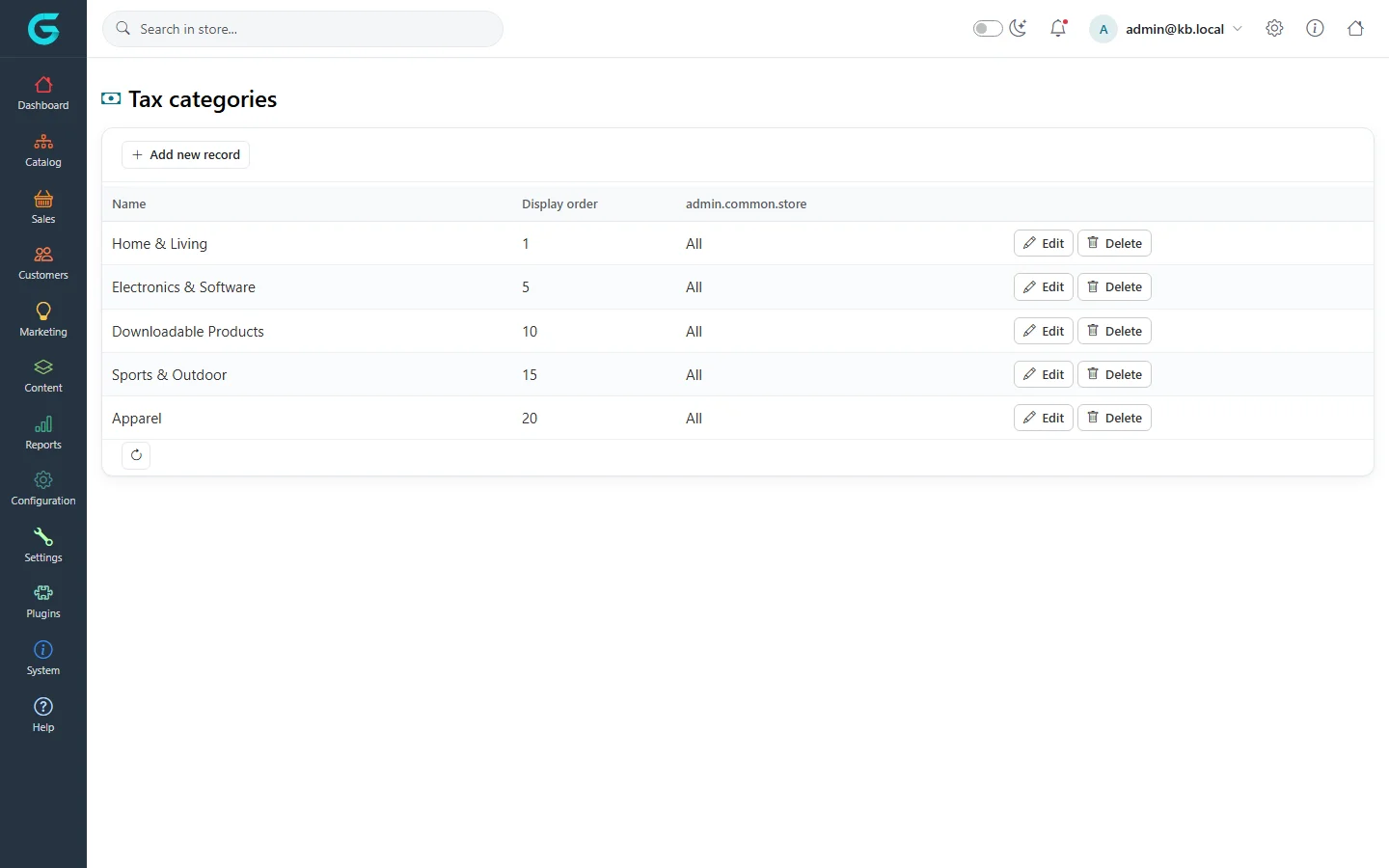
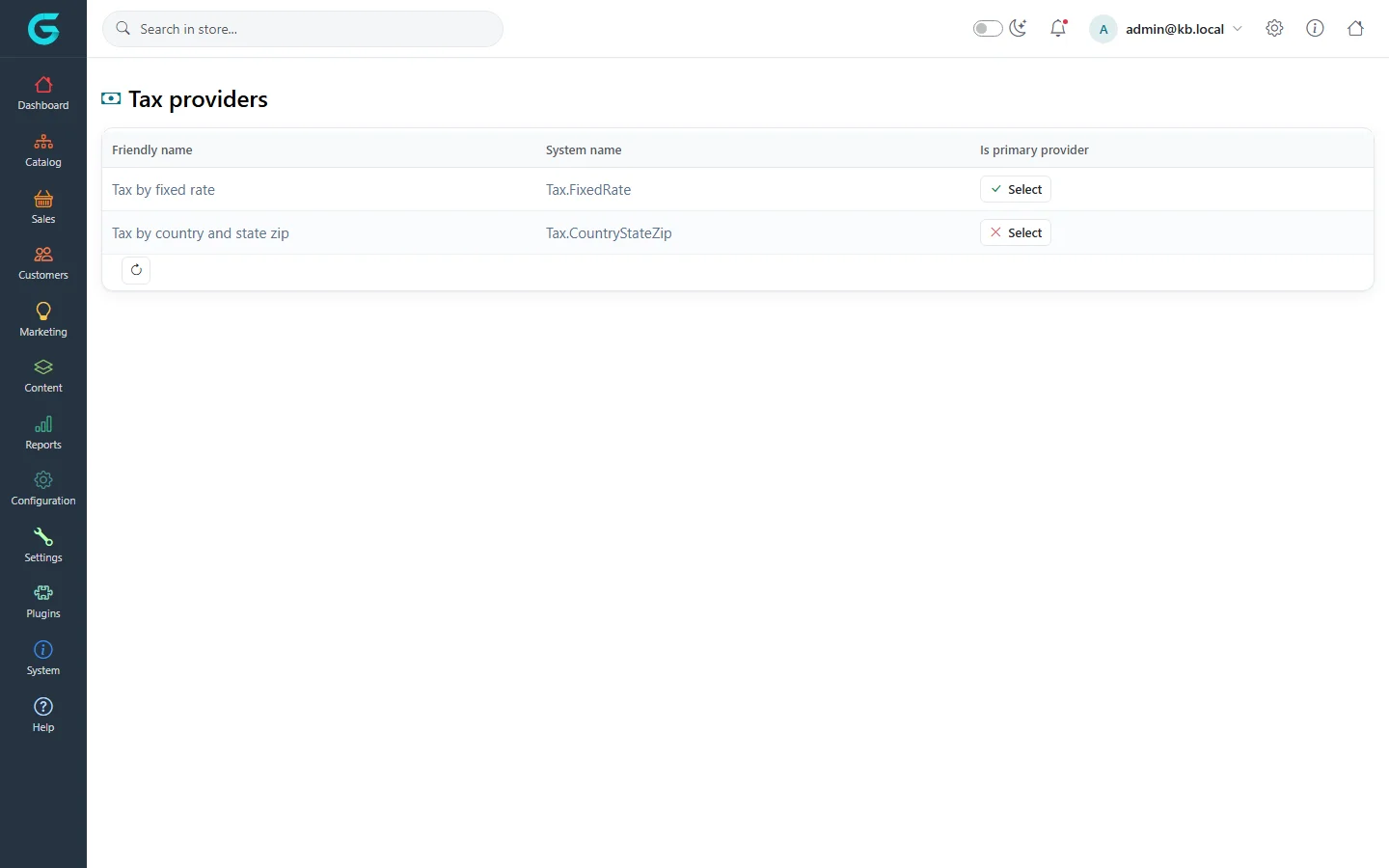
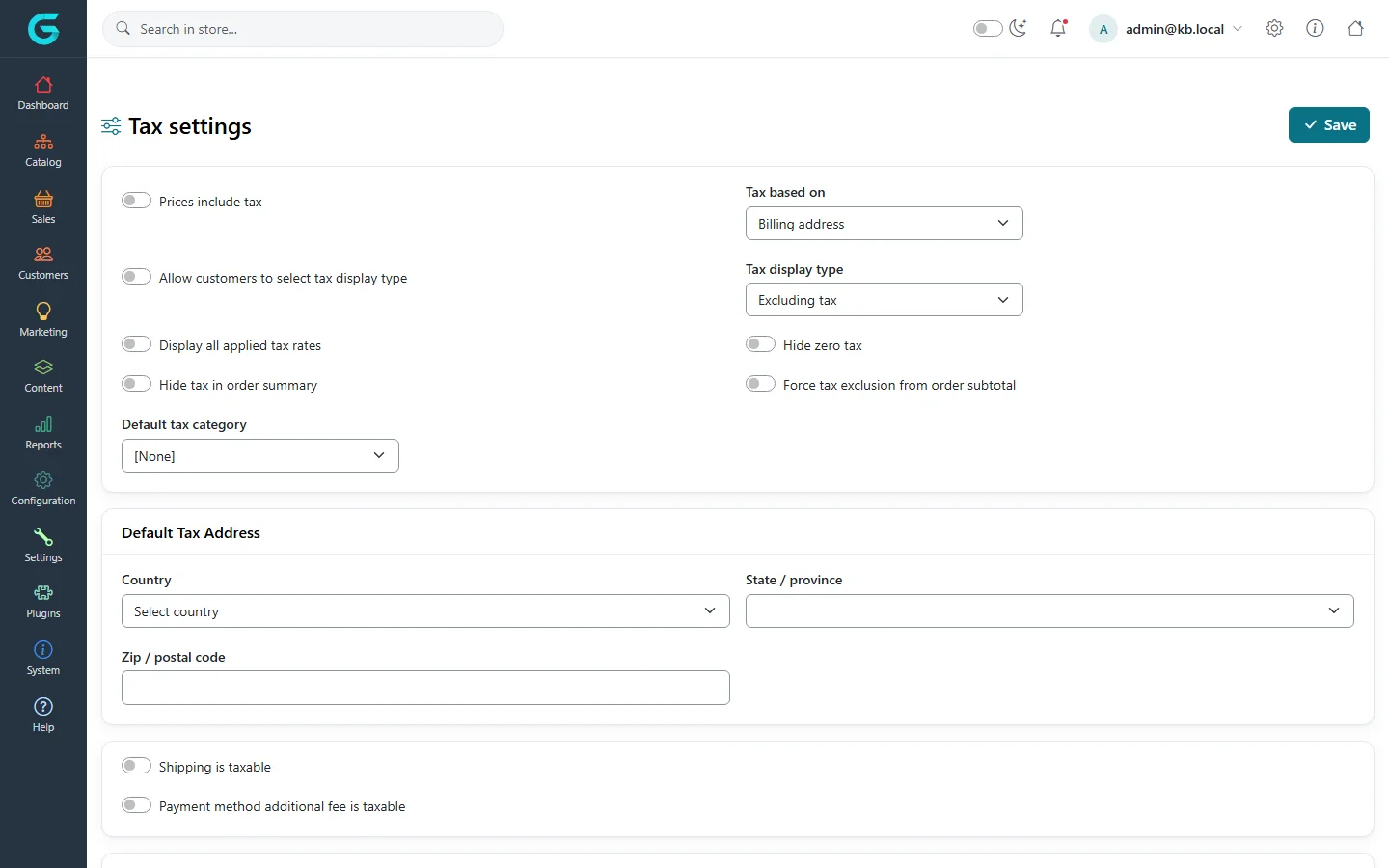
{"ArticleId":null,"Name":"Tax","Content":"\n\u003Cp\u003ETax in GrandNode has three parts: \u003Cstrong\u003Etax categories\u003C/strong\u003E (what kind of product it is), a \u003Cstrong\u003Etax provider\u003C/strong\u003E (how the rate is found) and the \u003Cstrong\u003Etax settings\u003C/strong\u003E (how prices are entered and shown).\u003C/p\u003E\n\n\u003Ch2 id=\u0022categories\u0022\u003ETax categories\u003C/h2\u003E\n\u003Cp\u003E\u003Cstrong\u003EConfiguration \u2192 Tax \u2192 Tax categories\u003C/strong\u003E. Create one category per rate group - for example \u0022Standard\u0022, \u0022Reduced\u0022, \u0022Books\u0022 - and assign each product to one on its Prices tab.\u003C/p\u003E\n\u003Cfigure\u003E\u003Cimg src=\u0022/Plugins/Theme.GrandNodeCom/Content/kb/configuration/tax-categories.webp\u0022 alt=\u0022Tax categories: Home \u0026 Living, Electronics \u0026 Software, Downloadable Products, Sports \u0026 Outdoor and Apparel with display order\u0022 width=\u00221440\u0022 height=\u0022900\u0022 loading=\u0022lazy\u0022\u003E\u003Cfigcaption\u003EConfiguration \u2192 Tax \u2192 Tax categories.\u003C/figcaption\u003E\u003C/figure\u003E\n\n\u003Ch2 id=\u0022providers\u0022\u003ETax providers\u003C/h2\u003E\n\u003Cp\u003E\u003Cstrong\u003EConfiguration \u2192 Tax \u2192 Tax providers\u003C/strong\u003E lists the installed providers; one is the \u003Cstrong\u003Eprimary\u003C/strong\u003E provider that calculates tax.\u003C/p\u003E\n\u003Cfigure\u003E\u003Cimg src=\u0022/Plugins/Theme.GrandNodeCom/Content/kb/configuration/tax-providers.webp\u0022 alt=\u0022Tax providers: Tax by fixed rate and Tax by country and state (zip), with Mark as primary provider buttons\u0022 width=\u00221440\u0022 height=\u0022900\u0022 loading=\u0022lazy\u0022\u003E\u003Cfigcaption\u003EConfiguration \u2192 Tax \u2192 Tax providers.\u003C/figcaption\u003E\u003C/figure\u003E\n\u003Cul\u003E\n\u003Cli\u003E\u003Cstrong\u003ETax by fixed rate\u003C/strong\u003E: one rate per tax category, the same for every customer. Simple and enough for many single-country shops. Set the rates with \u003Cstrong\u003EConfigure\u003C/strong\u003E.\u003C/li\u003E\n\u003Cli\u003E\u003Cstrong\u003ETax by country and state (zip)\u003C/strong\u003E: rates per tax category, country, state and zip code - for selling across borders or in the US.\u003C/li\u003E\n\u003C/ul\u003E\n\u003Cp\u003EMore providers (for example tax services) are added with plugins.\u003C/p\u003E\n\n\u003Ch2 id=\u0022settings\u0022\u003ETax settings\u003C/h2\u003E\n\u003Cfigure\u003E\u003Cimg src=\u0022/Plugins/Theme.GrandNodeCom/Content/kb/configuration/tax-settings.webp\u0022 alt=\u0022Tax settings: prices include tax, tax based on billing address, allow customers to select tax display type, tax display type excluding tax, display all applied rates, hide zero tax, default tax category, default tax address, shipping and payment fee taxable\u0022 width=\u00221440\u0022 height=\u0022900\u0022 loading=\u0022lazy\u0022\u003E\u003Cfigcaption\u003EConfiguration \u2192 Tax \u2192 Tax settings.\u003C/figcaption\u003E\u003C/figure\u003E\n\u003Ctable\u003E\n\u003Cthead\u003E\u003Ctr\u003E\u003Cth\u003ESetting\u003C/th\u003E\u003Cth\u003EWhat it does\u003C/th\u003E\u003C/tr\u003E\u003C/thead\u003E\n\u003Ctbody\u003E\n\u003Ctr\u003E\u003Ctd\u003EPrices include tax\u003C/td\u003E\u003Ctd\u003EOn: the prices you enter already contain tax (typical in Europe). Off: tax is added on top (typical in the US).\u003C/td\u003E\u003C/tr\u003E\n\u003Ctr\u003E\u003Ctd\u003ETax based on\u003C/td\u003E\u003Ctd\u003EWhich address decides the rate: billing, shipping, or the default tax address.\u003C/td\u003E\u003C/tr\u003E\n\u003Ctr\u003E\u003Ctd\u003ETax display type\u003C/td\u003E\u003Ctd\u003EShow prices including or excluding tax; \u003Cstrong\u003EAllow customers to select tax display type\u003C/strong\u003E lets B2B customers switch.\u003C/td\u003E\u003C/tr\u003E\n\u003Ctr\u003E\u003Ctd\u003EDisplay all applied tax rates, Hide zero tax, Hide tax in order summary\u003C/td\u003E\u003Ctd\u003EHow tax lines appear in the cart and on orders.\u003C/td\u003E\u003C/tr\u003E\n\u003Ctr\u003E\u003Ctd\u003EForce tax exclusion from order subtotal\u003C/td\u003E\u003Ctd\u003EShows the subtotal without tax even when prices include tax.\u003C/td\u003E\u003C/tr\u003E\n\u003Ctr\u003E\u003Ctd\u003EDefault tax category\u003C/td\u003E\u003Ctd\u003EThe category for products without one.\u003C/td\u003E\u003C/tr\u003E\n\u003Ctr\u003E\u003Ctd\u003EDefault tax address\u003C/td\u003E\u003Ctd\u003EUsed before the customer has entered an address, and with \u0022Tax based on: default address\u0022.\u003C/td\u003E\u003C/tr\u003E\n\u003Ctr\u003E\u003Ctd\u003EShipping is taxable, Payment method additional fee is taxable\u003C/td\u003E\u003Ctd\u003EWhether tax applies to shipping and payment fees, each with its own tax category.\u003C/td\u003E\u003C/tr\u003E\n\u003C/tbody\u003E\n\u003C/table\u003E\n\u003Cp\u003EThe EU VAT options (VAT number validation, reverse charge for businesses) are in the same page when enabled.\u003C/p\u003E\n\n\u003Ch2 id=\u0022tips\u0022\u003ETips\u003C/h2\u003E\n\u003Cul\u003E\n\u003Cli\u003EDecide \u003Cstrong\u003EPrices include tax\u003C/strong\u003E before entering products; switching later changes every price\u0027s meaning.\u003C/li\u003E\n\u003Cli\u003ETest with a customer address in each country you serve and compare the cart totals with your accountant\u0027s expectations.\u003C/li\u003E\n\u003C/ul\u003E\n\n\u003Ch2 id=\u0022related\u0022\u003ERelated\u003C/h2\u003E\n\u003Cul\u003E\n\u003Cli\u003E\u003Ca href=\u0022/configuration-currencies-countries-measures\u0022\u003ECurrencies, countries and measures\u003C/a\u003E\u003C/li\u003E\n\u003Cli\u003E\u003Ca href=\u0022/catalog-prices-inventory\u0022\u003EPrices and inventory\u003C/a\u003E\u003C/li\u003E\n\u003C/ul\u003E\n","ParentCategoryId":"6abdec6c83d2816248229f19","SeName":"configuration-tax","MetaKeywords":null,"MetaDescription":"Configure tax in GrandNode: tax categories, tax providers (fixed rate or by country and state), prices including or excluding tax, and tax settings.","MetaTitle":null,"AllowComments":false,"Captcha":{"ReCaptchaChallengeField":null,"ReCaptchaResponseField":null,"ReCaptchaResponseValue":null,"ReCaptchaResponse":null},"RelatedArticles":[],"CategoryBreadcrumb":[{"Name":"Configuration","Description":null,"IsCurrent":false,"Children":null,"Parent":null,"SeName":"docs-configuration","Id":"6abdec6c83d2816248229f19","UserFields":[]}],"AddNewComment":{"CommentText":null,"DisplayCaptcha":false,"Id":null,"UserFields":[]},"Comments":[],"Id":"6abdec6c83d2816248229f2b","UserFields":[]}