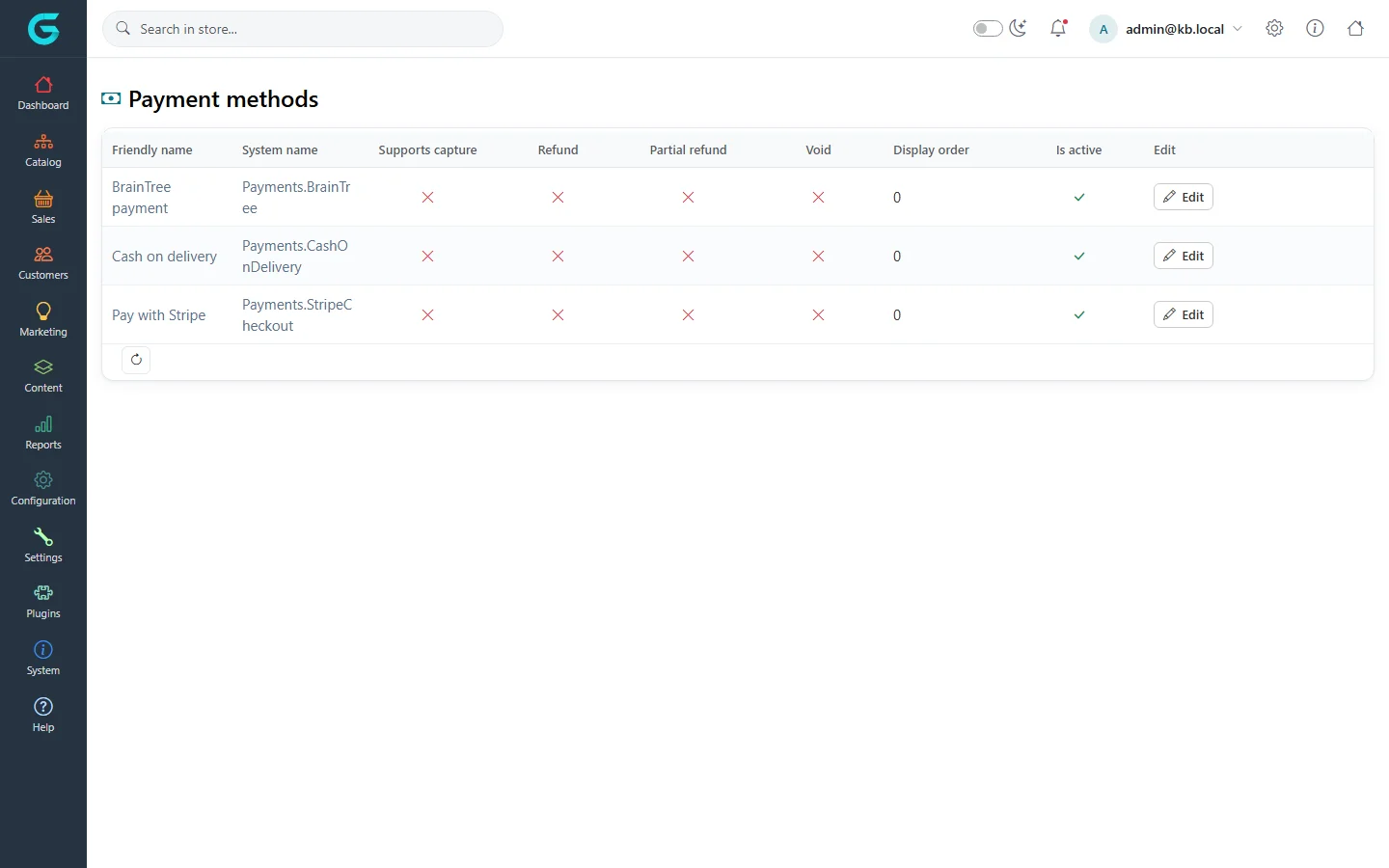
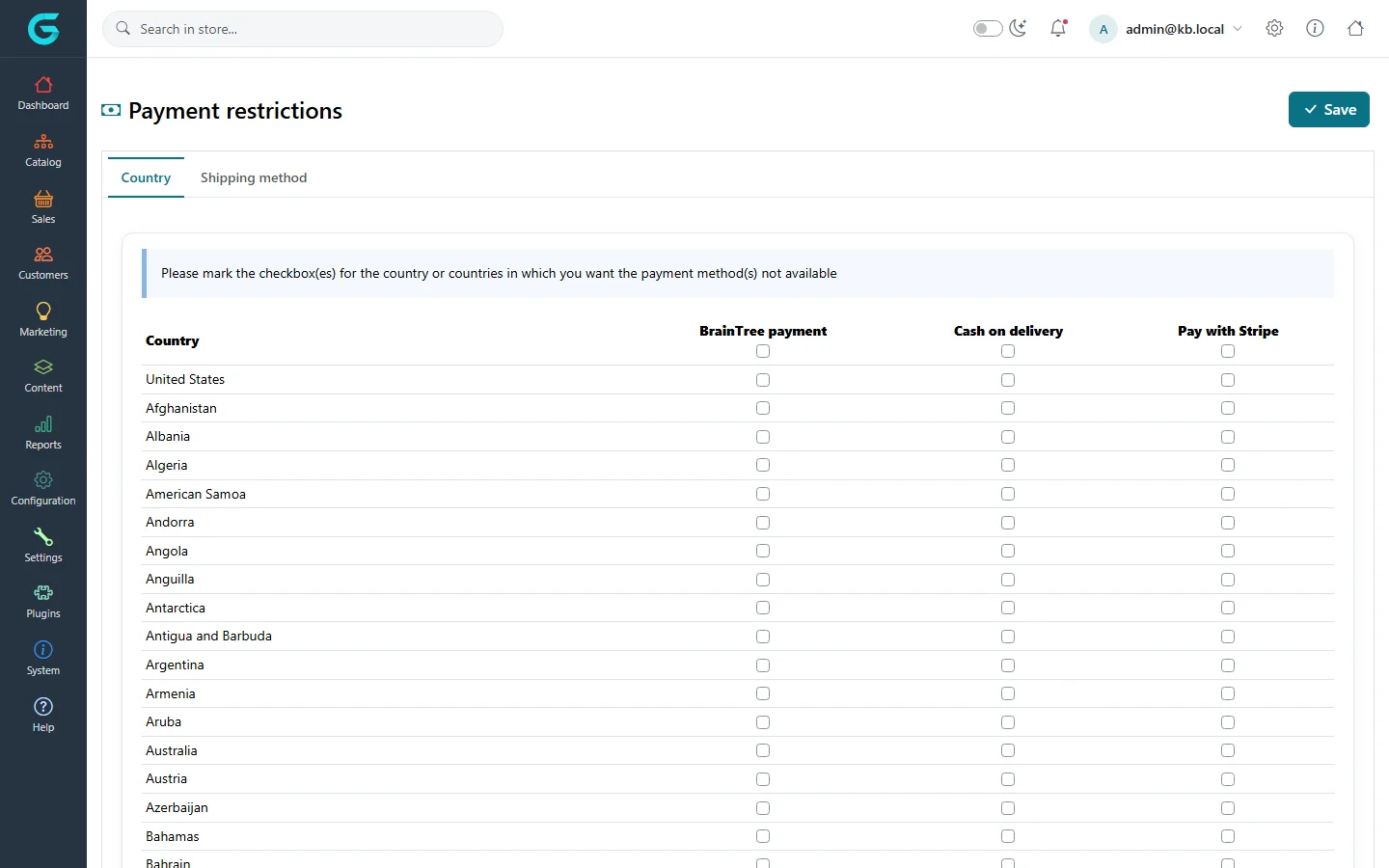
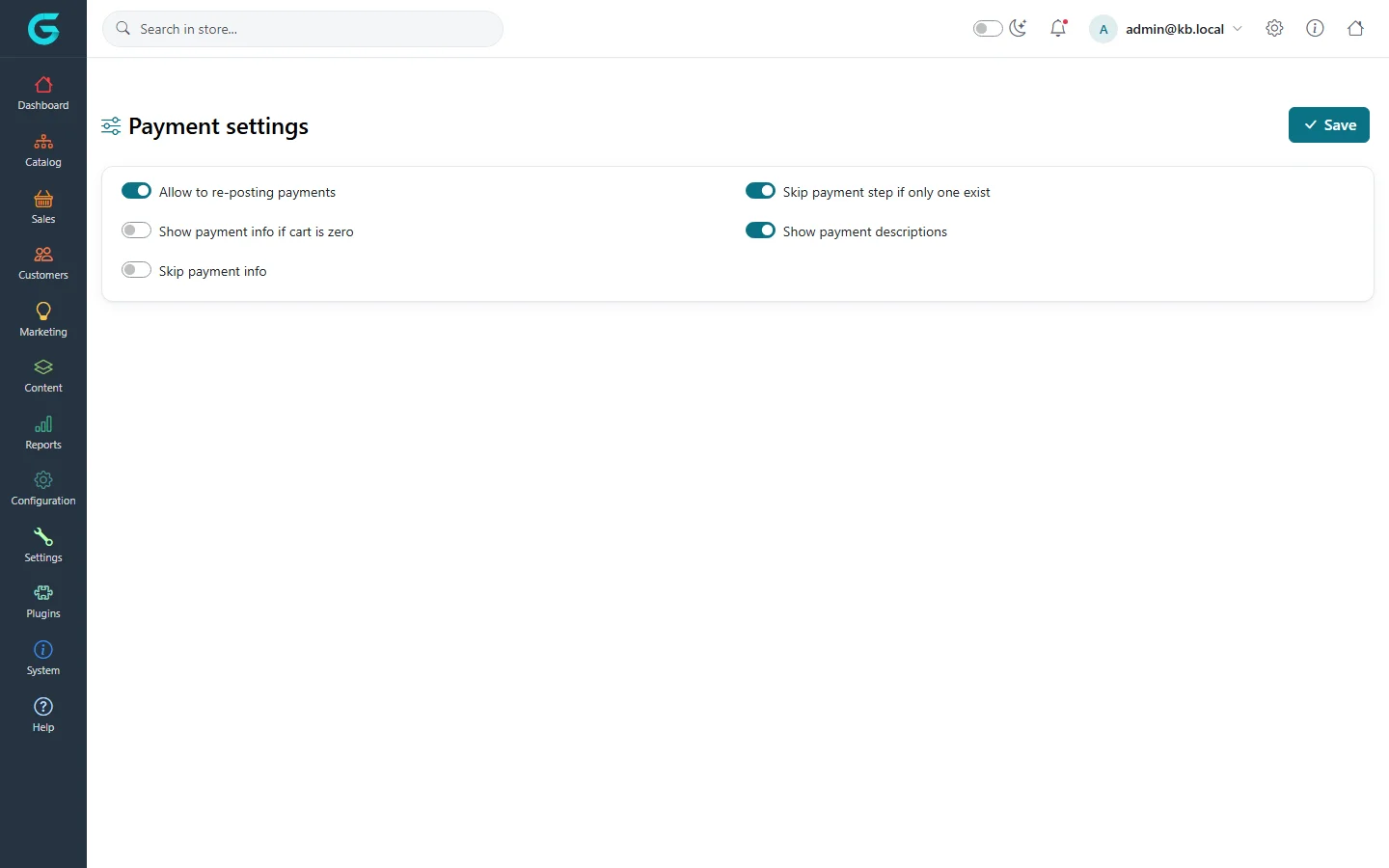
{"ArticleId":null,"Name":"Payments","Content":"\n\u003Cp\u003EPayment methods are plugins. GrandNode ships with \u003Cstrong\u003ECash on delivery\u003C/strong\u003E, \u003Cstrong\u003EStripe Checkout\u003C/strong\u003E and \u003Cstrong\u003EBrainTree\u003C/strong\u003E; more providers are available as plugins. You activate the methods you want, configure their credentials, and optionally restrict where they are offered.\u003C/p\u003E\n\n\u003Ch2 id=\u0022methods\u0022\u003EPayment methods\u003C/h2\u003E\n\u003Cp\u003E\u003Cstrong\u003EConfiguration \u2192 Payment \u2192 Payment methods\u003C/strong\u003E lists the installed methods with what they support - capture, refund, partial refund, void - and whether they are active.\u003C/p\u003E\n\u003Cfigure\u003E\u003Cimg src=\u0022/Plugins/Theme.GrandNodeCom/Content/kb/configuration/payment-methods.webp\u0022 alt=\u0022Payment methods: BrainTree payment, Cash on delivery and Pay with Stripe, with supported operations, display order and active flags\u0022 width=\u00221440\u0022 height=\u0022900\u0022 loading=\u0022lazy\u0022\u003E\u003Cfigcaption\u003EConfiguration \u2192 Payment \u2192 Payment methods.\u003C/figcaption\u003E\u003C/figure\u003E\n\u003Col\u003E\n\u003Cli\u003EClick \u003Cstrong\u003EEdit\u003C/strong\u003E on a method, tick \u003Cstrong\u003EIs active\u003C/strong\u003E, set the display order and save the row.\u003C/li\u003E\n\u003Cli\u003EClick \u003Cstrong\u003EConfigure\u003C/strong\u003E to enter its settings - API keys, sandbox mode, additional fee, the description shown at checkout. Keys can differ per store.\u003C/li\u003E\n\u003Cli\u003ETest a payment in sandbox mode before going live.\u003C/li\u003E\n\u003C/ol\u003E\n\u003Cp\u003EWhat the columns mean for daily work is explained in \u003Ca href=\u0022/sales-payments\u0022\u003EPayments and payment transactions\u003C/a\u003E.\u003C/p\u003E\n\n\u003Ch2 id=\u0022restrictions\u0022\u003EPayment method restrictions\u003C/h2\u003E\n\u003Cp\u003E\u003Cstrong\u003EPayment method restrictions\u003C/strong\u003E hides methods for chosen countries or shipping methods - for example no cash on delivery abroad, or only prepayment with pickup.\u003C/p\u003E\n\u003Cfigure\u003E\u003Cimg src=\u0022/Plugins/Theme.GrandNodeCom/Content/kb/configuration/payment-restrictions.webp\u0022 alt=\u0022Payment method restrictions, Country tab: a grid of countries with a checkbox per payment method\u0022 width=\u00221440\u0022 height=\u0022900\u0022 loading=\u0022lazy\u0022\u003E\u003Cfigcaption\u003ETick a box to hide that method for that country.\u003C/figcaption\u003E\u003C/figure\u003E\n\n\u003Ch2 id=\u0022settings\u0022\u003EPayment settings\u003C/h2\u003E\n\u003Cfigure\u003E\u003Cimg src=\u0022/Plugins/Theme.GrandNodeCom/Content/kb/configuration/payment-settings.webp\u0022 alt=\u0022Payment settings: allow re-posting payments, show payment info if cart is zero, skip payment info, skip payment step if only one exists, show payment descriptions\u0022 width=\u00221440\u0022 height=\u0022900\u0022 loading=\u0022lazy\u0022\u003E\u003Cfigcaption\u003EConfiguration \u2192 Payment \u2192 Payment settings.\u003C/figcaption\u003E\u003C/figure\u003E\n\u003Ctable\u003E\n\u003Cthead\u003E\u003Ctr\u003E\u003Cth\u003ESetting\u003C/th\u003E\u003Cth\u003EWhat it does\u003C/th\u003E\u003C/tr\u003E\u003C/thead\u003E\n\u003Ctbody\u003E\n\u003Ctr\u003E\u003Ctd\u003EAllow to re-posting payments\u003C/td\u003E\u003Ctd\u003ELets a customer retry a failed redirect payment (Stripe, PayPal) from the order page.\u003C/td\u003E\u003C/tr\u003E\n\u003Ctr\u003E\u003Ctd\u003ESkip payment step if only one exist\u003C/td\u003E\u003Ctd\u003EHides the payment method choice when there is only one.\u003C/td\u003E\u003C/tr\u003E\n\u003Ctr\u003E\u003Ctd\u003EShow payment info if cart is zero\u003C/td\u003E\u003Ctd\u003EShows the payment step even for free orders.\u003C/td\u003E\u003C/tr\u003E\n\u003Ctr\u003E\u003Ctd\u003ESkip payment info\u003C/td\u003E\u003Ctd\u003ESkips the payment information step.\u003C/td\u003E\u003C/tr\u003E\n\u003Ctr\u003E\u003Ctd\u003EShow payment descriptions\u003C/td\u003E\u003Ctd\u003EShows each method\u0027s description at checkout.\u003C/td\u003E\u003C/tr\u003E\n\u003C/tbody\u003E\n\u003C/table\u003E\n\n\u003Ch2 id=\u0022related\u0022\u003ERelated\u003C/h2\u003E\n\u003Cul\u003E\n\u003Cli\u003E\u003Ca href=\u0022/configuration-shipping\u0022\u003EShipping\u003C/a\u003E\u003C/li\u003E\n\u003Cli\u003E\u003Ca href=\u0022/developers-plugin-provider-types\u0022\u003EPlugin provider types\u003C/a\u003E\u003C/li\u003E\n\u003C/ul\u003E\n","ParentCategoryId":"6abdec6c83d2816248229f19","SeName":"configuration-payments","MetaKeywords":null,"MetaDescription":"Activate and configure payment methods in GrandNode, restrict them by country or shipping method, and set the payment settings.","MetaTitle":null,"AllowComments":false,"Captcha":{"ReCaptchaChallengeField":null,"ReCaptchaResponseField":null,"ReCaptchaResponseValue":null,"ReCaptchaResponse":null},"RelatedArticles":[],"CategoryBreadcrumb":[{"Name":"Configuration","Description":null,"IsCurrent":false,"Children":null,"Parent":null,"SeName":"docs-configuration","Id":"6abdec6c83d2816248229f19","UserFields":[]}],"AddNewComment":{"CommentText":null,"DisplayCaptcha":false,"Id":null,"UserFields":[]},"Comments":[],"Id":"6abdec6c83d2816248229f2f","UserFields":[]}