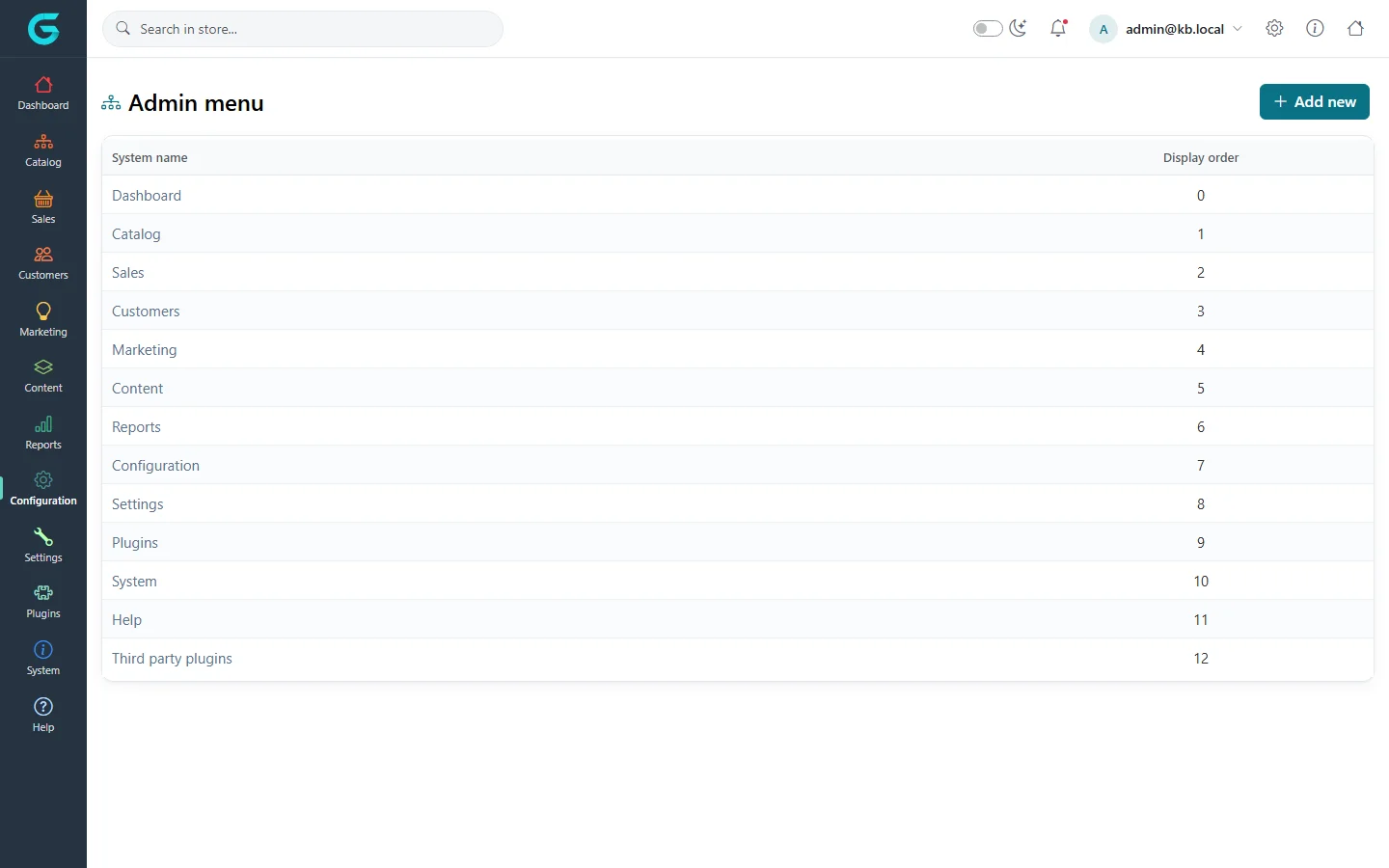
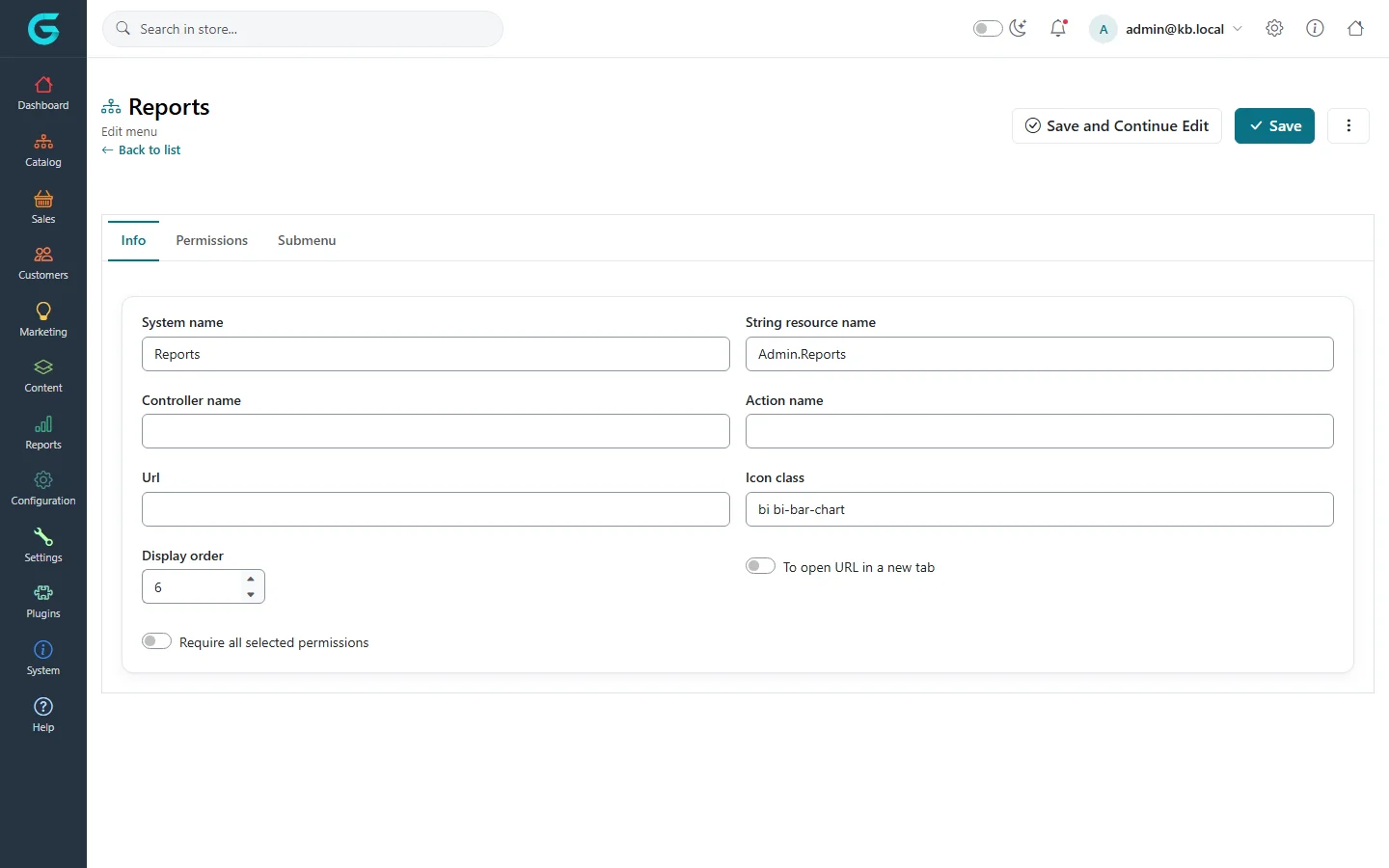
{"ArticleId":null,"Name":"Customising the admin menu","Content":"\n\u003Cp\u003EThe sidebar of the admin panel is not hard-coded: it is stored in the database and can be edited under \u003Cstrong\u003EConfiguration \u2192 Admin menu\u003C/strong\u003E. Reorder the sections your team uses most, add a link to an external tool, or put a plugin\u0027s screen into a menu of your choice.\u003C/p\u003E\n\n\u003Ch2 id=\u0022list\u0022\u003EThe menu list\u003C/h2\u003E\n\u003Cp\u003EThe list shows the top-level sections with their system name and display order. Open a section to see its \u003Cstrong\u003ESubmenu\u003C/strong\u003E.\u003C/p\u003E\n\u003Cfigure\u003E\u003Cimg src=\u0022/Plugins/Theme.GrandNodeCom/Content/kb/configuration/admin-menu.webp\u0022 alt=\u0022The Admin menu list: Dashboard, Catalog, Sales, Customers, Marketing, Content, Reports, Configuration, Settings, Plugins, System, Help and Third party plugins with display order\u0022 width=\u00221440\u0022 height=\u0022900\u0022 loading=\u0022lazy\u0022\u003E\u003Cfigcaption\u003EConfiguration \u2192 Admin menu.\u003C/figcaption\u003E\u003C/figure\u003E\n\n\u003Ch2 id=\u0022edit\u0022\u003EEdit an item\u003C/h2\u003E\n\u003Cfigure\u003E\u003Cimg src=\u0022/Plugins/Theme.GrandNodeCom/Content/kb/configuration/admin-menu-edit.webp\u0022 alt=\u0022Editing the Reports menu item: system name, string resource name Admin.Reports, controller name, action name, URL, icon class bi bi-bar-chart, display order, open in new tab, require all permissions, and tabs Permissions and Submenu\u0022 width=\u00221440\u0022 height=\u0022900\u0022 loading=\u0022lazy\u0022\u003E\u003Cfigcaption\u003EA menu item.\u003C/figcaption\u003E\u003C/figure\u003E\n\u003Ctable\u003E\n\u003Cthead\u003E\u003Ctr\u003E\u003Cth\u003EField\u003C/th\u003E\u003Cth\u003EWhat it does\u003C/th\u003E\u003C/tr\u003E\u003C/thead\u003E\n\u003Ctbody\u003E\n\u003Ctr\u003E\u003Ctd\u003ESystem name\u003C/td\u003E\u003Ctd\u003EThe item\u0027s identity. Keep it for built-in items.\u003C/td\u003E\u003C/tr\u003E\n\u003Ctr\u003E\u003Ctd\u003EString resource name\u003C/td\u003E\u003Ctd\u003EThe resource key of the label, so the label is translated (Configuration \u2192 Languages).\u003C/td\u003E\u003C/tr\u003E\n\u003Ctr\u003E\u003Ctd\u003EController name, Action name\u003C/td\u003E\u003Ctd\u003EThe admin screen the item opens.\u003C/td\u003E\u003C/tr\u003E\n\u003Ctr\u003E\u003Ctd\u003EUrl\u003C/td\u003E\u003Ctd\u003EA link instead of an admin screen, for example your help desk; with \u003Cstrong\u003ETo open URL in a new tab\u003C/strong\u003E.\u003C/td\u003E\u003C/tr\u003E\n\u003Ctr\u003E\u003Ctd\u003EIcon class\u003C/td\u003E\u003Ctd\u003EA Bootstrap Icons class, e.g. \u003Ccode\u003Ebi bi-bar-chart\u003C/code\u003E.\u003C/td\u003E\u003C/tr\u003E\n\u003Ctr\u003E\u003Ctd\u003EDisplay order\u003C/td\u003E\u003Ctd\u003EPosition among its siblings.\u003C/td\u003E\u003C/tr\u003E\n\u003Ctr\u003E\u003Ctd\u003EPermissions, Require all selected permissions\u003C/td\u003E\u003Ctd\u003EThe item is shown only to users who have the selected permissions (any of them, or all when ticked).\u003C/td\u003E\u003C/tr\u003E\n\u003C/tbody\u003E\n\u003C/table\u003E\n\u003Cp\u003EUse \u003Cstrong\u003EAdd new\u003C/strong\u003E for a new top-level section, or the \u003Cstrong\u003ESubmenu\u003C/strong\u003E tab of a section to add an item under it.\u003C/p\u003E\n\n\u003Ch2 id=\u0022permissions\u0022\u003EMenu and permissions\u003C/h2\u003E\n\u003Cp\u003EHiding a menu item does not take away access: a user with the permission can still open the screen by its address. To restrict access, change the \u003Ca href=\u0022/system-permissions\u0022\u003Epermissions\u003C/a\u003E; the menu then follows.\u003C/p\u003E\n\n\u003Ch2 id=\u0022tips\u0022\u003ETips\u003C/h2\u003E\n\u003Cul\u003E\n\u003Cli\u003EChange the order of whole sections to match your daily work - for example Sales first for an order-processing team.\u003C/li\u003E\n\u003Cli\u003EUpgrades can add new menu items; check the menu after an upgrade if you customised it heavily.\u003C/li\u003E\n\u003C/ul\u003E\n\n\u003Ch2 id=\u0022related\u0022\u003ERelated\u003C/h2\u003E\n\u003Cul\u003E\n\u003Cli\u003E\u003Ca href=\u0022/system-permissions\u0022\u003EPermissions\u003C/a\u003E\u003C/li\u003E\n\u003Cli\u003E\u003Ca href=\u0022/configuration-overview\u0022\u003EConfiguration overview\u003C/a\u003E\u003C/li\u003E\n\u003C/ul\u003E\n","ParentCategoryId":"6abdec6c83d2816248229f19","SeName":"configuration-admin-menu","MetaKeywords":null,"MetaDescription":"Reorder, rename, hide or add items in the GrandNode admin sidebar with the Admin menu editor, and control who sees them with permissions.","MetaTitle":null,"AllowComments":false,"Captcha":{"ReCaptchaChallengeField":null,"ReCaptchaResponseField":null,"ReCaptchaResponseValue":null,"ReCaptchaResponse":null},"RelatedArticles":[],"CategoryBreadcrumb":[{"Name":"Configuration","Description":null,"IsCurrent":false,"Children":null,"Parent":null,"SeName":"docs-configuration","Id":"6abdec6c83d2816248229f19","UserFields":[]}],"AddNewComment":{"CommentText":null,"DisplayCaptcha":false,"Id":null,"UserFields":[]},"Comments":[],"Id":"6abe3a3b04b9d0a2009febff","UserFields":[]}