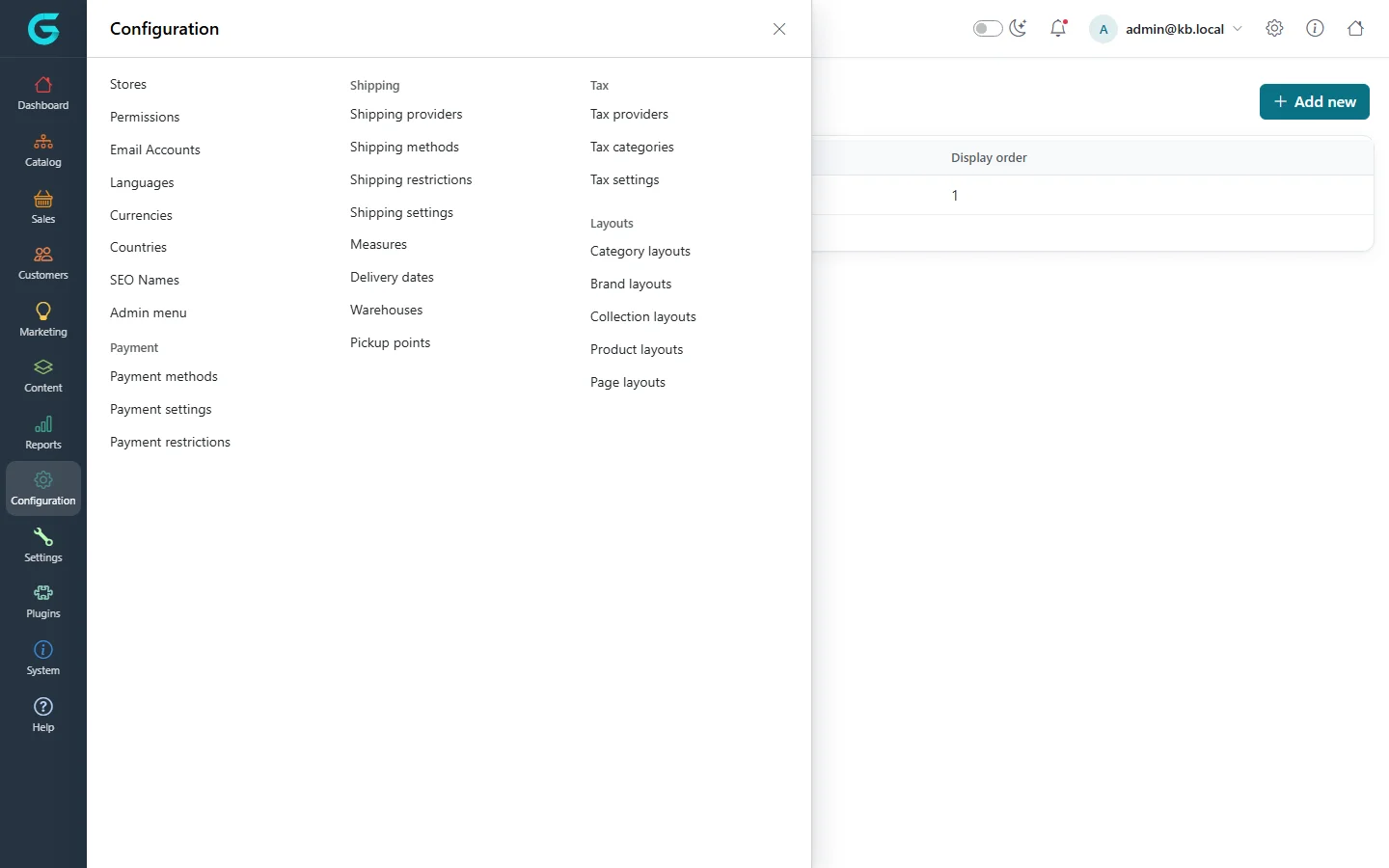
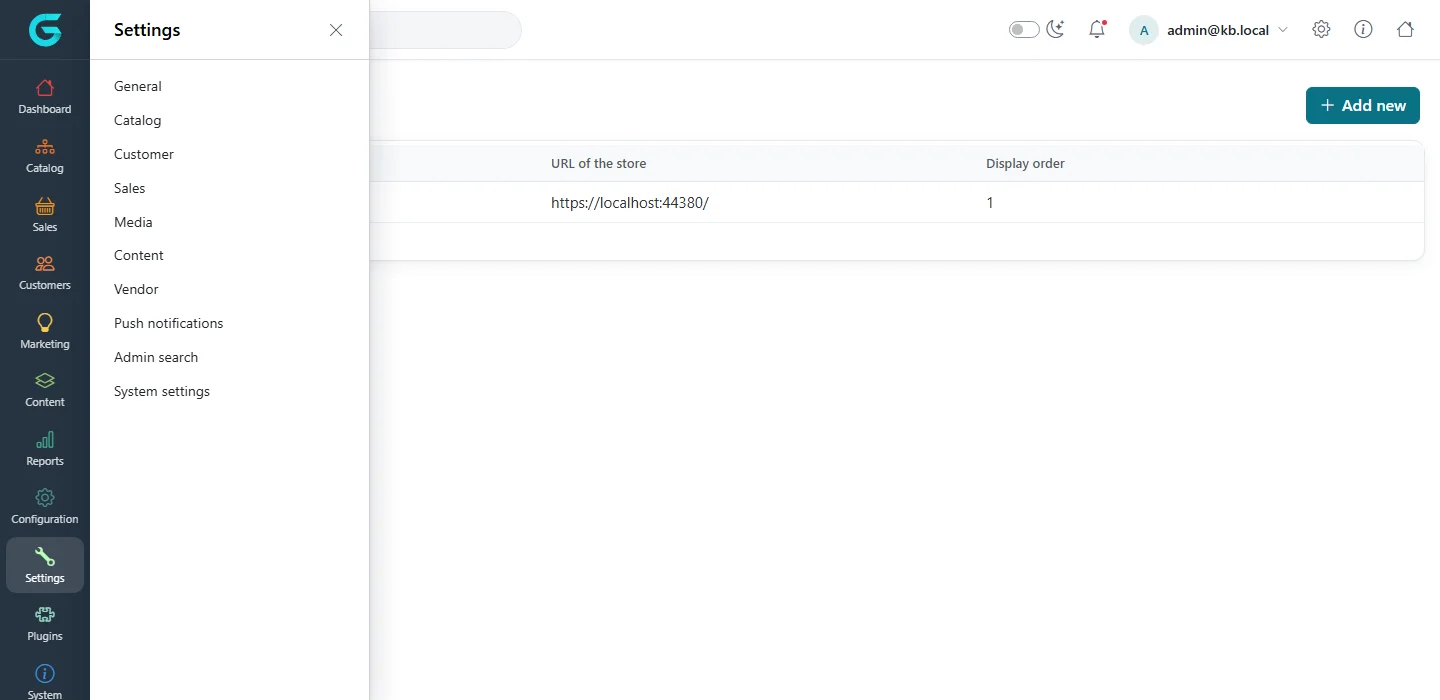
{"ArticleId":null,"Name":"Configuration overview: where store settings live","Content":"\u003Cp\u003EAlmost everything that makes a GrandNode store behave the way you want - which theme it uses, which currency it prices in, how tax is calculated, which shipping and payment methods the customer sees - is set up in two menus of the admin panel: \u003Cstrong\u003EConfiguration\u003C/strong\u003E and \u003Cstrong\u003ESettings\u003C/strong\u003E. This article is the map. Read it first, then follow the links to the detailed articles in this section.\u003C/p\u003E\n\n\u003Ch2 id=\u0022where-to-find-it\u0022\u003EWhere to find it\u003C/h2\u003E\n\u003Cp\u003ESign in to the admin panel at \u003Ccode\u003E/admin\u003C/code\u003E as an administrator. The left-hand navigation bar has two icons that matter here:\u003C/p\u003E\n\u003Cul\u003E\n\u003Cli\u003E\u003Cstrong\u003EConfiguration\u003C/strong\u003E (the gear icon) - the building blocks of a store: stores, permissions, email accounts, languages, currencies, countries, SEO names, the admin menu, and the \u003Cstrong\u003EPayment\u003C/strong\u003E, \u003Cstrong\u003EShipping\u003C/strong\u003E, \u003Cstrong\u003ETax\u003C/strong\u003E and \u003Cstrong\u003ELayouts\u003C/strong\u003E groups.\u003C/li\u003E\n\u003Cli\u003E\u003Cstrong\u003ESettings\u003C/strong\u003E (the wrench icon) - the settings pages: \u003Cstrong\u003EGeneral\u003C/strong\u003E, \u003Cstrong\u003ECatalog\u003C/strong\u003E, \u003Cstrong\u003ECustomer\u003C/strong\u003E, \u003Cstrong\u003ESales\u003C/strong\u003E, \u003Cstrong\u003EMedia\u003C/strong\u003E, \u003Cstrong\u003EContent\u003C/strong\u003E, \u003Cstrong\u003EVendor\u003C/strong\u003E, \u003Cstrong\u003EPush notifications\u003C/strong\u003E, \u003Cstrong\u003EAdmin search\u003C/strong\u003E and \u003Cstrong\u003ESystem settings\u003C/strong\u003E.\u003C/li\u003E\n\u003C/ul\u003E\n\u003Cfigure\u003E\u003Cimg src=\u0022/Plugins/Theme.GrandNodeCom/Content/kb/configuration/menu-configuration.webp\u0022 alt=\u0022The Configuration menu of the admin panel opened as a flyout with Stores, Languages, Currencies, Payment, Shipping, Tax and Layouts\u0022 width=\u00221440\u0022 height=\u0022900\u0022 loading=\u0022lazy\u0022\u003E\u003Cfigcaption\u003EThe \u003Cstrong\u003EConfiguration\u003C/strong\u003E menu groups the building blocks of a store.\u003C/figcaption\u003E\u003C/figure\u003E\n\u003Cfigure\u003E\u003Cimg src=\u0022/Plugins/Theme.GrandNodeCom/Content/kb/configuration/menu-settings.webp\u0022 alt=\u0022The Settings menu of the admin panel listing General, Catalog, Customer, Sales, Media, Content, Vendor, Push notifications, Admin search and System settings\u0022 width=\u00221440\u0022 height=\u0022700\u0022 loading=\u0022lazy\u0022\u003E\u003Cfigcaption\u003EThe \u003Cstrong\u003ESettings\u003C/strong\u003E menu lists one page per area of the store.\u003C/figcaption\u003E\u003C/figure\u003E\n\u003Cp\u003EPlugins that add a provider - a payment method, a shipping rate calculation, a tax provider, an exchange rate source - are configured from the list where they appear (for example \u003Cstrong\u003EConfiguration \u2192 Payment \u2192 Payment methods\u003C/strong\u003E), not from a separate plugin screen. The \u003Cstrong\u003EPlugins\u003C/strong\u003E menu is where you install, uninstall and upload plugins; see \u003Ca href=\u0022/docs-system\u0022\u003ESystem\u003C/a\u003E.\u003C/p\u003E\n\n\u003Ch2 id=\u0022what-each-part-does\u0022\u003EWhat each part does\u003C/h2\u003E\n\u003Ctable\u003E\n\u003Cthead\u003E\u003Ctr\u003E\u003Cth\u003EMenu item\u003C/th\u003E\u003Cth\u003EWhat you do there\u003C/th\u003E\u003Cth\u003EArticle\u003C/th\u003E\u003C/tr\u003E\u003C/thead\u003E\n\u003Ctbody\u003E\n\u003Ctr\u003E\u003Ctd\u003E\u003Cstrong\u003ESettings \u2192 General\u003C/strong\u003E\u003C/td\u003E\u003Ctd\u003EStore information, logo, storefront theme, store closed, SEO defaults, CAPTCHA, admin IP restriction, PDF invoices, top menu\u003C/td\u003E\u003Ctd\u003E\u003Ca href=\u0022/configuration-general-settings\u0022\u003EGeneral settings\u003C/a\u003E\u003C/td\u003E\u003C/tr\u003E\n\u003Ctr\u003E\u003Ctd\u003E\u003Cstrong\u003ESettings \u2192 Catalog\u003C/strong\u003E, \u003Cstrong\u003EMedia\u003C/strong\u003E, \u003Cstrong\u003EContent\u003C/strong\u003E\u003C/td\u003E\u003Ctd\u003EProduct pages, search, reviews, sorting, image sizes, blog, news and knowledgebase switches\u003C/td\u003E\u003Ctd\u003E\u003Ca href=\u0022/configuration-catalog-media-settings\u0022\u003ECatalog, media and content settings\u003C/a\u003E\u003C/td\u003E\u003C/tr\u003E\n\u003Ctr\u003E\u003Ctd\u003E\u003Cstrong\u003ESettings \u2192 Sales\u003C/strong\u003E, \u003Cstrong\u003ECustomer\u003C/strong\u003E\u003C/td\u003E\u003Ctd\u003EOrders, checkout, shopping cart, merchandise returns, loyalty points, registration, passwords, form fields\u003C/td\u003E\u003Ctd\u003E\u003Ca href=\u0022/configuration-sales-customer-settings\u0022\u003ESales and customer settings\u003C/a\u003E\u003C/td\u003E\u003C/tr\u003E\n\u003Ctr\u003E\u003Ctd\u003E\u003Cstrong\u003ESettings \u2192 Vendor\u003C/strong\u003E, \u003Cstrong\u003EAdmin search\u003C/strong\u003E, \u003Cstrong\u003EPush notifications\u003C/strong\u003E, \u003Cstrong\u003ESystem settings\u003C/strong\u003E\u003C/td\u003E\u003Ctd\u003EMarketplace switches, the admin search box, web push, grid sizes, picture storage, order numbering\u003C/td\u003E\u003Ctd\u003E\u003Ca href=\u0022/configuration-system-settings\u0022\u003ESystem, vendor and admin search settings\u003C/a\u003E\u003C/td\u003E\u003C/tr\u003E\n\u003Ctr\u003E\u003Ctd\u003E\u003Cstrong\u003EConfiguration \u2192 Stores\u003C/strong\u003E\u003C/td\u003E\u003Ctd\u003EOne or more storefronts, their domains, default language and currency\u003C/td\u003E\u003Ctd\u003E\u003Ca href=\u0022/configuration-stores-multi-store\u0022\u003EStores and multi-store\u003C/a\u003E\u003C/td\u003E\u003C/tr\u003E\n\u003Ctr\u003E\u003Ctd\u003E\u003Cstrong\u003EConfiguration \u2192 Languages\u003C/strong\u003E\u003C/td\u003E\u003Ctd\u003ELanguages and translation resources, import and export\u003C/td\u003E\u003Ctd\u003E\u003Ca href=\u0022/configuration-languages-translations\u0022\u003ELanguages and translations\u003C/a\u003E\u003C/td\u003E\u003C/tr\u003E\n\u003Ctr\u003E\u003Ctd\u003E\u003Cstrong\u003EConfiguration \u2192 Currencies\u003C/strong\u003E, \u003Cstrong\u003ECountries\u003C/strong\u003E, \u003Cstrong\u003EShipping \u2192 Measures\u003C/strong\u003E\u003C/td\u003E\u003Ctd\u003ECurrencies and exchange rates, countries and states, weights and dimensions\u003C/td\u003E\u003Ctd\u003E\u003Ca href=\u0022/configuration-currencies-countries-measures\u0022\u003ECurrencies, countries and measures\u003C/a\u003E\u003C/td\u003E\u003C/tr\u003E\n\u003Ctr\u003E\u003Ctd\u003E\u003Cstrong\u003EConfiguration \u2192 Tax\u003C/strong\u003E\u003C/td\u003E\u003Ctd\u003ETax providers, tax categories, prices including or excluding tax\u003C/td\u003E\u003Ctd\u003E\u003Ca href=\u0022/configuration-tax\u0022\u003ETax\u003C/a\u003E\u003C/td\u003E\u003C/tr\u003E\n\u003Ctr\u003E\u003Ctd\u003E\u003Cstrong\u003EConfiguration \u2192 Shipping\u003C/strong\u003E\u003C/td\u003E\u003Ctd\u003EShipping providers, methods, restrictions, warehouses, pickup points, delivery dates\u003C/td\u003E\u003Ctd\u003E\u003Ca href=\u0022/configuration-shipping\u0022\u003EShipping\u003C/a\u003E\u003C/td\u003E\u003C/tr\u003E\n\u003Ctr\u003E\u003Ctd\u003E\u003Cstrong\u003EConfiguration \u2192 Payment\u003C/strong\u003E\u003C/td\u003E\u003Ctd\u003EPayment methods, payment settings, restrictions by country and shipping method\u003C/td\u003E\u003Ctd\u003E\u003Ca href=\u0022/configuration-payments\u0022\u003EPayments\u003C/a\u003E\u003C/td\u003E\u003C/tr\u003E\n\u003Ctr\u003E\u003Ctd\u003E\u003Cstrong\u003ESettings \u2192 General\u003C/strong\u003E (theme), \u003Cstrong\u003EConfiguration \u2192 Layouts\u003C/strong\u003E\u003C/td\u003E\u003Ctd\u003EStorefront theme per store, category, product, brand, collection and page layouts\u003C/td\u003E\u003Ctd\u003E\u003Ca href=\u0022/configuration-themes-layouts\u0022\u003EThemes and layouts\u003C/a\u003E\u003C/td\u003E\u003C/tr\u003E\n\u003C/tbody\u003E\n\u003C/table\u003E\n\n\u003Ch2 id=\u0022how-settings-are-stored\u0022\u003EHow settings are stored\u003C/h2\u003E\n\u003Cp\u003EEvery settings page edits one or more \u003Cem\u003Esettings groups\u003C/em\u003E. A settings group is a single record in the database - for example all catalog settings together, or all SEO settings together. Each group can exist once for \u003Cstrong\u003Eall stores\u003C/strong\u003E and, in addition, once for any individual store. When the storefront reads a group for a store, it takes that store\u0027s copy if there is one and otherwise falls back to the copy for all stores.\u003C/p\u003E\n\u003Cp\u003EThis has one consequence that surprises many administrators: the fallback works for the \u003Cem\u003Ewhole group\u003C/em\u003E, not field by field. As soon as you save a settings page while a particular store is selected, GrandNode writes the complete group for that store. From then on, that store no longer sees changes made for all stores in any field of that group - even fields you did not touch. The \u003Ca href=\u0022/configuration-stores-multi-store\u0022\u003EStores and multi-store\u003C/a\u003E article explains how the store selector works and how to plan for this.\u003C/p\u003E\n\u003Cp\u003EOn an installation with a single store there is no store selector and every settings page saves directly for that store.\u003C/p\u003E\n\u003Cp\u003EA few groups are always saved for all stores regardless of the selector: the security settings (admin allowed IP addresses), CAPTCHA, push notifications, admin search and everything on \u003Cstrong\u003ESystem settings\u003C/strong\u003E.\u003C/p\u003E\n\n\u003Ch2 id=\u0022saving-and-caching\u0022\u003ESaving and caching\u003C/h2\u003E\n\u003Col\u003E\n\u003Cli\u003EOpen the settings page and switch to the tab you need. The page remembers the tab you last saved on.\u003C/li\u003E\n\u003Cli\u003EChange the values and click \u003Cstrong\u003ESave\u003C/strong\u003E in the top-right corner. Settings pages save every tab at once, so one click is enough even if you changed fields on several tabs.\u003C/li\u003E\n\u003Cli\u003EGrandNode clears its cache after every settings save, so the storefront picks up the change on the next request. There is no need to restart the application.\u003C/li\u003E\n\u003C/ol\u003E\n\n\u003Ch2 id=\u0022tips\u0022\u003ETips and common mistakes\u003C/h2\u003E\n\u003Cul\u003E\n\u003Cli\u003EWork through the configuration in the order of this section before you import products: stores, languages and currencies first, then tax and shipping, then payments. Prices, tax categories and shipping weights on products depend on those choices.\u003C/li\u003E\n\u003Cli\u003EAccess to each menu item is controlled by permissions (\u003Cstrong\u003EConfiguration \u2192 Permissions\u003C/strong\u003E). A staff member who does not see a menu item is missing the permission, not the feature. Permissions are described in \u003Ca href=\u0022/docs-system\u0022\u003ESystem\u003C/a\u003E.\u003C/li\u003E\n\u003Cli\u003EStore managers working in the store panel (\u003Ccode\u003E/store\u003C/code\u003E) see a reduced set of settings for their own store only; see \u003Ca href=\u0022/docs-store-panel\u0022\u003EStore panel\u003C/a\u003E.\u003C/li\u003E\n\u003C/ul\u003E\n\n\u003Ch2 id=\u0022related\u0022\u003ERelated\u003C/h2\u003E\n\u003Cul\u003E\n\u003Cli\u003E\u003Ca href=\u0022/configuration-general-settings\u0022\u003EGeneral settings\u003C/a\u003E\u003C/li\u003E\n\u003Cli\u003E\u003Ca href=\u0022/configuration-stores-multi-store\u0022\u003EStores and multi-store\u003C/a\u003E\u003C/li\u003E\n\u003Cli\u003E\u003Ca href=\u0022/docs-system\u0022\u003ESystem: plugins, tasks and maintenance\u003C/a\u003E\u003C/li\u003E\n\u003C/ul\u003E","ParentCategoryId":"6abdec6c83d2816248229f19","SeName":"configuration-overview","MetaKeywords":null,"MetaDescription":"Find your way around the Configuration and Settings menus of the GrandNode admin panel and learn how settings are stored per store.","MetaTitle":"Configuration overview: store settings","AllowComments":false,"Captcha":{"ReCaptchaChallengeField":null,"ReCaptchaResponseField":null,"ReCaptchaResponseValue":null,"ReCaptchaResponse":null},"RelatedArticles":[],"CategoryBreadcrumb":[{"Name":"Configuration","Description":null,"IsCurrent":false,"Children":null,"Parent":null,"SeName":"docs-configuration","Id":"6abdec6c83d2816248229f19","UserFields":[]}],"AddNewComment":{"CommentText":null,"DisplayCaptcha":false,"Id":null,"UserFields":[]},"Comments":[],"Id":"6abdec6c83d2816248229f1b","UserFields":[]}