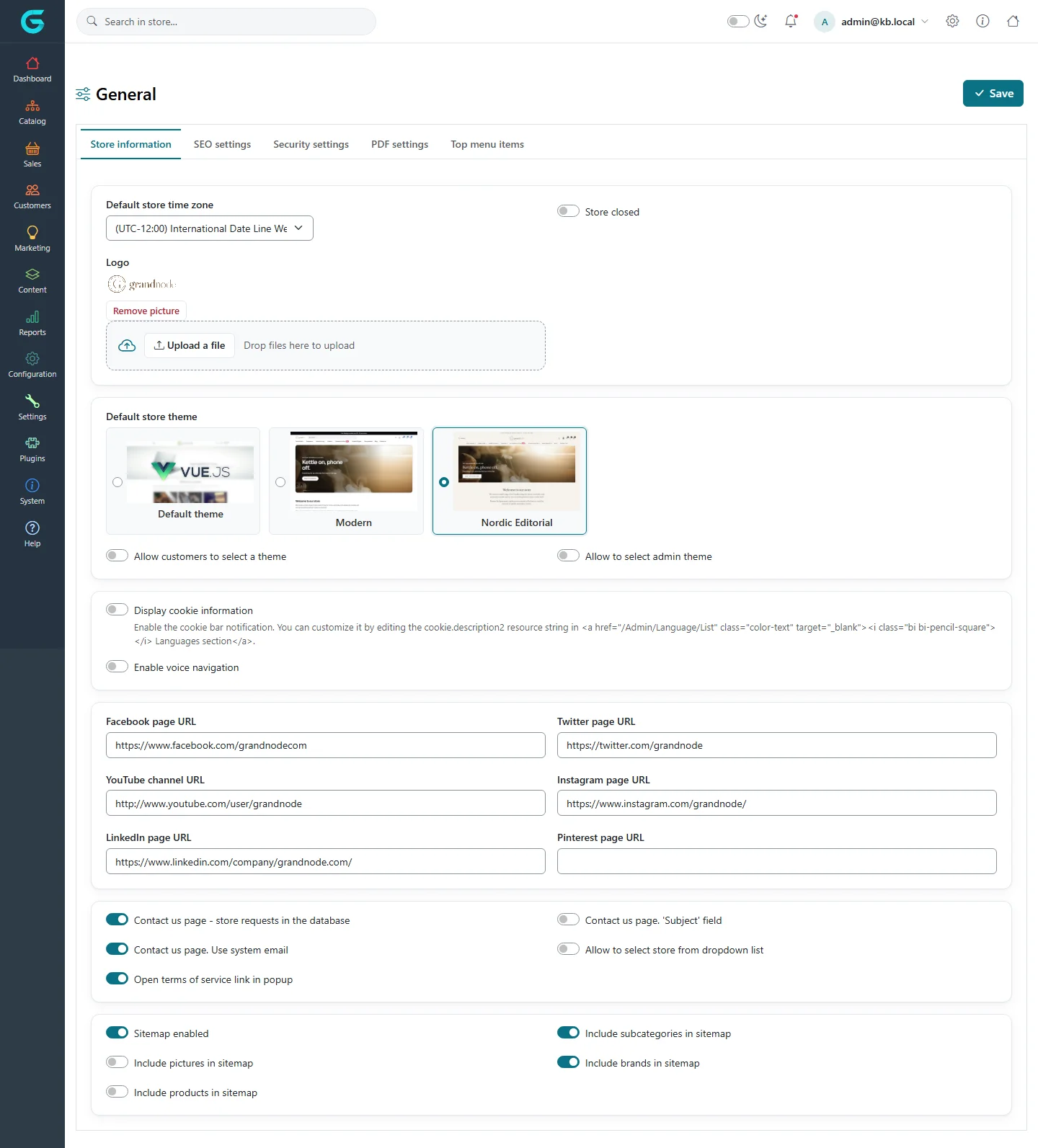
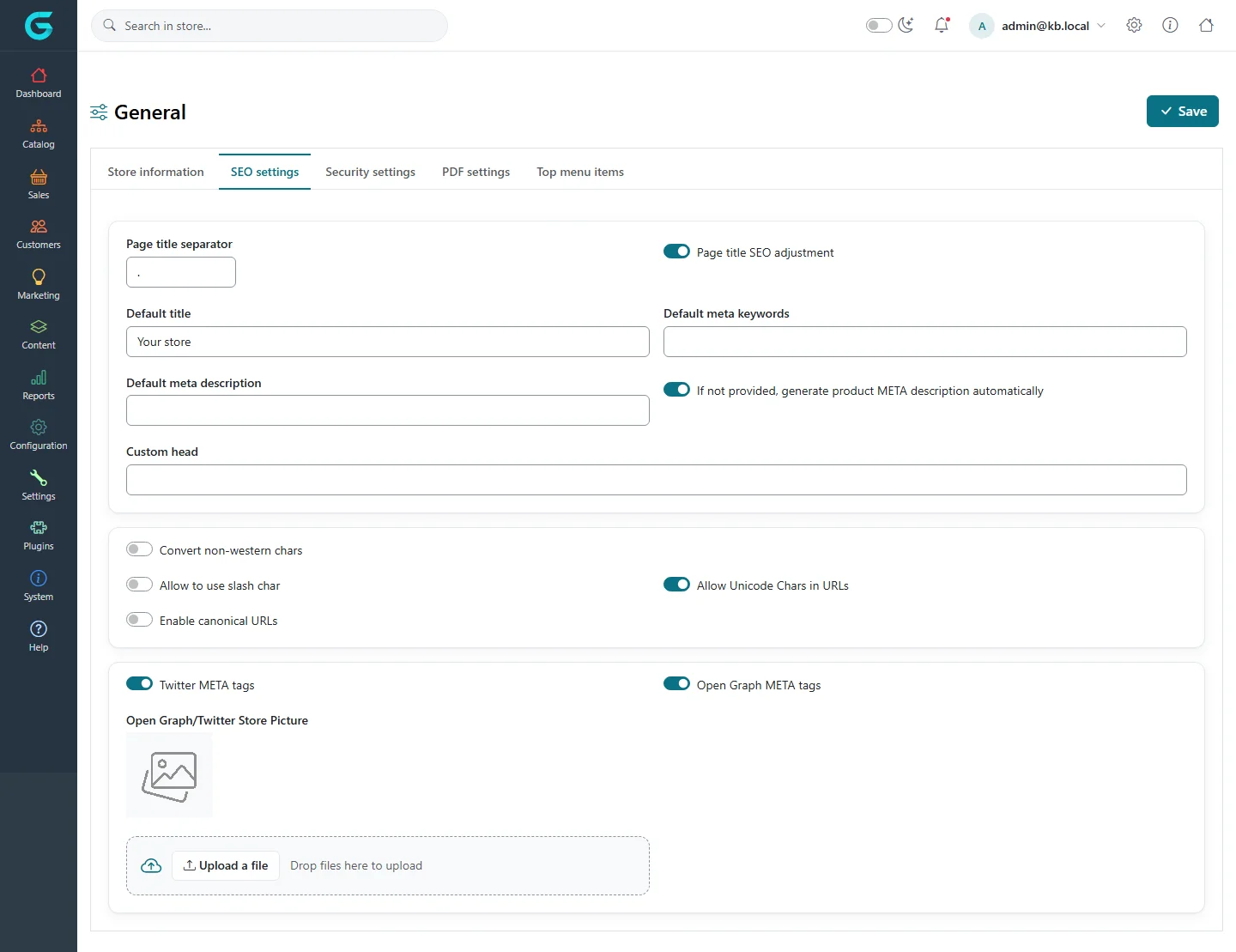
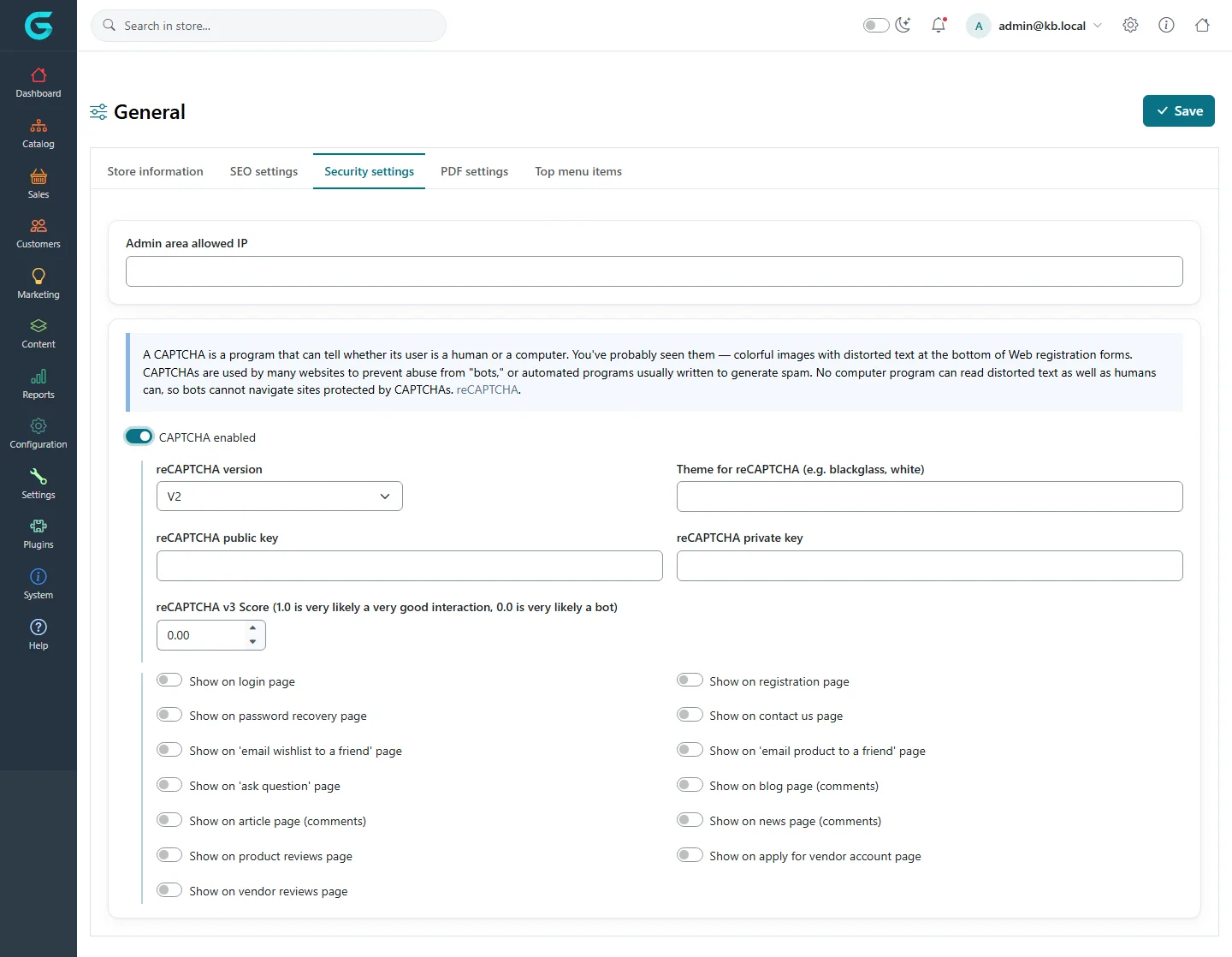
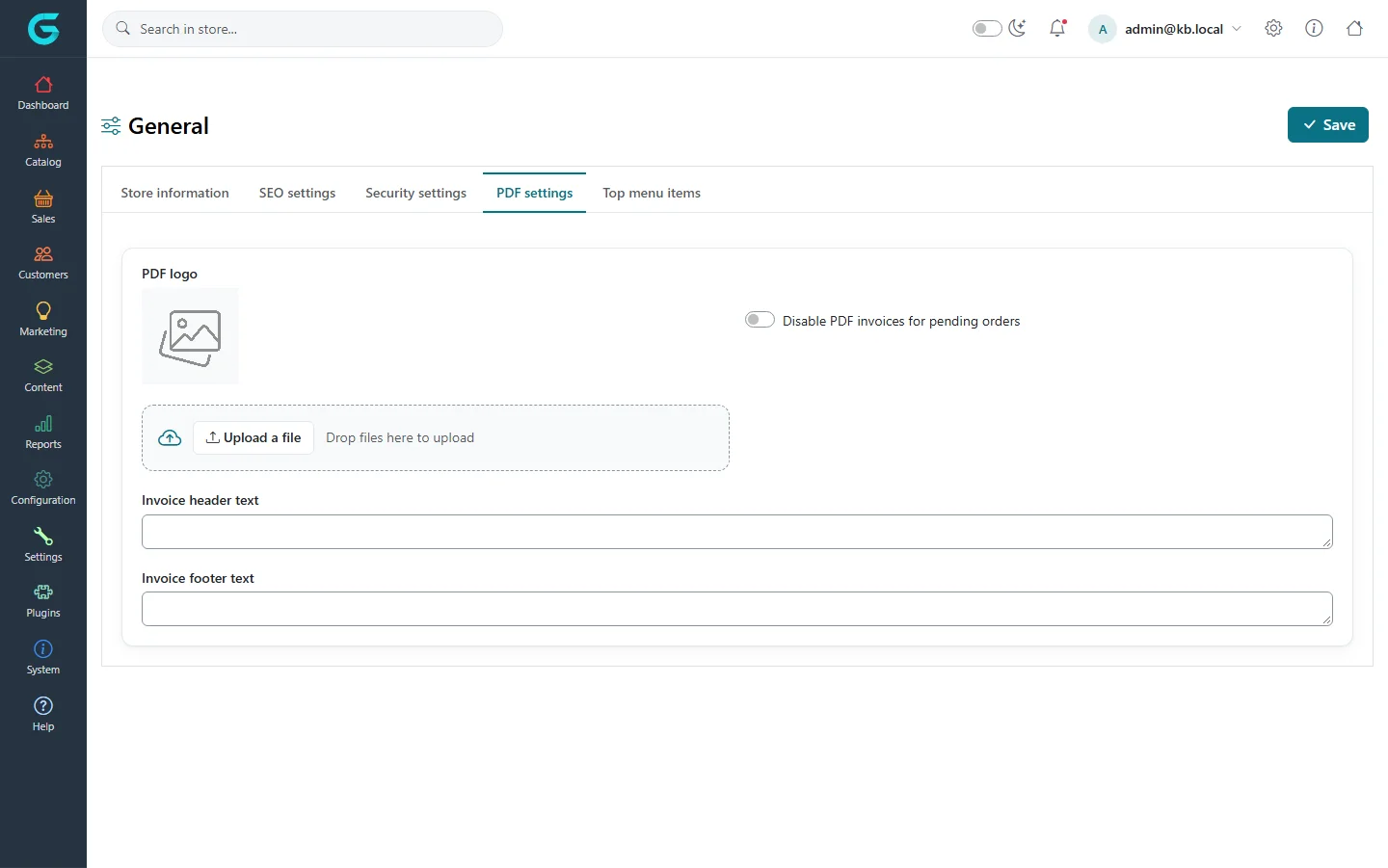
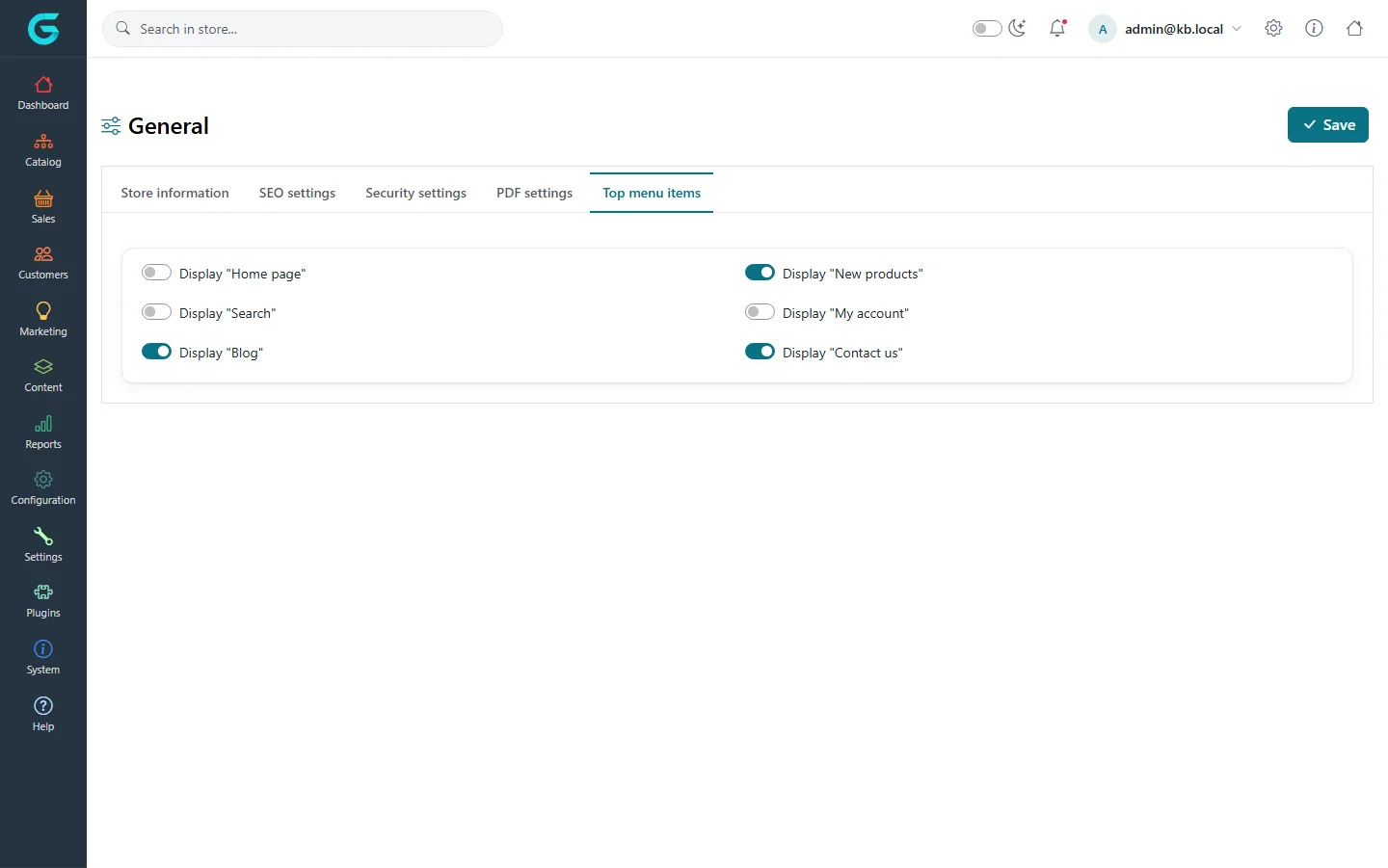
{"ArticleId":null,"Name":"General settings: store information, theme, SEO, security and PDF","Content":"\u003Cp\u003EThe \u003Cstrong\u003EGeneral\u003C/strong\u003E settings page holds the settings that belong to the store as a whole: its logo and time zone, whether it is open, which theme it uses, the default SEO title and description, CAPTCHA protection, the PDF invoice layout and the items in the top menu. It is usually the first page you visit after installation.\u003C/p\u003E\n\n\u003Ch2 id=\u0022where-to-find-it\u0022\u003EWhere to find it\u003C/h2\u003E\n\u003Cp\u003EGo to \u003Cstrong\u003ESettings \u2192 General\u003C/strong\u003E. The page has five tabs: \u003Cstrong\u003EStore information\u003C/strong\u003E, \u003Cstrong\u003ESEO settings\u003C/strong\u003E, \u003Cstrong\u003ESecurity settings\u003C/strong\u003E, \u003Cstrong\u003EPDF settings\u003C/strong\u003E and \u003Cstrong\u003ETop menu items\u003C/strong\u003E. One \u003Cstrong\u003ESave\u003C/strong\u003E button saves all tabs.\u003C/p\u003E\n\u003Cfigure\u003E\u003Cimg src=\u0022/Plugins/Theme.GrandNodeCom/Content/kb/configuration/settings-general.webp\u0022 alt=\u0022The Store information tab of the General settings page with time zone, logo, store closed, theme cards, social links, contact us and sitemap switches\u0022 width=\u00221440\u0022 height=\u00221593\u0022 loading=\u0022lazy\u0022\u003E\u003Cfigcaption\u003E\u003Cstrong\u003ESettings \u2192 General\u003C/strong\u003E, tab \u003Cstrong\u003EStore information\u003C/strong\u003E.\u003C/figcaption\u003E\u003C/figure\u003E\n\n\u003Ch2 id=\u0022store-information\u0022\u003EStore information\u003C/h2\u003E\n\u003Ctable\u003E\n\u003Cthead\u003E\u003Ctr\u003E\u003Cth\u003EField\u003C/th\u003E\u003Cth\u003EWhat it does\u003C/th\u003E\u003C/tr\u003E\u003C/thead\u003E\n\u003Ctbody\u003E\n\u003Ctr\u003E\u003Ctd\u003E\u003Cstrong\u003EDefault store time zone\u003C/strong\u003E\u003C/td\u003E\u003Ctd\u003EThe time zone used to display dates in the storefront and admin (order dates, reports). Dates are stored in UTC and converted for display.\u003C/td\u003E\u003C/tr\u003E\n\u003Ctr\u003E\u003Ctd\u003E\u003Cstrong\u003ELogo\u003C/strong\u003E\u003C/td\u003E\u003Ctd\u003EThe logo shown in the storefront header. Upload a file or drop it on the upload box.\u003C/td\u003E\u003C/tr\u003E\n\u003Ctr\u003E\u003Ctd\u003E\u003Cstrong\u003EStore closed\u003C/strong\u003E\u003C/td\u003E\u003Ctd\u003ECloses the storefront. Visitors are redirected to a \u0022store closed\u0022 page. Customers in a group with the \u003Cem\u003EAccess closed store\u003C/em\u003E permission (administrators by default) can still browse, and pages marked \u003Cem\u003EAccessible when store closed\u003C/em\u003E stay reachable - useful for a legal notice or contact page.\u003C/td\u003E\u003C/tr\u003E\n\u003Ctr\u003E\u003Ctd\u003E\u003Cstrong\u003EDefault store theme\u003C/strong\u003E\u003C/td\u003E\u003Ctd\u003EThe storefront theme. Every installed theme appears as a card with a preview; pick one. See \u003Ca href=\u0022/configuration-themes-layouts\u0022\u003EThemes and layouts\u003C/a\u003E.\u003C/td\u003E\u003C/tr\u003E\n\u003Ctr\u003E\u003Ctd\u003E\u003Cstrong\u003EAllow customers to select a theme\u003C/strong\u003E\u003C/td\u003E\u003Ctd\u003ELets visitors switch between installed themes; their choice is kept in a cookie.\u003C/td\u003E\u003C/tr\u003E\n\u003Ctr\u003E\u003Ctd\u003E\u003Cstrong\u003EAllow to select admin theme\u003C/strong\u003E\u003C/td\u003E\u003Ctd\u003ELets staff switch the look of the admin panel.\u003C/td\u003E\u003C/tr\u003E\n\u003Ctr\u003E\u003Ctd\u003E\u003Cstrong\u003EDisplay cookie information\u003C/strong\u003E\u003C/td\u003E\u003Ctd\u003EShows the cookie notice bar. Its text is the translation resource \u003Ccode\u003Ecookie.description2\u003C/code\u003E, editable under \u003Cstrong\u003EConfiguration \u2192 Languages\u003C/strong\u003E.\u003C/td\u003E\u003C/tr\u003E\n\u003Ctr\u003E\u003Ctd\u003E\u003Cstrong\u003EDisplay Privacy Preference\u003C/strong\u003E\u003C/td\u003E\u003Ctd\u003EShows the privacy preference (consent) dialog in the storefront.\u003C/td\u003E\u003C/tr\u003E\n\u003Ctr\u003E\u003Ctd\u003E\u003Cstrong\u003EFacebook / Twitter / YouTube / Instagram / LinkedIn / Pinterest page URL\u003C/strong\u003E\u003C/td\u003E\u003Ctd\u003ELinks rendered as social icons in the storefront footer. Leave empty to hide an icon.\u003C/td\u003E\u003C/tr\u003E\n\u003Ctr\u003E\u003Ctd\u003E\u003Cstrong\u003EContact us page - store requests in the database\u003C/strong\u003E\u003C/td\u003E\u003Ctd\u003EKeeps every contact form message under \u003Cstrong\u003EContent\u003C/strong\u003E so it is not lost if email delivery fails.\u003C/td\u003E\u003C/tr\u003E\n\u003Ctr\u003E\u003Ctd\u003E\u003Cstrong\u003EContact us page. Use system email\u003C/strong\u003E\u003C/td\u003E\u003Ctd\u003ESends contact form messages from the store\u0027s email account instead of the visitor\u0027s address, which avoids spam filtering.\u003C/td\u003E\u003C/tr\u003E\n\u003Ctr\u003E\u003Ctd\u003E\u003Cstrong\u003EAllow to select store from dropdown list\u003C/strong\u003E\u003C/td\u003E\u003Ctd\u003EOn multi-store installations, shows a store switcher in the storefront.\u003C/td\u003E\u003C/tr\u003E\n\u003Ctr\u003E\u003Ctd\u003E\u003Cstrong\u003ESitemap enabled\u003C/strong\u003E and the \u003Cstrong\u003EInclude \u2026 in sitemap\u003C/strong\u003E switches\u003C/td\u003E\u003Ctd\u003EControl the storefront HTML sitemap page and what it lists.\u003C/td\u003E\u003C/tr\u003E\n\u003C/tbody\u003E\n\u003C/table\u003E\n\n\u003Ch2 id=\u0022seo-settings\u0022\u003ESEO settings\u003C/h2\u003E\n\u003Cfigure\u003E\u003Cimg src=\u0022/Plugins/Theme.GrandNodeCom/Content/kb/configuration/settings-general-seo.webp\u0022 alt=\u0022The SEO settings tab with page title separator, default title, meta keywords and description, custom head, URL character options and Open Graph settings\u0022 width=\u00221440\u0022 height=\u00221109\u0022 loading=\u0022lazy\u0022\u003E\u003Cfigcaption\u003ETab \u003Cstrong\u003ESEO settings\u003C/strong\u003E.\u003C/figcaption\u003E\u003C/figure\u003E\n\u003Ctable\u003E\n\u003Cthead\u003E\u003Ctr\u003E\u003Cth\u003EField\u003C/th\u003E\u003Cth\u003EWhat it does\u003C/th\u003E\u003C/tr\u003E\u003C/thead\u003E\n\u003Ctbody\u003E\n\u003Ctr\u003E\u003Ctd\u003E\u003Cstrong\u003EDefault title\u003C/strong\u003E, \u003Cstrong\u003EDefault meta keywords\u003C/strong\u003E, \u003Cstrong\u003EDefault meta description\u003C/strong\u003E\u003C/td\u003E\u003Ctd\u003EUsed on pages that do not define their own. Products, categories and pages have their own SEO fields that take priority.\u003C/td\u003E\u003C/tr\u003E\n\u003Ctr\u003E\u003Ctd\u003E\u003Cstrong\u003EPage title separator\u003C/strong\u003E and \u003Cstrong\u003EPage title SEO adjustment\u003C/strong\u003E\u003C/td\u003E\u003Ctd\u003EHow the page title and the store title are joined, and in which order.\u003C/td\u003E\u003C/tr\u003E\n\u003Ctr\u003E\u003Ctd\u003E\u003Cstrong\u003EIf not provided, generate product META description automatically\u003C/strong\u003E\u003C/td\u003E\u003Ctd\u003EBuilds a product meta description from its short description when none is entered.\u003C/td\u003E\u003C/tr\u003E\n\u003Ctr\u003E\u003Ctd\u003E\u003Cstrong\u003ECustom head\u003C/strong\u003E\u003C/td\u003E\u003Ctd\u003EMarkup inserted into the \u003Ccode\u003E\u0026lt;head\u0026gt;\u003C/code\u003E of every storefront page, e.g. a site verification tag.\u003C/td\u003E\u003C/tr\u003E\n\u003Ctr\u003E\u003Ctd\u003E\u003Cstrong\u003EConvert non-western chars\u003C/strong\u003E and \u003Cstrong\u003ESEO char conversion\u003C/strong\u003E\u003C/td\u003E\u003Ctd\u003ETransliterates characters when generating URL names, using pairs such as \u003Ccode\u003E\u0105:a;\u0119:e;\u00F3:o\u003C/code\u003E.\u003C/td\u003E\u003C/tr\u003E\n\u003Ctr\u003E\u003Ctd\u003E\u003Cstrong\u003EAllow Unicode Chars in URLs\u003C/strong\u003E, \u003Cstrong\u003EAllow to use slash char\u003C/strong\u003E\u003C/td\u003E\u003Ctd\u003EWhat characters generated SEO names may contain.\u003C/td\u003E\u003C/tr\u003E\n\u003Ctr\u003E\u003Ctd\u003E\u003Cstrong\u003EEnable canonical URLs\u003C/strong\u003E\u003C/td\u003E\u003Ctd\u003EAdds a canonical link tag so search engines index one URL per page.\u003C/td\u003E\u003C/tr\u003E\n\u003Ctr\u003E\u003Ctd\u003E\u003Cstrong\u003ETwitter META tags\u003C/strong\u003E, \u003Cstrong\u003EOpen Graph META tags\u003C/strong\u003E, \u003Cstrong\u003EOpen Graph/Twitter Store Picture\u003C/strong\u003E\u003C/td\u003E\u003Ctd\u003ESocial sharing previews and the fallback image used for them.\u003C/td\u003E\u003C/tr\u003E\n\u003C/tbody\u003E\n\u003C/table\u003E\n\n\u003Ch2 id=\u0022security-settings\u0022\u003ESecurity settings and CAPTCHA\u003C/h2\u003E\n\u003Cfigure\u003E\u003Cimg src=\u0022/Plugins/Theme.GrandNodeCom/Content/kb/configuration/settings-general-security.webp\u0022 alt=\u0022The Security settings tab with the admin area allowed IP field, CAPTCHA enabled, reCAPTCHA version, keys, score and the pages where CAPTCHA is shown\u0022 width=\u00221440\u0022 height=\u00221118\u0022 loading=\u0022lazy\u0022\u003E\u003Cfigcaption\u003ETab \u003Cstrong\u003ESecurity settings\u003C/strong\u003E with CAPTCHA switched on.\u003C/figcaption\u003E\u003C/figure\u003E\n\u003Cul\u003E\n\u003Cli\u003E\u003Cstrong\u003EAdmin area allowed IP\u003C/strong\u003E - a comma-separated list of IP addresses. When it is not empty, only requests from those addresses can open the admin panel, the store panel and the admin API. Enter your own address first, or you will lock yourself out.\u003C/li\u003E\n\u003Cli\u003E\u003Cstrong\u003ECAPTCHA enabled\u003C/strong\u003E - turns on Google reCAPTCHA. Choose the \u003Cstrong\u003EreCAPTCHA version\u003C/strong\u003E (V2 checkbox or V3 invisible score), paste the \u003Cstrong\u003EreCAPTCHA public key\u003C/strong\u003E and \u003Cstrong\u003EreCAPTCHA private key\u003C/strong\u003E from the Google reCAPTCHA console, and for V3 set the minimum \u003Cstrong\u003EreCAPTCHA v3 Score\u003C/strong\u003E (0.5 is a common start). Then switch on the pages where it should appear: login, registration, password recovery, contact us, product reviews, blog and news comments, apply for vendor account and others.\u003C/li\u003E\n\u003C/ul\u003E\n\u003Cp\u003EIf you enable CAPTCHA without both keys, saving shows the error \u0022Captcha is enabled but the appropriate keys are not entered\u0022. Security and CAPTCHA settings are always saved for all stores.\u003C/p\u003E\n\n\u003Ch2 id=\u0022pdf-settings\u0022\u003EPDF settings\u003C/h2\u003E\n\u003Cfigure\u003E\u003Cimg src=\u0022/Plugins/Theme.GrandNodeCom/Content/kb/configuration/settings-general-pdf.webp\u0022 alt=\u0022The PDF settings tab with PDF logo upload, disable PDF invoices for pending orders, invoice header and footer text\u0022 width=\u00221440\u0022 height=\u0022901\u0022 loading=\u0022lazy\u0022\u003E\u003Cfigcaption\u003ETab \u003Cstrong\u003EPDF settings\u003C/strong\u003E.\u003C/figcaption\u003E\u003C/figure\u003E\n\u003Cp\u003ESet the \u003Cstrong\u003EPDF logo\u003C/strong\u003E printed on invoices and packaging slips, and optional \u003Cstrong\u003EInvoice header text\u003C/strong\u003E and \u003Cstrong\u003EInvoice footer text\u003C/strong\u003E - typically your company registration and bank details. \u003Cstrong\u003EDisable PDF invoices for pending orders\u003C/strong\u003E stops customers downloading an invoice before the order is confirmed. Attaching invoices to order emails is set in \u003Ca href=\u0022/configuration-sales-customer-settings\u0022\u003ESales settings\u003C/a\u003E.\u003C/p\u003E\n\n\u003Ch2 id=\u0022top-menu-items\u0022\u003ETop menu items\u003C/h2\u003E\n\u003Cfigure\u003E\u003Cimg src=\u0022/Plugins/Theme.GrandNodeCom/Content/kb/configuration/settings-general-menu.webp\u0022 alt=\u0022The Top menu items tab with switches for Home page, New products, Search, My account, Blog and Contact us\u0022 width=\u00221440\u0022 height=\u0022901\u0022 loading=\u0022lazy\u0022\u003E\u003Cfigcaption\u003ETab \u003Cstrong\u003ETop menu items\u003C/strong\u003E.\u003C/figcaption\u003E\u003C/figure\u003E\n\u003Cp\u003ESwitches that add fixed links to the storefront\u0027s main menu: \u003Cstrong\u003EDisplay \u0022Home page\u0022\u003C/strong\u003E, \u003Cstrong\u003E\u0022New products\u0022\u003C/strong\u003E, \u003Cstrong\u003E\u0022Search\u0022\u003C/strong\u003E, \u003Cstrong\u003E\u0022My account\u0022\u003C/strong\u003E, \u003Cstrong\u003E\u0022Blog\u0022\u003C/strong\u003E and \u003Cstrong\u003E\u0022Contact us\u0022\u003C/strong\u003E. Categories and pages appear in the menu based on their own \u0022include in menu\u0022 options.\u003C/p\u003E\n\n\u003Ch2 id=\u0022tips\u0022\u003ETips and common mistakes\u003C/h2\u003E\n\u003Cul\u003E\n\u003Cli\u003EUse \u003Cstrong\u003EStore closed\u003C/strong\u003E while you prepare the store; as an administrator you can still see everything.\u003C/li\u003E\n\u003Cli\u003EWith several stores, pick the store in \u003Cstrong\u003EMulti-store configuration for\u003C/strong\u003E before editing: the logo, theme and SEO defaults are typical per-store values. Remember that saving for one store copies the whole group for it - see \u003Ca href=\u0022/configuration-stores-multi-store\u0022\u003EStores and multi-store\u003C/a\u003E.\u003C/li\u003E\n\u003Cli\u003ETest CAPTCHA keys on the registration page in a private browser window before enabling it on login.\u003C/li\u003E\n\u003C/ul\u003E\n\n\u003Ch2 id=\u0022related\u0022\u003ERelated\u003C/h2\u003E\n\u003Cul\u003E\n\u003Cli\u003E\u003Ca href=\u0022/configuration-overview\u0022\u003EConfiguration overview\u003C/a\u003E\u003C/li\u003E\n\u003Cli\u003E\u003Ca href=\u0022/configuration-themes-layouts\u0022\u003EThemes and layouts\u003C/a\u003E\u003C/li\u003E\n\u003Cli\u003E\u003Ca href=\u0022/docs-content\u0022\u003EContent: pages, blog and news\u003C/a\u003E\u003C/li\u003E\n\u003C/ul\u003E","ParentCategoryId":"6abdec6c83d2816248229f19","SeName":"configuration-general-settings","MetaKeywords":null,"MetaDescription":"Set the logo, time zone, storefront theme, SEO defaults, CAPTCHA, admin IP restriction, PDF invoice text and top menu items in GrandNode.","MetaTitle":"General settings: store, theme, SEO, security","AllowComments":false,"Captcha":{"ReCaptchaChallengeField":null,"ReCaptchaResponseField":null,"ReCaptchaResponseValue":null,"ReCaptchaResponse":null},"RelatedArticles":[],"CategoryBreadcrumb":[{"Name":"Configuration","Description":null,"IsCurrent":false,"Children":null,"Parent":null,"SeName":"docs-configuration","Id":"6abdec6c83d2816248229f19","UserFields":[]}],"AddNewComment":{"CommentText":null,"DisplayCaptcha":false,"Id":null,"UserFields":[]},"Comments":[],"Id":"6abdec6c83d2816248229f1d","UserFields":[]}