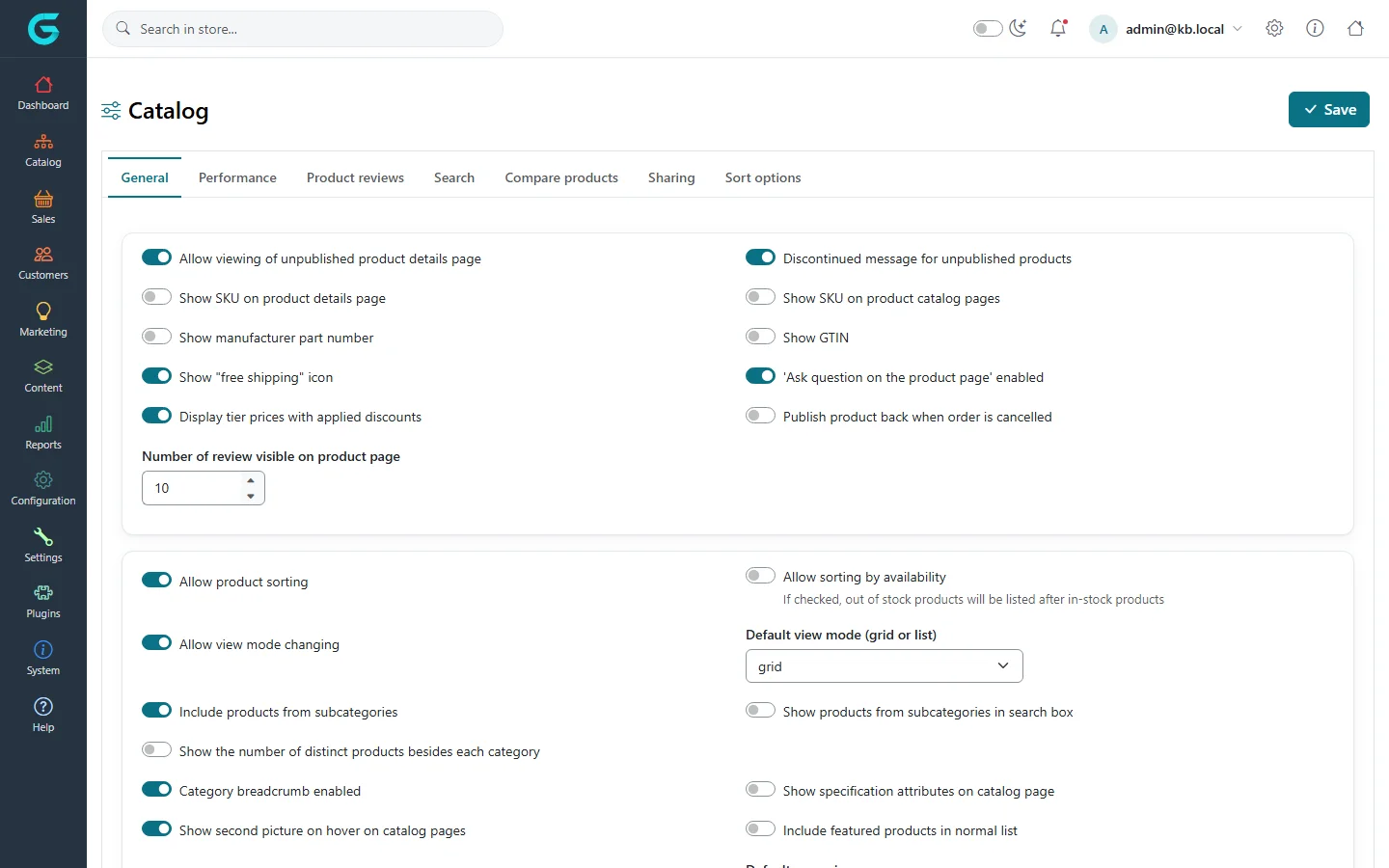
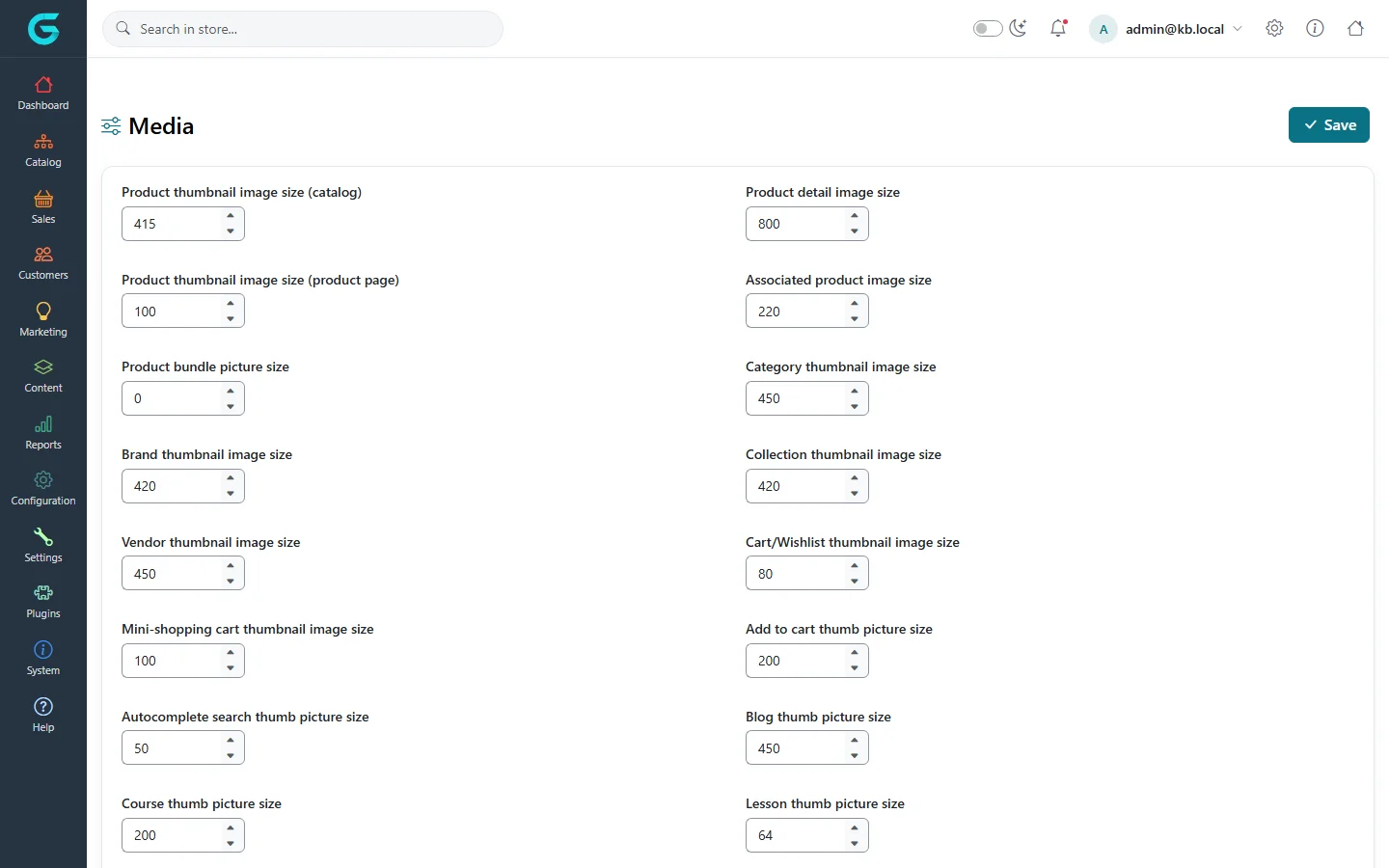
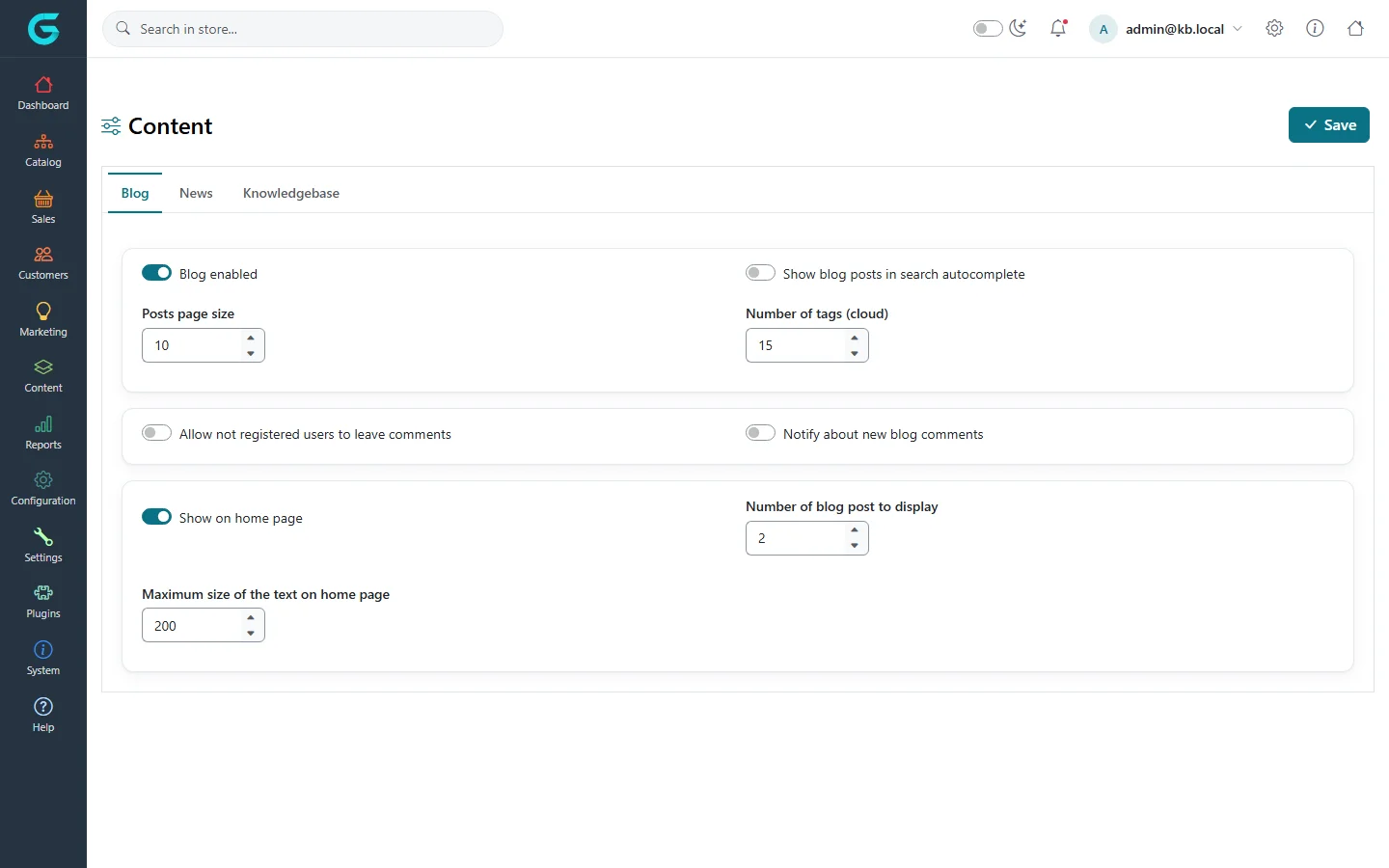
{"ArticleId":null,"Name":"Catalog, media and content settings","Content":"\u003Cp\u003EThree settings pages decide how the catalog looks and behaves in the storefront: \u003Cstrong\u003ECatalog\u003C/strong\u003E (what product and category pages show, search, reviews, sorting), \u003Cstrong\u003EMedia\u003C/strong\u003E (image sizes and allowed files) and \u003Cstrong\u003EContent\u003C/strong\u003E (whether the blog, news and knowledgebase are switched on). None of them changes your products - they change how products and content are presented.\u003C/p\u003E\n\n\u003Ch2 id=\u0022where-to-find-it\u0022\u003EWhere to find it\u003C/h2\u003E\n\u003Cp\u003EAll three are under \u003Cstrong\u003ESettings\u003C/strong\u003E: \u003Cstrong\u003ESettings \u2192 Catalog\u003C/strong\u003E, \u003Cstrong\u003ESettings \u2192 Media\u003C/strong\u003E and \u003Cstrong\u003ESettings \u2192 Content\u003C/strong\u003E. On a multi-store installation, choose the store in \u003Cstrong\u003EMulti-store configuration for\u003C/strong\u003E at the top of the page first.\u003C/p\u003E\n\n\u003Ch2 id=\u0022catalog-settings\u0022\u003ECatalog settings\u003C/h2\u003E\n\u003Cfigure\u003E\u003Cimg src=\u0022/Plugins/Theme.GrandNodeCom/Content/kb/configuration/settings-catalog.webp\u0022 alt=\u0022The Catalog settings page with the tabs General, Performance, Product reviews, Search, Compare products, Sharing and Sort options\u0022 width=\u00221440\u0022 height=\u0022900\u0022 loading=\u0022lazy\u0022\u003E\u003Cfigcaption\u003E\u003Cstrong\u003ESettings \u2192 Catalog\u003C/strong\u003E, tab \u003Cstrong\u003EGeneral\u003C/strong\u003E.\u003C/figcaption\u003E\u003C/figure\u003E\n\u003Cp\u003EThe page has seven tabs: \u003Cstrong\u003EGeneral\u003C/strong\u003E, \u003Cstrong\u003EPerformance\u003C/strong\u003E, \u003Cstrong\u003EProduct reviews\u003C/strong\u003E, \u003Cstrong\u003ESearch\u003C/strong\u003E, \u003Cstrong\u003ECompare products\u003C/strong\u003E, \u003Cstrong\u003ESharing\u003C/strong\u003E and \u003Cstrong\u003ESort options\u003C/strong\u003E. The most used settings:\u003C/p\u003E\n\u003Ctable\u003E\n\u003Cthead\u003E\u003Ctr\u003E\u003Cth\u003ESetting\u003C/th\u003E\u003Cth\u003EWhat it does\u003C/th\u003E\u003C/tr\u003E\u003C/thead\u003E\n\u003Ctbody\u003E\n\u003Ctr\u003E\u003Ctd\u003E\u003Cstrong\u003EAllow viewing of unpublished product details page\u003C/strong\u003E / \u003Cstrong\u003EDiscontinued message for unpublished products\u003C/strong\u003E\u003C/td\u003E\u003Ctd\u003EWhether an unpublished product\u0027s URL still opens (useful to keep search engine traffic) and whether it then says the product is discontinued.\u003C/td\u003E\u003C/tr\u003E\n\u003Ctr\u003E\u003Ctd\u003E\u003Cstrong\u003EShow SKU on product details page\u003C/strong\u003E, \u003Cstrong\u003EShow manufacturer part number\u003C/strong\u003E, \u003Cstrong\u003EShow GTIN\u003C/strong\u003E\u003C/td\u003E\u003Ctd\u003EWhich identifiers appear on the product page.\u003C/td\u003E\u003C/tr\u003E\n\u003Ctr\u003E\u003Ctd\u003E\u003Cstrong\u003EShow \u0022free shipping\u0022 icon\u003C/strong\u003E\u003C/td\u003E\u003Ctd\u003EMarks products that ship free.\u003C/td\u003E\u003C/tr\u003E\n\u003Ctr\u003E\u003Ctd\u003E\u003Cstrong\u003EAllow product sorting\u003C/strong\u003E, \u003Cstrong\u003EAllow view mode changing\u003C/strong\u003E, \u003Cstrong\u003EDefault view mode (grid or list)\u003C/strong\u003E\u003C/td\u003E\u003Ctd\u003EControls on category, brand and collection listings.\u003C/td\u003E\u003C/tr\u003E\n\u003Ctr\u003E\u003Ctd\u003E\u003Cstrong\u003EDefault page size\u003C/strong\u003E, \u003Cstrong\u003EDefault page size options (3,6,9) comma separated\u003C/strong\u003E\u003C/td\u003E\u003Ctd\u003EHow many products a listing shows per page and which alternatives the customer can pick.\u003C/td\u003E\u003C/tr\u003E\n\u003Ctr\u003E\u003Ctd\u003E\u003Cstrong\u003EInclude products from subcategories\u003C/strong\u003E\u003C/td\u003E\u003Ctd\u003EA parent category also lists the products of its subcategories.\u003C/td\u003E\u003C/tr\u003E\n\u003Ctr\u003E\u003Ctd\u003E\u003Cstrong\u003ECategory breadcrumb enabled\u003C/strong\u003E, \u003Cstrong\u003EShow second picture on hover on catalog pages\u003C/strong\u003E\u003C/td\u003E\u003Ctd\u003ENavigation and listing presentation.\u003C/td\u003E\u003C/tr\u003E\n\u003Ctr\u003E\u003Ctd\u003E\u003Cstrong\u003E\u0027Recently viewed products\u0027 enabled\u003C/strong\u003E, \u003Cstrong\u003E\u0027New products\u0027 page enabled\u003C/strong\u003E, \u003Cstrong\u003EShow best sellers on home page\u003C/strong\u003E, \u003Cstrong\u003E\u0027Products also purchased\u0027 enabled\u003C/strong\u003E\u003C/td\u003E\u003Ctd\u003EMerchandising blocks and how many items each shows.\u003C/td\u003E\u003C/tr\u003E\n\u003Ctr\u003E\u003Ctd\u003E\u003Cstrong\u003EProduct reviews must be approved\u003C/strong\u003E, \u003Cstrong\u003EAllow anonymous users to write product reviews\u003C/strong\u003E, \u003Cstrong\u003EProduct review possible only after purchasing product\u003C/strong\u003E\u003C/td\u003E\u003Ctd\u003EReview moderation (tab \u003Cstrong\u003EProduct reviews\u003C/strong\u003E). Approve reviews under \u003Cstrong\u003ECatalog \u2192 Product reviews\u003C/strong\u003E.\u003C/td\u003E\u003C/tr\u003E\n\u003Ctr\u003E\u003Ctd\u003E\u003Cstrong\u003ESearch page. Products per page\u003C/strong\u003E, \u003Cstrong\u003ESearch autocomplete enabled\u003C/strong\u003E, \u003Cstrong\u003ESearch term minimum length\u003C/strong\u003E, \u003Cstrong\u003ESearch by SKU\u003C/strong\u003E, \u003Cstrong\u003ESearch by Description\u003C/strong\u003E\u003C/td\u003E\u003Ctd\u003EStorefront search behaviour (tab \u003Cstrong\u003ESearch\u003C/strong\u003E).\u003C/td\u003E\u003C/tr\u003E\n\u003Ctr\u003E\u003Ctd\u003E\u003Cstrong\u003EShow a share button\u003C/strong\u003E, \u003Cstrong\u003EShare button code\u003C/strong\u003E\u003C/td\u003E\u003Ctd\u003ESocial sharing on the product page (tab \u003Cstrong\u003ESharing\u003C/strong\u003E).\u003C/td\u003E\u003C/tr\u003E\n\u003Ctr\u003E\u003Ctd\u003ESort options grid\u003C/td\u003E\u003Ctd\u003EEnable, disable and reorder the sort choices customers see (position, name, price, newest\u2026) (tab \u003Cstrong\u003ESort options\u003C/strong\u003E).\u003C/td\u003E\u003C/tr\u003E\n\u003C/tbody\u003E\n\u003C/table\u003E\n\u003Ch3 id=\u0022performance\u0022\u003EPerformance tab\u003C/h3\u003E\n\u003Cfigure\u003E\u003Cimg src=\u0022/Plugins/Theme.GrandNodeCom/Content/kb/configuration/settings-catalog-performance.webp\u0022 alt=\u0022The Performance tab of catalog settings with the Ignore discounts, Ignore featured products, Ignore filtering and Customers have independent product price switches\u0022 width=\u00221320\u0022 height=\u0022199\u0022 loading=\u0022lazy\u0022\u003E\u003Cfigcaption\u003ETab \u003Cstrong\u003EPerformance\u003C/strong\u003E.\u003C/figcaption\u003E\u003C/figure\u003E\n\u003Cp\u003EThe \u003Cstrong\u003EIgnore \u2026 (sitewide)\u003C/strong\u003E switches let GrandNode skip work on every product page and listing when you do not use a feature: if you have no discounts, \u003Cstrong\u003EIgnore discounts (sitewide)\u003C/strong\u003E saves a lookup per price; if you never schedule availability dates, leave \u003Cstrong\u003EIgnore \u0022filtering start and end date available products\u0022 (sitewide)\u003C/strong\u003E on. Switch the matching option off before you start using the feature, otherwise it will seem not to work. \u003Cstrong\u003ECustomers have independent product price\u003C/strong\u003E enables per-customer prices set on the customer record.\u003C/p\u003E\n\n\u003Ch2 id=\u0022media-settings\u0022\u003EMedia settings\u003C/h2\u003E\n\u003Cfigure\u003E\u003Cimg src=\u0022/Plugins/Theme.GrandNodeCom/Content/kb/configuration/settings-media.webp\u0022 alt=\u0022The Media settings page with product thumbnail, product detail, category, brand, collection, vendor and cart image sizes\u0022 width=\u00221440\u0022 height=\u0022900\u0022 loading=\u0022lazy\u0022\u003E\u003Cfigcaption\u003E\u003Cstrong\u003ESettings \u2192 Media\u003C/strong\u003E.\u003C/figcaption\u003E\u003C/figure\u003E\n\u003Cp\u003EEvery size is the longest edge, in pixels, of the image GrandNode generates for that place: \u003Cstrong\u003EProduct thumbnail image size (catalog)\u003C/strong\u003E, \u003Cstrong\u003EProduct detail image size\u003C/strong\u003E, \u003Cstrong\u003ECategory thumbnail image size\u003C/strong\u003E, \u003Cstrong\u003ECart/Wishlist thumbnail image size\u003C/strong\u003E and so on. Thumbnails are generated on first request and cached, so changing a size takes effect for new requests.\u003C/p\u003E\n\u003Ctable\u003E\n\u003Cthead\u003E\u003Ctr\u003E\u003Cth\u003ESetting\u003C/th\u003E\u003Cth\u003EWhat it does\u003C/th\u003E\u003C/tr\u003E\u003C/thead\u003E\n\u003Ctbody\u003E\n\u003Ctr\u003E\u003Ctd\u003E\u003Cstrong\u003EMaximum image size\u003C/strong\u003E\u003C/td\u003E\u003Ctd\u003EUploaded pictures larger than this are scaled down on upload.\u003C/td\u003E\u003C/tr\u003E\n\u003Ctr\u003E\u003Ctd\u003E\u003Cstrong\u003EImage quality\u003C/strong\u003E\u003C/td\u003E\u003Ctd\u003ECompression quality (0-100) of generated images.\u003C/td\u003E\u003C/tr\u003E\n\u003Ctr\u003E\u003Ctd\u003E\u003Cstrong\u003EDefault picture zoom enabled\u003C/strong\u003E\u003C/td\u003E\u003Ctd\u003EZoom on the product picture.\u003C/td\u003E\u003C/tr\u003E\n\u003Ctr\u003E\u003Ctd\u003E\u003Cstrong\u003EAllowed file types\u003C/strong\u003E\u003C/td\u003E\u003Ctd\u003EExtensions allowed for uploads through the file manager and download fields.\u003C/td\u003E\u003C/tr\u003E\n\u003Ctr\u003E\u003Ctd\u003E\u003Cstrong\u003EFile manager - enabled commands\u003C/strong\u003E / \u003Cstrong\u003Edisabled UI commands\u003C/strong\u003E\u003C/td\u003E\u003Ctd\u003EWhat staff can do in the built-in file manager used by the HTML editor.\u003C/td\u003E\u003C/tr\u003E\n\u003C/tbody\u003E\n\u003C/table\u003E\n\u003Cp\u003EWhether pictures are stored in the database or on disk is a system-wide choice made under \u003Ca href=\u0022/configuration-system-settings\u0022\u003ESystem settings\u003C/a\u003E.\u003C/p\u003E\n\n\u003Ch2 id=\u0022content-settings\u0022\u003EContent settings\u003C/h2\u003E\n\u003Cfigure\u003E\u003Cimg src=\u0022/Plugins/Theme.GrandNodeCom/Content/kb/configuration/settings-content.webp\u0022 alt=\u0022The Content settings page with Blog, News and Knowledgebase tabs; the Blog tab shows Blog enabled, posts page size and home page options\u0022 width=\u00221440\u0022 height=\u0022900\u0022 loading=\u0022lazy\u0022\u003E\u003Cfigcaption\u003E\u003Cstrong\u003ESettings \u2192 Content\u003C/strong\u003E, tab \u003Cstrong\u003EBlog\u003C/strong\u003E.\u003C/figcaption\u003E\u003C/figure\u003E\n\u003Cp\u003EThree tabs, each with an on/off switch for the feature and a few options:\u003C/p\u003E\n\u003Cul\u003E\n\u003Cli\u003E\u003Cstrong\u003EBlog\u003C/strong\u003E - \u003Cstrong\u003EBlog enabled\u003C/strong\u003E, \u003Cstrong\u003EPosts page size\u003C/strong\u003E, comments from guests, notification about new comments, showing the latest posts on the home page and in search autocomplete.\u003C/li\u003E\n\u003Cli\u003E\u003Cstrong\u003ENews\u003C/strong\u003E - \u003Cstrong\u003ENews enabled\u003C/strong\u003E, archive page size, comments and home page block.\u003C/li\u003E\n\u003Cli\u003E\u003Cstrong\u003EKnowledgebase\u003C/strong\u003E - \u003Cstrong\u003EKnowledge base enabled\u003C/strong\u003E and comment options.\u003C/li\u003E\n\u003C/ul\u003E\n\u003Cp\u003EWriting posts, news and articles is covered in \u003Ca href=\u0022/docs-content\u0022\u003EContent\u003C/a\u003E.\u003C/p\u003E\n\n\u003Ch2 id=\u0022tips\u0022\u003ETips and common mistakes\u003C/h2\u003E\n\u003Cul\u003E\n\u003Cli\u003EAfter changing image sizes, check a category page and a product page on a phone as well - themes scale images with CSS, but a too-small thumbnail looks blurred.\u003C/li\u003E\n\u003Cli\u003ETurning off \u003Cstrong\u003EBlog enabled\u003C/strong\u003E also removes the blog link from the top menu; the \u003Cstrong\u003EDisplay \u0022Blog\u0022\u003C/strong\u003E switch in \u003Ca href=\u0022/configuration-general-settings\u0022\u003EGeneral settings\u003C/a\u003E only matters while the blog is enabled.\u003C/li\u003E\n\u003Cli\u003ECatalog settings are one settings group: saving them for one store copies every catalog setting for that store. See \u003Ca href=\u0022/configuration-stores-multi-store\u0022\u003EStores and multi-store\u003C/a\u003E.\u003C/li\u003E\n\u003C/ul\u003E\n\n\u003Ch2 id=\u0022related\u0022\u003ERelated\u003C/h2\u003E\n\u003Cul\u003E\n\u003Cli\u003E\u003Ca href=\u0022/docs-catalog\u0022\u003ECatalog: products, categories and brands\u003C/a\u003E\u003C/li\u003E\n\u003Cli\u003E\u003Ca href=\u0022/configuration-themes-layouts\u0022\u003EThemes and layouts\u003C/a\u003E\u003C/li\u003E\n\u003Cli\u003E\u003Ca href=\u0022/configuration-system-settings\u0022\u003ESystem, vendor and admin search settings\u003C/a\u003E\u003C/li\u003E\n\u003C/ul\u003E","ParentCategoryId":"6abdec6c83d2816248229f19","SeName":"configuration-catalog-media-settings","MetaKeywords":null,"MetaDescription":"Configure product pages, search, reviews, sorting, featured and new products, image sizes, file types, blog, news and knowledgebase in GrandNode.","MetaTitle":null,"AllowComments":false,"Captcha":{"ReCaptchaChallengeField":null,"ReCaptchaResponseField":null,"ReCaptchaResponseValue":null,"ReCaptchaResponse":null},"RelatedArticles":[],"CategoryBreadcrumb":[{"Name":"Configuration","Description":null,"IsCurrent":false,"Children":null,"Parent":null,"SeName":"docs-configuration","Id":"6abdec6c83d2816248229f19","UserFields":[]}],"AddNewComment":{"CommentText":null,"DisplayCaptcha":false,"Id":null,"UserFields":[]},"Comments":[],"Id":"6abdec6c83d2816248229f1f","UserFields":[]}