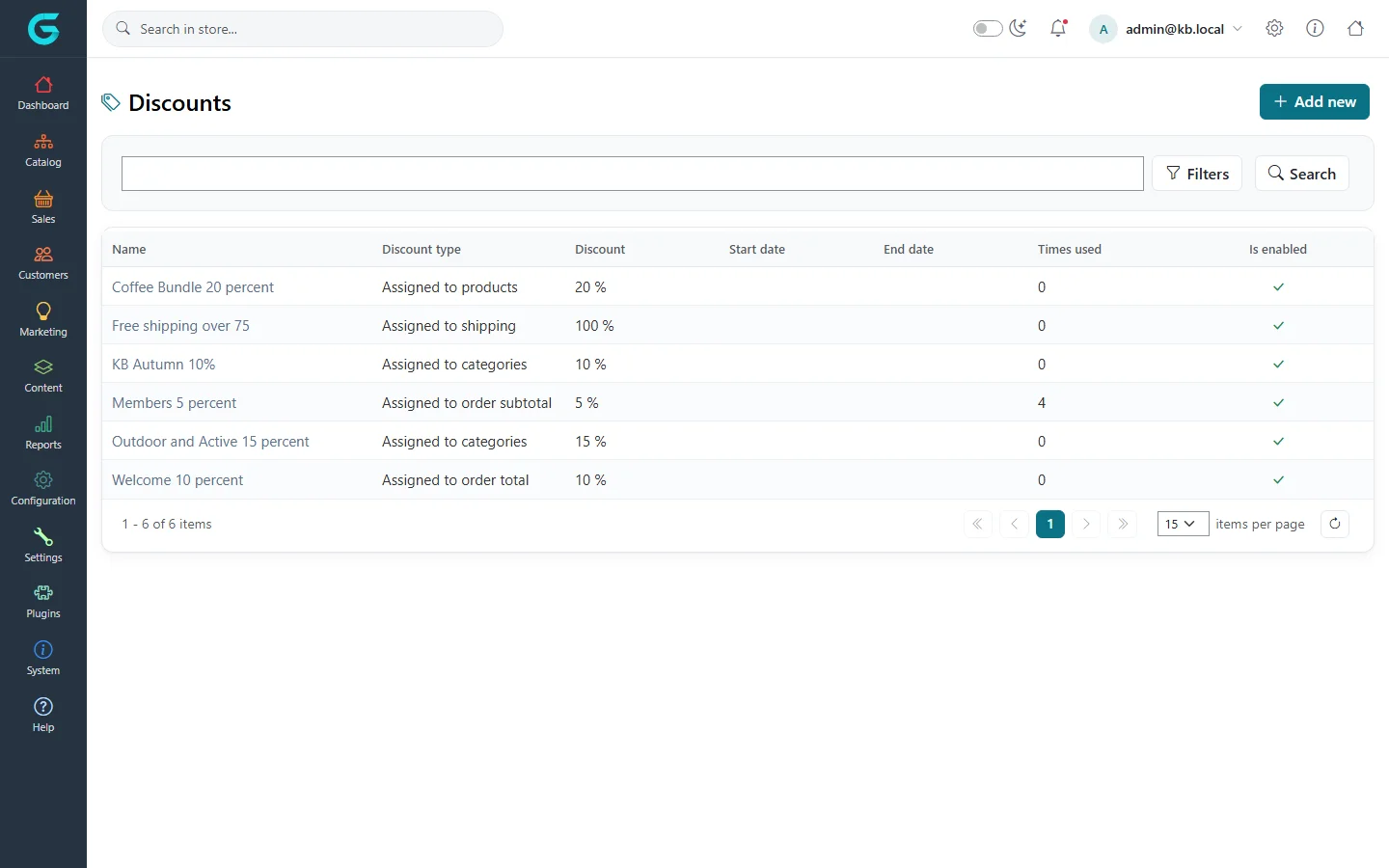
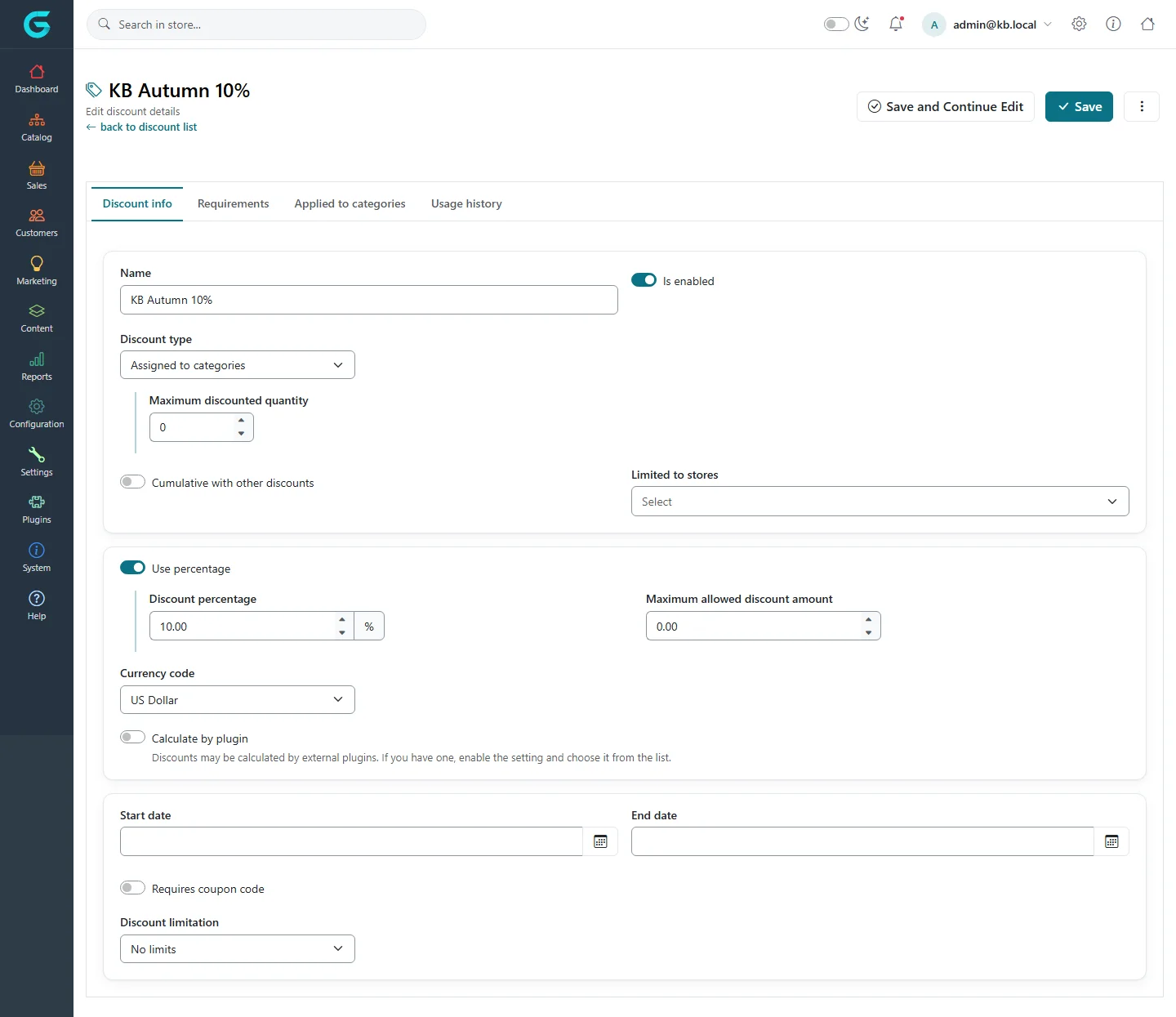
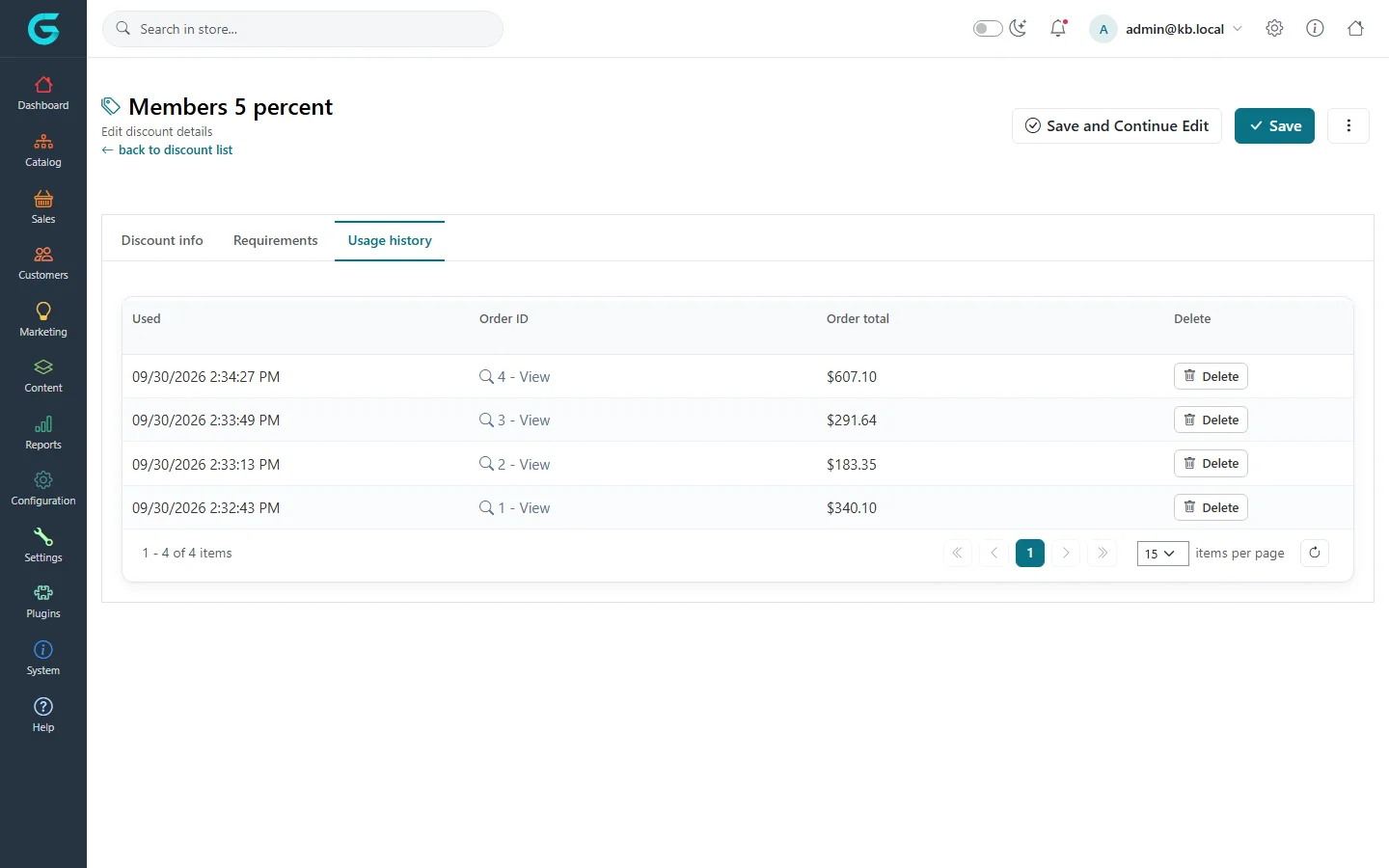
{"ArticleId":null,"Name":"Creating a discount","Content":"\n\u003Cp\u003EA discount lowers a price automatically or with a coupon code. Every discount in GrandNode has the same parts: \u003Cstrong\u003Ewhat\u003C/strong\u003E it applies to (its type), \u003Cstrong\u003Ehow much\u003C/strong\u003E (a percentage or an amount), \u003Cstrong\u003Ewhen\u003C/strong\u003E (dates), \u003Cstrong\u003Efor whom\u003C/strong\u003E (requirements) and \u003Cstrong\u003Ehow often\u003C/strong\u003E (limitations). This article walks through creating one; the next articles go deeper into types, codes and rules.\u003C/p\u003E\n\n\u003Ch2 id=\u0022where-to-find-it\u0022\u003EWhere to find it\u003C/h2\u003E\n\u003Cp\u003E\u003Cstrong\u003EMarketing \u2192 Discounts\u003C/strong\u003E lists all discounts with their type, value, dates, how many times they were used and whether they are enabled.\u003C/p\u003E\n\u003Cfigure\u003E\u003Cimg src=\u0022/Plugins/Theme.GrandNodeCom/Content/kb/marketing/discount-list.webp\u0022 alt=\u0022The Discounts list with Coffee Bundle 20 percent, Free shipping over 75, KB Autumn 10%, Members 5 percent, Outdoor and Active 15 percent and Welcome 10 percent, their types, values, times used and enabled flags\u0022 width=\u00221440\u0022 height=\u0022900\u0022 loading=\u0022lazy\u0022\u003E\u003Cfigcaption\u003EMarketing \u2192 Discounts.\u003C/figcaption\u003E\u003C/figure\u003E\n\n\u003Ch2 id=\u0022create\u0022\u003ECreate a discount\u003C/h2\u003E\n\u003Col\u003E\n\u003Cli\u003EClick \u003Cstrong\u003EAdd new\u003C/strong\u003E.\u003C/li\u003E\n\u003Cli\u003EEnter a \u003Cstrong\u003EName\u003C/strong\u003E. Customers see it in the cart and on the order, so make it readable (\u0022Autumn sale 10%\u0022).\u003C/li\u003E\n\u003Cli\u003EChoose the \u003Cstrong\u003EDiscount type\u003C/strong\u003E - for example \u003Cem\u003EAssigned to categories\u003C/em\u003E. See \u003Ca href=\u0022/marketing-discount-types\u0022\u003EDiscount types\u003C/a\u003E.\u003C/li\u003E\n\u003Cli\u003ESet the value: switch \u003Cstrong\u003EUse percentage\u003C/strong\u003E on and enter the \u003Cstrong\u003EDiscount percentage\u003C/strong\u003E, or leave it off and enter a fixed \u003Cstrong\u003EDiscount amount\u003C/strong\u003E in the chosen \u003Cstrong\u003ECurrency code\u003C/strong\u003E.\u003C/li\u003E\n\u003Cli\u003EOptionally set \u003Cstrong\u003EStart date\u003C/strong\u003E and \u003Cstrong\u003EEnd date\u003C/strong\u003E, the stores it is \u003Cstrong\u003ELimited to\u003C/strong\u003E, and a \u003Cstrong\u003EDiscount limitation\u003C/strong\u003E.\u003C/li\u003E\n\u003Cli\u003ETick \u003Cstrong\u003EIs enabled\u003C/strong\u003E and save. For types that apply to something (products, categories...), open the new tab \u003Cstrong\u003EApplied to ...\u003C/strong\u003E and add the items.\u003C/li\u003E\n\u003C/ol\u003E\n\u003Cfigure\u003E\u003Cimg src=\u0022/Plugins/Theme.GrandNodeCom/Content/kb/marketing/discount-edit-info.webp\u0022 alt=\u0022The Discount info tab of KB Autumn 10%: name, discount type Assigned to categories, maximum discounted quantity, cumulative switch, stores, use percentage 10, maximum amount, currency, dates, coupon code switch and limitation\u0022 width=\u00221440\u0022 height=\u0022900\u0022 loading=\u0022lazy\u0022\u003E\u003Cfigcaption\u003EThe Discount info tab.\u003C/figcaption\u003E\u003C/figure\u003E\n\n\u003Ch2 id=\u0022fields\u0022\u003EFields\u003C/h2\u003E\n\u003Ctable\u003E\n\u003Cthead\u003E\u003Ctr\u003E\u003Cth\u003EField\u003C/th\u003E\u003Cth\u003EWhat it does\u003C/th\u003E\u003C/tr\u003E\u003C/thead\u003E\n\u003Ctbody\u003E\n\u003Ctr\u003E\u003Ctd\u003EIs enabled\u003C/td\u003E\u003Ctd\u003ESwitches the discount on and off without deleting it.\u003C/td\u003E\u003C/tr\u003E\n\u003Ctr\u003E\u003Ctd\u003EUse percentage, Discount percentage\u003C/td\u003E\u003Ctd\u003EA percentage off. With \u003Cstrong\u003EMaximum allowed discount amount\u003C/strong\u003E you cap it, for example 10% but at most 50.\u003C/td\u003E\u003C/tr\u003E\n\u003Ctr\u003E\u003Ctd\u003EDiscount amount, Currency code\u003C/td\u003E\u003Ctd\u003EA fixed amount off, in the currency you choose.\u003C/td\u003E\u003C/tr\u003E\n\u003Ctr\u003E\u003Ctd\u003EMaximum discounted quantity\u003C/td\u003E\u003Ctd\u003EFor product-level types: how many units of a product get the discount (0 = all). \u002210% off, max 2 per order\u0022.\u003C/td\u003E\u003C/tr\u003E\n\u003Ctr\u003E\u003Ctd\u003ECumulative with other discounts\u003C/td\u003E\u003Ctd\u003EIf off, the customer gets the best single discount. If on, this discount can add up with other cumulative discounts.\u003C/td\u003E\u003C/tr\u003E\n\u003Ctr\u003E\u003Ctd\u003ECalculate by plugin\u003C/td\u003E\u003Ctd\u003ELets a discount plugin compute the amount instead of the fixed value.\u003C/td\u003E\u003C/tr\u003E\n\u003Ctr\u003E\u003Ctd\u003EStart date, End date\u003C/td\u003E\u003Ctd\u003EThe period in which the discount works. Empty means no limit.\u003C/td\u003E\u003C/tr\u003E\n\u003Ctr\u003E\u003Ctd\u003ERequires coupon code\u003C/td\u003E\u003Ctd\u003EThe discount applies only after the customer enters a code. See \u003Ca href=\u0022/marketing-coupon-codes-and-limits\u0022\u003ECoupon codes and limits\u003C/a\u003E.\u003C/td\u003E\u003C/tr\u003E\n\u003Ctr\u003E\u003Ctd\u003EDiscount limitation\u003C/td\u003E\u003Ctd\u003ENo limits, N times only, or N times per customer.\u003C/td\u003E\u003C/tr\u003E\n\u003Ctr\u003E\u003Ctd\u003ELimited to stores\u003C/td\u003E\u003Ctd\u003EOn a multi-store installation, the stores in which the discount works.\u003C/td\u003E\u003C/tr\u003E\n\u003C/tbody\u003E\n\u003C/table\u003E\n\n\u003Ch2 id=\u0022usage\u0022\u003EUsage history\u003C/h2\u003E\n\u003Cp\u003EThe \u003Cstrong\u003EUsage history\u003C/strong\u003E tab lists every order that used the discount, with the date and order total. Delete an entry to give a use back to a limited discount, for example after a cancelled order.\u003C/p\u003E\n\u003Cfigure\u003E\u003Cimg src=\u0022/Plugins/Theme.GrandNodeCom/Content/kb/marketing/discount-usage-history.webp\u0022 alt=\u0022The Usage history tab of Members 5 percent with four orders, dates and totals\u0022 width=\u00221440\u0022 height=\u0022900\u0022 loading=\u0022lazy\u0022\u003E\u003Cfigcaption\u003EUsage history: which orders used the discount.\u003C/figcaption\u003E\u003C/figure\u003E\n\n\u003Ch2 id=\u0022tips\u0022\u003ETips and common mistakes\u003C/h2\u003E\n\u003Cul\u003E\n\u003Cli\u003ETest a new discount with a customer account before you announce it; check the cart, not only the product page.\u003C/li\u003E\n\u003Cli\u003ELeave \u003Cstrong\u003ECumulative\u003C/strong\u003E off unless you mean it; two stacked percentage discounts are easy to forget about.\u003C/li\u003E\n\u003Cli\u003EExpired discounts stay in the list; disable or delete them to keep the list readable.\u003C/li\u003E\n\u003C/ul\u003E\n\n\u003Ch2 id=\u0022related\u0022\u003ERelated\u003C/h2\u003E\n\u003Cul\u003E\n\u003Cli\u003E\u003Ca href=\u0022/marketing-discount-types\u0022\u003EDiscount types\u003C/a\u003E\u003C/li\u003E\n\u003Cli\u003E\u003Ca href=\u0022/marketing-discount-rules\u0022\u003EDiscount rules\u003C/a\u003E\u003C/li\u003E\n\u003C/ul\u003E\n","ParentCategoryId":"6abdec6c83d2816248229ef1","SeName":"marketing-discounts","MetaKeywords":null,"MetaDescription":"Create a discount in GrandNode: name, type, percentage or amount, maximum amount, dates, stores, cumulative discounts and usage history.","MetaTitle":null,"AllowComments":false,"Captcha":{"ReCaptchaChallengeField":null,"ReCaptchaResponseField":null,"ReCaptchaResponseValue":null,"ReCaptchaResponse":null},"RelatedArticles":[],"CategoryBreadcrumb":[{"Name":"Marketing and promotions","Description":null,"IsCurrent":false,"Children":null,"Parent":null,"SeName":"docs-marketing","Id":"6abdec6c83d2816248229ef1","UserFields":[]}],"AddNewComment":{"CommentText":null,"DisplayCaptcha":false,"Id":null,"UserFields":[]},"Comments":[],"Id":"6abdec6c83d2816248229ef5","UserFields":[]}