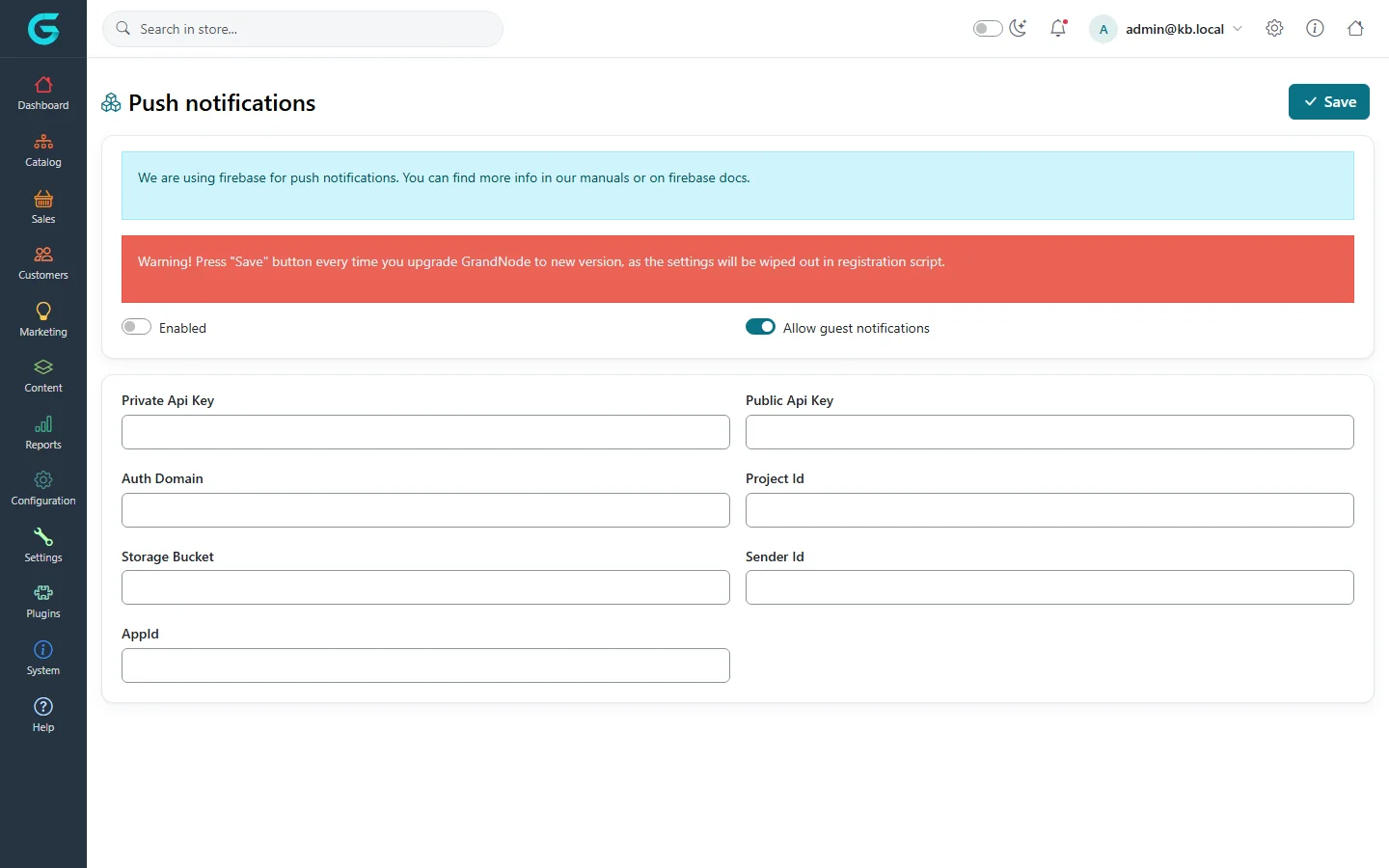
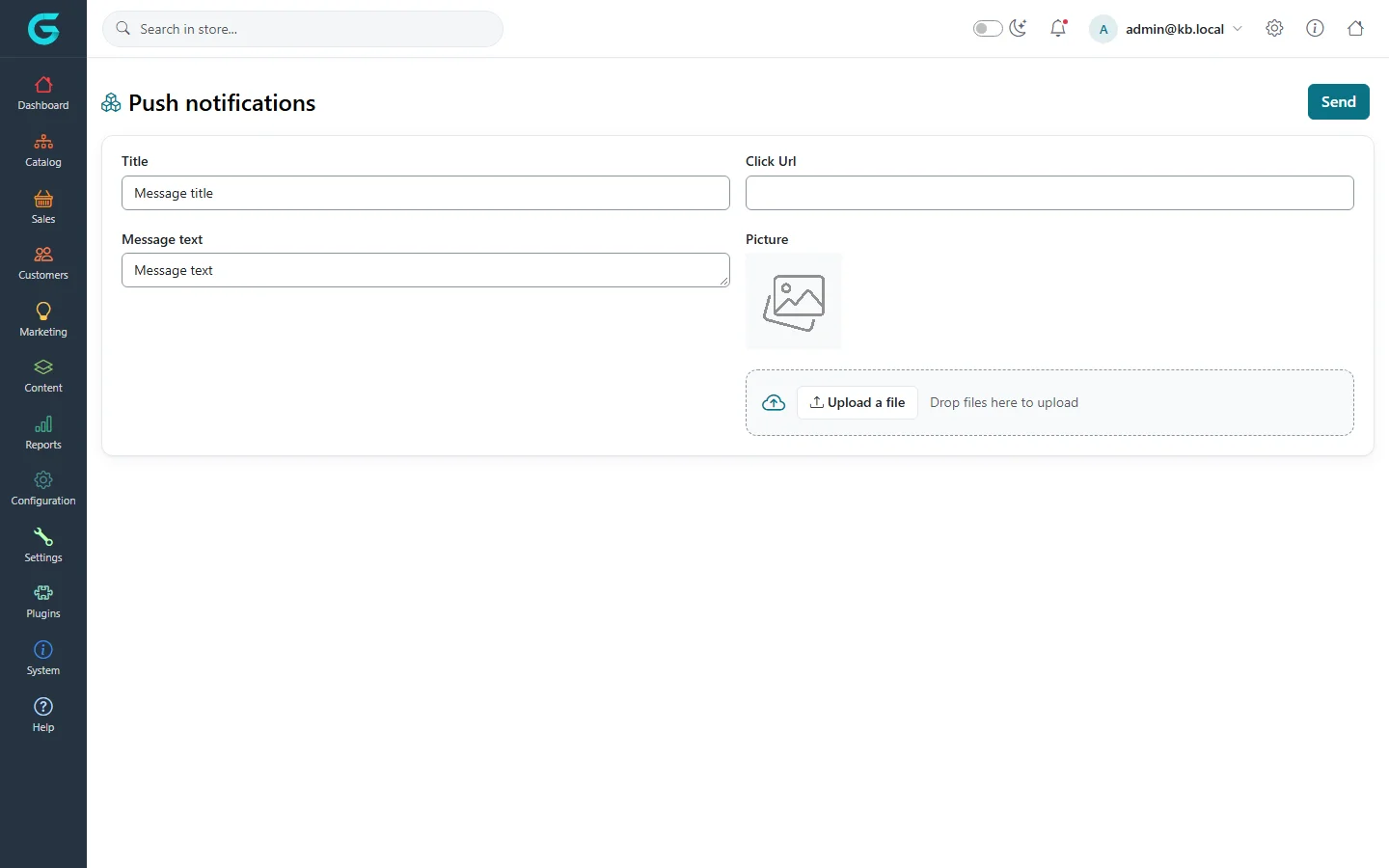
{"ArticleId":null,"Name":"Push notifications","Content":"\n\u003Cp\u003EPush notifications are short messages that appear on the customer\u0027s screen through the browser, even when your store is not open - a new collection, a flash sale, back in stock. GrandNode sends them through \u003Cstrong\u003EFirebase Cloud Messaging\u003C/strong\u003E (Google), so you need a free Firebase project.\u003C/p\u003E\n\n\u003Ch2 id=\u0022setup\u0022\u003ESet up\u003C/h2\u003E\n\u003Col\u003E\n\u003Cli\u003ECreate a project in the Firebase console and add a web app. Copy its configuration values.\u003C/li\u003E\n\u003Cli\u003EOpen \u003Cstrong\u003ESettings \u2192 Push notifications settings\u003C/strong\u003E, tick \u003Cstrong\u003EEnabled\u003C/strong\u003E, and enter the \u003Cstrong\u003EPrivate Api Key\u003C/strong\u003E, \u003Cstrong\u003EPublic Api Key\u003C/strong\u003E, \u003Cstrong\u003EAuth Domain\u003C/strong\u003E, \u003Cstrong\u003EProject Id\u003C/strong\u003E, \u003Cstrong\u003EStorage Bucket\u003C/strong\u003E, \u003Cstrong\u003ESender Id\u003C/strong\u003E and \u003Cstrong\u003EAppId\u003C/strong\u003E.\u003C/li\u003E\n\u003Cli\u003EDecide whether guests may subscribe (\u003Cstrong\u003EAllow guest notifications\u003C/strong\u003E) and save.\u003C/li\u003E\n\u003C/ol\u003E\n\u003Cfigure\u003E\u003Cimg src=\u0022/Plugins/Theme.GrandNodeCom/Content/kb/marketing/push-settings.webp\u0022 alt=\u0022Push notifications settings with a note that Firebase is used, a warning to press Save after every upgrade, Enabled and Allow guest notifications switches and the Firebase key fields\u0022 width=\u00221440\u0022 height=\u0022900\u0022 loading=\u0022lazy\u0022\u003E\u003Cfigcaption\u003ESettings \u2192 Push notifications settings.\u003C/figcaption\u003E\u003C/figure\u003E\n\u003Cblockquote\u003E\u003Cp\u003EAs the warning on the page says: press \u003Cstrong\u003ESave\u003C/strong\u003E on this page again after every GrandNode upgrade - the upgrade rewrites the registration script and the settings have to be written into it again.\u003C/p\u003E\u003C/blockquote\u003E\n\n\u003Ch2 id=\u0022receivers\u0022\u003EWho receives them\u003C/h2\u003E\n\u003Cp\u003EWhen push notifications are enabled, the storefront asks visitors whether they want to receive notifications. Those who allow it appear in \u003Cstrong\u003EMarketing \u2192 Push notifications \u2192 Receivers\u003C/strong\u003E, where you can also remove a receiver.\u003C/p\u003E\n\n\u003Ch2 id=\u0022send\u0022\u003ESend a notification\u003C/h2\u003E\n\u003Col\u003E\n\u003Cli\u003EOpen \u003Cstrong\u003EMarketing \u2192 Push notifications \u2192 Send\u003C/strong\u003E.\u003C/li\u003E\n\u003Cli\u003EEnter the \u003Cstrong\u003ETitle\u003C/strong\u003E and \u003Cstrong\u003EMessage text\u003C/strong\u003E, the \u003Cstrong\u003EClick Url\u003C/strong\u003E the notification opens (a product, a category, a page), and optionally a \u003Cstrong\u003EPicture\u003C/strong\u003E.\u003C/li\u003E\n\u003Cli\u003EClick \u003Cstrong\u003ESend\u003C/strong\u003E. The message goes to all receivers.\u003C/li\u003E\n\u003C/ol\u003E\n\u003Cfigure\u003E\u003Cimg src=\u0022/Plugins/Theme.GrandNodeCom/Content/kb/marketing/push-send.webp\u0022 alt=\u0022The Send push notification page with title, message text, click URL and picture upload, and a Send button\u0022 width=\u00221440\u0022 height=\u0022900\u0022 loading=\u0022lazy\u0022\u003E\u003Cfigcaption\u003EMarketing \u2192 Push notifications \u2192 Send.\u003C/figcaption\u003E\u003C/figure\u003E\n\u003Cp\u003E\u003Cstrong\u003EMessages\u003C/strong\u003E lists the notifications that were sent.\u003C/p\u003E\n\n\u003Ch2 id=\u0022tips\u0022\u003ETips\u003C/h2\u003E\n\u003Cul\u003E\n\u003Cli\u003EBrowsers show the permission prompt only on HTTPS.\u003C/li\u003E\n\u003Cli\u003ESend rarely and only what is worth an interruption; a visitor who blocks notifications cannot be asked again.\u003C/li\u003E\n\u003C/ul\u003E\n\n\u003Ch2 id=\u0022related\u0022\u003ERelated\u003C/h2\u003E\n\u003Cul\u003E\n\u003Cli\u003E\u003Ca href=\u0022/marketing-newsletter-campaigns\u0022\u003ENewsletter, campaigns and the contact form\u003C/a\u003E\u003C/li\u003E\n\u003C/ul\u003E\n","ParentCategoryId":"6abdec6c83d2816248229ef1","SeName":"marketing-push-notifications","MetaKeywords":null,"MetaDescription":"Send browser push notifications to customers with GrandNode and Firebase: settings, who receives them, sending a message and the history.","MetaTitle":null,"AllowComments":false,"Captcha":{"ReCaptchaChallengeField":null,"ReCaptchaResponseField":null,"ReCaptchaResponseValue":null,"ReCaptchaResponse":null},"RelatedArticles":[],"CategoryBreadcrumb":[{"Name":"Marketing and promotions","Description":null,"IsCurrent":false,"Children":null,"Parent":null,"SeName":"docs-marketing","Id":"6abdec6c83d2816248229ef1","UserFields":[]}],"AddNewComment":{"CommentText":null,"DisplayCaptcha":false,"Id":null,"UserFields":[]},"Comments":[],"Id":"6abe3a3a04b9d0a2009febeb","UserFields":[]}