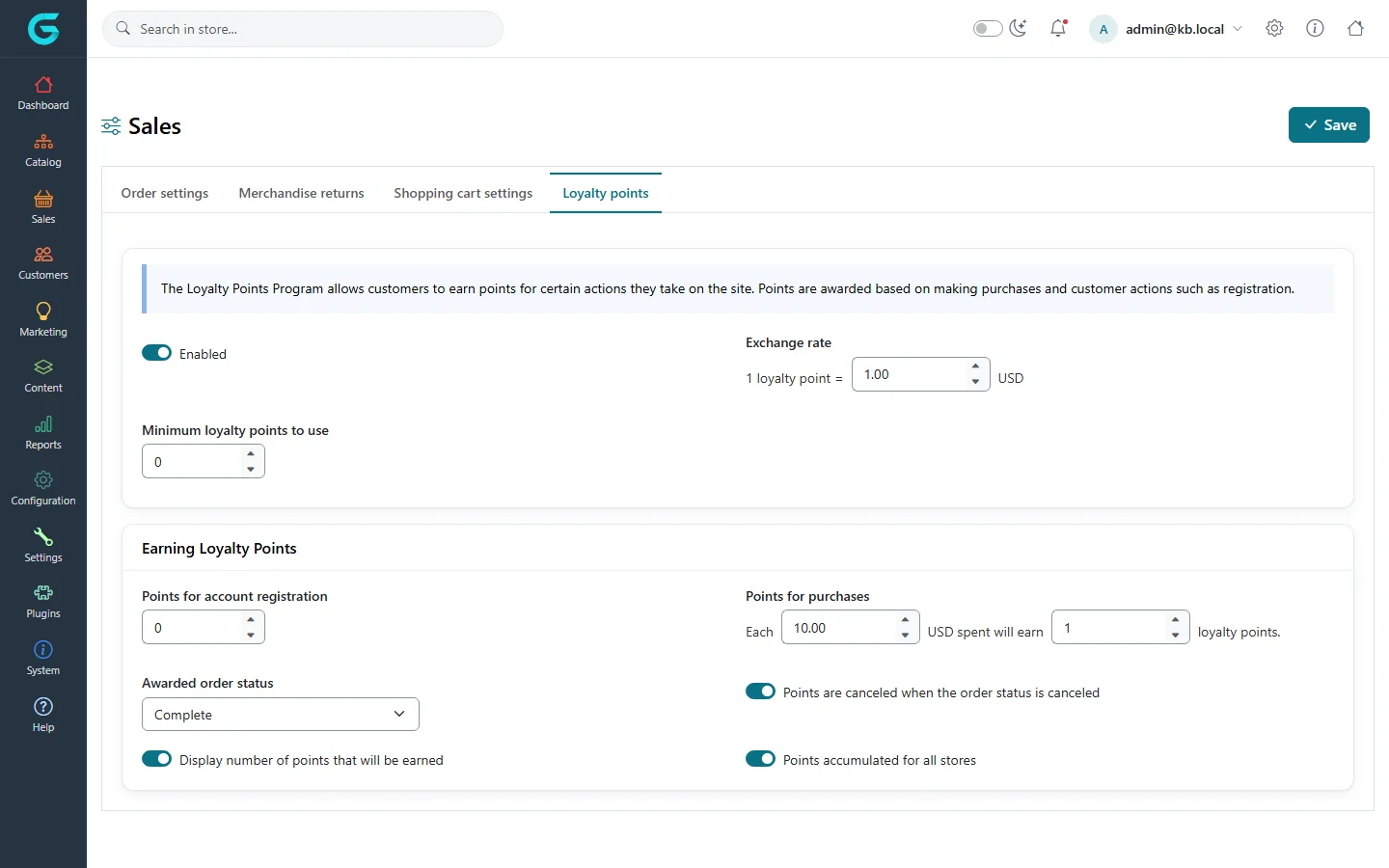
{"ArticleId":null,"Name":"Loyalty points","Content":"\n\u003Cp\u003ELoyalty points reward customers for buying and registering. Points are earned on completed orders and can be spent at checkout, where each point is worth a fixed amount of money.\u003C/p\u003E\n\n\u003Ch2 id=\u0022enable\u0022\u003ETurn the program on\u003C/h2\u003E\n\u003Cp\u003EOpen \u003Cstrong\u003ESettings \u2192 Sales settings\u003C/strong\u003E, tab \u003Cstrong\u003ELoyalty points\u003C/strong\u003E.\u003C/p\u003E\n\u003Cfigure\u003E\u003Cimg src=\u0022/Plugins/Theme.GrandNodeCom/Content/kb/marketing/loyalty-points-settings.webp\u0022 alt=\u0022The Loyalty points tab: enabled, exchange rate 1 point = 1.00 USD, minimum points to use, points for registration, points for purchases per 10 USD spent, awarded order status Complete, cancel and all-stores switches\u0022 width=\u00221440\u0022 height=\u0022900\u0022 loading=\u0022lazy\u0022\u003E\u003Cfigcaption\u003ESettings \u2192 Sales settings \u2192 Loyalty points.\u003C/figcaption\u003E\u003C/figure\u003E\n\u003Ctable\u003E\n\u003Cthead\u003E\u003Ctr\u003E\u003Cth\u003ESetting\u003C/th\u003E\u003Cth\u003EWhat it does\u003C/th\u003E\u003C/tr\u003E\u003C/thead\u003E\n\u003Ctbody\u003E\n\u003Ctr\u003E\u003Ctd\u003EEnabled\u003C/td\u003E\u003Ctd\u003ESwitches the whole program on.\u003C/td\u003E\u003C/tr\u003E\n\u003Ctr\u003E\u003Ctd\u003EExchange rate\u003C/td\u003E\u003Ctd\u003EHow much one point is worth when spent, in the primary currency.\u003C/td\u003E\u003C/tr\u003E\n\u003Ctr\u003E\u003Ctd\u003EMinimum loyalty points to use\u003C/td\u003E\u003Ctd\u003ECustomers can pay with points only from this balance.\u003C/td\u003E\u003C/tr\u003E\n\u003Ctr\u003E\u003Ctd\u003EPoints for account registration\u003C/td\u003E\u003Ctd\u003EA welcome bonus.\u003C/td\u003E\u003C/tr\u003E\n\u003Ctr\u003E\u003Ctd\u003EPoints for purchases\u003C/td\u003E\u003Ctd\u003E\u0022Each X spent will earn Y points\u0022.\u003C/td\u003E\u003C/tr\u003E\n\u003Ctr\u003E\u003Ctd\u003EAwarded order status\u003C/td\u003E\u003Ctd\u003EPoints are credited when the order reaches this status - usually Complete, so returns and cancellations do not cost you points.\u003C/td\u003E\u003C/tr\u003E\n\u003Ctr\u003E\u003Ctd\u003EPoints are canceled when the order status is canceled\u003C/td\u003E\u003Ctd\u003ETakes the points back from a cancelled order.\u003C/td\u003E\u003C/tr\u003E\n\u003Ctr\u003E\u003Ctd\u003EDisplay number of points that will be earned\u003C/td\u003E\u003Ctd\u003EShows the points in the cart and checkout.\u003C/td\u003E\u003C/tr\u003E\n\u003Ctr\u003E\u003Ctd\u003EPoints accumulated for all stores\u003C/td\u003E\u003Ctd\u003EOne balance across all stores, instead of a balance per store.\u003C/td\u003E\u003C/tr\u003E\n\u003C/tbody\u003E\n\u003C/table\u003E\n\n\u003Ch2 id=\u0022customers\u0022\u003EWhat customers see\u003C/h2\u003E\n\u003Cp\u003EIn \u003Cstrong\u003EMy account \u2192 Loyalty points\u003C/strong\u003E customers see their balance and history. At checkout, with enough points, they can tick \u003Cstrong\u003EUse my loyalty points\u003C/strong\u003E on the payment step to pay part of the order.\u003C/p\u003E\n\n\u003Ch2 id=\u0022manual\u0022\u003EAdd or remove points by hand\u003C/h2\u003E\n\u003Cp\u003EOn the customer\u0027s page in the admin, the \u003Cstrong\u003ELoyalty points\u003C/strong\u003E tab shows the history and lets you add or subtract points with a message - for a goodwill gesture or a correction. See \u003Ca href=\u0022/customers-customer-record\u0022\u003EThe customer record\u003C/a\u003E.\u003C/p\u003E\n\n\u003Ch2 id=\u0022related\u0022\u003ERelated\u003C/h2\u003E\n\u003Cul\u003E\n\u003Cli\u003E\u003Ca href=\u0022/docs-sales\u0022\u003ESales and orders\u003C/a\u003E\u003C/li\u003E\n\u003C/ul\u003E\n","ParentCategoryId":"6abdec6c83d2816248229ef1","SeName":"marketing-loyalty-points","MetaKeywords":null,"MetaDescription":"Reward customers with loyalty points for registration and purchases, set the exchange rate, and let them pay part of an order with points in GrandNode.","MetaTitle":null,"AllowComments":false,"Captcha":{"ReCaptchaChallengeField":null,"ReCaptchaResponseField":null,"ReCaptchaResponseValue":null,"ReCaptchaResponse":null},"RelatedArticles":[],"CategoryBreadcrumb":[{"Name":"Marketing and promotions","Description":null,"IsCurrent":false,"Children":null,"Parent":null,"SeName":"docs-marketing","Id":"6abdec6c83d2816248229ef1","UserFields":[]}],"AddNewComment":{"CommentText":null,"DisplayCaptcha":false,"Id":null,"UserFields":[]},"Comments":[],"Id":"6abdec6c83d2816248229efd","UserFields":[]}